

What is Tolgee?
Tolgee is a localization platform for web, mobile and desktop software, developed by Tolgee s.r.o. Founder Jan Cizmar started the project as a master's thesis in late 2019, and the company describes the product as available since 2020. It covers the path from a translation key in source code to a reviewed string in production: a web application for translators and reviewers, SDKs that connect running applications to a project, a command-line tool for repository synchronisation and a REST API. The README positions it as an open-source alternative to Crowdin, Phrase and Lokalise.
The platform is offered in two forms. Tolgee Cloud runs at app.tolgee.io with a free plan and paid annual tiers. The same server can be self-hosted with the tolgee/tolgee Docker image or with the executable JAR attached to each GitHub release. The self-hosting guide lists 2 CPU cores and 4 GB of RAM as the minimum, and 4 cores, 16 GB of RAM and 20 GB of free disk space as recommended. The image still bundles a PostgreSQL 13 database, but that setup is deprecated and the documentation states that Tolgee v4 removes it, and the documentation describes connecting an external PostgreSQL server instead.
Releases are frequent and automated. The current version is v3.242.5, published November 10, 2026, a performance release in which the branch merge preview loads keys and snapshots as plain rows instead of entities. Version 3.242.4, published November 6, accepts current passwords longer than 50 characters in account settings. Version 3.242.0 prepared the built-in MCP server for the Claude Connectors Directory, 3.241.0 shows hosted words on the project dashboard, 3.233.0 redesigned the export page with tag filters, 3.230.0 added OAuth 2.1 for MCP clients, 3.223.0 introduced word-based pricing and 3.221.0 added Azure Blob Storage as main file storage. Community Translation arrived in 3.213.0 and gained contributor tracking in 3.215.0, the same release that deprecated the embedded database.
The backend is written in Kotlin on Spring Boot, with configuration through YAML, environment variables or command-line properties, and the web interface is a TypeScript React application. The repository is dual-licensed: code outside the ee/ and webapp/src/ee directories is under Apache License 2.0, while those directories use the Tolgee EE License, which allows non-commercial use only and forbids circumventing the licence-key check. Official binaries contain both parts, with the advanced features inactive until a licence key is applied.
Tolgee manages strings, not documents. It is not a CMS for long-form pages, a machine translation engine of its own or a computer-assisted translation desktop tool. Machine and AI translation call external providers, and the JavaScript, Android and iOS SDKs live in separate repositories with their own release cycles. The official documentation covers the platform, SDKs, CLI and API. Related listings on iThub include the headless CMS projects Strapi and Payload.
Tolgee screenshots
Explore the interface. Open a screenshot to view it at full size.
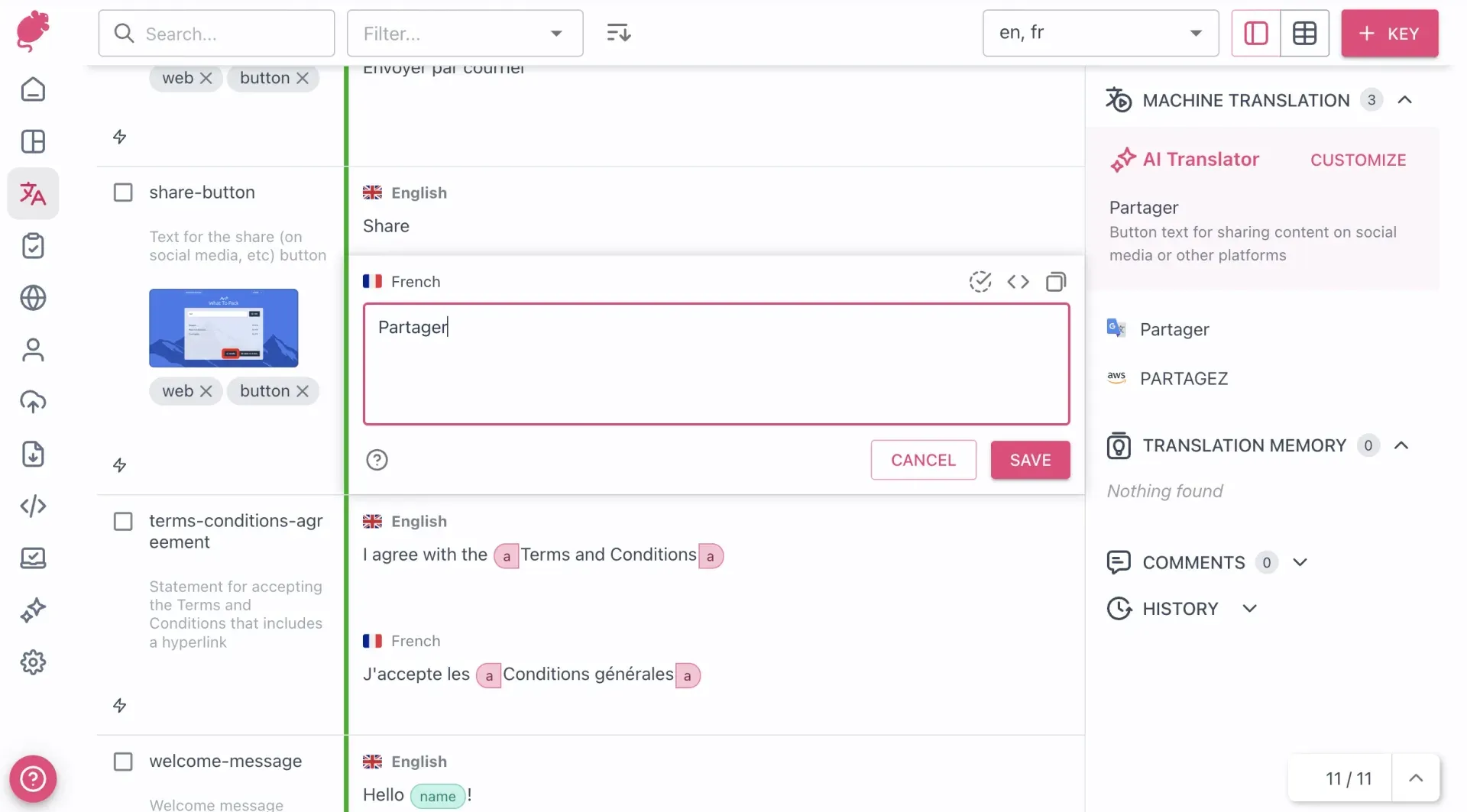
Official documentation screenshot of the translation editor with an AI Translator suggestion, machine translation results, comments and history panels.
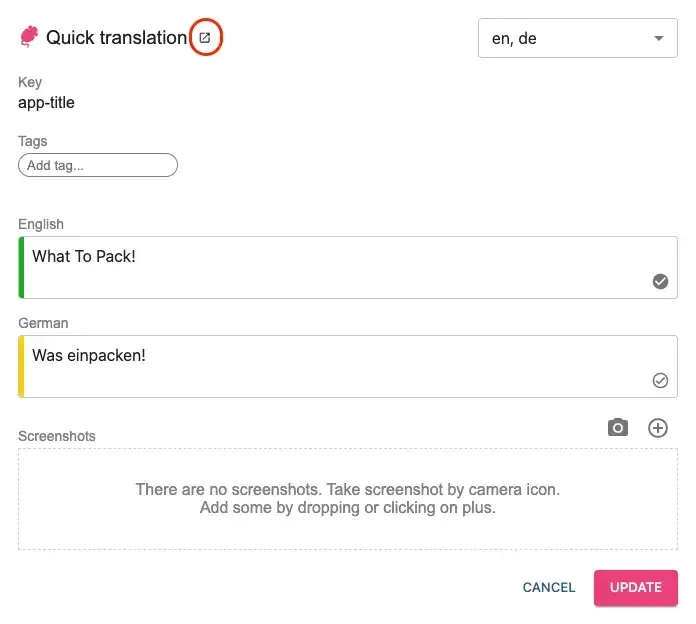
Official documentation screenshot of the in-context Quick translation dialog opened from a running application.
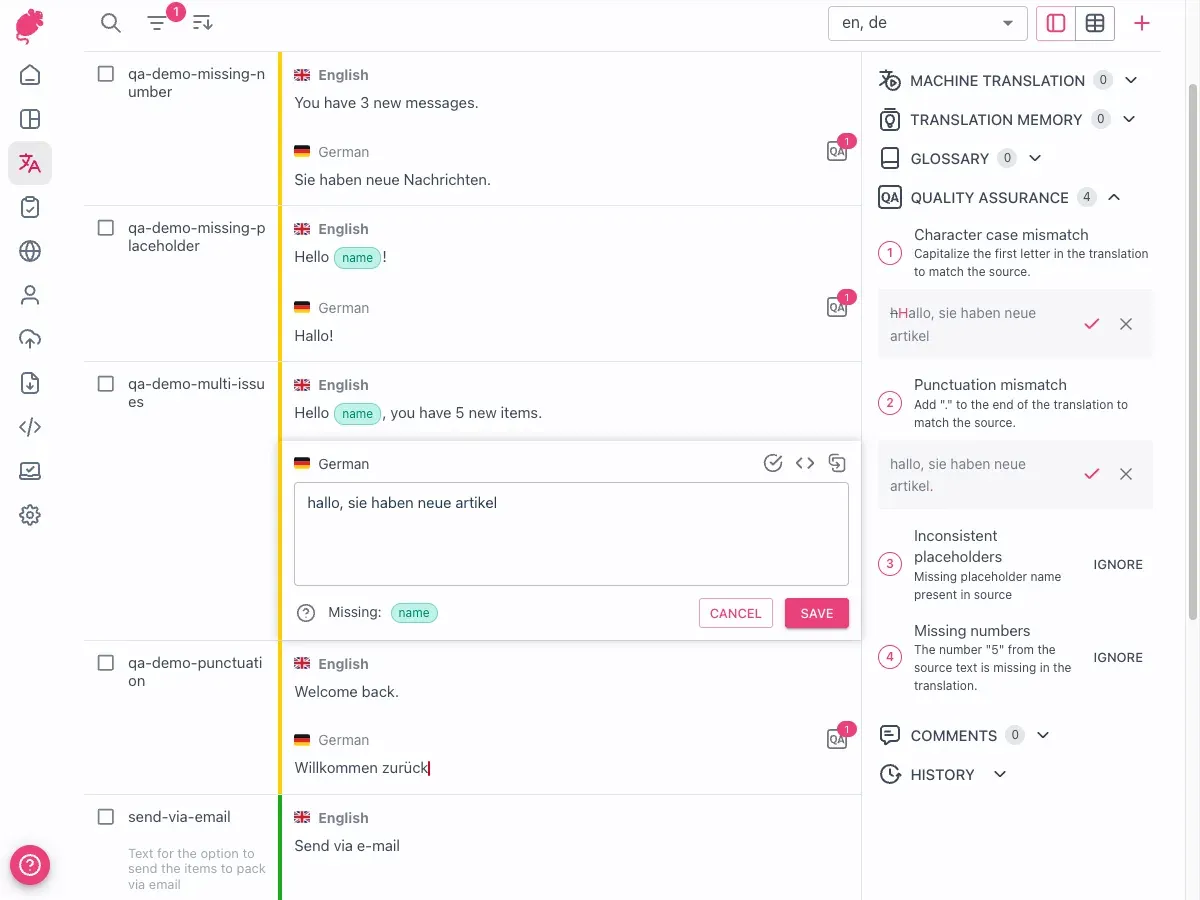
Official documentation screenshot of the Quality Assurance panel with suggested corrections and Ignore actions.
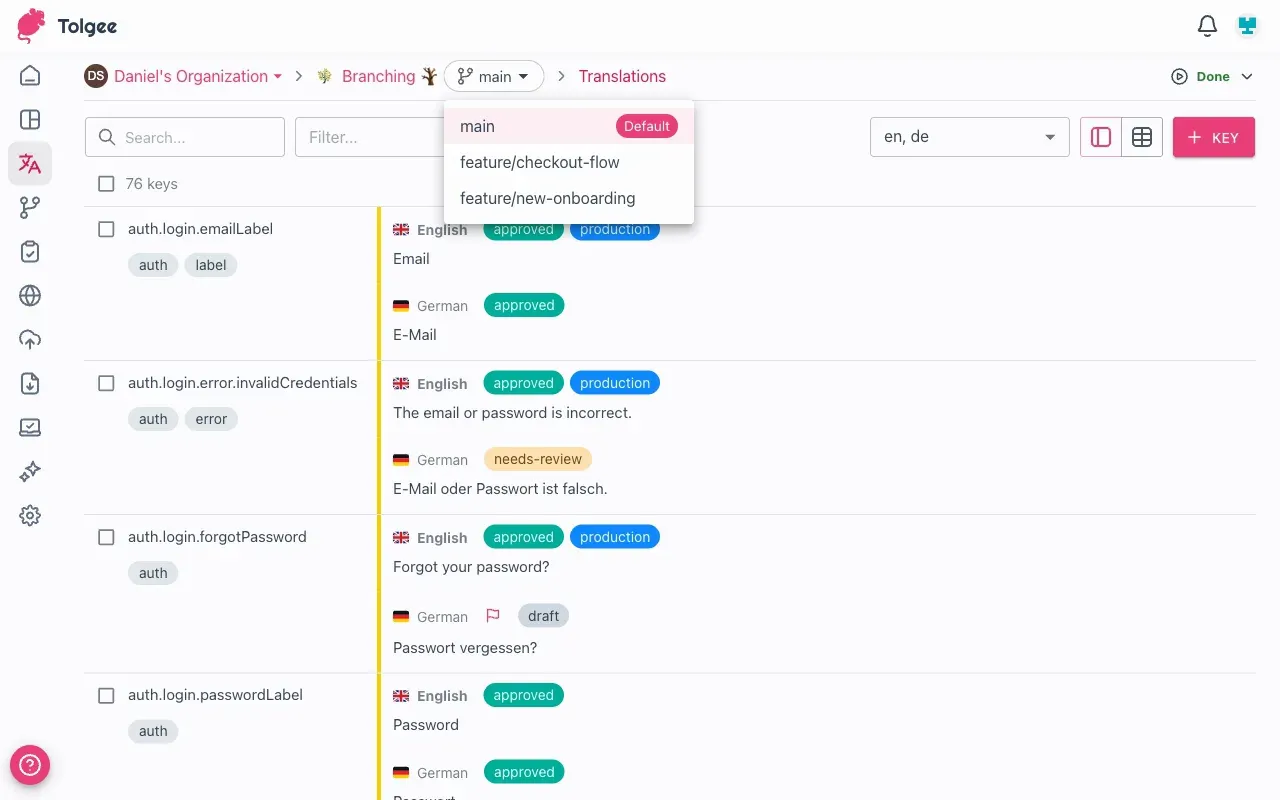
Official documentation screenshot of the branch selector in a project with branching enabled; keys carry labels such as approved and needs-review.
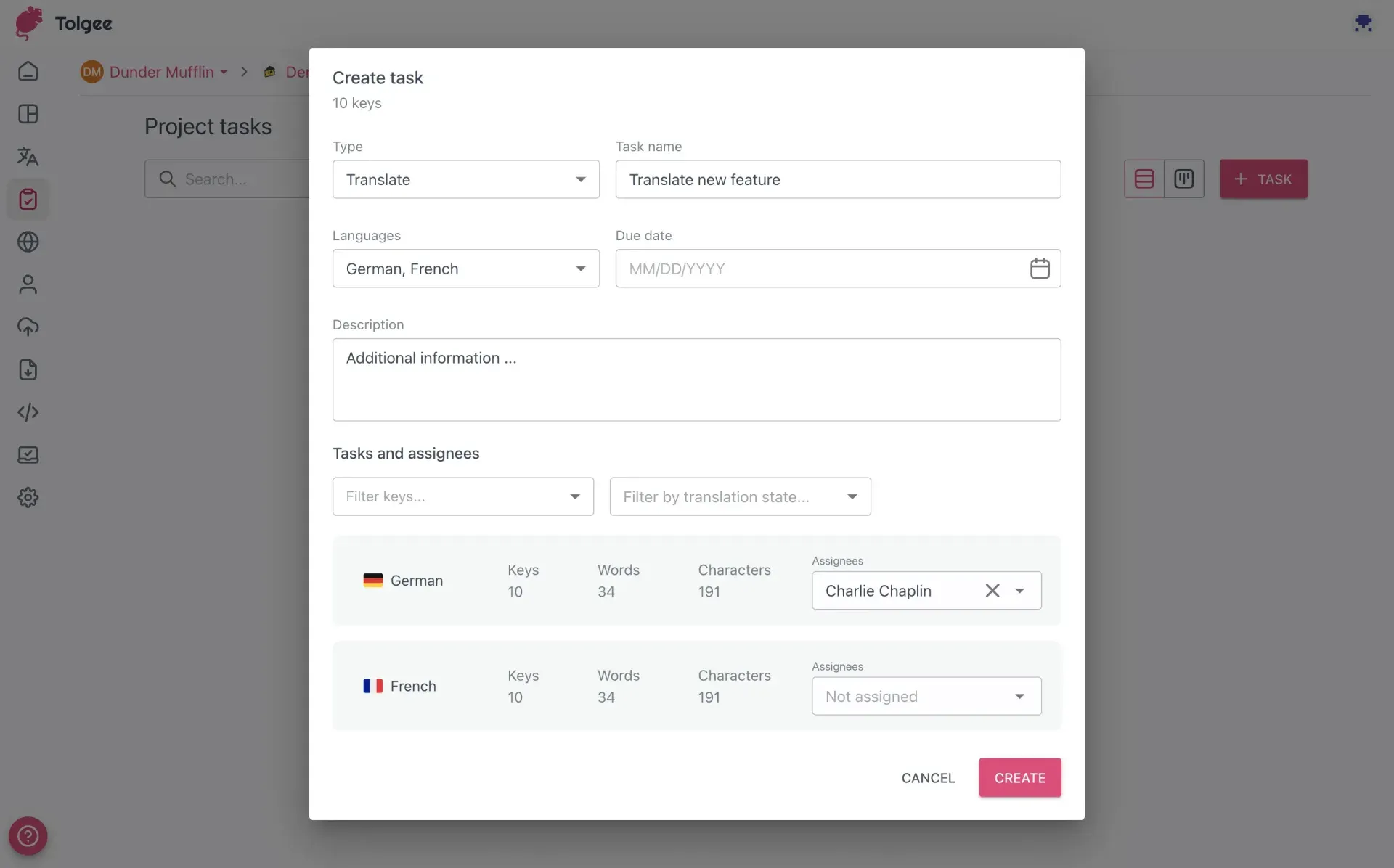
Official documentation screenshot of creating a translation task with languages, due date and assignees.
Source: official Tolgee project page.
Key capabilities
- Translation editor with list and table views Each key shows its translations per language, state (untranslated, translated, reviewed), tags, description, screenshots, comments and history. A side panel collects machine translation results, translation memory matches with a similarity percentage, glossary terms and QA findings. Filters include tags, namespaces, translation state, pluralised keys and an exact-match scoped search such as
key:=name. - In-context translation inside the running application With the JavaScript SDK and its DevTools plugin, holding Alt or Option and clicking a string opens a Quick translation dialog that writes back to the project. DevTools are omitted from production builds by default. On production, the Tolgee Tools Chrome extension supplies the API key instead, and the documentation warns against putting an API key in a production configuration.
- Screenshots attached to keys Screenshots can be uploaded manually, captured with one click from the in-context dialog through the Chrome extension, or imported. Keys are highlighted on the image, translators open it from the key detail, and the AI translator can use it as context. The screenshot guide explains upload and deletion.
- AI translator with application context The AI translator combines screenshots, key and project descriptions, language notes, translation memory results and Tolgee Context, a record of how keys are laid out in the application that requires SDK 5.9.0 or later. Tolgee Cloud uses Anthropic Claude and OpenAI models; organisations and self-hosted servers can add OpenAI, Azure OpenAI, Anthropic, Google Gemini or any OpenAI-compatible endpoint such as LM Studio. Prompts can be edited and tested in an AI playground.
- Machine translation, translation memory and auto translation DeepL, Google Translate, AWS Translate and Azure Translator can be enabled per project. Auto translation fills new keys from translation memory or a selected machine translation provider as soon as they are created. On self-hosted servers, machine translation runs with your own provider API keys; credits sold by Tolgee apply only to Tolgee-supplied providers.
- QA checks Checks flag empty translations, spacing and newline mismatches, case and punctuation differences, missing numbers, bracket and special-character issues, different URLs, key length limits and inconsistent placeholders, HTML or ICU syntax. Findings can be corrected or ignored. QA checks require an advanced plan or a self-hosted licence, and spelling and grammar checks on self-hosted servers need a separate LanguageTool container.
- Glossaries Organisation-level glossaries hold preferred translations, non-translatable terms, case-sensitive terms, abbreviations and forbidden terms, and can be assigned to several projects. Terms appear in the translation view. Glossaries are listed as an advanced-plan feature in the glossary documentation, with import and export available.
- Translation and review tasks Managers create Translate or Review tasks for a set of keys and languages, see key, word and character counts per language, assign users and set a due date. Review tasks wait for overlapping translation tasks, read-only users receive temporary rights for their task, and a report can be exported to Excel. Tasks require an advanced plan or licence.
- Branching and merging When enabled under Project settings, a branch is an isolated copy of all keys and translations at the point of branching. Branches can be protected, merged into their origin with conflict detection, and pinned to content delivery configurations. Branch management uses dedicated permissions, and the branching overview lists it as an advanced feature.
- Import and export in 17 formats The supported formats include structured JSON, i18next JSON, XLIFF, Gettext PO, Java properties, YAML, Ruby on Rails YAML, CSV, XLSX, Apple Strings and Stringsdict, Apple String Catalog, Apple XLIFF, Android XML, Compose Multiplatform XML, Flutter ARB and .NET RESX. Placeholders are converted through Tolgee Universal ICU placeholders. Apple XLIFF cannot modify base strings, and the documentation recommends Apple Strings when base values change.
- Content delivery for over-the-air updates A configuration publishes selected languages, states, namespaces and tags in a chosen format to Tolgee's CDN or to your own S3 or Azure Blob storage, manually or after every change. Updates can take up to 15 minutes to appear. The free cloud plan allows one configuration without custom storage; self-hosted content delivery requires licence setup.
- JavaScript SDKs The JavaScript SDK has integrations for React, Next.js, Angular, Vue, Svelte, React Native, i18next and vanilla JavaScript. It fetches translations from the API during development or from static files and content delivery in production. Its documentation is versioned separately.
- Android and iOS SDKs The Android SDK supports Views and Jetpack Compose with over-the-air updates, runtime locale changes, caching and fallback to Android resources. The iOS SDK supports UIKit and SwiftUI on iOS and macOS, with runtime language override and fallback to bundled translations. Both fetch translations through Tolgee's CDN or a self-hosted one.
- Tolgee CLI Installed with
npm install --global @tolgee/cliand requiring Node.js 18 or later, the CLI pushes new strings, pulls localisation files, extracts keys from source code and keeps a.tolgeercproject file. Interactive use signs in through the browser; CI pipelines use a project API key. - REST API, webhooks and MCP server The REST API accepts project API keys for
/v2/projects/endpoints and personal access tokens elsewhere, and sensitive operations need a short-lived super token tied to two-factor authentication. Webhooks fire on every modifying activity and are signed with HMAC SHA256 in aTolgee-Signatureheader. The built-in MCP server at/mcp/developeruses streamable HTTP with OAuth or anX-API-Keyheader and exposes keys, translations, languages, tags, namespaces, branches and batch operations. - Design and team integrations A free Figma plugin connects designs to a project with a project API key, uploads design texts as keys in the base language and downloads translations back into the page. The Tolgee Slack app is installed from Organization Settings and requires an advanced plan or licence, and an Unreal Engine plugin covers game localisation. The integrations index lists setup guides for each.
- Community Translation Since v3.215.0, a project can be made public so that any Tolgee account holder can suggest translations and comment without being invited. Members review and accept suggestions. Contributors get View-role access, which includes reading and exporting every translation and screenshot in the project. The feature is not plan-gated.
- Organisations, permissions and SSO Projects sit inside organisations with roles, language-scoped and granular permissions, an activity log and translation history. Single sign-on supports Keycloak, Okta and Google Workspace, and organisation owners can disable SSO-managed users. SSO and granular permissions require a licensed self-hosted plan; on Tolgee Cloud, SSO is listed under Enterprise.
- Self-hosting with Docker or Java The single-container start is
docker run -v tolgee_data:/data/ -p 8085:8080 tolgee/tolgee. Compose files mount aconfig.yamland can point to an external PostgreSQL 17 container withpostgres-autostartdisabled. Without Docker, runjava -jar tolgee-<version>.jarfrom the release assets. The Docker guide and configuration reference cover SMTP, authentication, storage and machine translation keys.
Where Tolgee fits
Localising a React, Next.js or Vue web application
A project is connected to the matching JavaScript SDK integration with the API URL and a project API key during development, and translators and developers edit strings in context with Alt or Option and a click. For production, the documentation describes exporting static files with the CLI or pointing the SDK's BackendFetch plugin at a content delivery link, without an API key in the production bundle. DevTools are omitted from production builds by default, and fallback languages are configured in the SDK.
Keeping repository files in sync from CI
Teams that keep JSON, PO, XLIFF or Android XML files in Git run tolgee push to upload new keys and tolgee pull to download translations, with settings in .tolgeerc and a project API key for non-interactive pipelines. The CLI can also extract keys from source code. Framework-specific formats such as Ruby on Rails YAML, Flutter ARB and Apple String Catalog exist alongside generic JSON and YAML, and placeholders are converted through Tolgee Universal ICU placeholders.
Updating mobile app strings without a store release
A content delivery configuration publishes selected languages, translation states, namespaces and tags to Tolgee's CDN or to S3 or Azure Blob storage, manually or automatically after every change. The Android and iOS SDKs read from that link, cache translations and fall back to bundled resources when offline. The documentation states that updates can take up to 15 minutes to appear.
Running a reviewed translation process with agencies or volunteers
Tasks, glossaries, QA checks and the activity log cover work with external translators. Managers create Translate tasks per language with due dates and assignees, follow them with Review tasks and export a task report to Excel. For open-source projects, Community Translation lets any Tolgee account holder suggest strings that project members accept. Tasks, glossaries and QA checks are advanced-plan or licensed features, while Community Translation is not plan-gated.
Using AI translation with project context
The AI translator uses the project description, language notes, screenshots, translation memory and Tolgee Context collected by SDK 5.9.0 or later. Auto translation fills new keys as they are created, prompts can be edited and tested in the AI playground, and glossary terms appear in the translation view. Translation states (untranslated, translated, reviewed) remain separate, and content delivery and exports can be filtered by state.
Operating a self-hosted instance
The self-hosting documentation provides a Docker Compose file that mounts a config.yaml and can use an external PostgreSQL database; the embedded PostgreSQL setup is deprecated and is removed in v4. The configuration covers the JWT secret, SMTP, authentication, file storage and machine translation keys. The free self-hosted edition supports up to 10 seats, and a licence key applied under Server administration unlocks features such as SSO, tasks, branching and webhooks. Each GitHub release also ships an executable JAR.
Install
docker run -v tolgee_data:/data/ -p 8085:8080 tolgee/tolgeeReviews of Tolgee
Be the first to share your experience with Tolgee.
Write a review
Loading review form…
Related to Tolgee
 StrapiStrapi is an MIT-licensed headless CMS in JavaScript and TypeScript with a visual Content-Type Builder, generated REST and GraphQL APIs, i18n, roles and plugins, self-hosted on Node.js or on Strapi Cloud, with paid Growth and Enterprise features.
 Payload CMSOpen-source, code-first CMS and application framework for Next.js and TypeScript. One config generates an admin panel, REST and GraphQL APIs, auth and access control on MongoDB, Postgres or SQLite.