
What is Call.md?
Call.md is a desktop meeting assistant made by VideoDB. It records a meeting on the user's own computer by capturing the screen, the microphone and the system audio at the same time, so it works with whatever call app is running on the desktop; the README and the VideoDB docs page describe local capture and do not describe a bot that joins the call. While the meeting runs, the microphone channel is transcribed as "you" and the system audio channel as "them", and the app shows live suggestions, conversation metrics and results from connected MCP servers. After the meeting it writes a three-part summary and exports the meeting as Markdown files under ~/.call_md/ so that coding agents and other tools can read them.
VideoDB describes itself as an applied lab for visual intelligence that builds infrastructure turning video into data that machines and agents can use. Its team page lists Mango Capital, Strange Ventures, OVO Fund and Untapped Capital as backers and names UC Berkeley and IIIT Bangalore as supporters; it gives no funding amounts and no headquarters. The call.md repository was created in February 2026 and is developed in TypeScript.
The official installer for macOS 12 or later is a shell script (curl -fsSL https://artifacts.videodb.io/call.md/install | bash) that detects Apple Silicon or Intel, downloads the matching DMG and copies Call.md into the Applications folder. On November 22, 2026 the script installs version 1.0.4, whose DMGs on artifacts.videodb.io are dated June 3, 2026. The repository has no GitHub releases or tags. Windows x64 recording works in a build from source (npm run dist:win), but VideoDB does not publish a Windows installer; Linux AppImage and Windows ARM64 builds run the interface, MCP servers, workflows, history and export, while recording is rejected because no capture binary exists for those targets.
The app is built on Electron 42, React 19, TypeScript, Tailwind CSS with shadcn/ui, tRPC 11 on a Hono server that binds to 127.0.0.1, and Drizzle ORM with SQLite. Recording and real-time transcription use the VideoDB SDK, tool calls use the MCP SDK, and language model calls go through the OpenAI SDK pointed at VideoDB's OpenAI-compatible API (by default api.videodb.io).
A VideoDB API key from the VideoDB console is required. According to the README security section, the database, settings and logs stay on the machine, while recording, transcription and AI inputs are sent to VideoDB when those features are used, and each recording is saved as a video in the user's VideoDB account. Call.md itself has no price; usage is billed by VideoDB, whose pricing page offers a free account with $20 of credits and no credit card, then usage rates in USD such as $0.084 per hour of realtime capture and $0.01 per minute of transcription (checked November 22, 2026).
The package.json manifest declares the MIT license and names VideoDB as author, but the repository contains no LICENSE file, so GitHub shows no license for it. Out of scope: offline or on-device transcription, a meeting bot, recordings longer than two hours without a rebuild, and a hosted Windows or Linux installer. Similar meeting recorders listed on iThub include Meetily, Minutes and Anarlog, which transcribe on the device.
Key capabilities
- Local screen and audio capture Call.md records the screen, the microphone and the system audio together from the desktop instead of sending a participant into the call. macOS needs the Microphone and Screen Recording (Screen & System Audio Recording) permissions; Windows needs microphone access for desktop apps. Recording stays unavailable until those permissions are granted.
- Dual-channel live transcription The microphone is transcribed as "you" and system audio as "them", streamed to VideoDB over a WebSocket for real-time transcription. The README notes that the first transcript lines can take 5 to 10 seconds and that transcription needs an internet connection.
- Transcription language setting Settings, Transcription offers Automatic plus 20 languages, including English, Spanish, French, German, Hindi, Japanese, Chinese and Arabic. The choice applies to the next recording; if VideoDB's backend does not support a language, the app falls back to the engine default.
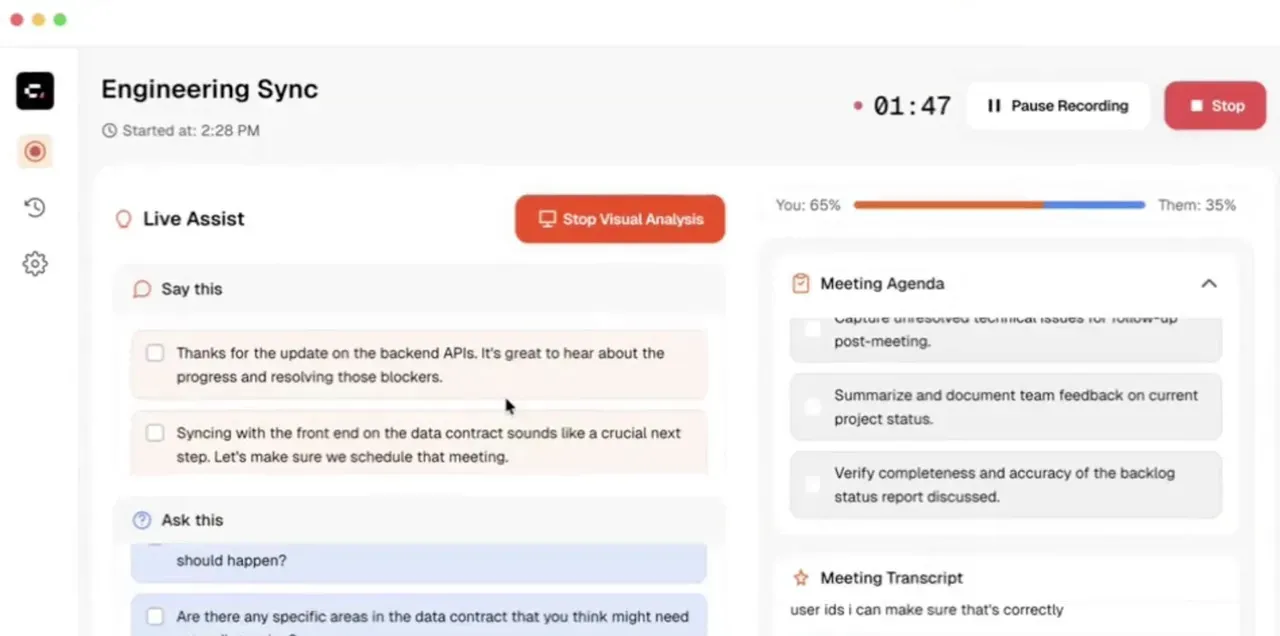
- Live Assist During a call the app generates "Say this" and "Ask this" suggestions from the running transcript. The docs page states that the suggestions refresh every 20 seconds.
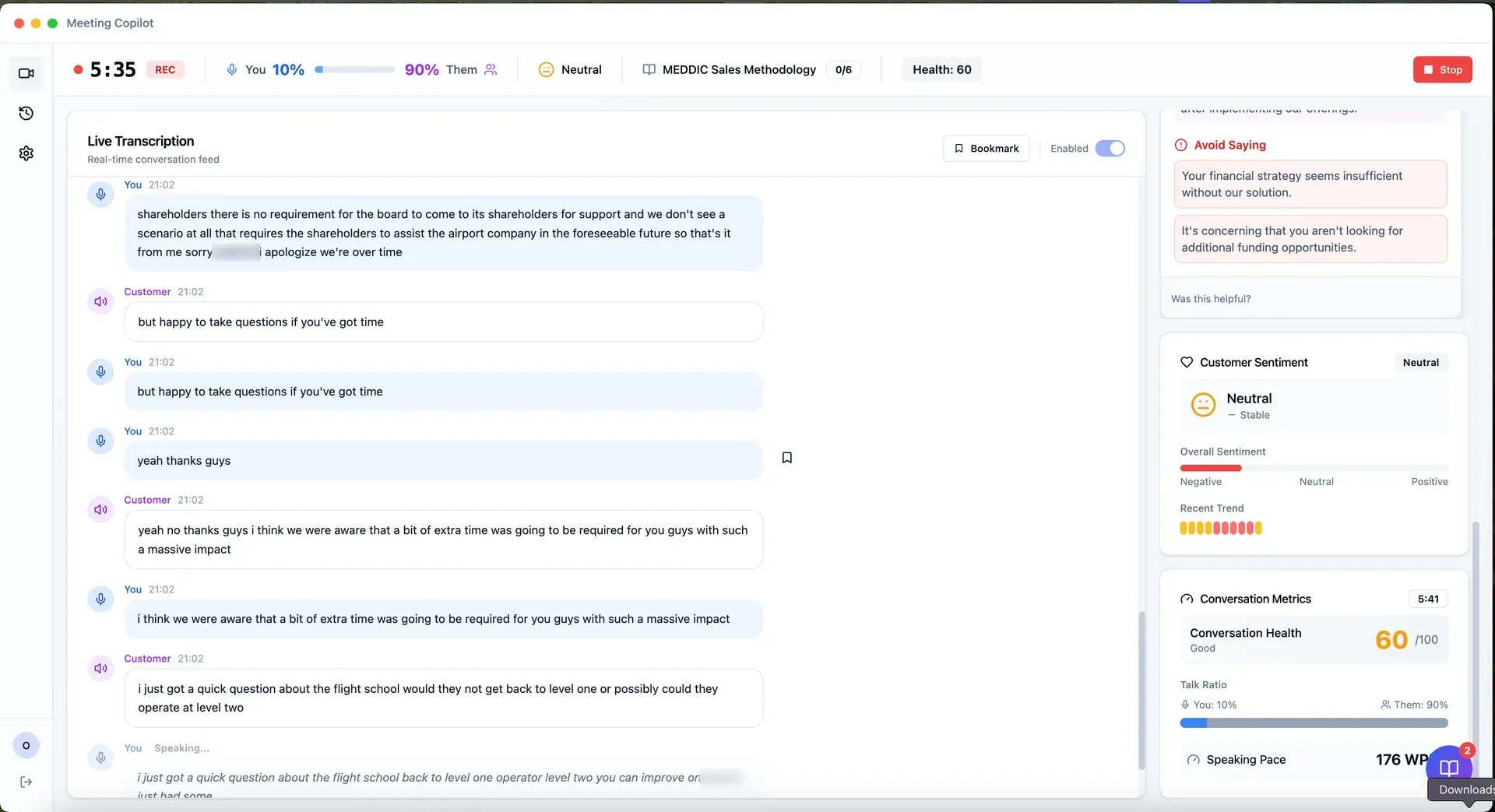
- Conversation metrics and coaching nudges A metrics panel shows talk ratio, speaking pace in words per minute, questions asked and monologue detection, which the docs list with a 45-second threshold and describe as computed without a language model. Rate-limited nudges appear when the conversation drifts.
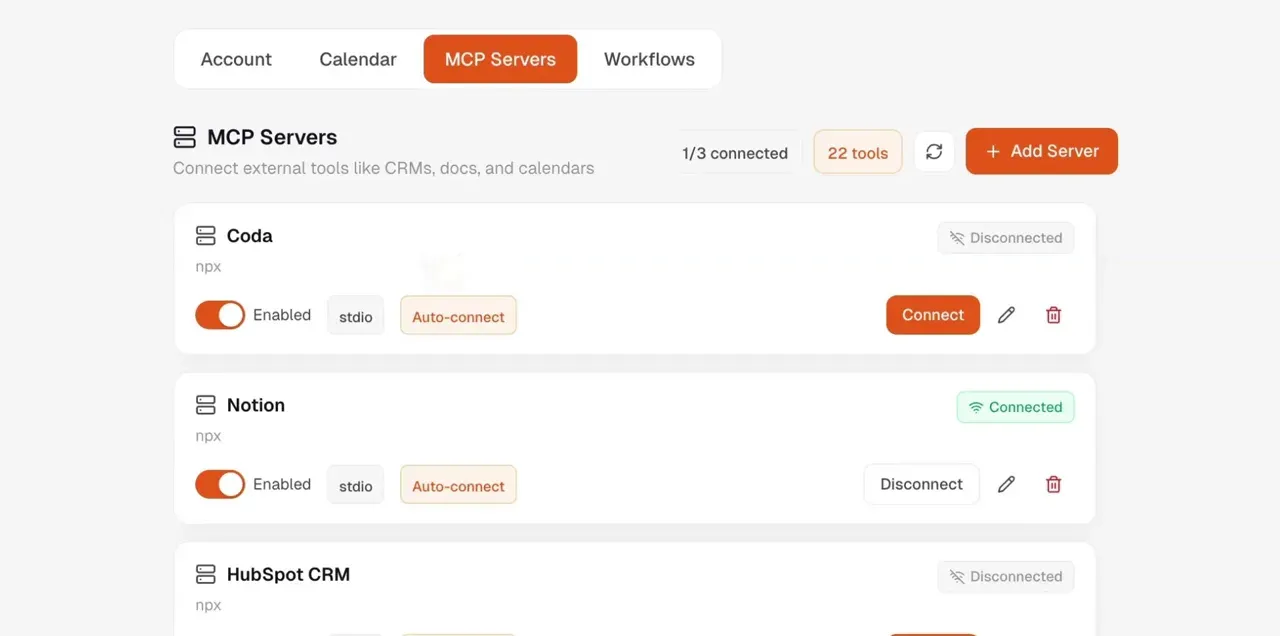
- MCP tools during meetings Users add MCP servers under Settings, MCP Servers, over stdio for local servers or HTTP for remote ones; the app ships templates for Notion, HubSpot CRM and Coda. An intent detector watches the conversation and calls matching tools, which the docs limit to a run every 20 seconds with at most 3 tool calls per run, and shows the output in an MCP Results panel.
- Meeting setup wizard Before a call, the setup wizard takes a meeting description and generates probing questions and a discussion checklist, which is then tracked as a meeting agenda during the recording.
- Google Calendar sync Upcoming meetings can be pulled from Google Calendar. The connection is optional and can be skipped during onboarding; OAuth tokens are stored encrypted with Electron safeStorage and are cleared on logout.
- Bookmarks A Bookmark button marks moments during the recording so they can be found again in the recording history.
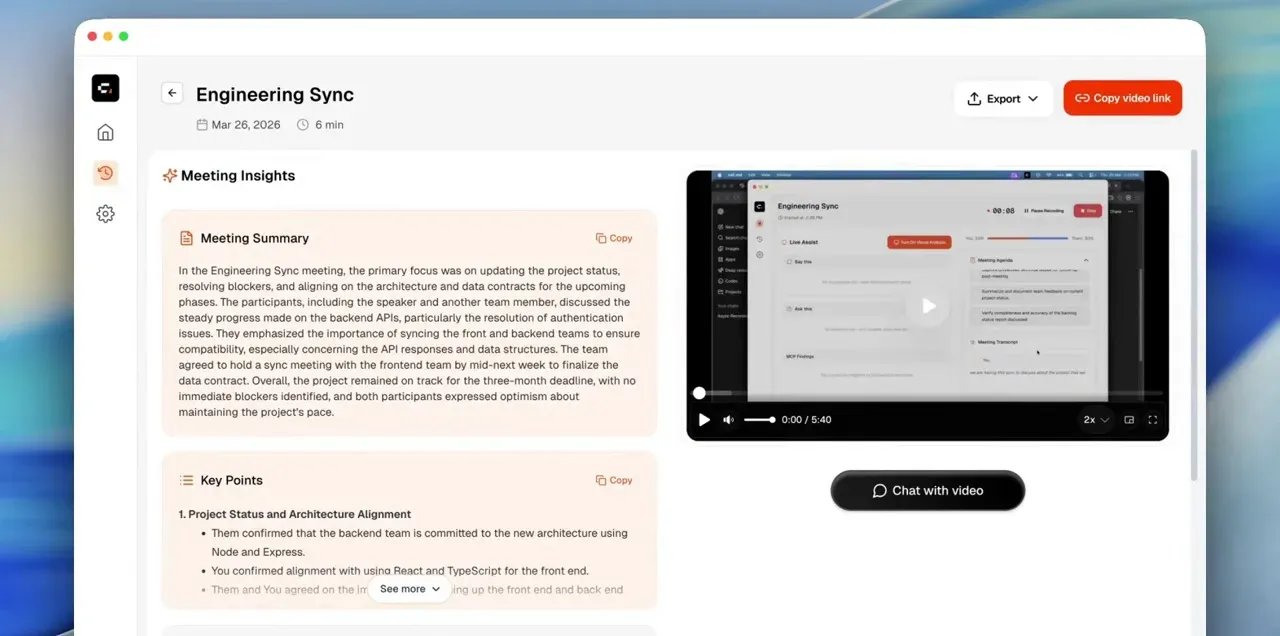
- Post-meeting summary When the recording stops, three parallel extractions produce a short narrative overview, key points grouped by topic and attributed to participants, and a list of concrete action items. The docs give 3 to 5 sentences for the overview and 3 to 10 action items.
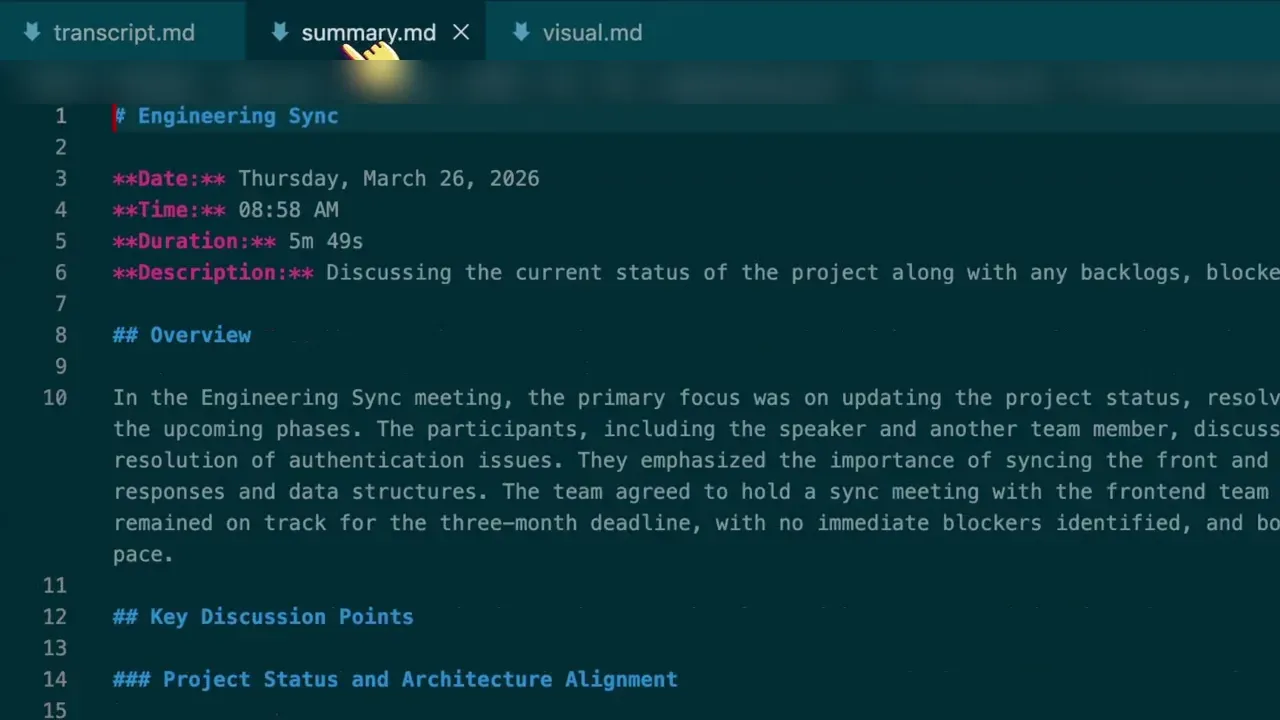
- Markdown export for agents Each meeting is written to
~/.call_md/meetings/YYYY/MM/DD/<meeting>/assummary.md,transcript.md,visual.mdandmetrics.md, with anindex.mdlisting all meetings, so any agent with file access can read them. - Recordings in VideoDB, Claude and ChatGPT Every recording is saved as a video in the user's VideoDB account. VideoDB's remote MCP server at
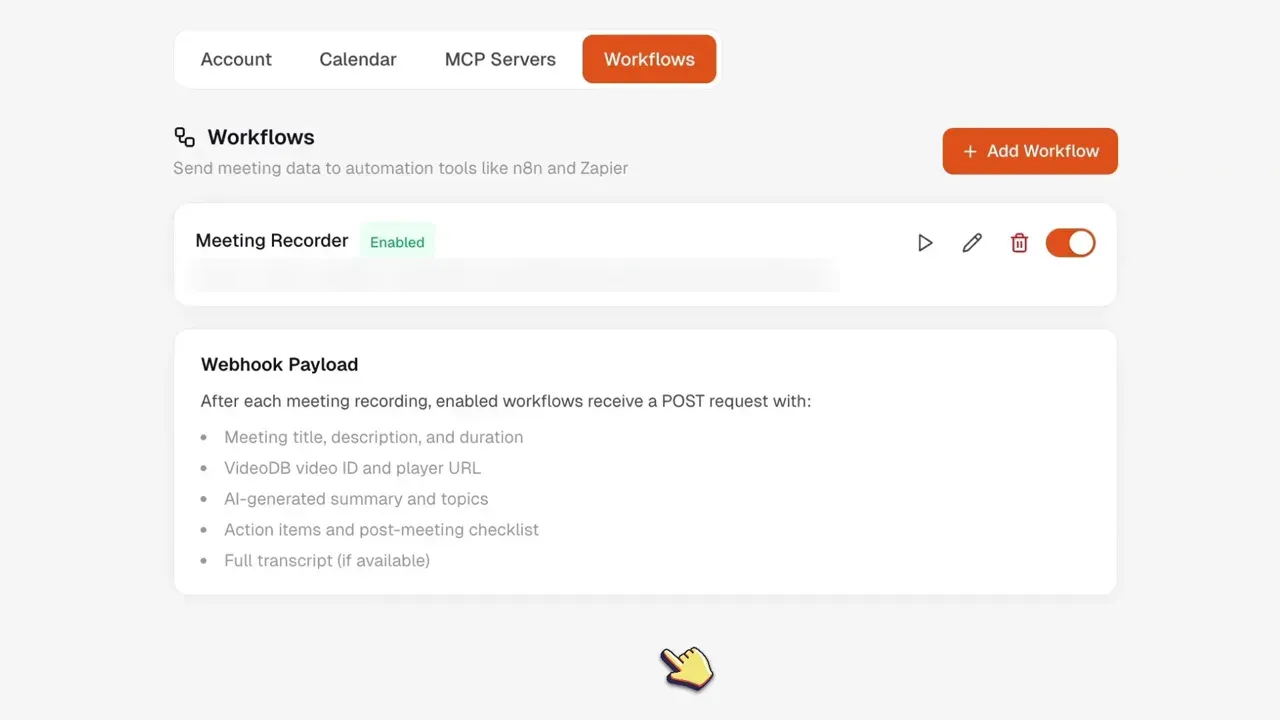
https://mcp.videodb.io/mcp, its Claude and ChatGPT connectors and the video-db/skills package (npx skills add video-db/skills) let agents search those recordings, list decisions and return clips; setup is described in the MCP connect guide. - Workflow webhooks Settings, Workflows sends a POST request after each recording to tools such as n8n, Zapier or a CRM. The payload carries the meeting title, description and duration, the VideoDB video ID and player URL, the summary and topics, action items and the transcript. URLs pointing to loopback, private, link-local or cloud-metadata addresses are rejected, and requests time out after 30 seconds.
- Recording history A history view lists past meetings with summaries, transcripts and the recorded video, with Export and Copy video link actions on each meeting page.
- Two-hour recording limit Recordings stop automatically after 2 hours of active recording time, with a notification 5 minutes before; paused time and system sleep do not count. The cap is a constant in
src/shared/constants/recording.tsand changes only in a rebuilt app. - Credential and local API protection The VideoDB API key is stored encrypted in the SQLite database, MCP server secrets use AES-256-GCM under a key wrapped by Keychain, DPAPI or libsecret, and credential writes fail when no strong OS-backed store is available. The local tRPC API listens only on 127.0.0.1 and requires an access token; app files are created with 0600 permissions.
- macOS installer
curl -fsSL https://artifacts.videodb.io/call.md/install | bashinstalls the 1.0.4 DMG for Apple Silicon or Intel on macOS 12 or later. After launch, the user grants permissions and registers with a VideoDB API key. - Builds from source Developers need Node.js 22.12 or later and npm 10 or later, then run
npm install,npm run rebuildandnpm run dev.npm run dist:mac,dist:winanddist:linuxproduce a DMG, an NSIS installer and an AppImage; only macOS and Windows x64 builds can record.
Where Call.md fits
Preparing for a sales or customer call
The meeting setup wizard takes a short description of the call and generates probing questions and a checklist, which then appears as the meeting agenda during the recording. With Google Calendar connected, upcoming meetings are listed in the app. The README screenshot shows a sales call tracked against a MEDDIC checklist with a sentiment indicator and conversation health score.
Live guidance during a call
While recording, the transcript is split into "you" and "them", Live Assist proposes things to say and questions to ask, and the metrics panel tracks talk ratio, speaking pace and monologues. Suggestions and metrics depend on VideoDB's real-time transcription, so they need a working internet connection and a valid API key.
Pulling context from team tools mid-meeting
With MCP servers such as Notion, HubSpot or Coda connected under Settings, MCP Servers, the app detects information needs in the conversation and calls the relevant tools on its own, showing the results inline. Remote MCP servers receive the data the app sends them, as the README security section notes.
Handing meeting notes to coding agents
After each recording, the Markdown export in ~/.call_md/ gives agents such as Claude Code or Codex plain files with the summary, transcript and metrics, plus an index of all meetings. The same recordings can also be searched through VideoDB's MCP server or the video-db/skills package, which work on the copies stored in the VideoDB account.
Automating follow-up after the meeting
Workflow webhooks post the summary, action items, transcript and VideoDB video link to n8n, Zapier or a CRM when the meeting ends, for example to draft follow-up emails or update CRM records. Each webhook URL is validated both when it is saved and when it is called.
Reviewing past meetings
The recording history lists each meeting with its summary, key points, action items and the recorded video, which can be exported or shared through a VideoDB video link. When a meeting reaches the two-hour cap, the automatic stop saves and summarizes the recording as if Stop had been pressed.
Install
curl -fsSL https://artifacts.videodb.io/call.md/install | bashReviews of Call.md
Be the first to share your experience with Call.md.
Write a review
Loading review form…
Found Call.md useful? Upvote it todayYour vote helps other IT teams find it in the daily ranking.