
What is VoiceStudio?
VoiceStudio is an open-source desktop application for speech generation and speech recognition that runs its models on the user's own hardware. Its README lists voice cloning from a reference recording, voice design from a text description, video dubbing, dictation, transcription and audiobook narration, with language coverage the project states as 646 languages, depending on the engine. The application is maintained by Yupcha Softwares Private Limited, with Palash Debnath named as creator and Shimul Debnath as a core team member. The project website is voicestudio.sh.
The project was first published as OmniVoice-Studio. According to the changelog, release 0.5.0 of August 13, 2026 renamed the app to VoiceStudio and moved the repository to github.com/debpalash/VoiceStudio, while keeping the data folder, settings and Docker image paths. Up to v0.5.3 the desktop shell was built with Tauri; the migration guide states that Electron is now the only maintained desktop app and that the Tauri app is archived.
The latest stable release is v0.5.7, published October 26, 2026. Its release notes describe preview iOS and Android apps that run models on the phone, a small CPU PyTorch build for computers without a GPU, redesigned Models, Dubbing, Stories and Workflows pages, an opt-in Beta update channel, a GPU acceleration panel and an in-app agent called Ask VoiceStudio. Pre-releases of 0.5.8 followed in November 2026. Installers are published for Windows x64 and ARM64, macOS on Apple Silicon and Intel, Linux x64 (AppImage, deb, Snap, AUR), Android (APK) and iOS (unsigned IPA), plus Docker images on GHCR and Docker Hub.
The stack combines an Electron desktop and web front end, a FastAPI Python backend that keeps models loaded, a native desktop helper and a command package. The default speech engine is k2-fsa/OmniVoice; the Model Manager offers further text-to-speech engines such as CosyVoice 3, IndexTTS 2.5, VoxCPM2, KittenTTS and GPT-SoVITS, and transcription engines including WhisperX (default), Faster-Whisper, MLX Whisper, Parakeet TDT, Moonshine and FunASR, as listed in the feature and engine catalog.
The application is licensed under AGPL-3.0-only, which per the license notice includes commercial use under its terms. Model weights are licensed separately: the notice states that the default OmniVoice pretrained weights are CC-BY-NC, and the Model Manager displays licence notices for each model. A paid, closed-source VoiceStudio Pro build adds a Commercial License and multi-device features, and a hosted VoiceStudio Cloud API is announced as not yet available. The project asks users to clone a voice only with its owner's permission.
VoiceStudio screenshots
Explore the interface. Open a screenshot to view it at full size.
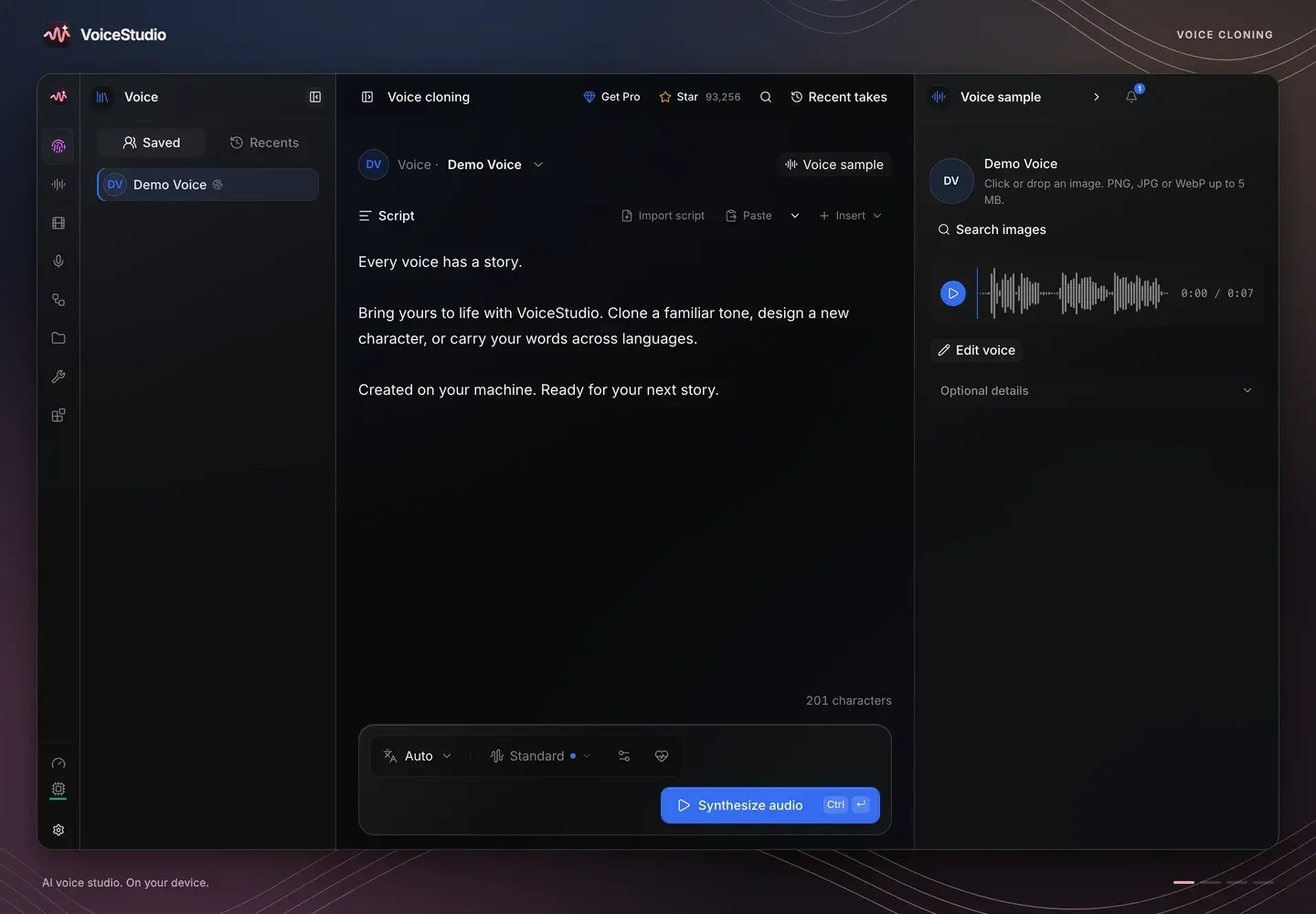
Official project screenshot from the VoiceStudio repository. Voice cloning workspace with the bundled demo voice, script editor and Synthesize audio control.
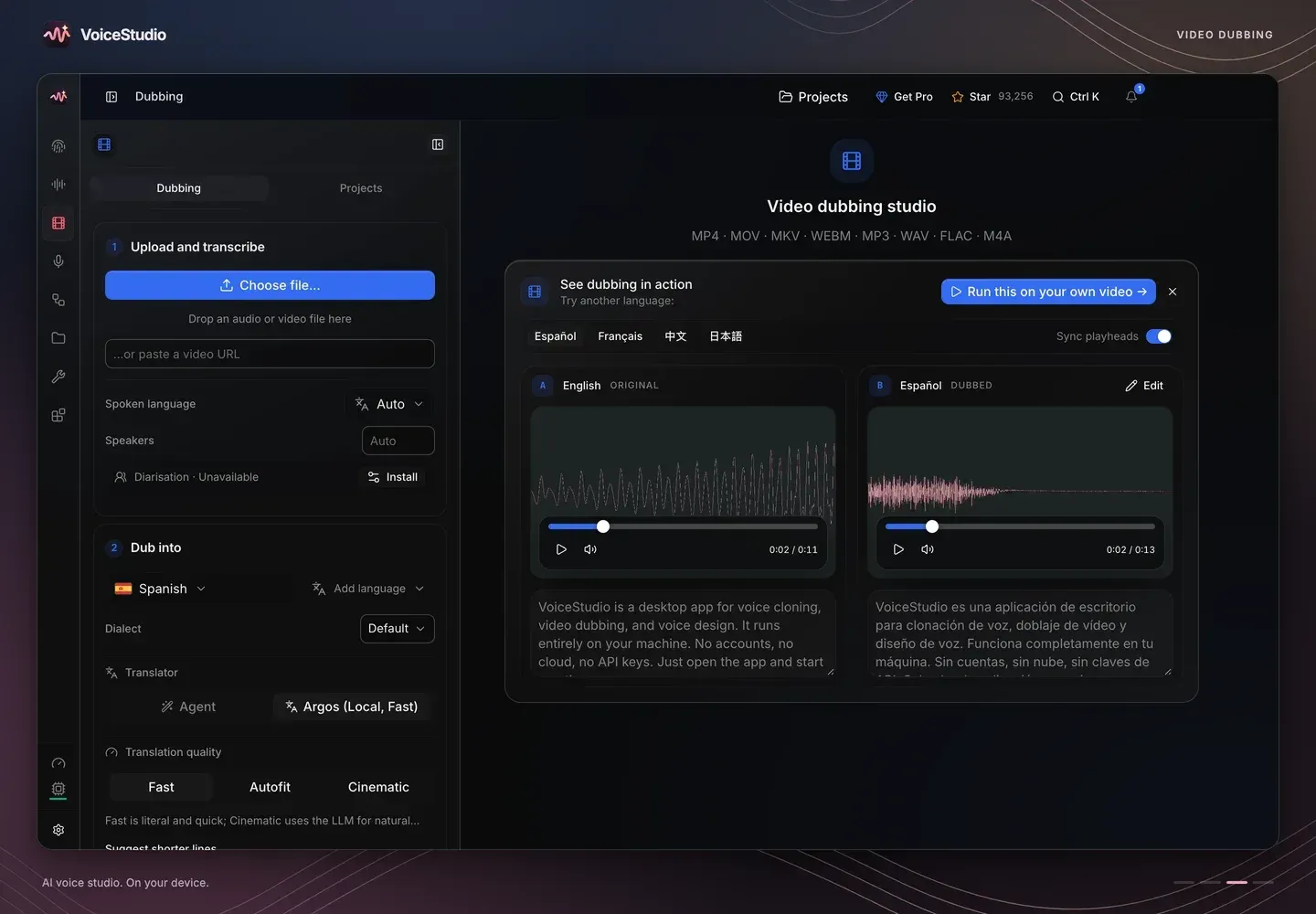
Official project screenshot from the VoiceStudio repository. Dubbing workspace: upload and transcribe, target language and translator settings, and original and dubbed playback side by side.
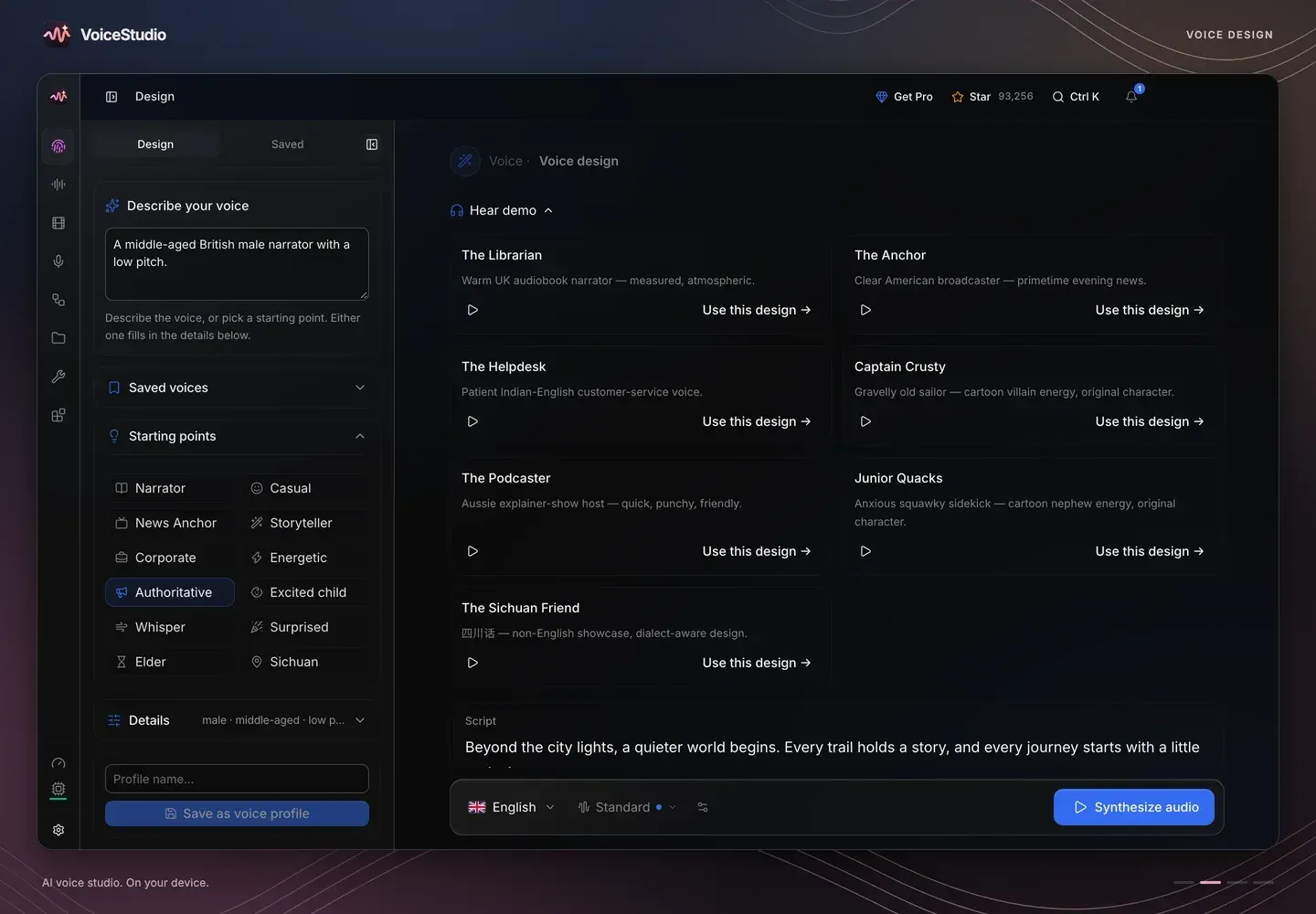
Official project screenshot from the VoiceStudio repository. Voice design from a text description, with starting points and demo designs.
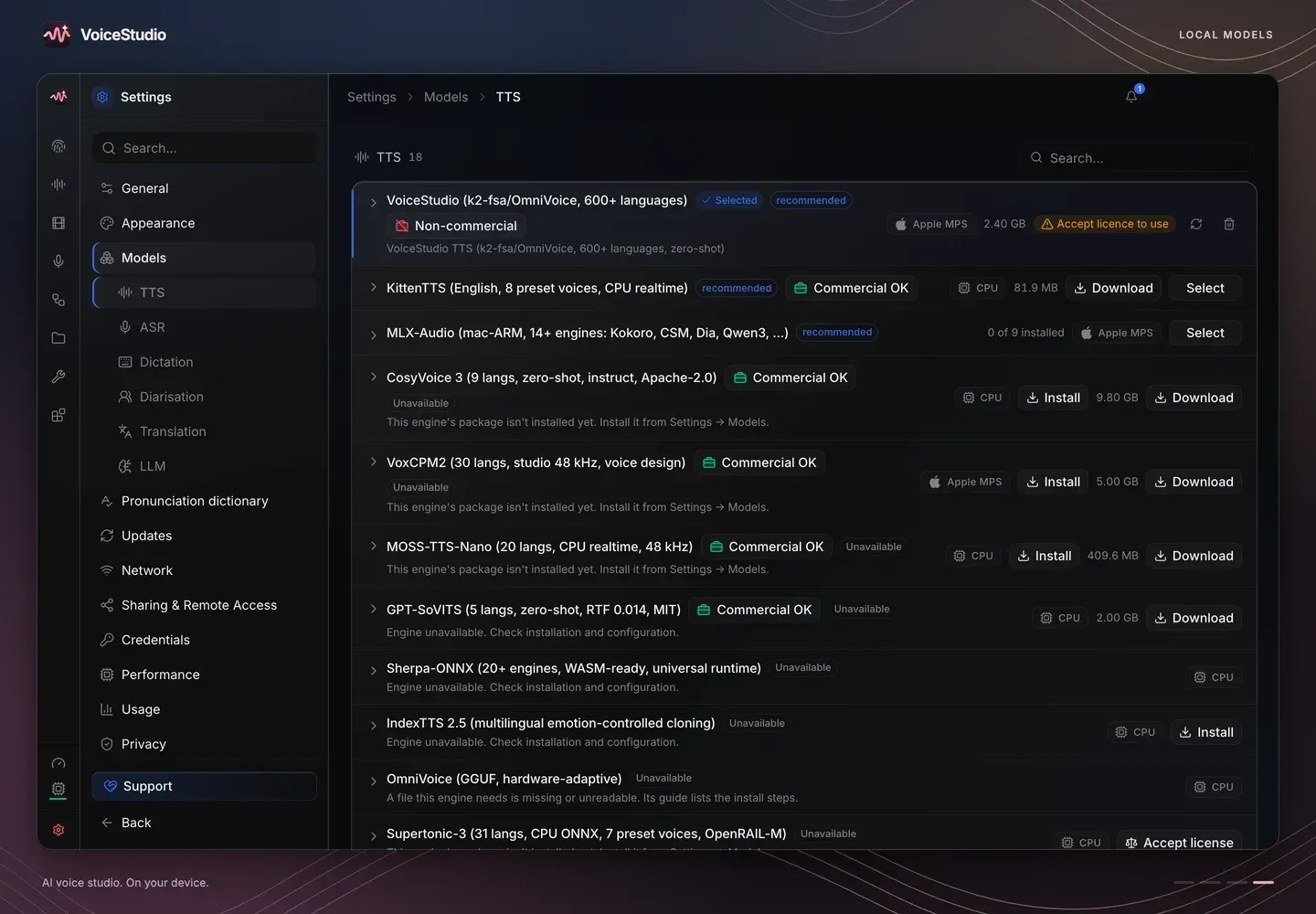
Official project screenshot from the VoiceStudio repository. Model Manager listing TTS engines with download size, target hardware and licence labels such as Non-commercial and Commercial OK.
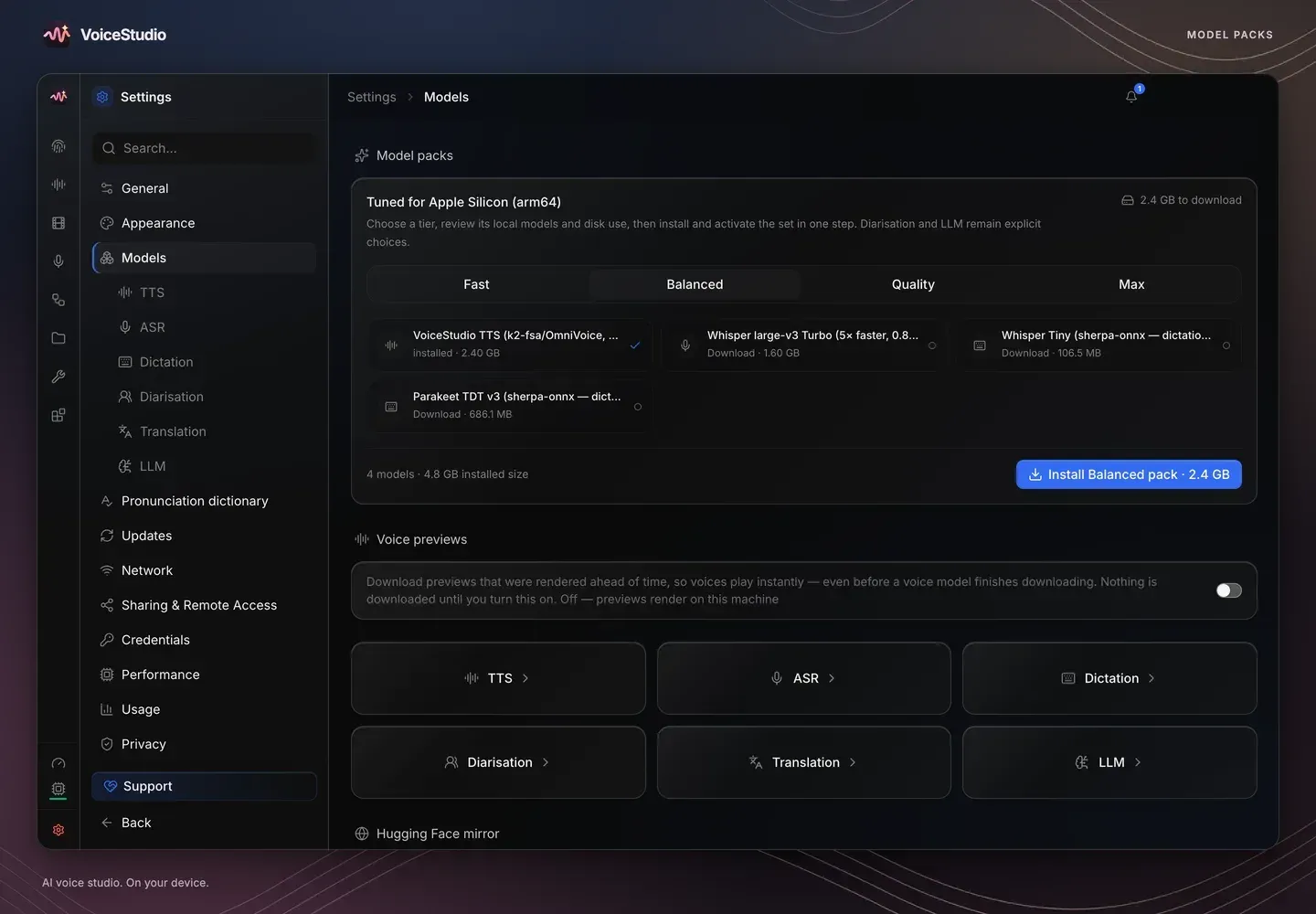
Official project screenshot from the VoiceStudio repository. Model packs tuned for Apple Silicon, with the Balanced pack's models and total download size.
Source: official VoiceStudio project page.
Key capabilities
- Voice cloning Speech is generated from a reference recording of a voice, which the app's home screen describes as 5 to 15 seconds of clean speech. A bundled demo voice is included, and cloned voices are saved as voice profiles for later generations. The project's audio quality guide covers export precision and local checks.
- Voice design A voice can be created from a written description such as age, gender, pitch, accent and style, or from preset starting points such as Narrator, News Anchor or Whisper. The voice design workspace includes demo designs and saves the result as a reusable voice profile.
- Video dubbing The dubbing workspace transcribes an audio or video file, translates it and generates speech in the target language timed to the original. Supported inputs shown in the app include MP4, MOV, MKV, WEBM, MP3, WAV, FLAC and M4A. Translation can use the local Argos translator or an LLM agent, and optional speaker diarization separates multiple speakers. The documentation includes a multi-speaker guide and an export guide.
- Dictation A dictation shortcut records speech, transcribes it locally and inserts the text into the active application. Live dictation uses sherpa-onnx streaming models. On Snap installs, microphone access requires connecting the audio-record interface.
- Transcription Recorded audio and video can be turned into timed text, with SRT, VTT and TXT output shown on the website. WhisperX is the default transcription engine; Faster-Whisper, MLX Whisper, PyTorch Whisper, Parakeet TDT, Moonshine, FunASR and an OpenAI-compatible server can be selected instead.
- Stories and audiobooks Stories lets a script be cast with several voices, one per role. The Audiobook workspace turns a long script or an EPUB into a chaptered audiobook. Long jobs run through a batch queue, and the project documents remote GPU workers that render audiobooks chapter by chapter with local fallback.
- Model Manager and model packs Engines and models are downloaded on demand; the app asks before it downloads any model. Model packs bundle a speech model, transcription models and dictation models per hardware tier (Fast, Balanced, Quality, Max) and show their disk size before installation. Each model row shows its size, target hardware and licence status, such as Non-commercial or Commercial OK.
- Model licence notices The repository keeps a licence inventory of 63 configured model repositories. The project states that a false commercial-use flag covers both non-commercial terms and unfinished review, and that buying Pro does not override model terms. The default OmniVoice weights are labelled non-commercial and require accepting the licence before use.
- Local OpenAI-compatible API The backend serves an HTTP API on port 3900, including an OpenAI-compatible transcription route, a WebSocket stream for partial and final live text and a capabilities document at /.well-known/voicestudio-speech. An API key can be set through OMNIVOICE_API_KEY. The local speech platform guide documents the protocols.
- MCP server An MCP server is mounted on the running backend at /mcp, with a stdio shim for clients that only support stdio. Its tools include generate_speech, clone_voice, describe_voice, design_voice, transcribe, list_voices and check_health. Output can be returned inline as base64 WAV or written to files, as described in the MCP guide.
- Recipes, watch folders and workflows The README lists reusable recipes and watch folders for automation. The Workflows page is described in the app as designed locally, with calls that run only after confirmation. A command-line command and agent skills installable with npx skills add debpalash/VoiceStudio are also provided.
- AI watermark The backend includes an audio watermarking service. Its source describes an invisible AudioSeal watermark that encodes a 16-bit message identifying VoiceStudio as the source, plus an optional audible signature tone and a logo overlay for video exports.
- Hardware acceleration The app runs on the CPU and can use NVIDIA CUDA, Apple Metal (MPS) and AMD ROCm on Windows as an opt-in setup for selected RDNA 2 cards. Native GGUF engines such as OmniVoice GGUF and CosyVoice GGUF can use Vulkan on AMD, Intel and NVIDIA GPUs. The website states that about 8 GB of RAM is enough to start.
- Desktop installation MacOS 13.3 or later on Apple Silicon installs through the project's Homebrew tap, a DMG or a one-command script; on Intel Macs the interface runs and connects to a backend on another computer. Windows 10 and 11 x64 use an EXE installer or a PowerShell one-liner, with an experimental ARM64 build. Linux x64 is distributed as AppImage, deb, Snap and AUR packages, and a Nix development environment is provided.
- Docker Images are published on GHCR as ghcr.io/debpalash/voicestudio:stable and mirrored on Docker Hub, in CPU, NVIDIA CUDA and AMD ROCm variants. The container serves the browser interface on port 3900 and stores data in a mounted volume; the README example generates an API key at start-up. Compose instructions are in the Docker guide.
- Phone apps Preview apps for Android 10 or later and iOS or iPadOS 17 or later run speech, cloning, dictation and dubbing on the device after models are downloaded. They are not in the App Store or Google Play: Android uses an APK, a publisher-operated F-Droid repository or Obtainium, and iOS uses an unsigned IPA that is sideloaded and signed with the user's Apple ID. A phone can also be paired with a computer running VoiceStudio.
- VoiceStudio Pro Pro is a closed-source build that requires an account and includes a Commercial License for client work, one user on up to three active devices, remote GPU devices and early access to features. The pricing page lists Pro at a launch price of 99 US dollars per user per year and Lifetime at 199 US dollars one-time, with a 7-day refund. The free AGPL app needs no account.
Where VoiceStudio fits
Narrating text in a cloned voice
In the Voice cloning workspace a user selects a saved voice or adds a reference recording, types or imports a script and synthesizes audio. The first generation downloads the selected engine only after confirmation. The acceptable use policy states that the owner's permission is required, that commercial work should keep a signed release for each cloned voice, and that labelling synthetic audio as synthetic is expected where listeners could otherwise be misled.
Dubbing a video into other languages
A video or audio file is uploaded or linked by URL, the spoken language is detected or set, and one or more target languages and dialects are selected. The project then transcribes, translates with a local or LLM translator, and generates speech aligned to the original timing, with side-by-side playback of original and dubbed tracks. Multi-speaker material uses the optional diarization model.
Producing stories and audiobooks
Scripts with several characters are cast in Stories, with a voice per role. For long-form narration the Audiobook workspace takes a long script or EPUB and renders it chapter by chapter, using the batch queue. VoiceStudio Pro lists sending jobs to other GPUs while projects stay on the local machine.
Dictating and transcribing on the desktop
A dictation shortcut turns speech into text inserted into the active application, and recordings such as interviews can be transcribed to SRT, VTT or TXT. Available engines include WhisperX, Faster-Whisper, MLX Whisper and Parakeet TDT, plus sherpa-onnx streaming models for live dictation.
Giving coding agents a voice
Agents such as Claude Code, Cursor and Codex connect to the MCP server on the running backend to synthesize speech, clone or design voices and transcribe files. Scripts, editor extensions and other tools use the local OpenAI-compatible HTTP API or the WebSocket stream on port 3900. The online documentation covers the quickstart, local API reference and MCP setup.
Running a shared backend on a server
The Docker image runs the backend and browser interface on a server or workstation with CPU, CUDA or ROCm, protected by an API key. Intel Macs, phones and other machines can then use that backend remotely. Similar listings on iThub: ElevenLabs (hosted voice AI), Dograh (self-hosted voice agents), and OpenWhispr and Handy for local dictation.
Install
curl -fsSL https://voicestudio.sh/install | shReviews of VoiceStudio
Be the first to share your experience with VoiceStudio.
Write a review
Loading review form…
Alternatives to VoiceStudio
 ElevenLabsElevenLabs is a closed-source voice AI platform: text to speech, Scribe speech to text, dubbing, music and ElevenAgents voice agents through a web app and API. Official SDKs are MIT licensed; the plans start free.
 DograhDograh is a BSD-2-Clause voice agent platform that you can run with Docker. It combines a visual workflow builder, bring-your-own LLM, speech-to-text and text-to-speech providers, telephony integrations and an MCP server.
 OpenWhisprMIT-licensed dictation app for macOS, Windows and Linux that types speech at the cursor, records meetings with speaker labels and keeps searchable notes. Runs Whisper, Parakeet and other models locally, or uses OpenWhispr Cloud or your own API keys.