

What is Handy?
Handy is a free, open-source speech-to-text desktop application for Windows, macOS and Linux, created by CJ Pais. You press a keyboard shortcut, speak, and Handy transcribes the recording on your own computer before pasting the text into whichever text field has focus. The project began after its author broke a finger and found no open, extensible dictation tool; the about page states the aim of being the most forkable speech-to-text app rather than the most complete one. The repository dates from February 2025 and succeeds an earlier Python command-line version, Handy CLI.
Releases are published on GitHub and on handy.computer. Version 0.10.0 ships Windows x64 and ARM64 MSI and setup.exe installers, macOS DMGs for Apple Silicon and Intel, and Linux DEB, RPM and AppImage packages for x86_64 and aarch64. Installers carry a .sig file in Tauri's updater signature format that can be checked with minisign against the public key in the repository. A Homebrew cask and a winget package exist, but the README notes that third parties maintain them. The repository also contains a Nix flake.
Version 0.10.0, published on November 2, 2026, is described by the maintainer as roughly feature complete on the way to V1, with following releases focused on stability rather than new features. It adds transcription of audio files into History, a Preferred Languages setting with a rebuilt model picker that grades each model per language, automatic language detection for every model, chunking for long audio and a new onboarding flow. Transcription now runs in a separate process, so a model or GPU crash no longer takes down the app, and a failed GPU run is retried on the CPU. ONNX models were removed and users are guided to GGUF replacements. Version 0.9.7 added the Auto shortcut mode, and 0.9.0 made transcribe.cpp the primary engine and introduced streaming models with a live overlay.
Handy is a Tauri 2 application with a Rust backend and a React and TypeScript interface, translated into 26 locales. Speech recognition runs through transcribe.cpp, maintained by the same team and built on ggml, with voice activity detection to skip silence. The catalog covers Whisper, Parakeet, Cohere Transcribe, Qwen3 ASR, IBM Granite, Mistral Voxtral, Google MedASR, Fun-ASR, Canary, Moonshine, SenseVoice and GigaAM families. Whisper and Cohere Transcribe use Metal on macOS and Vulkan on Windows and Linux.
The code is MIT licensed, but the Handy name, logo, icon and brand assets are not, so forks and redistributions must use their own branding. There is no paid tier or account: the project is funded through donations and sponsors. Its scope is deliberately narrow, one tool that turns speech into text in a text box. Handy offers no hosted transcription service and no mobile client, and optional LLM post-processing is the only feature that sends transcript text to a third party. The documentation and the README's known-issues section list platform limits.
Handy screenshots
Explore the interface. Open a screenshot to view it at full size.
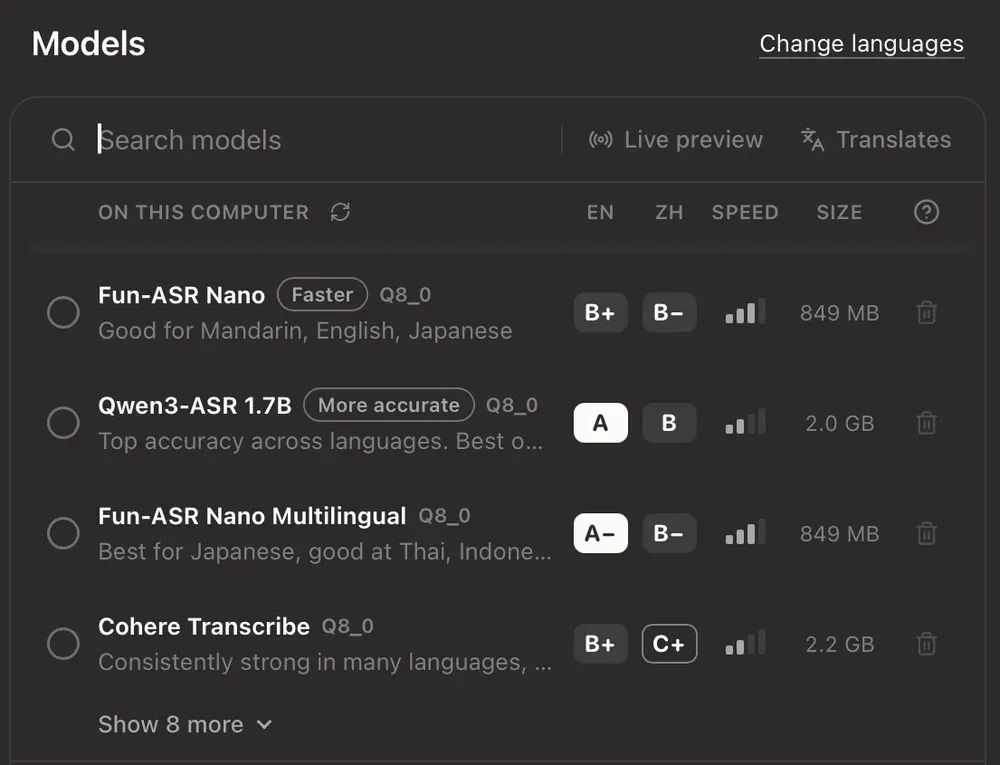
Official 0.10.0 release-note image of the rebuilt model picker, with per-language accuracy grades and Faster and More accurate labels.
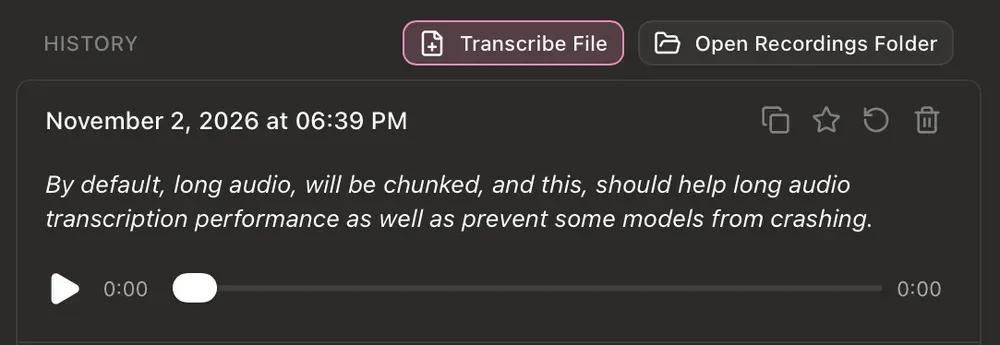
The History tab with the Transcribe File button added in 0.10.0, a dated entry with its action icons and the recording player. Official release-note image.
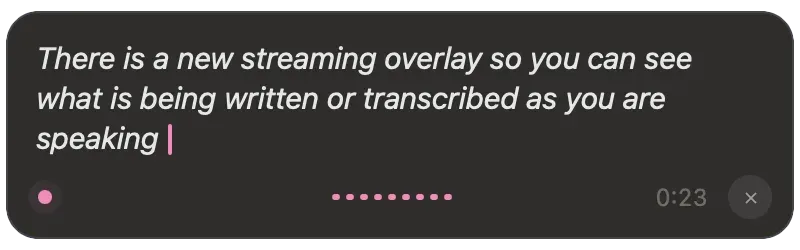
The live streaming overlay introduced in 0.9.0, which shows transcribed text while speaking with a compatible streaming model. Official release-note image.
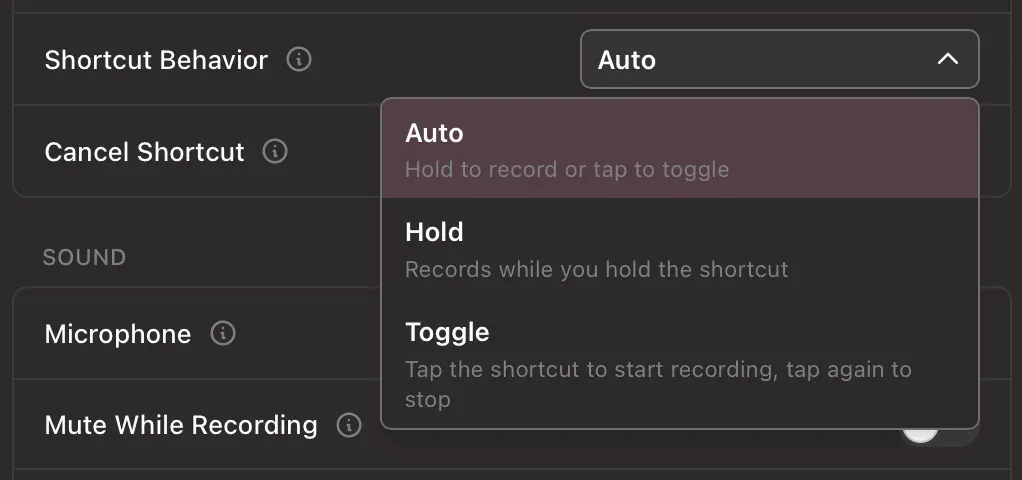
The Shortcut Behavior setting from 0.9.7 with Auto, Hold and Toggle modes, next to the Cancel Shortcut, Microphone and Mute While Recording settings. Official release-note image.
Source: official Handy project page.
Key capabilities
- Download Handy for Windows Version 0.10.0 provides x64 and ARM64 builds, each as an MSI installer and an NSIS setup.exe, with matching .sig signature files on the latest release page. A community-maintained winget package installs with
winget install cjpais.Handy. Windows blocks non-elevated processes from typing into elevated windows, so pasting into an administrator console requires running Handy as administrator. - Download Handy for macOS Separate DMGs exist for Apple Silicon and Intel Macs, plus .app.tar.gz bundles used by the updater. The Homebrew cask installs with
brew install --cask handyand is maintained outside the project. On first launch Handy asks for Microphone access to record and Accessibility access to paste into other applications. - Download Handy for Linux DEB, RPM and AppImage packages are published for x86_64 and aarch64. Install the DEB with
sudo apt install ./Handy_*.debso dependencies, including OpenSSL 3, are resolved. Handy links gtk-layer-shell at runtime, and a typing tool such as xdotool on X11 or wtype, dotool or ydotool on Wayland is needed for reliable text input. - Shortcut-driven dictation A global shortcut starts recording and the transcription is pasted at the cursor; if no text field is active, nothing is pasted. The Auto mode, default for new installs since 0.9.7, records while the key is held or toggles on a tap, while Hold and Toggle remain available. On macOS the documented defaults are Option+Space to transcribe, Option+Shift+Space to transcribe with post-processing and Escape to cancel.
- Local model catalog and picker Models download on first use and run on the device. Since 0.10.0 the Models page grades each model from A to F for every preferred language and marks a Recommended, a Faster and a More accurate option. The README lists Whisper Small (487 MB), Medium (492 MB), Large (1.1 GB) and Turbo (1.6 GB) files, and a Parakeet Unified English 0.6B GGUF model (731 MB) as the recommended download.
- GPU acceleration with process isolation According to the models documentation, Whisper and Cohere Transcribe use Metal on macOS and Vulkan on Windows and Linux, while Parakeet, Canary, Moonshine, SenseVoice and GigaAM run on the CPU. Since 0.10.0 the transcription engine runs in its own worker process; if the model or GPU crashes or hangs, Handy keeps running and retries on the CPU. On Windows, Handy skips implicit Vulkan layers to avoid crashes from overlay and capture tools.
- Streaming models and live overlay Streaming models such as Parakeet Unified for English and Nemotron Streaming 3.5 for multilingual use show text in an overlay while you speak and usually finish sooner. The overlay can be switched to a minimal style or positioned at the top, bottom or not at all. On Linux it defaults to None, because some compositors give it focus and break pasting.
- Language detection and preferred languages Auto language detection works with every supported model since 0.10.0. Models that cannot identify the language themselves rely on a small detector that downloads when you pick Auto. An experimental setting limits detection to your preferred languages, and the tray menu now includes a language submenu.
- Audio file transcription The History tab has a Transcribe File button, and audio files can also be dragged onto the window; results are stored as history entries. Long audio is chunked with voice activity detection by default to improve performance and avoid model crashes. Chunking can be disabled under Advanced, Long Audio Chunking.
- History and recordings Each entry keeps a timestamp, the text and an audio player for the original recording, with copy, star and delete actions. A History Limit caps the number of entries, and 0 disables history. Recordings can be auto-deleted after 3 days, 2 weeks or 3 months, or by keeping the latest entries; starred items are protected from automatic removal.
- Paste methods and clipboard handling The paste methods page lists clipboard paste, Ctrl+Shift+V, Shift+Insert, Direct Input, None and an external script on Linux. Handy can restore the previous clipboard after pasting or leave the transcription on it. Direct Input garbles output on AZERTY and QWERTZ layouts, and Shift+Insert is recommended for Windows Terminal, CMD and PowerShell.
- Custom words and custom Whisper models A custom word list corrects frequently misheard terms; since 0.10.0 it is passed directly to Qwen3 ASR, Granite and other models, not only Whisper. The documentation calls the correction imperfect and exposes a threshold in Debug. Whisper GGML .bin files placed in the models folder appear under Custom Models after a restart, without troubleshooting support for community models.
- Optional LLM post-processing An experimental feature sends the transcript through a language model with a custom prompt in which
${output}is replaced by the raw text. Providers include OpenAI, Anthropic, OpenRouter, Groq, Cerebras, Z.AI and AWS Bedrock, Apple Intelligence on Apple Silicon with macOS 26 or later, and any OpenAI-compatible endpoint such as a local LM Studio server. A dedicated shortcut triggers it, so the normal shortcut always returns the unmodified transcription. - Transcription hook On macOS and Linux an executable at
hooks/transcriptionin the app data folder receives the text on stdin after any post-processing, and its stdout is pasted. Empty output pastes nothing, and if the hook fails or runs longer than 30 seconds the original text is used. The hook does not inherit the shell PATH, so absolute paths are required. - Command-line flags and signals A running instance accepts
--toggle-transcription,--toggle-post-processand--cancel, and startup accepts--start-hidden,--no-trayand--debug. The README describes these flags as largely beta. On Linux,pkill -USR2 -n handytoggles transcription; SIGUSR1 is no longer handled because WebKitGTK uses it internally. - Tray, startup and memory controls Handy can start hidden, launch at login and run from a tray or menu bar icon. An Unload Model setting frees memory after an idle period from immediately to one hour, or never. Auto Submit can send Enter or a modifier plus Enter after insertion, and a trailing space can be appended to each paste.
- Offline model installation For proxies and restricted networks, model files can be downloaded in a browser and placed in the models folder of the app data directory, with exact file names. Handy also detects models already present in the shared Hugging Face cache. Paths are documented for macOS, Windows and Linux in the README.
- Signed updates and verification Update checks contact GitHub Releases, are on by default and can be disabled in settings. Release artifacts are signed in Tauri's updater format, and the README documents manual verification with minisign, not gpg. A debug view, opened with Cmd+Shift+D or Ctrl+Shift+D, exposes logs, paste delays and the experimental Reliable Paste option on macOS and Windows.
Where Handy fits
Dictating into everyday applications
Install the package for the operating system, grant microphone and accessibility permissions, download one model and set a shortcut. Test the paste in the applications people actually use: browsers, chat clients, IDEs and terminals. If the History entry is correct but older clipboard text appears, raise the paste delay or try Reliable Paste in Debug. Elevated Windows applications and Windows consoles need the administrator and Shift+Insert workarounds described in the paste documentation.
Running Handy on a Linux Wayland desktop
Install gtk-layer-shell and a typing tool that matches the session, such as wtype, dotool or ydotool; Ubuntu 26.04 needs ydotool with its daemon. Because Wayland restricts global shortcuts, bind handy --toggle-transcription to a custom shortcut in GNOME, KDE Plasma, Sway or Hyprland. Keep the overlay set to None unless pasting still reaches the right window. Renderer and startup workarounds, including HANDY_NO_GTK_LAYER_SHELL, are listed in the README troubleshooting section.
Choosing a model for languages and hardware
Set the Preferred Languages first so the picker can grade models for them. The models documentation suggests Parakeet for most English and European users on the CPU, Whisper Small or Medium for broad language coverage, and Cohere Transcribe or Whisper Large when a capable GPU is available. Compare speed and accuracy with a short recording of your own vocabulary, then add custom words for names and product terms. Use Unload Model on machines with limited memory.
Deploying in restricted or offline networks
Models normally download from Hugging Face with a fallback to blob.handy.computer. Where that is blocked, download the files manually, place them in the models folder with their original names and restart Handy. Disable update checks if releases are distributed internally, and verify each installer against its .sig file with minisign. After installation, ordinary transcription needs no network connection.
Cleaning up dictation with a language model
Enable Post Processing under Advanced, Experimental Features, then write a prompt for grammar fixes, lists or spoken punctuation. A local OpenAI-compatible server keeps transcripts on the machine, while cloud providers receive the text and the API key. The post-processing guide notes that models under 3B parameters often ignore prompts and that reasoning models can leak reasoning tags. Since 0.10.0, a blank response from the provider no longer replaces the original dictation.
Extending or forking the codebase
Small changes rarely need a fork: the transcription hook, CLI flags, Unix signals and the community Raycast extension cover many integrations. For source builds, BUILD.md requires Rust, Bun and the Tauri prerequisites, plus CMake and the Vulkan SDK on Windows and Vulkan and WebKitGTK development packages on Linux. A redistributed fork must replace the Handy name and brand assets, which the MIT license does not cover.
Reviews of Handy
Be the first to share your experience with Handy.
Write a review
Loading review form…
Alternatives to Handy
 HexHex is an open-source, MIT-licensed voice dictation app for Mac, Windows and Linux that transcribes on your device and pastes text into any app.
 OpenWhisprMIT-licensed dictation app for macOS, Windows and Linux that types speech at the cursor, records meetings with speaker labels and keeps searchable notes. Runs Whisper, Parakeet and other models locally, or uses OpenWhispr Cloud or your own API keys.
 VoiceInkGPL-3.0 voice-to-text app for macOS that transcribes on-device or through your own provider keys, pastes at the cursor and applies per-app Modes. Prebuilt app is a one-time license from $25; the source can be built for free.