

What is Dograh?
Dograh, also written Dograh AI, is an open-source platform for building and running voice agents that take or place phone calls and browser conversations. It positions itself as a self-hostable alternative to the hosted services Vapi and Retell. The repository dograh-hq/dograh contains a Python backend, a Next.js user interface and the Docker files needed to run the whole stack, and the project builds on the Pipecat voice framework according to its repository topics.
The README says Dograh is built by Zansat Technologies Private Limited and describes the team as Y Combinator alumni and exit founders. The company website at dograh.com says it works with teams in fintech, healthtech, defense and regulated regions and offers managed cloud, committed-volume and on-premise plans next to the free open-source edition. Documentation is at docs.dograh.com.
The quickstart downloads a Docker Compose file and a start script, and the first start can take two to three minutes while images are pulled. The Compose file defines services for PostgreSQL with pgvector, Redis, MinIO, Nginx, a TURN server, the API and the UI, plus an optional Cloudflare quick tunnel for inbound telephony webhooks. The interface then opens at localhost on port 3010. The latest release, dograh-v1.51.0, was published on November 4, 2026. It adds Murf as a bring-your-own-key voice provider and updates the tuner Pipecat SDK so that all spoken agent lines are kept.
The code is under the BSD 2-Clause license. The README states that anonymous usage data is collected by default and can be turned off by setting ENABLE_TELEMETRY=false before running the start script. A managed cloud is available at app.dograh.com. The README also notes that the default quickstart starts a public tunnel to the API and leaves signup enabled until you change it.
Dograh screenshots
Explore the interface. Open a screenshot to view it at full size.
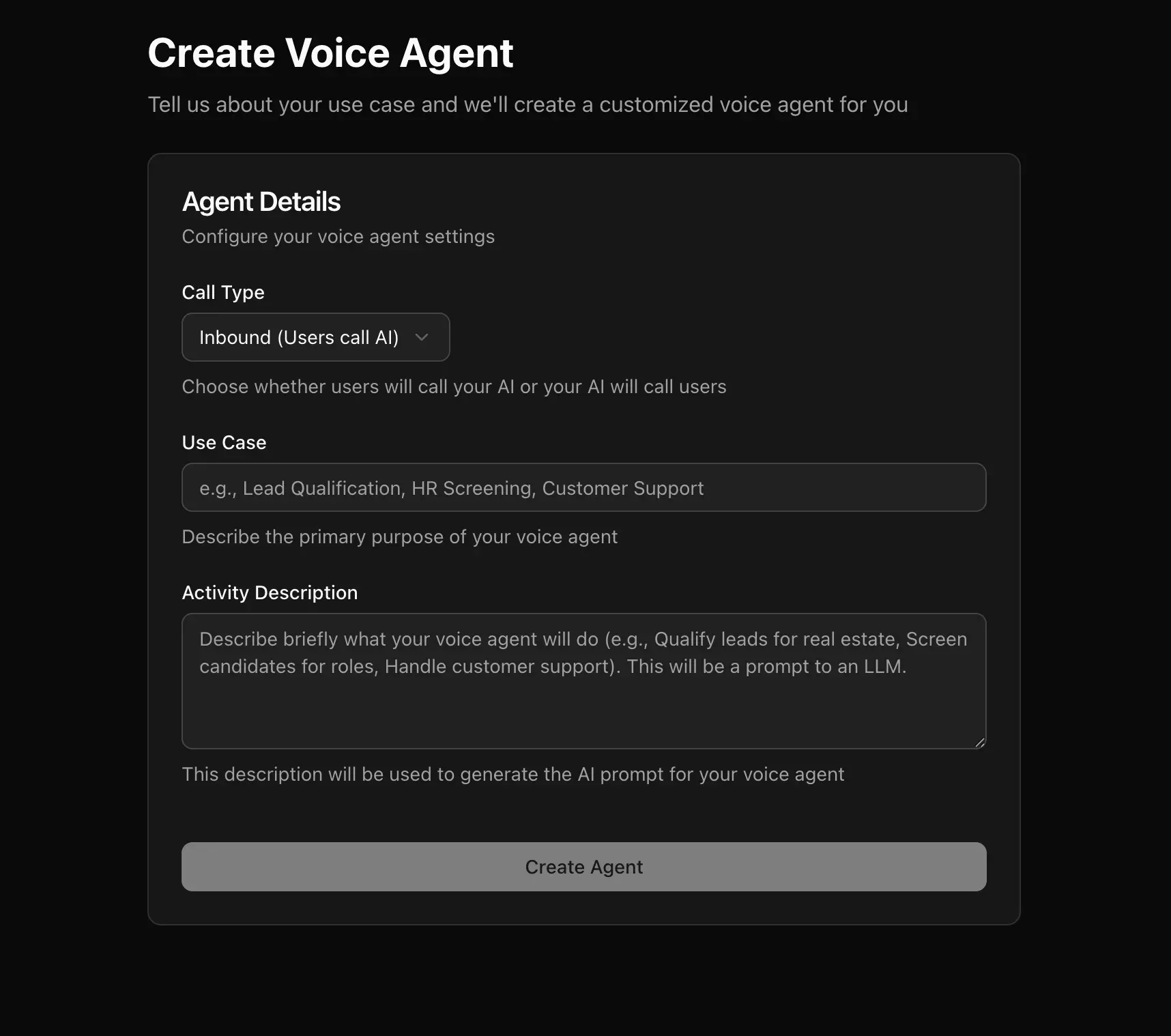
Official documentation screenshot of the form that creates an agent from a use-case description.
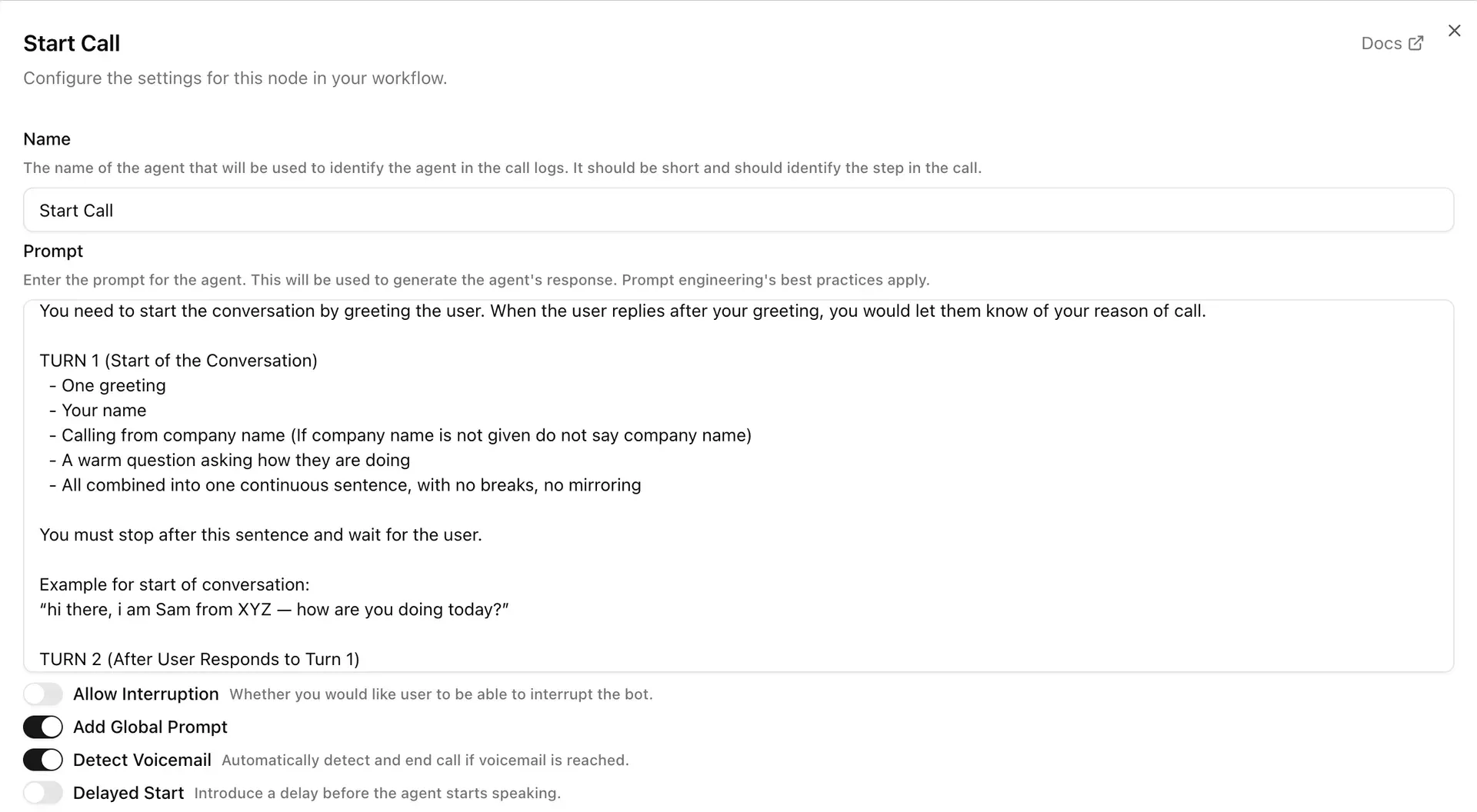
Official documentation screenshot of a workflow node with its prompt and call options.
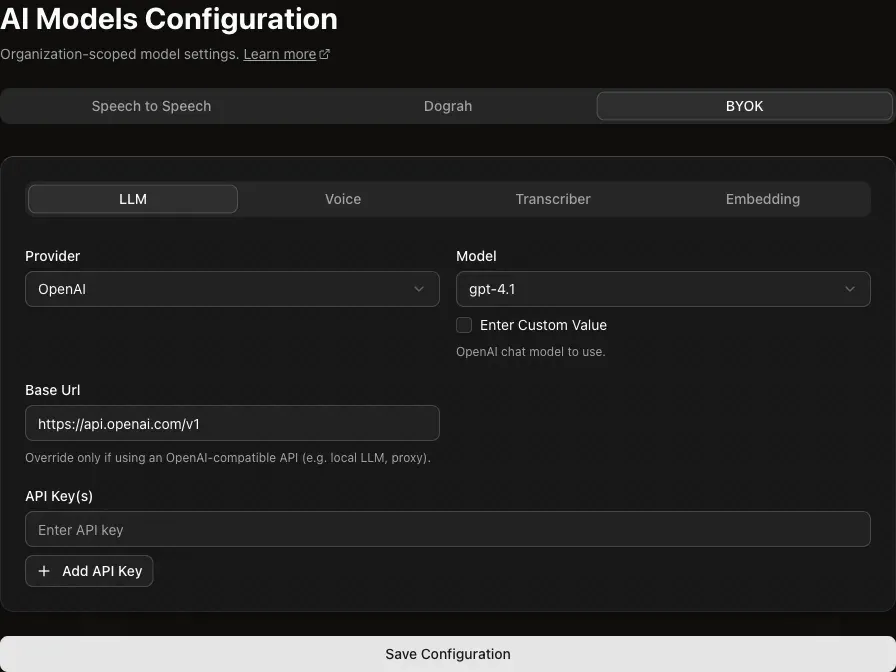
Official documentation screenshot of bring-your-own-key model settings.
Source: official Dograh project page.
Key capabilities
- Visual workflow builder Agents are built from start nodes, agent nodes, global instructions, tools, transitions and end-call outcomes on a canvas. Each node has a name and a prompt, and options such as allowing interruption, adding a global prompt, detecting voicemail and delaying the start.
- Quick agent creation The Create Voice Agent form asks for the call type, inbound or outbound, a use case and a short activity description. The platform uses that text as input to an LLM that drafts the first prompt, which you then edit.
- Test Audio and Test Chat Test Audio lets you speak to the agent in the browser, and Test Chat iterates in text. In Test Chat you can edit or replay user turns, and Dograh regenerates the agent replies and node transitions from that point.
- Bring your own models The model configuration screen has tabs for speech-to-speech, Dograh models and bring-your-own-key. With your own keys you can choose a provider, model and base URL for the LLM, voice, transcriber and embeddings, including OpenAI-compatible endpoints for local models.
- Built-in model stack The README says the quickstart ships with auto-generated keys and its own LLM, TTS and STT stack so you can test without external accounts. Check the current terms for that stack before depending on it in production.
- Telephony integrations Built-in integrations are Twilio, Vonage, Telnyx, Plivo, Vobiz, Cloudonix and Asterisk ARI. The documentation also lists Exotel, VICIdial, WhatsApp and Dograh managed SIP, and a guide for adding a custom provider.
- Human handoff Calls can be transferred to a person on supported telephony providers, so an agent can pass difficult cases to staff.
- Tools, webhooks and knowledge bases Agents can call external tools, send data through webhooks, run a QA node, fetch data before a call and answer from knowledge bases built with embeddings.
- Campaigns The API has campaign endpoints to create a campaign, upload contacts, start, pause and resume it and read progress and runs, which supports bulk outbound calling.
- Website embeds An Add to Website guide describes floating, inline and headless widgets that let visitors talk to an agent from a page.
- MCP server Dograh exposes an MCP endpoint at
/api/v1/mcp/for Claude Code, Codex, Claude Desktop and Cursor. With an API key, an assistant can list agents, fetch definitions and node schemas, search the docs, create workflows and save drafts. - Python and Node SDKs The
dograh-sdkpackage on PyPI and@dograh/sdkon npm create agents and place outbound calls from code. The REST API reference covers agents, runs, campaigns and API keys. - Observability The docs describe tracing, conversation history, call events and integrations with Langfuse, Tuner and Noveum for inspecting what an agent said and which tools it called.
- Language and region coverage Speech and language support depends on the STT, TTS and LLM providers you choose, and the README is available in English, Chinese and Japanese. Test each language you plan to serve, because providers differ in accents, latency and voice quality.
- Storage and deployment options Artifacts can go to the bundled MinIO or to AWS or S3-compatible storage. A remote-server guide covers HTTPS, and the README advises setting
ENABLE_SIGNUP=falseafter creating the first account.
Where Dograh fits
Prototyping a voice agent locally
Run the quickstart script, open the UI on port 3010, choose Inbound or Outbound and describe the use case in a few words. Use Test Audio for a spoken check and Test Chat to refine prompts faster. Write a short script with persona, call flow, rules and objection handling instead of a one-line prompt.
Connecting a phone number
Follow the telephony guide for your carrier, such as Twilio or Telnyx, and point inbound webhooks at your server. The quickstart opens a trycloudflare tunnel for that purpose, which exposes the API to the internet, so use a stable domain and HTTPS for anything beyond a trial. Place a test call and read the call record.
Using your own models
Open the model configuration, switch to bring-your-own-key and enter provider keys for the LLM, voice and transcriber. Test latency and interruption behavior with real phone audio, since a browser test hides carrier delays. Keep a fallback provider in mind, and record which model versions you tested so later changes are easy to trace.
Running outbound campaigns
Create a campaign through the UI or the campaigns API, upload contacts and start with a small batch. Confirm that you have the legal basis and consent rules for calling each contact, and check pause and resume before a large run.
Letting a coding assistant edit agents
Generate an API key, register the MCP endpoint in Claude Code or Cursor and ask the assistant to inspect an agent or draft a workflow. Review each saved draft in the builder before publishing. The MCP guide lists the client commands.
Deploying for production
Use the Docker deployment guide for a remote server, set up HTTPS, turn off open signup and decide about telemetry. Back up the PostgreSQL and MinIO volumes and plan upgrades by reading each release note, since the project ships releases frequently. Pin image tags where you need repeatable deployments instead of following latest.
Install
curl -o docker-compose.yaml https://raw.githubusercontent.com/dograh-hq/dograh/main/docker-compose.yaml && curl -o start_docker.sh https://raw.githubusercontent.com/dograh-hq/dograh/main/scripts/start_docker.sh && chmod +x start_docker.sh && ./start_docker.shReviews of Dograh
Be the first to share your experience with Dograh.
Write a review
Loading review form…
Alternatives to Dograh
 LiveKitLiveKit server is an Apache 2.0 WebRTC selective forwarding unit written in Go. It routes audio, video and data between browsers, apps, phones and AI agents, runs as a binary, Docker image or Helm chart, and scales across nodes with Redis.
 ElevenLabsElevenLabs is a closed-source voice AI platform: text to speech, Scribe speech to text, dubbing, music and ElevenAgents voice agents through a web app and API. Official SDKs are MIT licensed; the plans start free.
 ParlantApache 2.0 Python framework and engine by Emcie for support and sales chat agents. It matches written policies per turn, reviews tool calls and replies, and ships a React chat widget, human handoff, session API and an optional paid Dashboard.