

What is Parlant?
Parlant is an open-source Python framework and engine for building customer-facing chat agents with large language models. It is developed by Emcie, with Yam Marcovitz and Dor Zohar listed as package authors. The design target is support, service and sales conversations with a business's own customers, where the user may be confused or hostile, nobody supervises the exchange in real time, and a wrong promise has a cost. The project describes a workflow in which a person explains the desired behavior to a coding agent such as Claude Code, Codex or Cursor, and that coding agent writes the Parlant policies, tools and tests.
The framework is published on PyPI as parlant and supports Python 3.10 to 3.14. A project created with parlant init runs as a Python server, by default on port 8800, that frontends and backends reach over HTTP. OpenRouter is the default model provider; OpenAI is included in the base install, while Gemini, Anthropic and LiteLLM support come from package extras. The optional Parlant Dashboard is a separate hosted service for testing, managed hosting and monitoring, and the self-hosting guide covers running the same project on your own infrastructure.
The latest GitHub release is v4.0.2, published November 4, 2026, two days after Parlant 4.0.0. The changelog restarts at version 4 because the public vocabulary changed enough that older entries describe an API that can no longer be called; history up to 3.3.2 remains at the v3.3.2 tag. Version 4.0.2 adds Amazon S3 storage for sessions and customers, a WebMCP ask_agent tool in the chat widget and a single avatar prop, and raises the minimum python-multipart version to 0.0.30 for CVE-2026-53539. Version 4.0.1 stopped sending a temperature to Claude models that reject it. A v4.0.3 tag without release notes adds CLI identification headers to Dashboard requests.
Architecturally, one agent holds a catalog of policies, observations, tools, retrievers, canned responses, terms and variables. On each turn the engine discovers which parts of that catalog the conversation has made relevant, resolves priorities between them, runs the tools those rules allow and composes a reply, optionally checked by a review step. The documentation contrasts this with one large system prompt or a graph of intent-routed nodes. The agent architecture guide explains the turn model in detail.
The framework and its open engine, Compass Lite, are licensed under Apache 2.0 with no usage limits. Compass Pro, a commercially licensed plugin set with a native voice interface, and the Dashboard plans are paid products. Model inference is billed by the chosen provider. Out of scope by the project's own description: internal assistants, coding agents, long-running automations and agents whose own logic must live in a language other than Python.
Parlant screenshots
Explore the interface. Open a screenshot to view it at full size.
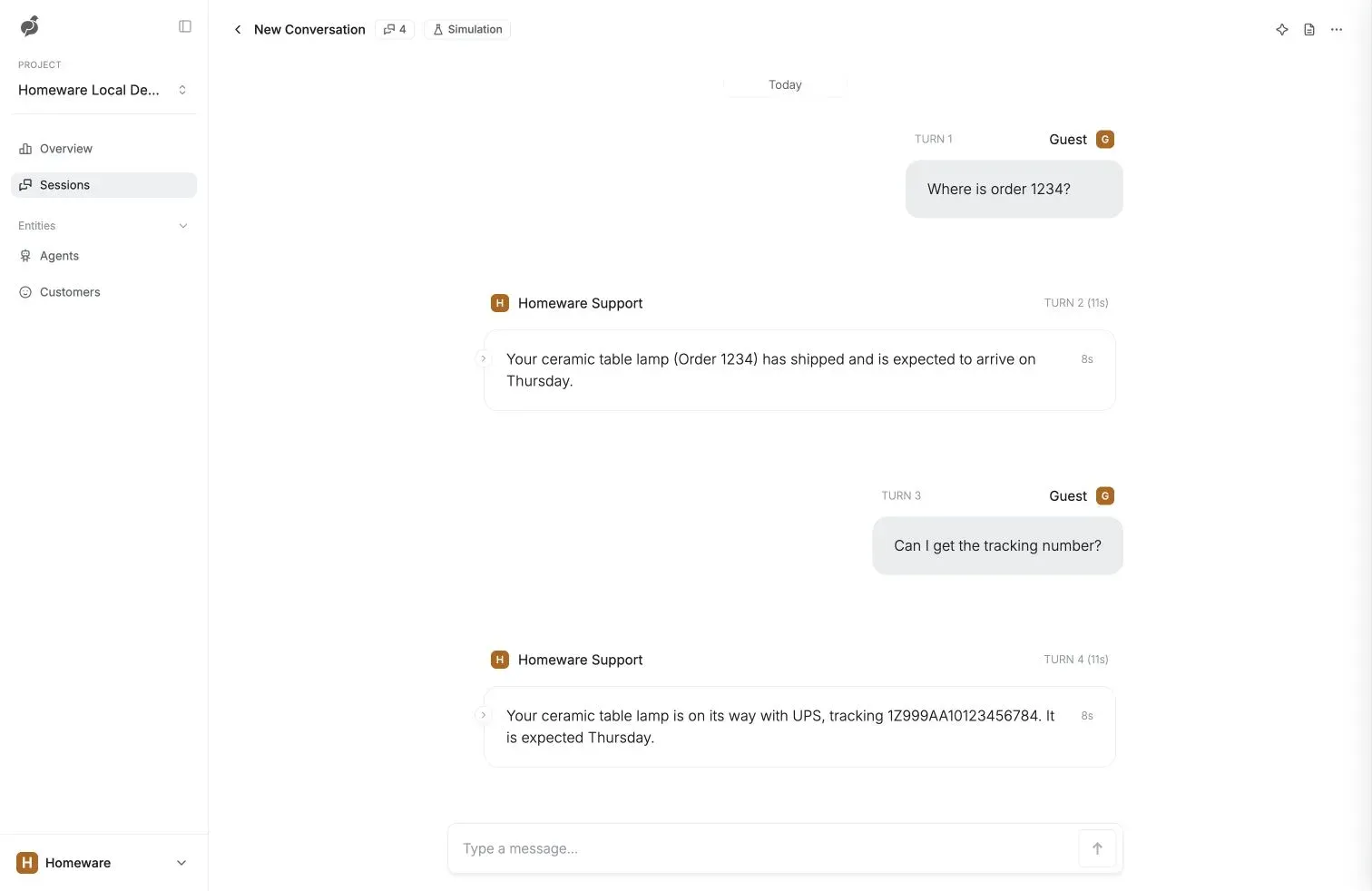
Official quickstart screenshot of a simulated conversation with the retail-store example agent in a local development project on the Parlant Dashboard.
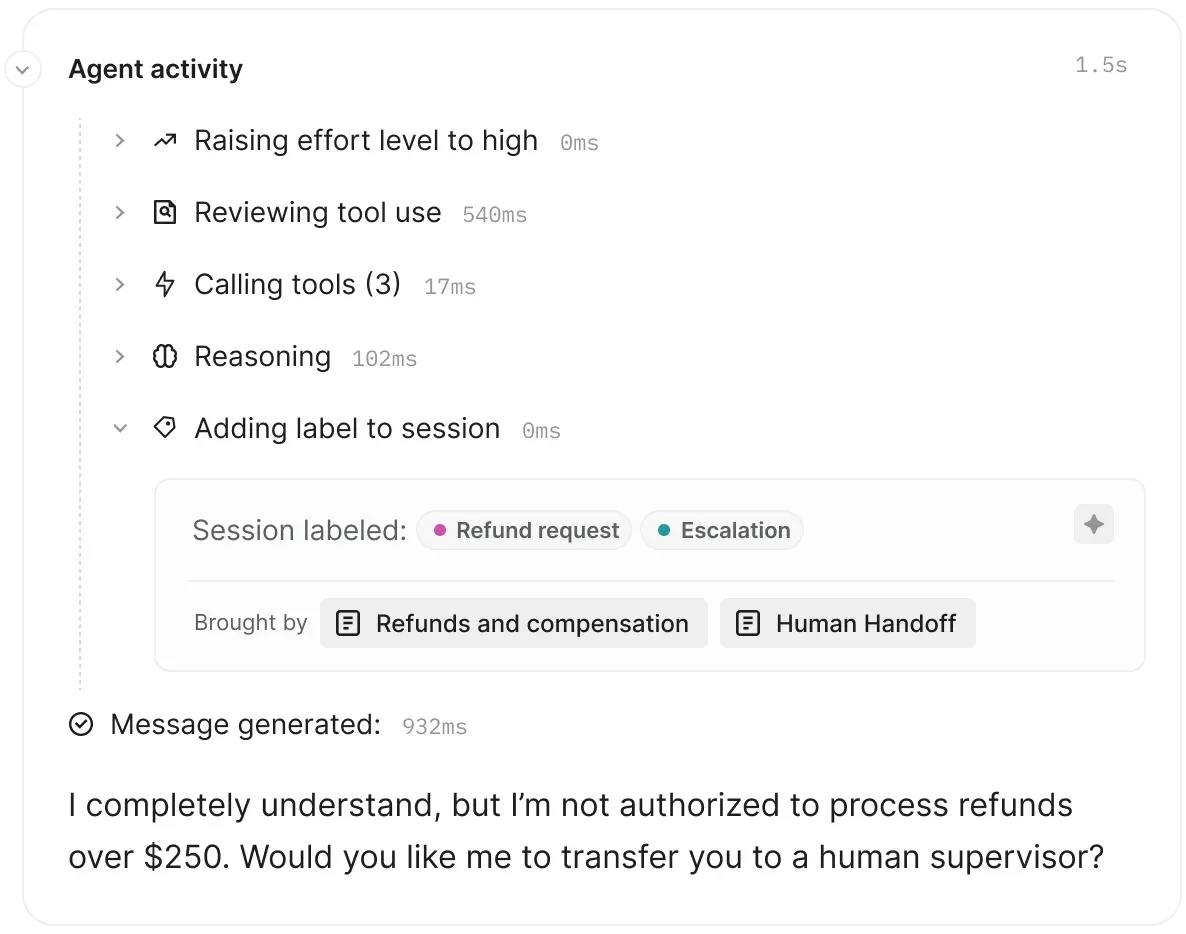
Official figure from the Parlant enterprise page: the trace of one turn, with session labels for a refund request and escalation brought by two policies, and the reply that declines refunds over $250.
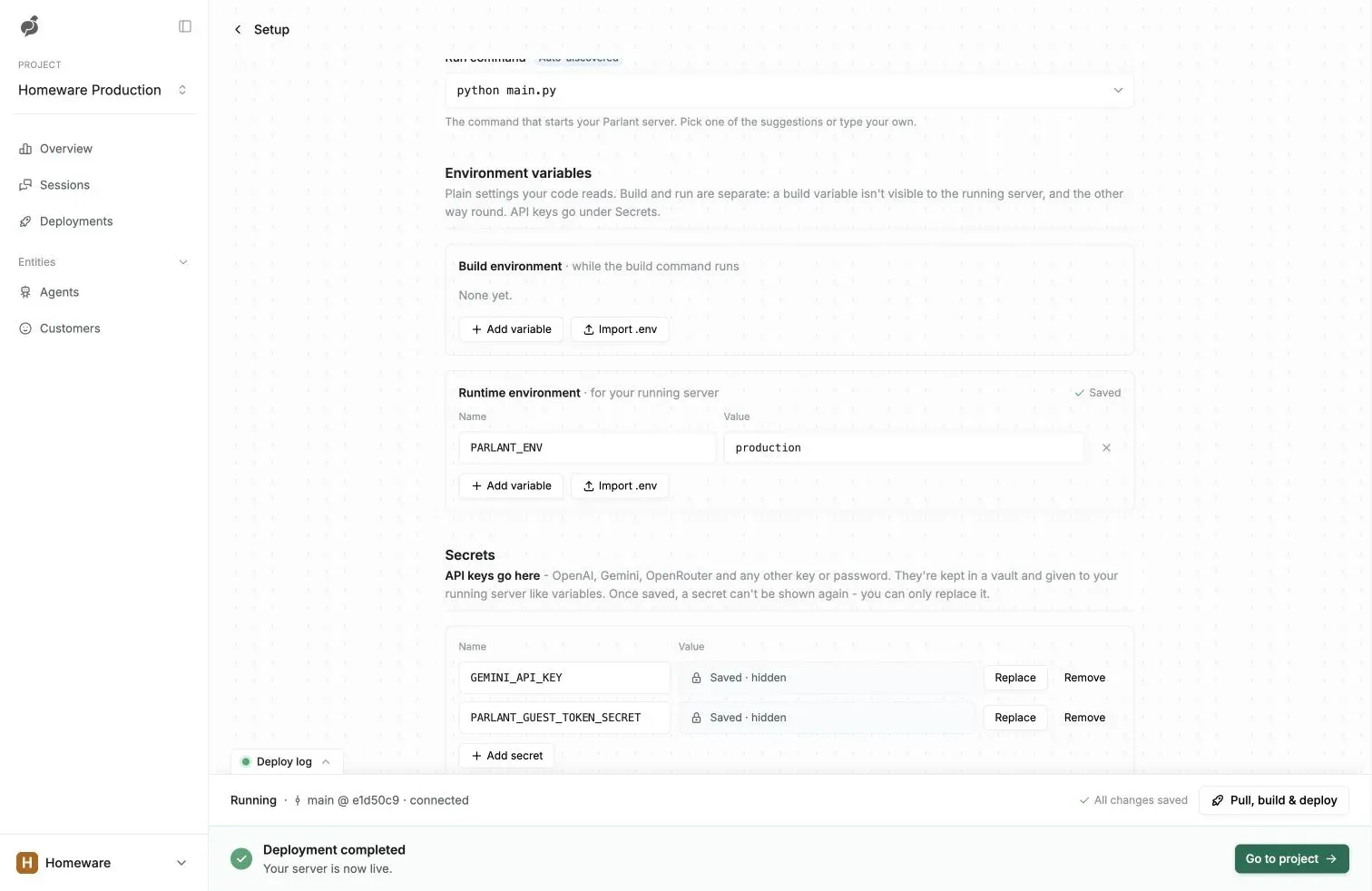
Official deployment guide screenshot of a managed project: run command, runtime environment, stored secrets and a completed deployment from the main branch.
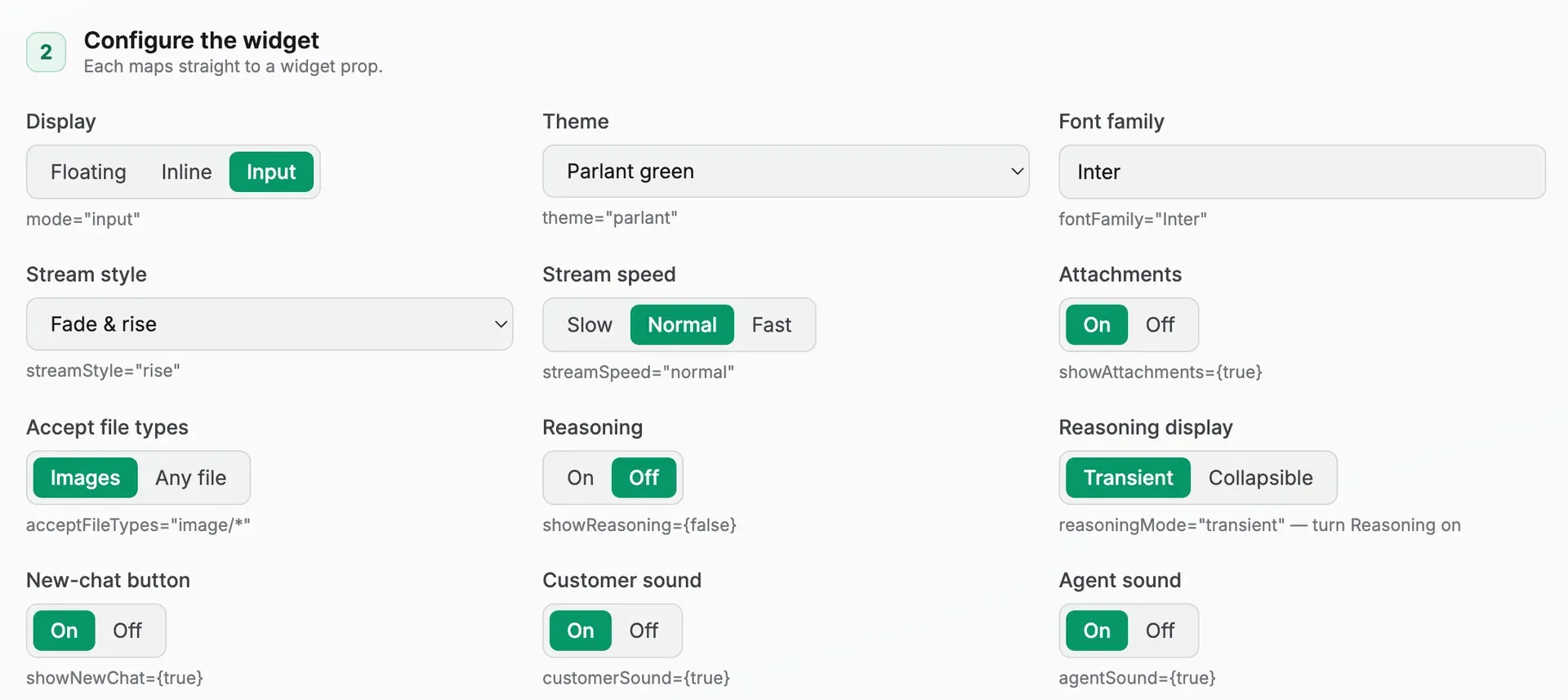
Official screenshot of the widget playground from the frontend integration guide; each control shows the matching ChatWidget prop.
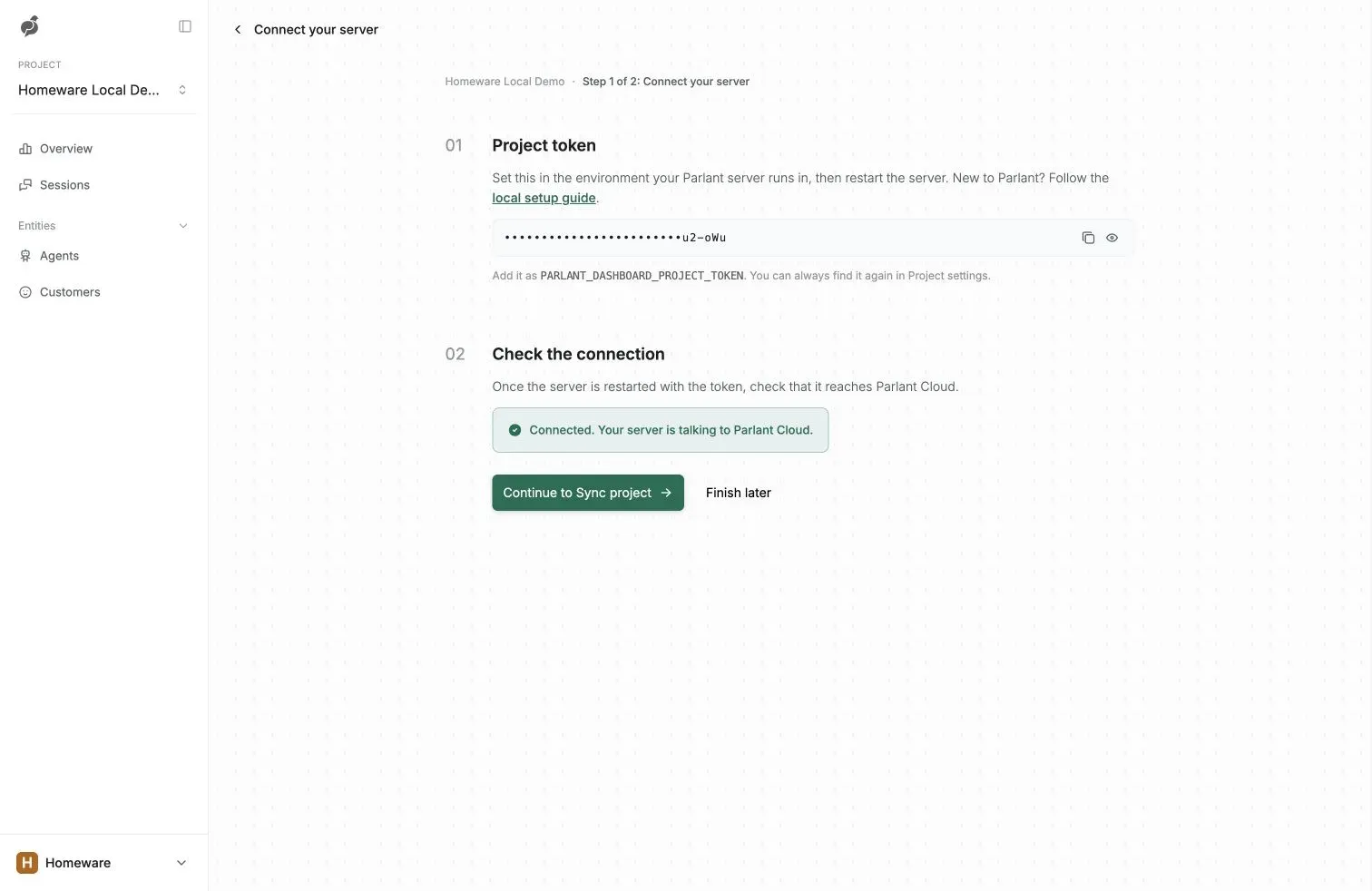
Official quickstart screenshot of connecting a locally running Parlant server to a Dashboard project with PARLANT_DASHBOARD_PROJECT_TOKEN.
Source: official Parlant project page.
Key capabilities
- Python package and project scaffolds Install with
pip install parlantor, as the quickstart recommends, as a user-wide tool with uv.parlant initcreates a project from one of three scaffolds:retail-store(a support agent with sample orders and shipments),lead-gen(a website agent that qualifies visitors and books meetings against a sample CRM and calendar) orbasic. Generated projects include run scripts for macOS, Linux and Windows and anAGENTS.mdfile with instructions for coding agents. - Policies, procedures and observations Rules are written in plain language. A policy says what to do in a situation, from a one-line rule to a multi-step procedure; an observation recognizes a situation and can raise effort, add an analytics label, offer tools or request reviews. Weights set how firmly the agent holds a rule, and declared relationships settle conflicts. The policy design guide covers signals, steering guidelines and scaling a large catalog.
- Per-turn context discovery Instead of sending every rule on every turn, the engine classifies which rules apply and places only those in front of the model. A procedure can run alongside cross-cutting policies and resume after a detour when the customer changes topic. Policy focus repeats the applicable rules close to the reply so details in long policies are not lost.
- Tools and retrievers A tool is a Python function decorated with
@p.tooland attached to the rules that need it, so it is offered only when relevant. Retrievers put knowledge in front of the agent before it writes, without a tool call. Tools can read session and customer state, ask before acting and show a narration such as "Checking which days are free" while they run. MCP tools are also accepted. - Tool reviews and message reviews Tool reviews check a proposed call, such as a refund, against the instructions before it runs. Message reviews hold a drafted reply, compare it with instructions, approved wording and tool results, and regenerate it before the customer sees it. Both add model calls and latency, so the documentation recommends enabling them only where a mistake is expensive; they reduce errors without guaranteeing their absence.
- Canned responses and adaptive effort Canned responses are approved example messages, optionally with notes, that the agent adapts to the conversation for tone and exact wording such as disclosures. Adaptive effort raises the model work spent on a turn when an observation detects a high-stakes moment, keeping routine turns cheaper. Since 4.0.2, each canned response keeps separate search vectors for its text and every signal; existing indexes are not rebuilt automatically.
- Model routing across providers Each kind of work in a turn can be routed to a different model, from one provider for everything down to exact models per route and effort level. Built-in providers are OpenAI, OpenRouter, Gemini, Anthropic and LiteLLM, with custom providers possible. Credentials can be referenced through
p.SecretRefand loaded at runtime by ap.SecretLoaderrather than stored in agent configuration. See model routing. - Chat widget for websites and apps
parlant widget initcopies a React chat widget (React 18 or later) into a frontend project. It supports floating, inline and input display modes, themes, streaming styles, attachments, persistent suggestions and returning guests. Version 4.0.2 adds anavatarprop for a logo, photo or looping video and a WebMCPask_agenttool for browser agents, which can be disabled withwebmcp={false}. - Sessions API and other channels A session is one persistent conversation shared by the agent and any human operator. Sessions and events are created and read over HTTP, and the local server publishes its schema at
/docsand/openapi.json. The documentation shows how to connect email, Slack, Discord or other channels by feeding inbound messages into sessions, and how to serve an AG-UI frontend such as CopilotKit through a small adapter. - Human handoff and operator takeover A person can take over the same chat and later hand it back to the agent, with the full history kept in one session. The human handoff playbook includes an operator queue example. Handoff routing to a specific helpdesk is code you write; Parlant is not built into a vendor inbox such as Intercom.
- Authentication and authorization Production servers separate admins, signed-in customers and guests. With
PARLANT_ENV=production, the server refuses to start without an admin API key. Customer tokens are verified with a shared JWT secret or a JWKS URL, and anonymous guest sessions are signed with a separate secret. Authorization rules cover session ownership, persona access and redaction. - Durable storage options Sessions, customers and context variables each have a store: transient memory, a local SQLite file for one process, MongoDB for several replicas, or your own implementation of the store interface. Since 4.0.2, sessions and customers can also use an
s3://bucket, which must support conditional writes; any query other than a lookup by ID reads every object, so MongoDB remains the documented choice for indexed queries at scale. - Self-hosting and operations The self-hosting guide provides a minimal
python:3.12-slimDockerfile, production environment variables and a checklist./healthzanswers unauthenticated probes, logs rotate at 10 MiB with five backups, and standard OpenTelemetry endpoint variables export traces, logs and metrics. Schema migration on startup is off by default and enabled only for the deploy that upgrades Parlant. - Observability and diagnostic reports Tracing links every reply to the rules, tool calls and checks behind it. Admins can download a per-turn diagnostic report from
/debug/reportsto see what the engine matched and why. Logs and reports can contain customer messages, so the documentation advises treating those directories as sensitive. - Moderation, spend limits and compaction A moderation model can screen customer messages and agent replies at configurable checkpoints. Spend management reports cost per conversation, model and provider, and enforces session budgets with a configurable action when a session exceeds its limit. Compaction summarizes the early part of long sessions, guided by your policies, to keep replayed context and token costs bounded.
- Analytics labels and simulated tests Observations can label sessions as situations occur, such as a refund request or an escalation, and those labels can be queried for analytics. Simulated customer conversations are marked as test sessions and appear in the Dashboard, so a change can be checked against personas before release. Filtering sessions by labels returns complete pages since 4.0.2.
- Parlant Dashboard and managed hosting The hosted Dashboard shows sessions, agents and customers, provides Coparlant, an assistant for inspecting sessions, and can deploy a project from a GitHub repository through the Parlant GitHub App. Managed hosting requires the Basic plan or higher. The
parlant dashboardCLI handles sign-in, project creation, connection, deployment and session reading. The platform is described as SOC 2 Type II audited. - Compass Pro commercial plugins Compass Pro adds a policy distiller for long procedures, a deeper review path at high effort, a session circuit breaker that stops runaway spend mid-turn, and a voice interface over LiveKit for browser and phone calls. It installs next to the open-source package and is enabled by replacing
ServerwithProServer. Licensing is by contact with the Parlant team; no public price is listed.
Where Parlant fits
Building a support agent for order and account questions
Start from the retail-store scaffold or your own basic project, then write one policy per real service procedure and attach the tools that read your order or account system. Add canned responses for apologies, delays and disclosures. Test with an order that exists, one that does not and a customer who asks two things at once. The install and run guide walks through the first conversation and a hot-reloaded change.
Qualifying website leads and booking meetings
The lead-gen scaffold answers buyer questions, asks a few qualifying questions, books meetings and hands sales a scored lead. In 4.0.2 its agent no longer guesses when product knowledge has no answer: it offers a team follow-up and collects a contact. Replace the sample CRM, calendar and email services with sandboxes first, and check timezones, locales and what happens when a visitor declines to share details.
Guarding consequential actions such as refunds
Attach refund, cancellation or account-change tools only to the policies that permit them, enable tool reviews on those tools and raise effort through an observation when the amount or context is sensitive. Verify that the agent asks for confirmation, refuses requests above its limit and offers a human handoff. The consequential tools playbook shows the complete pattern.
Putting the agent on a website
Run parlant widget init in a React 18 or later project, mount the chat widget with the server URL and agent ID, and match it to your brand through themes, fonts and the avatar prop. Allow the site origin on the server or its proxy, and test on phones: 4.0.2 fixed iPhone zoom on the message box and closes the keyboard after sending. Decide whether the WebMCP tool should stay enabled for visitors' browser agents.
Moving from a laptop to production
Either deploy from GitHub to Dashboard managed hosting on a paid plan, or self-host. For self-hosting, add a production branch in config.py that sets MongoDB or another durable store for all three stores, turns hot reload off and keeps migrate off except for upgrade deploys. Set the admin key, customer JWT secret or JWKS URL and guest secret in the process environment, mount PARLANT_HOME on a volume and put TLS in front of port 8800.
Investigating an unexpected reply
Open the session in the Dashboard or download the turn's diagnostic report from the server, then read which rules were matched, which tools ran and whether a review rejected a step. Adjust the policy wording, signals or weights instead of adding prompt text. Re-run the simulated personas that exposed the problem before pushing the change. The debugging guide describes the report contents.
Install
pip install parlantReviews of Parlant
Be the first to share your experience with Parlant.
Write a review
Loading review form…
Alternatives to Parlant
 LangChainLangChain is an MIT-licensed open-source framework (Python/JS) for building LLM applications and agents via LangGraph; LangSmith adds optional hosted tracing, evaluation and deployment.
 DifyDify by LangGenius combines a visual workflow builder, knowledge pipelines, sandboxed agents, model management and app APIs. It runs as Dify Cloud or self-hosted with Docker Compose under a modified Apache 2.0 license.