

What is Anarlog?
Anarlog is an open-source AI meeting notepad maintained by Fastrepl. It records the microphone and computer audio on the user's own device instead of sending a bot into Zoom, Google Meet or Microsoft Teams, then keeps each meeting as an editable memo, a transcript and an AI summary. The project started as Hyprnote, briefly used the Char name, and was renamed Anarlog in 2026 when Fastrepl moved the Char brand to a separate to-do product. The rename came with a license change from GPL to MIT, as described in the rename announcement.
The desktop application is distributed from the download page and the GitHub releases. macOS 15 or later is supported with separate Apple Silicon and Intel DMG builds. Windows x64 (NSIS installer or Microsoft Store) and Linux x64 or ARM64 (AppImage, DEB, a signed APT repository and an Arch PKGBUILD) are labeled beta. iOS and Android clients exist as betas through TestFlight and Google Play testing, and the former Nightly channel no longer receives updates.
The current release is desktop 1.4.34, published October 29, 2026. It stops a closed meeting tab from deleting its notes, protects newer notes and titles from stale autosaves, keeps manual speaker assignments in synced transcripts and exports, and leaves existing audio intact when a downloaded replacement is corrupt. Version 1.4.33 remembers the last export format and keeps distinct speakers in recordings synced from mobile; 1.4.32 reduced memory use for large sync backlogs and fixed audio playback on Linux; 1.4.30 added an option to write summaries in the main language.
Technically, the app is a Tauri v2 application with a React and TypeScript interface and a Rust backend. Rust crates handle audio capture, transcription, diarization and storage. Sessions, notes and transcripts live in a local SQLite database, recordings and attachments are plain files, and meeting search uses a local Tantivy full-text index. Transcription and the language model for summaries and chat are two independent settings, documented on the models and providers page.
The monorepo uses path-based mixed licensing explained in LICENSING.md: the desktop, web, mobile, CLI and community server code is MIT, while the enterprise/ folder is source-visible but commercially licensed. Optional hosted services (Anarlog Cloud AI, encrypted sync, sharing, the Cloud API) are run by Fastrepl and are not required for local use. Anarlog does not claim SOC 2, ISO 27001 or HIPAA certification.
Anarlog screenshots
Explore the interface. Open a screenshot to view it at full size.
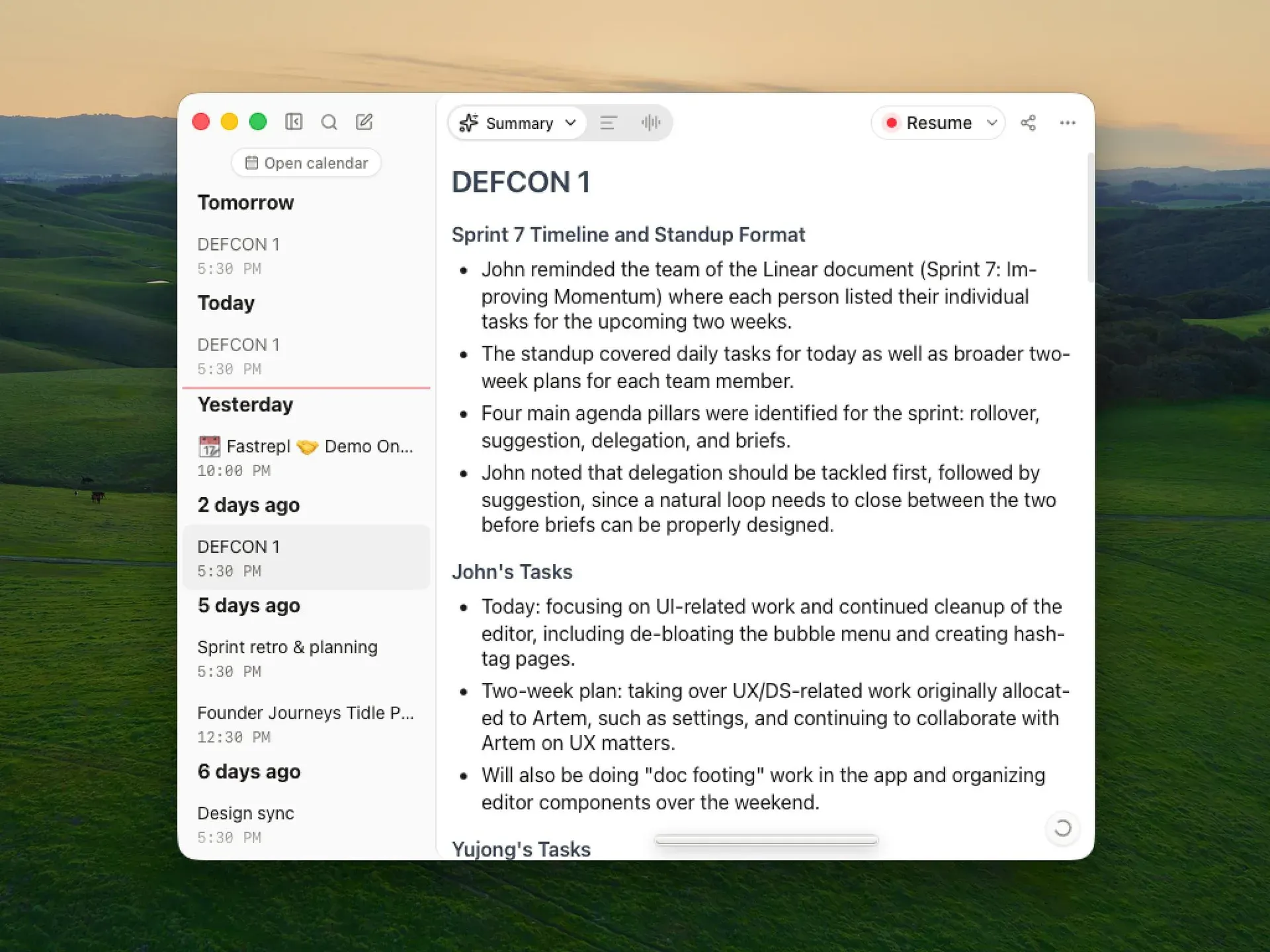
Official screenshot: a structured AI summary beside the local meeting timeline grouped by day.
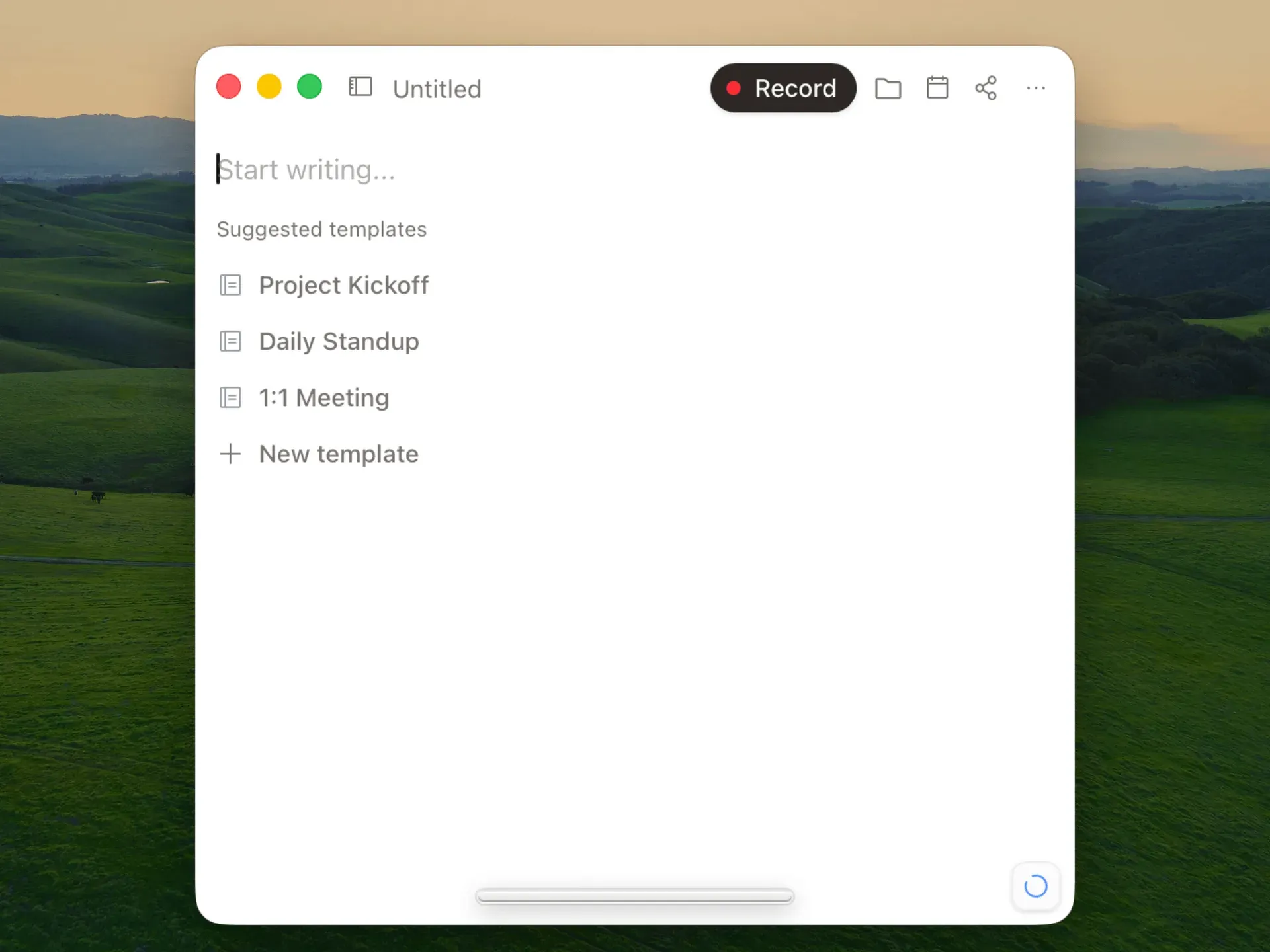
Official screenshot: an empty note with the Record control and suggested summary templates.
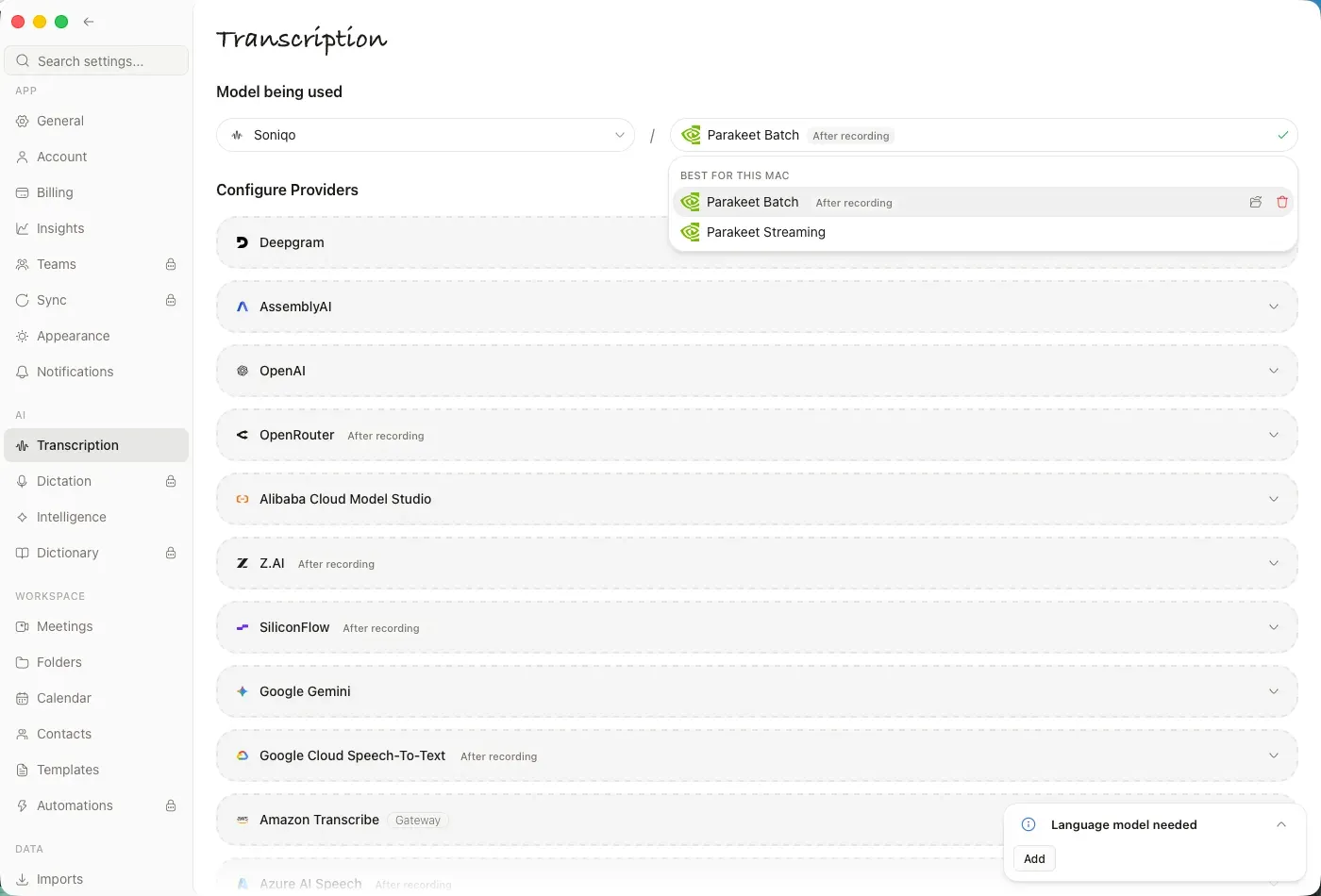
Official screenshot: Soniqo Parakeet models on an Apple Silicon Mac, above the list of hosted transcription providers.
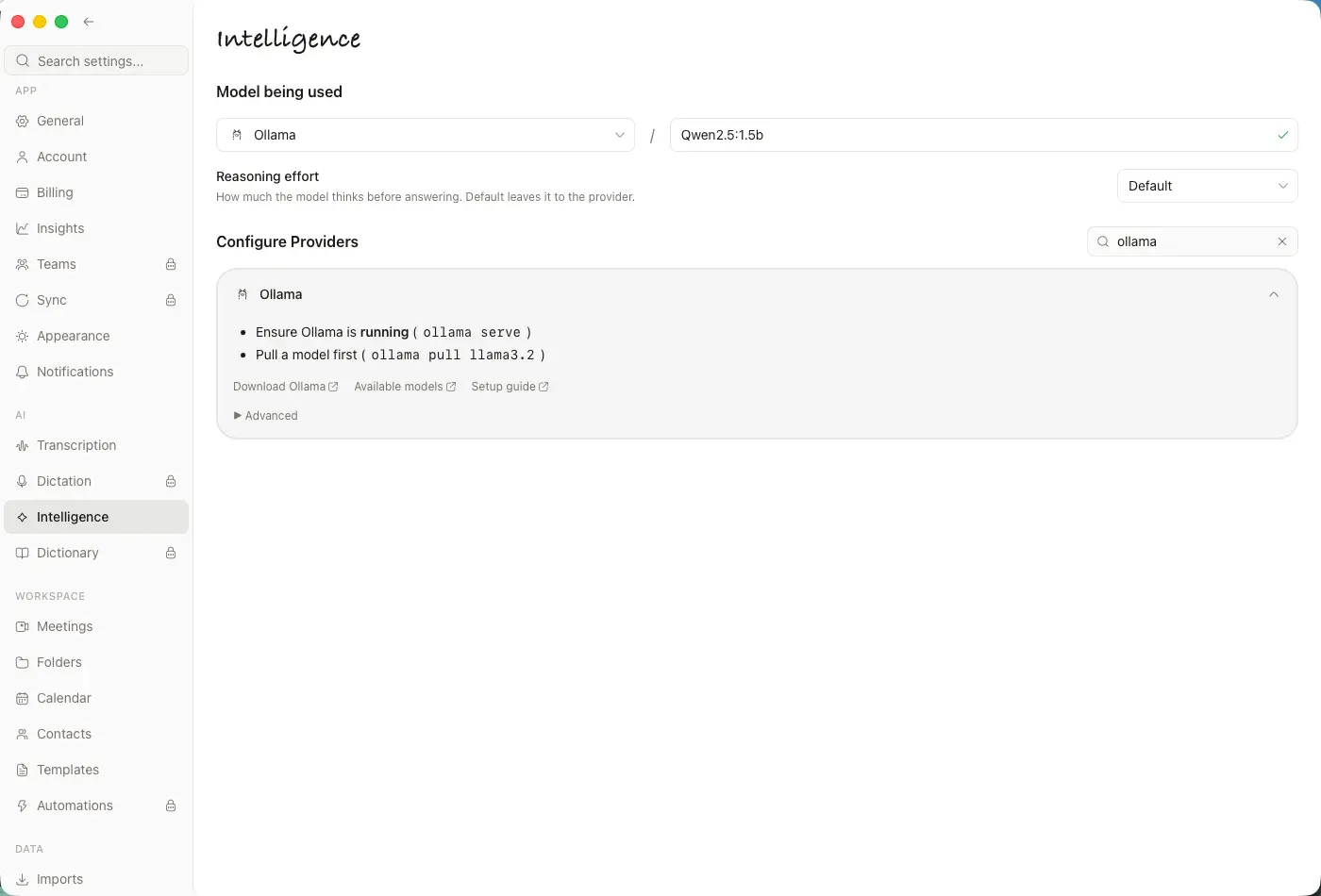
Official screenshot: summaries and chat routed to a local Ollama server instead of a hosted model.
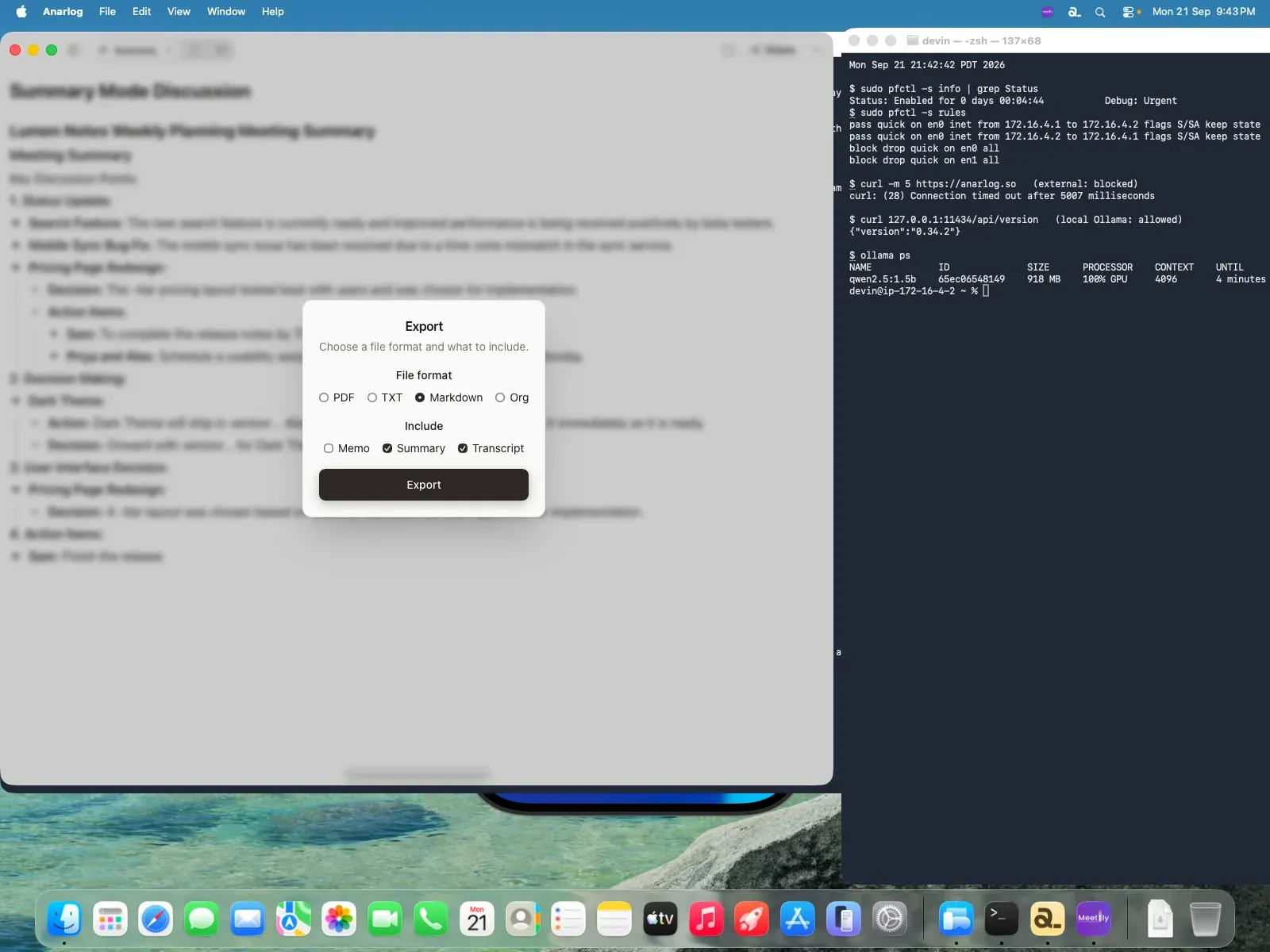
Official screenshot from an offline test by the Anarlog team: Markdown export of summary and transcript while external network access is blocked.
Source: official Anarlog project page.
Key capabilities
- Download Anarlog for macOS Apple Silicon and Intel DMG builds require macOS 15 or later; open the DMG, move Anarlog to Applications and grant microphone, system audio and calendar access when prompted. macOS is the most mature platform. The built-in on-device speech models (Soniqo, Apple Speech, On-device file) require Apple Silicon, so Intel Macs need a hosted provider or a local Deepgram-compatible server.
- Download Anarlog for Windows A Windows x64 NSIS installer is offered on the download page, and the same app is listed in the Microsoft Store for Windows 10 and 11, which handles updates. Windows support is labeled beta. Without Apple Silicon, transcription runs through Anarlog Cloud, a bring-your-own-key provider or a local server on the network.
- Download Anarlog for Linux X64 and ARM64 builds ship as AppImage and DEB, with a signed APT repository at anarlog.so/apt for updates through
apt upgradeand ananarlog-binPKGBUILD for Arch-based systems. Linux is in beta; the installation guide documents a WebKit DMA-BUF workaround for black windows on Wayland with NVIDIA GPUs. - Bot-free meeting capture Anarlog records microphone and computer audio locally, so nothing joins the participant list in Zoom, Google Meet or Microsoft Teams, and in-person or phone meetings work the same way. Calendar reminders offer Join and record for events with a meeting link. Recording-consent rules still apply and remain the user's responsibility.
- Memos, transcripts and summaries Each meeting keeps a private memo typed during the call, a live or after-recording transcript, and one or more generated summaries. Templates such as Project Kickoff, Daily Standup and 1:1 Meeting shape the summary, and a dictionary teaches names and acronyms. Version 1.4.34 keeps conflicting drafts in note history instead of overwriting newer edits.
- On-device transcription Soniqo Parakeet Streaming transcribes live and Parakeet Batch transcribes after recording with speaker labels, both for 25 European languages on Apple Silicon. Apple Speech covers ten languages on macOS 26, and On-device file runs a whisper.cpp .bin model after recording; .gguf files are not supported yet. Parakeet Batch is the documented choice for hour-long calls.
- Hosted and bring-your-own transcription The managed Pro (Cloud) route prefers Soniox 5 and falls back to Deepgram, AssemblyAI, Gladia and others by language and mode. With your own key, providers include AssemblyAI Universal 3.5 Pro, Google Gemini 3.5 Transcribe, Deepgram, OpenAI, Smallest AI Pulse and NVIDIA Speech NIM. Keys are stored in the operating system credential store and never sync between devices.
- Choice of language model for summaries and chat Intelligence is set separately from transcription: LM Studio, Ollama, Unsloth or experimental Apple Intelligence keep text local, while API keys, OpenAI-compatible endpoints and subscriptions (Claude, ChatGPT, GitHub Copilot and others) are also supported. The managed Auto route currently uses the latest Claude Sonnet alias through OpenRouter. If a selected local server is down, Anarlog reports an error instead of silently using the cloud.
- Chat over meetings A chat panel answers questions over the current meeting and can reformat a summary or draft a follow-up. Prompts and context go to the selected Intelligence provider. Web search in chat always sends the query to a hosted research endpoint (currently Exa), even when transcription and summaries are fully local.
- Local storage, retention and export Notes and transcripts stay in local SQLite, and audio retention is set per installation from Don't save to Forever, with 1 day, 3 days, 1 week and 1 month in between. Notes export as PDF, TXT, Markdown or Org with a choice of memo, summary and transcript. Editing the database directly is not supported and can corrupt notes.
- Multilingual meetings The Anarlog Cloud picker lists about 50 languages for the main language and additional spoken languages. Summaries are written in the language used most among the selected languages unless the main-language option is enabled. On-device and bring-your-own models support their own, often smaller, language sets.
- Imports from other meeting assistants Settings, Imports reads official exports (JSON, CSV, Markdown, text, VTT, SRT) from tools such as Granola, Fireflies.ai, Fathom, Otter.ai, Krisp, Zoom, Teams and Google Meet. Results are grouped as imported, matched, conflicts and errors, and repeated imports do not duplicate meetings. Original audio and video are not imported; single audio, SRT or VTT files go through a separate import.
- Encrypted Cloud Sync Pro accounts can sync notes, transcripts, participants and action items end-to-end encrypted across devices, with a recovery key Fastrepl cannot read. Recordings, attachments, API keys, model choices and most settings stay on each computer. The sync guide cites five synced devices for Pro, while the pricing page lists 3 personal devices or 5 per workspace member; extra slots can be purchased.
- Sharing, teams and automations Pro adds sharing of generated summaries by invitation, email recap, Slack or link, without the private memo. Team workspaces add members, roles, shared folders, templates and automations. Automations run after a meeting ends to post Slack recaps, append Notion updates, draft Linear issues, save to Google Drive or export Markdown to a local folder.
- System-wide dictation Dictation (Pro) inserts transcribed speech into the focused field of another app with a hold-to-talk or hands-free shortcut. Sessions stop after five minutes and pause during meeting recording. macOS needs Accessibility permission, and on Linux Wayland the target app must expose an editable accessibility field.
- CLI and local MCP server The
anarlogexecutable, installed from Settings, Developers or built withcargo install --locked --path apps/cli, lists meetings, reads bounded transcript pages and exports meetings as Markdown or JSON with a versioned JSON contract.anarlog mcpruns a stdio MCP server that opens no port. Agents can only stage summary or memo proposals that a human approves in the desktop app; see the CLI reference. - Cloud API, remote MCP and webhooks An opt-in Cloud API at
https://api.anarlog.so/v1and a remote MCP endpoint give read-only access withanl_keys or OAuth, limited to a burst of 10 requests then one every 200 ms. Enabling it uploads a separate server-readable copy of meetings, deleted when turned off. Signed HMAC-SHA256 webhooks formeeting.completedandnote.enhancedare available on every plan.
Where Anarlog fits
Keeping a sensitive meeting fully local
On an Apple Silicon Mac, download a Soniqo Parakeet model under Settings, Transcription, then point Settings, Intelligence at Ollama, LM Studio or Unsloth with a model already pulled. Confirm both Model being used fields before the call, because a local choice in one setting does not make the other local. Avoid chat web search, share links, sync and the Cloud API for that content. The offline guide lists what works without a network.
Replacing a bot-based notetaker
Install the desktop app on each participant's machine that should take notes and connect Google, Outlook or Apple Calendar so reminders offer Join and record. Export history from the previous assistant and bring it in through Settings, Imports, then review the conflicts group. Agree on recording disclosure first: Anarlog does not announce itself in the call, so consent has to be handled by the people recording.
Standardizing team meeting records
Create a Pro workspace, invite members and share folders and templates through the team library. Set a folder's default access to the workspace so new notes are shared once their summary is ready, while private memos stay excluded. Add an automation to post the recap to Slack or create Linear issues from action items, and check its last-run status after the first meetings.
Feeding meeting context to coding and research agents
Install the CLI, run anarlog --json doctor and register anarlog mcp in an MCP host such as Claude Code, Codex or Cursor; the repository also ships an agent plugin and skill. Agents should list meetings, use returned IDs and page transcripts only as needed. Edits arrive as proposals with a unified diff that a person applies or declines, as described in the agent overview.
Running Anarlog on Windows or Linux
Use the Microsoft Store or NSIS build on Windows and the APT repository on Debian or Ubuntu so updates arrive through the system package manager. Since the built-in speech models need Apple Silicon, choose Anarlog Cloud, a bring-your-own-key provider or a Deepgram-compatible server on the local network. Test system-audio capture with a short recording, and report the operating system and app version when filing a beta issue.
Building or forking the MIT application
Clone the repository, install Node.js 22, pnpm 11.1.1, Rust 1.94.0, process-compose and the Tauri v2 prerequisites, then run pnpm dev:desktop. Apple Silicon builds also need Xcode's Metal Toolchain for the MLX shaders. The local-first app starts without secrets; hosted AI, sync and billing need extra services. Keep forks outside enterprise/, which is not MIT.
Reviews of Anarlog
Be the first to share your experience with Anarlog.
Write a review
Loading review form…
Alternatives to Anarlog
 MeetilyMeetily is an MIT-licensed meeting assistant for Windows and macOS that records microphone and system audio, transcribes locally with Whisper or Parakeet, and writes summaries with a built-in model, Ollama or your own provider.
 OpenWhisprMIT-licensed dictation app for macOS, Windows and Linux that types speech at the cursor, records meetings with speaker labels and keeps searchable notes. Runs Whisper, Parakeet and other models locally, or uses OpenWhispr Cloud or your own API keys.
 OllamaOllama is an MIT-licensed tool for downloading and running open models such as Gemma, Qwen, DeepSeek and gpt-oss on your own machine. It ships a desktop app, CLI and local REST API, and offers cloud-hosted models on a pay-as-you-go or subscription basis.