

What is Minutes?
Minutes is a free, MIT-licensed conversation memory app. It records and transcribes meetings, calls, voice memos and dictation on the user's own computer and saves each one as a Markdown file with YAML frontmatter in ~/meetings/. Claude Code, Codex, Cursor, Gemini CLI, OpenCode or any other MCP client can then search that history through a local MCP server. The project describes itself as an open-source, local-first alternative to hosted note takers such as Granola and Otter.ai, and it does not add a bot participant to calls. It is built by Mat Silverstein, founder of X1 Wealth; the repository was opened in March 2026 and the official site is useminutes.app.
There are several ways to install it. On Apple Silicon Macs the notarized desktop app is installed with brew install --cask silverstein/tap/minutes or from the DMG and includes a bundled CLI. The standalone CLI comes from the Homebrew formula, from crates.io as minutes-cli, or as prebuilt binaries for macOS arm64, Linux x64 and Windows x64. The MCP server is the npm package minutes-mcp, and Claude Desktop users can install the minutes.mcpb extension. Windows gets an NSIS installer and a portable zip of the desktop app, which the install guide calls an unsigned preview for advanced users. Intel Macs and Linux desktops can build the app from source.
The current release is v0.33.0, published on November 9, 2026. It fixes the Windows desktop app, which exited at startup in 0.32.1 because a menu shortcut used a Mac-only modifier; Add Note is now Ctrl+Shift+N on Windows and Linux. On the Mac, call recordings are now transcribed in chunks of about two minutes while the call is running, so only the last stretch is left after Stop. The Claude Desktop extension now runs its helper processes under a system Node.js 20 or newer, with an optional Node.js path setting. Version 0.32.1 added a row under the Recall header that shows which meeting and document the agent is reading, put the Mac window controls in one title row with resizable panes and moved the archive crates to zip 9.0.5 to close a critical parser advisory. Version 0.32.0 records both sides of FaceTime and iPhone calls answered on a Mac through a Core Audio tap and warns during a call when the remote side is silent. Version 0.31.0 added one-click installation of NVIDIA Parakeet v3 on Apple Silicon and optional search by meaning, and 0.30.0 added opt-in automatic recording of Teams and Zoom desktop calls on macOS.
The code is a Rust workspace with core, CLI, MCP, SDK and archive crates and a Tauri v2 desktop app. Whisper runs through whisper.cpp, Parakeet v3 runs in an isolated sherpa-onnx plugin and speaker diarization uses pyannote-rs ONNX models. Summaries are optional and can be written by an agent CLI on an existing Claude Code, Codex, OpenCode or Pi subscription, by Ollama, by Mistral, or by any OpenAI-compatible endpoint. The README says the repository will stay MIT licensed, with no relicensing and no paid tier for anything in it.
Some things are out of scope. Minutes has no hosted service, team workspace or shared admin console: each person runs it on their own machine and syncs files only through tools they choose. There is no native mobile app; phone recordings arrive through a watched sync folder. Calendar suggestions, call detection and the native dictation hotkey are macOS only, and the prebuilt Linux binary needs glibc 2.39 or newer. The documentation hub maps the desktop app, CLI, MCP server and Claude Code plugin. Similar projects listed on iThub include Meetily, Anarlog, OpenWhispr and Handy.
Minutes screenshots
Explore the interface. Open a screenshot to view it at full size.
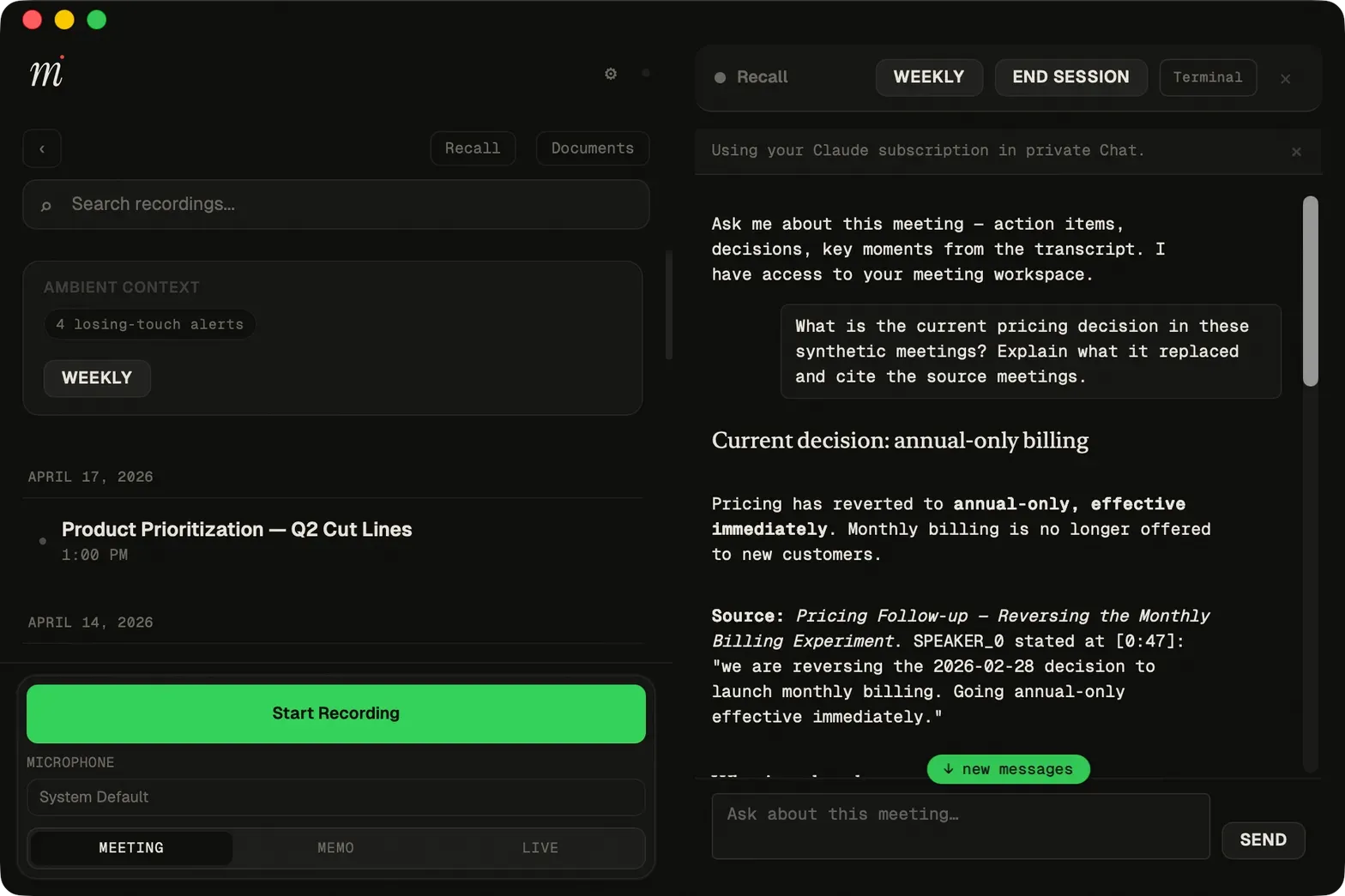
Recall answering a question about synthetic sample meetings and quoting the source speaker and timestamp. Official screenshot from the Minutes repository.
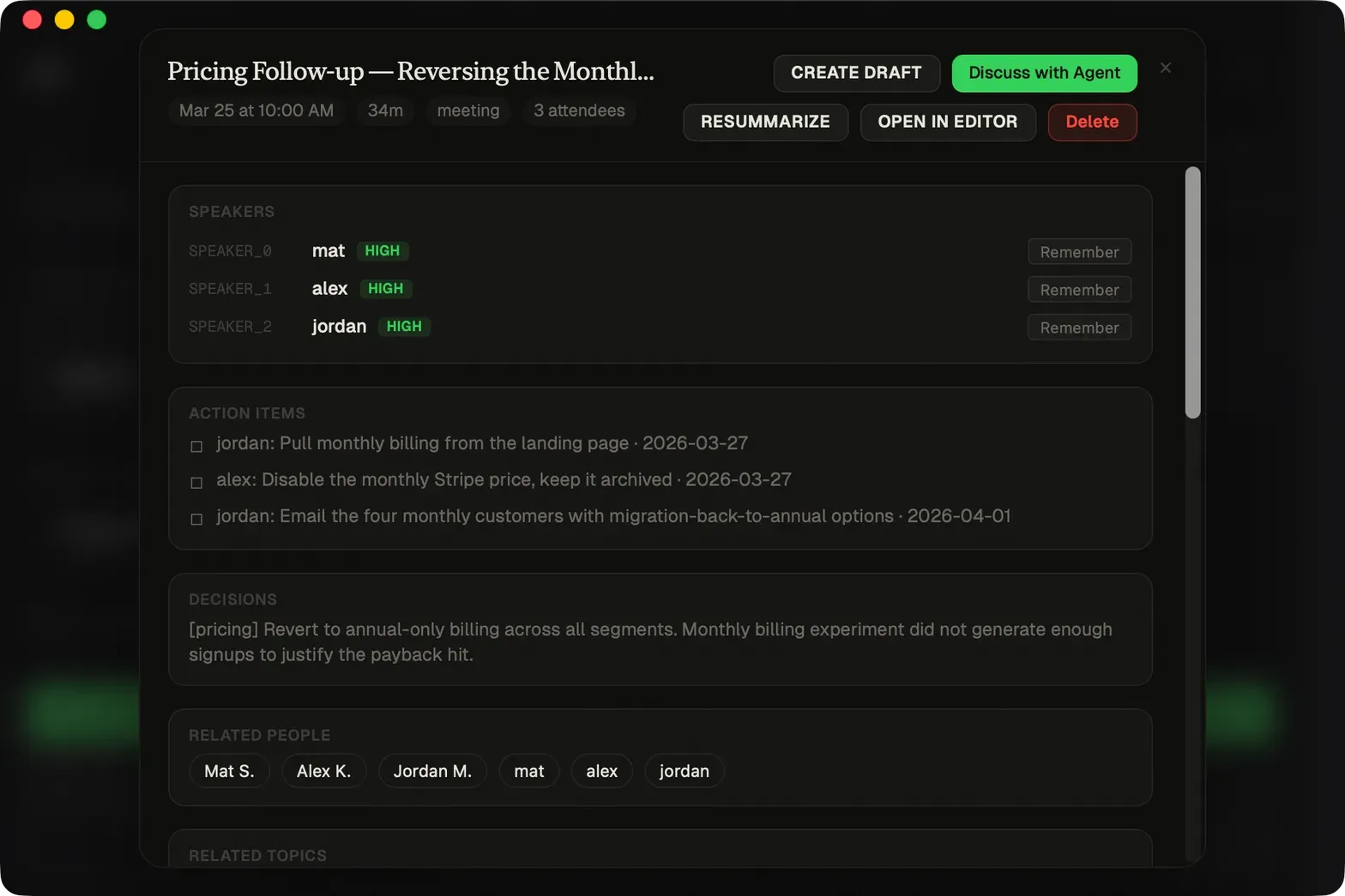
Meeting detail with speaker attribution, action items and decisions, plus Resummarize, Open in Editor and Discuss with Agent buttons. Official screenshot from the Minutes repository.
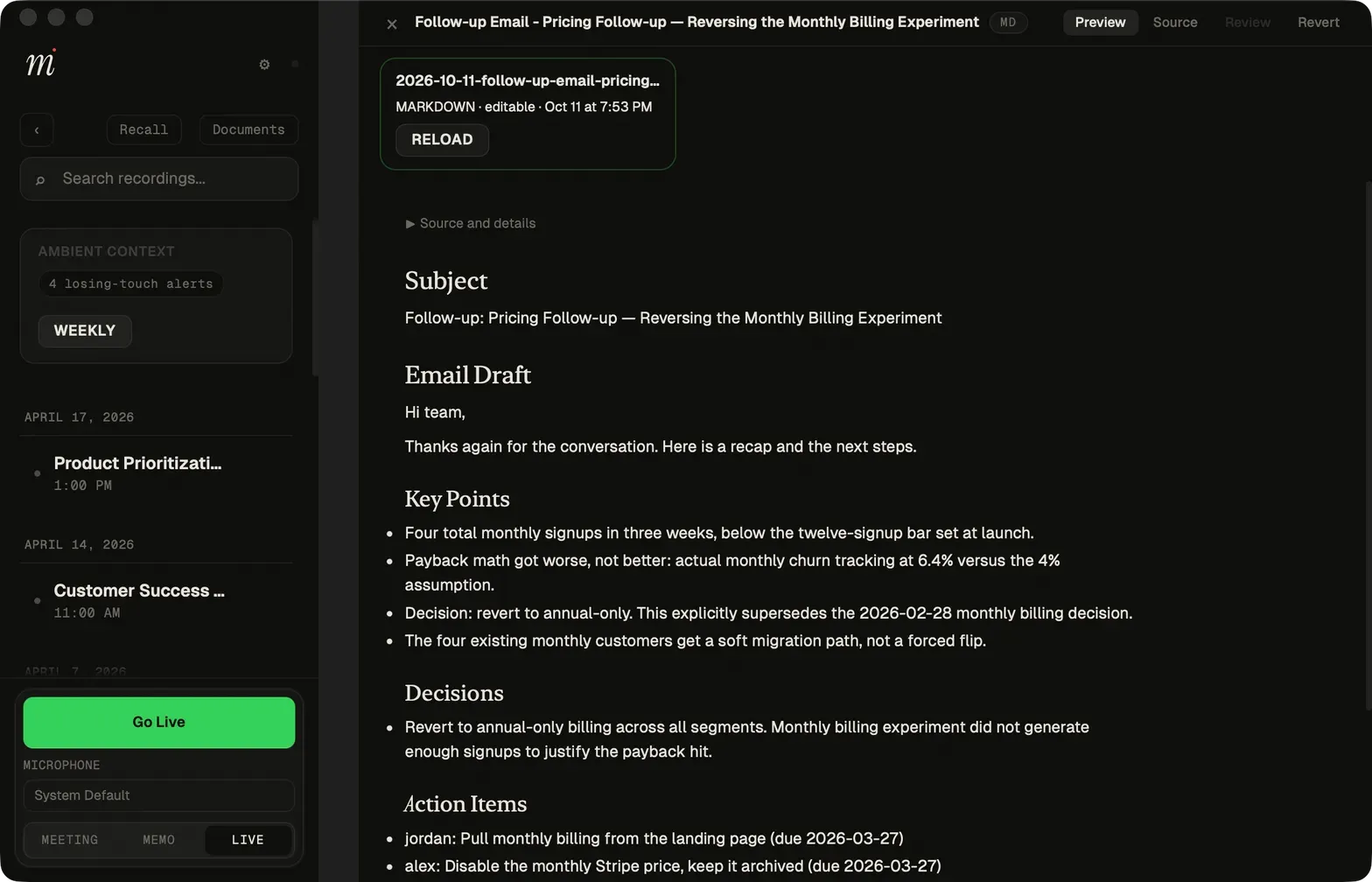
A follow-up email drafted from a meeting and shown as an editable Markdown document. Official screenshot from the Minutes repository.
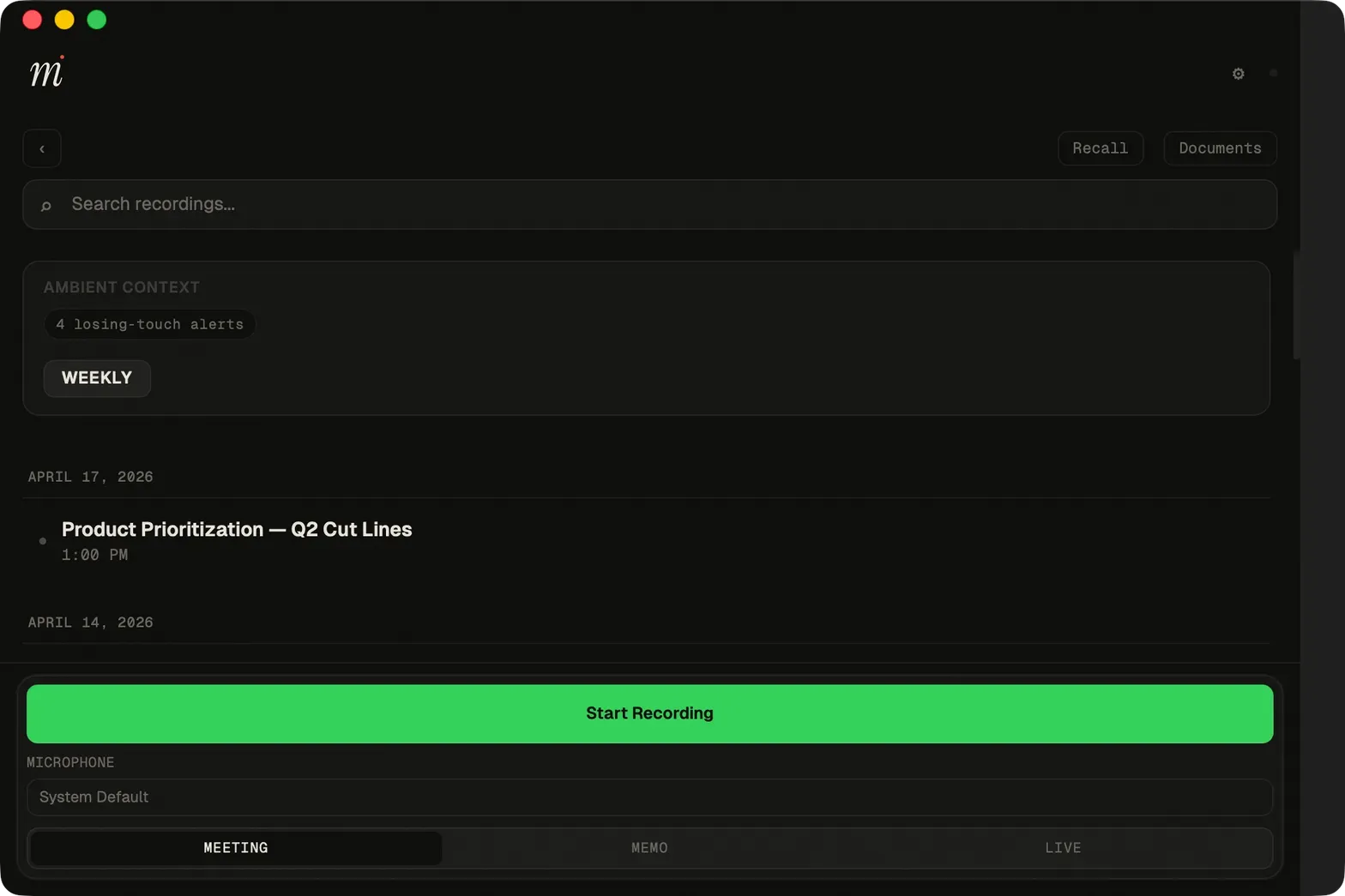
Main window with the meeting list and recording controls for meeting, memo and live modes. Official screenshot from the Minutes repository.
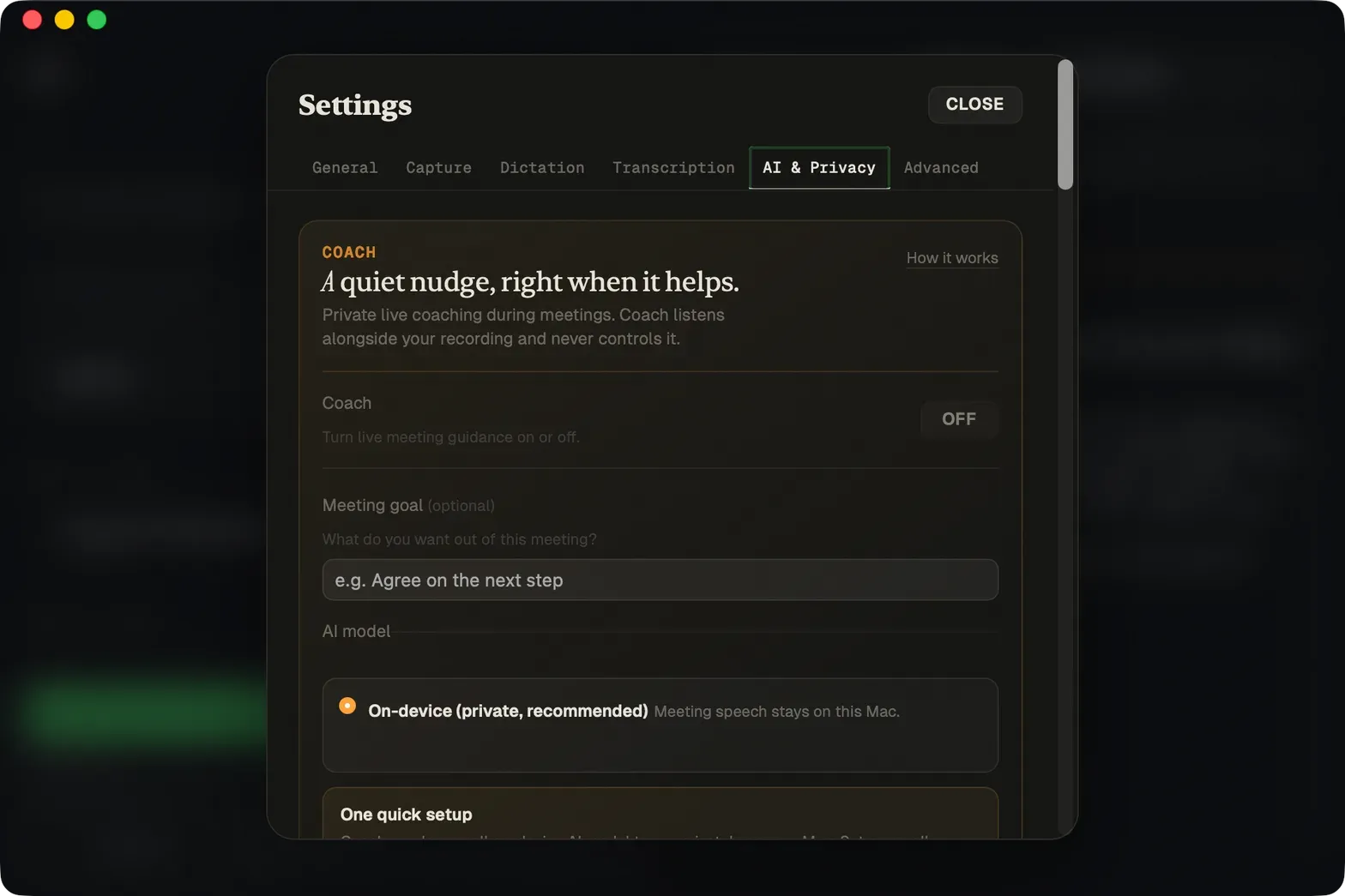
Settings with tabs for General, Capture, Dictation, Transcription, AI and Privacy and Advanced; Coach is off by default. Official screenshot from the Minutes repository.
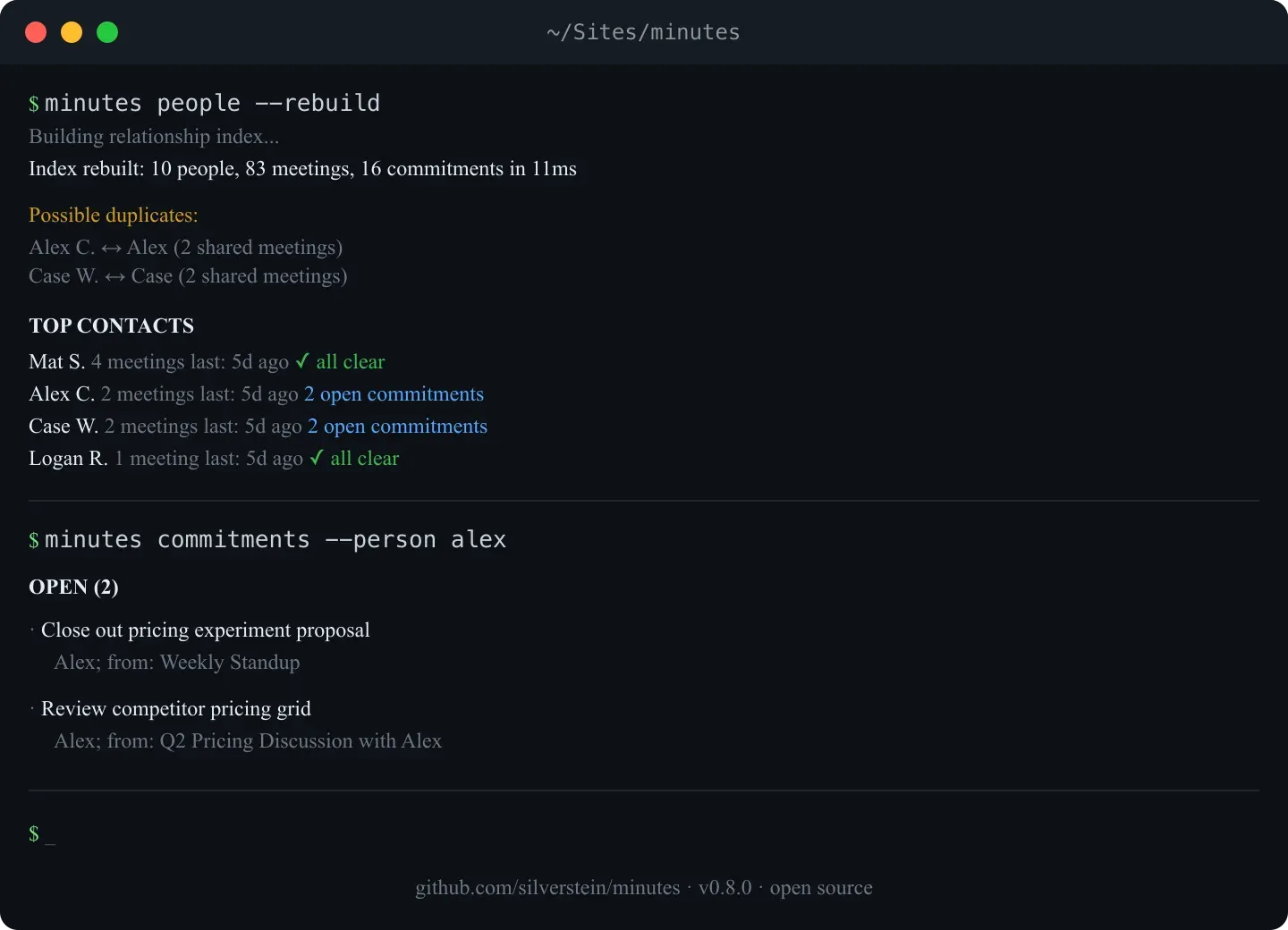
CLI relationship index and open commitments for one person. Official figure from the Minutes repository, made with version 0.8.0.
Source: official Minutes project page.
Key capabilities
- Mac desktop app. A menu bar app for Apple Silicon Macs with recording controls, an audio visualizer, a meeting list, Recall and a document viewer, installed from the DMG or with
brew install --cask silverstein/tap/minutes. It captures the microphone and call audio through ScreenCaptureKit on macOS 15 or later, after Screen Recording and Microphone permission is granted. The notarized update feed covers Apple Silicon only; Intel Macs on macOS 15 or later can build from source. - Windows desktop preview. Releases include
minutes-desktop-windows-x64-setup.exeand a portable zip. The install guide describes the installer as unsigned and an advanced-user preview, and says to use the installer or the zip rather than the raw.exe, which lacks the Visual C++ runtime files. Version 0.33.0 fixed a startup exit of the 0.32.1 desktop app on Windows. Recording, transcription, search, settings and Recall work on Windows; calendar suggestions, call detection and the native dictation hotkey do not yet. - Command-line interface. The README lists about 60 commands for recording, processing, search, import and automation, including
minutes record,minutes stop,minutes searchandminutes actions. It installs withbrew install silverstein/tap/minutes,cargo install minutes-clior a prebuilt binary. The CLI needs BlackHole and a Multi-Output Device on macOS to capture system audio. - Linux and Chromebook support. The
minutes-linux-x64binary needs glibc 2.39 (Ubuntu 24.04) plus the ALSA and PipeWire runtime libraries, even for headless MCP use. Debian 12 and older distributions build from source with cmake, clang and the ALSA and PipeWire development packages. Chromebooks run the CLI and MCP server inside Crostini, CPU only, with no tray app or global hotkeys. - On-device transcription. Whisper models are downloaded with
minutes setup:small(466 MB) is the recommended default andbase(141 MB) is lighter. On Apple Silicon, Parakeet v3 is a 639 MB one-time download, pinned to one model revision and checked against SHA-256 hashes; the Auto engine uses it for meetings and falls back to Whisper. Parakeet v3 covers 25 European languages, so other languages stay on Whisper. - GPU acceleration. MacOS release builds ship with Metal enabled, which the install guide says runs
large-v3about twice as fast as the CPU build. CoreML, CUDA, ROCm/HIP and Vulkan are build-time feature flags and are marked experimental. On older NVIDIA GPUs under Windows the guide recommends Vulkan over CUDA. - Call capture without a bot. The desktop app records the local microphone and the call audio of Zoom, Teams, Meet or any other app that plays through the Mac, so no participant joins the meeting. Since 0.32.0, FaceTime and iPhone calls answered on the Mac are captured through a Core Audio tap with ScreenCaptureKit as fallback, and a live warning appears if the remote side is silent. Automatic recording of detected Teams and Zoom desktop calls is opt-in and off by default. Since 0.33.0 the Mac app transcribes finished stretches of about two minutes during a call, uses a chunk only when its audio and settings match the final recording, and stops early if the Mac cannot keep up; the Transcribe during calls setting turns this off.
- Speaker identification. Diarization uses about 34 MB of ONNX models, and names are attached in four levels: calendar attendees, LLM inference from context, an enrolled voice sample and manual confirmation. Only high-confidence matches rewrite transcript labels; lower-confidence guesses stay in the
speaker_mapfrontmatter. Voice embeddings stay in~/.minutes/voices.dbwith 0600 permissions, and enrollment is limited to your own voice. - Markdown files with structured frontmatter. Each meeting is one Markdown file with a transcript plus YAML fields for title, date, duration, decisions, action items with assignee and due date, consent basis and speaker map. A published frontmatter schema documents the format. The files open in Obsidian, grep or any text editor without Minutes installed.
- MCP server with 34 tools.
npx minutes-mcpexposes tools such assearch_meetings,get_meeting,track_commitments,read_live_transcript,start_recordingandresummarize_meeting, plus resources and prompt templates. Search and browsing work without Rust; recording and transcription need the CLI binary, which the server can auto-install with checksum verification. The MCP tools reference lists every tool. - Claude Code plugin and SDK.
claude plugin marketplace add silverstein/minutesinstalls meeting lifecycle skills such as brief, prep, debrief and search, a meeting-analyst agent and SessionStart and PostToolUse hooks. Claude Desktop users can install theminutes.mcpbextension, which needs Node.js 20 or newer installed on the system and has an optional Node.js path setting. A TypeScript SDK reads meeting files directly for developers who do not want MCP. Pi auto-discovers the bundled skill pack. - Recall and documents. Recall is an in-app chat that answers questions about one meeting or all meetings and cites the source file, speaker and timestamp. It can use your Claude subscription in a private chat or open an embedded terminal. Meetings can produce drafts such as follow-up emails as editable Markdown documents with preview, source and revert views.
- Optional summaries. Summaries are off unless an engine is configured:
agent(Claude Code, Codex, OpenCode or Pi CLI),ollama,mistraloropenai-compatible. Bundled templates cover meeting, standup, 1-on-1 and voice memo, and they extract key points, decisions, action items, open questions and commitments.minutes resummarizereruns only the AI sections after a transcript is edited and keeps a backup. - Consent and sensitive meetings. Consent mode can be off, remind or require, and the chosen basis, such as
verbal_all_parties, is stamped into the file. Sensitive meetings record typed timestamped notes without any audio and save ascapture: nonewithsensitivity: restricted. The project describes this as a disclosure aid, not legal advice. - Voice memo pipeline.
minutes watchprocesses any audio file that lands in a watched folder, so iPhone Shortcuts with iCloud Drive, or Dropbox, Google Drive or Syncthing on Android, can feed it. Supported inputs are WAV, M4A, MP3, OGG, WebM, MP4, MOV and AAC. ffmpeg is preferred for compressed formats, with a bundled decoder as fallback. - Dictation. Hold the shortcut (Cmd or Ctrl + Shift + D by default) and speak. On a Mac the text is typed at the cursor; on Windows and Linux it goes to the clipboard. Every dictation is also saved as Markdown under
dictations/. Cleanup is rule-based on the device and handles phrases such as "scratch that", voice commands and personal snippets. Since 0.32.0 a shell command can receive each dictation as JSON on stdin. - Live transcript and Coach.
minutes livestreams local transcription, and agents can read finalized lines plus one provisional draft that expires after three seconds and is never written to disk. Coach is an optional private live-guidance feature with an on-device model setting. All Minutes windows are hidden from screen sharing by default. - Cross-meeting intelligence.
minutes research,minutes person,minutes commitmentsandminutes consistencysearch across meetings, build person profiles, list open commitments and flag contradicting decisions. A knowledge-base option can push decisions and action items into a wiki, PARA folder or Obsidian vault with provenance back to the source meeting.minutes demo --fullseeds five sample meetings for trying this without a microphone.
Where Minutes fits
Agent-searchable meeting memory
The MCP server is registered in Claude Code with claude mcp add and the command npx -y minutes-mcp, and the same command works in Codex, Cursor and other MCP clients. Agents can then answer questions such as what was decided about a topic and whether it changed later, citing the source meeting file. minutes demo --full seeds five sample meetings for this workflow and minutes demo --clean removes them. Text returned by the server is passed to whichever assistant the client uses.
Bot-free recording of video calls
The desktop app records after Microphone and Screen Recording access is granted. A recording starts from the "Call detected" banner, the menu bar calendar or the Start Recording button. Since 0.32.0 the app warns during a call when the remote side is silent, and since 0.33.0 the Mac app transcribes most of a call before Stop is pressed. Automatic recording of Teams and Zoom calls is a separate opt-in setting, and consent modes can stamp a consent basis into each file.
Phone voice memos into the same archive
A sync folder such as an iCloud Drive or Dropbox minutes-inbox is added to [watch] paths in config.toml, and minutes watch or the background service processes new files. An iPhone Shortcut or an Android sync app drops recordings there, and each one becomes a searchable memo. Compressed formats are decoded with ffmpeg when installed, or with the bundled decoder.
Local dictation that is kept as notes
The desktop shortcut dictates into any app on a Mac, or to the clipboard on Windows and Linux, and minutes dictate is the CLI equivalent. On Apple Silicon, Parakeet v3 covers 25 European languages and Whisper handles the rest. Dictations are saved as Markdown under dictations/, in the same searchable history as meetings.
Action items and commitments across meetings
With a summary engine configured, minutes actions --assignee, minutes commitments --person and minutes consistency list open work and decisions that contradict each other. Corrected transcripts can be resummarized with minutes resummarize --apply, which keeps user-edited status and due dates and backs up the previous version. Assignees are derived from speaker attribution.
Feeding a personal knowledge base
[knowledge] path points at an Obsidian vault, wiki or PARA folder, with the obsidian, wiki or para adapter. With engine = "none" only structured YAML facts are written; the agent engine uses an LLM for extraction. Restricted meetings are skipped, every fact links back to its source meeting, and minutes ingest --dry-run --all previews the changes.
Install
brew install --cask silverstein/tap/minutesReviews of Minutes
Be the first to share your experience with Minutes.
Write a review
Loading review form…
Alternatives to Minutes
 MeetilyMeetily is an MIT-licensed meeting assistant for Windows and macOS that records microphone and system audio, transcribes locally with Whisper or Parakeet, and writes summaries with a built-in model, Ollama or your own provider.
 AnarlogAnarlog is an MIT-licensed AI meeting notepad for macOS, Windows and Linux. It captures meetings without a bot, transcribes on-device or with your chosen provider, and keeps notes in local SQLite with optional encrypted sync.
 OpenWhisprMIT-licensed dictation app for macOS, Windows and Linux that types speech at the cursor, records meetings with speaker labels and keeps searchable notes. Runs Whisper, Parakeet and other models locally, or uses OpenWhispr Cloud or your own API keys.