
What is OpenCode Manager?
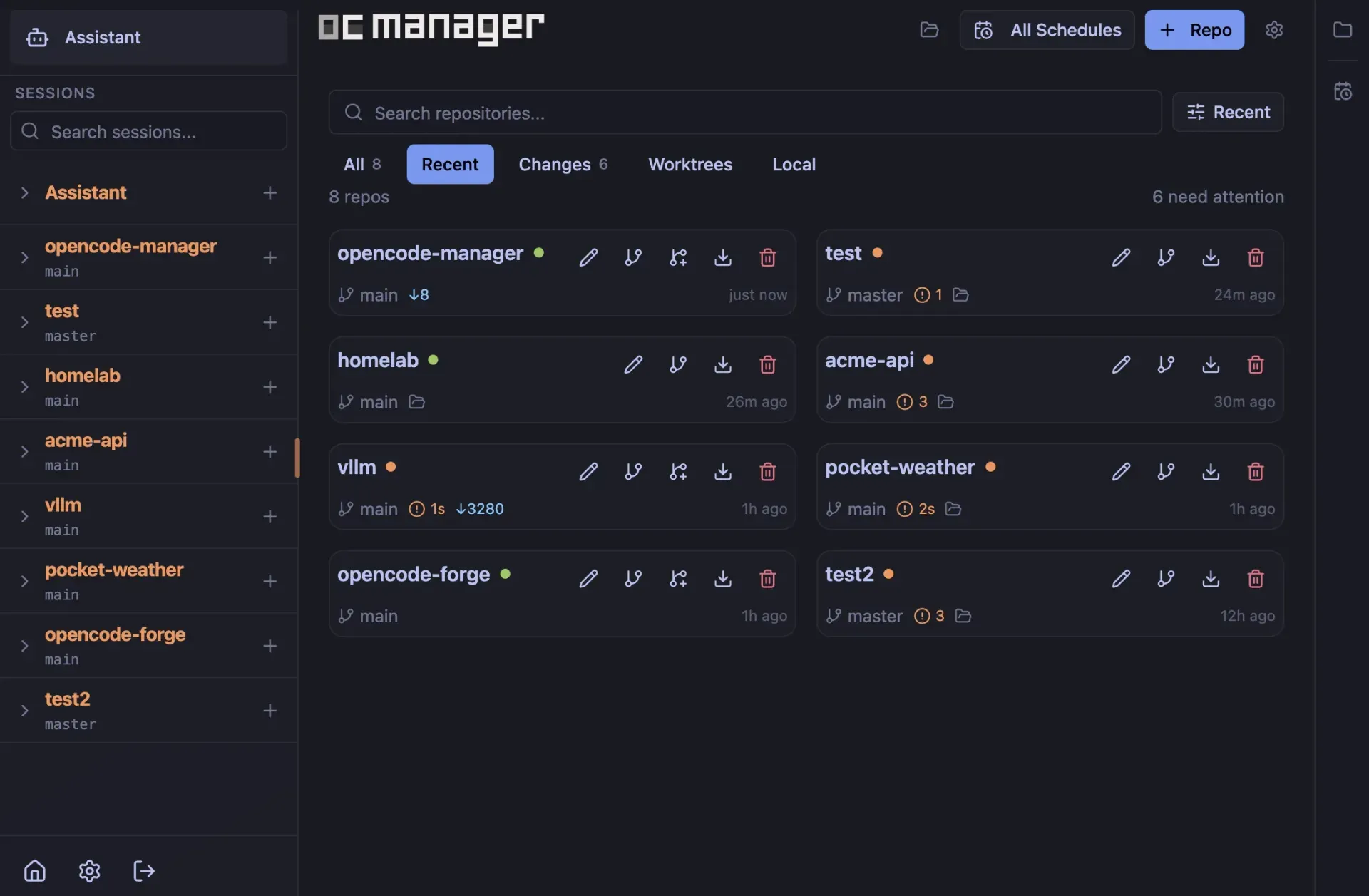
OpenCode Manager is a self-hosted web application for OpenCode, the open-source AI coding agent. Its README describes it as a command center that puts sessions, git, terminals and schedules into one web app used from a desktop browser or a phone. The FAQ on opencodemanager.app states that it is not a fork of OpenCode: it runs and manages a real OpenCode server. The project is developed in the chriswritescode-dev/opencode-manager repository on GitHub, and its MIT license file names Chris Scott as the copyright holder.
The code base is a TypeScript pnpm workspace. A Bun and Hono backend initializes SQLite, Better Auth, settings, schedules, notifications and an OpenCode client; it supervises an OpenCode server that handles agent sessions, proxies its API and streams events to the browser over server-sent events. The frontend is a React and Vite app, and the ocm-cli package provides the ocm command. According to the documentation, OpenCode Manager requires OpenCode 2.x at 2.1.2 or newer and bundles 2.1.2; OpenCode 1.x is not supported.
Installation requires Docker with Compose v2. The installation guide documents three routes: the installer script, which creates ~/opencode-manager, saves the release Compose file and starts the app on port 5003; a manual download of docker-compose.release.yml followed by docker compose up -d; and a source checkout for development with Node.js 24, pnpm 10, Bun and Git. Both Docker routes pull the image published on ghcr.io, about 1.2 GB on first download. On first launch the user creates an admin account, then connects a model provider and adds repositories.
The latest GitHub release is v1.1.0, published on October 26, 2026. It added linked OpenCode servers paired with ocm link and a QR code, GitHub Actions style secrets and variables for agent shells and terminals, QR pairing for phones and browsers, schedules that can run each run in its own microVM, a hands-free voice conversation mode and an offline start that restores the signed-in session. It moved the bundled OpenCode version from 2.0.15 to 2.1.2, and its upgrade notes state that database migrations only go forward. Version 1.0.1 (October 16, 2026) added an active work view, per-session sandbox VMs, agent-built HTML change walkthroughs and inline HTML artifacts. Version 1.0.0 (October 9, 2026) introduced the docked desktop tool panel and multi-run fusion.
OpenCode Manager is free under the MIT license; the FAQ states that users pay only their model provider. Providers such as Anthropic, OpenAI and GitHub Copilot are connected with the user's own API keys or OAuth sign-in. The authentication page describes single-user authentication designed for personal deployments and states that the Manager is not a multi-user isolation boundary. The web app installs as a Progressive Web App; the documentation also describes a native mobile app with QR pairing, but the website does not link a store download for it. Other listings for driving coding agents from several devices include Paseo and T3 Code, and OpenWork is a desktop workspace built on OpenCode.
Key capabilities
- Installer for Docker hosts
curl -fsSL https://opencodemanager.app/install | shchecks for Docker and Compose v2, creates~/opencode-manager(orOCM_DIR) and starts the Manager onhttp://localhost:5003. Before starting it asks whether to import an existing OpenCode config, provider logins and chat history, share a repositories folder read-write, and allow sign-in from the local network; every question except network sign-in defaults to no. Re-running the script updates to the latest release and keeps.envanddocker-compose.override.yml. - Release Compose file and volumes The release Compose file runs
ghcr.io/chriswritescode-dev/opencode-manager:latestand publishes port 5003 for the Manager, 5004 for the preview gateway and 5100 to 5103 for dev servers. Three named volumes hold the workspace and OpenCode state, the SQLite database with the generatedAUTH_SECRET, and OpenCode versions installed from Settings. The container generatesAUTH_SECRETon first start when it is unset, as described in the Docker configuration guide. - Managed OpenCode server and logs The Manager starts and supervises its own OpenCode 2 server, shows a Healthy or Unhealthy indicator in Settings and restarts it with interrupted sessions resuming afterwards. Health monitoring with automatic recovery is configurable, OpenCode 2 upgrades can be triggered from the UI, and a Logs tab shows Manager and OpenCode server output.
- Repositories and source control Repositories are cloned over HTTPS or SSH, or discovered from a parent folder on disk; existing standalone OpenCode chats appear when the path matches. Private GitHub repositories use a personal access token with
reposcope, and SSH keys are configured under Settings > Git > Credentials. The Source Control panel covers changes, commits, branches and stashes, unified diffs, merge, rebase and cherry-pick continuation or abort, AI-generated commit messages and per-repository git identities. Worktrees can be created from new or existing branches and integrated into another branch by merge commit or cherry-pick. - Chat and sessions Sessions stream over server-sent events and support slash commands, fuzzy
@mentions of files, agents and skills, a shell mode started with!, and switching between Plan, Build and custom primary agents. The session picker has Activity, Sessions and Projects tabs across every repository, with pinning, forking,/btwside questions and Markdown export. Keyboard shortcuts use the OpenCode TUI leader keyCtrl+Xand can import existing TUI keybinds, as listed on the Chat and Sessions page. - Permission modes and session goals Each session runs in Ask every time (the default) or Accept everything. The mode is owned by the backend, so an Accept everything session keeps answering requests with the browser closed; it never saves a permanent rule and never overrides a
denyrule. Permission dialogs offer Allow Once, Allow Always and Deny with an optional reason. A session goal keeps a session working until an auditor model judges it done or blocked, capped by a maximum of automatic continuations (1 to 200, default 20) and an optional token budget. - Multi-run and fusion One prompt can be sent to up to five models at once, each in its own session and, with Isolate runs on, its own OpenCode worktree started from a chosen branch. Two to five completed results can then be fused into a new worktree session with a selected synthesis model and optional instructions.
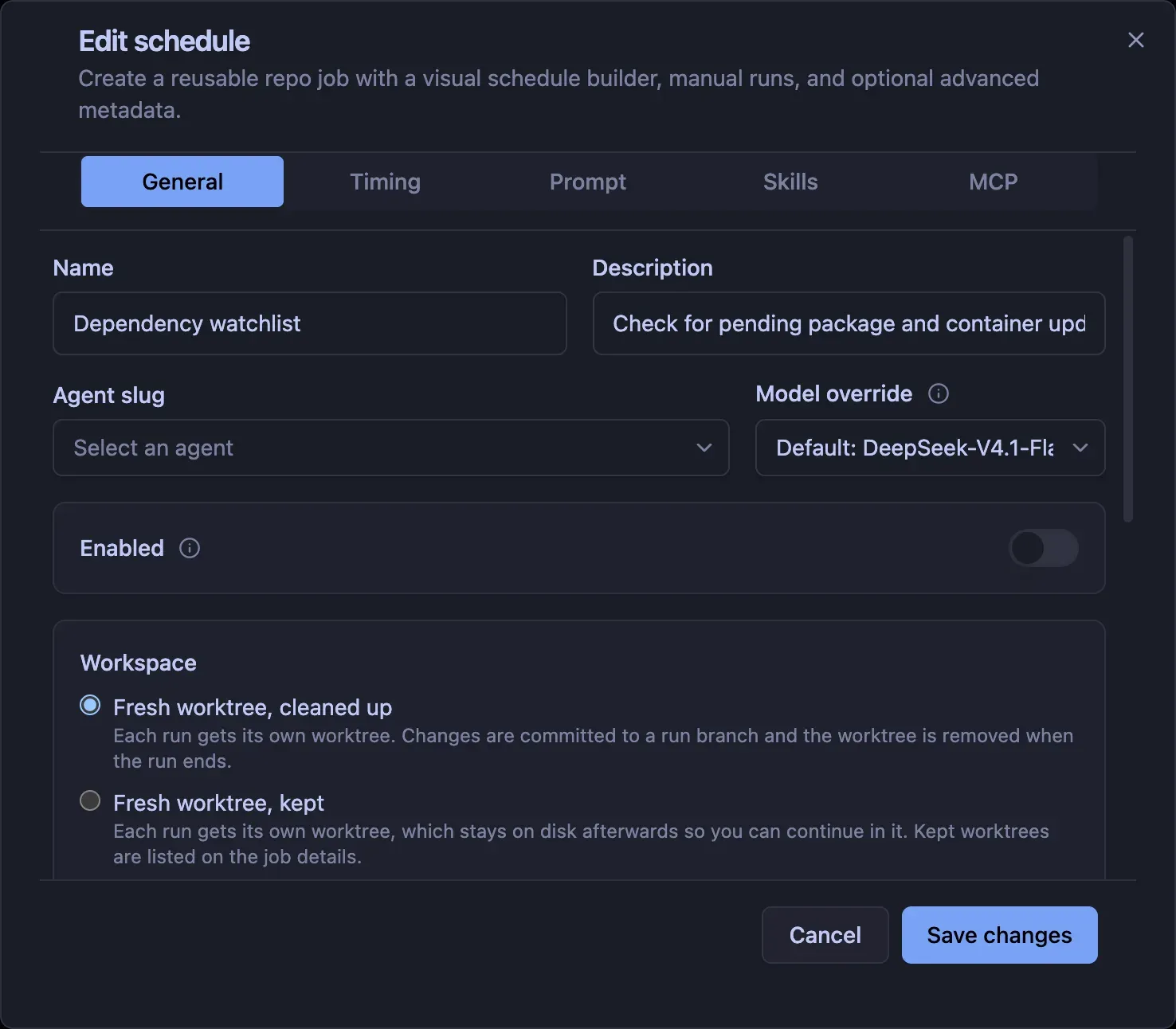
- Schedules and recurring jobs Schedules run reusable prompts against a repository on an interval, hourly, daily, weekday, weekly, monthly or custom cron timing with a stored timezone. Each run works in a fresh worktree that is removed or kept, a shared worktree or the repository checkout, can attach skills and MCP servers, and stores status, logs, assistant output and a linked session. Since v1.1.0 a job can run each run in a sandbox microVM with CPU and memory limits, per the schedules guide.
- Terminals Interactive PTY terminals open in a repository, workspace directory or linked-server project, with tabs and a mobile key bar. They are backed by OpenCode PTYs, survive a browser reload and replay buffered output, but end when OpenCode restarts. Terminals receive the repository's GitHub token as
GH_TOKENandGITHUB_TOKENand are not sandboxed. - Live Preview panel The Preview panel lists listening loopback ports at or above 1024 and shows the selected dev server through a gateway on its own origin (
PREVIEW_PORT, default 5004). Access uses a single-use start token that expires after 60 seconds, Manager auth cookies are stripped before proxying, and WebSocket upgrades are proxied so hot module reload works.PREVIEW_PUBLIC_URLsets an HTTPS origin when the Manager runs behind a reverse proxy, as documented on the Preview page. - Project actions, secrets and variables A repository's
.ocm/project.jsondefines actions that run and stop from the header menu and worktree setup commands, with a trust review before untrusted actions run. Secrets and variables are stored at global, repository or environment scope and mapped into shells with${{ secrets.NAME }}and${{ vars.NAME }}, up to 100 entries. Secret values are encrypted in the Manager database, are not shown again after saving and are masked in tool output. - Change walkthroughs and HTML artifacts
/walkthroughstarts a separate agent session that reads a diff and builds an interactive HTML walkthrough of session, uncommitted, staged, unstaged, branch or pull request changes; a build stops after 15 minutes. An agent can also write a self-contained.htmlfile of up to 5 MB inside the session directory and show it inline in the chat in a sandboxed frame. - Providers, models, MCP and skills Providers are configured with an API key or, for Anthropic and GitHub Copilot, OAuth. Custom models and providers, such as a self-hosted OpenAI-compatible endpoint, are written to the OpenCode configuration. Favorites, recents and variants are stored in OpenCode's own
model.json, so they are shared with the OpenCode TUI. Local and remote MCP servers can be added with OAuth support, andSKILL.mdskills are available globally or per repository. - Agent sandboxing in microVMs With the sandbox Compose overlay on a Linux host with
/dev/kvm, each sandboxed session runs the agentshelltool in its own microVM that mounts only that session's repository or worktree. SSH keys, provider and MCP credentials and the OpenCode configuration stay outside the guest; terminals, file tools, plugins and local MCP servers are not sandboxed. Defaults are 2 CPUs and 4 GB of memory, idle VMs are removed after 30 minutes and at most 4 run at once. Docker Desktop on macOS and Windows cannot provide/dev/kvm, so the feature is unavailable there, according to the sandboxing guide. - Linked OpenCode servers Another machine's
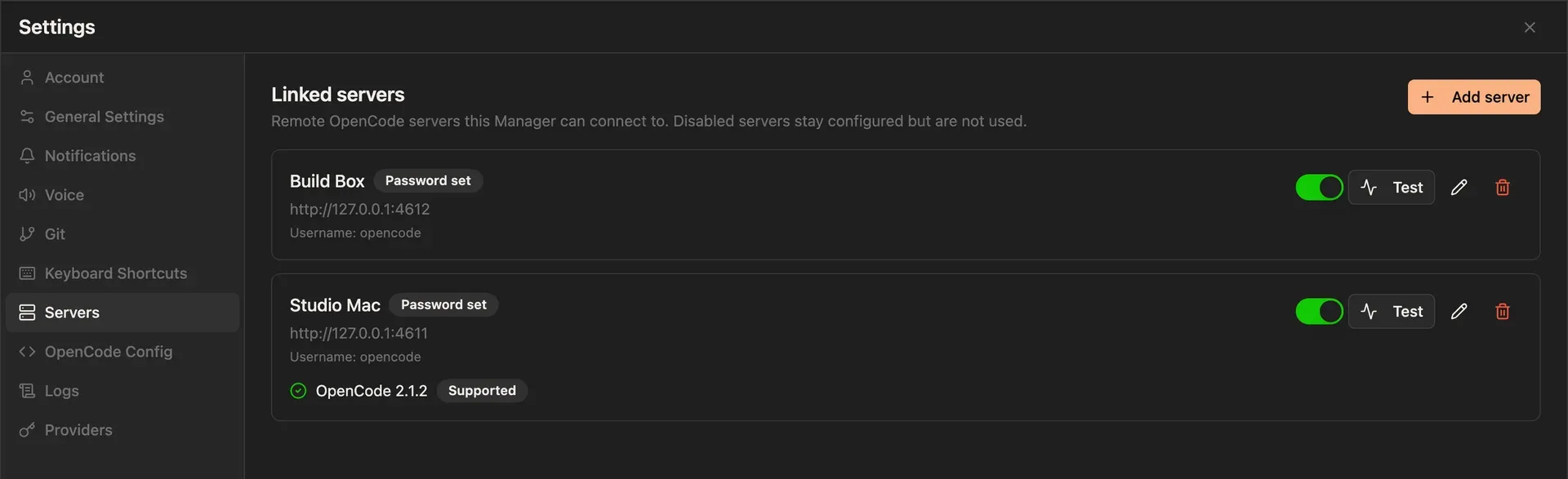
opencode serveinstance (OpenCode 2.1.2 or newer; OpenCode 3 is not supported yet) can be added under Settings > Servers manually or by pairing withocm link, which prints a one-time QR code andocm://linkURL. The Manager proxies every request and stores the server password encrypted with AES-256-GCM. Chat, permissions, goals, terminals, MCP, skills, schedules and multi-runs work on linked servers, while source control there is read-only and the file browser, Preview, worktrees, walkthroughs and sandboxing stay local, per the Linked Servers page. - ocm CLI for the OpenCode TUI The
@opencode-manager/ocm-clipackage, installed with pnpm or through the OpenCode plugin list, attaches a local OpenCode TUI to a repository hosted on the Manager afterocm loginwith the Manager's internal token.ocm pushandocm pullmirror a local working tree,/ocm-movemoves a local session onto the Manager, and/ocm-goaland/ocm-multirunstart goals and multi-runs from the TUI. The ocm CLI guide lists macOS and Linux token stores and states that Windows is not supported. - Mobile PWA, push and voice The interface is mobile first and installs as a PWA from Safari on iOS, Chrome on Android, or Chrome and Edge on desktop, with a bottom tab bar, swipe navigation and a composer key bar for
/,@and!. Push notifications need HTTPS (except on localhost) and VAPID keys, and cover permission requests, questions, errors, goal outcomes and, optionally, completed sessions. Text-to-speech and speech-to-text use the browser's Web Speech API or OpenAI-compatible endpoints, and v1.1.0 added a hands-free voice conversation mode. - Sign-in and remote access Sign-in supports email and password, passkeys (on HTTPS or localhost) and optional GitHub, Google or Discord OAuth; sessions last 7 days and extend while in use. Remote devices must be listed in
AUTH_TRUSTED_ORIGINS, and Compose defaultsAUTH_SECURE_COOKIESto false, and the documented HTTPS configuration sets it to true. The Cloudflare Tunnel guide covers reaching the Manager and its preview hostname over HTTPS without opening router ports, and QR device pairing codes expire after 3 minutes. - Assistant mode and internal API Assistant mode adds a dedicated workspace at
repos/assistant/where a built-in agent manages repositories, sessions, schedules, settings and push notifications through theocmtool, using five auto-provisioned skills. The tool calls the Assistant Internal API, a bearer-token HTTP API whose token is also used by external clients such as theocmCLI.
Where OpenCode Manager fits
Answering agent permission requests from a phone
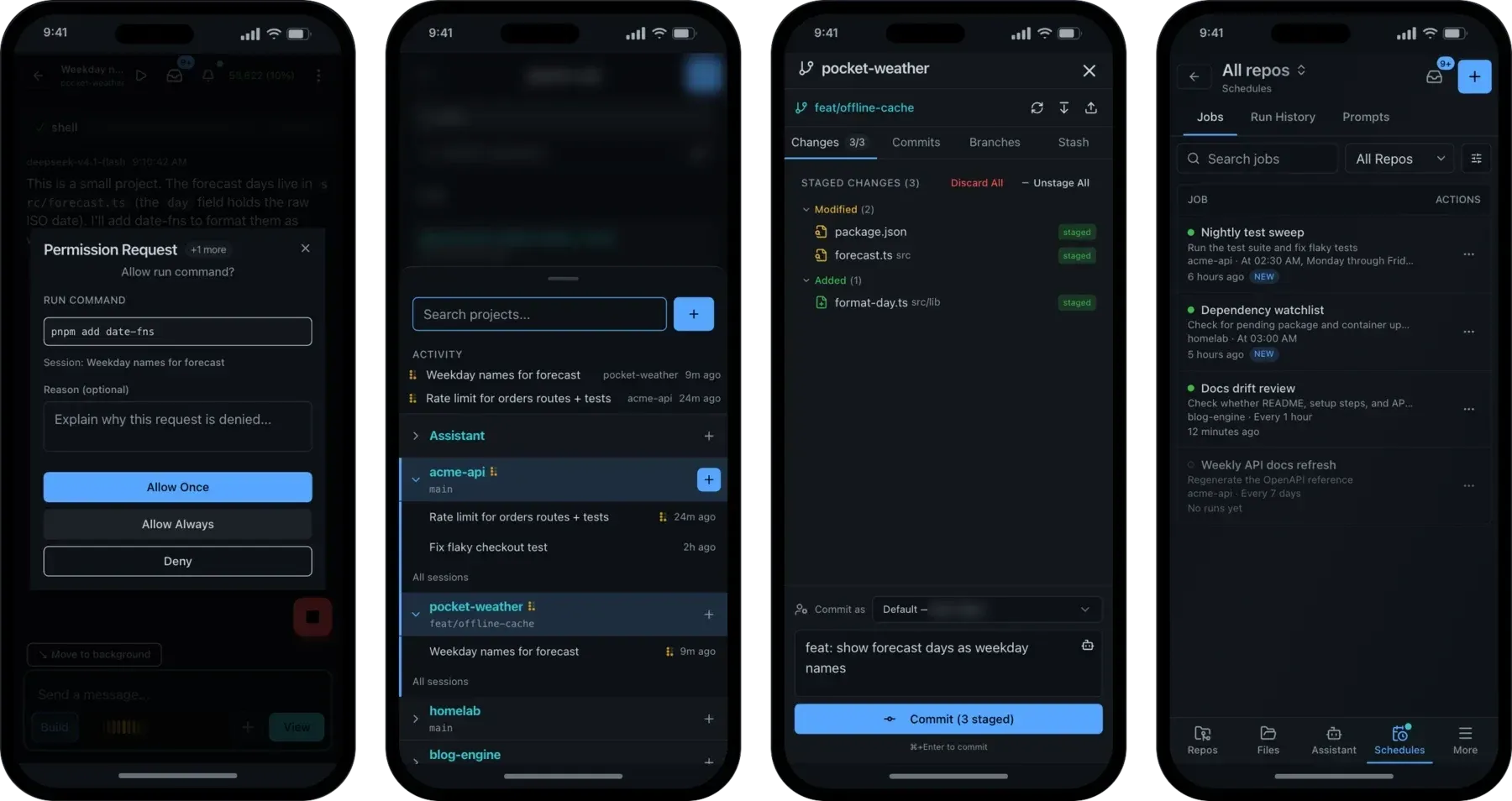
The website describes an agent waiting on a permission while its owner is away from the desk. With push notifications set up over HTTPS, a notification arrives when a session asks for permission or has a question; tapping it opens the session that raised it, where the permission dialog offers Allow Once, Allow Always or Deny with an optional reason. A session switched to Accept everything answers its own requests on the backend, still subject to deny rules, and sends no notification for requests it answers automatically.
Running recurring repository jobs overnight
A schedule stores a prompt, an interval or cron timing, an optional agent and model override, and attached skills and MCP servers. The website describes runs working in a git worktree rather than the checkout (a fresh one per run, a kept one or a shared one), with changes committed to a schedule branch; the documentation also lists the repository checkout itself as a workspace mode. The run history records status, logs, assistant output and errors, unread reports collect in an Inbox, and Open session continues the linked OpenCode session from the run. Since v1.1.0 a run can execute in its own sandbox microVM.
Comparing several models on one task
Multi-run sends the same prompt to up to five models, each in its own session and, when Isolate runs is on, its own detached OpenCode worktree. The Runs tab lists recent groups with live status per entry and Open, Walkthrough and Discard actions. Fuse results combines two to five ready entries into a new worktree session using a chosen synthesis model, base ref and instructions, as described in the multi-run documentation.
Checking a dev server an agent started
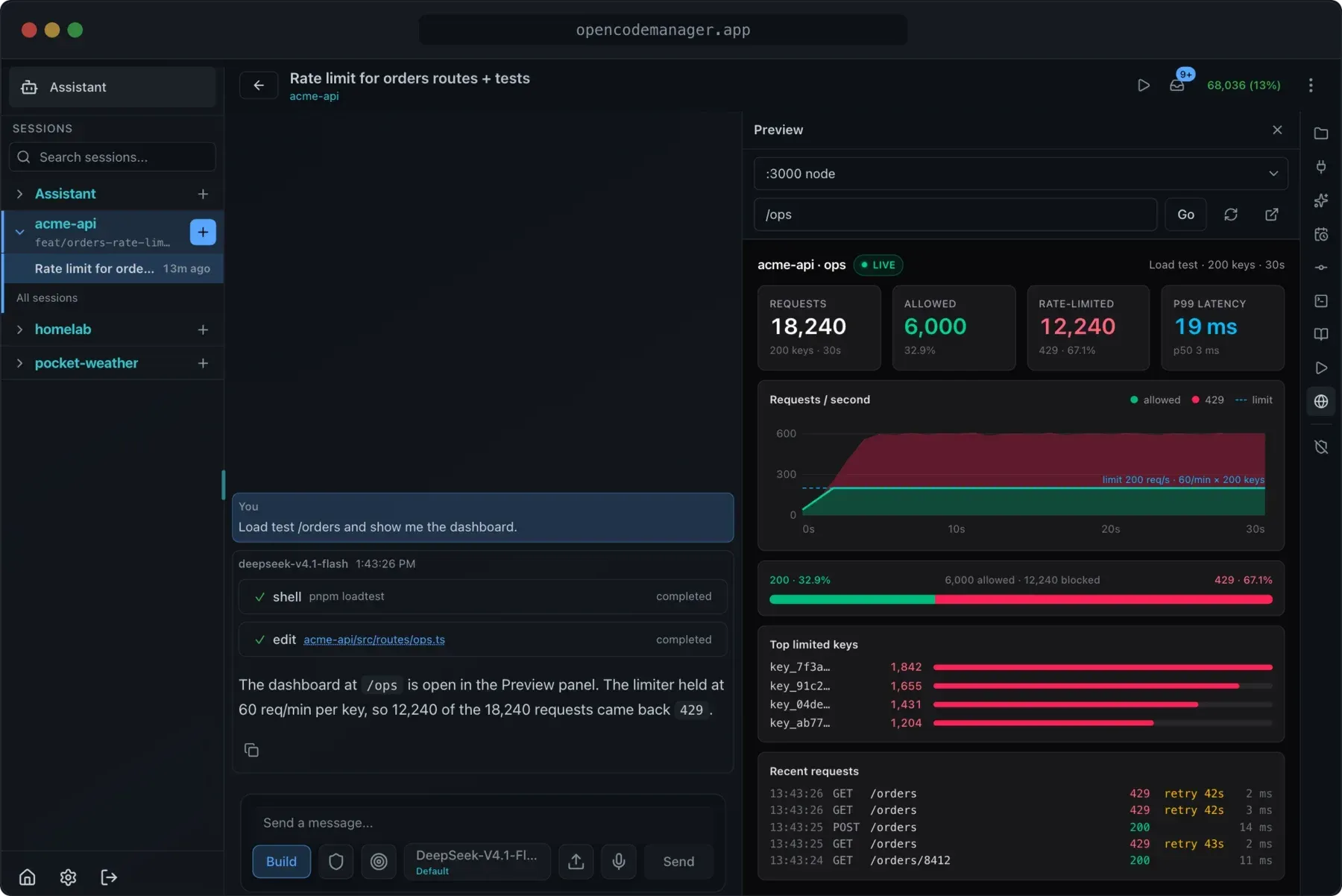
A dev server started in the terminal, by a project action or by the agent appears in the Preview panel's port list, grouped under This repo when its process runs in the repository. Clicking a local URL printed in a terminal opens it in the panel instead of a new tab. The preview is served from a separate gateway origin with its own session cookie, and a viewport switch shows phone and tablet widths. On a wide screen the Preview panel docks in the tool panel beside the chat.
Working with OpenCode on several machines
On a second machine running the OpenCode service, ocm link detects the service, reuses its stored password and prints a QR code; scanning it or pasting the ocm://link URL in Settings > Servers fills in the form, and a connection test reports the OpenCode version. A sidebar switcher then moves between OC Manager and each linked server, the home page lists that server's projects, and the Activity list and push notifications cover sessions on every enabled server.
Moving between a local TUI and the Manager
A developer using the OpenCode TUI on a laptop logs in with ocm login and the Manager's internal token, lists repositories with ocm list and attaches with ocm use, so prompts run on the Manager's filesystem while the TUI stays local. /ocm-move pushes the local working tree and session to the Manager, landing in an OpenCode worktree when the server checkout is not already clean on that branch, and sessions created through ocm appear in the web UI like any other session.
Install
curl -fsSL https://opencodemanager.app/install | shReviews of OpenCode Manager
Be the first to share your experience with OpenCode Manager.
Write a review
Loading review form…
Found OpenCode Manager useful? Upvote it todayYour vote helps other IT teams find it in the daily ranking.