

What is AutoMode?
AutoMode is a free, open-source plugin (a "mod") for Claude Code that chooses a model and a reasoning effort for each prompt. Quick questions go to Haiku at low effort, small edits to Sonnet, and design, security or migration work to Opus. Code, not a model, sets a risk floor for sensitive changes, and a mandatory independent review follows risky edits. It is a community project: the README states that Anthropic does not make it and that it is not Claude Code's built-in auto permission mode. The source is on GitHub under the MIT license, and the project site is at mralexivy.github.io/AutoMode.
It is distributed as a Claude Code plugin marketplace entry. You add the marketplace with /plugin marketplace add mralexivy/AutoMode, install automode@automode, then run /reload-plugins. There is no API key to configure and no server to host: it runs on the Claude login you already use, and its state lives in a data folder under ~/.claude/plugins/data/automode/. It requires Claude Code 2.1.287 or later in the terminal, 2.1.286 or later for the Desktop app and 2.1.299 or later for the VS Code extension. The README says it was tested with Claude Code 2.1.318.
The current release is v0.10.0, published on November 5, 2026. The project is moving quickly: it has published more than a dozen tagged releases between late October and early November 2026. Version 0.10.0 added a live savings figure to the status bar, 0.9.0 added the automode:builder agent, optional v6 execution switches and an optional task budget, and 0.9.1 fixed how a risk-floor lift picks an allowed tier. The changelog lists each change.
The mod is written in TypeScript as a function-hooks module. It uses Claude Code's mod API to call a short Haiku judge per prompt, to read and write files in its own data folder, to run a small set of local commands and to draw a status bar above the prompt. The README states that AutoMode has no network code of its own and does not call the HTTP, MCP or prompt-submit APIs. Its scope is routing, review gating, cost visibility and a plan, build, verify and review workflow inside Claude Code. It is not a standalone coding agent and does not replace Claude Code.
AutoMode screenshots
Explore the interface. Open a screenshot to view it at full size.
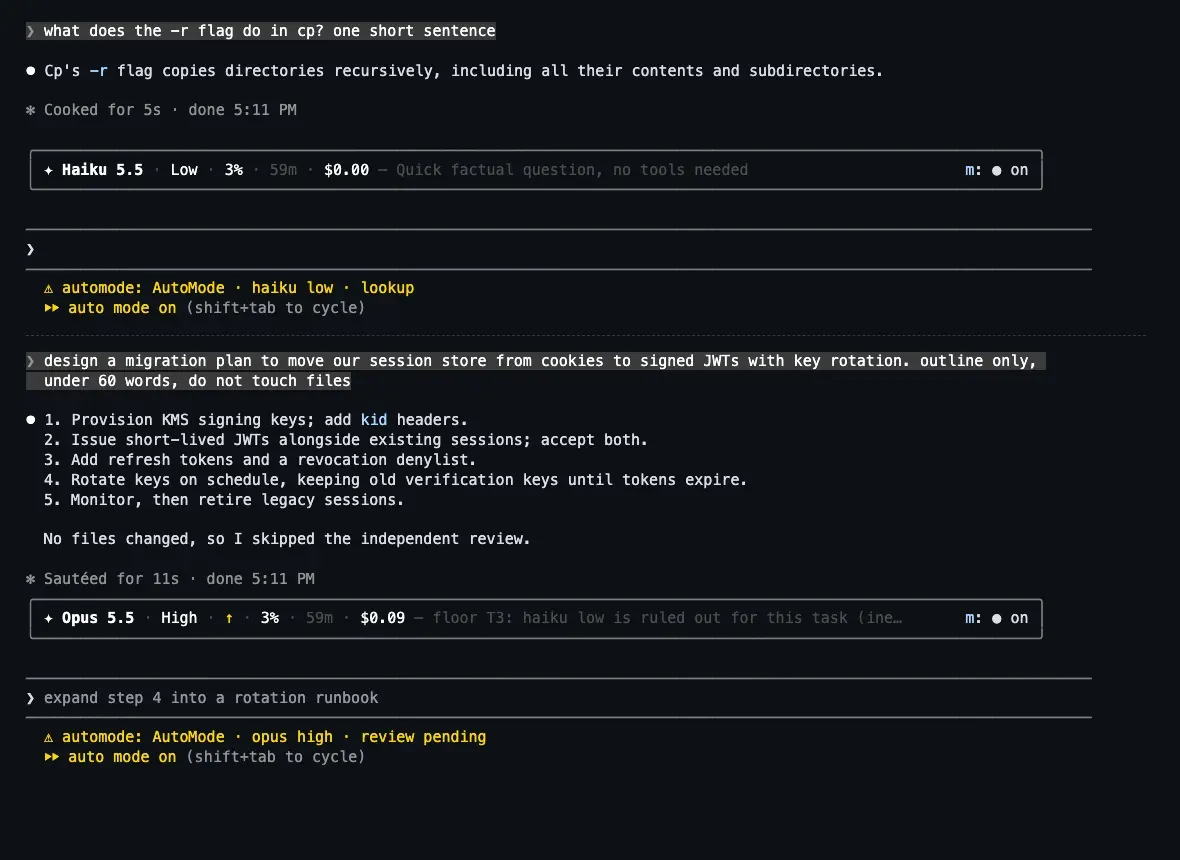
Official README screenshot of a real Claude Code session on version 2.1.314: the bar shows Haiku Low for a quick question, then Opus High with the risk floor as the reason.
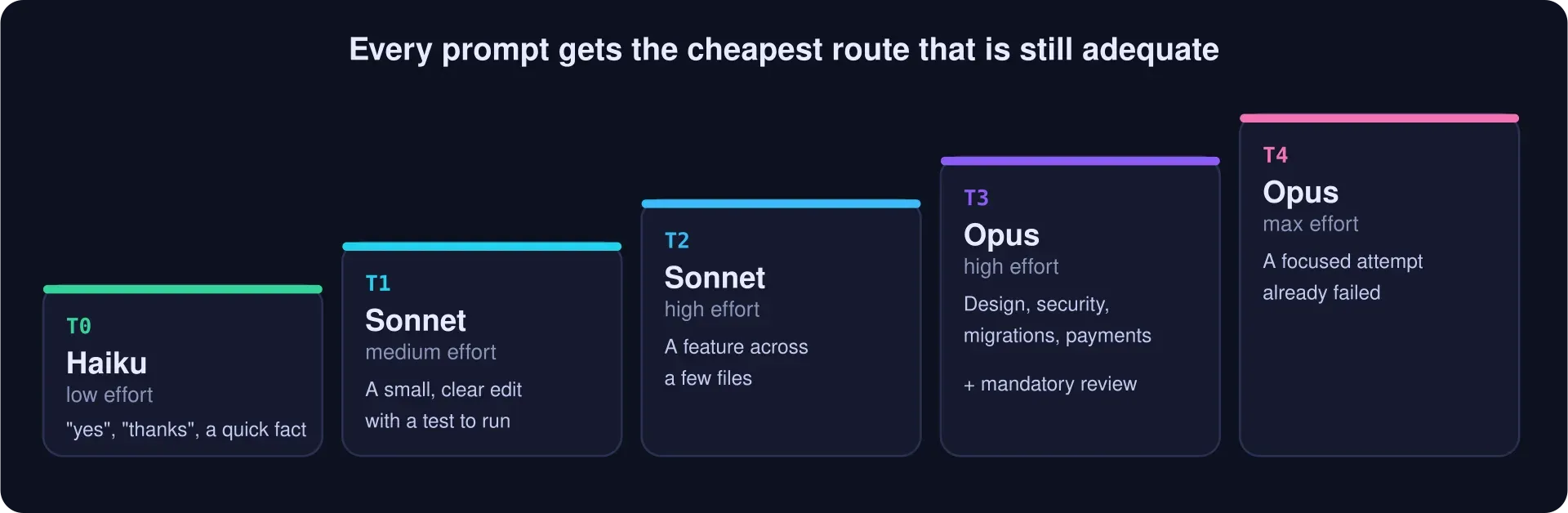
Official README figure of the ladder: T0 Haiku low, T1 Sonnet medium, T2 Sonnet high, T3 Opus high with mandatory review, T4 Opus max.
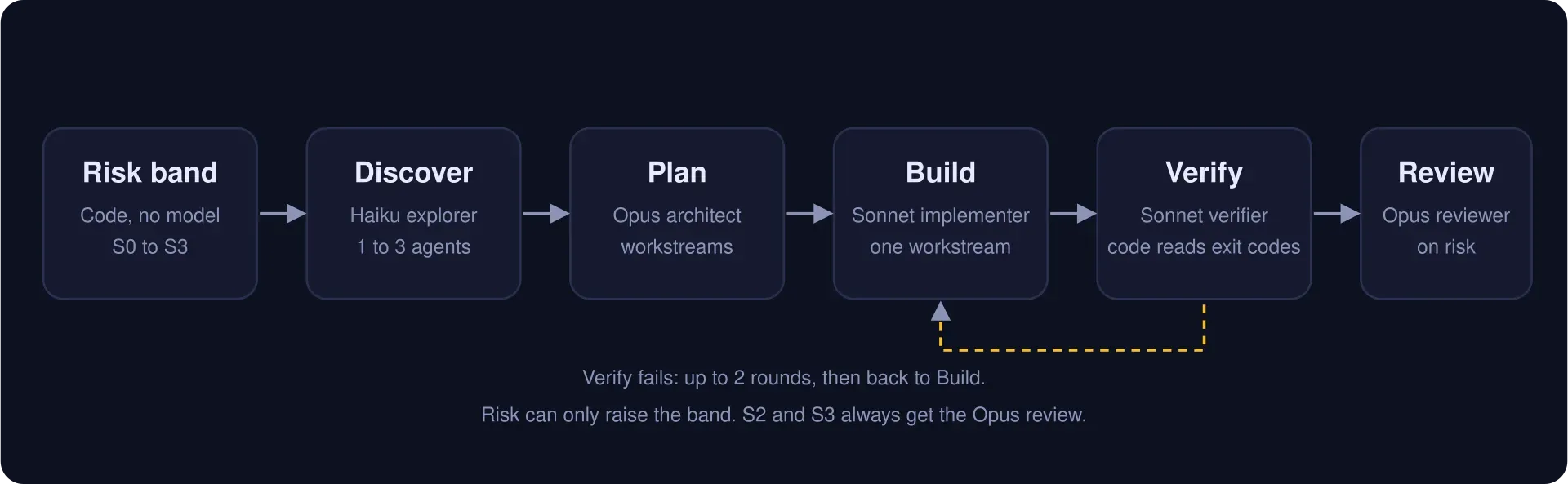
Official README figure of the workflow: code sets the risk band, then Haiku discovers, Opus plans, Sonnet builds and verifies, and Opus reviews on risk.
Source: official AutoMode project page.
Key capabilities
- Install from the plugin marketplace Run
/plugin marketplace add mralexivy/AutoModeand/plugin install automode@automodein the Claude Code chat box, or the equivalentclaude plugincommands in a terminal, then/reload-plugins. To update, runclaude plugin marketplace update automodeand thenclaude plugin update automode@automode. The install guide covers all three install paths. - Per-prompt model and effort routing A short Haiku judge rates each prompt in about a second and AutoMode picks one of five rungs: Haiku at low effort, Sonnet at medium, Sonnet at high, Opus at high and Opus at max. Every prompt takes the cheapest route that is still adequate. The ladder is shown as an official figure in the README and explained in the routing concept page.
- Risk floors set by code Prompts that touch security or credentials, migrations or destructive operations, concurrency, external contracts, payments or sensitive data get a floor that the judge cannot lower. In the README's demo session, a JWT migration moves to Opus because the floor rules out Haiku. The risk band runs from S0 to S3 and only goes up during a task.
- Mandatory independent review For high-risk changes, once the checks pass, one reviewer agent reads the diff. It runs on Opus when the diff shows critical risk and on Sonnet otherwise. The setting
reviewPolicydefaults torisk, andalwaysadds a review to every change. - Plan, build, verify and review workflow For open-ended work,
am:run <request>starts a workflow with discovery on Haiku, planning on Opus, building on Sonnet, verification on Sonnet and review on Opus. Code reads exit codes to decide pass or fail, verification runs at most two rounds, andmaxConcurrencydefaults to 1. Automatic entry into the workflow is off by default throughautoWorkflow. - Six small agents The bundled agents are explorer, architect, implementer, verifier, reviewer and diagnoser, each with a fixed model and tool list; the explorer, architect, reviewer and diagnoser are read-only apart from the reviewer's git diff access. Version 0.9.0 added a seventh,
automode:builder, used by the optional rescue and builder modes. - Status bar above the prompt One line shows the effort and model that actually ran, context fill, a countdown to the prompt cache going cold, an estimated saving and the reason for the route. Version 0.10.0 prices each request on the session's own model, and right after a model switch it shows how much cheaper requests must save to pay back the new cache rewrite. The bar is drawn in the terminal and the Desktop app, but not in the VS Code chat panel.
- Prompt cache awareness Switching models can force a paid cache rewrite, so AutoMode checks whether a switch is worth it. The optional
recoverymodes avoid moving a large context to another model in the middle of a task and start a fresh builder instead. The prompt cache page explains the reasoning and where the logic lives. - Guardian A guardian watches the session in modes off, observe, recommend, assist and auto. It redacts secret-shaped text before storing it, pauses a risky turn until you reply
am:continue, shortens large tool results while keeping the original on disk, and saves a task checkpoint thatam:handoffrestores after/clear. Subagents are denied git writes andrm -rf. - Slash and prompt commands
/automodeprints the bar as text, and subcommands cover details, on, off, setup, settings, debug and help./automode:usagereports model calls, tokens, cache use and estimated API cost. Starting a prompt witham:steers it:am:haiku,am:sonnet,am:opus,am:lowtoam:max,am:direct,am:run,am:explore,am:newandam:reset. - Settings and environment switches Defaults live in
config.jsonand can be overridden in the plugin data directory or through/plugin configure automode@automode. Keys includepolicy,reachHaiku,learning,delegationanddebugLog. Environment switches areAUTOMODE_ROUTER=off,AUTOMODE_UI=off,AUTOMODE_GUARDIAN=offandAUTOMODE_SIGNALS=off. See the settings reference. - Learning from rescues With
learningon, a kind of task that needed rescue in a project starts on Opus the next time. It only raises a route and never lowers one. State is stored per project under the plugin data folder, and the README lists the learned file as keeping the last 200 tasks. - Optional Concise output style Switch to
automode:Concisewith/output-style automode:Concise. It writes shorter prose in the style of simplified technical English and keeps code, commands and paths exact. The project's own check of 20 prompts found about 10 percent fewer output tokens, with some short writing tasks getting longer, and it covers only short single-turn prompts. - Published benchmark The README reports 5 mixed sessions of 20 steps where AutoMode cost $2.01 against $4.14 for plain Opus, all passing, and 30 single coding tasks where it passed 29 at $0.275 per pass against 28 at $0.499 for Opus. It also states where it does not win: long coding tasks on Sonnet high cost about the same plus judge overhead. These are the project's list-price estimates from one repetition per arm. See the results page.
- Turn it off or remove it
/automode offstops routing for one session without writing to settings."mode": "off"in config orAUTOMODE_ROUTER=offstops it everywhere,claude --safe-modedisables all mods for a session, andclaude plugin uninstall automode@automoderemoves it. Deleting the data folder removes stored records. - Open source and reviewable The whole mod is in the
hooks/folder andclaude plugin validate ./AutoModelists the hooks and API calls it uses. The README is explicit that a mod runs with your permissions and is not sandboxed, so it advises installing mods only from authors you trust and reading the code first. Contributions of benchmark tasks, judge cases and risk rules are described in the contributing guide.
Where AutoMode fits
Cutting Claude Code cost without choosing models by hand
Install the plugin, run /reload-plugins and work normally for a few days. Compare the saved figure on the bar and the /automode:usage report with your previous spend. Treat the published benchmark as a signal from one repetition, not a guarantee, and expect little saving if you already run Sonnet at high effort for long coding tasks.
Keeping quick questions off Opus
Questions between tasks are where the project reports its largest saving, because a fact lookup runs on Haiku at low effort. Ask a few short factual questions, check that the bar shows Haiku, and use am:opus on any prompt where you want the strongest model regardless of the judge.
Adding a review gate for risky changes
Rely on the S3 rule for security, migrations, payments and similar work, or set reviewPolicy to always for stricter teams. After a change, check that the reviewer's findings appear and that blockers were fixed before you accept the diff. The review reads the diff and does not replace your own tests.
Running a structured plan, build, verify and review pass
For a larger task, start the prompt with am:run. Check the plan's workstreams and acceptance criteria before building, and read which commands the verifier ran, since code decides pass or fail from exit codes. Leave maxConcurrency at 1 unless workstreams do not share files.
Controlling when a model switch pays off
Watch the cache countdown and the payback figure on the bar. A model switch right after a long session can cost more than it saves, so inspect /automode details for the recorded decision. If you want an alternative to switching, test the optional recovery: rescue mode, which is off by default and described in the changelog.
Operating it under managed Claude Code settings
On a machine with managed settings or a Team or Enterprise login, Claude Code runs a built-in guard that skips some hooks of a user-installed mod. Routing, the judge and the bar still work, but compaction features are limited. An administrator can install AutoMode as an organization mod, and allowManagedModsOnly prevents a user-installed copy from loading.
Install
claude plugin marketplace add mralexivy/AutoMode; claude plugin install automode@automodeReviews of AutoMode
Be the first to share your experience with AutoMode.
Write a review
Loading review form…