

What is OpenWork?
OpenWork is a desktop application in which AI agents carry out tasks on folders you authorize: summarizing documents, editing spreadsheets, drafting reports or running scripts. It is developed by Different AI, Inc., a Y Combinator-backed company, and presents itself as an open alternative to Claude Cowork. The agent runtime underneath is OpenCode; OpenWork adds a graphical workspace, model selection, a library of skills and connectors, scheduled automations and team administration. No OpenWork account is needed to use the desktop app locally with your own model keys.
The desktop app is distributed through the official download page and GitHub releases for macOS (Apple Silicon and Intel), Windows (x64 and ARM64) and Linux (x64 and ARM64 AppImage or tar.gz). The current release, v0.18.65 of November 5, 2026, separates public openwork-*, Cloud openwork-cloud-* and Enterprise openwork-enterprise-* artifacts with their own updater manifests, and Windows installers are signed through Microsoft Artifact Signing. Version 0.18.63 added import of Claude chats and Claude Code sessions, Google Drive, OneDrive and SharePoint file handling on the OpenCode v2 engine, and computer use on Windows. Version 0.18.60 moved remaining OpenCode v1 installs to v2 in the background after backing up existing chats.
The repository is a TypeScript monorepo. The desktop app combines a React UI, an Electron shell and a local openwork-server that listens only on loopback. OpenWork Den, under ee/, is the organization control plane: a Next.js web app, a Node.js (Hono) API with a MySQL 8-compatible database and Better Auth, an MCP gateway and an optional model gateway. A hosted version runs at app.openworklabs.com. Self-hosting uses Docker Compose for evaluation and a Helm chart on EKS, AKS or GKE for production, as described in the self-hosting guide.
Licensing is split by directory. Everything outside ee/, including the desktop app and core packages, is MIT. The ee/ directory uses the source-available OpenWork EE License: production use needs a subscription, except for organizations with up to 5 users, a 30-day evaluation at any size, and development or testing. Each ee/ release converts to MIT two years after publication, and versions released before this scheme stay under FSL-1.1-MIT. Plans are listed on the pricing page.
OpenWork is not a model provider or a code editor. Output quality, cost and data handling depend on the provider or local runtime you connect. Several documented features are early: OpenWork in Slack is a private alpha, and enterprise agent permissions are still rolling out and apply only to the OpenCode v2 engine. Recent release notes also list open pull requests that were deliberately deferred to later versions, so read the notes for the exact build you deploy.
OpenWork screenshots
Explore the interface. Open a screenshot to view it at full size.
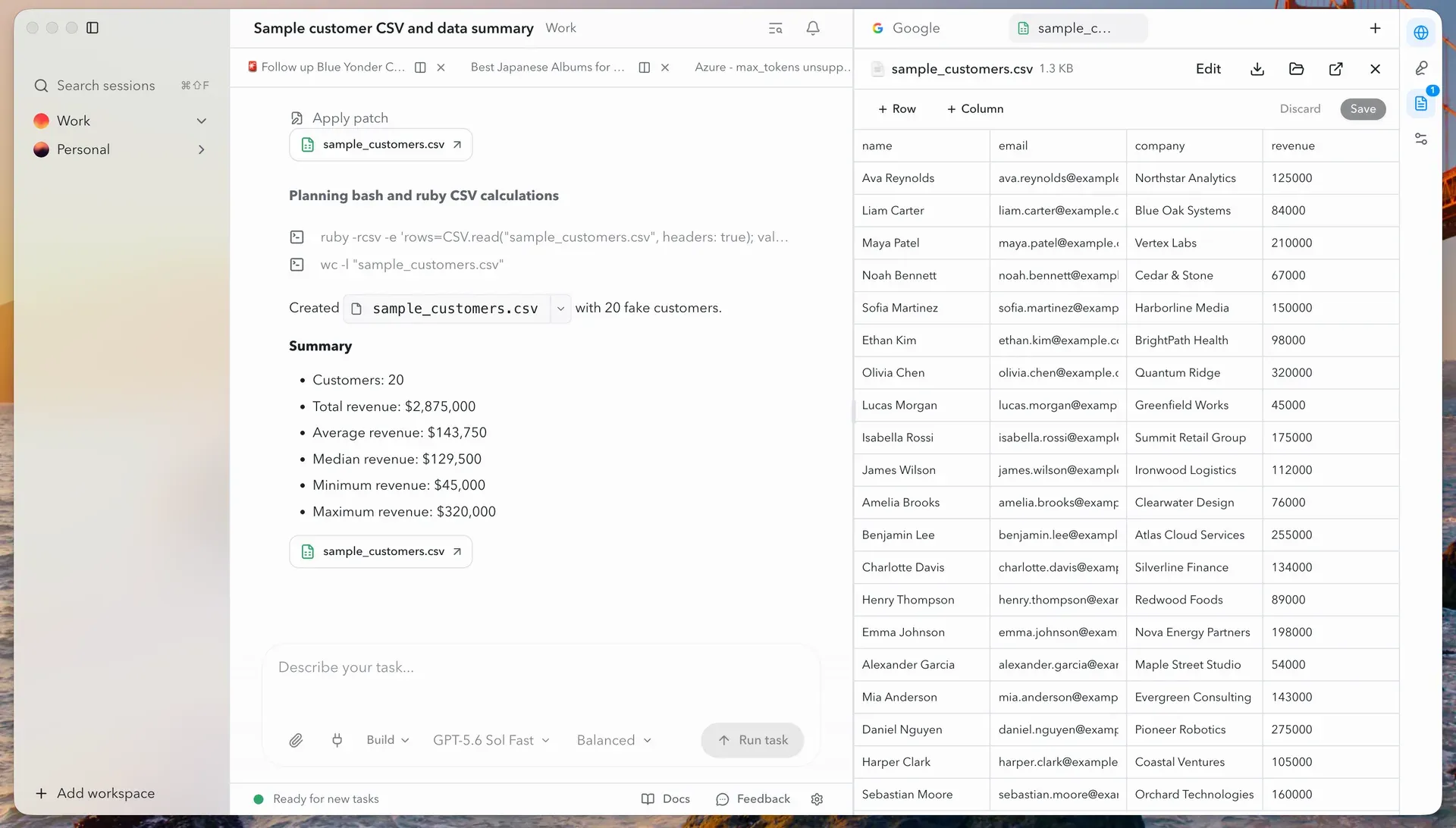
Official README screenshot of the OpenWork desktop app: the agent ran shell commands, wrote a CSV file and summarized it, with the file open for editing beside the chat.
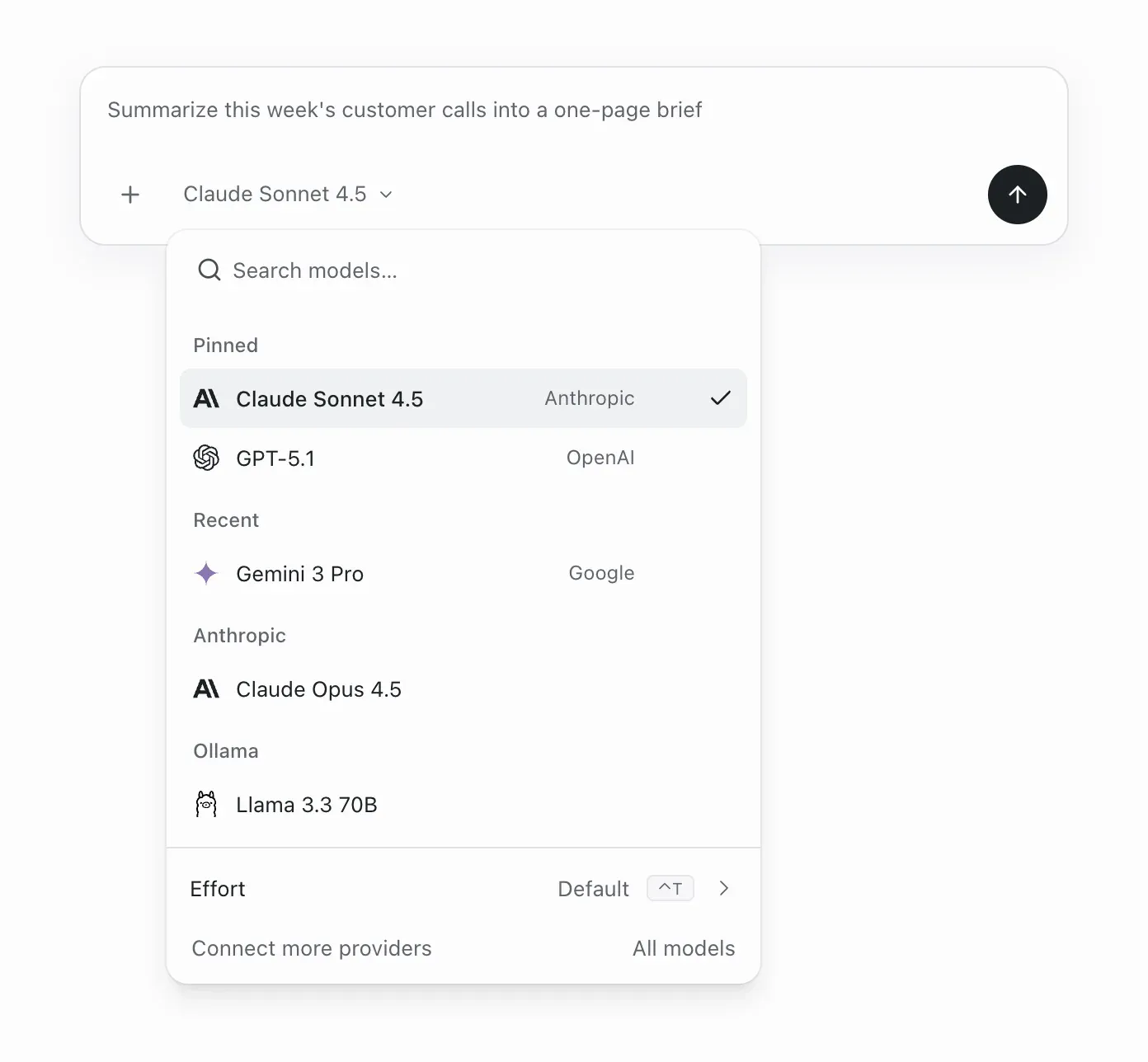
Official repository image of the model picker: pinned and recent models from Anthropic, OpenAI and Google next to a local Ollama model. Model names reflect the time of capture.
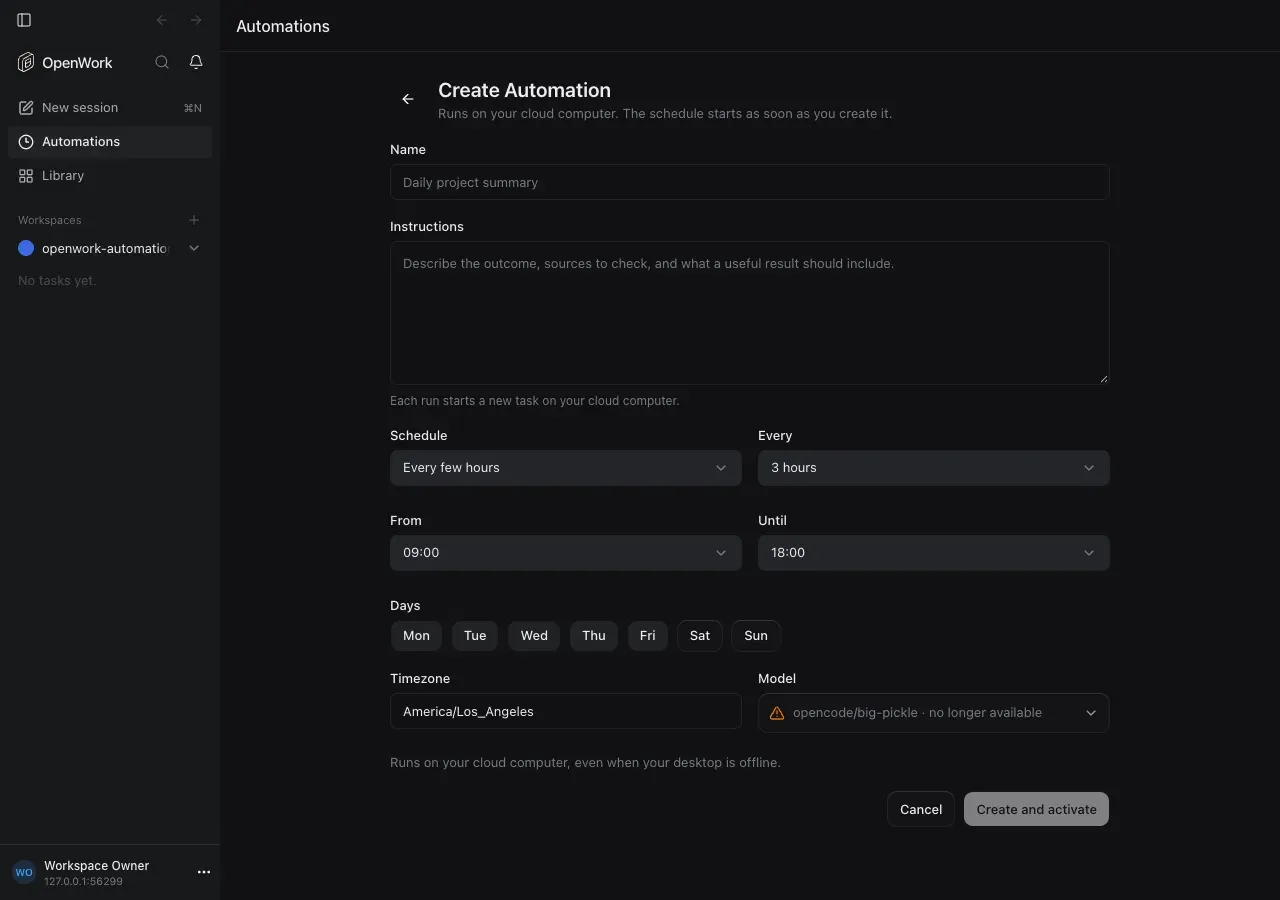
Official feature screenshot of a Cloud automation set to run every few hours within a daily time window on selected days.
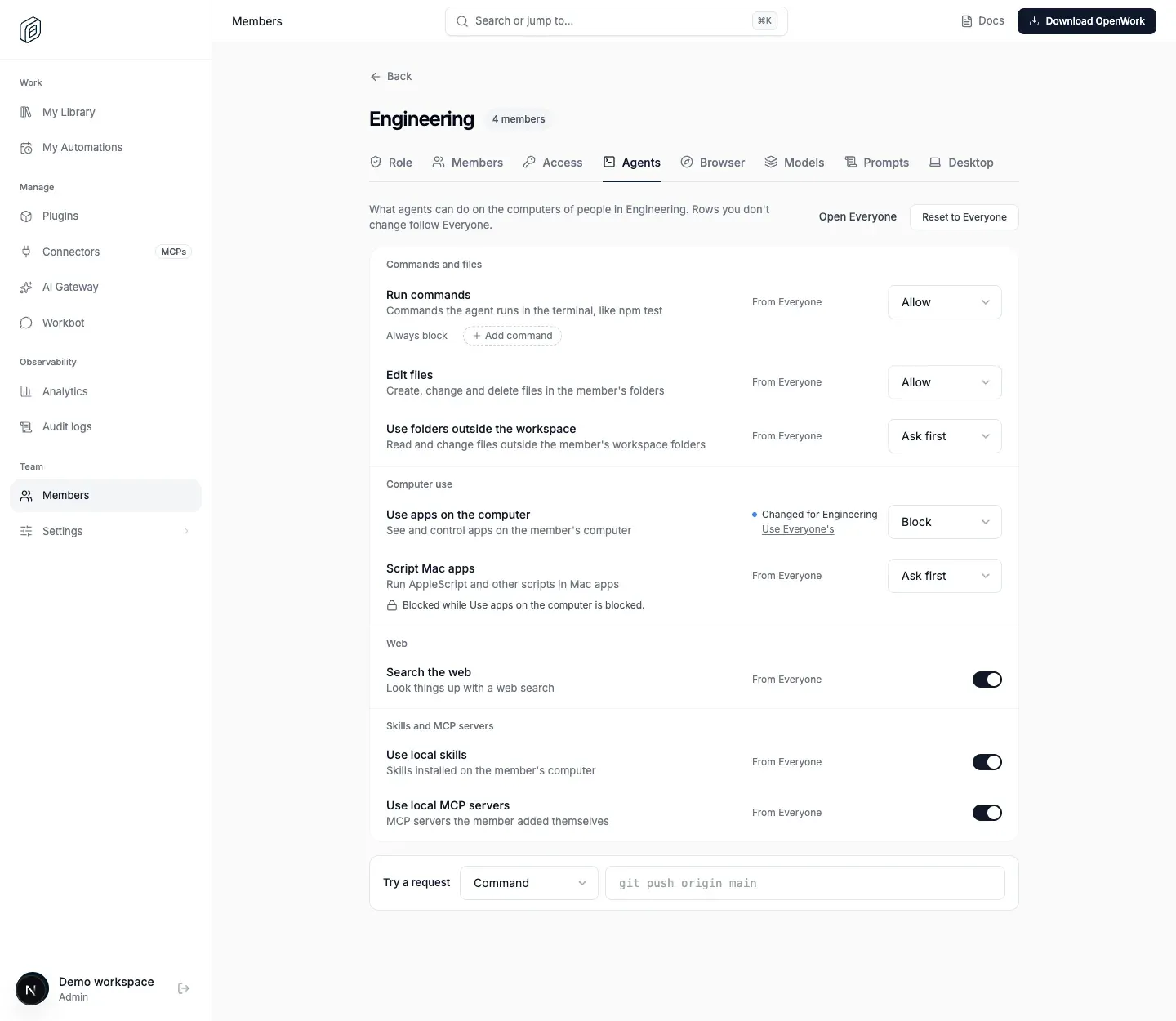
Official feature screenshot of team-level agent permissions in OpenWork Cloud, where one team blocks control of apps on members' computers.
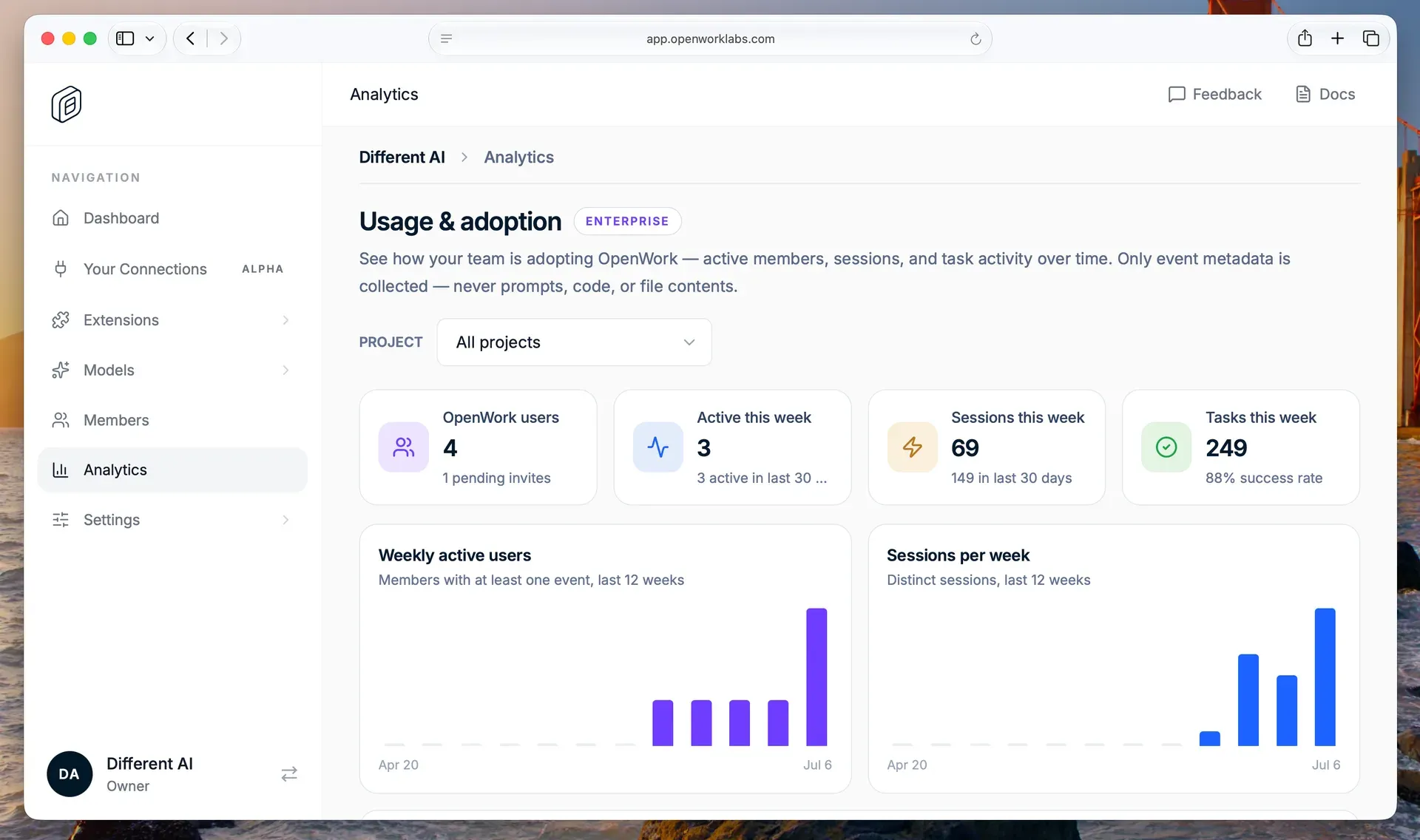
Official README screenshot of the OpenWork Den control plane analytics page, an Enterprise feature showing members, sessions and tasks over time.
Source: official OpenWork project page.
Key capabilities
- Download OpenWork for macOS Apple Silicon (M1 and later) and Intel builds are published as DMG and ZIP packages on the download page and GitHub releases. The documentation also names a Homebrew cask, installed with
brew install --cask openwork. A minimum macOS version is not stated. The desktop app updates itself through its Electron updater manifest. - Download OpenWork for Windows X64 and ARM64 .exe installers are attached to each release, signed with Microsoft Artifact Signing. A separate Windows x64 alpha channel is published as a GitHub prerelease. Do not install through
npx openwork: the documentation warns that the npm package with that name belongs to a different project. - Download OpenWork for Linux AppImage and tar.gz archives are published for x86_64 and ARM64. The release assets contain no DEB or RPM packages, so desktop integration and updates follow the AppImage or archive route. Hardware requirements are not documented beyond what the chosen model needs.
- Public, Cloud and Enterprise builds Since v0.18.64 each release ships three artifact families. The public openwork-* build runs without an account; openwork-cloud-* requires sign-in to OpenWork Cloud; openwork-enterprise-* keeps the standard app identity for managed organizations. Each family has its own updater manifest, so pick the right one before rolling out.
- Folder-scoped workspaces OpenWork works only inside folders you authorize as workspaces. The agent can read and write files, run shell commands, apply patches and show results in a side panel that previews or edits documents such as CSV files. The documented first task is to ask it to summarize the folder, which confirms it can read your files.
- Any model provider Through OpenCode, OpenWork supports 50+ providers with your own API keys, ChatGPT sign-in, Anthropic keys, Gemini and Google Vertex AI, and any OpenAI-compatible endpoint such as OpenRouter, LiteLLM or Azure OpenAI. The composer has a model picker with pinned and recent models and an effort setting. API billing is separate from consumer chat subscriptions.
- Local models A built-in Ollama screen connects to
http://localhost:11434, lists or downloads models and adds them to the workspace. LM Studio, the llama.cpp server and vLLM are added as custom providers inopencode.jsoncpointing at their /v1 endpoint. The local models guide notes that small models often fail at tool calls, vision is detected per model, and an organization policy can block local providers. - Skills, plugins and connectors Skills use the SKILL.md format and can be created from a useful chat. Claude-compatible plugins can be imported from GitHub marketplaces, and MCP servers become connectors. My Library collects what you made and what your team shares with you, and items can be shared with teammates without any manual MCP configuration.
- Migration from Claude Cowork The migration guide moves skills as private skills, imports selected plugins and turns MCP servers into connectors that must be reconnected. Credentials, projects and scheduled tasks do not transfer. Claude chats and Claude Code sessions can be imported separately from Settings, Import, added in v0.18.63.
- OpenWork MCP for other agents One remote MCP endpoint,
https://api.openworklabs.com/mcp/agent, exposes four tools: search_capabilities, execute_capability, list_skills and get_skill. Codex, Claude Code, Cursor, VS Code, Gemini CLI, ChatGPT and others connect with OAuth, and the chosen organization is pinned to the token. OpenCode is verified end to end; the other clients are documented as setup only. An OpenWork account and organization are required. - Desktop and Cloud automations An automation is a scheduled task whose every run becomes a normal chat. Schedules are once, daily, weekly, every few hours within a time window, or around accepted Google Calendar meetings (Cloud only). Desktop automations run only while the app is open and signed in, and missed runs are marked as such; Cloud automations run on an OpenWork cloud computer. A runner cannot be changed after creation.
- Computer use and Workbot On macOS the agent can operate and script apps while you keep working, with Take over, Stop and Continue controls; Windows gained computer use with local apps in v0.18.63. Workbot is the browser-based assistant for teams, with Browser and Computer views on a cloud computer. Admins can block app control or AppleScript per team.
- Documents and connected files Agents can search, open, edit and save Word, Excel and PowerPoint files in OneDrive and SharePoint once an admin grants the permission, and bring Google Drive files into a workspace. Each transfer must be approved. Google Docs, Sheets and Slides stay in Google and save back to the original file.
- OpenWork Den administration Den lets admins invite members, create teams, decide which teams may use each model provider, publish skills and plugins through marketplaces and assign them to people or teams. Enterprise adds desktop policies, version controls, audit logs and usage analytics; the analytics screen states that only event metadata is collected, not prompts, code or file contents.
- Agent permissions Admins set run commands, edit files and open websites to Allow, Ask first or Block, with allow and block lists for commands and sites, and toggle web search, local skills and local MCP servers. Blocked patterns always win, and the strictest team setting applies. The agent permissions page marks this as an Enterprise feature still rolling out, effective only on OpenCode v2.
- AI Gateway and OpenWork Models The AI Gateway controls model access, limits and spend for an organization and supports custom providers such as Azure Foundry. OpenWork Models is a managed inference add-on with no keys to distribute. Provider-specific spend limits and default models for new desktop chats can be set per team or organization when enabled.
- REST API with organization keys The API reference covers admin, authentication, automations, organizations and SSO endpoints at
https://api.openworklabs.comor your own Den API host. Organization API keys are sent in the x-api-key header, act as the user who created them, allow 600 requests per minute and expire after 90 days. - Self-hosted control plane A checksum-pinned Docker Compose file starts Den web on port 3005, Den API on port 8788 and an internal MySQL for evaluation; it enables public signup and has no TLS or backups. Production uses the Helm chart
oci://ghcr.io/different-ai/charts/openwork-eeon EKS, AKS or GKE with managed MySQL, HTTPS and the DEN_BASE_URL, BETTER_AUTH_SECRET and DEN_DB_ENCRYPTION_KEY settings. Terraform modules are beta and cover Den web and API only.
Where OpenWork fits
Delegating file work on a single desktop
Install the public build, create a workspace from one project folder and connect a model with an API key or ChatGPT sign-in. Start with a read-only request such as summarizing the folder, then move to edits on copies. Watch the shell commands and patches listed in the chat: they show what the agent actually changed. The documentation describes the four-step path from install to first task. Check that files are written to the opened folder and that failed writes are reported as failures.
Keeping prompts on the machine with a local model
Run Ollama, open Settings, Ollama in OpenWork and add a model to the workspace, or point a custom provider at an LM Studio, llama.cpp or vLLM /v1 endpoint. After the model download no internet connection or cloud account is required, and model requests go only to the local server. Test a multi-step task that reads files and calls tools before relying on a small model; connectors and MCP servers you add still talk to their own services.
Moving a team off Claude Cowork
Open the same folders as workspaces, connect a model and confirm its billing, then migrate skills and plugins with the documented tool or by hand. Reconnect each MCP server and test read-only actions before write actions on a disposable example. Recreate scheduled tasks and run each once manually. Keep Cowork available until a representative workflow passes end to end, and import past Claude chats from Settings, Import if the history matters.
Reusing team skills from Claude Code, Codex or Cursor
Publish skills and shared MCP connections in OpenWork Cloud, then add the OpenWork MCP to each developer's agent with one command, for example claude mcp add --transport http openwork https://api.openworklabs.com/mcp/agent. Sign in through the browser and pick the organization. Check which organization the token is pinned to, since switching requires logging out of the server entry, and confirm that a shared skill runs with the expected connected account.
Scheduling recurring reports
Create a Desktop automation when the task needs local files and apps, or a Cloud automation when it only needs connected services and must run while laptops are off. Choose the schedule, time zone and model, then use Run now once and read the resulting chat. For desktop runners, confirm that a signed-in app is online when runs are due, otherwise they are marked missed. Admins can disable either kind of automation in organization settings.
Evaluating a self-hosted control plane
Download the pinned Compose file, verify its SHA-256 checksum, generate the two secrets and start the stack, preferably with signup disabled and the first-administrator setup code. Reach it through an SSH tunnel instead of exposing ports. Point a test desktop at the instance through its runtime configuration, publish one skill and run it. For production, plan the Helm deployment, managed MySQL with TLS verification, migrations before traffic, backups and the EE license threshold of five users.
Install
brew install --cask openworkReviews of OpenWork
Be the first to share your experience with OpenWork.
Write a review
Loading review form…
Alternatives to OpenWork
 gooseApache-2.0 AI agent written in Rust, with a desktop app, a CLI and an ACP server. It works with 15+ model providers or built-in local inference, connects to MCP extensions and runs reusable recipes. Originally from Block, now hosted by AAIF.
 Cherry StudioAGPL-licensed desktop client for Windows, macOS and Linux that connects 60+ model providers and local servers such as Ollama, and adds agents with folder access, MCP and Skills, knowledge bases, image generation and a local API gateway.
 OpenBotSource-available Electron app that turns provider CLIs such as Codex, Claude Code, Grok and GitHub Copilot into named agents with their own workspaces, queues, routines, shared channels and an embedded browser. Free for noncommercial use.