What is DockTail?
DockTail is an open-source service written in Go that publishes Docker containers as native Tailscale Services. It follows Docker container events, reads docktail.* labels on each container and advertises the matching containers through the local tailscaled daemon. By default it points Tailscale at the container's IP on its Docker network, so application containers need no published host ports. Every app is served from the single tagged Tailscale node on the host (or its sidecar), so apps do not become separate Tailscale devices with their own node keys.
The project lives in the marvinvr/docktail repository, created in November 2025, and is licensed under AGPL-3.0. It ships as the container image ghcr.io/marvinvr/docktail for linux/amd64, linux/arm64 and linux/arm/v7, mirrored to Docker Hub as marvinvr/docktail. Releases newer than 1.8.3 also carry static Linux binaries for the same three architectures with a checksums.txt file. The documentation is published on docktail.org, also as Markdown and an llms.txt file, and is rendered from the docs/ folder of the repository. Tailscale lists DockTail among its community projects and featured it on its YouTube channel.
The current release is DockTail 1.8.7, published on November 10, 2026. It connects to DockTail Cloud as soon as the agent starts instead of first waiting for the Tailscale socket, and a stop signal now interrupts the socket wait and the Docker event retry delay. Earlier releases in the 1.8 line corrected memory readings inside Proxmox LXC containers (1.8.5 and 1.8.6), repaired interrupted service advertisements (1.8.4) and added custom Funnel paths, PROXY protocol and a reworked startup (1.8.0). Release 1.7.0 introduced DockTail Cloud.
DockTail has two hard requirements: access to a Docker Engine API (the Docker socket or DOCKER_HOST) and a tailscaled socket it can write serve configuration to, either from Tailscale installed on a Linux host or from a tailscale/tailscale sidecar container. The node must carry a tag that the tailnet policy allows to advertise services. With a Tailscale OAuth client or API key, DockTail creates service definitions automatically; without credentials it runs in manual mode and the definitions are created in the admin console. The maintainers test on plain Linux Docker. Podman and Unraid are reported working by users, Synology and TrueNAS SCALE 24.10 or later are documented but untested, macOS and Windows work only with the sidecar, Docker Swarm has no native support and Kubernetes is not supported.
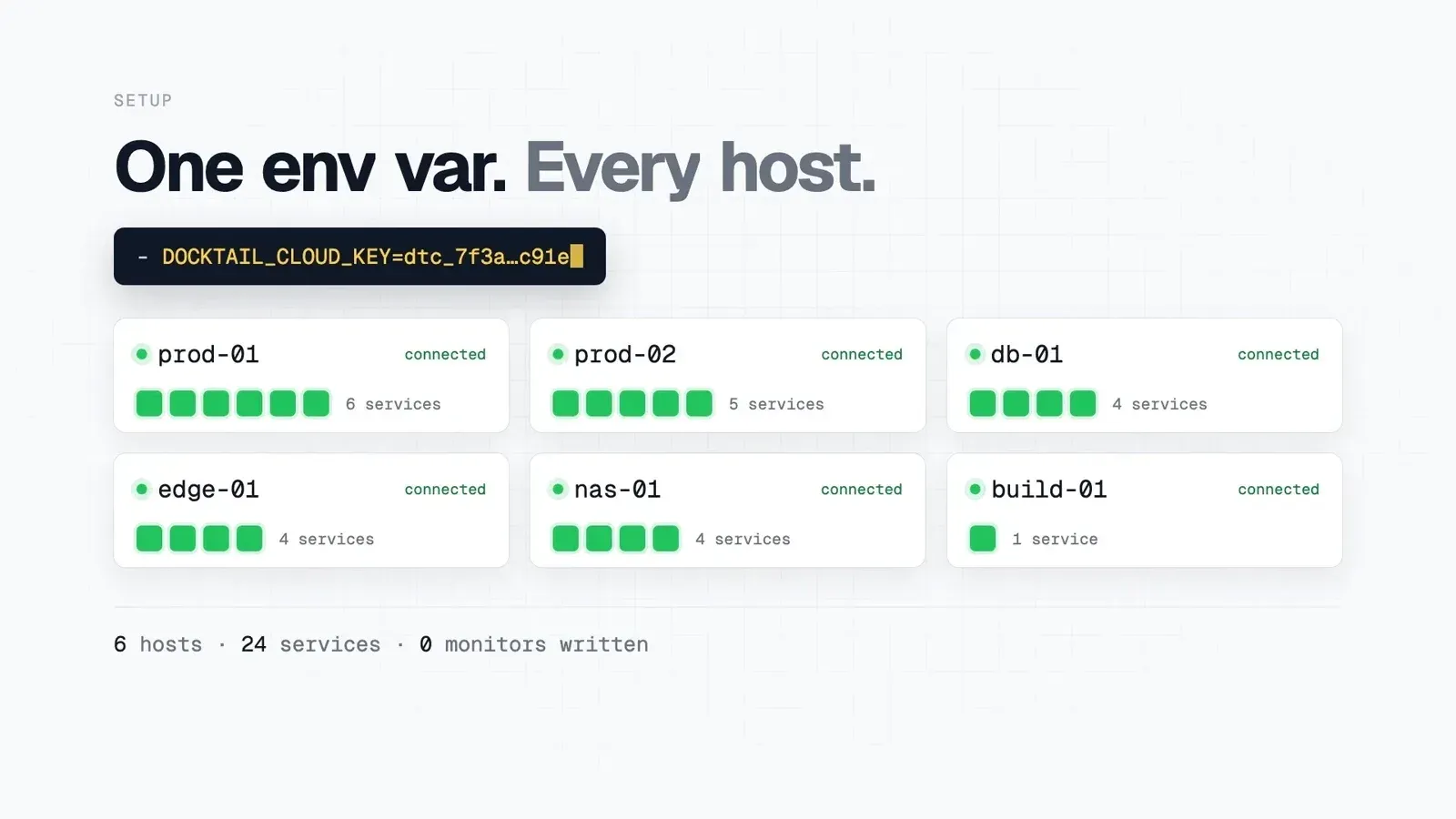
DockTail Cloud is an optional, paid hosted dashboard that monitors DockTail hosts and services. The same agent reports to it when the DOCKTAIL_CLOUD_KEY environment variable is set and stays inert otherwise. According to the pricing page, Homelab costs 5 USD per month for 2 hosts, Team 29 USD per month for 10 hosts and Business 99 USD per month with 30 hosts included and up to 100; Homelab and Team start with a 30-day trial. Related listings on iThub: Tailscale, which DockTail builds on, and Pangolin, a self-hosted reverse proxy and tunnel.
Key capabilities
- Label-based container discovery DockTail watches Docker events and picks up any container labelled
docktail.service.enable=true. The service name, container port and tailnet port come from further labels such asdocktail.service.name,docktail.service.portanddocktail.service.service-port. A labelled container shows up on the tailnet shortly after it starts, and its service goes away when it stops. - Direct proxying to container IPs In the default direct mode, Tailscale connects to the container's address on its Docker network, so no host port has to be published. Setting
docktail.service.direct=falseswitches to published port bindings, which the documentation describes as the path for rootless Docker, where hosttailscaledoften cannot reach container IPs. Containers usingnetwork_mode: hostare served on127.0.0.1;network_mode: nonecannot use direct mode. - HTTP, HTTPS and TCP services Supported service protocols are
http,httpswith automatic TLS,tcpandtls-terminated-tcp, where Tailscale terminates TLS and forwards decrypted TCP. Backends can behttp,https,https+insecurefor self-signed certificates,tcpor TLS-terminated TCP. The README shows a PostgreSQL container exposed on port 5432 as a TCP service. - Tailscale HTTPS certificates Setting
docktail.service.service-port=443exposes a service through Tailscale HTTPS with automatically issued certificates. In the README example the backend container listens on port 3000 while the tailnet address answers on 443. - Tailscale Funnel for public access The
docktail.funnel.*labels publish a container to the public internet through Tailscale Funnel, including a chosen Funnel port and, since 1.8.0, a path such as/webhook. Funnel also requires the funnel node attribute in the tailnet policy file. Without Funnel labels, services stay reachable only from tailnet devices the policy allows. - Several services per container One container can carry more than one Tailscale service definition, as listed in the README feature list.
- PROXY protocol on TCP services TCP forwards normally hide the tailnet client address from the backend. Setting
docktail.service.proxy-protocolto1or2makes Tailscale prepend a PROXY protocol header, which the README shows for a Traefik container on port 443. The backend must accept the header, and HTTP or HTTPS services cannot use it. - Automatic service definitions With
TAILSCALE_OAUTH_CLIENT_IDandTAILSCALE_OAUTH_CLIENT_SECRET, orTAILSCALE_API_KEY, DockTail creates service definitions through the Tailscale API before advertising them and keeps their tags and descriptions in sync with the labels. The OAuth client needs Services write and Devices Core write permissions, plus Auth Keys write for the sidecar method. The first advertisement of a new service may still need approval in the admin console. - Reconciliation loop Besides reacting to events, DockTail reconciles state every 60 seconds by default (
RECONCILE_INTERVAL), so changed container IPs are followed and missing advertisements are restored. If two containers claim the same service name and port, that endpoint is frozen in its current state and an error is logged. - Cleanup controls On shutdown DockTail drains and clears its services unless
SKIP_SHUTDOWN_CLEANUPis set.DELETE_UNUSED_SERVICESis an opt-in setting that deletes tailnet service definitions no host advertises any more, andIGNORE_SERVICE_NAMESlists services DockTail must never drain, clear, delete or restore. - Socket loss handling and health check When the
tailscaledsocket stays unreachable past a 90-second grace period, DockTail exits on purpose so the container restart policy can re-establish the mount. The image's health check runsdocktail health, which reads a status file and reports the last reconcile and the Cloud connection state. - Secrets from files Credentials can be read from mounted files through
FILE__TAILSCALE_OAUTH_CLIENT_IDstyle variables or*_FILEvariants, which works with Docker secrets instead of plain environment values. - Container image and Linux binaries The documented setups are Docker Compose files with Tailscale on the Linux host or a Tailscale sidecar container, plus ready-made
docker-compose.yamlanddocker-compose.sidecar.yamlfiles in the repository. The static binaries need thetailscaleCLI on thePATH, access to both sockets and a supervisor such as a systemd unit withRestart=always. - Hardening options The hardening guide explains that Docker socket access is equivalent to root on the host and documents running DockTail behind a read-only
tecnativa/docker-socket-proxywith only the API sections it needs. DockTail only reads from Docker, needs no Linux capabilities and can run withcap_drop: ALLandno-new-privileges. - Update check Once a day DockTail checks GitHub for a newer release and logs it once. Setting
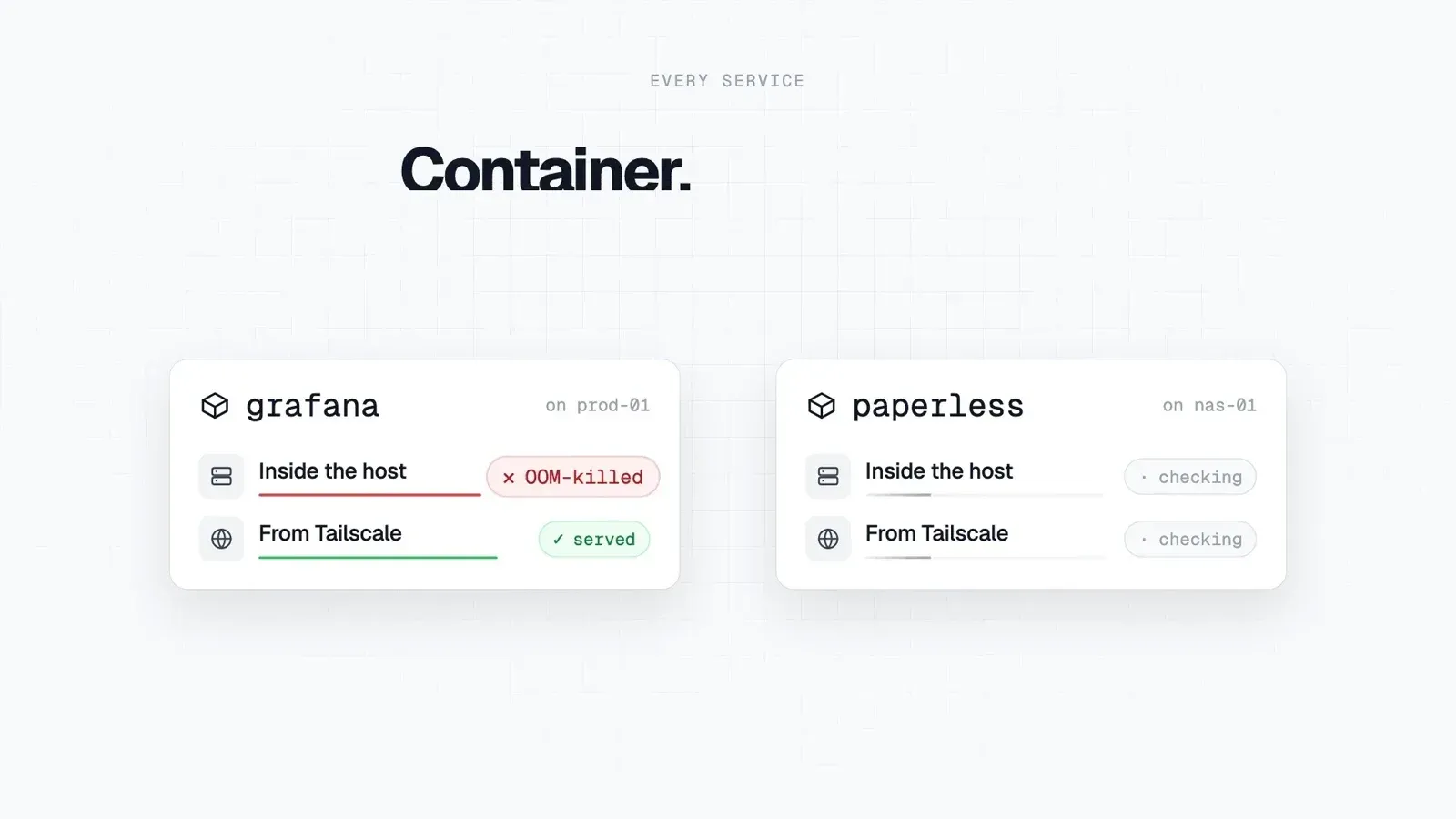
UPDATE_CHECK=falsestops all contact with GitHub. - Optional DockTail Cloud monitoring The hosted service combines a local check from inside the host with the Tailscale control-plane state, so it separates a container failure from an exposure problem such as a service awaiting approval, and from a host that stopped sending heartbeats. Incidents carry the Docker event and a log tail capped at 40 lines and redacted on the host, alerts go to Slack, Telegram, ntfy, webhooks or email, and every plan includes a REST API and a remote MCP server. The link is an outbound-only encrypted WebSocket with no exec, deploy or shell message types.
Where DockTail fits
Reaching homelab apps on the tailnet without published ports
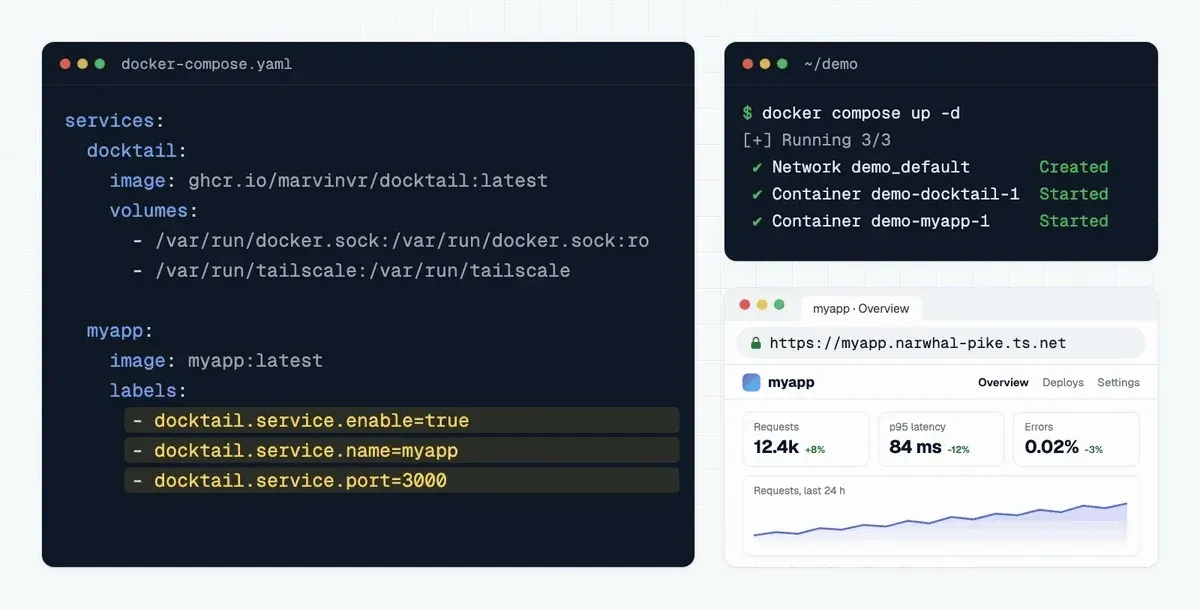
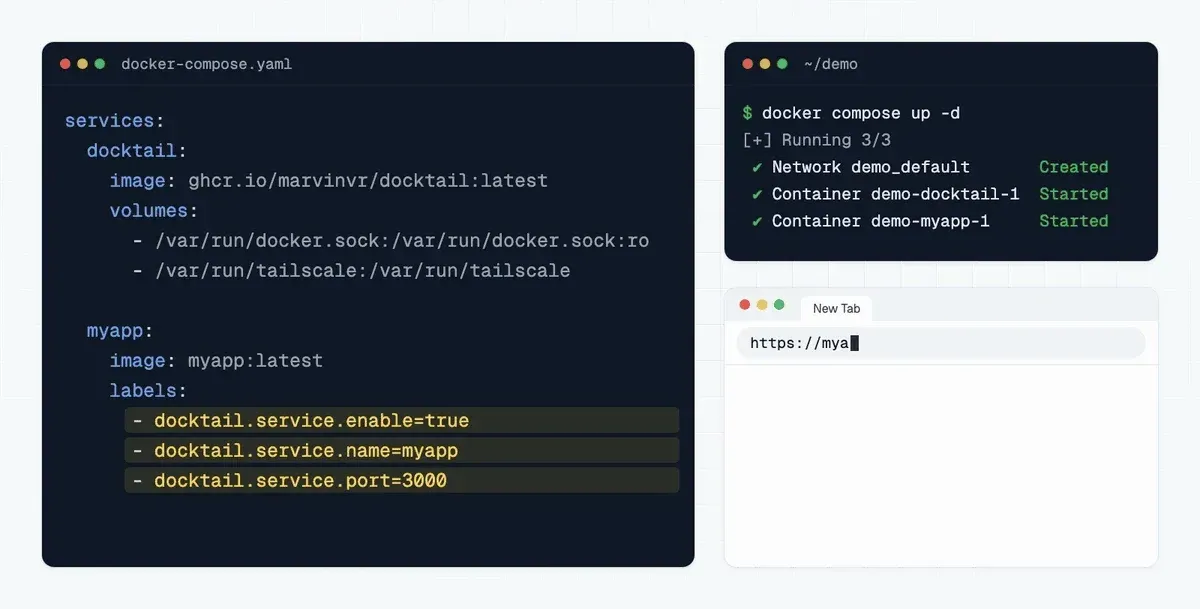
The basic workflow in the Quick Start adds three labels to an app in a Compose file, runs docker compose up -d and opens the app at https://myapp.your-tailnet.ts.net. DockTail runs beside the app with the Docker socket mounted read-only and the /var/run/tailscale directory mounted, and the host is tagged, for example with tag:server, to match the policy's auto-approvers. The project's guides walk through complete setups for Jellyfin and Home Assistant.
Publishing databases and other TCP services
For non-HTTP services, the tcp protocol forwards a raw port such as PostgreSQL on 5432 to tailnet clients. When the backend is itself a reverse proxy like Traefik, the proxy-protocol label passes the original tailnet client IP through to it. tls-terminated-tcp lets Tailscale handle TLS in front of a backend that only speaks plain TCP.
Receiving webhooks from the internet with Funnel
A container that must accept calls from outside the tailnet, such as a webhook receiver, uses the Funnel labels with a Funnel port and, optionally, a path like /webhook. The tailnet policy needs the funnel node attribute for the host. Everything without Funnel labels remains private to the tailnet.
Running on NAS systems, Podman, macOS or Windows
The platform guides describe how Podman's Docker-compatible socket is mounted in place of the Docker socket, how Unraid reaches the host tailscaled, and how Synology, TrueNAS SCALE, macOS and Windows use the Tailscale sidecar, which joins the tailnet as its own device with its own auth key. On Docker Swarm, DockTail runs as a global service on every node and reads container labels, not service-level deploy.labels.
Moving from per-container Tailscale devices
Projects such as TSDProxy and sidecar templates historically created one Tailscale node per app. DockTail keeps a single node per host and advertises apps as services, and the repository includes a migration guide from TSDProxy. The comparison table on docktail.org lists the documented differences between DockTail, TSDProxy, ScaleTail, tsbridge, plain Tailscale Services and DockFlare.
Monitoring several Docker hosts
With DOCKTAIL_CLOUD_KEY set on each agent, every host registers itself by Docker engine identity and its labelled services become monitors without separate URL or interval configuration. The dashboard reports CPU, memory, load and temperature per host and a read-only inventory of the other containers. AI agents such as Claude Code, Cursor or Codex can read incidents through the MCP server, where a read key inspects and only a read_write key can acknowledge or resolve incidents.
Reviews of DockTail
Be the first to share your experience with DockTail.
Write a review
Loading review form…
Found DockTail useful? Upvote it todayYour vote helps other IT teams find it in the daily ranking.