

What is Firezone?
Firezone is a remote access platform built on WireGuard from Firezone, Inc. It connects users and machines to private applications, databases, servers and subnets, with policies that decide which groups may reach each Resource and under which conditions. Clients run on user devices, Gateways run in the customer's own networks next to the Resources, and Firezone operates the admin portal, control plane API, policy engine and relay network as a managed service. The source of all components is published in the firezone/firezone repository.
According to the about page, Firezone was founded in 2021 by Jamil Bou Kheir and Jason Gong as a side project to make WireGuard easier to use. The first commit dates from April 2020, the first public release was announced in September 2021, the company joined Y Combinator's Winter 2022 batch, and the first commercial version of the zero trust product launched in April 2024. On November 3, 2026, Firezone announced Firezone Cloud EU, which keeps identity data, policies and audit logs in Microsoft Azure regions in Sweden and France; US accounts use deployments in Iowa and Arizona.
The repository is a monorepo: the admin portal and control plane are written in Elixir, the data plane, Gateway, relay, headless client and Windows and Linux GUI client in Rust, the macOS and iOS clients in Swift and the Android and ChromeOS client in Kotlin. Licensing is split: the elixir/ directory is under the Elastic License 2.0, and the rest of the code is under the Apache License 2.0. The README states that the licenses permit self-hosting under their terms but that production self-hosting is not officially supported, and that published clients are only guaranteed to work with the managed service.
Components are versioned separately. The latest GitHub release is headless-client-1.5.16, published on November 10, 2026 together with Gateway 1.6.5 and GUI client 1.5.21. The changelog lists for Gateway 1.6.5 faster failover when a Client or Gateway exits abnormally, a limit of 4,096 concurrent DNS Resources per Client on a Gateway, and stripping of IPv4 options from forwarded packets. Gateway 1.6.4 parallelized WireGuard encryption and decryption across worker threads.
The managed service has a free Starter plan for up to 6 users and paid Team, Business and Enterprise plans, listed on the pricing page. The service is SOC 2 Type II compliant according to the README, with reports in the Trust Center. Other WireGuard-based access tools listed on iThub include NetBird, Tailscale and Defguard.
Firezone screenshots
Explore the interface. Open a screenshot to view it at full size.
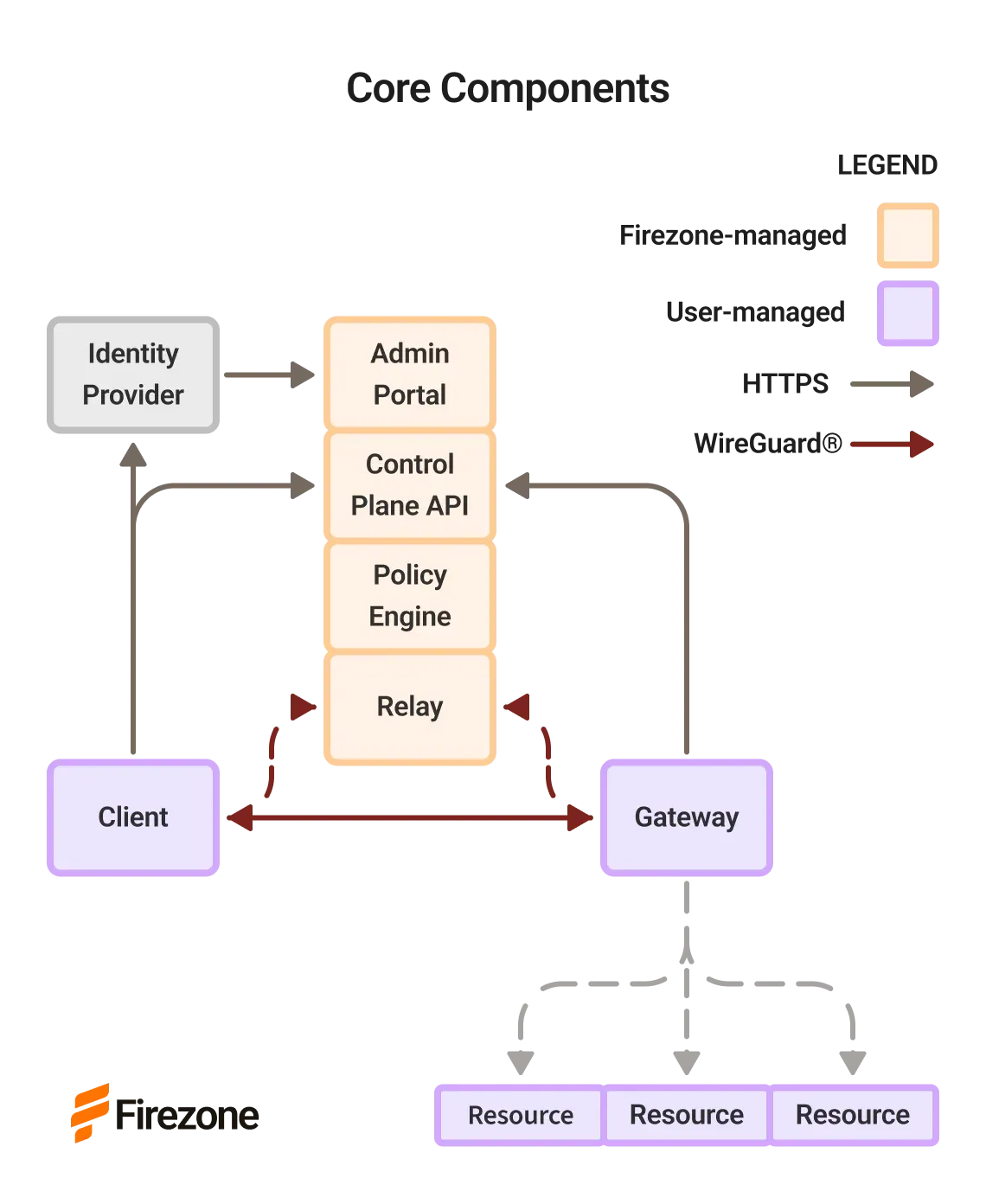
Official component diagram: Firezone-managed portal, API, policy engine and relays; user-managed Clients and Gateways.
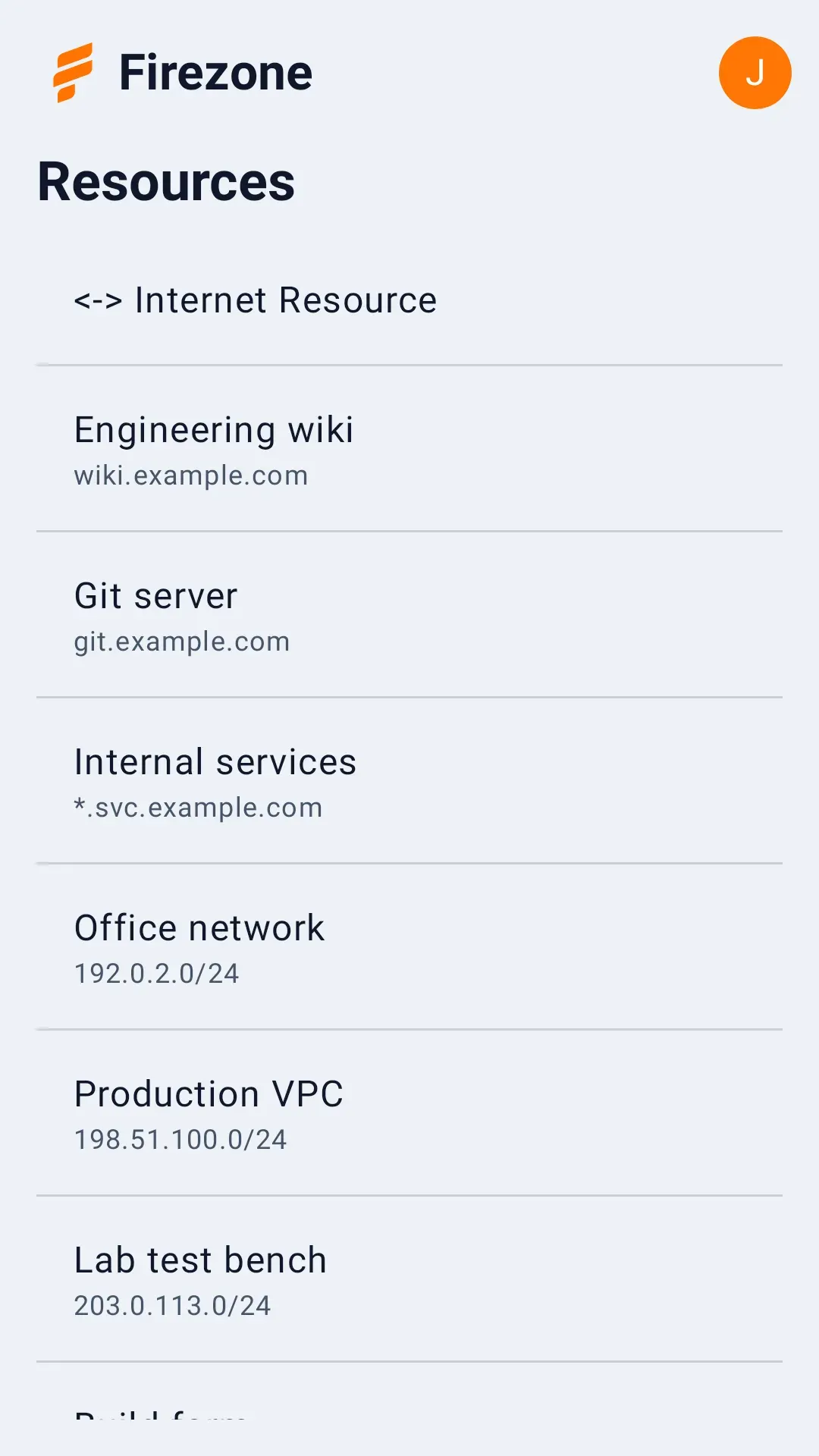
The Android client showing the Resources available to the signed-in user, from the repository screenshots.
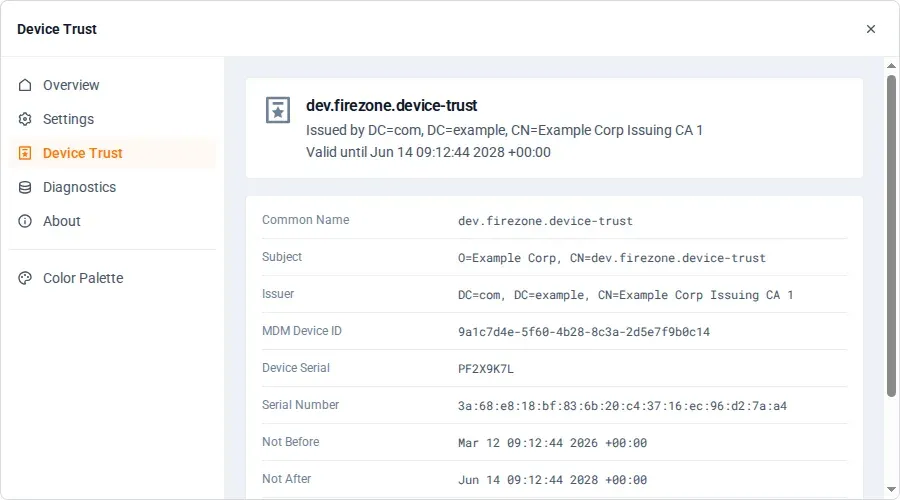
The GUI client Device Trust page with a sample device certificate.
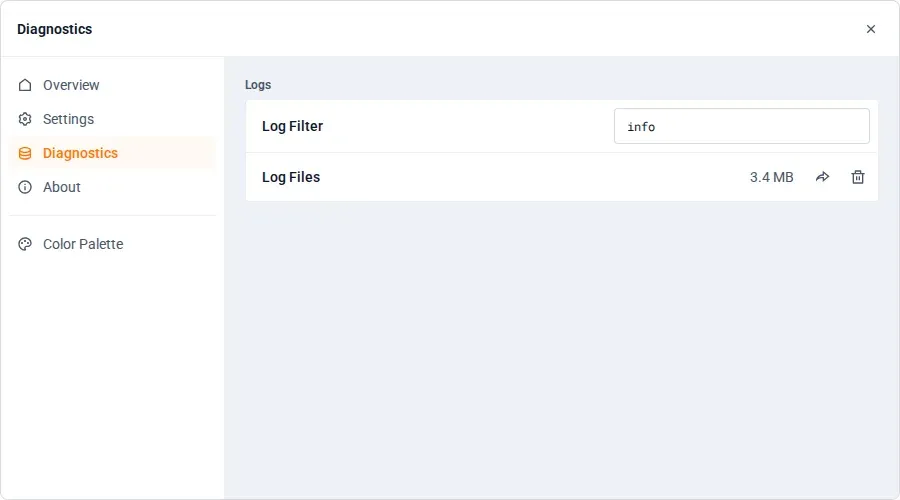
The GUI client Diagnostics page for log filtering and log export.
Source: official Firezone project page.
Key capabilities
- Resources and policies Resources are anything reachable over IP: a DNS name or wildcard, an IP address, a CIDR range or the Internet Resource for full-tunnel routing. Policies grant a group access to a Resource, and traffic restrictions can limit ports and protocols. The Resources documentation describes each type.
- Gateways in your infrastructure Gateways are the data plane: they run in the network that contains the Resources and forward traffic from authorized Clients. Install methods are the Firezone APT repository for Debian and Ubuntu, a hardened systemd service, Docker, a NixOS flake module and a standalone binary; Gateway binaries are published for x86_64, aarch64 and armv7. The docs recommend at least three Gateways per Site for high availability, and sizing guidelines cover host selection.
- Clients for every major platform Native Clients are available for Windows, macOS, Linux, iOS, Android and ChromeOS, plus headless Clients for Linux and Windows for servers and CI jobs. The client download page lists each platform. Headless Client 1.5.16 ships Linux binaries for x86_64, aarch64 and armv7 and a Windows x86_64 executable.
- Direct connections and relays Clients and Gateways connect peer to peer through NAT traversal without opening inbound firewall ports, and the README states connections to new peers are typically ready within 200 ms. When a direct path is not possible, encrypted traffic flows through relay clusters: 34 cities for Firezone Cloud US and 10 cities on four continents for Firezone Cloud EU.
- Identity provider integration Users sign in by email one-time code or any OpenID Connect provider, with documented setups for Google, Microsoft Entra ID and Okta. Directory sync for Google Workspace, Entra ID and Okta keeps users and groups aligned and is part of the Business plan and above.
- Device Trust Device Trust requires a device to present an X.509 certificate issued by the organization's MDM or PKI, with proof of private-key possession over mutual TLS, before access is granted. Documented certificate sources include Microsoft Cloud PKI, SCEPman, DigiCert and SecureW2, and it is included on every plan.
- Device posture checks On Business and Enterprise plans, access can depend on device security checks from MDM and endpoint protection providers. The documentation covers Microsoft Intune, Iru (Kandji), Microsoft Defender for Endpoint, Santa, SentinelOne and Sophos XDR.
- Conditional access policies From the Team plan, policies can allow access based on source IP, authentication method, time of day or country. Client verification, which requires an admin to mark a Client as verified, is available on all plans.
- Audit logs and log sinks Audit logs record configuration changes, sessions, API requests and network flows with 90-day retention. Log sinks on Business and Enterprise stream records to Amazon S3, Datadog, Elastic, IBM QRadar, Microsoft Sentinel, New Relic, Splunk or a generic HTTP endpoint.
- Device Pools Device Pools create a peer-to-peer mesh between Clients with encrypted Client-to-Client WireGuard tunnels, without deploying a Gateway. Policies control which groups can reach the devices in each pool.
- DNS-based routing and NAT64 Traffic can be routed through Firezone by DNS matching rules, while other traffic stays on the local network through split tunneling. IPv4 and IPv6 Resources are supported, with automatic NAT64 between IPv4-only and IPv6-only networks, and non-Firezone queries can use DNS-over-HTTPS providers.
- Load balancing and failover Multiple Gateways in a Site share traffic, and Clients switch automatically from unhealthy Gateways to healthy ones. Gateway 1.6.5 improved failover time when a Client or Gateway exits abnormally.
- REST API, MCP server and automation Every plan includes a REST API and an MCP server for AI assistants such as ChatGPT, Codex and Claude. The docs also cover a Terraform provider and Gateway modules for AWS, GCP and Azure, plus MDM provisioning profiles for Intune, Iru (Kandji) and Jamf Pro.
- Data plane performance The shared Rust data plane uses packet batching and platform offloads such as UDP GSO and GRO on Linux and Android, batched
sendmsg_xandrecvmsg_xon Apple platforms and WinTUN batching on Windows. The README lists tested throughput of 2+ Gbps on iOS and Android and 5+ Gbps on Windows, macOS and Linux. - Plans The pricing page lists Starter (free, up to 6 users and 10 service accounts), Team ($50 per seat per year billed annually, up to 500 users), Business ($80 per seat per year, up to 1,000 users with directory sync, posture checks and log sinks) and Enterprise (custom pricing with unlimited users, SOC 2 and pentest reports and a 99.9% uptime SLA). Prices are shown in US dollars for Firezone Cloud US; EU accounts are billed in euros.
- Regions Firezone Cloud US stores account data in Iowa and Arizona, and Firezone Cloud EU in Sweden and France on Microsoft Azure. The region determines where identity data, policies and audit logs are stored; application traffic is end-to-end encrypted between Clients and Gateways and does not need to pass through the account region.
Where Firezone fits
Replacing a legacy VPN for remote staff
An administrator signs up, creates a Site, deploys Gateways in the office or cloud network and defines Resources for internal web apps, Git servers or subnets. Users install the Client, sign in with the identity provider and see only the Resources their groups are allowed to reach. The quickstart describes the full sequence.
Accessing cloud VPCs and databases
Gateways deployed inside a VPC give engineers access to private databases, web apps or hosts over SSH and RDP without public endpoints. The documentation includes workflows for a Postgres database, a private web app, a remote host and scaling access to a VPC with multiple Gateways.
Connecting CI jobs and servers
Headless Clients run under service accounts, machine accounts used without a user present, so automated workloads such as GitHub Actions jobs can reach private Resources. Site-to-site tunnels connect networks, and service accounts are counted separately from user seats in each plan.
Enforcing device requirements
Organizations with an MDM issue device certificates and require Device Trust in policies, so only managed devices connect. On Business and Enterprise plans, posture checks from Intune, Defender for Endpoint, SentinelOne and other providers add device security checks as a further policy condition.
Routing traffic through a fixed public IP
Full-tunnel routing through the Internet Resource or DNS-based Resources for specific SaaS domains send traffic through a Gateway with a known egress IP. The documentation covers managing SaaS app access this way, and flow logs record the traffic between Clients and Resources.
Meeting audit and data residency needs
Change, session, API request and flow logs are kept for 90 days and can be streamed to a SIEM. Organizations that need account data in the EU create their account in Firezone Cloud EU, as described in the EU region announcement.
Reviews of Firezone
Be the first to share your experience with Firezone.
Write a review
Loading review form…
Alternatives to Firezone
 TailscaleTailscale connects devices and services in a private network called a tailnet, with identity-based access policies, traffic routing and an API for automation.
 NetBirdNetBird is a WireGuard-based overlay network from NetBird GmbH in Berlin. Agents connect peer to peer with relay fallback, while a management service applies group policies, posture checks, DNS and routes. It runs as NetBird Cloud or self-hosted.
 DefguardDefguard is a self-hosted remote access platform combining a WireGuard VPN, an OpenID Connect identity provider, connection-level MFA with FIDO2 keys and firewall rules. Open source under the AGPL, with Business and Enterprise plans.