

What is Defguard?
Defguard is a self-hosted secure remote access platform that combines a WireGuard VPN, identity and access management, multi-factor authentication and network access control in one system. It is developed by defguard sp z o.o., the company named on defguard.net, and the repository describes it as zero-trust access management with WireGuard 2FA and MFA. The documentation states that it can run on an organization's own infrastructure or in the cloud, with no external cloud relay and no telemetry. Defguard is not an official WireGuard project; WireGuard is a registered trademark of Jason A. Donenfeld.
The architecture documentation separates three server components. The Core is the control plane: it stores users, devices and configuration, enforces policy, acts as the identity provider and stays on a private network. The Edge, formerly called Proxy and maintained in its own repository, is the only component with a public HTTPS interface and serves enrollment, password reset and web authentication flows. The Gateway is the data plane: it terminates WireGuard tunnels on a single UDP port, enforces firewall rules and caches its configuration so it keeps working while the Core is unavailable. Components talk to each other over gRPC with TLS. Desktop clients for Windows, macOS and Linux and mobile clients for Android and iOS complete the platform. The server is written in Rust and uses PostgreSQL.
Deployment options documented for the 2.x series include distribution packages for Debian 12, Ubuntu 24.04, Fedora 40 and FreeBSD 14 with an APT repository, Docker Compose with the official Docker Engine, Kubernetes, Terraform, an OVA image and an Amazon Machine Image with CloudFormation. Gateways can also run on OPNsense and VyOS firewalls. A one-line installer starts a Docker Compose stack that the README describes as intended for testing, demonstrations and evaluation, not production.
The latest release is Defguard 2.2.0, published on November 6, 2026. It introduces multi-step MFA flows built from ordered steps, FIDO2 hardware keys as an MFA factor, MFA setup inside the desktop client after enrollment, bulk actions for firewall rules, split DNS with several DNS-enabled locations connected at once, custom MTU per location with group overrides, an automatic WireGuard interface metric on Windows in all-traffic mode, bulk storage of enrollment tokens in Active Directory and a redesigned mobile client. The changelog also lists an LDAP migration wizard, duplication of firewall rules and aliases, removal of secret values from API responses and fixes for two issues labelled DG220-3 and DG220-4.
Licensing is dual. According to the README, the code outside the crates/defguard_core/src/enterprise directory is available under the AGPL, and all code including that directory is covered by a separate Enterprise License. The pricing page lists an Open Source plan that is always free with unlimited users and locations, a Business plan that is free up to 10 users and 1 location and priced with a calculator above that, and an Enterprise plan with custom pricing. Defguard is software that the operator deploys and runs; the vendor does not list a hosted service on the pricing page. Similar WireGuard-based projects on iThub include NetBird, Firezone and Netmaker.
Defguard screenshots
Explore the interface. Open a screenshot to view it at full size.
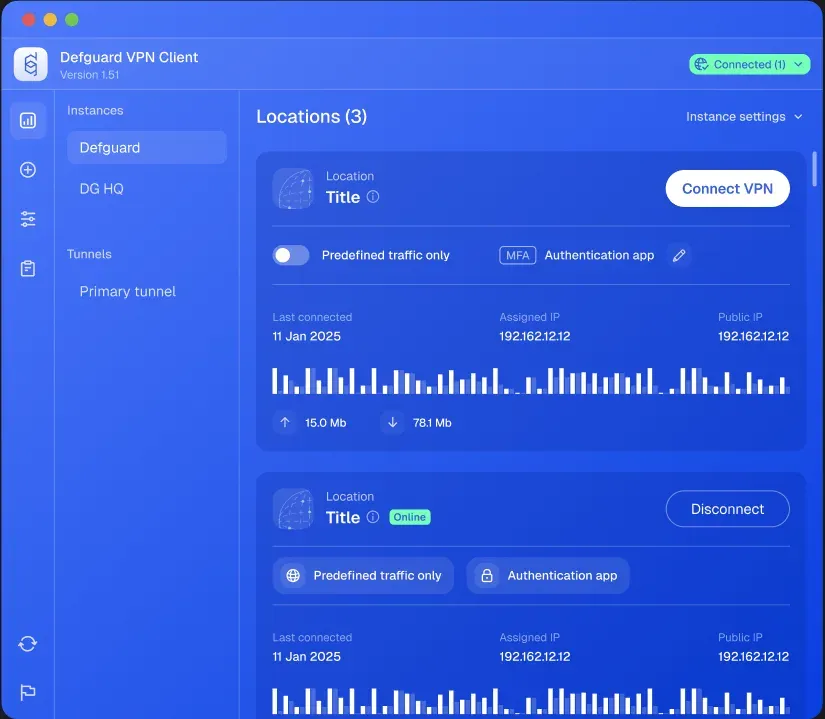
Official desktop client illustration: locations, MFA method and transfer statistics.
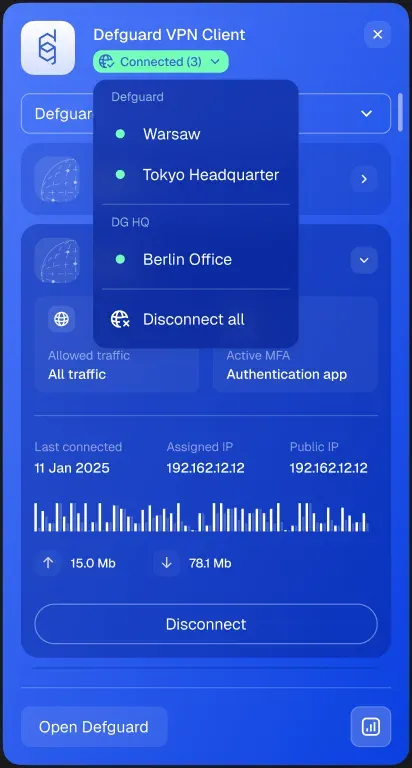
Official client menu showing connected locations across instances and the disconnect-all action.
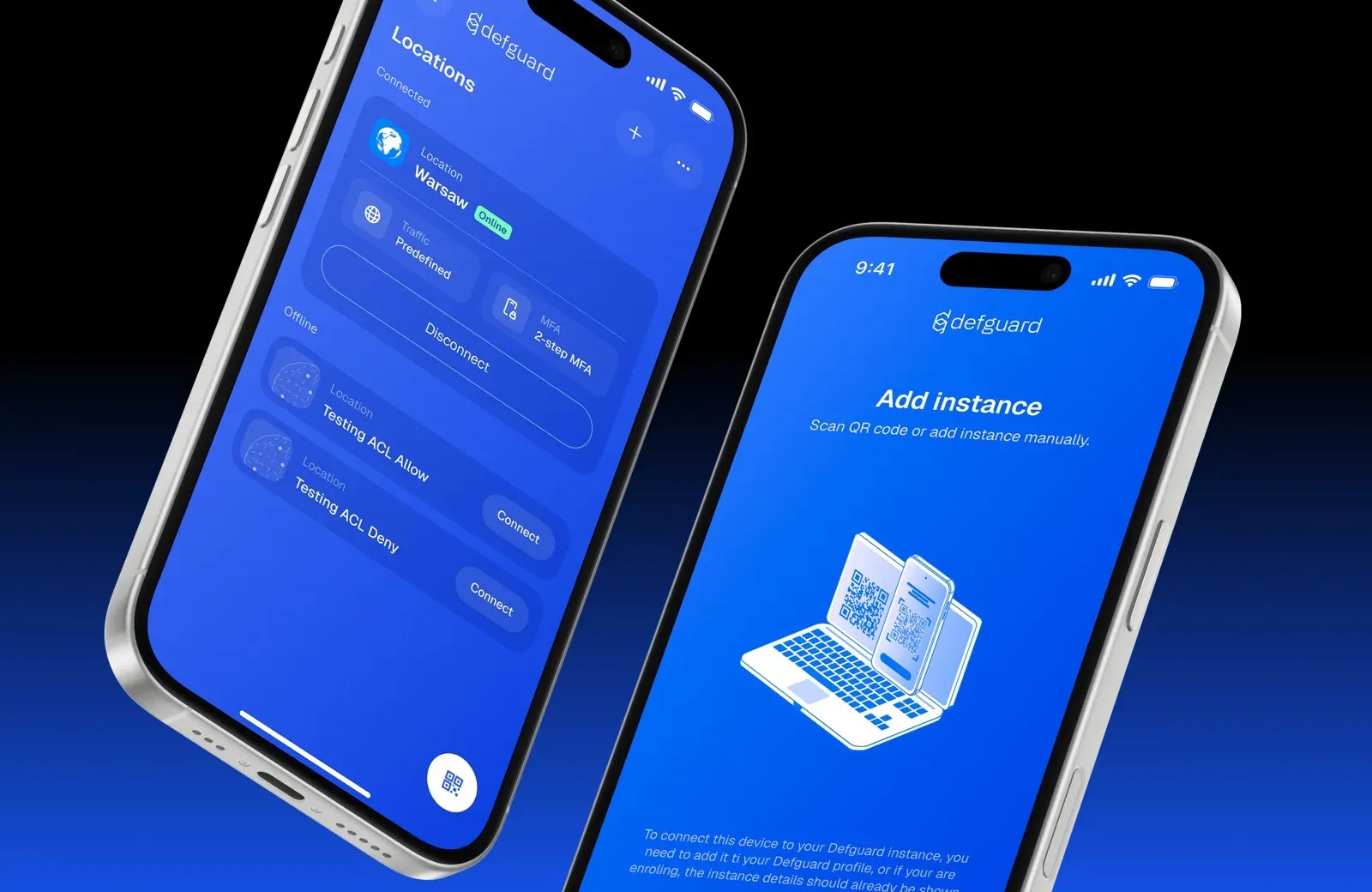
Official release image of the redesigned mobile client from the 2.2.0 notes.
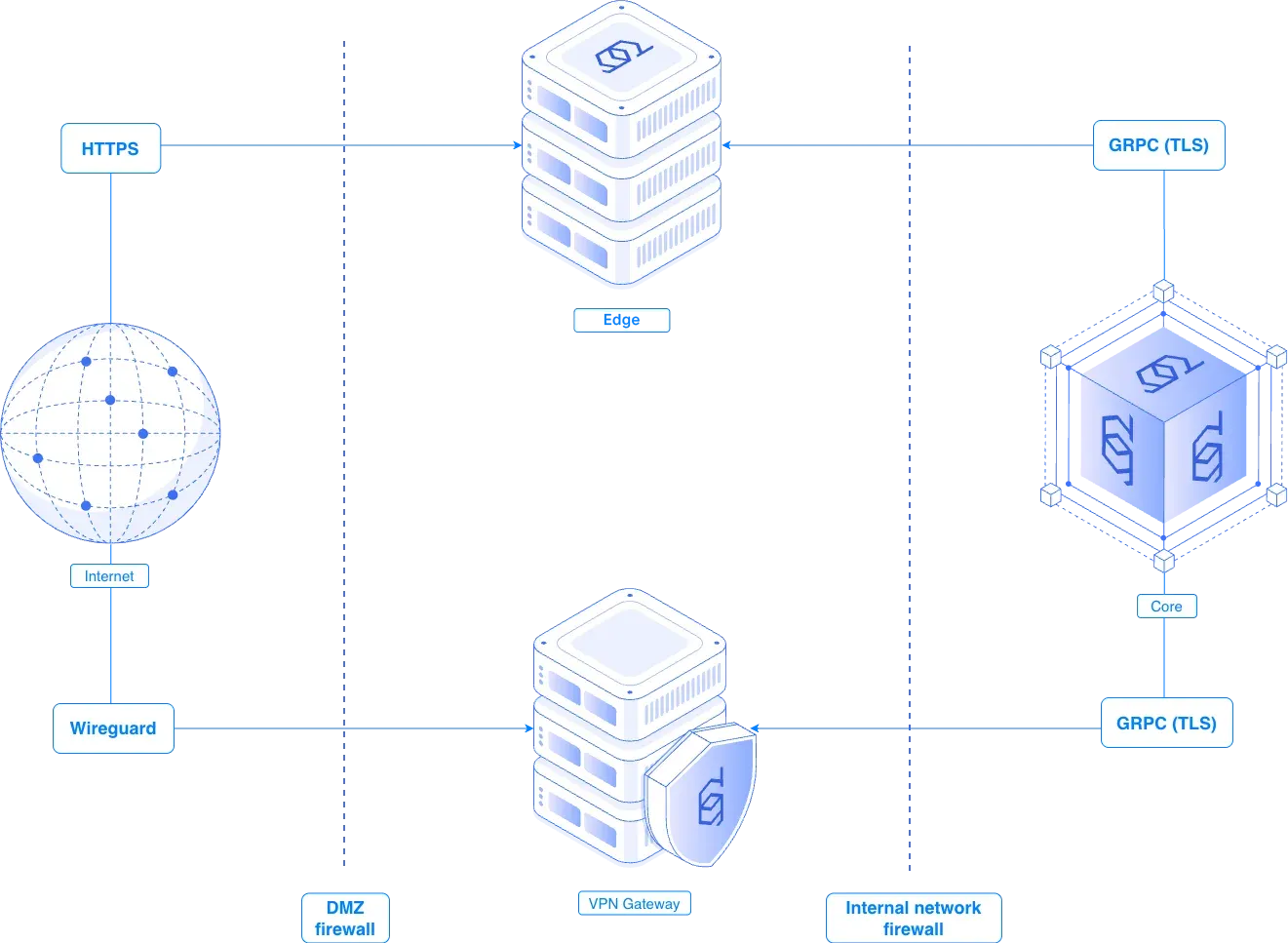
Official diagram: HTTPS to Edge, WireGuard to Gateway, and gRPC with TLS to the Core behind firewalls.
Source: official Defguard project page.
Key capabilities
- WireGuard VPN locations Each VPN location is a WireGuard network with its own Gateway, address range, allowed IPs and access rules, and locations can be limited to all users or to selected groups. Defguard allocates client addresses automatically and supports static IP assignment. It works with kernel WireGuard on Linux and FreeBSD and with a userspace implementation; the Gateway Address and port have to be reachable from the internet, directly or through NAT.
- Connection-level MFA The documentation describes MFA that is applied as part of establishing the VPN connection rather than only at web login. Per-location pre-shared keys act as one-time authorization tokens after a successful MFA check. The internal identity provider performs this step even when users sign in through an external OIDC provider.
- MFA methods Supported factors are TOTP authenticator apps, email codes sent over SMTP, biometric approval in the mobile app and WebAuthn or FIDO2 keys. The features overview names YubiKey, Face ID and Touch ID as examples of FIDO2 authenticators. In 2.2, the server checks that the FIDO2 factor for VPN MFA uses a hardware key.
- Multi-step MFA flows An MFA flow is a named, ordered list of steps; each step lists alternative factors, the user proves one per step, and the tunnel is established only after the last step. One flow can be reused across locations, and a location can carry different flows for selected groups. The pricing page lists multi-step flows under Business and group-level overrides and FIDO2 keys under Enterprise.
- Built-in OpenID Connect provider Defguard acts as an OIDC provider for single sign-on into other applications, with a discovery endpoint, authorization, token and userinfo endpoints and per-application client credentials and scopes. The documentation includes setup guides for Portainer, Grafana, Proxmox, Matrix Synapse, Django, MinIO and Vault. Users can revoke access granted to applications from their profile.
- External SSO and directory synchronization On the Business plan, users can sign in through Google, Microsoft Entra ID, Okta, JumpCloud, Keycloak, Zitadel or a custom OIDC provider, and MFA is still enforced per VPN location. LDAP and Active Directory integration supports two-way synchronization; the features overview notes testing on OpenLDAP. Release 2.2 adds an LDAP migration wizard and new Okta user statuses.
- Remote enrollment and onboarding With remote enrollment, an administrator creates the user and Defguard issues an activation token, sent by email when SMTP is configured or handed over another way. The user enters the token on the Edge page or in the desktop client, sets a password and configures MFA, which becomes mandatory when at least one location requires it. Enrollment through external OIDC is also documented, and mobile devices can be added by QR code.
- Desktop client auto-provisioning For Windows fleets, enrollment tokens can be stored in an on-premise Active Directory attribute or delivered in Entra ID environments, so the client configures itself on first start. Release 2.2 adds a bulk action that writes tokens for selected users into Active Directory in one step. Tokens can also be generated through the REST API.
- YubiKey provisioning (1.x documentation) The documentation for the 1.x series describes a separate YubiKey provisioning service that creates SSH and OpenPGP keys on YubiKey 5 series hardware and sends only the public keys to Defguard. That page states that private keys are not stored and that the GPG master key is deleted after provisioning. The provisioning page does not appear in the current 2.x documentation index, while user profiles still hold SSH and GPG public keys.
- SSH key distribution and forward auth The endpoint
/api/v1/ssh_authorized_keysreturns the public SSH keys of a user, a group or both, for use with the OpenSSHAuthorizedKeysCommandoption. Forward auth protects services behind Traefik or Caddy that have no login of their own, provided they share the base domain of the Defguard instance. Both are listed in the documentation's features section. - Firewall and access control lists The firewall module defines allow and deny rules per location for users, groups, aliases and destinations, and changes are applied to Gateways in real time. Release 2.2 adds bulk enable, disable, deploy and delete actions and rule duplication. On Enterprise, the allowed IPs in each user's WireGuard configuration can be generated from the firewall rules.
- Device posture verification On Enterprise, a location can require a device to meet posture checks before connecting: client version, minimum OS or Linux kernel version, disk encryption, antivirus status, Active Directory membership, device integrity and the age of Windows updates or Android security patches. It requires Core 2.1 with Desktop Client 2.1.0 or Mobile Client 1.7.0 or newer. Device attestation is marked as coming soon on the pricing page.
- Service locations and traffic policies Service locations establish a VPN connection at system boot without appearing in the client: Pre-logon mode on Windows ends the tunnel at user login, and Always on mode runs on Windows and Linux. They are an Enterprise feature. The pricing page lists client traffic policies and admin-only device management under Business, and its comparison table includes an option that blocks non-Defguard WireGuard clients.
- Desktop and mobile clients The desktop client for Windows, macOS and Linux manages several instances and locations, can connect to multiple locations at once, shows connection statistics and handles MFA prompts, and a command-line client exists for network devices. Android and iOS apps support QR onboarding, biometric MFA and FIDO2 keys over NFC. A compatibility matrix lists which client versions support which server features.
- Split DNS and MTU Since 2.2, only the internal domains configured for a location are resolved by that location's DNS servers, and other names use the device resolver. Several locations with DNS settings can be connected simultaneously. Administrators can set the MTU sent to clients per location, with overrides for selected groups.
- Activity logs, notifications and SIEM streaming Activity and audit logs record user and administrative events with filtering by user, module, event type and time range, and users see only their own events. Logs can be streamed in real time to SIEM systems, with Vector and Logstash guides; the README labels streaming as Enterprise while the pricing page lists it under Business. Email, Gateway disconnect and new version notifications are also documented.
- REST API, webhooks and CLI A REST API authenticated with API tokens and outgoing webhooks are documented for integration. The API is listed in the Business plan, and endpoints such as user SNAT bindings, which assign a public egress IP per user and location, are configured through it. The
defguard managecommand connects directly to the database to create admins, reset passwords or disable LDAP and OIDC sync when the web interface is unavailable. - Certificates and high availability A built-in certificate authority can issue certificates for Core and Edge, operators can upload their own PEM certificates, and the Edge can use Let's Encrypt. Enterprise supports several Gateways per location behind a layer 4 load balancer or a floating IP, plus active-active Edge instances. Example Envoy and Compose configurations are in the deployment repository.
Where Defguard fits
Remote access for a distributed team
The documented production layout places Core in an internal network segment, Edge in a DMZ with public HTTPS and the Gateway with a public UDP port and routes to the internal networks offered over VPN. The hardware recommendations give a baseline of at least 1 vCPU and 1 GB of RAM per location for Core, with separate machines for each component. Users install the desktop or mobile client, connect to the locations their groups allow and see transfer statistics in the client.
MFA on every VPN connection
Administrators build an MFA flow from ordered steps, such as an authenticator code followed by a FIDO2 key, and assign it to a location. When a user connects, the client asks for one factor per step and the Gateway admits the peer only after the final step. If a location requires a method the user has not set up, the 2.2 desktop client shows a Configure MFA prompt and guides the setup without re-enrolling the instance.
One identity source for VPN and applications
Defguard's internal OIDC provider signs users into applications such as Grafana, Proxmox or Vault, while LDAP or Active Directory synchronization and external OIDC providers bring users and groups in from existing directories. Group membership then decides which VPN locations and firewall rules apply. The license documentation states that once the user limit of a paid license is reached, directory synchronization stops creating new accounts.
Onboarding users without sharing passwords
An administrator adds a user with the self-enrollment option, and Defguard emails or displays an activation token. The user opens the public Edge page or the desktop client, enters the token, chooses a password and configures MFA; the client is configured in the same step. On Windows, tokens stored in Active Directory let the client provision itself, which the 2.2.0 release notes extend with a bulk action.
Segmenting networks with firewall rules and posture checks
Allow and deny rules per location restrict which destinations users and groups reach through the tunnel, and aliases group addresses and ports for reuse. On Enterprise, posture checks block devices that lack disk encryption, run an outdated OS or client, or are not domain members, and allowed IPs can be generated from the rules so a client only receives permitted subnets. The posture documentation lists the client versions each check requires.
Always-on and machine connections
Service locations bring up a tunnel at boot on Windows and Linux, either until the user logs in, which the documentation describes for sign-in against an identity provider such as Active Directory, or permanently. Network devices such as servers are managed only by administrators, belong to a single location and enroll with the Defguard CLI client or a manual WireGuard configuration. Multiple Gateways per location provide failover on Enterprise.
Install
bash <(curl -sSL https://raw.githubusercontent.com/defguard/deployment/main/docker-compose2.0/setup.sh)Reviews of Defguard
Be the first to share your experience with Defguard.
Write a review
Loading review form…
Alternatives to Defguard
 NetBirdNetBird is a WireGuard-based overlay network from NetBird GmbH in Berlin. Agents connect peer to peer with relay fallback, while a management service applies group policies, posture checks, DNS and routes. It runs as NetBird Cloud or self-hosted.
 FirezoneFirezone is a WireGuard-based remote access platform with Clients for Windows, macOS, Linux, iOS and Android, Gateways you run, identity-based policies, Device Trust and audit logs. Managed service with a free plan; Apache-2.0 and ELv2 source.
 NetmakerNetmaker builds and manages virtual networks on kernel WireGuard. A central server pushes configuration to Netclient agents, WireGuard endpoints and desktop apps, with gateways, relays, egress, private DNS and access policies. Community Edition is Apache 2.0.