

What is Netmaker?
Netmaker is a virtual networking platform built on WireGuard. It creates and manages encrypted overlay networks that connect servers, containers, IoT devices and users across clouds, data centers and edge sites, so that every node can reach the others as if they were on one flat network. The project describes the result as similar to an AWS VPC for arbitrary computers. Netmaker is developed by Netmaker, Inc., a Y Combinator company, in the gravitl/netmaker repository, which was created in March 2021.
The architecture has four parts. The Netmaker server is the configuration and orchestration hub: it stores network and device settings and pushes updates to nodes. A message queue synchronizes configuration changes between server and clients, and clients report local changes such as IP addresses and ports back, so the network updates itself. A DNS service resolves host names across nodes, with domain-specific or catch-all rules and name servers scoped to particular peers. On the client side, Netclient is a headless agent for Windows, Linux, macOS and Docker; plain WireGuard endpoints can join any compatible device; and Netmaker Desktop is an app for user remote access with authentication and session expiry. Netmaker uses kernel WireGuard.
Netmaker is offered as an open-source Community Edition, a self-hosted Professional Edition and a SaaS Professional Edition. The pricing page lists the Community plan as free, Apache 2.0 licensed, with unlimited networks and devices, and paid plans starting at 2 USD per active connection per month, billed on daily active connections, for features such as SSO login, advanced user and access policies, Prometheus and Grafana metrics export, network analytics and the desktop and mobile apps. In the repository, code under the pro/ directory is under a separate Pro license, while the rest is Apache 2.0, as stated in LICENSE.md.
The latest release is v1.7.0, published on August 31, 2026. It adds organisations and tenants so MSPs can run several isolated customer environments from one server, a TCP and WSS uplink on gateways for clients in networks where UDP is blocked, and, in Pro, EDR posture checks with Microsoft Defender, CrowdStrike, SentinelOne and Wazuh and MDM compliance checks with Microsoft Intune, Jamf, JumpCloud and Iru. The release completes a SQL schema migration: existing deployments must run v1.6.0 successfully before upgrading, and v1.7.0 refuses to start otherwise. Release assets contain the netmaker server binary for Linux amd64 and the nmctl CLI for Linux, macOS and Windows.
Documentation is moving from docs.netmaker.io to learn.netmaker.io. Support channels named in the README are Discord, the r/netmaker subreddit and the company blog. The README also lists community projects such as a Traefik setup, an OpenWRT Netclient packager, a CoreDNS plugin, a Terraform provider and a Podman setup. Other WireGuard-based listings: NetBird, Defguard and Firezone.
Netmaker screenshots
Explore the interface. Open a screenshot to view it at full size.
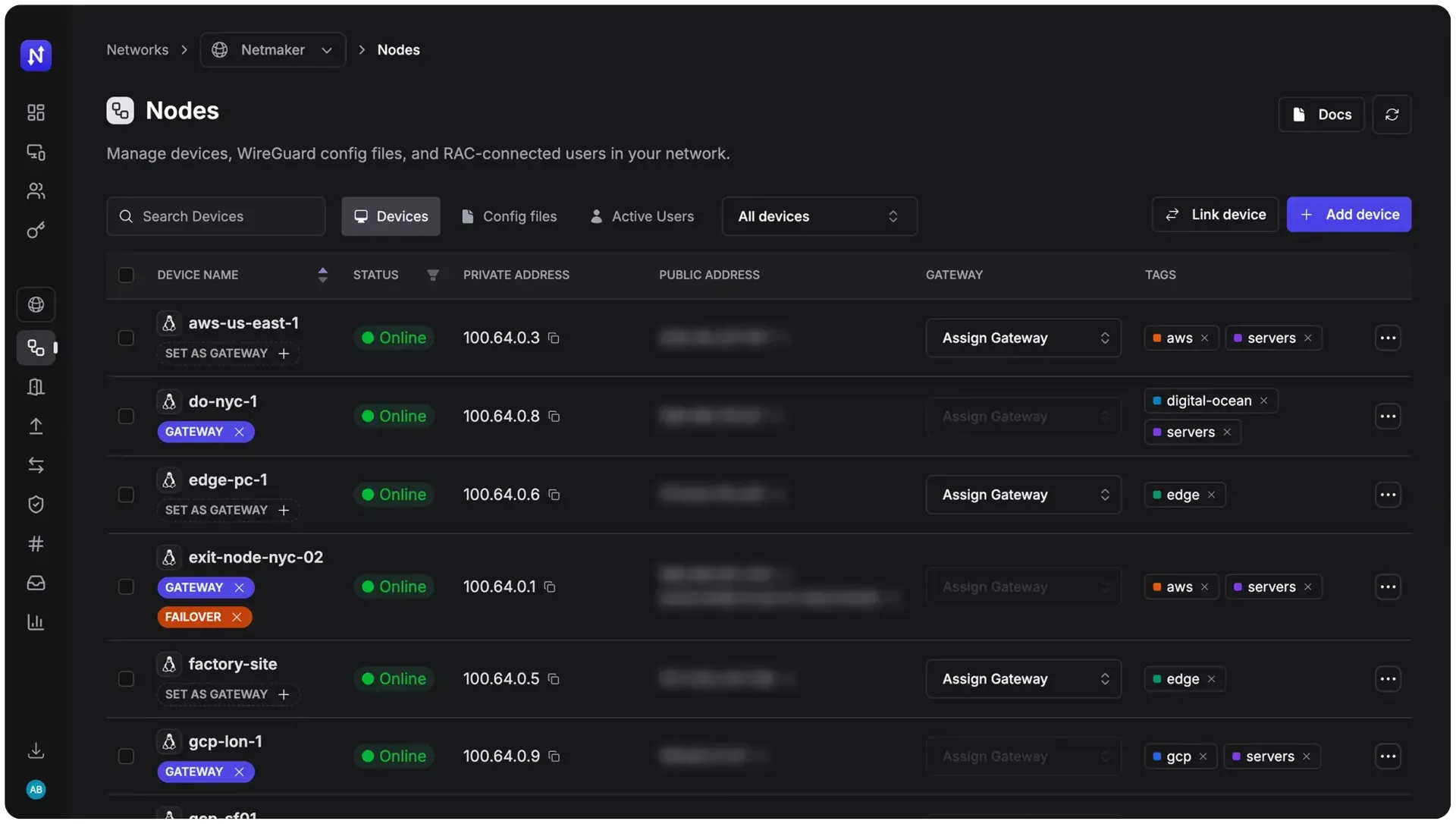
Nodes view of the current Netmaker UI with devices, gateways, failover and tags, from netmaker.io.
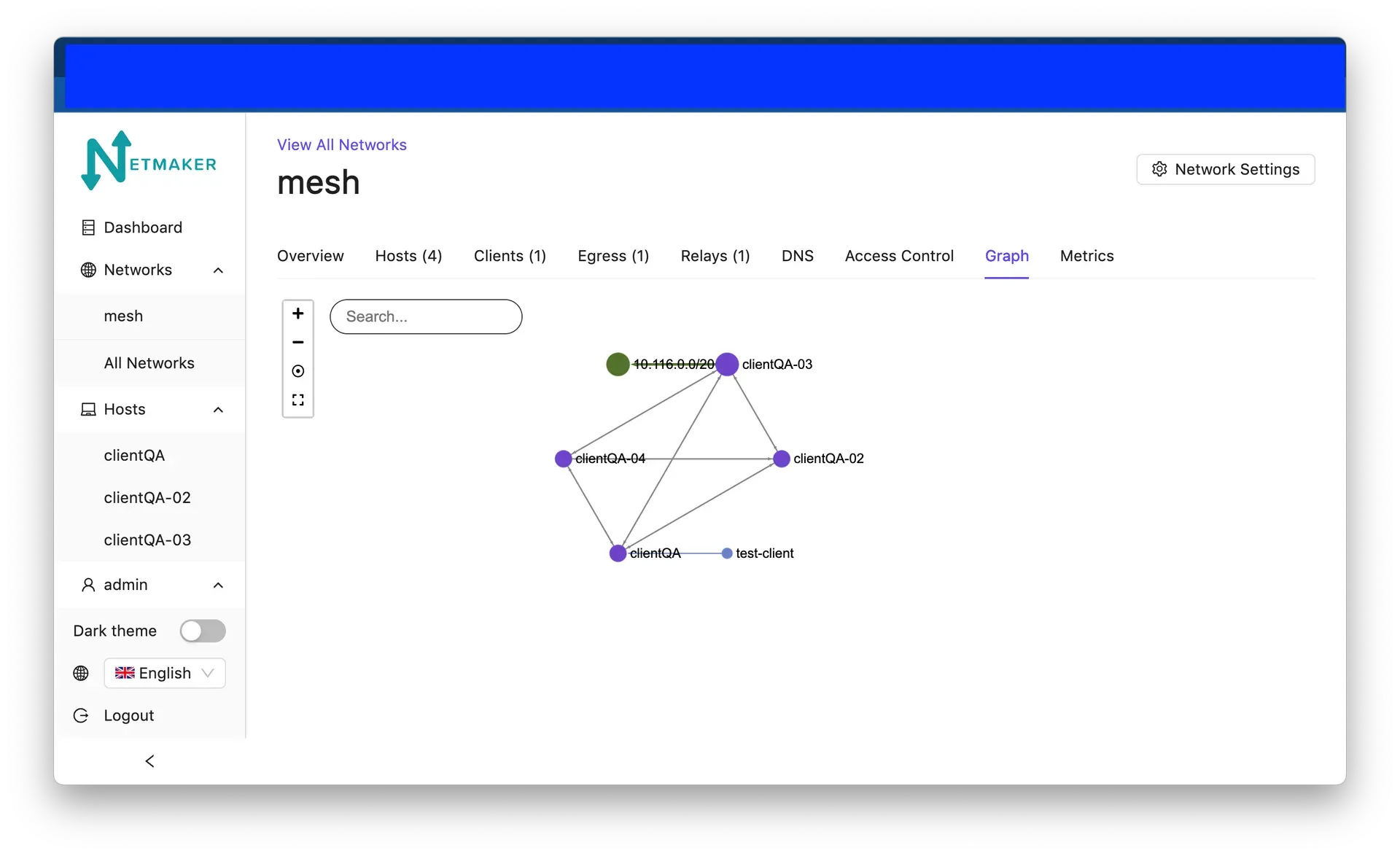
Graph tab of a mesh network in an earlier version of the Netmaker UI, from the Netmaker documentation.
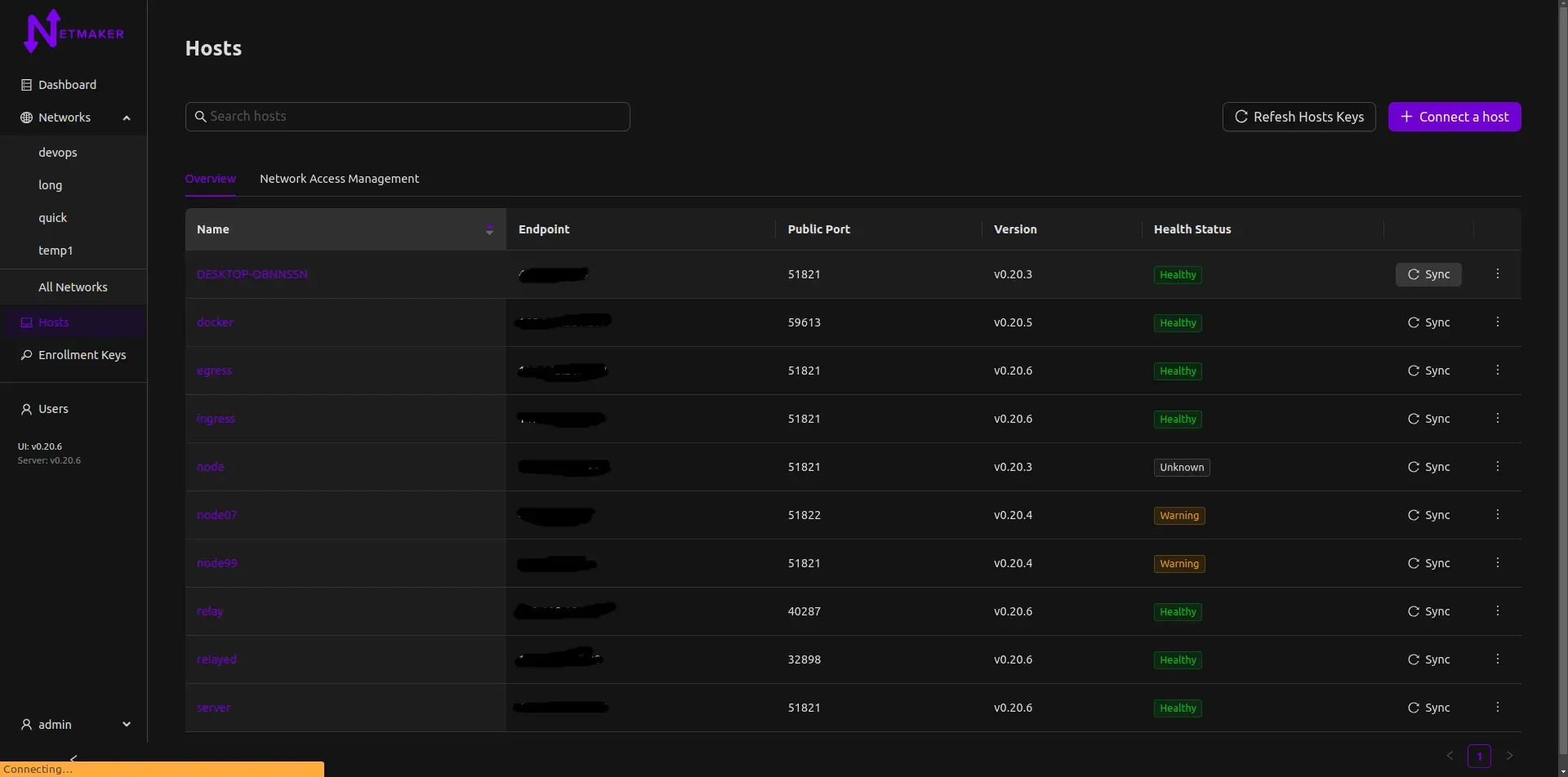
Hosts list with WireGuard ports, client versions and health status in an earlier v0.20 UI; endpoints are redacted.
Source: official Netmaker project page.
Key capabilities
- Automated WireGuard networks The server generates and distributes WireGuard configuration for every node, so peers, keys and routes are kept in sync without editing
wg-quickfiles by hand. Networks can carry IPv4 and IPv6 address ranges. - Mesh, site-to-site and remote access The README lists WireGuard networks, remote access gateways, mesh VPNs and site-to-site connectivity. Several networks can run on one server, and a host can join more than one network.
- Netclient agent Netclient is the headless agent for servers, IoT devices and routing nodes on Windows, Linux, macOS and Docker. It receives configuration through the message queue and reports changes such as new public IPs or ports back to the server. Hosts join with enrollment keys.
- Plain WireGuard endpoints Devices that cannot run Netclient can be added as WireGuard endpoints using generated config files, and the Nodes view lists these config files alongside devices.
- Netmaker Desktop A user-facing remote access app authenticates users, applies their authorization and supports session expiry. The pricing page lists the desktop and mobile apps in the paid plans.
- Gateways and full-tunnel internet gateways Gateways handle incoming and outgoing traffic for a network, including full-tunnel gateways that route a client's internet traffic. Since v1.7.0 gateways can offer a TCP or WSS uplink with self-signed or externally terminated TLS for clients on networks that block UDP.
- Relays and failover Relay nodes carry traffic between peers that cannot connect directly. v1.7.0 can reset a single peer pair that uses an auto-relay without resetting the whole network, and the Professional Edition adds failover servers.
- Egress routing Selected egress nodes route traffic to external networks by IP range or by domain, giving control over which path traffic takes to resources outside the overlay.
- Private DNS The built-in DNS service resolves node names across the network, supports domain-specific or catch-all rules and can scope name servers to specific peers.
- Access control policies Device policies are part of the free Community plan. Paid plans add user policies, advanced access controls and identity provider integration with Google, Microsoft Entra ID, Okta, GitHub or custom OIDC for SSO.
- Web admin UI The UI manages networks, nodes, hosts, gateways, users, enrollment keys and tags, shows host health and versions, and includes a network graph of peers and routes.
- REST API and nmctl The server exposes a REST API, and
nmctlis the command-line client for Linux, macOS and Windows. Since v1.7.0 both can target an organisation and tenant throughX-Organization-IDandX-Tenant-IDheaders or--org_idand--tenant_idflags. - Multi-tenancy for MSPs Version 1.7.0 introduces organisations and tenants, each tenant an isolated environment with its own networks, devices and users. Enterprise and MSP installs sync tenants from the MSP license; Community and standard Pro installs use a single default tenant.
- Device posture with EDR and MDM (Pro) Integrations check endpoint health and risk from Microsoft Defender, CrowdStrike, SentinelOne and Wazuh, and device enrollment and compliance from Microsoft Intune, Jamf, JumpCloud and Iru, matching devices by Entra device ID, serial number, hardware UUID or host name.
- Metrics and observability (paid) Paid plans include network analytics and a metrics exporter to Prometheus and Grafana, with per-peer connectivity, latency, bytes sent and received and uptime.
- Kubernetes operator The pricing page lists a K8s operator in the free Community plan, and the project documents connecting Kubernetes clusters across regions and providers.
- Quick install script On an Ubuntu 24.04 VM with a static public IP, ports 443 and 51821 open and an optional wildcard DNS record,
nm-quick.shinstalls the Community Edition. A separate guide covers the self-hosted Pro version, and the SaaS version is created from the Netmaker account portal.
Where Netmaker fits
Replacing a remote access VPN
A remote access gateway connects users' laptops to private networks. Users sign in through Netmaker Desktop, which applies their access policies and session expiry, while administrators manage users and policies in the web UI. Full-tunnel gateways can also route the users' internet traffic.
Site-to-site and multi-cloud networking
Hosts in AWS, Azure, GCP, on-premises sites and branch offices run Netclient and join one network. Egress nodes expose the subnets behind them, and the server keeps the WireGuard peers in sync as addresses and ports change.
Managing servers, edge sites and IoT devices
Headless Netclient agents on servers, robots, drones or IoT gateways give administrators a private, encrypted path for remote management. Devices that only support WireGuard can be added as plain endpoints with generated configs.
Connecting Kubernetes clusters
The documentation lists connecting clusters across regions or cloud providers as a use case, and the free plan includes a Kubernetes operator. The README also points to community projects for multi-cluster setups and K3s.
Operating many customer networks as an MSP
Since v1.7.0 a single server can host organisations and tenants, each with its own networks, devices and users. The API and nmctl select the tenant per request, and MSP licenses create and remove tenants automatically.
Self-hosting the Community Edition
The quick install guide starts from an Ubuntu 24.04 VM with a static IP: open TCP and UDP 443 and 51821, optionally set a wildcard DNS record, run nm-quick.sh, then create a network and connect hosts with enrollment keys. Upgrades from older versions follow the documented path, for example through v1.6.0 before v1.7.0.
Enforcing device posture (Pro)
With EDR or MDM integrations configured under Integrations or through the REST API, Netmaker evaluates agent health, risk level and enrollment compliance from the connected platforms as part of device posture policies, alongside the existing posture checks.
Install
sudo wget -qO /root/nm-quick.sh https://raw.githubusercontent.com/gravitl/netmaker/master/scripts/nm-quick.sh && sudo chmod +x /root/nm-quick.sh && sudo /root/nm-quick.shReviews of Netmaker
Be the first to share your experience with Netmaker.
Write a review
Loading review form…
Alternatives to Netmaker
 NetBirdNetBird is a WireGuard-based overlay network from NetBird GmbH in Berlin. Agents connect peer to peer with relay fallback, while a management service applies group policies, posture checks, DNS and routes. It runs as NetBird Cloud or self-hosted.
 TailscaleTailscale connects devices and services in a private network called a tailnet, with identity-based access policies, traffic routing and an API for automation.
 ZeroTierZeroTier connects devices, VMs and containers into virtual Layer 2 networks over an encrypted peer-to-peer protocol. ZeroTier One agents run on desktop, mobile, NAS and Docker; networks are managed in ZeroTier Central or a self-hosted controller.