

What is Pangolin?
Pangolin is an open-source networking and security platform built on WireGuard, developed by Fossorial, Inc. The project describes it as a SASE platform that combines a zero-trust VPN, a zero-trust reverse proxy, privileged access management and an identity-aware AI gateway under one identity and policy model. Access is granted per resource rather than per network: an administrator defines HTTPS applications, hosts, CIDR ranges, SSH, RDP, VNC or AI gateway resources, then assigns them to users and roles. Nothing on a connected network is reachable until a resource is defined and access is granted, as explained in How Pangolin Works.
According to the system architecture documentation, Pangolin is split into a control plane and a data plane. The Pangolin server (this TypeScript repository) stores organization state in a database, serves the dashboard and REST API, handles authentication and pushes configuration over WebSocket. A node combines Traefik for TLS and HTTP routing, Gerbil as the WireGuard tunnel manager and relay, and Badger as the Traefik forward-auth middleware. Site connectors run inside remote networks and open outbound WireGuard tunnels, so no inbound ports or public IP are needed there; Newt is the shared site networking stack and Olm the shared client networking stack used by the desktop and mobile apps. Each component has its own repository under the fosrl GitHub organization.
There are three deployment options. Pangolin Cloud is the managed service at app.pangolin.net. Self-hosted Community Edition is free and licensed under AGPL-3. Self-hosted Enterprise Edition uses the ee Docker image and a license key under the Fossorial Commercial License; it is free for personal and hobbyist use and for organizations with less than 100,000 USD gross annual revenue, while larger organizations need a paid license. The repository LICENSE states that files without a header are AGPL-3, files with a Fossorial Commercial License header follow that license, and AGPL-3 files can also be licensed commercially by agreement.
The latest release is 1.26.0, published November 4, 2026. Its release announcement centers on sessions: a list of active resource sessions with revocation, continuous session revalidation against OIDC identity providers using refresh tokens, and SSH session logs with command transcripts for Pangolin SSH mode (these three are Enterprise Edition features in the release notes). It also adds custom DNS records on domains delegated to Pangolin, custom auth page domains on self-hosted servers, an optional match on base wildcard domains, opt-in CrowdSec bot detection and automatic background updates for the Windows client. SSH session logs need Pangolin CLI 0.2.0 or Newt 1.20.0 or later on the site, and the 1.26 migration tries to update Badger to 1.8.0. Version 1.25 added HTTP redirects, mTLS on public resources, roles on machine clients, load balancing strategies and blueprint export; 1.24 added exit nodes and a subnet router for Linux machine clients.
Self-hosting uses Docker containers for Pangolin, Gerbil and Traefik, installed by an interactive installer for AMD64 and ARM64 Linux servers, with manual Docker Compose, Podman Quadlets, Kubernetes (Helm, Kustomize, Helmfile, Argo CD, Flux) and prebuilt AWS and DigitalOcean images documented as alternatives. Tunneling is optional: without Gerbil, Pangolin runs as a standard reverse proxy. High availability through clustering is listed as an Enterprise feature. Similar WireGuard-based access tools listed on iThub include NetBird, Firezone and Defguard; OpenZiti is a zero-trust overlay that does not use WireGuard.
Pangolin screenshots
Explore the interface. Open a screenshot to view it at full size.
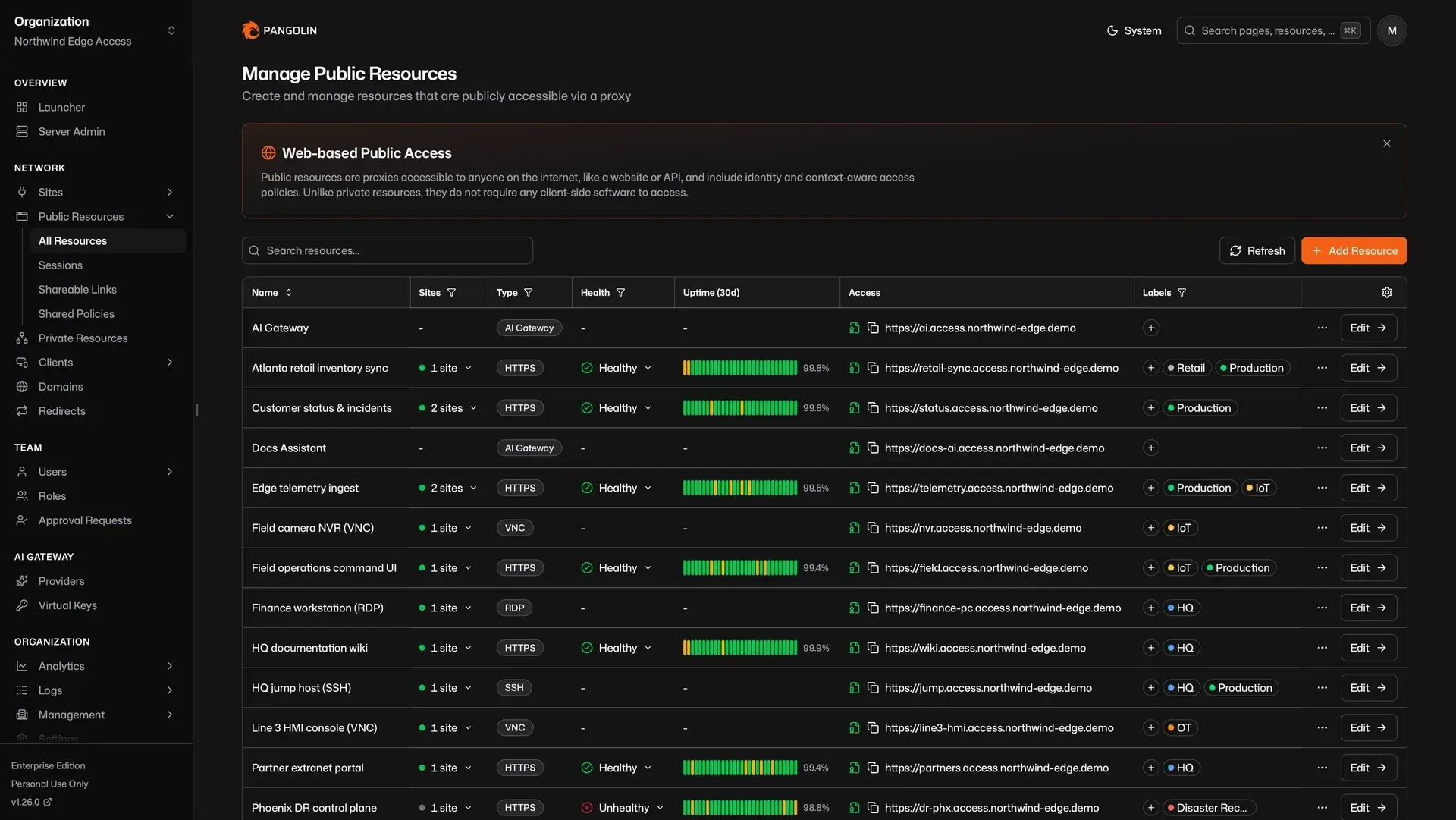
Official Pangolin screenshot of the public resources table with health status, uptime bars, access URLs and labels.
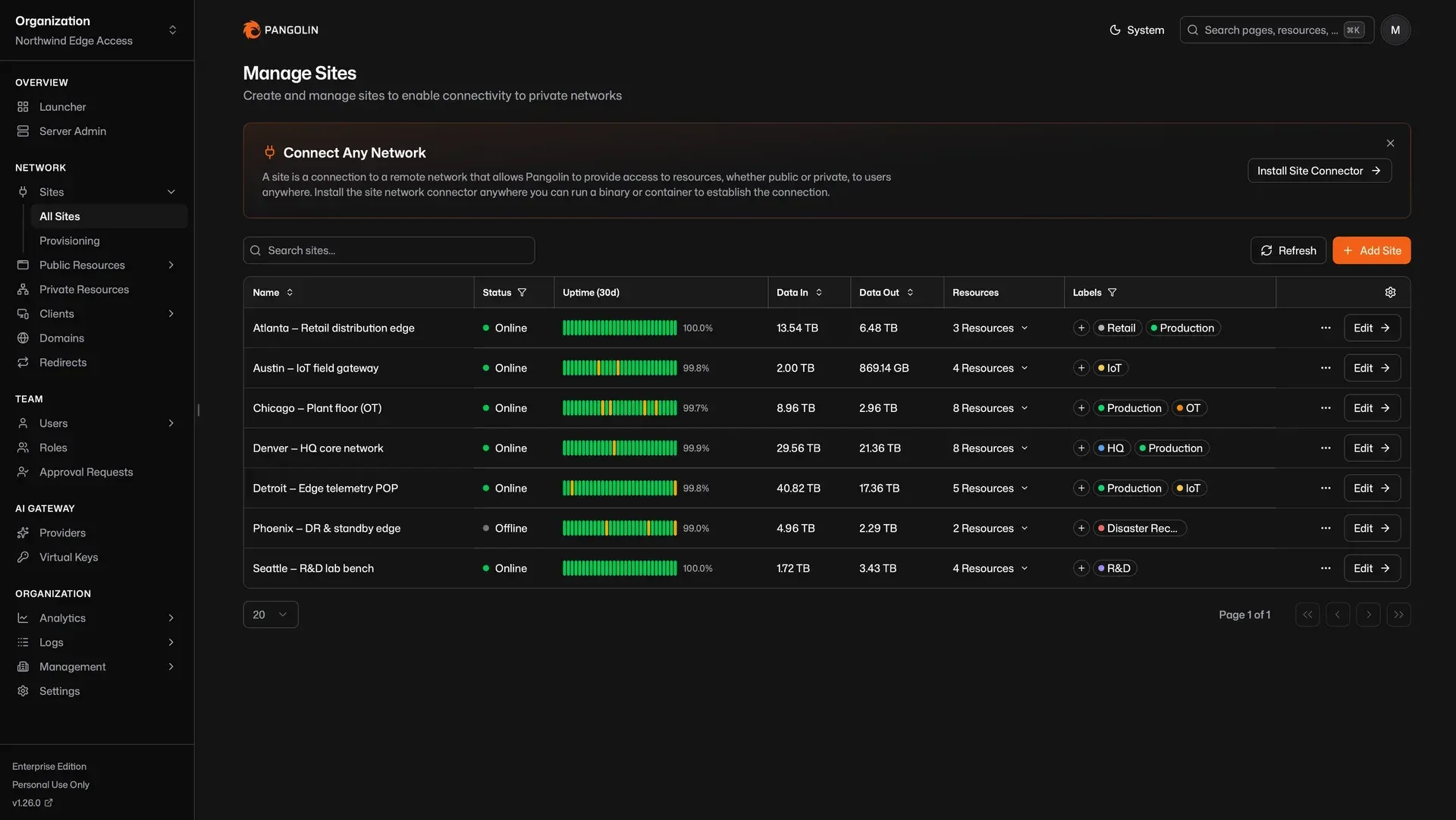
Sites overview: each site connector with status, uptime, traffic totals and the resources it serves.
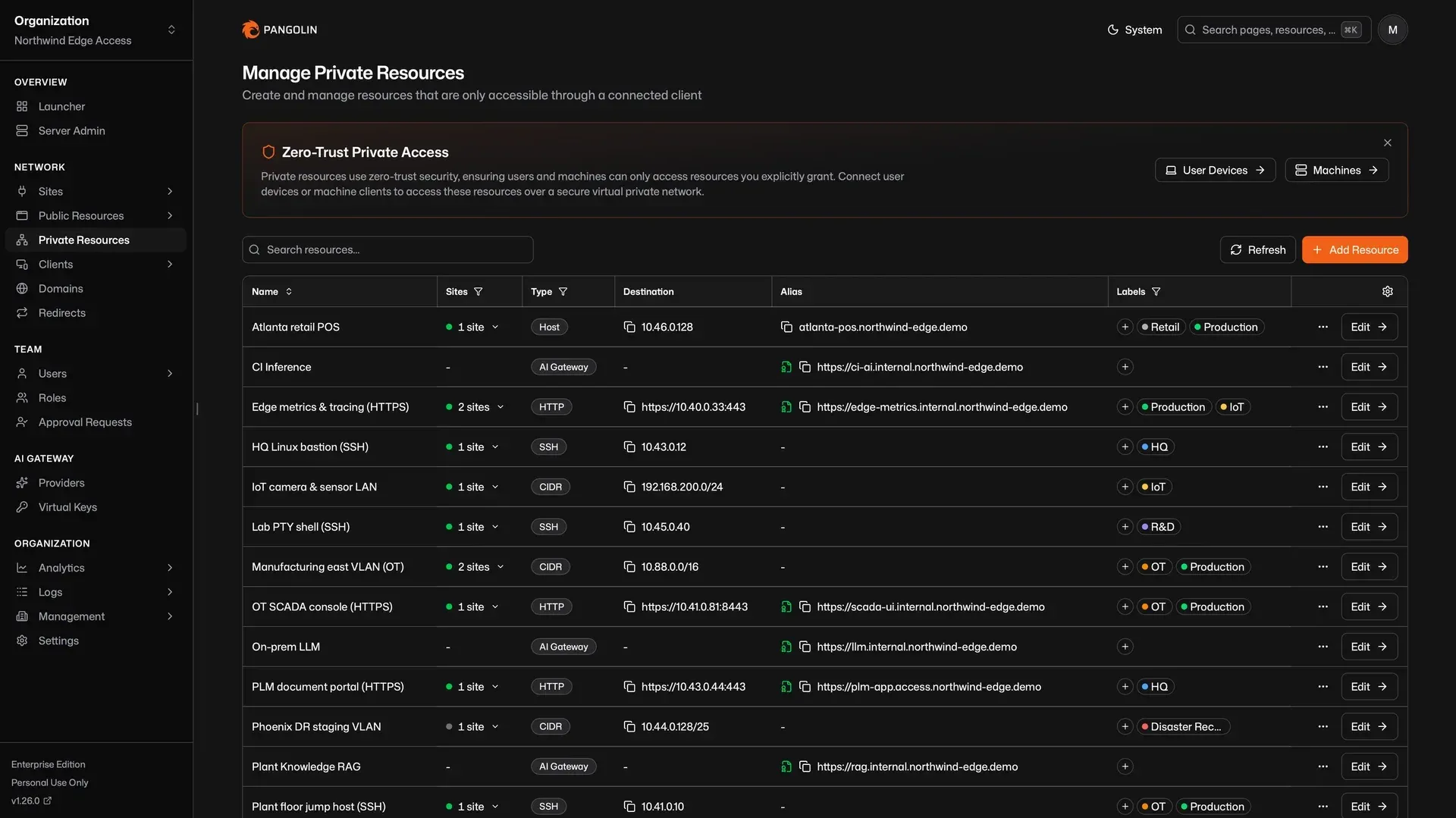
Private resources reachable only through a connected client: hosts, CIDR ranges, SSH, private HTTP and AI gateways.
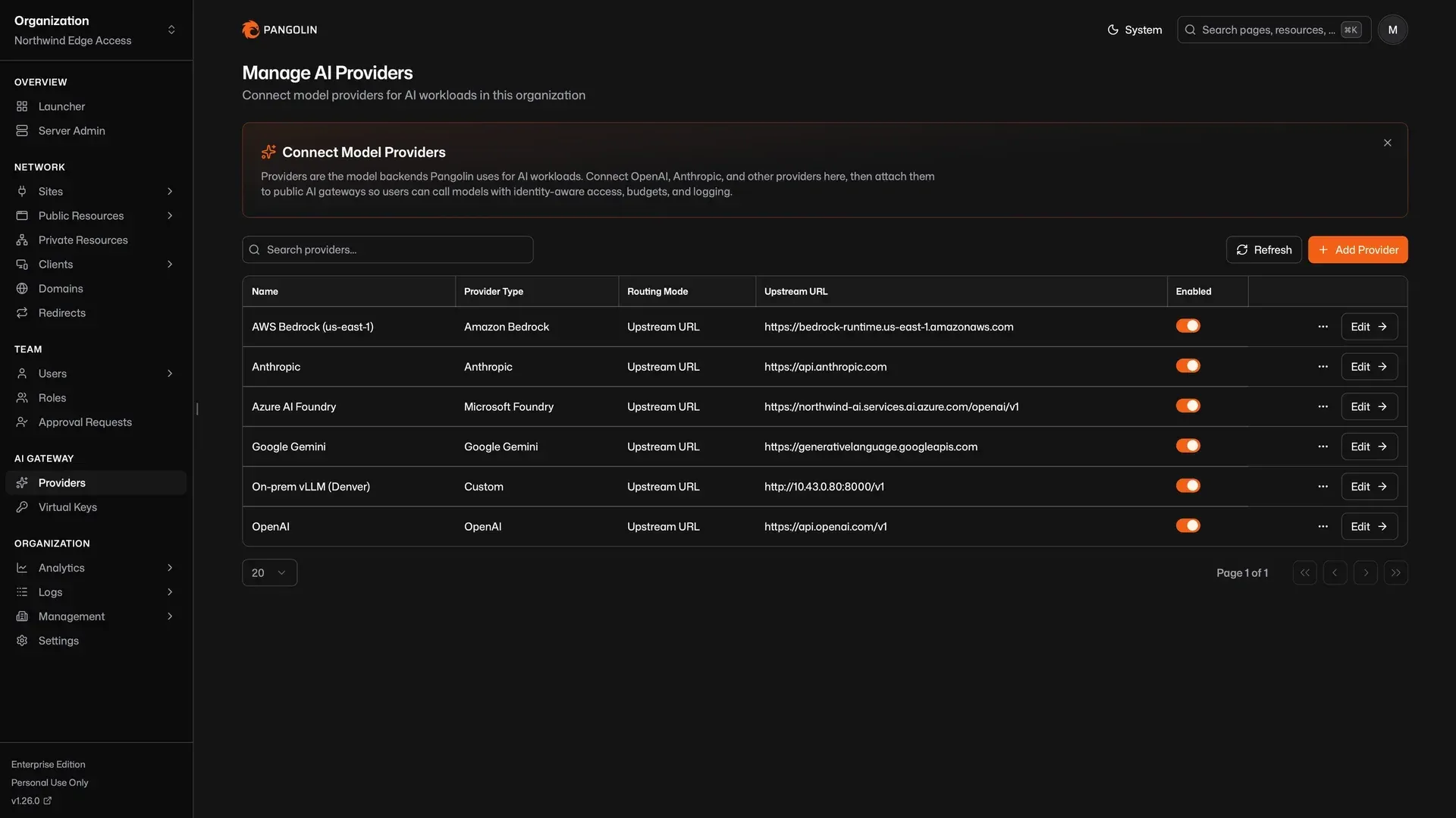
AI gateway providers configured once per organization, including a self-hosted vLLM endpoint.
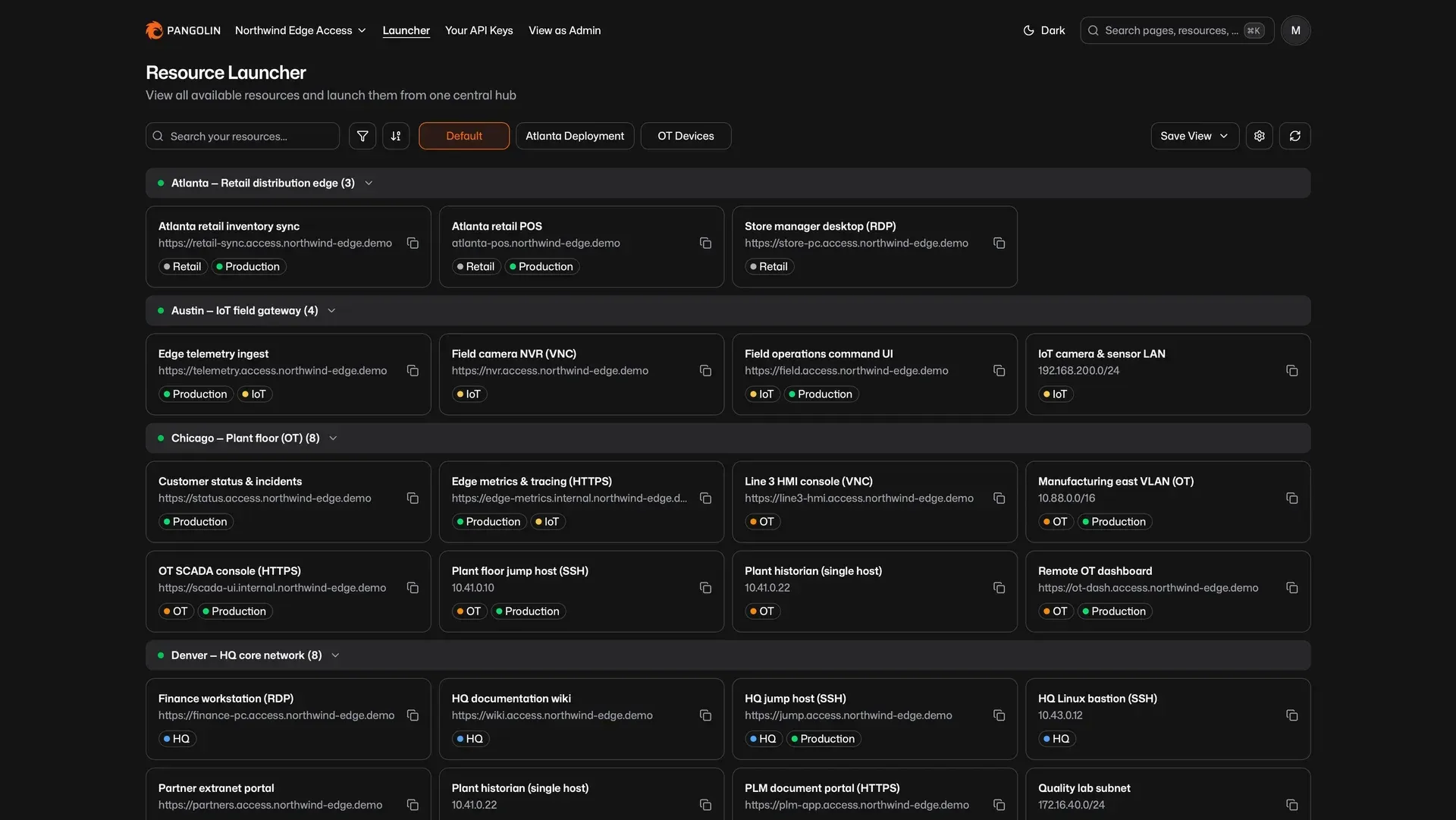
Resource launcher: a user's accessible resources grouped by site, with saved views and filters.
Source: official Pangolin project page.
Key capabilities
- Sites and site connectors A site connects a remote network to the Pangolin server through a lightweight user-space connector that opens outbound tunnels and uses NAT traversal, so the network needs no public IP or open inbound ports. Sites are deny-by-default: deploying one exposes nothing until resources are defined. The connector runs as a static binary for Linux, macOS and Windows on AMD64 and ARM64, as the
fosrl/pangolin-cliDocker image, or on Kubernetes through Helm and Kustomize, and it can install itself as a systemd, launchd or Windows service. See Install Sites. - Public resources through the reverse proxy Public resources are HTTPS applications and APIs published on a public domain with automatic Let's Encrypt certificates, routing, load balancing and health checks. Authentication happens at the node through Badger before traffic enters the tunnel. Raw TCP and UDP public resources bind a port on the self-hosted server and are proxied without an authentication layer; on Pangolin Cloud they require a remote node.
- Browser-based SSH, RDP and VNC SSH terminals, Windows remote desktop and VNC displays can be published as public resources and opened in a web browser without installing a client. SSH resources support password, key or Pangolin identity authentication, and the Pangolin SSH mode adds privileged access management with role-based SSH management.
- Private resources over client tunnels Private resources stay off the public internet and are reached through a connected Pangolin client: single hosts, port ranges, CIDR network ranges, SSH targets and private HTTPS endpoints with edge TLS termination. Clients connect peer to peer to the site after NAT hole punching, use the LAN when both are on the same network (Pangolin 1.21 or later), and fall back to relaying through Gerbil on UDP 21820 when a direct path fails. DNS aliases give friendly names to destinations.
- Clients for desktop, mobile and servers The client platforms are Windows, macOS, Linux, iOS and iPadOS, Android and the Pangolin CLI. The Linux desktop client ships deb, rpm and Arch packages for x86_64 and ARM64 and needs WebKitGTK 4.1, which excludes RHEL 9. Machine clients for servers and automation authenticate with an ID and secret. The older Olm command-line client is marked deprecated in the docs.
- Multi-site routing and exit nodes When the same resource is reachable from more than one site, Pangolin routes through the available connectors and fails over between them. Release 1.24 added exit nodes and a subnet router for Linux machine clients, and release 1.25 added load balancing strategies for resource targets.
- Users, roles and identity providers Users can be local Pangolin accounts or come from external identity providers through OAuth2/OIDC, Google or Azure Entra ID, with guides for providers such as Pocket ID. Access is assigned per resource to users and roles, and IdP users and roles can be auto-provisioned. On the cloud pricing page, external IdPs start with the Team plan.
- Resource authentication options Besides SSO, public resources can be protected with PIN codes, passcodes, email one-time passwords, shareable links with access tokens, allow-lists and geoblocking. Organization security settings enforce two-factor authentication, session length and password expiry. Release 1.26 fixed passkey registration in Safari.
- Session management and revalidation Release 1.26 lists every active session on public resources with actor, resource, authentication method, expiry and client details, and lets administrators revoke a session to force re-authentication. Continuous session revalidation is configured per identity provider, is off by default and ends Pangolin sessions only when the IdP explicitly rejects the refresh. Both are Enterprise Edition features in the release notes.
- Logging and audit The platform records HTTP request logs, authentication logs, network logs of TCP and UDP sessions on private resources, admin action logs and SSH session logs with command transcripts. SSH logging is enabled by setting a retention period above the default of 0 days, and logs can be exported to CSV. Cloud plans retain logs for 3, 30 or 90 days depending on tier; log streaming to a SIEM is an Enterprise feature.
- Identity-aware AI gateway AI gateway resources put an identity-aware proxy in front of cloud model APIs such as OpenAI, Anthropic, Google Gemini, Vertex AI, Amazon Bedrock and Microsoft Foundry, and in front of self-hosted servers such as Ollama or vLLM. Public gateways authenticate coding agents and AI clients with personal virtual API keys; private gateways use the connected desktop client as the credential. Budgets, usage analytics and session history apply to each call.
- Resource launcher A personalized home page lists the resources each user can access, grouped by site or label, searchable and filterable, in grid or list view. Saved views store filters, grouping and layout as personal or organization-wide defaults.
- Blueprints for declarative configuration Blueprints describe public resources, private resources, shared policies and site settings in YAML or Docker container labels. They can be applied from the dashboard, the API, the Pangolin CLI or continuously from a site with
--blueprint-file, support{{env.VARIABLE}}templating, and existing resources can be exported to YAML. - Integration API A REST API with Bearer-token API keys covers most dashboard operations, with organization keys and, on self-hosted servers, root keys that work across organizations. The API must be enabled on self-hosted editions, the OpenAPI description and Swagger documentation are published, and the docs warn that routes can change between releases.
- Health checks and alerting Health checks monitor public resource targets and arbitrary endpoints from sites, remove unhealthy targets from routing and can show a maintenance page. Alert rules deliver events about sites, resources and health checks by email, webhooks or integrations.
- Domains and DNS Organizations can use custom domains and wildcard resources (Cloud and Enterprise). Domains delegated to Pangolin with NS records can hold custom DNS records such as MX, SPF and DMARC since release 1.26, and HTTP redirects were added in 1.25.
- Self-hosted installer The quick install guide requires a Linux server with root access and a public IP, a domain, an email for Let's Encrypt and open ports 80 and 443 TCP plus 51820 and 21820 UDP; Ubuntu 20.04+ or Debian 11+ is recommended. The installer asks for the edition, domains and whether to install Gerbil, pulls the pangolin, gerbil and traefik images and prints a setup URL for the first admin account.
- Pangolin Cloud and remote nodes On Pangolin Cloud the vendor runs the dashboard, database, certificates and globally distributed nodes. Remote nodes let a Cloud customer run the tunnel, TLS and relay layer on their own server while Cloud handles management and failover.
Where Pangolin fits
Publishing internal web applications with SSO
A site connector is installed on a host inside the network, and an HTTPS public resource is created for each application with a target address on that network. Pangolin obtains the certificate, routes the domain through Traefik and requires authentication through Badger before forwarding traffic into the tunnel. Users sign in with a Pangolin account or an external identity provider and see only the resources assigned to their user or role.
Replacing a network-level VPN with per-resource access
Instead of joining users to a whole network, administrators define private resources for specific hosts, port ranges or CIDR blocks and grant them to roles. Users install the Pangolin client on Windows, macOS, Linux, iOS or Android, and the client installs routes only for authorized destinations. The comparison page in the docs describes how this model differs from traditional VPNs and reverse proxies.
Browser-based administrative access to servers and desktops
SSH, RDP and VNC resources open a terminal or remote display in the browser through the reverse proxy, so contractors or support staff do not need a VPN client. In Pangolin SSH mode, sessions can be recorded as SSH session logs with command transcripts (an Enterprise Edition feature in the 1.26 release notes, with role-based SSH management listed on paid plans), while Standard SSH Server mode passes sessions through to the server's own logging.
Connecting sites behind CGNAT or restrictive firewalls
Homelabs, branch offices, factory networks and cloud VPCs without a public IP can be connected because the connector only makes outbound connections over WebSocket and WireGuard. Several sites can serve the same resource for failover, and site provisioning keys let one long-lived token bootstrap many connectors without pre-creating an ID and secret for each host.
Governing access to AI models
Teams register upstream providers once per organization and expose them through AI gateway resources. Coding agents such as Claude Code, Codex or OpenCode call a single Pangolin URL with a personal virtual key, or reach a private gateway keylessly through the desktop client. Self-hosted models on a site, such as an on-premises vLLM server, appear next to cloud APIs, with budgets, usage analytics and session logs.
Managing access as code
Resources, policies and site settings can be kept in YAML blueprints in version control and applied through CI with the Pangolin CLI and an Integration API key, or defined as labels on Docker Compose services so each container carries its own resource definition. The Integration API covers sites, resources, targets, roles and users for other automation.
Install
curl -fsSL https://static.pangolin.net/get-installer.sh | bashReviews of Pangolin
Be the first to share your experience with Pangolin.
Write a review
Loading review form…
Alternatives to Pangolin
 NetBirdNetBird is a WireGuard-based overlay network from NetBird GmbH in Berlin. Agents connect peer to peer with relay fallback, while a management service applies group policies, posture checks, DNS and routes. It runs as NetBird Cloud or self-hosted.
 FirezoneFirezone is a WireGuard-based remote access platform with Clients for Windows, macOS, Linux, iOS and Android, Gateways you run, identity-based policies, Device Trust and audit logs. Managed service with a free plan; Apache-2.0 and ELv2 source.
 DefguardDefguard is a self-hosted remote access platform combining a WireGuard VPN, an OpenID Connect identity provider, connection-level MFA with FIDO2 keys and firewall rules. Open source under the AGPL, with Business and Enterprise plans.