

What is Pocket ID?
Pocket ID is a self-hosted OpenID Connect and OAuth 2.0 provider whose only sign-in method is passwordless, mainly passkeys. You register each app that supports OIDC as a client, and users authenticate once with a fingerprint, face scan, PIN or hardware key such as a YubiKey. The project says it is OpenID Connect Certified and aims to be simpler than Keycloak or authentik for small teams, startups and homelabs.
Pocket ID is a single program with a built-in SQLite database, so one container or one binary is enough to run it; PostgreSQL is supported as an alternative database, with one Pocket ID instance per database. The documentation recommends Docker Compose, with images published as ghcr.io/pocket-id/pocket-id and pocketid/pocket-id. It listens on port 1411 and needs HTTPS in front of it, because browsers only allow passkeys on HTTPS pages or on localhost. Release binaries cover Linux, macOS, Windows, FreeBSD and OpenBSD, with checksums and SBOM files attached.
The current release is v2.19.2, published on November 2, 2026. Its notes call it a patch release, mostly dependency updates, and announce that Pocket ID v3 will bring a redesigned interface. They also advise people who update automatically to pin a major-version image tag such as v2 instead of latest, so that a major release does not arrive unreviewed.
The source is under the BSD 2-Clause license. The project sends an anonymous heartbeat once every 24 hours by default, containing a random instance ID, the version and first and last seen times, and it can be disabled with ANALYTICS_DISABLED=true. There is no commercial edition described in the documentation; the scope is sign-in and provisioning, not a full directory or privileged access product.
Pocket ID screenshots
Explore the interface. Open a screenshot to view it at full size.

Official README screenshot of the sign-in page shown when an app redirects to Pocket ID.
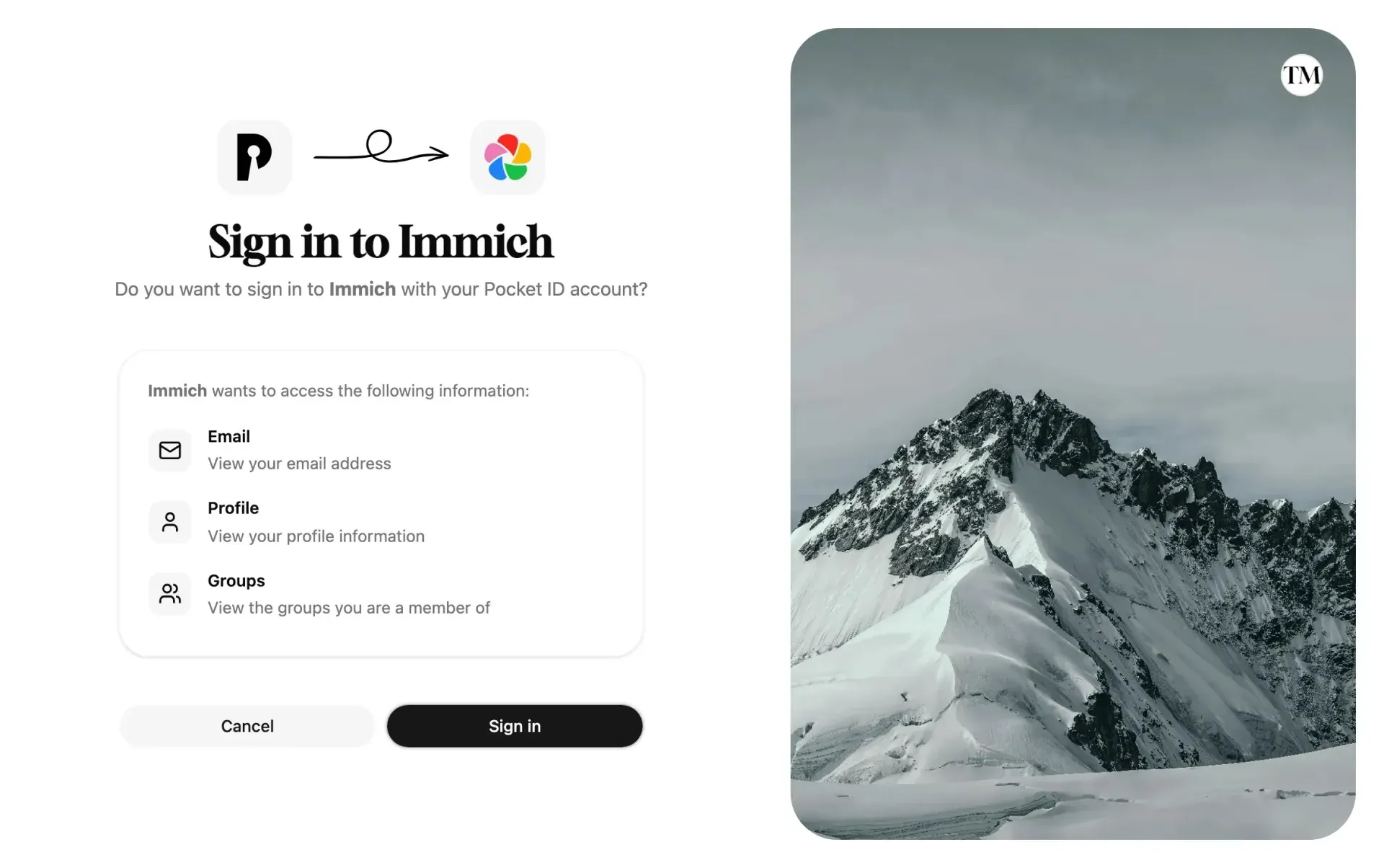
Official docs screenshot of the consent step that lists the scopes an app requests.
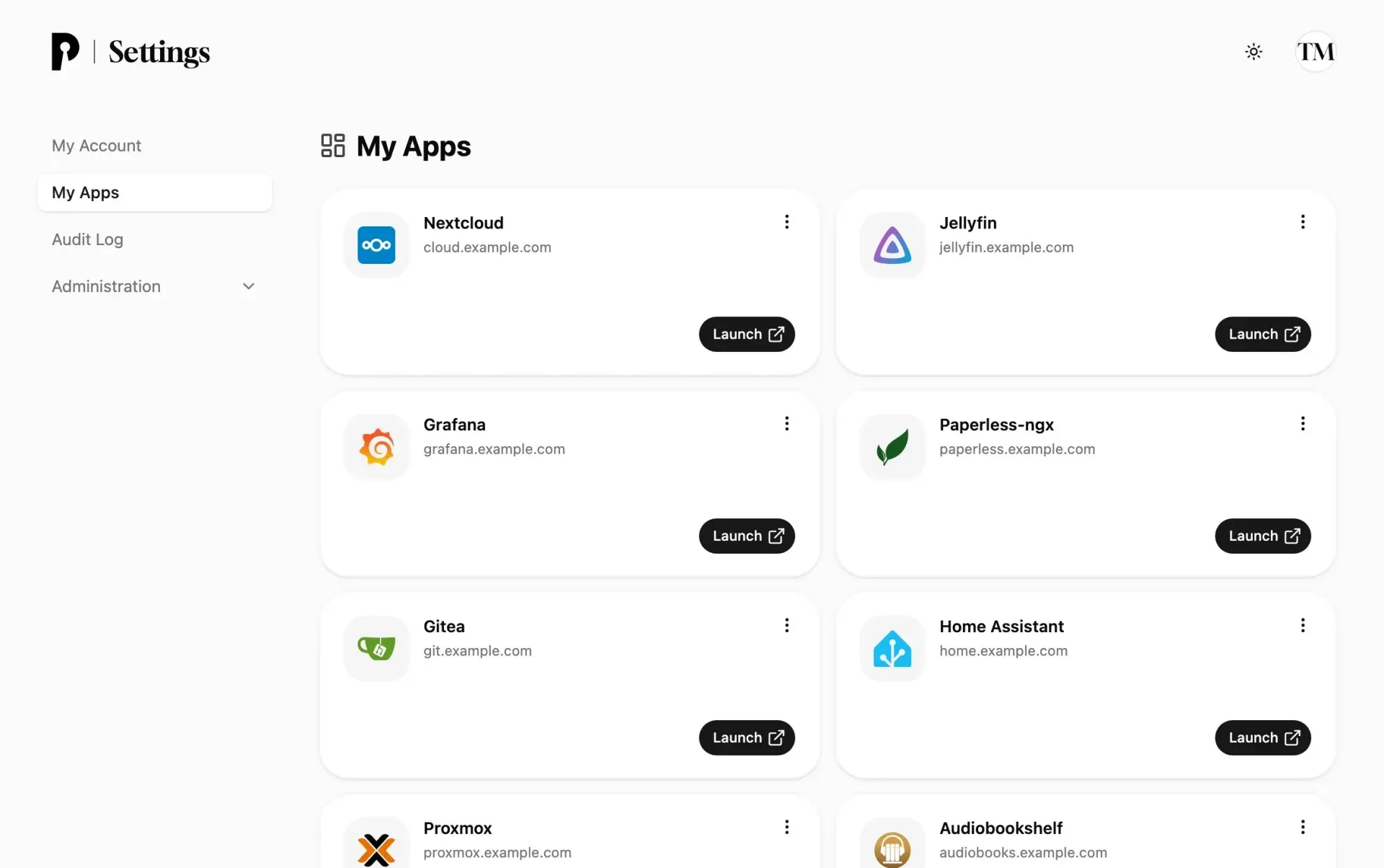
Official docs screenshot of the My Apps dashboard that lists the apps a user may sign in to.
Source: official Pocket ID project page.
Key capabilities
- Passkey-only sign-in Users authenticate with a passkey stored in a password manager, in a platform keychain or on a hardware key. Only the public key is stored by Pocket ID, and a passkey works only on the domain it was created for. Admins can require user verification, allow or block synced passkeys and restrict the authenticator type.
- OIDC and OAuth 2.0 provider Any app that offers sign-in with OIDC can use it. Each client has its own client ID, secret and callback URLs, and the app receives a signed ID token and userinfo. Callback URLs can use wildcards, and the docs list the discovery, authorization, token and userinfo endpoints.
- Scopes, claims and tokens Supported scopes are
openid,profile,email,groupsandoffline_access. ID tokens last one hour, access tokens 60 minutes by default, refresh tokens 30 days of inactivity, and per-client lifetimes can be changed. Users and groups can carry custom claims. - Groups and per-client access Each client is restricted to selected user groups or open to all users. A client created in the admin UI starts with no group selected, so nobody can sign in until an admin chooses. Users outside the groups see an access-denied message, and apps receive group names for role mapping.
- Login codes and account recovery An admin can issue a short-lived login code, as text, QR code or link, to let a user in once and add the first passkey. The same mechanism recovers users who lost all their passkeys, and a command-line recovery route is documented. Treat a code as equal to a passkey until it expires.
- Sign in with another device A new device shows a QR code, and the user approves the request with a passkey on a phone within five minutes. An optional email login code exists, but the documentation warns it makes the user's mailbox as valuable as their passkey.
- Signup links and user creation Accounts can be created by hand, synced from LDAP, created through signup tokens with expiry, usage limits and default groups, or created through the API. Open signup exists but is meant only for instances that are not public.
- LDAP sync Users and groups can be read from lldap, OpenLDAP, Active Directory or another LDAP server, a few seconds after start and then hourly. The sync is read-only, synced objects are read-only in Pocket ID, and users removed from LDAP are disabled by default. Pocket ID does not serve LDAP to other apps.
- SCIM provisioning For apps that expose a SCIM endpoint, Pocket ID pushes users and groups so that accounts exist before first sign-in and are removed when access ends. Syncs run five minutes after a change, hourly, and on demand with Sync now.
- My Apps dashboard A start page lists the clients a user may sign in to, with launch links and logos. Users can revoke an app's consent from the tile, and Pocket ID asks again at the next sign-in.
- REST API and OpenAPI spec Everything in the admin UI goes through a REST API authenticated with an
X-API-KEYheader, and the API documentation lists routes. A key acts with the rights of the admin who created it. A static key can be set through an environment variable for declarative setups. - API permissions and metadata-document clients Your own backends can be registered as APIs with permissions, and clients can request tokens for them. Client ID metadata documents and OIDC client authentication with Kubernetes, Azure, GitLab CI or Tailscale workload identities are described for advanced cases.
- Authentication proxies Apps without OIDC support, or with only LDAP or SAML, can sit behind Pocket ID through proxies such as Caddy, Traefik, OAuth2 Proxy or Tinyauth. The guide shows configuration for each, and the app still needs to trust the headers the proxy sets.
- Client examples The client examples give step-by-step setup for nearly a hundred apps, including Immich, Proxmox, Grafana, Nextcloud, Jellyfin and Paperless-ngx. Use them to check an app's callback URL and claim mapping before rollout.
- Custom signing keys and observability Signing keys can be generated as ES256 or EdDSA, and the docs describe logging and an observability section for operators. The install steps require an
ENCRYPTION_KEY, which you should keep with your backups. - Data export and import A documented export and import process helps with backups and moves. Back up the
datafolder or the PostgreSQL database before upgrades, as the upgrade guide advises, since the database migrates itself on start. - Container hardening The default container starts as root to set permissions and then drops privileges. The docs describe running it as a fixed user and switching to a distroless image, with the data volume owned by that user.
Where Pocket ID fits
Single sign-on for a homelab or small team
Install Pocket ID behind an HTTPS reverse proxy, create the admin and its passkey, then add users and groups. Register each app as a client using the matching client example. Check that every user has at least two passkeys, on different devices, before turning off local logins in the apps.
Passwordless access for staff
Create accounts, send short-lived login codes or signup tokens and have each person add a passkey from a managed device or a hardware key. Set user verification to required, and decide whether synced passkeys are acceptable for your risk level. Test the recovery route with a non-admin account. Keep one break-glass admin with a hardware key stored offline.
Controlling who reaches which app
Use groups and each client's Access tab so that, for example, a media group reaches Jellyfin and an operations group reaches Grafana. Use the OIDC Data Preview to inspect what the app will receive, and confirm that group names, not friendly names, match the app's role mapping. Revisit the client list quarterly and delete clients for apps you no longer run.
Provisioning users into apps
Where an app supports SCIM, enter its endpoint and token under the client and run Sync now. Check that removed or restricted users disappear. For directory-backed setups, connect LDAP and remember that edits must be made in LDAP, not in Pocket ID.
Protecting apps without OIDC support
Put an authentication proxy in front of the app and point it to Pocket ID. Verify that the app cannot be reached directly on its own port, and that it trusts only the proxy for identity headers. Document which apps rely on the proxy so a future migration does not miss them.
Automating administration
Create an API key for scripts that add users or clients, give it an expiry date and store it in your secret manager. Use the OpenAPI spec to generate a client, and review audit entries after automated changes.
Reviews of Pocket ID
Be the first to share your experience with Pocket ID.
Write a review
Loading review form…
Alternatives to Pocket ID
 authentikauthentik is a self-hostable identity provider for single sign-on. It supports OAuth2 and OIDC, SAML, LDAP, RADIUS and SCIM, with flows, policies and outposts. Free open-source edition, paid Enterprise tiers.
 KeycloakApache-2.0 identity and access management server from the CNCF: single sign-on, social login, identity brokering, LDAP and Active Directory federation, MFA and passkeys, organizations and fine-grained authorization, self-hosted on Java.
 ZITADELZITADEL is an AGPL-3.0 identity and access management platform written in Go on PostgreSQL, with SSO, MFA, passkeys, B2B organizations, an event-based audit trail and APIs, self-hosted or run as ZITADEL Cloud.