
What is Kantor?
Kantor is a native office suite for Linux, macOS and Windows written in Rust on GPUI, the UI framework behind the Zed editor. One binary contains three apps: Sheets for .xlsx, Docs for .docx and Slides for .pptx, plus a PDF viewer with page tools, digital signatures and Batch processing. The project README names the goal as a small, fast suite that opens Office files, edits them and saves them back in the same format; the name is Indonesian for "office", and the interface is available in English and Indonesian.
The repository was created on November 7, 2026, and is maintained by Dzulfikar Ats Tsauri, who is listed as committer, reviewer and release approver in the code signing policy. The download site at kantor.paparanai.id carries a "by Paparan AI" credit that links to paparanai.id, a separate AI presentation service. Kantor itself is free, needs no account and is licensed under the GNU Affero General Public License v3.0 or later.
The project describes its own status as early: all three apps work, and the Known gaps section reports that 418 of 424 public real-world files (government open data and bug-report files from Apache POI, LibreOffice and others) open, save, reopen and print without a problem, while Word 6/95 documents and three damaged or unusual files are refused. Layout has not been compared with Microsoft Office, and the README says to expect differences from Excel, Word and PowerPoint. When Kantor saves, parts of a file it cannot show yet are written back byte for byte.
Tagged releases have appeared almost daily since v0.1.0, the Sheets MVP, on November 7, 2026. The latest, v0.21.1 of November 21, 2026, makes Docs mail merge match Word for Address Block formats with a country rule and Russian greeting lines. Version 0.21.0 extended provider signing and e-Meterai stamping to password-protected PDFs, 0.20.0 added signing of protected PDFs with the user's certificate plus Word's Address Block and Greeting Line fields, and 0.19.0 brought certificate signing, PDF Batch and mail merge. Changes per release are in the changelog; the longer roadmap lives in plan.md.
Formulas and .xlsx reading and writing come from IronCalc, carried as patched copies with cached lookups. Text is laid out with parley, PDFs are written with krilla and drawn with hayro, and the number format crate is adapted from GridCraft. Linux builds come from an AlmaLinux 9 container on GitHub Actions and need glibc 2.34 or newer. Other desktop office suites on iThub include LibreOffice and GenOffice.
Key capabilities
- One binary, three apps and a shared shell
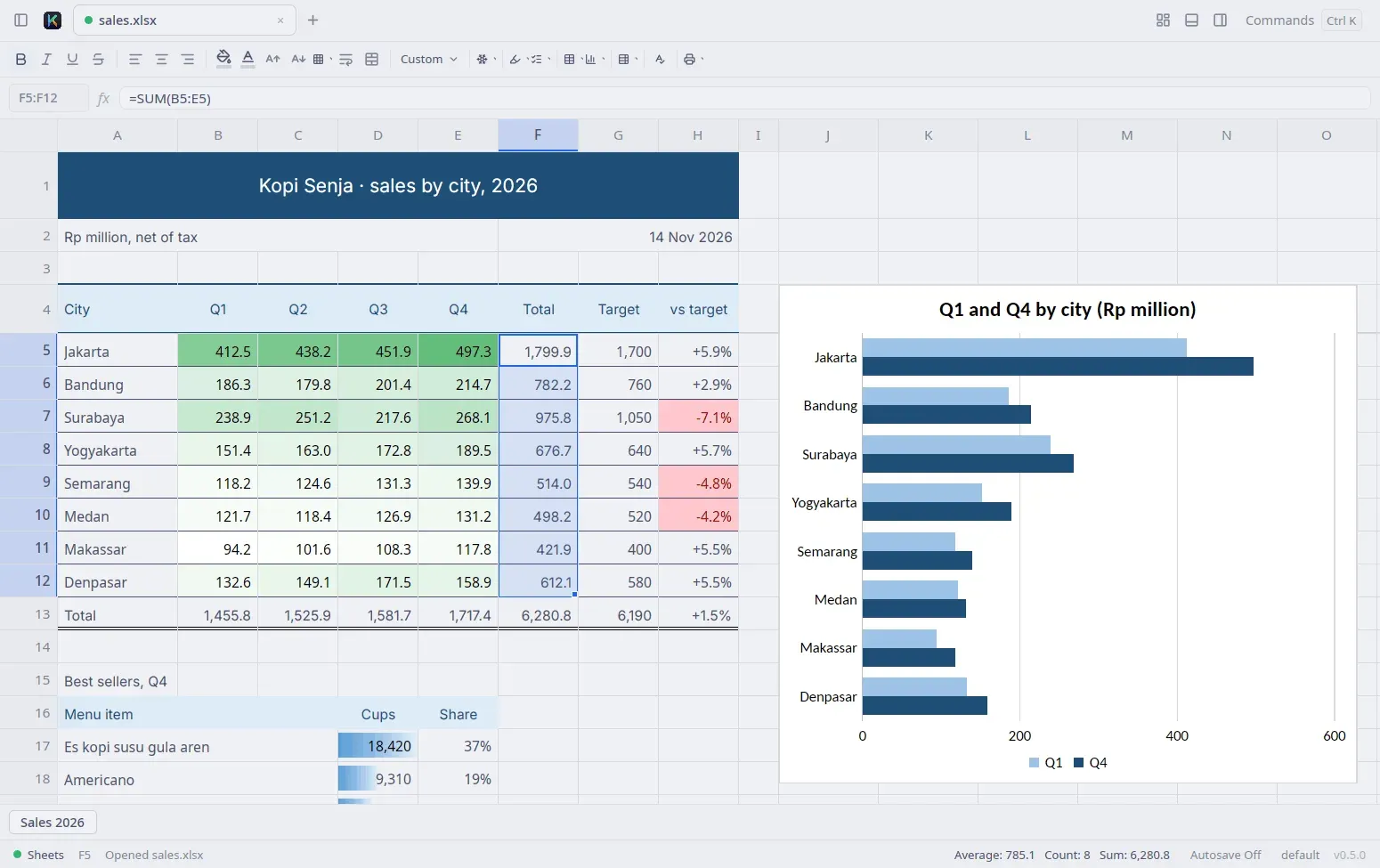
kantoropens a Home screen for Docs, Sheets and Slides;kantor file.xlsxopens files in tabs, and--sheets,--docsor--slidesstart a new document. Tabs can be split side by side (Ctrl \), and Find and Replace, undo and the command palette (Ctrl K) work the same in all three apps. On macOSCmdreplacesCtrl. - Sheets formatting and number formats Fills, fonts, borders, alignment, wrapped text and merged cells display as in Excel and are set from the toolbar, each as one undo step. Number formats cover thousands separators, currency, dates, elapsed time, conditions and colours. Conditional formatting rules, colour scales, data bars and icon sets are displayed and can be made and managed in Kantor.
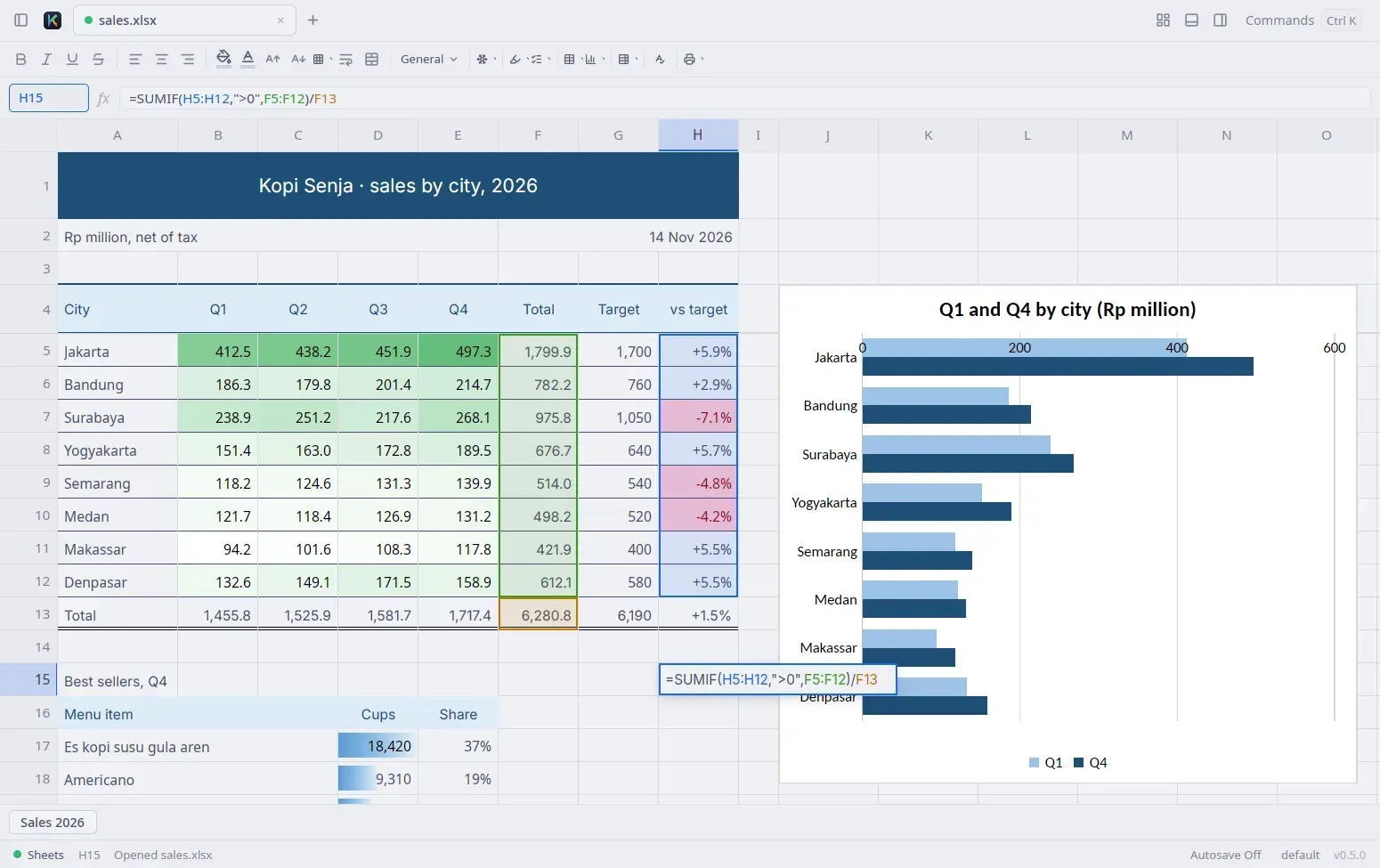
- Formulas and large workbooks Formulas run through IronCalc, with point-mode references coloured in the editor and on the grid,
F4anchor cycling and function-name suggestions. The README reports that a 180,000-row, 32 MB workbook uses about 323 MB with the app open and that a real workbook with 767,000 formulas recalculates in about 3 seconds. Workbooks with more than 50,000 formulas switch to manual calculation (F9). - Sheets tables, pivots and charts Excel tables with structured references, multi-column sort and AutoFilter, pivot tables (created, refreshed, grouped, with calculated fields and items), slicers and timelines are supported. Charts are inserted and changed in a Chart panel. Sparklines are drawn and printed but cannot be made or changed yet, and macros in
.xlsmfiles are kept on save but never run. - Spreadsheet imports
.csv/.tsv,.ods,.xls/.xltand.xlsbfiles open as imports, and saving writes a new.xlsx. Excel 97-2003 and OpenDocument imports bring formatting, notes, data validation, conditional formatting, pictures and common chart types; TIFF pictures are left out. - Printing and PDF export Sheets prints as Excel does, honouring paper size (A4, Letter, Legal, F4 and others), orientation, fit to pages, print areas, print titles, page breaks and headers and footers. Docs and Slides export PDFs with the same layout as the screen, and Slides prints notes pages and handouts with 1 to 9 slides per page. Printing hands the PDF to the system PDF viewer.
- Docs page layout
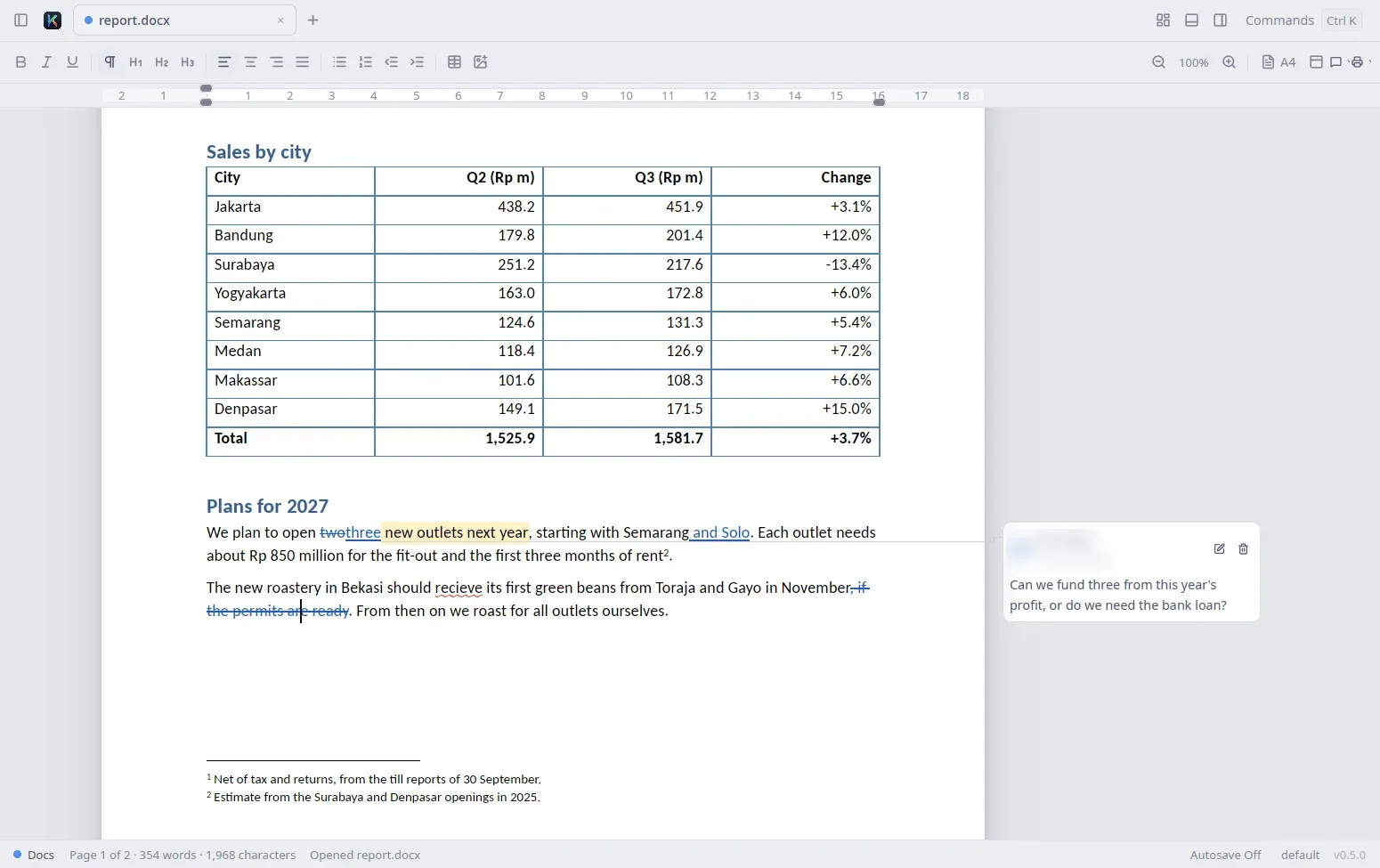
.docxediting covers paragraph and character styles, lists with nine levels, tables with merged cells, inline pictures, tab stops and page setup with a ruler. Headers and footers, page numbers, sections and multiple columns are laid out as Word lays them out. - Docs review, notes and fields Comments appear as cards beside the page, and tracked changes from Word show in the author's colour; with Track Changes on (
Ctrl Shift E), Kantor records edits under the user's name for accept or reject. Footnotes, endnotes, text boxes, fields such as tables of contents, cross-references andSEQ, and offline spell check in English and Indonesian are included. Word equations are kept but not shown properly yet. - Mail merge The Mailings bar takes recipients from
.xlsx,.xls,.xlsb,.odsor.csv, filters and sorts them, previews results and merges into one document, one.docxor PDF per recipient, or print. Word's merge fields, Address Block and Greeting Line work, andkantor docs merge,kantor slides mergeandkantor sheets mergedo the same without a window. - Word and RTF imports
.rtffiles and Word 97-2003.doc/.dotfiles open as unsaved copies, and Save asks for a new.docxwithout touching the original. Imports bring formatting, tables, pictures, comments and tracked changes from.doc; Word 6/95 and password-protected files are refused. - Slides editing and slide show
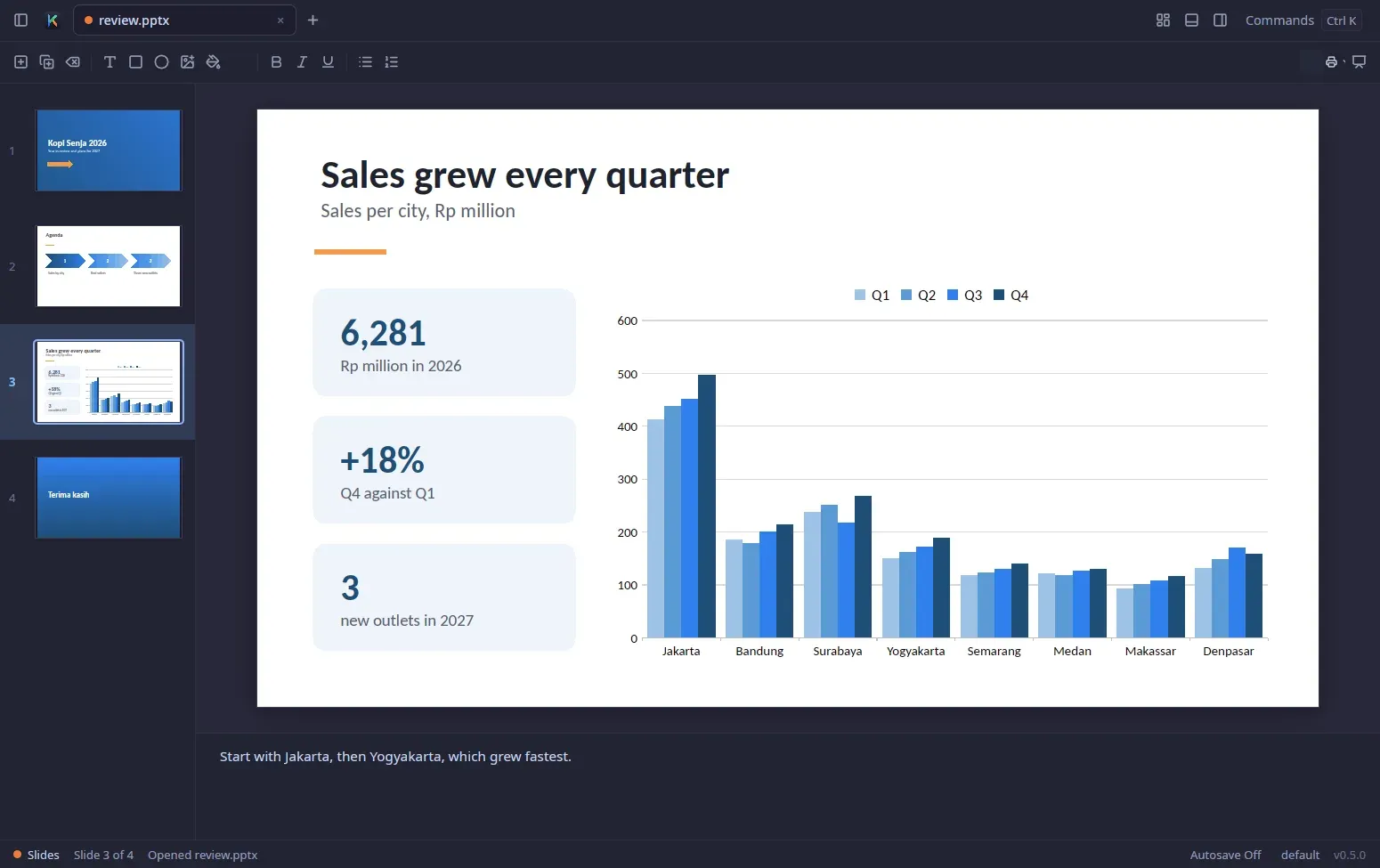
.pptxslides are drawn with all 187 preset shapes, gradient and pattern fills, groups, tables, SmartArt and a long list of chart types. Table cells are typed into on the slide, and chart data is edited in a panel.F5starts a slide show with speaker notes; SmartArt re-layout works only in a listed set of layouts. - PowerPoint 97-2003 import
.ppt,.ppsand.potfiles open unsaved, and Save writes a new.pptxnext to the original. Slides, masters, formatted text, shapes, pictures, tables, notes and hidden slides come in; transitions, animations, sounds and macros are left out, and password-protected or PowerPoint 95 files cannot be opened. - Preservation, recovery copies and autosave Saving keeps what Kantor does not show or edit yet, such as sparklines or Word equations. While a document has unsaved changes, a recovery copy is written to the data folder two minutes after the first change and when the window loses focus, and restored after a crash; up to two minutes of typing can still be lost. Autosave is off by default, as described in Your work is safe.
- PDF viewer and page tools
.pdffiles open in a continuous-page viewer drawn by hayro, with zoom, thumbnails, bookmarks, search, text selection and links. Pages can be reordered, rotated, deleted, extracted and combined across files, and the Tools menu adds Split, page numbers, watermarks and file size reduction. Comments, stamps, forms and Fill and Sign are added, but the text on a page cannot be edited. - PDF signatures, e-Meterai and Batch Signed PDFs are checked on open with signer, time stamp and change details, and Sign with Certificate creates PAdES signatures from a
.p12/.pfxfile, a PKCS #11 token or, on macOS and Windows, the system store. Indonesian e-Meterai (VIDA, Mekari Sign) and certified signatures (Xignature) use the user's own provider account and were tested against mock servers, not live services. Tools, Batch stamps, fills, numbers and signs whole folders, as the PDF signing guide describes. - Command-line tools
kantor convertturns.docx,.xlsx,.pptx,.rtf,.docand.pptinto PDF or current Office formats.kantor pdfmerges, splits, rotates, watermarks, verifies and signs PDFs, andkantor slides buildwrites a.pptxfrom JSON described in slides-json.md. None of these open a window. - MCP server for AI agents
kantor mcplets Claude Code, Claude Desktop, Cursor and other MCP clients read and edit documents open in the running app. Every change is one undo step and nothing is saved until the agent or user saves. The app listens on a private Unix socket, or on Windows on127.0.0.1behind a per-run token, as the MCP section explains. - Optional AI commands AI is off until a provider is chosen in AI Settings: Anthropic, OpenAI, OpenRouter, Groq, DeepSeek, Google Gemini, any OpenAI-compatible server or a local Ollama. Each command sends only what it needs, such as column headers and up to 20 sample rows for a formula. API keys go to the system keychain.
- Cloud drives over WebDAV Files open from and save to Nextcloud, OpenCloud/ownCloud or any WebDAV server, with app passwords or OpenID Connect sign-in. Kantor checks the server version before uploading, takes WebDAV locks so a file someone else has open opens read-only, and keeps working offline until the server is reachable again.
- Downloads, signing and updates Tagged releases provide a universal
Kantor.dmgfor macOS 11 or later, signed and notarised by Apple; AppImages for Linux x86_64 and aarch64 that need glibc 2.34 or newer and FUSE 3; and a per-user installer and portable zip for Windows 10 and 11 on x64 and Arm, which are not code-signed, so SmartScreen warns on first run. The install script installs the nightly build unlessKANTOR_VERSIONpins a tag. Updates are checked at most once a day against an Ed25519-signed manifest.
Where Kantor fits
Editing Excel workbooks without Office
A workbook opens with kantor budget.xlsx, a double-click on the AppImage or Open with, Kantor after the Windows installer or macOS app is in place. Large files load in the background with a Cancel button and show the values Excel saved; above 50,000 formulas Kantor switches to manual calculation, and F9 recalculates. .xls, .xlsb, .ods and CSV files are imports and are saved as a new .xlsx.
Reviewing a Word report with tracked changes
Comments from Word show as cards beside the page and tracked changes in each author's colour. A reviewer adds comments with Ctrl Alt M, turns on Track Changes with Ctrl Shift E and accepts or rejects changes at the caret or all at once from the Review menu. Untouched comments are saved back byte for byte, and Export as PDF writes the same layout as the screen, revisions included.
Presenting and printing a PowerPoint deck
A .pptx opens with thumbnails on the left and speaker notes below the slide; F5 starts the slide show and Shift F5 starts from the current slide. Print offers slides, notes pages or handouts with 1, 2, 3, 4, 6 or 9 slides per page through the system PDF viewer, and older .ppt decks are imported and saved as a new .pptx.
Converting and merging documents in scripts
kantor convert -o out/ --to pdf a.docx b.docx converts several files without opening a window, and kantor convert --sheet Sales --fit-width --landscape --paper f4 book.xlsx sales.pdf overrides a sheet's page setup. kantor docs merge offer.docx staff.xlsx -o out/ --pdf produces one PDF per recipient, and on Windows the commands run through kantor.com.
Signing and stamping PDFs
A signed PDF shows a bar with the overall result and a Signatures panel with each signer, time stamp and the changes made after signing. Sign with Certificate adds a visible or invisible PAdES signature with optional time stamp and long-term validation data, saved as a new file so earlier signatures stay valid, and kantor pdf sign or Tools, Batch repeat it over many files. Indonesian users can add an e-Meterai or a certified signature through their own VIDA, Mekari Sign or Xignature account, set up in e-Sign Providers.
Letting an AI assistant edit open files
The palette command Copy MCP Setup for Claude Code copies the registration command for Claude Code, and kantor mcp --print-config prints the JSON for Claude Desktop, Cursor and others. The agent then reads and writes cell ranges, replaces paragraphs or builds slides in the running window while the user watches; each change is one undo step, and the first tool call starts Kantor if it is not running. Related tools on iThub include DeckCraft and OfficeCLI.
Install
curl -fsSL https://raw.githubusercontent.com/dzulfikar08/kantor/main/scripts/install.sh | shReviews of Kantor
Be the first to share your experience with Kantor.
Write a review
Loading review form…
Found Kantor useful? Upvote it todayYour vote helps other IT teams find it in the daily ranking.