
What is GenOffice?
GenOffice is an open-source desktop office suite from Genspark that bundles six editors in one tabbed application: Docs for Word files, Sheets for Excel workbooks, Slides for PowerPoint decks, a PDF editor, a Markdown editor and an HTML page builder. Each editor has an AI panel next to the document. The suite opens and saves native .docx, .xlsx and .pptx files, and the project describes saving as byte-preserving: only the parts a user or the AI edited are rewritten, while every other part of the Office package is copied back unchanged. The source is published at github.com/genspark-ai/genoffice and the product site is genoffice.ai.
The application is distributed as signed desktop installers attached to each GitHub release. The v0.13.18 release, published on November 12, 2026, ships a .dmg for Apple Silicon and one for Intel Macs (macOS 11 or later), x64 and ARM64 .exe installers for Windows (Windows 10 or later on x64, Windows 11 on Arm), and Linux builds as .deb, .rpm and AppImage for x86_64 systems with glibc 2.34 or newer. The release notes state that macOS installers are signed with the Genspark company certificate and Windows installers with a DigiCert EV certificate. ChromeOS is covered only through the Linux packages inside the Crostini Linux environment, described in the repository's platform notes. There is no web, iOS or Android version.
Five releases shipped between October 26 and November 12, 2026. The headline of v0.13.18 is legacy PowerPoint 97-2003 .ppt support, where a deck opens as an editable .pptx copy with shapes, fills, pictures, WMF and EMF artwork, text styles and master and layout inheritance carried over. The same release adds MP4 video export for presentations at 1080p or 720p, PDF, HTML and Markdown targets in the Docs Save As dialog, persistent slicers and timelines in Sheets, a sensitive-information pattern search for PDF redaction, session restore at startup, and the convert_document and check_document tools for the MCP server.
Technically, GenOffice consists of seven Electron apps (the six editors plus the shell) written mainly in TypeScript and sharing one engine layer. Sheets uses an in-house Rust .xlsx sidecar that builds on calamine and IronCalc, the spreadsheet UI extends Univer, PDF editing runs on PDFium with pdf.js and pdf-lib, and the Docs and Markdown editors are built on Tiptap and ProseMirror. On save, only changed blocks are converted back into OOXML and spliced into the original document XML. The engine packages are described in CONTRIBUTING.md.
The code is licensed under Apache-2.0, with one exception: the ee/ directory is reserved for future enterprise modules under a separate GenOffice Enterprise License. The README states that the GenOffice and Genspark names and logos are trademarks of Mainfunc, Inc. and are not covered by the Apache license, so forks are expected to use their own branding. The apps are free to download and use, with no ads, watermarks or paid tier for the apps themselves. AI features use either Genspark credits after signing in with a Genspark account or the user's own API key for a supported provider, in which case the provider's usage charges apply.
Document editing, saving and format conversion run on the local machine and do not need a network connection. AI agents, web search and image tools require a connection. Official packaged builds send limited usage analytics to Google Analytics 4 by default, which can be switched off under Settings, General; the privacy notice lists every event and states that document content, file names, file paths, account identity and email addresses are never part of the analytics payload. Builds made from source install a no-op tracker. Similar projects in the directory include LibreOffice, ONLYOFFICE Docs and OfficeCLI.
Key capabilities
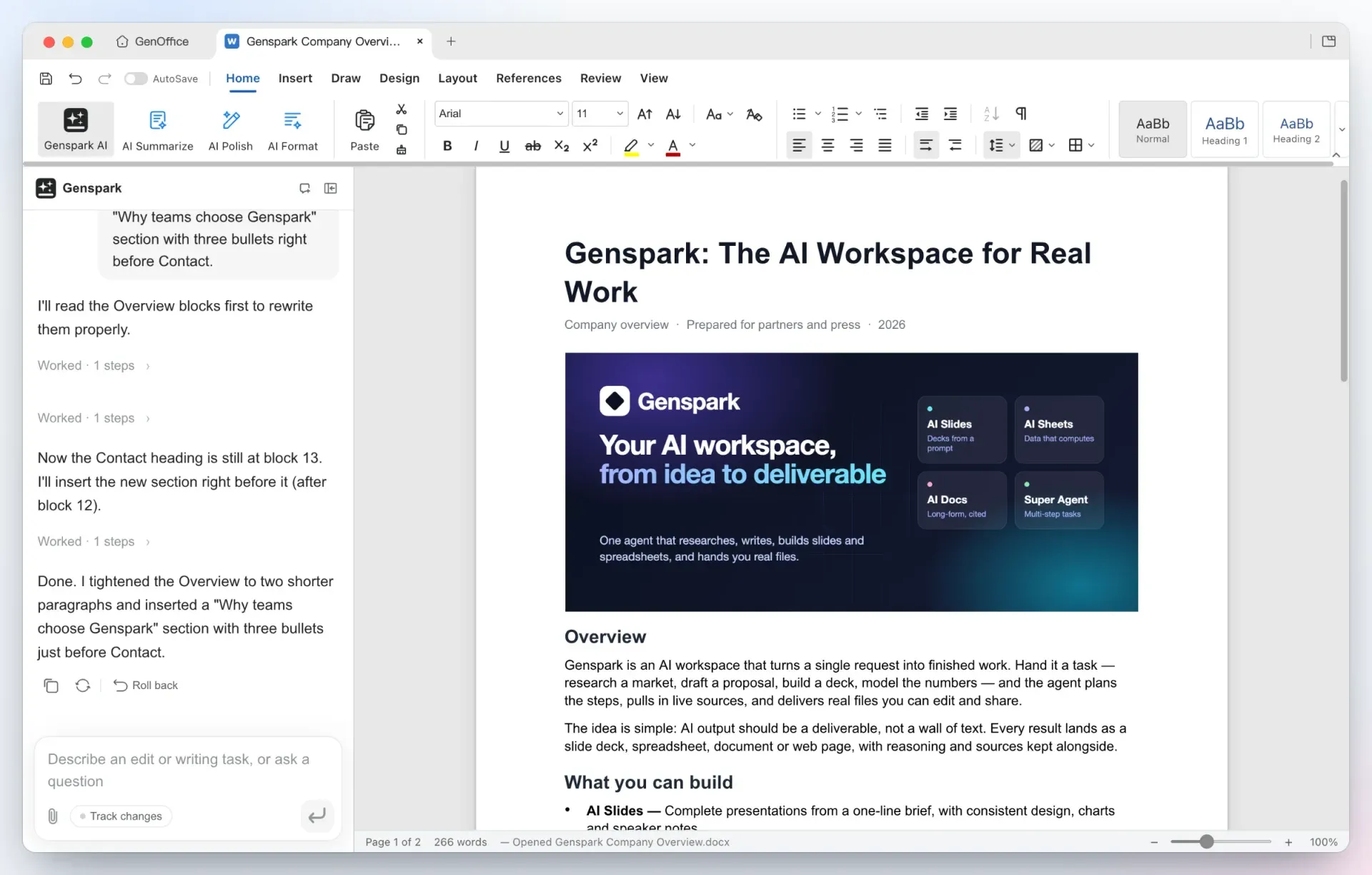
- Docs editor for .docx Docs opens Word files with their layout: multi-column sections, full-bleed images, shaded tables, headers, footers and pagination based on Word line metrics. Styles, comments, tracked changes, equations, ink and content controls round-trip without changes. Release v0.13.18 adds a story view that hides formatting while writing, table of contents updates from the context menu, and Save As targets for PDF, HTML and Markdown next to Word.
- Mail merge in Docs A Mailings tab turns a document into a merge template. The recipient list comes from an
.xlsxor.csvfile, realMERGEFIELDfields are inserted, and records can be previewed one by one. The merge produces either one combined document or one.docxper record. - AI edits with snapshots, diffs and tracked changes The AI panel reads the blocks it needs and edits the document directly instead of returning text to paste. Every AI turn is stored as a snapshot with one-click rollback, and with Track changes switched on the edits arrive as Word-style revisions. A Docs selection or a Sheets cell range can be hidden from the model, which then sees only a named placeholder; the README notes that this hiding applies to the in-app AI only, not to the CLI, MCP tools or headless export.
- Sheets with live formulas, pivots and charts Sheets is built on an in-house Rust
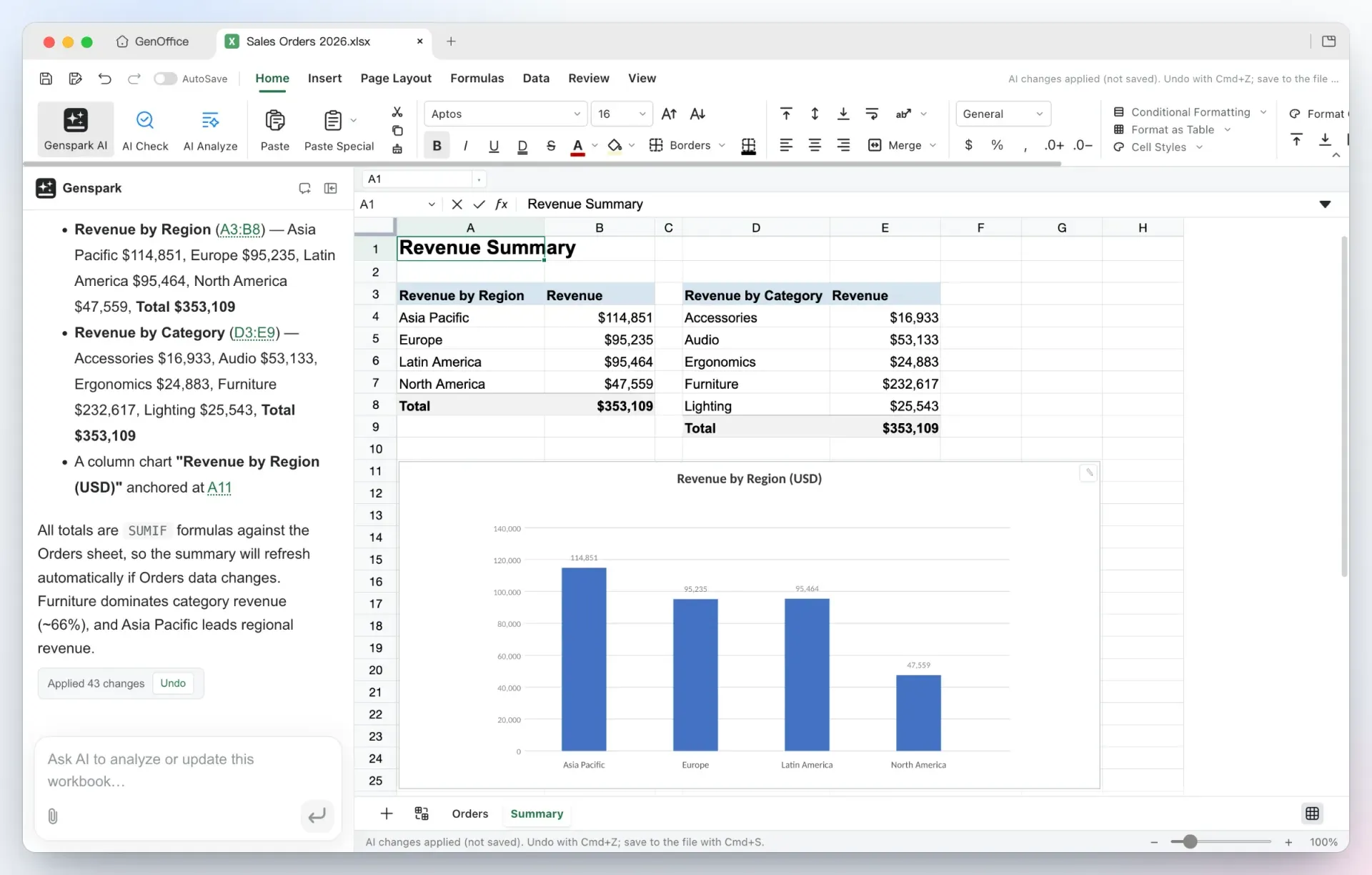
.xlsxengine with charts, pivot tables, slicers, timelines, conditional formatting and formula tracing. When the AI builds a summary it writes real formulas such asSUMIFinstead of pasted values, and applies all changes as one undoable batch. Questions about a workbook return the reasoning plus clickable citations to the cells used. Pictures can be embedded in cells in Excel's native rich-value format. - Slides generation and editing for .pptx Slides takes a one-line request, plans a storyline and drafts each slide onto the canvas as a native
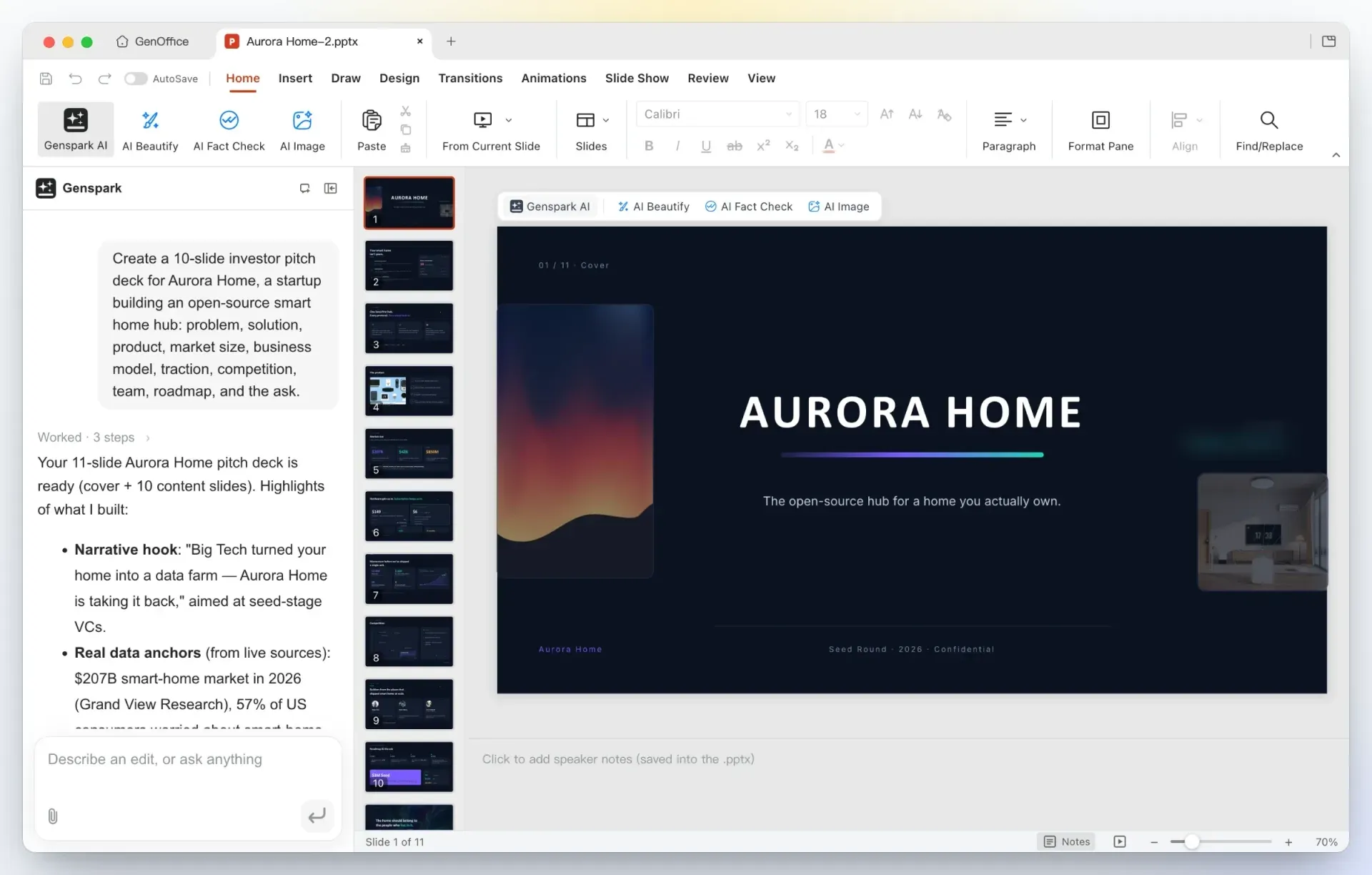
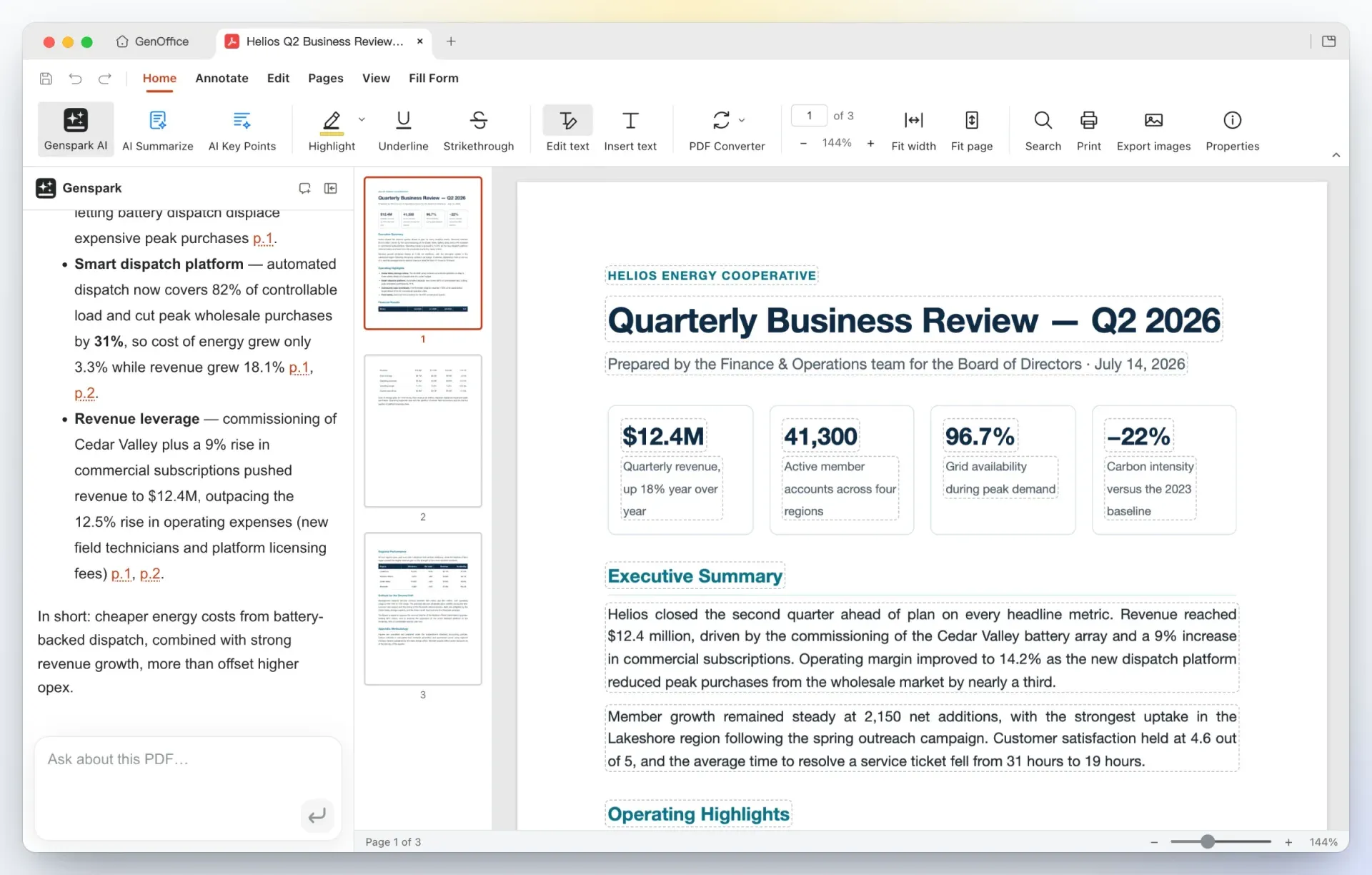
.pptxthat stays editable. Editing tools include masters, layouts, smart guides, non-destructive cropping and 3D models from.glbfiles stored the way PowerPoint stores 3D. Slide Show, Record narrates a deck slide by slide and saves narration and timings into the file, and v0.13.18 adds MP4 export at 1080p or 720p, encoded locally, plus 4-up and 9-up handouts. - PDF editing in place Edit text mode outlines every text block on a page for direct retyping; the content stream is rewritten through PDFium with the original fonts rather than covered by an annotation. The PDF app also handles images, annotations, forms, page replacement, page size, crop and insert operations. The AI panel answers questions about a PDF with page citations, and v0.13.18 adds a search for sensitive-information patterns to support redaction.
- On-device PDF conversion PDF Converter turns a PDF into an editable Word, Excel or PowerPoint file using PDFium character-level extraction and geometry-based layout analysis, with no cloud service involved. The website states that this conversion uses no AI credits. Scanned pages are read with the operating system OCR on macOS and Windows; the website lists OCR support for those two platforms only.
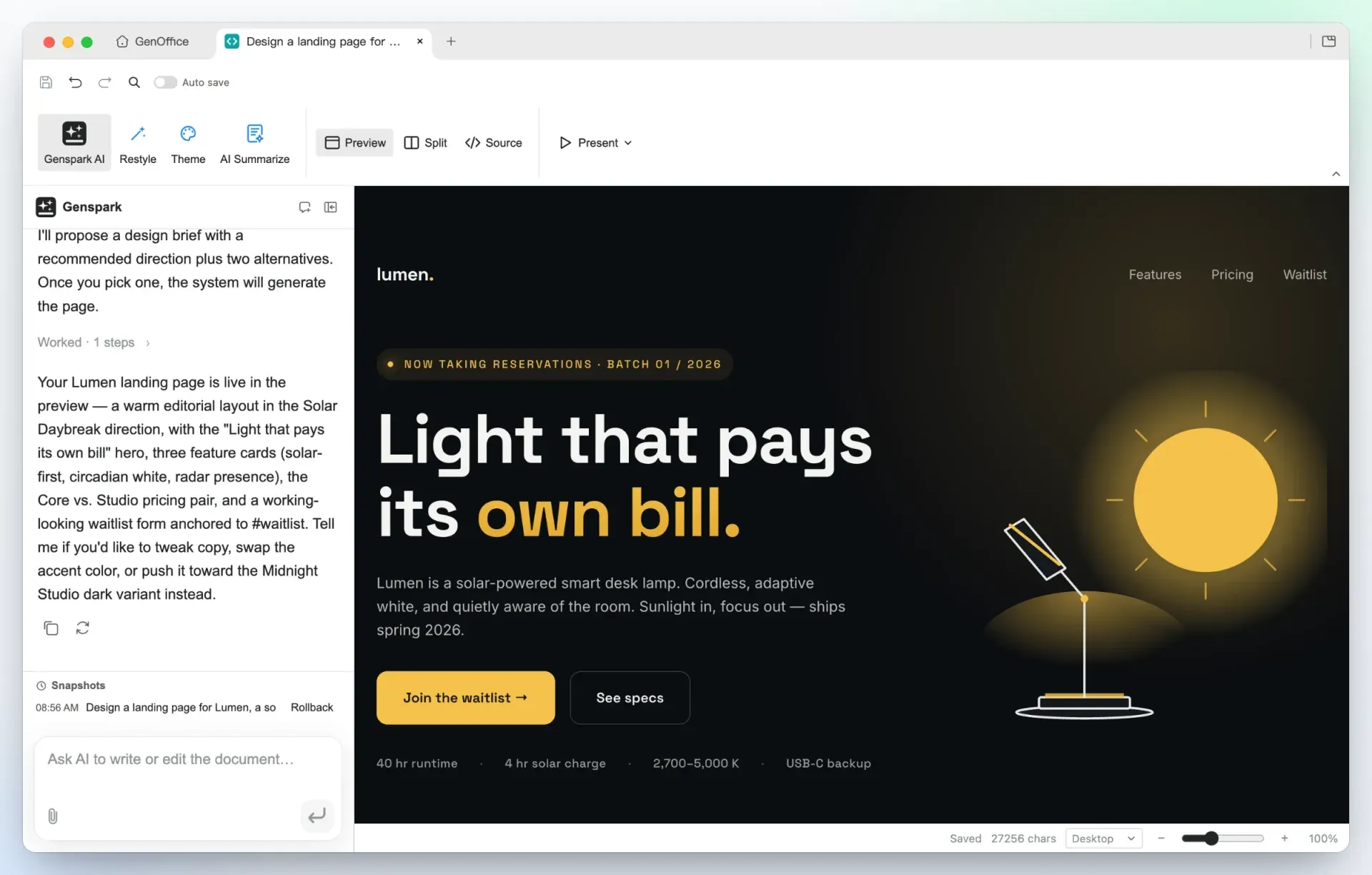
- HTML page and UI builder The HTML app asks what a page is for and proposes a design brief with hook, palette, typography and style direction before building a single self-contained
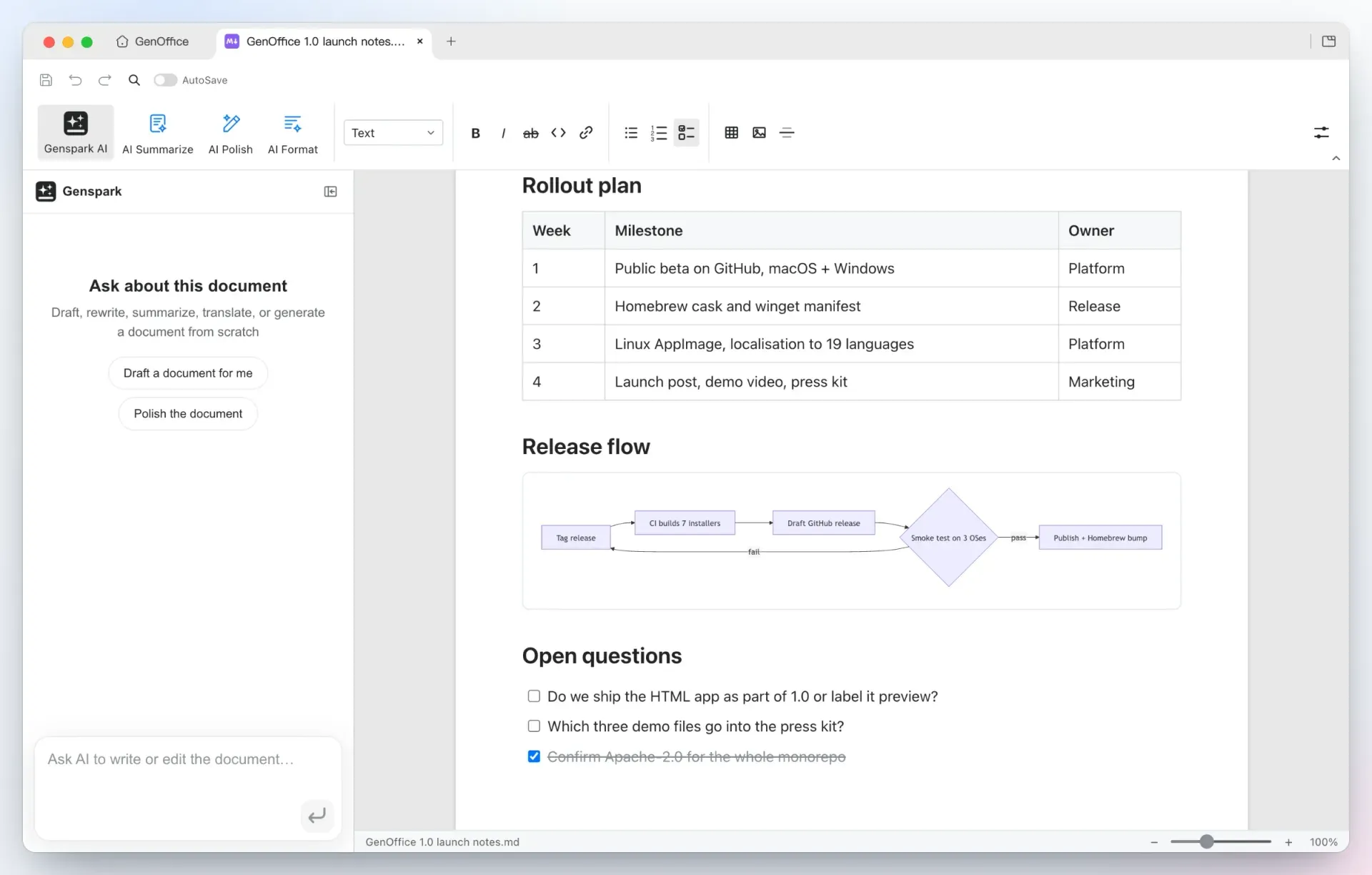
.htmlfile. Elements can be restyled by clicking, text edited by double-clicking, and the source opened in a CodeMirror view. A Restyle request swaps the brief's design tokens while keeping copy and structure. Pages can be presented fullscreen or exported as PDF or as a native Word document. - Markdown editor with linked notes Markdown files open in a Tiptap block editor that renders headings, lists, tables, images, code blocks and Mermaid diagrams and writes everything back as plain
.md. Wiki links in double brackets, note embeds, a Backlinks panel and a Graph view of the whole vault work in the style of Obsidian. Markdown to Word export runs fully locally. - Legacy, ODF and Hancom import Legacy Word
.docand.dot, Excel 97.xls, PowerPoint 97-2003.ppt, the OpenDocument family (.odt,.ods,.odpand their templates) and Hancom.hwpand.hwpxopen as converted OOXML copies. These imports are one-way: saving always writes.docx,.xlsxor.pptx, never the source format, and the original file is not modified. For.pptfiles, notes, animations, transitions and hyperlinks are not carried over yet. - Local full-text search across documents The home screen indexes names, folders and extracted text of Word, Excel, PowerPoint, PDF, Markdown and HTML files in a local SQLite full-text index with CJK-aware tokenizing. Optional Jev search reranking, off by default, sends the query and up to 20 excerpts of the top hits to TypeSafe or OpenRouter for a relevance score; if the call fails, the local order is kept. The index itself is never uploaded.
- Ask AI across starred files Starred files act as a knowledge base for the home screen Ask AI. The agent searches them through the local index, reads the passages it needs and answers with a citation after each claim; clicking a citation opens the file in the matching editor. Files and images can be attached to a question, and every question is kept as a separate conversation that survives a restart.
- Genspark sign-in or bring your own key Signing in with Genspark routes model calls through the Genspark proxy to Claude, GPT and Gemini model families and adds web search, image search, image generation and media analysis. Alternatively, Settings, AI accepts keys for Claude, OpenAI, Gemini, DeepSeek, Kimi, GLM, Qwen, Doubao, MiniMax, Grok, Mistral, OpenRouter and other listed providers, plus a custom slot for any OpenAI-compatible endpoint including local model servers. Web search and image providers are configured separately under AI Media and Search.
- Skills in the AI panel A skill is a
SKILL.mdfile that describes one job, such as a weekly report or an NDA. GenOffice ships a recommended catalog under Settings, Skills, and imports a folder, a zip or a singleSKILL.md; nothing runs on import. A skill is attached to one message from the plus menu of any AI panel. - genoffice command line The app installs a
genofficeCLI that runs the same engines headless to inspect, convert, create, read, edit and render Word, Excel, PowerPoint, PDF, Markdown and HTML files. Every command prints a one-line summary or a single JSON object with--json, edits are atomic, and the CLI itself makes no model calls. The full command reference is in the CLI README. - Agent skill for coding agents A bundled skill teaches Claude Code, Codex, Cursor, Gemini CLI, GitHub Copilot, OpenCode and Windsurf when and how to use the CLI. It is installed from Settings, Integrations, which lists the agents found on the computer, downloaded as a zip for claude.ai and the Claude desktop apps, or added with
npx skills add genspark-ai/genoffice. - MCP server Every CLI command is also exposed as a Model Context Protocol tool.
genoffice mcpruns as a stdio server that the assistant starts itself, with tools such ascreate_docx,docs_apply,slides_renderand a staged deck flow fromdeck_starttodeck_build. A separate local HTTP server inside the app on port 3093, off by default, drives a visible Word editor tab, andgenoffice mcp --httpserves the tool set to other machines with optional token protection. - Desktop installers for three platforms Each release provides macOS
.dmgfiles for Apple Silicon and Intel, Windows installers for x64 and ARM64, and Linux.deb,.rpmand AppImage packages for x86_64. The deb and rpm add GenOffice to the applications menu and install blank document templates for the KDE Dolphin file manager; the AppImage needs the FUSE 2 runtime. In-app updates use electron-updater.
Where GenOffice fits
Editing Word documents with an AI reviewer
A user opens a .docx in Docs, describes the change in the AI panel, and the agent reads the relevant blocks, rewrites them or inserts new sections. With Track changes on, each edit appears as a Word revision that can be accepted or rejected, and each AI turn can be rolled back as a snapshot. Because unchanged parts of the file are written back byte for byte, the project states that the result keeps working in Microsoft Word. The README demo shows a company overview tightened and extended this way.
Building spreadsheet summaries and answering questions about data
In Sheets, a one-sentence request can add a summary sheet with SUMIF formulas by region and category plus a column chart, applied as one undoable batch of changes. Questions about a workbook return an answer together with links to the cells used. The formulas stay live, so the summary updates when the source rows change.
Generating and presenting slide decks
Slides plans a storyline from a prompt, researches figures where web search is configured and drafts each slide onto the canvas as an editable .pptx. Users continue with masters, layouts and the AI restyling tools, record narration with Slide Show, Record, and since v0.13.18 export the deck as an MP4 video with timings, transitions, animations and narration. Old .ppt decks can be opened as converted .pptx copies first. Related directory listings for deck generation include PPT Master.
Converting and editing PDF files locally
A PDF opened in the PDF app can be edited in place, annotated, filled as a form or reorganized by page. PDF Converter produces Word, Excel or PowerPoint files on the device, and the README describes the result opening in Docs next to the source with headings, stat rows and paragraphs intact. The website asks users to check tables and formatting after conversion and lists scanned-page OCR for macOS and Windows.
Letting a coding agent produce Office files
With the skill or MCP server installed, an agent such as Claude Code can create and edit real Office files without opening a window. The README walkthrough shows an agent building an eight-slide deck: it reads the slide guide, writes a style sheet, an outline and one page spec per slide, runs genoffice slides check to reject overflow and overlap, assembles the .pptx with genoffice create and inspects PNG renders. An MCP-only run documented in the README took 38 tool calls and about thirteen minutes; only the search and media tools left the machine.
Finding and querying a local document collection
The home screen search indexes every file in the work folders, so a query matches file names, folders and full text in Office, PDF, Markdown and HTML documents. Starring a set of files turns them into a source for Ask AI, which answers questions with citations to the files behind each claim. Optional Jev reranking reorders the top 20 local hits by model relevance score; the privacy notice details which excerpts are sent when it is enabled and that a local endpoint keeps the request on the device.
Reviews of GenOffice
Be the first to share your experience with GenOffice.
Write a review
Loading review form…
Found GenOffice useful? Upvote it todayYour vote helps other IT teams find it in the daily ranking.