

What is ONLYOFFICE Docs?
ONLYOFFICE Docs is a self-hostable online office suite with browser editors for text documents, spreadsheets, presentations, fillable forms and PDF files, plus a diagram viewer. It works natively with the Office Open XML formats (DOCX, XLSX, PPTX) and supports real-time co-editing, comments, track changes and version history. Until version 6.0 the server was called ONLYOFFICE Document Server, which is why the repository, packages and Docker image still carry that name.
The suite is developed by Ascensio System SIA, a company registered in Riga, Latvia, and founded by Lev Bannov; according to the ONLYOFFICE company page the legal entity dates from 2009 and the holding company is registered in Singapore. ONLYOFFICE Docs is not a file manager. It is an editing and conversion service that another system embeds: ONLYOFFICE DocSpace or Workspace, one of the 50+ published connectors (Nextcloud, ownCloud, Seafile, SharePoint, Moodle, Odoo, Confluence and others) or your own application through the Docs API.
It is distributed as the onlyoffice/documentserver Docker image, DEB and RPM packages for amd64 and arm64, a Windows installer, Helm charts for Kubernetes and OpenShift, and as a hosted cloud service. Three self-hosted editions share one code base: Community (package onlyoffice-documentserver, GNU AGPL v3), Enterprise (-ee) and Developer (-de), the latter two under a proprietary license.
The current release is version 10.0.0, published on GitHub on October 12, 2026. It adds the Data Table chart element, conversion of SVG images into editable shapes, saving to XLS, OFD viewing and conversion, presentation export to video, a Reading View, role-based PDF forms and table recognition in the PDF editor. On the server side it enables JWT by default in default.json, adds multipart conversion endpoints, moves the default DEB and RPM port to 8083 and lists about thirty security fixes in the changelog. Version 9.4.0 (May 2026) merged the back-end components into a single process, removed the RabbitMQ and database dependencies and dropped the limit of 20 simultaneously open documents.
The repository itself mainly holds packaging and the changelog. The code lives in component repositories: server (Node.js back end), core (C++ conversion engine for DOC, DOCX, ODT, RTF, PDF, EPUB, XPS, DjVu, XLS, ODS, CSV, PPT, ODP and more), sdkjs (JavaScript document model and API), web-apps (editor interface), plus fonts, spell-check dictionaries and templates. Offline desktop editors and the Android and iOS Documents apps are separate ONLYOFFICE products and are not part of this listing.
ONLYOFFICE Docs screenshots
Explore the interface. Open a screenshot to view it at full size.
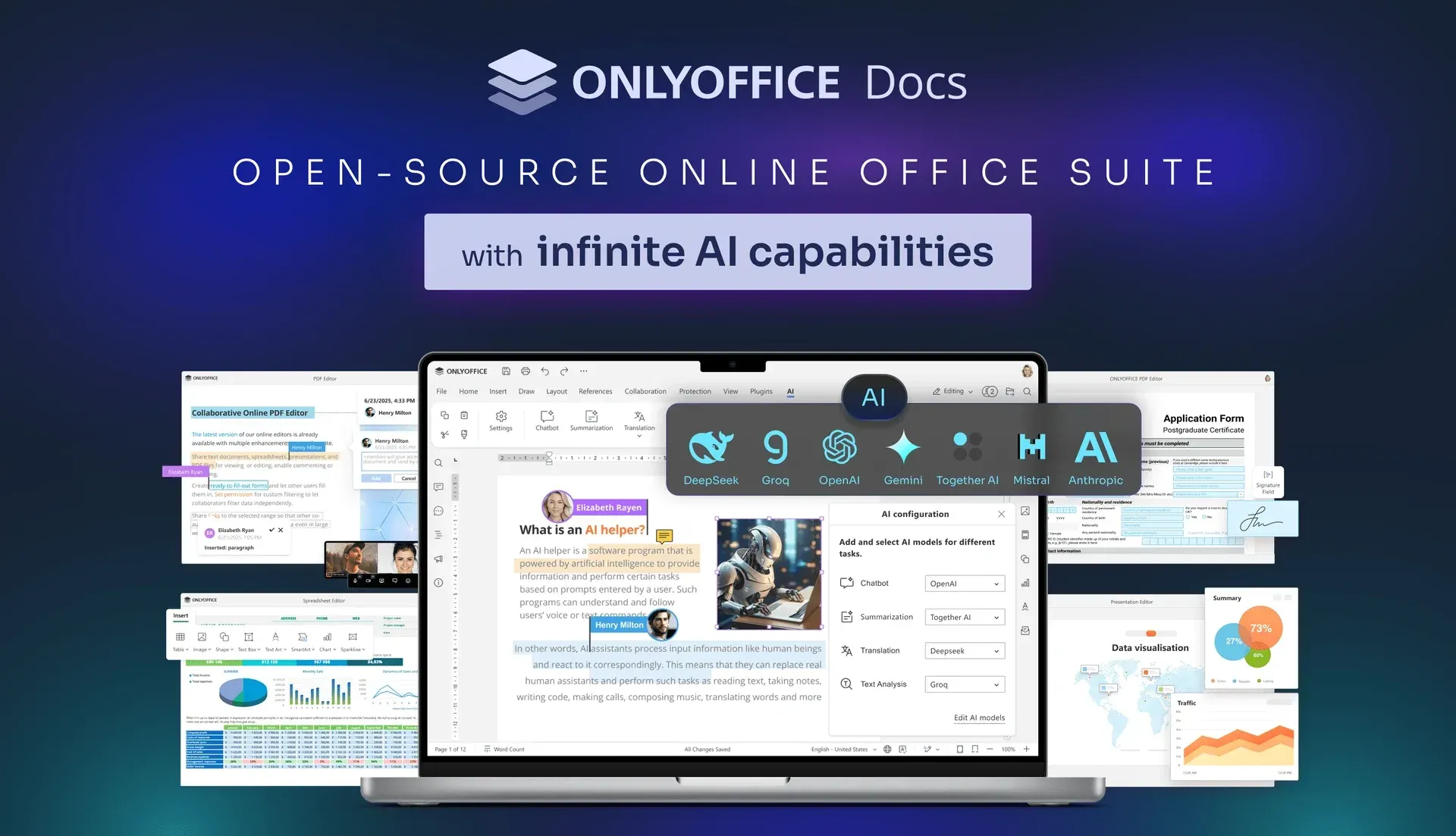
Official README image: the document editor with the AI model configuration dialog, surrounded by the PDF, spreadsheet, presentation and form editors.
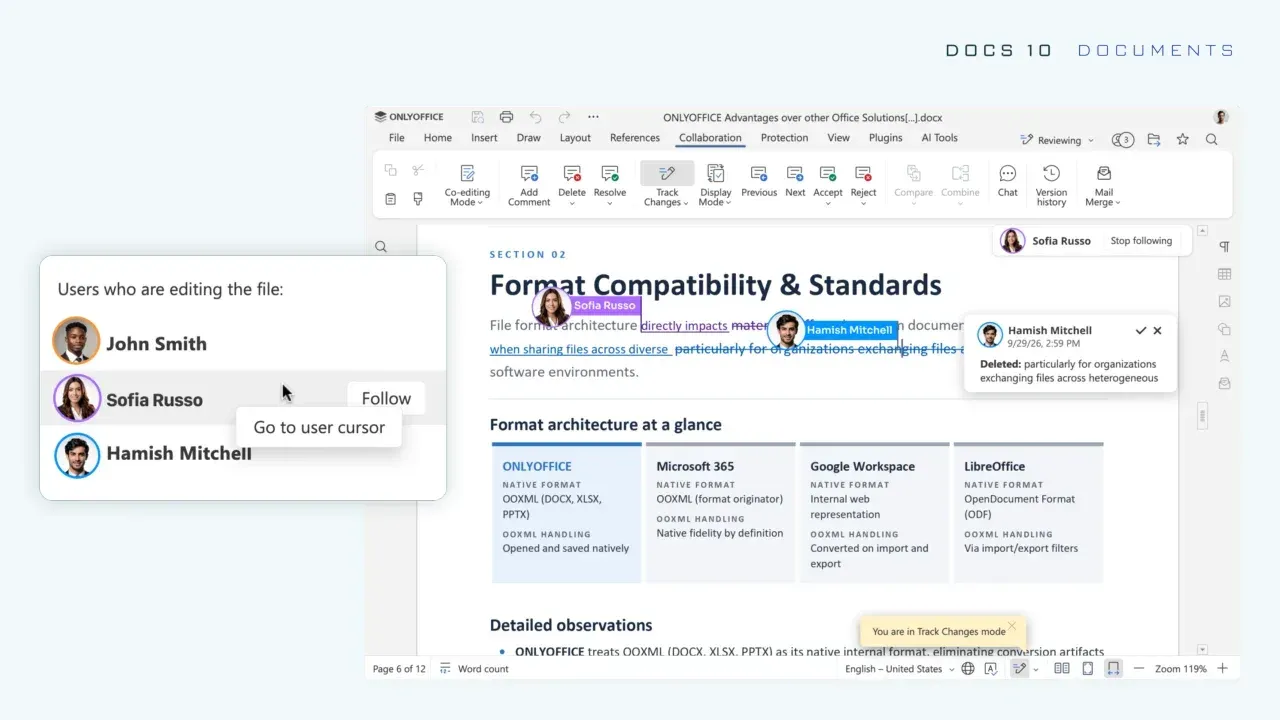
Official Docs 10.0 image: track changes and comments during co-editing, with the new option to follow another user's cursor.
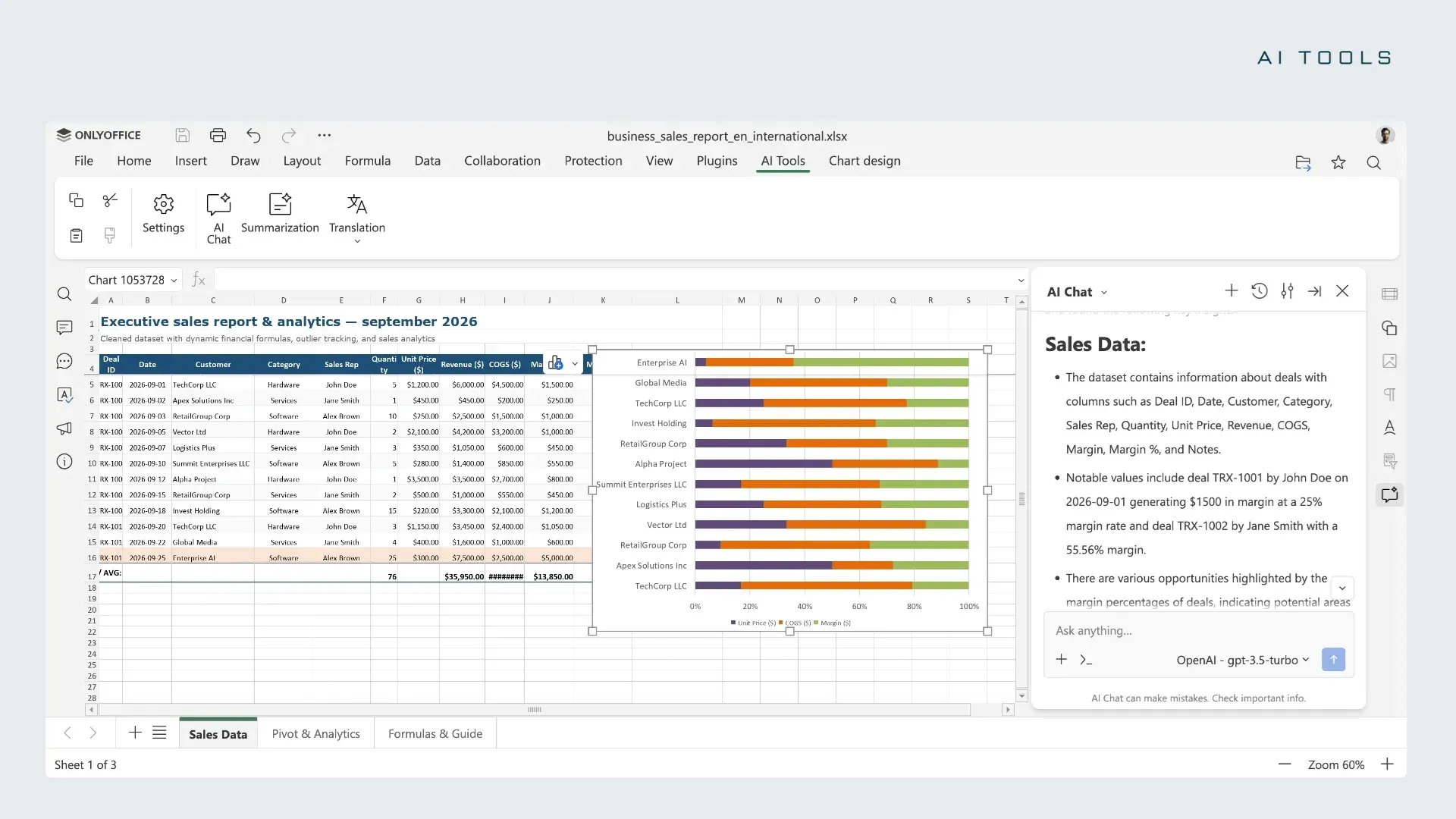
Official Docs 10.0 image: the AI Tools tab and AI Chat panel in the Spreadsheet Editor, next to a selected chart.
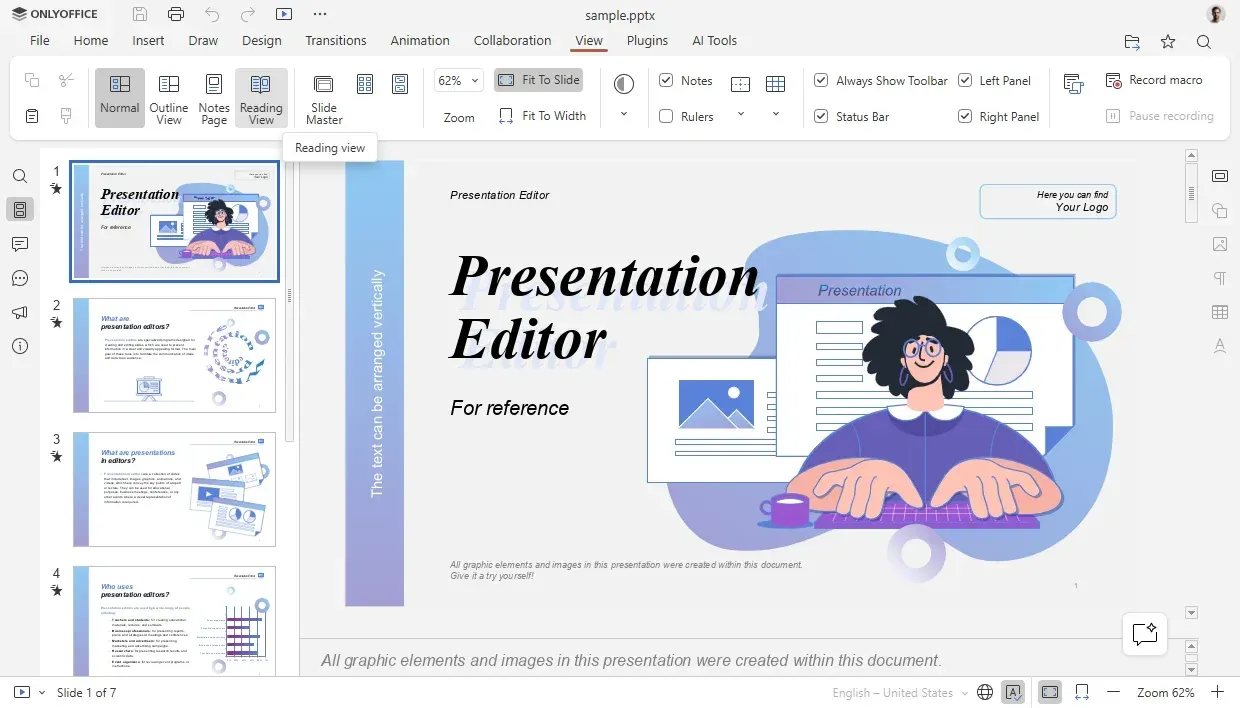
Official Docs 10.0 image: the Presentation Editor View tab with the new Outline, Notes Page and Reading View modes.
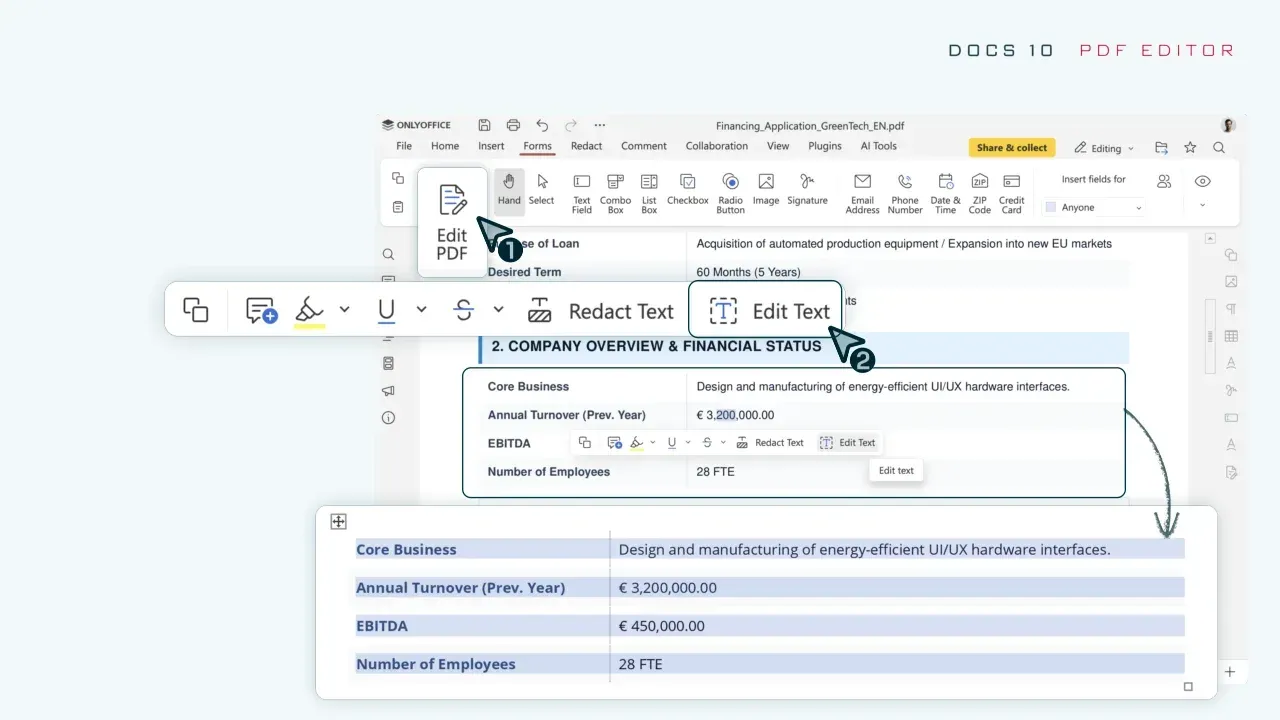
Official Docs 10.0 image: Edit Text mode in the PDF Editor recognizing a bordered table as editable cells.
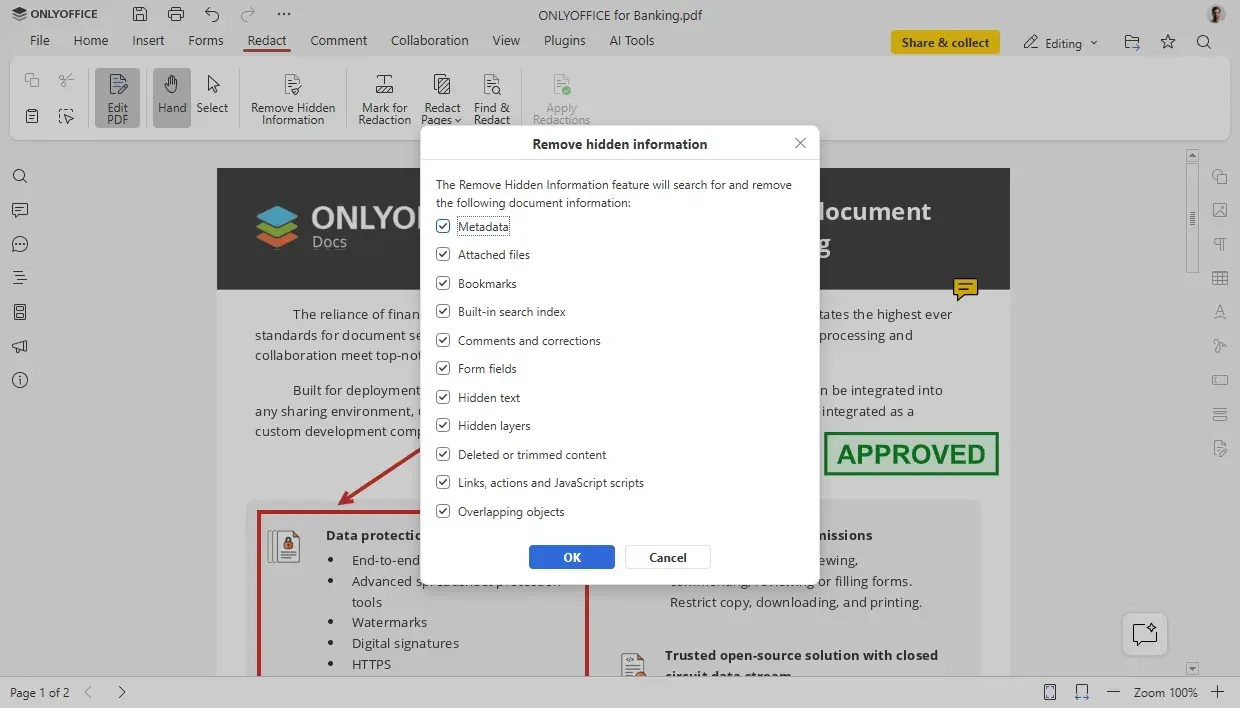
Official Docs 10.0 image: the Redact tab dialog that removes metadata, attached files, hidden layers and JavaScript from a PDF.
Key capabilities
- Docker deployment The documented one-liner runs the Community image with port 80 published and a fixed JWT secret. The Docker guide asks for a dual-core 2 GHz CPU, 4 GB RAM, 40 GB free disk, 4 GB swap and an amd64 Linux host with kernel 3.10 or later. Mount
/var/log/onlyoffice,/var/www/onlyoffice/Dataand/var/lib/onlyofficeas volumes to keep logs, certificates and the file cache across container updates. - Linux packages (DEB and RPM) Release 10.0.0 ships
onlyoffice-documentserveras DEB for amd64 and arm64 and as RPM for x86_64 and aarch64. The Debian and Ubuntu guide installs from the signed ONLYOFFICE APT repository and requires NGINX plus Microsoft core fonts throughttf-mscorefonts-installer. Since 10.0 the packaged service listens on port 8083 by default. - Windows Server installer
onlyoffice-documentserver.exetargets 64-bit Windows Server 2016 or later, with a separate prerequisites package. A custom port is set with the/DS_PORTswitch, and the main services areds-docserviceandds-converter. The Windows guide still lists Erlang, RabbitMQ and PostgreSQL, while the 9.4.0 changelog removes those dependencies, so check the guide against the version you install. - Kubernetes and clustering The Kubernetes-Docs Helm charts deploy to Kubernetes or OpenShift with persistent storage, a message broker, a key-value store, a database and an optional StatsD exporter for Prometheus. Clustering is listed for the Enterprise and Developer editions only; Community is a single-node deployment recommended for up to 20 users.
- Document Editor Covers font and paragraph formatting, content controls, tables of contents, mail merge, document comparison and a navigation panel. Version 9.3 added a multiple-pages view and saving to Markdown; 10.0 adds horizontal line settings, a row option that prevents breaking across pages, Keep with next for tables and better handling of equations in right-to-left text.
- Spreadsheet Editor Supports formulas, pivot tables, data validation, conditional formatting, sparklines, Sheet Views and a Solver for linear problems (Simplex LP). 9.3 added dynamic arrays and the
REGEXTEST,REGEXREPLACEandREGEXEXTRACTfunctions; 10.0 adds saving to legacy XLS, charts from non-adjacent ranges, range highlighting in the formula bar and faster whole-column array formulas. - Presentation Editor Provides slide masters, transitions, animations, notes and presenter mode. 9.4 added 25 design themes and 20 transitions; 10.0 adds Outline, Notes, Handout Master and Notes Master views, a Reading View, extended print modes for handouts and notes, and export of a slide range as an animated file or video with chosen resolution and slide duration.
- PDF Editor and forms PDF files can be edited and co-edited: text, pages, objects, annotations, comments, freehand drawing, redaction and form filling. Version 10.0 adds role-based form creation and data collection, reusable saved signatures, recognition of bordered tables in Edit Text mode, and removal of metadata and annotations through the Redact tools. Forms saved as regular PDF are signed on submission.
- Co-editing and review Two co-editing modes are available: Fast, which shows changes as they are typed and saves automatically, and Strict, which syncs on Save. Comments, built-in chat, track changes with display modes and version history are present in every edition. 10.0 lets a user jump to another editor's cursor and follow it.
- Format support and conversion The conversion service handles DOC, DOCX, ODT, RTF, TXT, PDF, HTML, EPUB, XPS, DjVu, XLS, XLSX, ODS, CSV, PPT, PPTX and ODP, with TSV reading (9.3), Markdown output (9.3) and OFD input (10.0). The Conversion API is available in all editions; 10.0 adds direct uploads through
POST /converter/from-file, and aconvertServiceEnableflag can switch the public converter off. - Docs API for embedding An integrator's document manager loads
api.js, passes each file'surland uniquekey, and receives saves through acallbackUrl. The callback handler receives status codes such as 2 (ready for saving) about 10 seconds after the last editor closes and must answer{"error":0}. A Node.js test example is bundled but is documented as being for testing only. - Command service, Live Viewer and WOPI The command service handles force-save, disconnecting users, document status and metadata updates. A Live Viewer shows other users' edits to read-only viewers in every edition. WOPI support lets WOPI hosts open documents; since 10.0 WOPI requires an explicit host entry in the
ipfilterrules, andallow: *is no longer enough. - Plugins, macros and Office API Plugins and macros are written in JavaScript and run inside the editors, with a marketplace redesigned in 10.0. The Office API exposes document objects; 10.0 adds a global
Editorobject whose methods return Promises,Editor.RunMacro, and new classes for text ranges, watermarks, shadows and tables of contents. - Document Builder and Automation API The Document Builder service generates documents from scripts without opening an editor, and the Automation API drives editors programmatically. Both are listed for the Developer Edition only. 10.0 adds
POST /docbuilder/from-fileand adocbuilderEnableflag, and fixes several Document Builder issues, including local file access and CVE-2026-110385. - AI Tools The editors include AI chat, summarization, translation and quick actions through a configurable provider list. The README screenshot shows providers such as OpenAI, Anthropic, Mistral, Gemini, DeepSeek, Groq and Together AI, and the AI page states that fully local models are supported. Administrators can hide the feature with
editorConfig.customization.ai.disabled. - Security controls JSON Web Tokens sign requests between the integrator and the server and are enabled by default in 10.0. The Docker image generates a random JWT secret when none is set, and it changes on every reboot, so production deployments should pass
JWT_SECRET. 10.0 also adds checksum verification of downloaded files and stops/converter,/docbuilderand/commandfrom accepting the editor token. - Interface and localization The interface is available in 46 languages with right-to-left and CJK text support, a tabbed layout, dark theme and 125 to 200 percent scaling. Spell checking uses the bundled dictionaries. The Admin Panel, mobile web editors and white labelling are not part of the Community Edition.
Where ONLYOFFICE Docs fits
Adding office editing to Nextcloud, ownCloud or Seafile
Deploy ONLYOFFICE Docs on its own host name with HTTPS, set a JWT secret, then install the platform's ONLYOFFICE connector and enter the server address and the same secret. Open a DOCX from two accounts to confirm co-editing, then close both editors and check that the saved file appears in the storage after the callback delay. A mismatch between secrets is the most common reason documents fail to open.
Embedding editors in your own web application
Follow the how-it-works overview: your application is the document manager and storage, ONLYOFFICE Docs is the editing service. Generate a new document key for each saved version, sign the editor configuration with JWT and implement a callback endpoint that downloads the edited file when status 2 arrives. Test the case where the callback endpoint is unreachable; the command service includes functions for recovering such forgotten files.
Server-side conversion pipelines
Use the Conversion API to turn DOC, ODT or PPT uploads into DOCX, XLSX, PPTX or PDF, or the new multipart /converter/from-file endpoint to send files directly. Requests need a JWT whose operation field is set for the from-file endpoints. Restrict the converter to internal clients, or disable it with convertServiceEnable when only the editors are needed.
Collaborative review of contracts and reports
Switch to Strict co-editing when authors want to publish changes only on Save, enable track changes and use comments for review rounds. Version history keeps earlier states available to reviewers. For final copies, use the PDF editor's Redact tools, which since 10.0 can also remove annotations and metadata from the redacted document.
Building and collecting PDF forms
Create fields in the form editor, assign them to roles and save the form as PDF. Recipients fill it in the browser, and 10.0 adds role-based collection of submitted data and reusable signatures. Test the complete submit path inside the connector you use before relying on it to collect responses.
Running a controlled AI setup
Decide whether AI Tools should be available at all. If they are, configure a provider in the AI settings, preferably a self-hosted or local model when documents must not leave your network, and document which provider each team uses. Otherwise set editorConfig.customization.ai.disabled in the integration so users do not see the AI tab.
Install
sudo docker run -i -t -d -p 80:80 --restart=always -e JWT_SECRET=my_jwt_secret onlyoffice/documentserverReviews of ONLYOFFICE Docs
Be the first to share your experience with ONLYOFFICE Docs.
Write a review
Loading review form…
Alternatives to ONLYOFFICE Docs
 LibreOfficeLibreOffice is a free, open source office suite with Writer, Calc, Impress, Draw, Base and Math, developed by a volunteer community.
 CryptPadAGPL-licensed collaboration suite from XWiki that encrypts documents in the browser before they reach the server. Use a public instance such as CryptPad.fr, buy a hosted or on-premise enterprise plan, or self-host it with Node.js or Docker.
 La Suite DocsLa Suite Docs is an MIT-licensed collaborative editor started by the French and German governments. Teams write block-based documents in real time, nest them into wikis, share by role or link and export to .docx, .odt or PDF on infrastructure they run.