
What is GridCraft?
GridCraft is an open-source spreadsheet application written in Rust by the ArtCraft team. The project README describes a clean-room take on modern spreadsheet workflows: a ribbon, formula bar, Name Box, sheet tabs, fill handle, conditional formatting, tables, charts and pivot tables, with XLSX as the native file format. The roadmap names Microsoft Excel (Microsoft 365) as its parity target. The same code base runs as a native desktop program on Windows, macOS, Linux and FreeBSD and as a WebAssembly build in the browser.
GridCraft is one of the free Crafting Apps listed on getartcraft.com, next to sister projects such as WordCraft, PdfCraft and CADCraft. The repository was created on October 7, 2026, and v0.1.0 was published the next day. The code is dual-licensed under MIT or Apache-2.0 at the user's option; the ArtCraft name and logos are trademarks excluded from that license. The README states that there is no subscription, no licence server and no telemetry, that the UI icons are drawn in code and that no fonts are bundled.
The project labels its stage as alpha: the core workflow of opening an XLSX file, entering data and formulas, formatting, sorting and filtering, charting, pivoting, printing to PDF and saving works end to end, while depth and file fidelity are still incomplete. The roadmap, last reviewed on November 1, 2026, estimates readiness for real work at about 50 percent and counts 281 of 296 catalogued ribbon commands and 513 of 523 worksheet functions, 504 of them working. The gaps document lists open items such as 100 MB workbooks that do not open, single-threaded recalculation, XLSX output not yet confirmed in Excel on a real-file corpus, chart options lost on round trip, no Power Query or data model, no co-authoring and no mobile layout.
Releases appear every few days. The latest, v0.19.1 of November 12, 2026, repairs Flatpak update checks and self-updates. Version 0.19.0 added Arabic bidirectional layout, font fallback, sorting and AutoFit, Hijri calendar prefixes in number formats, regional format data for 20 regions, Excel's implicit intersection for legacy formulas, a sandbox crate for helper processes and a long list of bounded-work fixes. Version 0.18.0 added a page command API to the web build, rebuilt the dependency graph from shared syntax trees and made paste, fill and copy skip rows a filter hides.
Internally, GridCraft is an engine-first Cargo workspace with enforced layering: crates for addresses and values, number formats, the formula parser, the function library, the workbook model, the calculation engine, XLSX and CSV I/O, chart rendering, the command engine, the egui interface and the MCP server, plus the desktop app, gridcraft-cli and gridcraft-web. Workbooks are copy-on-write, recalculation is incremental and the grid lays out only visible cells, as the architecture document describes. Other spreadsheet listings on iThub include IronCalc, a Rust spreadsheet engine, and LibreOffice.
GridCraft screenshots
Explore the interface. Open a screenshot to view it at full size.
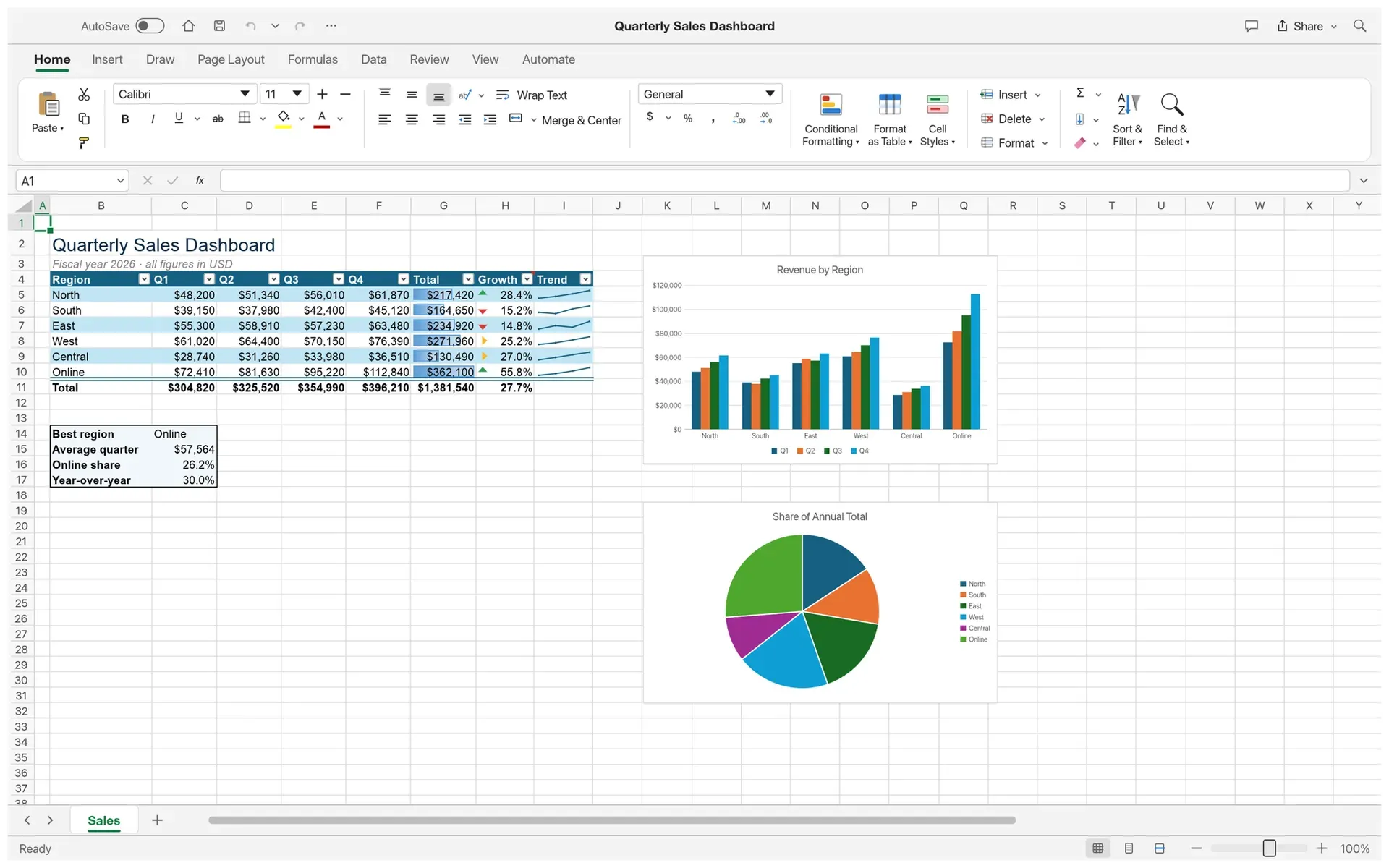
The Quarterly Sales Dashboard sample: a table with a totals row, data bars, arrow icons and sparklines next to a column chart and a pie chart.
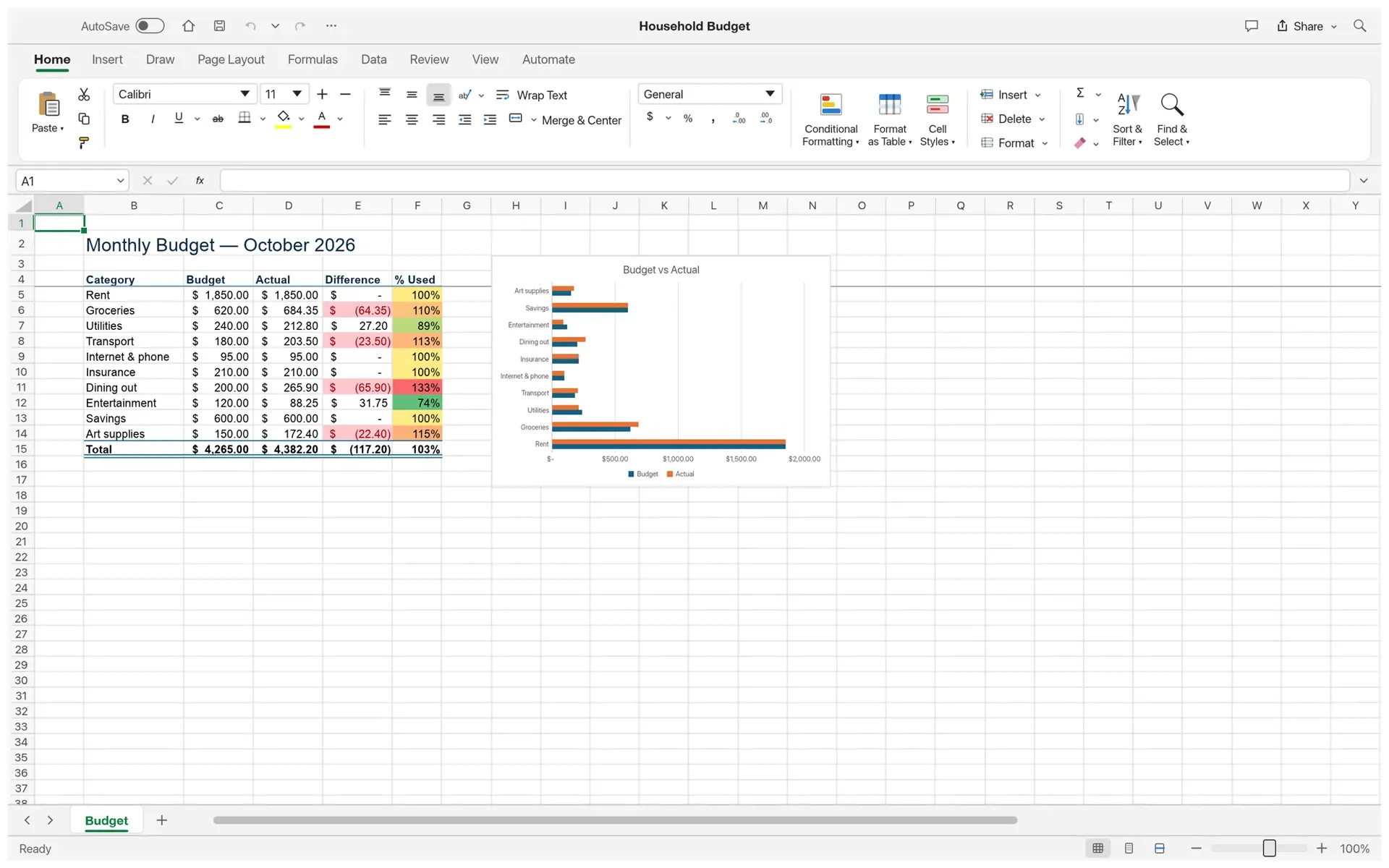
A household budget with accounting number formats, highlighted overspending, a colour scale on the percent-used column and a bar chart.
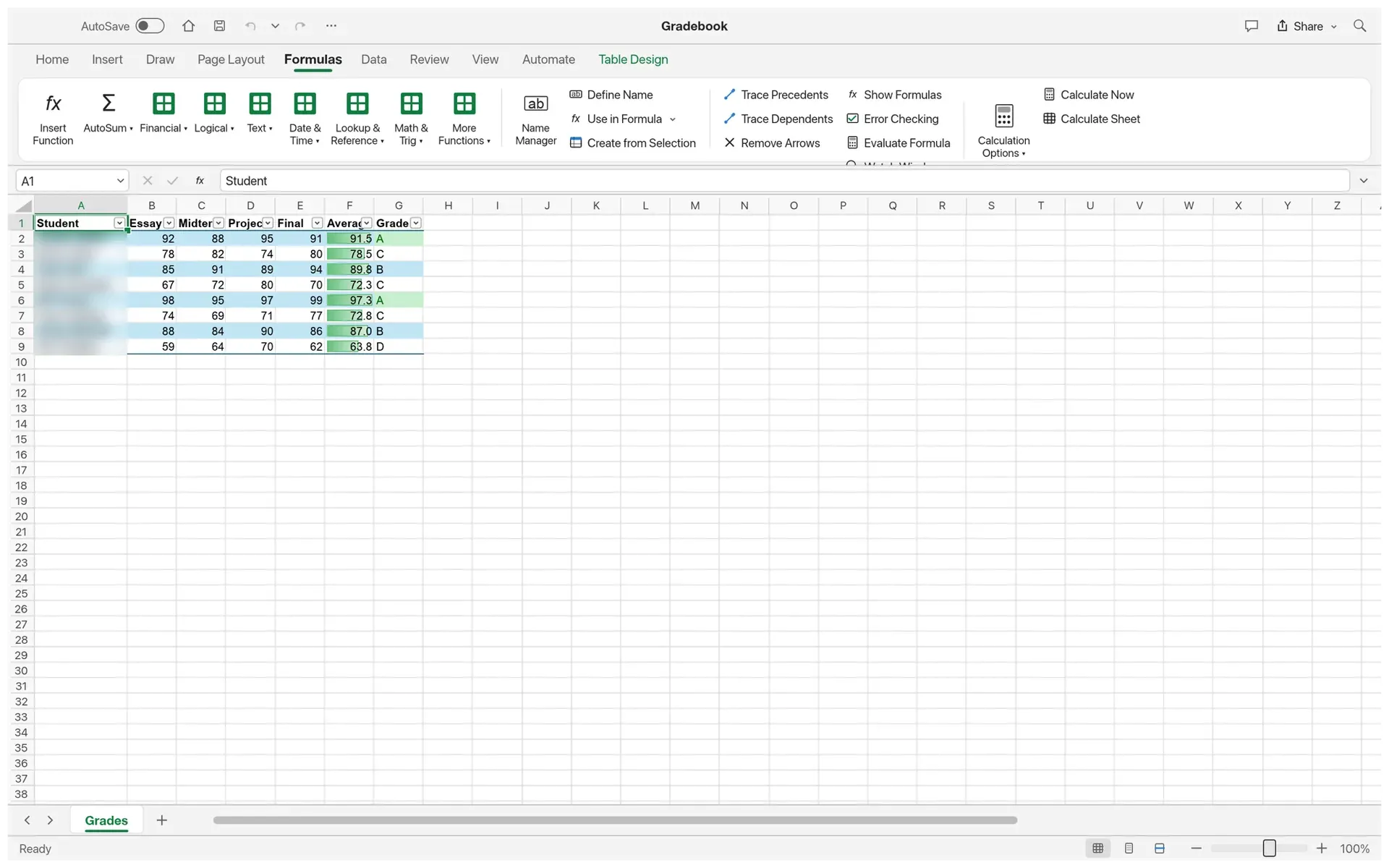
A gradebook table with averages, letter grades computed with IFS and data bars, with the Formulas tab and function library open; the student name column is blurred.
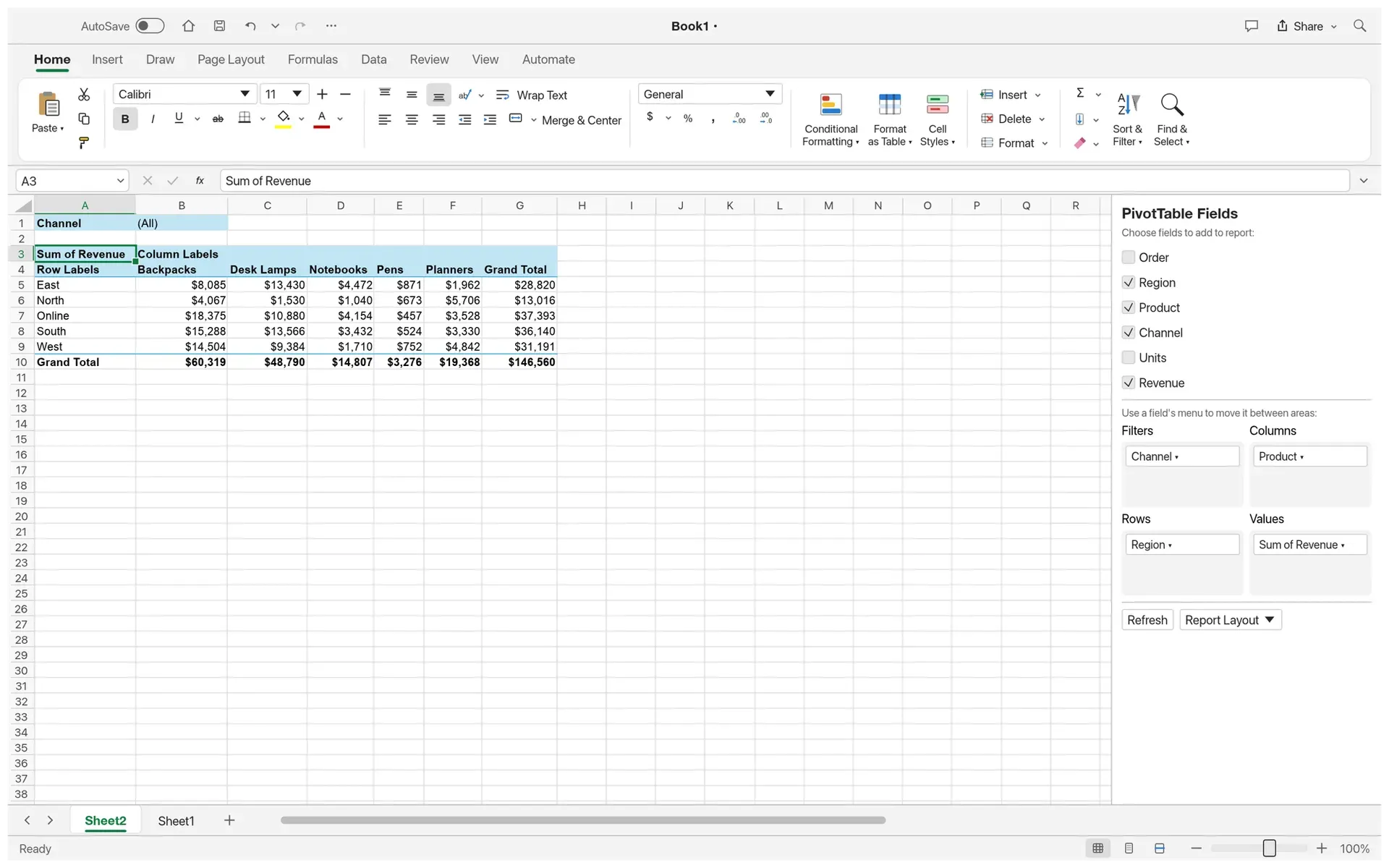
A pivot table summarising revenue by region and product with a Channel report filter, grand totals and the PivotTable Fields pane.
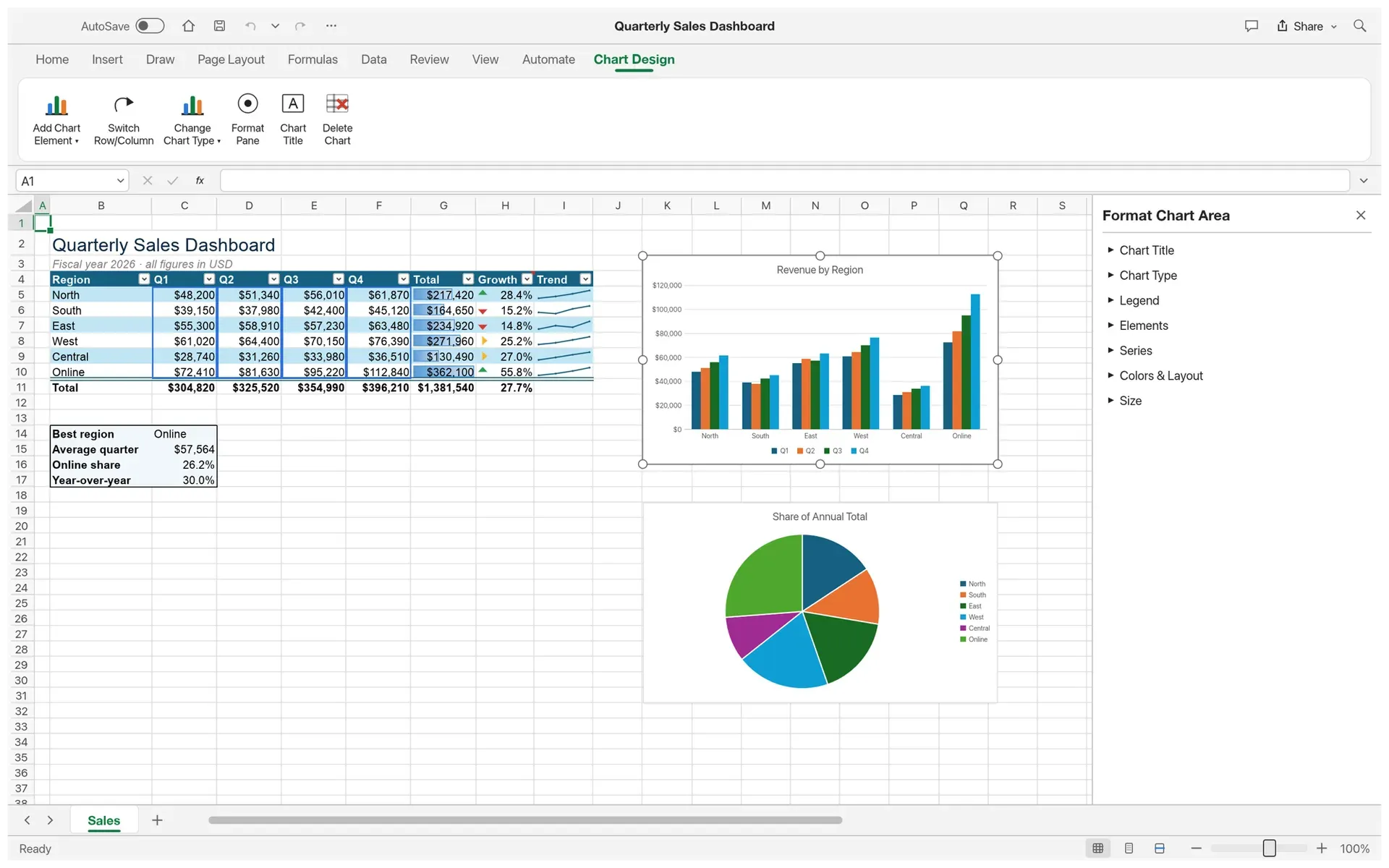
The column chart selected, with its source data outlined, the Chart Design tab and the Format Chart Area pane.
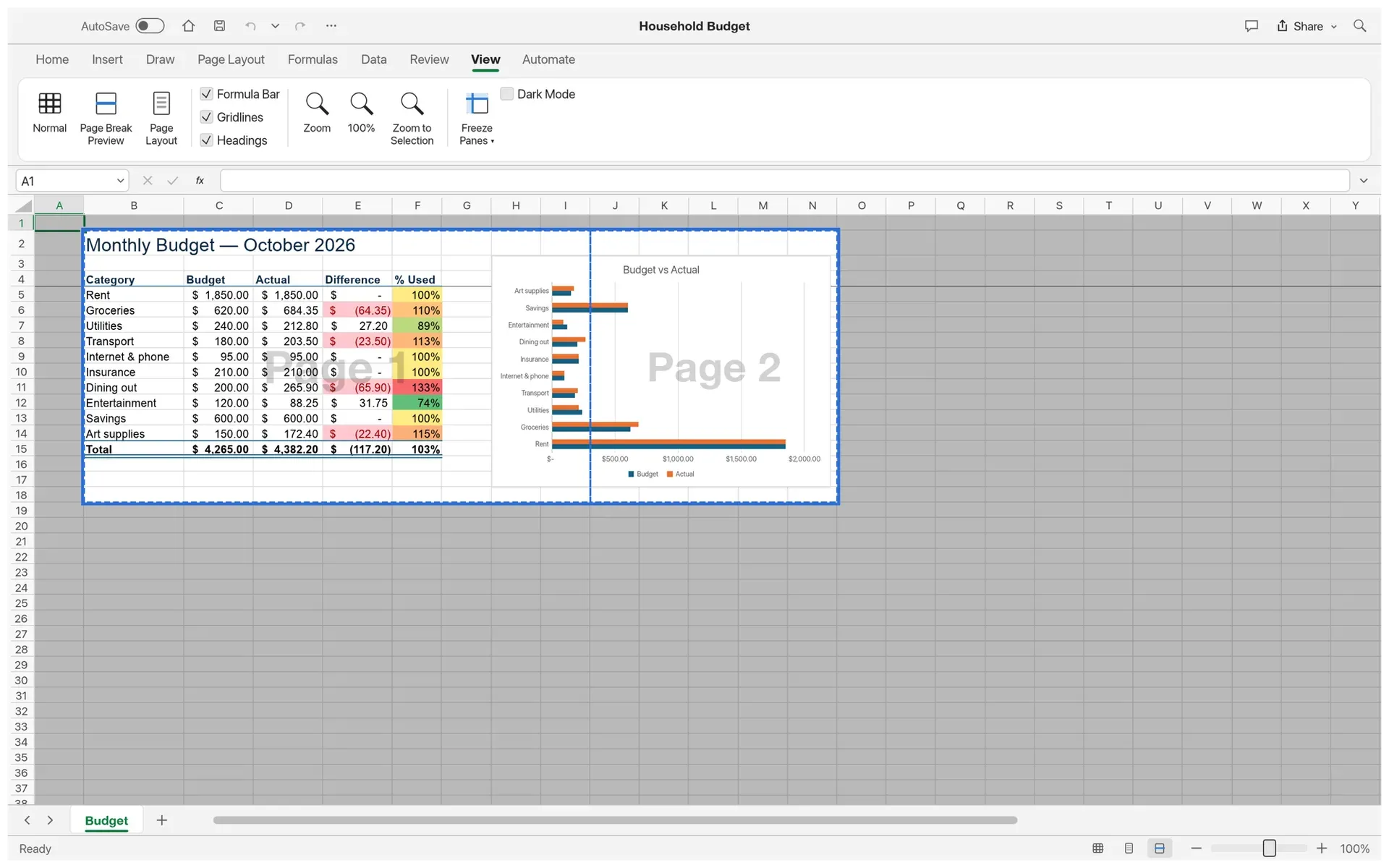
Page Break Preview of the budget sheet, with the print area outlined, a dashed page break and page watermarks.
Source: official GridCraft project page.
Key capabilities
- Ribbon, formula bar and grid The window has Home, Insert, Draw, Page Layout, Formulas, Data, Review, View and Automate tabs, a formula bar with Name Box, sheet tabs and a fill handle. Formulas can be entered in point mode with coloured references, and Format Cells, Paste Special and Find and Replace dialogs are available. Access keys after Alt or F10 cover the Home tab and legacy menu paths so far.
- Calculation engine and functions A dependency-graph engine recalculates incrementally and supports dynamic arrays with spilling, LET, LAMBDA, MAP, REDUCE, SCAN, BYROW, BYCOL and MAKEARRAY, and structured table references. The function parity list tracks the 513 implemented worksheet functions. With the Spanish interface, formulas use Spanish names, decimal commas and semicolon separators, while files keep canonical English syntax.
- Formatting and conditional formats Number formats use a format-code language that includes accounting formats and calendar prefixes. Cell styles, borders, merges, themes and Format as Table are available, and conditional formatting covers rules, data bars, colour scales and icon sets with a Manage Rules dialog.
- Tables, sorting and data tools Data tools include sort, AutoFilter, Flash Fill, Text to Columns, Remove Duplicates, data validation, outlining, grouping and subtotals, Consolidate and Get Data imports. Since 0.18.0, paste, fill and copy skip rows hidden by a filter.
- Charts and sparklines The README lists seventeen chart types, edited through a Chart Design tab and a Format pane; selecting a chart outlines its source range. Sparklines sit in cells, and chart data tables and trendlines are supported. The chart parity document tracks chart types and elements, and the gaps list notes that charts can still lose options on an XLSX round trip.
- Pivot tables PivotTables have a field list with Filters, Columns, Rows and Values areas, report filters, layouts, date grouping and show-values-as calculations, and are saved to and read from XLSX. Slicers, calculated items and PivotCharts are not implemented yet.
- What-if analysis tools Goal Seek, Solver (Simplex LP with integer constraints, a nonlinear method and the Evolutionary method, with Answer, Sensitivity and Limits reports), all 19 Analysis ToolPak tools and Forecast Sheet with the FORECAST.ETS functions are implemented. Dialogs take ranges by selection on the grid.
- Pictures, shapes, equations and comments Pictures float over the sheet or, as described in the cell pictures guide, sit inside a cell and move with sorting and filtering. Shapes, text boxes, form controls, equations written in LaTeX and stored as Office Math, threaded comments and notes, spelling and sheet and workbook protection with Excel-compatible password hashes are also present.
- XLSX and other file formats XLSX is read and written with styles, themes, formulas, tables, conditional formats, validation, comments, links, charts, pictures, sparklines, pivot tables and print settings. XLSM files keep their VBA project byte for byte but macros never run; password-encrypted workbooks open but cannot be saved with a password. Legacy XLS opens with values, formulas and number formats, XLSB and ODS import data only, and CSV, TSV and text files open with delimiter and date-order detection.
- Printing and PDF export Page Break Preview, Page Layout view with rulers and header and footer editing, print areas and print titles are supported. On the desktop, printing goes to a chosen printer with copies, duplex and grayscale options, and sheets export to PDF, CSV or HTML.
- Macros Macros are typed, declarative lists of GridCraft commands with repeat, if and stop steps, not VBA. A run is one undo step, rolls back workbook changes on an error and does not touch files without permission; macros can be recorded, edited in a step editor and bound to form buttons, as the macro documentation explains. Python cells from files are stored and kept but not executed.
- Command-line tool
gridcraft-clioffersinfo,convert(XLSX, CSV, TSV, JSON, HTML),evalfor single formulas,catfor aligned range output,checkfor calculation and round-trip fidelity over a folder of files,runfor scripted command sequences,commands,functions,mcpandsend. The CLI reference documents every subcommand. - MCP server for AI agents
gridcraft-cli mcpserves the Model Context Protocol on stdio, headless or connected to a running window. Tools includeread_range,write_range,set_cell,evaluate_formula,format_range,insert_chart,create_table,sort_range,filterandexecute_command, which reaches every engine command. The MCP guide shows Claude Code and Claude Desktop setups. - Authenticated control channel Started with
--control PORT, the desktop app accepts JSON lines on 127.0.0.1 after anauthline carrying a 256-bit token from an owner-only file, as the control protocol describes. It adds real pointer and keyboard input, dialogs and screenshots, and Automate, Action Journal lists every command run in a session. - Interface, languages and windows The interface is offered in 19 languages, with light and dark themes; the localization parity document notes that several of them cover menus only. Each workbook window can be a separate native window, with New Window, Switch Windows and Arrange All.
- Desktop downloads V0.19.1 provides code-signed MSI installers and portable zips for Windows x64 and ARM64, a signed and notarized universal DMG for macOS 11 or later plus a universal CLI zip, Linux AppImage, Flatpak, .deb, .rpm, Arch package and tarball builds for x86_64 and ARM64, RISC-V 64 tarball, .deb and .rpm builds, and FreeBSD tarballs for x86_64 and ARM64. Checksums and signatures accompany the files, and the ArtCraft Linux repositories offer Flatpak, APT and RPM sources. The README also lists 32-bit Windows packages, which are not attached to this release.
- Web build and self-hosting
gridcraft-web-<ver>.zipis a static site with no server-side code for any static host, subpath or CDN bucket. Open uses the browser file picker and Save downloads the workbook. The web hosting guide covers MIME types, compression and caching; WebGPU needs HTTPS or localhost, with a WebGL2 fallback. - Updates, logs and source builds The app checks for updates at startup, and the ArtCraft Launcher installs and updates all Crafting Apps after checking release checksums. Logs go to
gridcraft.login the settings folder, capped at 16 MiB. Source builds need Rust 1.95 according to the workspace manifest (the product page lists 1.90) and start withcargo run --release -p gridcraft.
Where GridCraft fits
Building a sales dashboard
The Quarterly Sales Dashboard sample, opened with File, New, Sample, is built entirely from GridCraft commands: a formatted table with banded rows, filter buttons and a totals row, data bars, arrow icons and sparklines, and a clustered column chart and a pie chart linked to the table. Selecting a chart outlines the range it plots, and the Chart Design tab and Format pane change its type, elements and colours.
Tracking a household budget
The budget sample combines accounting number formats, conditional rules that highlight overspent categories, a colour scale on the percent-used column, a totals row with a double border, frozen headers and a bar chart comparing budget with actual spending. Page Break Preview shows how the sheet and chart split across printed pages before printing or PDF export.
Summarising data with pivot tables
A PivotTable is inserted from a table or range, and fields are placed in the Filters, Columns, Rows and Values areas of the field list. Report filters, date grouping and show-values-as options change the summary, and the result is saved to XLSX with the workbook.
Exchanging workbooks with Excel users
XLSX workbooks open with their formulas, styles, tables, charts and pivot tables and are saved back as XLSX, while XLS, XLSB and ODS files open with their data and are saved as XLSX. The file-format parity document lists what each format keeps, and the project's alpha notice in the GridCraft documentation states that some workbooks from other apps may not open or look exactly as they should.
Scripting workbooks from the command line
gridcraft-cli run opens a file or sample, applies --cmd steps or a JSON-lines script such as bolding a header row, entering a formula and filling it down, and saves with --out. eval evaluates a formula without a workbook, cat prints a range as an aligned table and check reports calculation and round-trip fidelity over a folder of XLSX files.
Letting an AI agent edit a workbook
An MCP client starts gridcraft-cli mcp, optionally with --in and a file path, and asks for changes in plain language; the server writes ranges, enters formulas, formats cells, creates tables and charts, then reads values back to check the result. Connected to a window opened with --control, the changes appear live, and the AI agents guide notes that the assistant can open and save files anywhere the user can. Related automation tools on iThub include OfficeCLI.
Reviews of GridCraft
Be the first to share your experience with GridCraft.
Write a review
Loading review form…
Alternatives to GridCraft
 IronCalcIronCalc is an MIT and Apache 2.0 spreadsheet engine in Rust with about 500 functions, .xlsx support, a browser app, Python, Node.js and WebAssembly bindings, and a Docker Compose setup for self-hosting.
 LibreOfficeLibreOffice is a free, open source office suite with Writer, Calc, Impress, Draw, Base and Math, developed by a volunteer community.
 GristGrist is a relational spreadsheet from Grist Labs. grist-core (Apache-2.0) is the self-hosted Community edition with Python formulas, widgets, forms, access rules and a REST API; hosted plans and a paid full edition add more features.