
What is PixShaft (Shaft)?
PixShaft, also known by its project codename Shaft, is an open-source third-party client for pixiv on Android. It covers illustrations, manga, novels, rankings, PixiVision features, FANBOX and pixiv COMIC in one app built with Material You. It is an unofficial client: the project README states that it is not an official pixiv app, that all works remain the copyright of their creators or pixiv, and that the code is published for learning and communication. Using it requires a pixiv account; the FAQ says the main supported sign-in method is a pixiv ID or email address with a password, and that other methods such as Google sign-in are not guaranteed to work.
The project is developed in the CeuiLiSA/Pixiv-Shaft repository on GitHub, which was created in 2019. PixShaft is the public name used on Google Play and on pixshaft.com; the README confirms that PixShaft and Shaft are the same app from the same codebase. The app is distributed through Google Play and as an APK on GitHub Releases, and it can be built from source with Gradle. It supports Android 7.0 and newer (Min SDK 24) and targets Android 16 (Target SDK 36).
The current release is v4.9.9, published on November 3, 2026, with an APK of about 48 MB. Its notes list offline snapshots that now include ugoira animations and can be generated in batches from bookmarks, an option to pin the home bottom bar, in-app downloading of update packages with resume, a storage view for download-related data, and fixes for slowdowns with large local databases. The global R-18 filter was also corrected to catch works that carry a viewing restriction without an R-18 tag. The previous release, v4.9.8, added experimental full-text novel translation, image filters on the viewer page and AI tags to help identify AI-generated works.
The app is written mainly in Kotlin. The README lists Coroutines and Flow, Material Design 3, an MVVM architecture with a repository pattern, Retrofit 2 and OkHttp, Room, MMKV, Glide, Lottie and ZoomImage, plus in-house modules: a Feeds list framework with local-first snapshots, the witstudio UI layer and actionqueue, a persistent rate-limited queue for actions such as bookmarks and follows. Network requests can go through Cronet with custom DNS, and Activity Embedding provides the two-pane tablet layout. Module notes are kept in the repository docs folder.
The repository is licensed under the GNU General Public License, version 2. The README states that the app is free, open source and ad-free, with every feature unlocked. The one quota-limited function is sorting search results for any keyword by popularity, which uses shared search resources; optional Pro and Max subscriptions on Afdian raise that quota, while pixiv Premium members use the official popularity sort without a quota. Sponsorship through Afdian is optional. Other open-source third-party media clients in the same iThub category include NewPipe and OpenTubeX.
Key capabilities
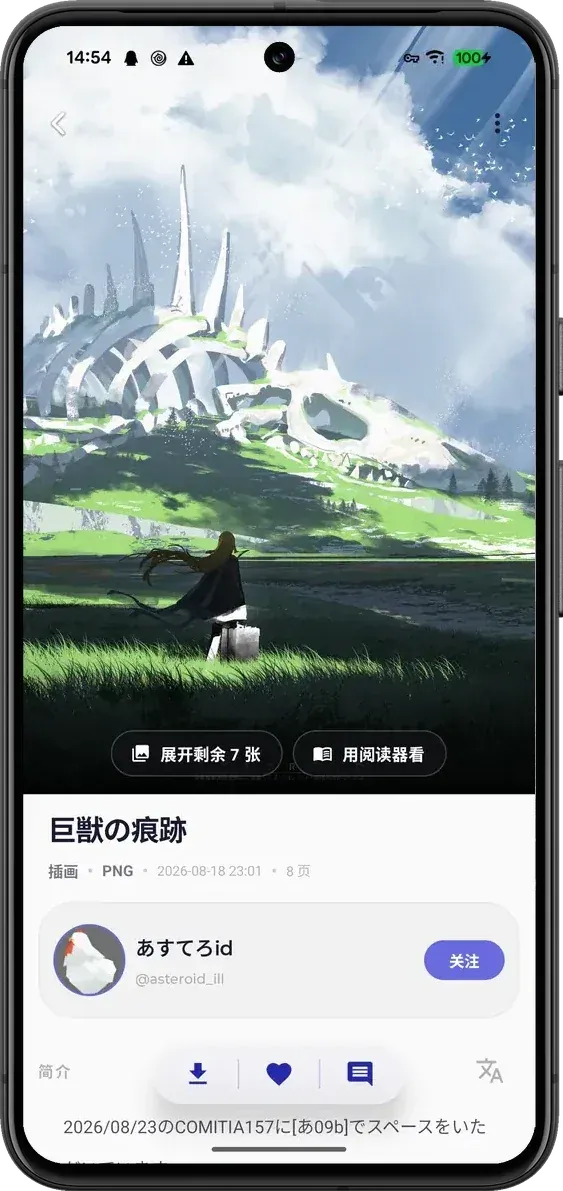
- Personalized feeds The home screen shows personalized recommendations for illustrations, manga and novels, with a horizontal ranking strip at the top and a waterfall feed below. Cards can be bookmarked directly, and a long press opens an action menu. Trending tags are refreshed in real time with cover previews.
- Rankings and chart hub Daily, weekly and monthly rankings include a date picker for viewing any past day. The Discover tab adds manga and novel columns, official PixiVision features, newest uploads, and charts for bookmarks, AI works, eras, wallpapers, tag zones and artists.
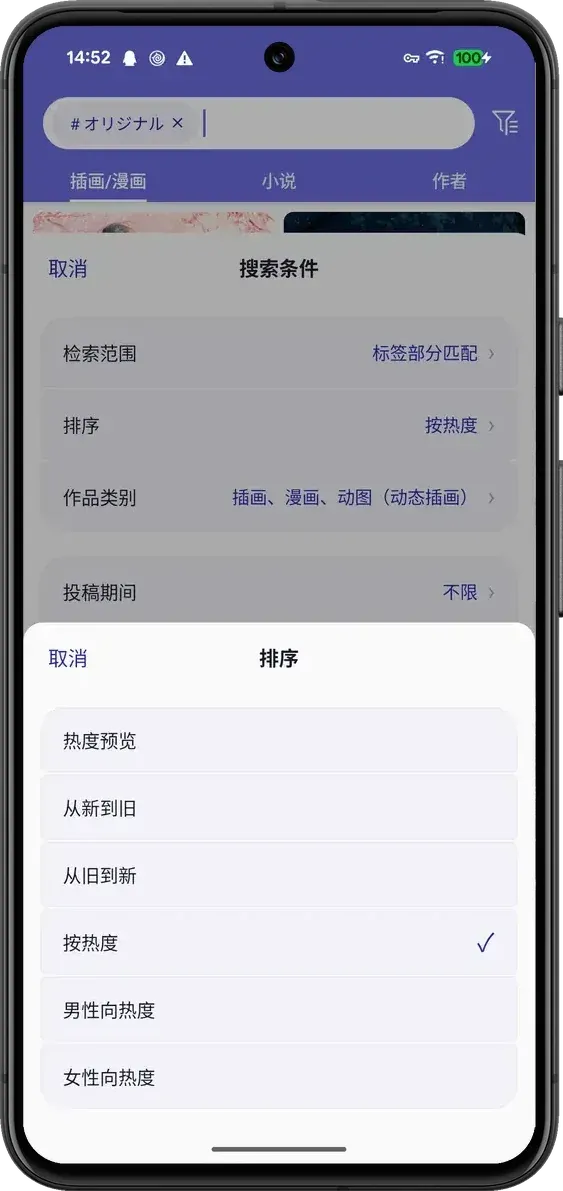
- Search and filters Search offers six sort orders: popularity preview, newest, oldest, popular, popular among male users and popular among female users. Results can be narrowed by search scope, work type, upload period, bookmark-count range, aspect ratio and resolution, with a three-way AI switch (any, hide, only) and a safe-only option. Sorting any keyword by popularity is quota-based for users without pixiv Premium.
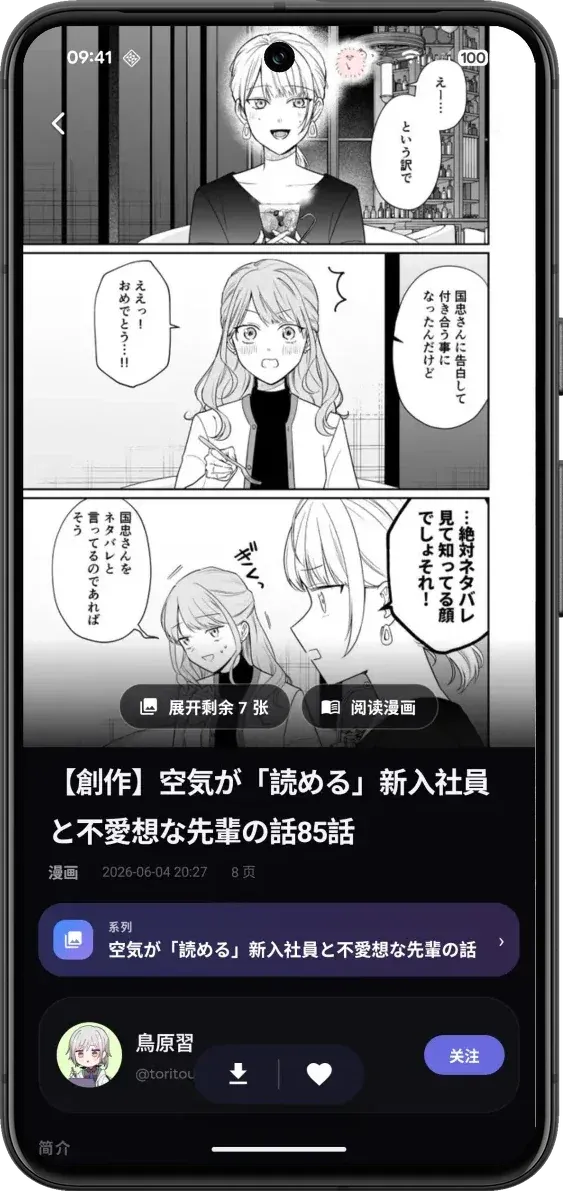
- Artwork viewer The viewer uses the ZoomImage engine with three selectable double-tap behaviours and an option to force-load the original image. Multi-page works fold into one card and can be expanded or opened in the reader. Download, bookmark and comment actions sit in a floating capsule, alongside reverse image search and AI upscaling.
- Reverse image search Images can be sent to SauceNAO, TinEye, IQDB or Ascii2D with one tap to look up the original source of an illustration. The function is available from the artwork viewer.
- FANBOX and pixiv COMIC FANBOX is integrated natively, with the post feed, recommended creators, full post bodies and plan details shown inside the app instead of a browser. The pixiv COMIC home page is also available in the app under the same pixiv account.
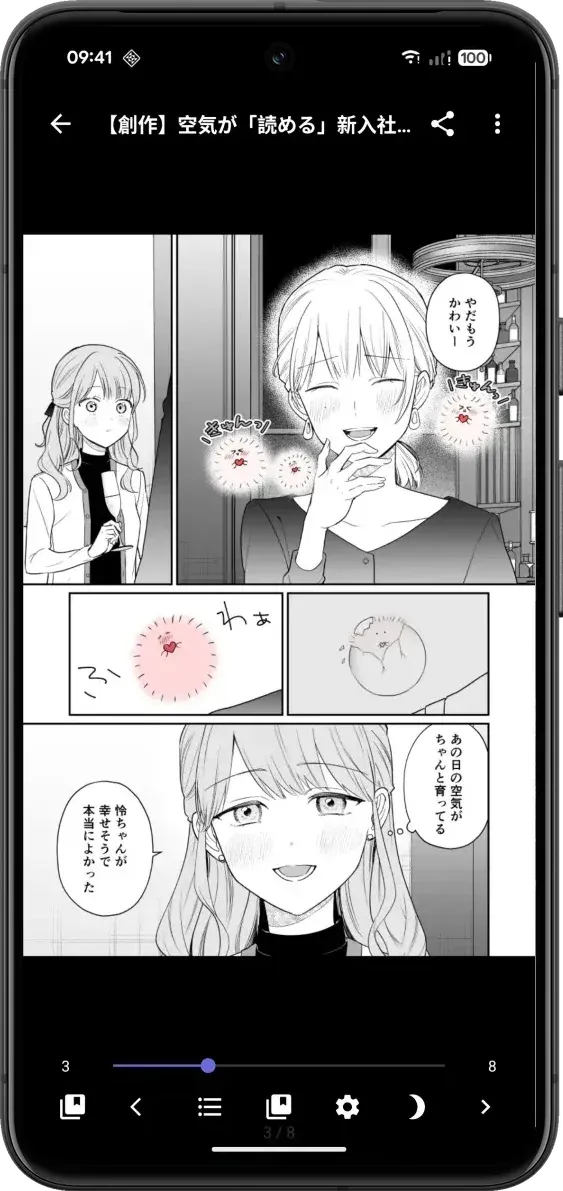
- Manga series and reader Manga series are listed chapter by chapter, and following the author keeps track of updates. The reader supports previous and next chapter navigation, paging direction, a progress bar, table of contents, bookmarks and night mode, and whole chapters can be batch downloaded or bookmarked while multi-selecting.
- Novel reader and local library The novel reader handles series, contents, bookmarks and a persistent progress percentage, with adjustable font size, line spacing and background, and mixes in related illustrations. A local folder of txt files can be opened as a library, and bookmarking a novel saves the whole text as TXT. Version 4.9.8 added an experimental full-text translation mode with original, translated or side-by-side text.
- Batch and resumable downloads Whole sets of works can be queued, with sections for downloading, waiting and completed jobs. Downloads resume after network failures and cold starts, files can be batch-renamed with naming templates, captions can be exported alongside, and jobs can be sent to an aria2 instance, for example on a NAS. The repository includes a separate guide to download paths and file names.
- AI super-resolution Low-resolution illustrations can be upscaled 2x or 4x, with line-art sharpening and denoising. The README states that inference runs on the device and that nothing is uploaded.
- Cut-out and image filters A cut-out tool separates a character from the background and exports a transparent PNG, with batch processing. Since v4.9.8 the viewer and work pages also offer image filters that can be adjusted, then saved or shared.
- Manga translation Speech bubbles are detected automatically, translated in place and re-typeset using OCR and machine translation. A translate-whole-series mode processes multiple pages and continues in the background after leaving the viewer. Besides the built-in engine, a custom OpenAI-compatible endpoint with streaming can be configured.
- Ugoira interpolation Animated ugoira works can be interpolated 2x or 4x with RIFE, approaching a 50 fps ceiling, and played through a frame-sequence player. Results can be saved as H.264 MP4, which the project describes as a fraction of the size of a GIF; GIF export is also listed among the features.
- Content filters and muting Tags and artists can be muted separately, and single works can be muted in place, in which case cards are blurred until tapped. Settings include a default R-18 content filter, filters for already bookmarked works and AI works, and v4.9.9 makes these filters apply in place without reloading.
- Multiple accounts and watch later Several pixiv accounts can be added and switched quickly, including follows, messages and bookmarks. v4.9.8 added deleting accounts from the account page with a choice of which local data to clear. A watch-later list stores works locally and, according to the README, is never reported to a server.
- Network self-check and direct connection A built-in network test page checks DNS, the App API, web endpoints and a real image download, and reports IPv6 pollution. The project states that the app includes a direct-connection option for users in mainland China. Image loading can be switched to third-party mirrors or a user's own reverse proxy, and a custom App API proxy can be set.
- Local-first loading and tablet layout Home recommendations, rankings and latest works open from the last saved snapshot while the network refreshes in the background, and bookmarks and follows go into a persistent queue so taps made offline are kept. On tablets in landscape, an optional two-pane mode shows the feed on the left and the artwork detail on the right.
- Installation The app is available on Google Play under the package ceui.pixiv.pshaft and as an APK on GitHub Releases, published with SHA-1 and SHA-256 checksums in the release notes. The install FAQ says an existing copy from a different source should be removed before installing another build, to avoid a conflict. It requires Android 7.0 or newer; building from source needs JDK 17 or newer and Android SDK 36, using
./gradlew assembleDebugorassembleReleasewith a signing config.
Where PixShaft (Shaft) fits
Browsing pixiv from an Android phone
After signing in with a pixiv account, the home tab shows recommendations and a ranking strip, the Discover tab collects PixiVision features, trending tags, newest uploads and the chart hub, and a following feed shows new work from followed artists. Artist pages list illustrations, manga, novels, manga series and bookmarks, with an advanced tag search across that artist's tags and an option to pin the profile to the Android home screen.
Finding specific works and their sources
Search combines six sort orders with filters for scope, type, upload period, bookmark count, aspect ratio, resolution and AI works, and these conditions can be kept between sessions since v4.9.8. Reverse image search through SauceNAO, TinEye, IQDB or Ascii2D helps trace the original source of an image. Muting by tag or artist and the default R-18 filter control what appears in feeds and results.
Reading manga and novels
Manga series open chapter by chapter in a reader with paging direction, table of contents, bookmarks and night mode. Novels open in a reader with typography settings and a progress percentage, and a folder of local txt files can be read in the same reader. Manga pages can be translated with OCR and machine translation, either with the built-in engine or a configured OpenAI-compatible endpoint, as described in the README.
Saving works offline
Single works or whole sets can be queued for download, with resume after interruptions, naming templates, caption export and optional hand-off to aria2. Offline snapshots, extended to ugoira animations in v4.9.9, can be generated in batches from bookmarks with pause and resume. The repository's download guide documents the save paths and file-name templates.
Following FANBOX creators and pixiv COMIC
FANBOX posts, recommended creators and plan details are shown natively in the app, and the pixiv COMIC home page is available without leaving it. Both use the same signed-in pixiv account as the rest of the client.
Processing images on the device
From the viewer, illustrations can be upscaled 2x or 4x, cut out to transparent PNGs, or adjusted with image filters, and ugoira animations can be interpolated with RIFE and saved as H.264 MP4. The README states that upscaling runs on the device. Release notes for each version are published on GitHub Releases, and questions or bug reports go to the project's issue tracker.
Reviews of PixShaft (Shaft)
Be the first to share your experience with PixShaft (Shaft).
Write a review
Loading review form…
Found PixShaft (Shaft) useful? Upvote it todayYour vote helps other IT teams find it in the daily ranking.