

What is OpenTubeX?
OpenTubeX is an open-source YouTube client that the project describes as highly customizable and privacy-focused. It runs as a desktop application on Windows 10 and later, macOS 13 and later and Linux, with an Android app (Android 8.0 or newer) and experimental iOS and iPadOS builds for version 17.4 and later. The README states that OpenTubeX originated as a fork of FreeTube and is independently developed and supported, and that it is not affiliated with, endorsed by, maintained by or supported by the FreeTube project. The project is published by the OpenTubeX organization on GitHub and at opentubex.org.
On its relation to YouTube, the README states that OpenTubeX uses a built-in extractor to request data and videos directly from YouTube, that the Invidious API can be used instead, and that OpenTubeX does not use YouTube's official API. It does not load the standard YouTube website or its page JavaScript. The project also states that it does not hide network requests: YouTube, an Invidious operator or an optional service may still see request metadata, including the IP address unless a proxy is used, and the README recommends a VPN or Tor for hiding the IP address. The client comparison page notes that third-party names and logos appear only to identify compared products and that OpenTubeX is not affiliated with or endorsed by those owners. The README also lists playback from sites supported by yt-dlp.
The project labels the app as Beta and says bugs and missing features remain. The latest release at the time of writing is v0.37.4 Beta, published November 6, 2026, alongside automated nightly builds from the development branch. That release added an in-app notification bell for live stream reminders, new uploads and automatic downloads, moved the interface to Material 3 Expressive, added automatic RSS feed refresh with RSSHub browsing, a Shows tab for channels with TV shows and an "All time" option for deleting watch history. It also raised the macOS minimum to version 13 and dropped 32-bit ARM Linux builds, both because Electron no longer supports them, and made OpenTubeX available through Scoop on Windows.
The desktop app is built on Electron and the codebase is mainly JavaScript; mobile builds are listed under the Capacitor, Android and iOS topics of the repository. Releases ship as Windows installers and portable archives for x64 and ARM64, macOS DMG and archives for Apple Silicon and Intel, Linux AppImage, DEB, RPM, pacman and portable packages for amd64 and arm64, Android APKs (including smaller Lite APKs without yt-dlp and FFmpeg) and an unsigned iOS IPA. The downloads page also lists WinGet, Scoop, a Homebrew tap, APT, RPM, COPR, Arch, Flatpak, Snap, a Nix flake, an F-Droid repository and Obtainium. The README states that the app will never be available on the Google Play Store. A web demo runs the latest release in a browser with a reduced feature set.
OpenTubeX is licensed under the GNU Affero General Public License version 3 or later. The project discloses that it is developed extensively with AI-assisted tools and adds that this does not mean the app sends viewing data to an AI service. The privacy policy documents which services receive which requests. Related clients in this directory include FreeTube, Invidious and NewPipe.
OpenTubeX screenshots
Explore the interface. Open a screenshot to view it at full size.
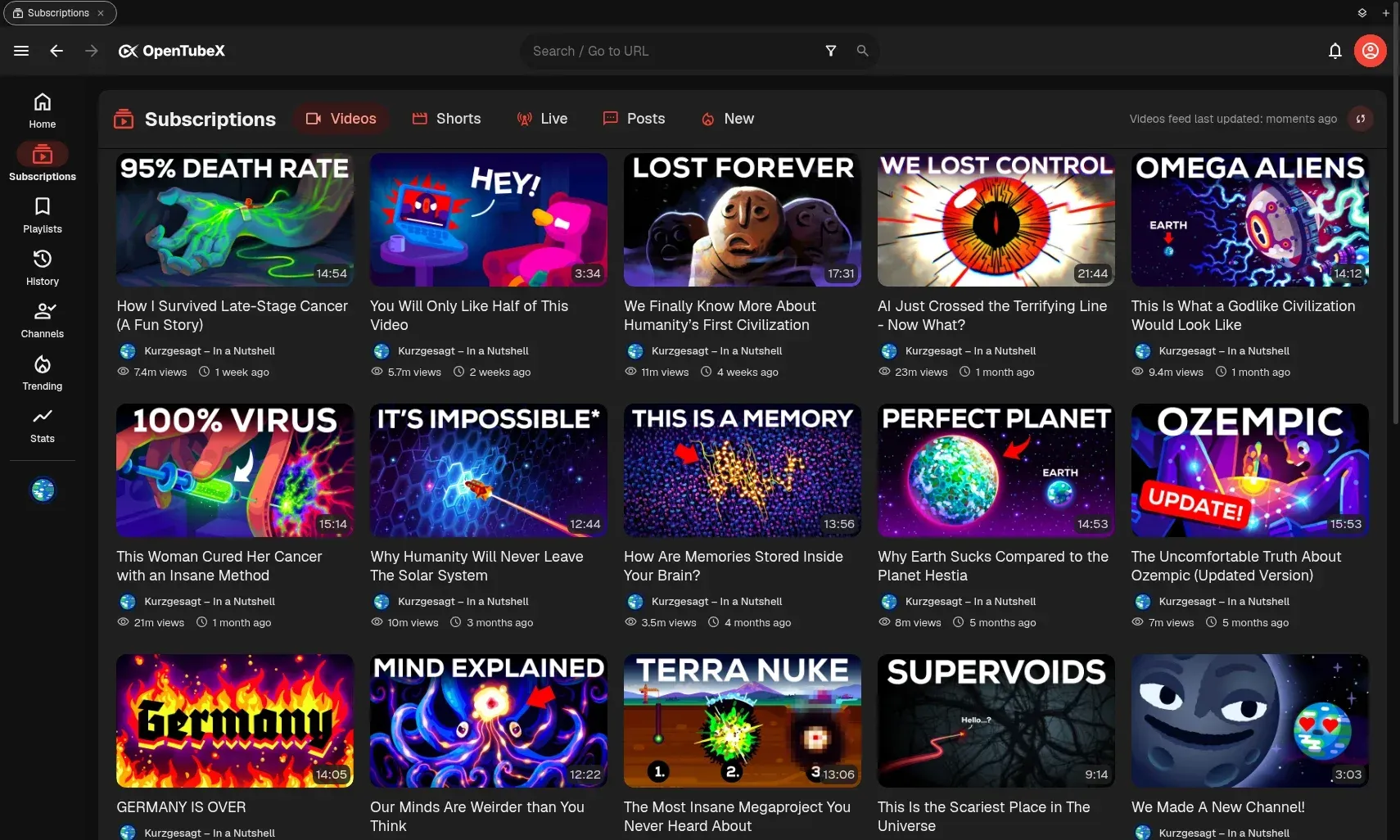
Desktop Subscriptions feed with a sidebar for Home, Playlists, History, Channels, Trending and Stats. Official README screenshot (dark theme).
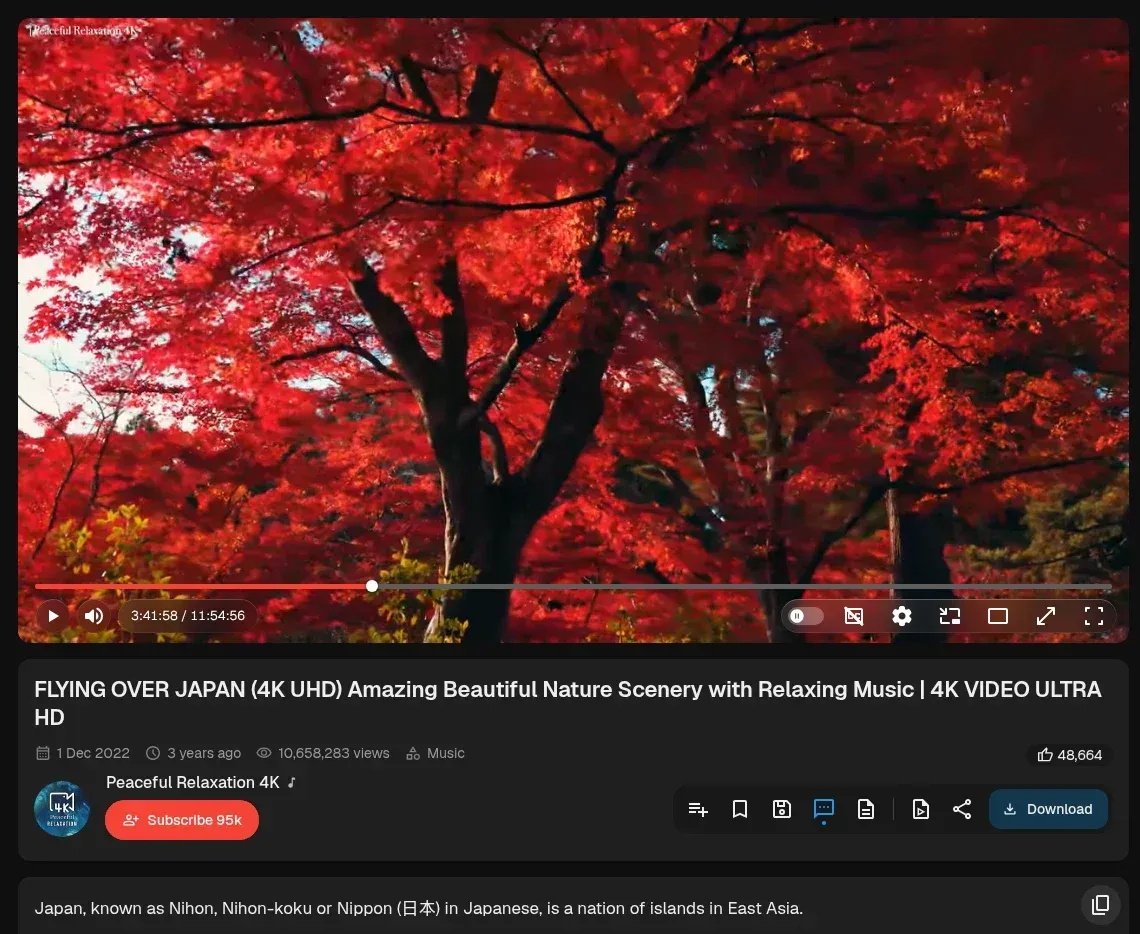
Desktop watch page with player controls, video metadata and the action bar including Download. Official README screenshot, cropped to the player column.
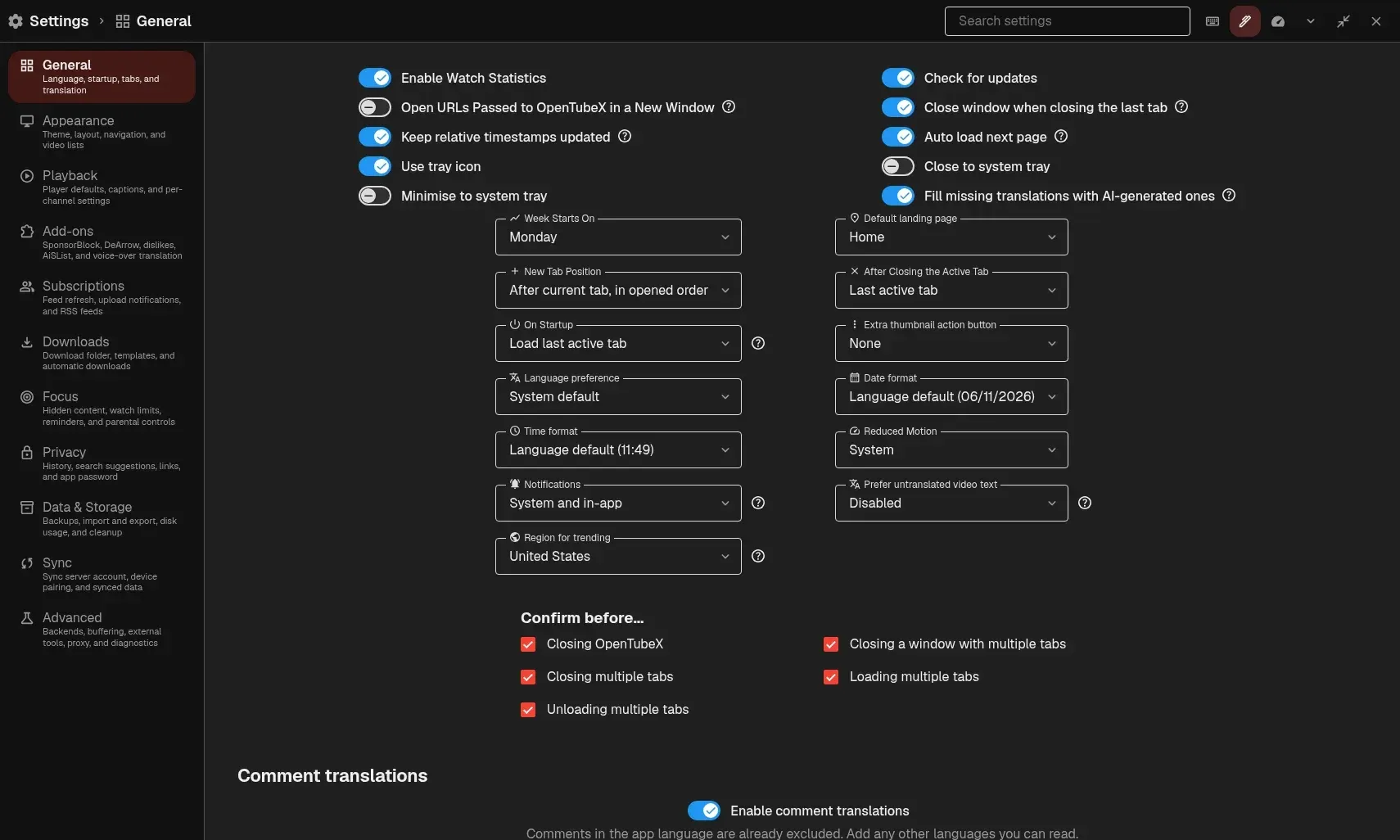
Settings dialog, General page: categories include Playback, Add-ons, Subscriptions, Downloads, Focus, Privacy, Data and Storage, Sync and Advanced. Official README screenshot.
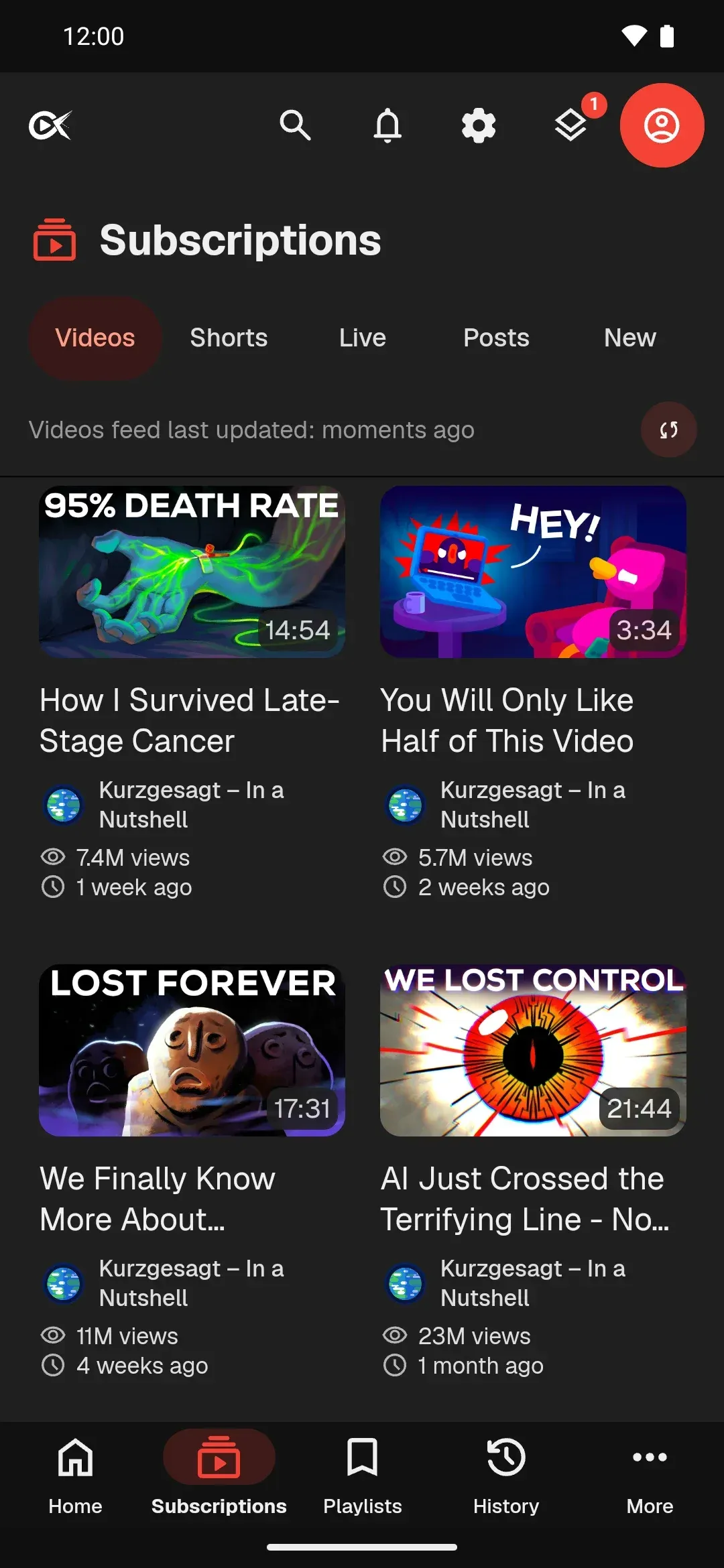
Phone layout of the Subscriptions feed with bottom navigation for Home, Subscriptions, Playlists, History and More. Official project screenshot.
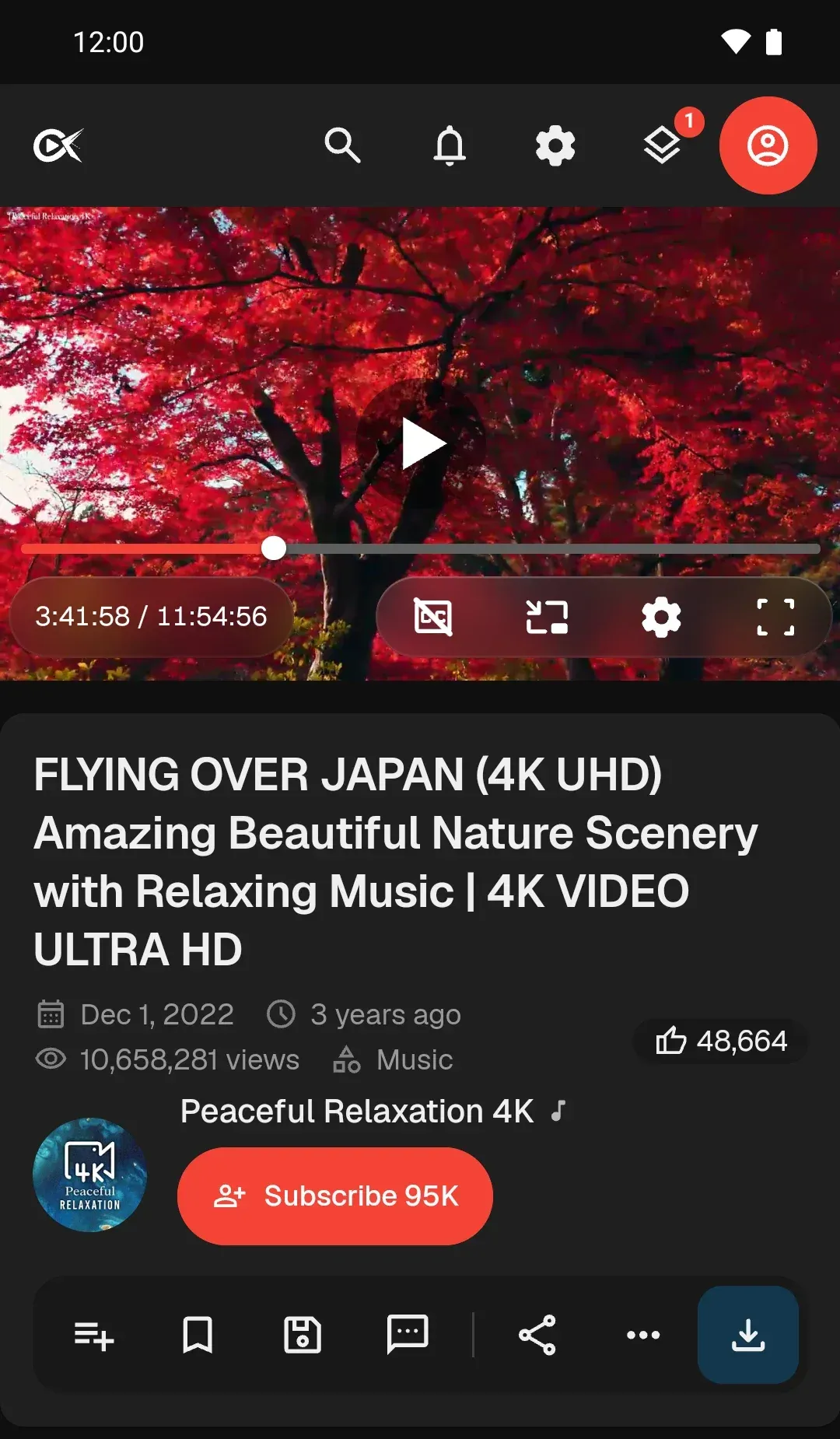
Phone layout of the watch page with player controls and the action row. Official project screenshot, cropped above the comments section.
Source: official OpenTubeX project page.
Key capabilities
- Viewing without a Google account Subscriptions, playlists and history are kept in the app, and the documentation states that no sign-in to YouTube is needed. Changes made in OpenTubeX do not update a YouTube account. The README lists watching videos without ads and without Google tracking through cookies and JavaScript.
- Choice of content provider The provider guide describes three backends: the Local API (built-in extractor that contacts YouTube directly), the Invidious API through a selected instance, and a Yattee Server. A separate stream extraction setting chooses between the built-in method and yt-dlp, with automatic switching on by default. Fallback to a non-preferred backend is off by default, and the app warns when a fallback exposes the IP address to YouTube.
- Subscription profiles and feed filters Channels can be grouped into profiles for more focused feeds, and each channel can be set to show videos, Shorts, live streams or posts. Daily video limits are available. Optional recommendations rank unwatched videos locally from viewing activity and feedback, without a recommendation server according to the project.
- Per-channel playback settings Playback speed, quality, subtitles and volume can be saved per channel and applied automatically. One switch in Channel Settings disables them without deleting them. Speeds from the Youtube Speed By Channel userscript can be imported.
- SponsorBlock, DeArrow and Return YouTube Dislike SponsorBlock skips selected segment categories, with channel exemptions. DeArrow and Return YouTube Dislike are optional add-ons. The privacy policy lists what each configured operator receives, such as IP address, timing and video identifier hash prefixes.
- Tabs, queue and mini-player Videos and channels open in tabs, a queue can be built, and a mini-player keeps playing while switching tabs; Auto Picture-in-Picture is also available. The desktop session can be restored on return. Multiple windows are supported.
- Downloads and offline viewing Videos, audio, playlists and subtitles can be downloaded and managed in one place. Downloads rely on yt-dlp and FFmpeg, so they are not available in the Android Lite build or the web demo. Automatic downloads appear in the notification list added in v0.37.4.
- Media from other sites A compatible link from another site can be pasted to play it in a Watch tab through yt-dlp. The project states that this covers individual links, not browsing or playlists from other sites. Since v0.37.4, such videos get transcripts, side panels and synced watch progress.
- Casting Google Cast and FCast are supported on Android and desktop, and DLNA on Android, desktop and iOS or iPadOS. Each protocol is enabled in Player settings. FCast receivers do not get subtitles.
- Optional end-to-end encrypted sync Sync is off by default. The sync guide describes a default public OpenTubeX sync server with end-to-end encryption, a self-hostable sync server, and LibreTube sync servers without end-to-end encryption. Categories include subscriptions, playlists, history, reminders, profiles, open tabs and settings. A lost privacy passphrase cannot be recovered from the server if no connected device keeps the key.
- Import and export Supported subscription imports include OpenTubeX or FreeTube .db files, YouTube Takeout CSV, JSON and OPML, NewPipe JSON and LibreTube backups. A YouTube Takeout ZIP can be imported directly with a preview of changes. Full library backups are exported as a ZIP.
- Themes and interface layout Themes can be chosen or created, navigation rearranged and frequently used controls placed in Quick Settings. The Home page can show subscriptions, unfinished videos and playlists. Distraction Free and Focus settings hide elements such as descriptions or the most-replayed graph.
- Watch statistics and history Daily and weekly watch time charts are available, watch history can be searched, and retention can be set. Since v0.37.4 the Delete Old History action includes an "All time" option.
- Browser extensions LibRedirect (from version 3.5.0) and RedirectTube (from version 2.0.0) can open YouTube links in OpenTubeX. The README notes that these extensions do not work with Linux portable builds.
- Windows installation Installers and portable archives are published for x64 and ARM64. The README lists
winget install OpenTubeX.OpenTubeXand an official Scoop bucket, with a nightly Scoop package that shares settings with the stable one. - macOS installation DMG and archive files are published for Apple Silicon and Intel, plus a Homebrew tap installed with
brew install --cask opentubex/tap/opentubex. The installation guide states that the app is not notarized by Apple, so the first launch may need approval in Privacy and Security settings. - Linux installation Packages cover AppImage, DEB, RPM, pacman and portable archives for amd64 and arm64, with project-run APT, RPM and Arch repositories, COPR, a Flatpak remote, the Snap Store (beta channel) and an official Nix flake. Nightly channels exist for each repository.
- Android and iOS Android 8.0 or newer is required; installation is through the OpenTubeX F-Droid repository, Obtainium or APKs from GitHub Releases. OpenTubeX Lite installs as a separate app without yt-dlp and FFmpeg. The iOS and iPadOS build is experimental and is sideloaded as an unsigned IPA, for example through SideStore; authenticated playback, app-managed proxies and closed-app subscription refresh are unavailable there.
Where OpenTubeX fits
Following channels without a YouTube account
A user searches for a channel, selects Subscribe and opens the Subscriptions feed, which fetches new uploads on refresh. Existing subscriptions can be brought in from a YouTube Takeout ZIP, NewPipe, LibreTube or FreeTube export instead of adding channels one by one. The documentation points to the active profile and to the All Channels view when a channel seems to be missing.
Moving from FreeTube
OpenTubeX reads FreeTube .db files for subscriptions, watch history, search history and playlists, as listed on the comparison page. The import result appears per category in Data and Storage settings, and the library pages show the imported entries afterwards.
Routing requests through Invidious or a proxy
In Advanced settings, Preferred API Backend switches from the Local API to an Invidious instance or a Yattee Server. The project documents that, depending on the video proxy setting, media requests may still go directly to YouTube, and that fallback can send requests to the service a user wanted to avoid. A proxy such as Tor can be configured, and the README recommends a VPN or Tor to hide the IP address.
Keeping a library in sync across desktop and phone
Under Settings, Sync, a user enables sync, enters a server URL, account credentials and a separate privacy passphrase for encrypted sync, then selects which categories to sync. Further devices are paired through secure pairing that transfers the encryption key. The guide advises exporting a backup first, since sync can propagate deletions.
Saving videos for offline viewing
The Download button on a video saves video, audio or subtitles; playlists can also be downloaded and automatic downloads can be configured in Downloads settings. On Android the full build is required, because Lite leaves out yt-dlp and FFmpeg. The project states that downloaded videos start within a few seconds even when YouTube is unreachable.
Watching media from other sites
Pasting a supported link into the search field opens it in a Watch tab through yt-dlp, with creator details, chapters and saved progress. This works for individual links only and is not available in the Lite build or the web demo.
Install
winget install OpenTubeX.OpenTubeXReviews of OpenTubeX
Be the first to share your experience with OpenTubeX.
Write a review
Loading review form…
Alternatives to OpenTubeX
 FreeTubeFreeTube is an open-source YouTube desktop client for Windows, macOS and Linux that plays videos without ads and keeps subscriptions on your computer.
 NewPipeNewPipe is a libre, lightweight Android streaming front-end for YouTube, PeerTube, Bandcamp, SoundCloud and media.ccc.de that needs no account.
 InvidiousInvidious provides a web interface for watching YouTube videos without ads or tracking. It supports independent subscriptions, audio-only playback, data imports and exports, and a developer API.