

What is NewPipe?
NewPipe is a free and open-source streaming front-end for Android, published by Team NewPipe. The project repository describes it as a libre lightweight streaming front-end, and the official website at newpipe.net presents it as a lightweight YouTube experience for Android without ads or questionable permissions. The app currently supports YouTube and YouTube Music, PeerTube and all its instances, Bandcamp, SoundCloud and media.ccc.de. The README states that YouTube is the best supported of these services and that the team is looking for maintainers for SoundCloud and PeerTube.
Content is retrieved through the separate NewPipe Extractor library. According to the README, NewPipe fetches data from a service's official API where one is usable (PeerTube is the example given). If the official API is restricted, as with YouTube, or proprietary, the app parses the website or uses an internal API instead. As a result, no account on any supported service is needed. Neither the app nor the Extractor uses proprietary libraries or frameworks such as Google Play Services, so NewPipe runs on devices and custom ROMs without Google apps installed.
The project distributes NewPipe as an APK for Android 6 and newer. The documented channels are Team NewPipe's own F-Droid repository, APK files on GitHub Releases, the main F-Droid repository and self-built debug APKs. NewPipe is not distributed on Google Play: the README states that putting NewPipe, or any fork of it, into the Google Play Store violates Google's terms and conditions. "NewPipe" is a registered word mark covered by a trademark policy of NewPipe e.V. The README labels the app as beta software.
The latest GitHub release is v0.29.3, published on November 10, 2026 as a hotfix for Bandcamp and SoundCloud: it adds support for aac_96k SoundCloud audio streams, bypasses Bandcamp client verification and fixes Bandcamp search with a non-English content language. It followed v0.29.2 of November 7, 2026, which added YouTube Podcasts and Courses tabs, chapter divisions on the player seekbar, brotli support in the downloader, asynchronous ARM Memory Tagging Extension and a set of player fixes. Earlier, v0.29.1 fixed media.ccc.de live streams.
The app is written mainly in Java with Kotlin parts and is licensed under the GNU General Public License version 3 or later. In 2026 blog posts, the team announced that feature additions to the old codebase are on hold, that its next priority is finishing the rewrite of the codebase, and that it agreed to merge the refactor branch into the dev branch. Further short-term goals named in the April 2026 announcement are SABR protocol support for YouTube, a new way for the Extractor to provide streams, and replacing the current player with NewPlayer. Similar projects on iThub include FreeTube for desktop and the self-hosted Invidious web front-end.
NewPipe screenshots
Explore the interface. Open a screenshot to view it at full size.
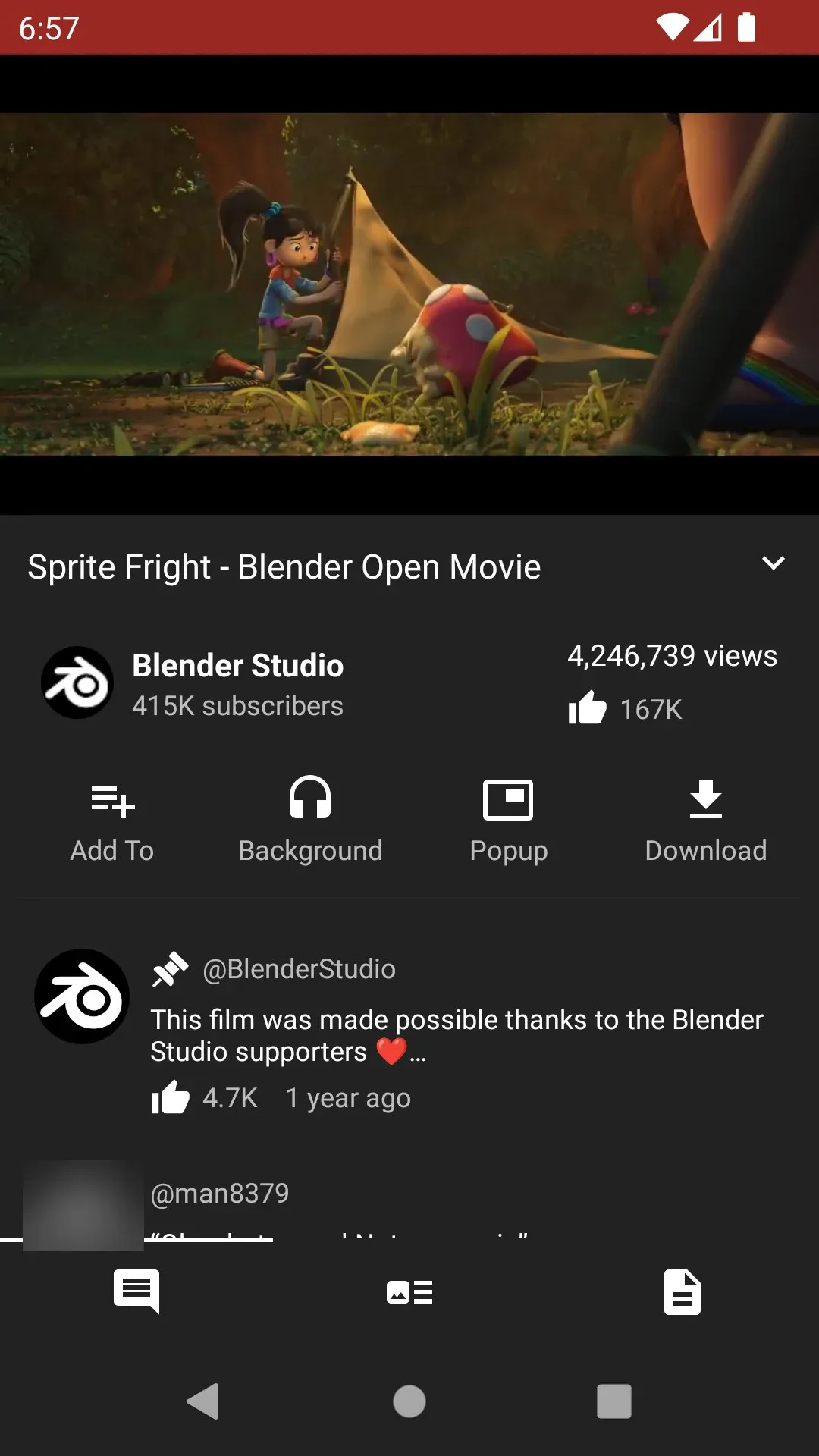
Official screenshot: video detail page with player, channel, view count and the Background, Popup and Download actions. One commenter avatar is blurred.
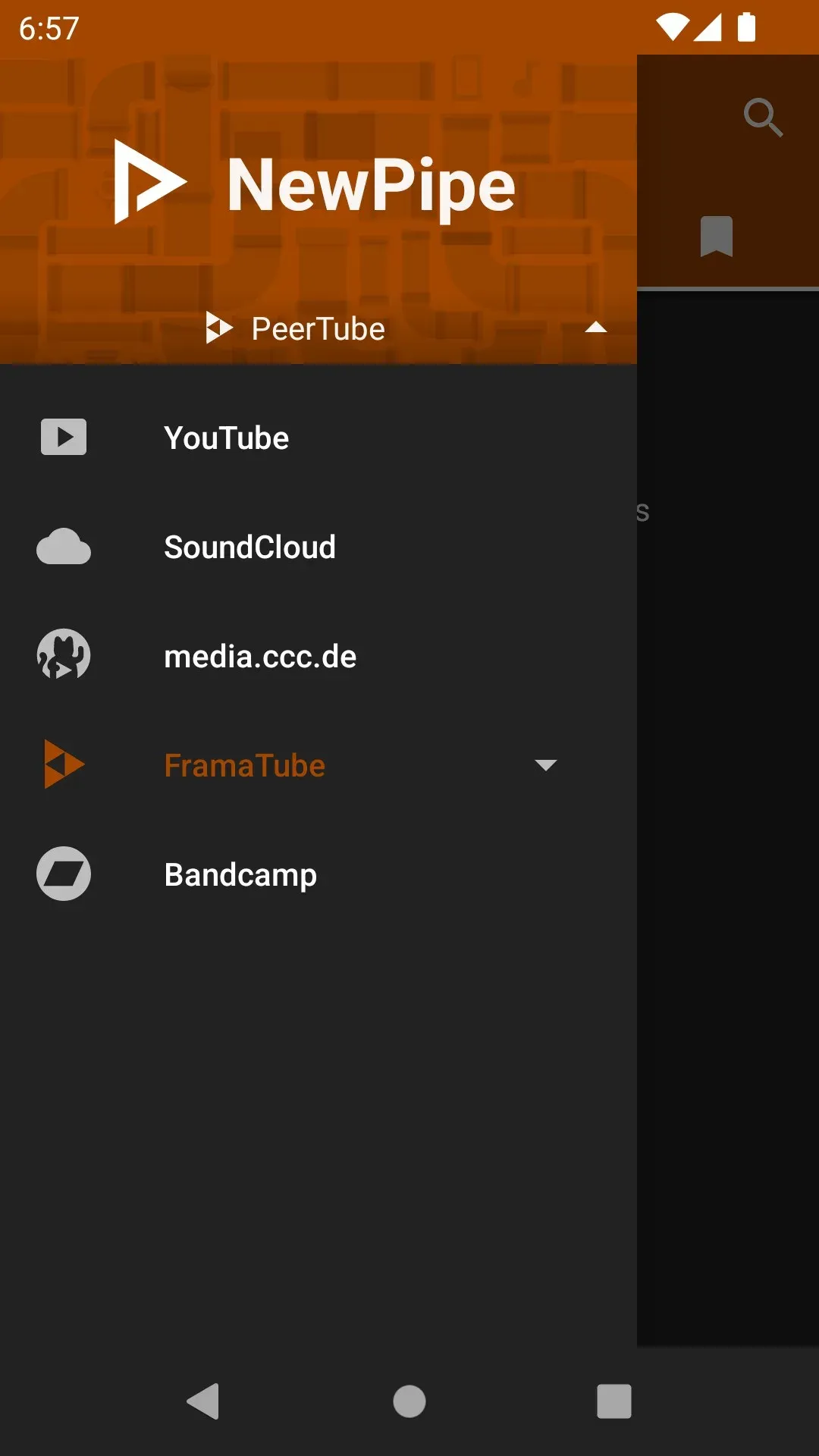
Official screenshot: service selector with PeerTube active and a FramaTube instance among the supported services.
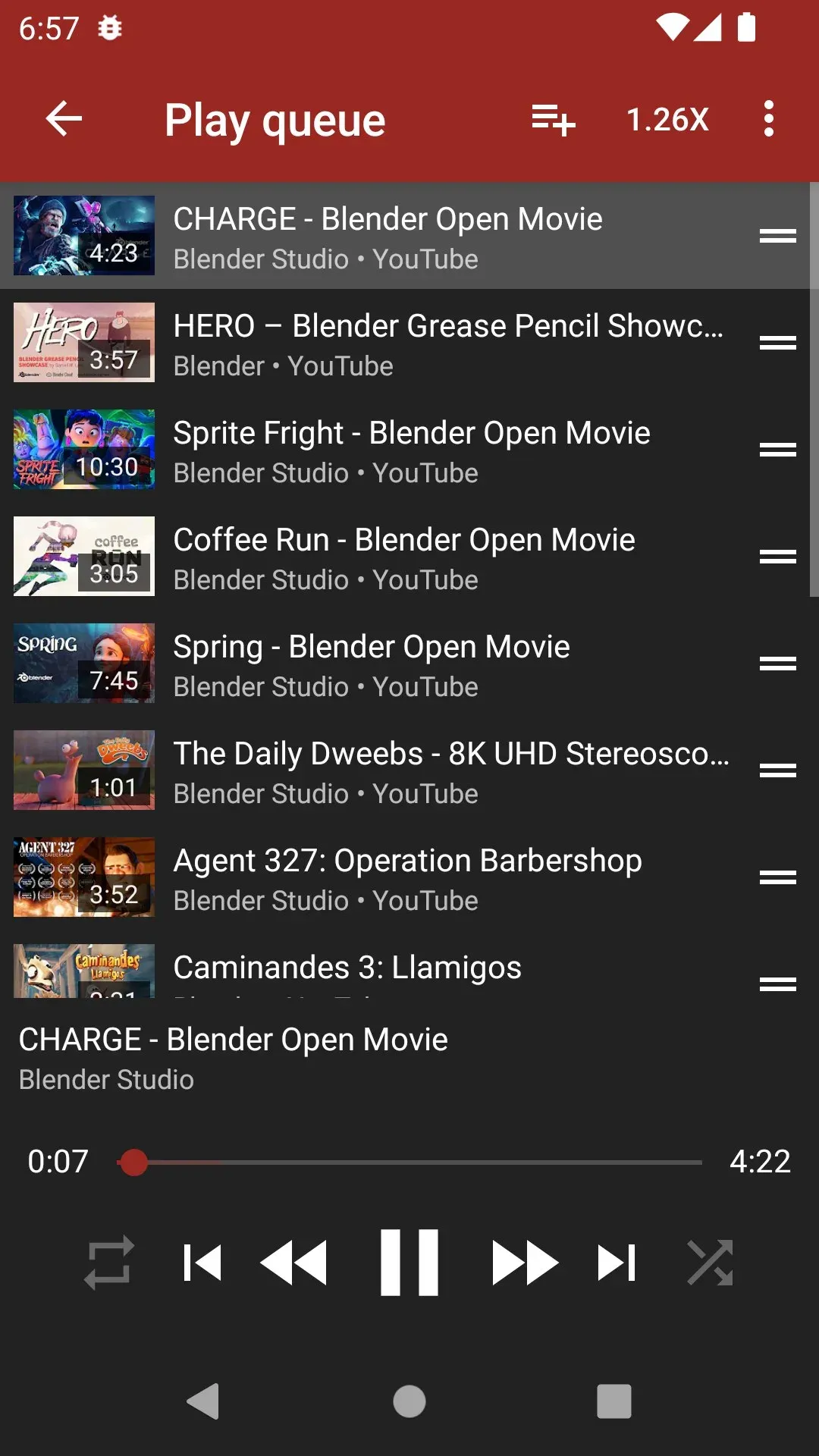
Official screenshot: play queue with reorder handles, speed setting and player controls.
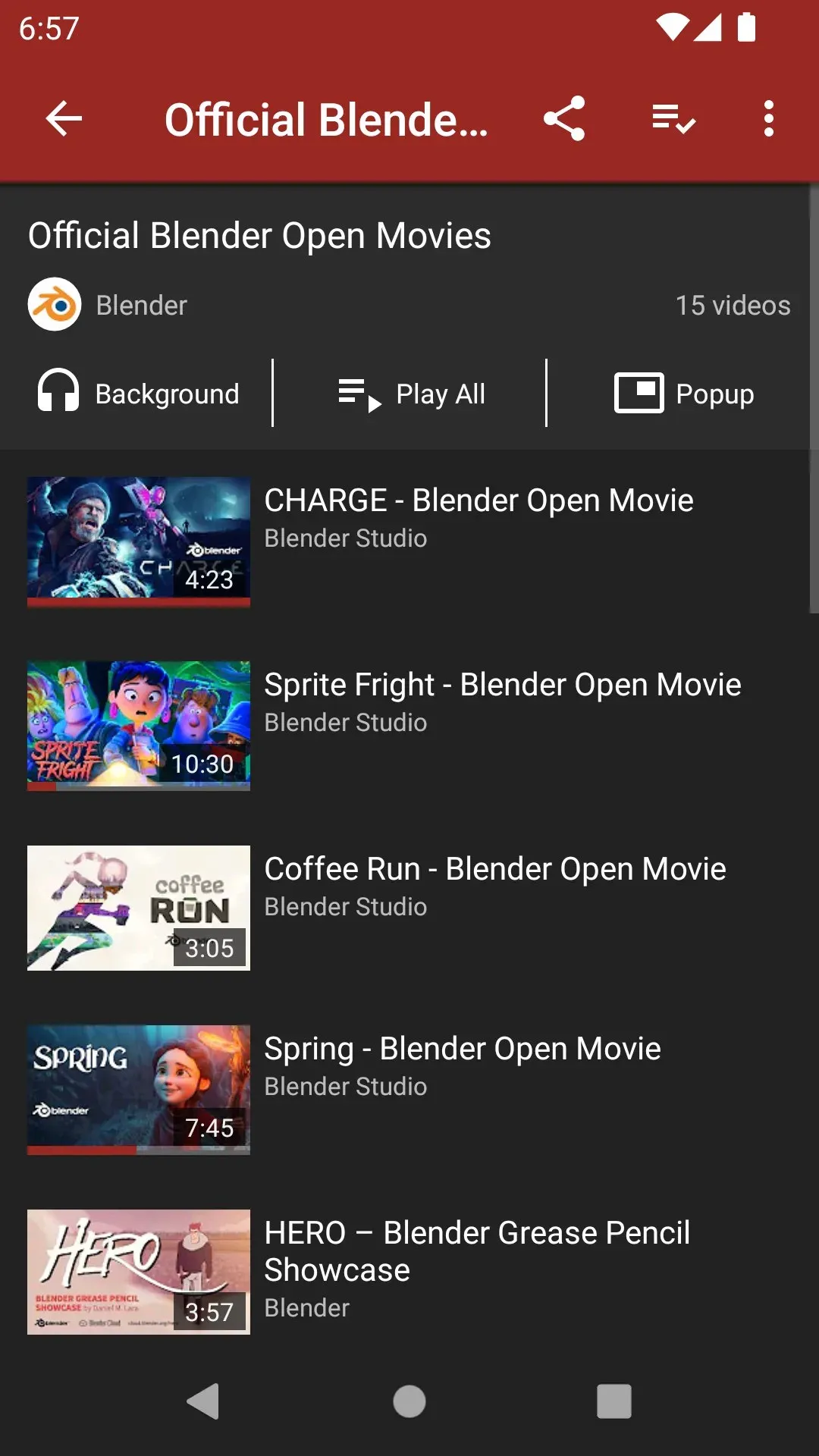
Official screenshot: a remote playlist with buttons to play it in the background, in the main player or in the popup player.
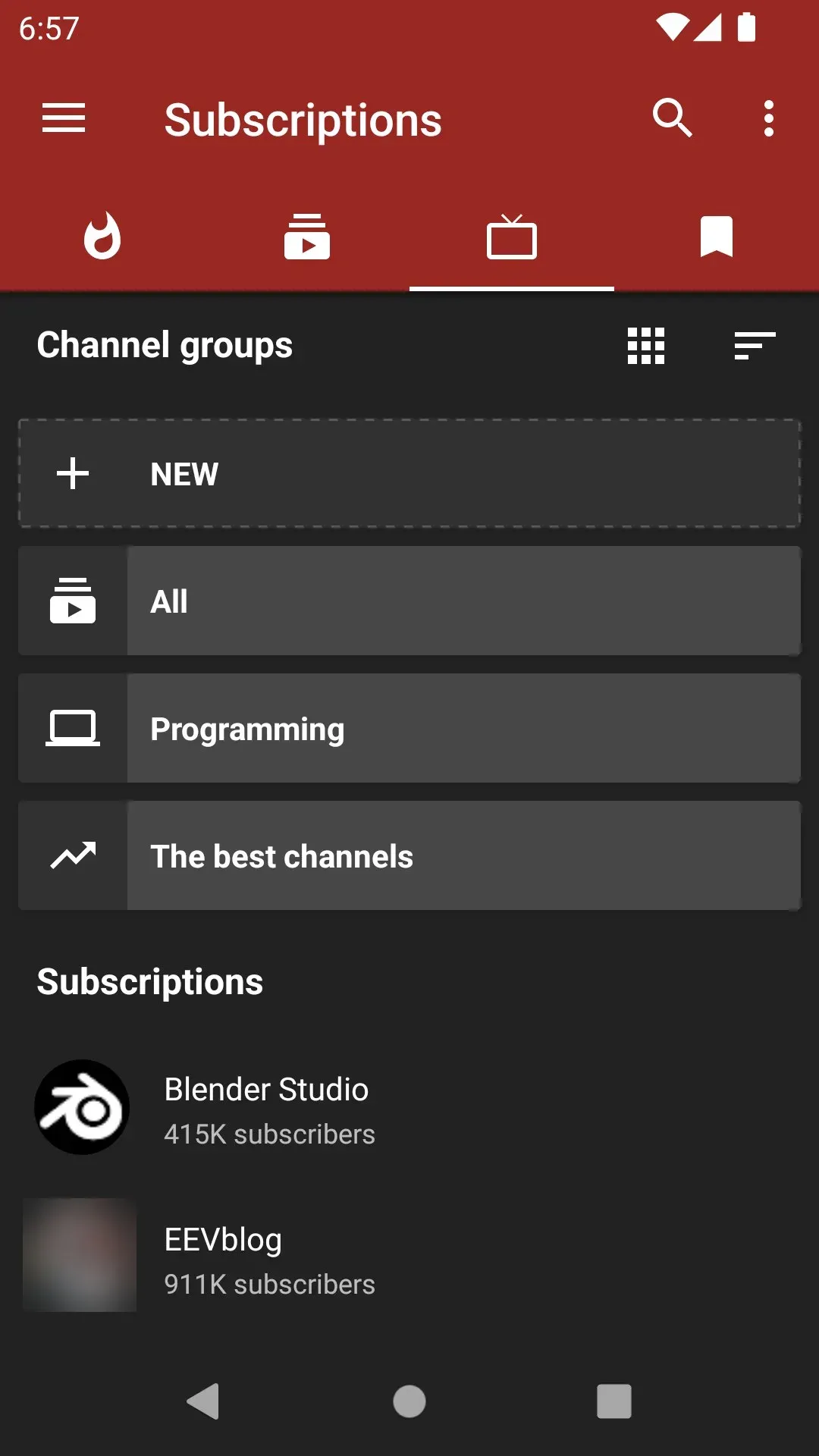
Official screenshot: local subscriptions organized in channel groups. One channel avatar is blurred.
Source: official NewPipe project page.
Key capabilities
- Supported services The README lists YouTube and YouTube Music, PeerTube and all its instances, Bandcamp, SoundCloud and media.ccc.de. The website notes that any PeerTube instance can be added to the app. YouTube is described as the best supported service, and new services are added through the NewPipe Extractor documentation.
- No account and no Google Play Services NewPipe uses official APIs, website parsing or internal APIs to fetch content, so no account on any service is required. Neither the app nor the Extractor uses proprietary libraries or frameworks such as Google Play Services. The website lists "No proprietary Google APIs" among its privacy points, and the README states the app can be used on devices or custom ROMs without Google apps.
- Video playback up to 4K and live streams Videos can be watched at resolutions up to 4K, and live streams are supported. Subtitles and closed captions can be shown or hidden. Since v0.29.2 the player shows full subtitle names when the service exposes them, and the seekbar is divided by chapters.
- Background player Audio can play in the background while other apps are in use, loading only the audio stream to save data. The website describes playlists for continuous music playback in this mode. Since v0.29.2 the popup and background queues show progress and total duration.
- Popup player A floating player (Picture-in-Picture) can be resized and moved over other apps. The website states that playback can be switched between the main, popup and background players with one click. The video detail page offers Add To, Background, Popup and Download actions.
- Downloads Videos, audio and subtitles (closed captions) can be downloaded, with a choice of title, file format and resolution according to the website. The v0.28.1 release notes describe metadata embedding for OPUS audio downloads and recovery of interrupted downloads in more cases. v0.29.2 added brotli support to the downloader and keeps the chosen audio track when resuming a download.
- Subscriptions without an account Channels can be subscribed to without logging into any account, and NewPipe can send notifications about new videos from subscribed channels. Subscriptions can be sorted into channel groups, and video feeds are generated from those groups. Since v0.28.4 the feed fetch order is randomized, which the team says should also help against fingerprinting.
- Import and export The import and export tutorial covers importing YouTube subscriptions from a Google Takeout zip file, importing SoundCloud subscriptions from a profile URL and exporting subscriptions to a JSON file. The complete local database, including history if enabled, local playlists and settings, can be exported and imported under Settings, Backup and restore. Importing a database overrides the current one and cannot be undone.
- Local and remote playlists Remote playlists are fetched from the service being browsed and can be searched and watched. Local playlists are created and stored in the app and have no connection to any service. Videos can be enqueued and the queue saved as a local playlist.
- Search and browsing Search covers videos, audio, channels, playlists and albums, and on YouTube the content language can be specified. Channels can be browsed for videos and audio, and v0.29.2 added YouTube Podcasts and Courses tabs. Descriptions, tags, related videos and comments can each be shown or hidden.
- Watch history Watch history can be viewed and searched, and search suggestions can draw on previous searches. The website states that users control what the app keeps. History is part of the local database that the backup function exports.
- Open in Kodi and age-restricted content Videos can be opened in Kodi from NewPipe. Age-restricted material can be watched or blocked, according to the README feature list.
- Installation from the NewPipe F-Droid repository Team NewPipe runs its own F-Droid repository, which the installation tutorial calls the recommended way to install the app. It is added to an F-Droid client by link or QR code, and updates arrive faster than in the main F-Droid repository. APKs from this repository and from GitHub Releases are signed with the same key and are interchangeable.
- APK from GitHub Releases Each release attaches a signed APK, for example NewPipe_v0.29.3.apk. The README and website publish the SHA-256 fingerprint of the signing key so a downloaded APK can be compared before installation. Android 6 or newer is required since v0.28.7.
- Main F-Droid repository and other builds NewPipe is also available from the main F-Droid repository, which builds and signs the APK itself; the README describes it as the slowest update path. These APKs use F-Droid's key and cannot update an installation from the NewPipe repository or GitHub. Debug APKs can be built from source, and pull request APKs install side by side with the official app.
- Switching between signing keys To move between F-Droid's build and the NewPipe-signed build, the README describes exporting the database under Settings, Backup and restore, uninstalling, installing the new APK and importing the database. It notes that importing a database exported from an unofficial APK into the official app is unsupported.
- Privacy statements The README states that the app does not collect any data without your consent. The privacy policy describes crash reports that are sent only when the user chooses to send a composed e-mail with readable JSON, processed on a self-hosted Sentry instance with data stored in a German datacenter. The website states that NewPipe stores everything offline on the device and sends only the information required to get video and channel details.
- Translations and license The app is translated on Weblate, and the website mentions more than 70 languages. NewPipe is free software under the GNU GPL version 3 or later. Donations are accepted, with Liberapay preferred by the project.
Where NewPipe fits
Watching YouTube and PeerTube without an account
The service selector in the side drawer switches between YouTube, SoundCloud, media.ccc.de, PeerTube instances and Bandcamp. Searches, channels, comments and related videos are fetched without logging in, and the content language can be set for YouTube searches. PeerTube instances can be added in the app; the federated platform itself is listed on iThub as PeerTube.
Listening to music and podcasts in the background
The Background action on a video, channel or playlist starts audio-only playback that continues while other apps are open, loading only the audio stream. The play queue can be reordered, its speed changed and its contents saved as a local playlist. v0.29.2 added YouTube Podcasts tabs and shows queue progress and total duration for popup and background queues.
Following channels with local subscriptions
Subscriptions are stored in the app rather than in a service account. Channel groups such as All or user-defined groups produce separate feeds, and notifications can report new videos. Existing YouTube subscriptions can be imported from a Google Takeout export and SoundCloud subscriptions from a profile URL, as described in the import and export tutorial.
Saving media for offline use
The Download action stores video, audio or subtitles with a chosen format and resolution. Recent releases improved resume handling, kept the chosen audio track when resuming and embedded metadata in OPUS audio downloads. Downloaded files can be opened from the app's download list.
Running on devices without Google apps
Because NewPipe uses no Google Play Services or other proprietary libraries, it installs on custom ROMs and phones without Google apps through F-Droid or a GitHub APK. The project's own F-Droid repository at archive.newpipe.net delivers updates signed by Team NewPipe faster than the main F-Droid repository, and the signing key fingerprint is published on the website for APK verification. Android 6 or newer is required.
Moving data between devices and builds
Settings, Backup and restore exports the full local database: subscriptions, history if enabled, local playlists and settings. The same file can be imported on another device or after switching between F-Droid and NewPipe-signed builds, which use different keys. The project notes that an import replaces the current database and cannot be undone. Other YouTube clients on iThub include OpenTubeX, and NewPipe can hand videos to Kodi.
Reviews of NewPipe
Be the first to share your experience with NewPipe.
Write a review
Loading review form…
Alternatives to NewPipe
 FreeTubeFreeTube is an open-source YouTube desktop client for Windows, macOS and Linux that plays videos without ads and keeps subscriptions on your computer.
 InvidiousInvidious provides a web interface for watching YouTube videos without ads or tracking. It supports independent subscriptions, audio-only playback, data imports and exports, and a developer API.
 OpenTubeXOpenTubeX is an AGPL-3.0 YouTube client forked from FreeTube for Windows, macOS, Linux, Android and experimental iOS. It keeps subscriptions and history on the device and does not use the official YouTube API.