

What is Tonkatsu Box?
Tonkatsu Box is a free, MIT-licensed collection manager for games, movies, TV shows, animation, anime, manga, visual novels, books, comics, music albums and podcasts. It is developed in the open by the GitHub user hacan359 and written in Dart with Flutter. One library holds every media type, and each type keeps its own progress model: pages for books, chapters for manga, seasons and episodes for series, and a listened-track checklist for albums. There is no account and no cloud service run by the project; the library is a SQLite database on the device, or on a server you operate yourself.
Builds are published on the GitHub releases page: a Windows ZIP, a Linux x86_64 AppImage and a tar.gz bundle, an experimental unsigned macOS DMG, and Android APKs split for arm64-v8a, armeabi-v7a and x86_64 alongside a universal package. Android users can also install from RuStore or follow GitHub releases with Obtainium. The browser version is not hosted by the project: you build it from the repository with Docker Compose and a small Dart server delivers it from your own machine. The project website summarises features and data sources and links to the user wiki.
The current release, v0.46.0 of November 1, 2026, adds credits on item cards (directors, creators, studios, developers and publishers) that open the rest of that person's or company's work in your collection, a "stopped at" line for the current page, chapter, episode or track, ratings per season, bulk refresh from the original sources, interface scaling, two new themes, imports that a collection remembers and can rerun, an optional access token and cover-host allowlist for the self-hosted server, and a Linux AppImage in every release. It also leaves a database created by a newer version untouched instead of opening it. Version 0.45.0 added cover replacement from a file, a link, IGDB, SteamGridDB or ScreenScraper and catalog lookup for custom-card imports; 0.44.0 introduced the personalization hub with statistics, recommendations, release showcases and a likes page. The changelog lists releases from February 2026 onward.
The app uses Riverpod for state, Dio for HTTP and SQLite through sqflite on Android and sqflite_common_ffi on desktop, with versioned schema migrations. The architecture notes describe a strict features, data and core layering. The self-hosted build adds a pure-Dart server that owns the database, exposes the data-access methods to the browser over a JSON RPC endpoint and proxies the external catalogs, so API credentials stay on the server. Metadata comes from fifteen catalogs, among them IGDB, TMDB, TVmaze, AniList, Kitsu, MangaDex, VNDB, OpenLibrary, Hardcover, ComicVine, MusicBrainz and Podcast Index.
The README labels the project as in active development: an update can carry database migrations, and users are asked to create a backup before updating. Tonkatsu Box is a tracker, not a media player or streaming server. It does not play or scan local media files, it has no hosted sync service, and iOS is not supported. The macOS build has not yet been tested by the maintainers.
Tonkatsu Box screenshots
Explore the interface. Open a screenshot to view it at full size.
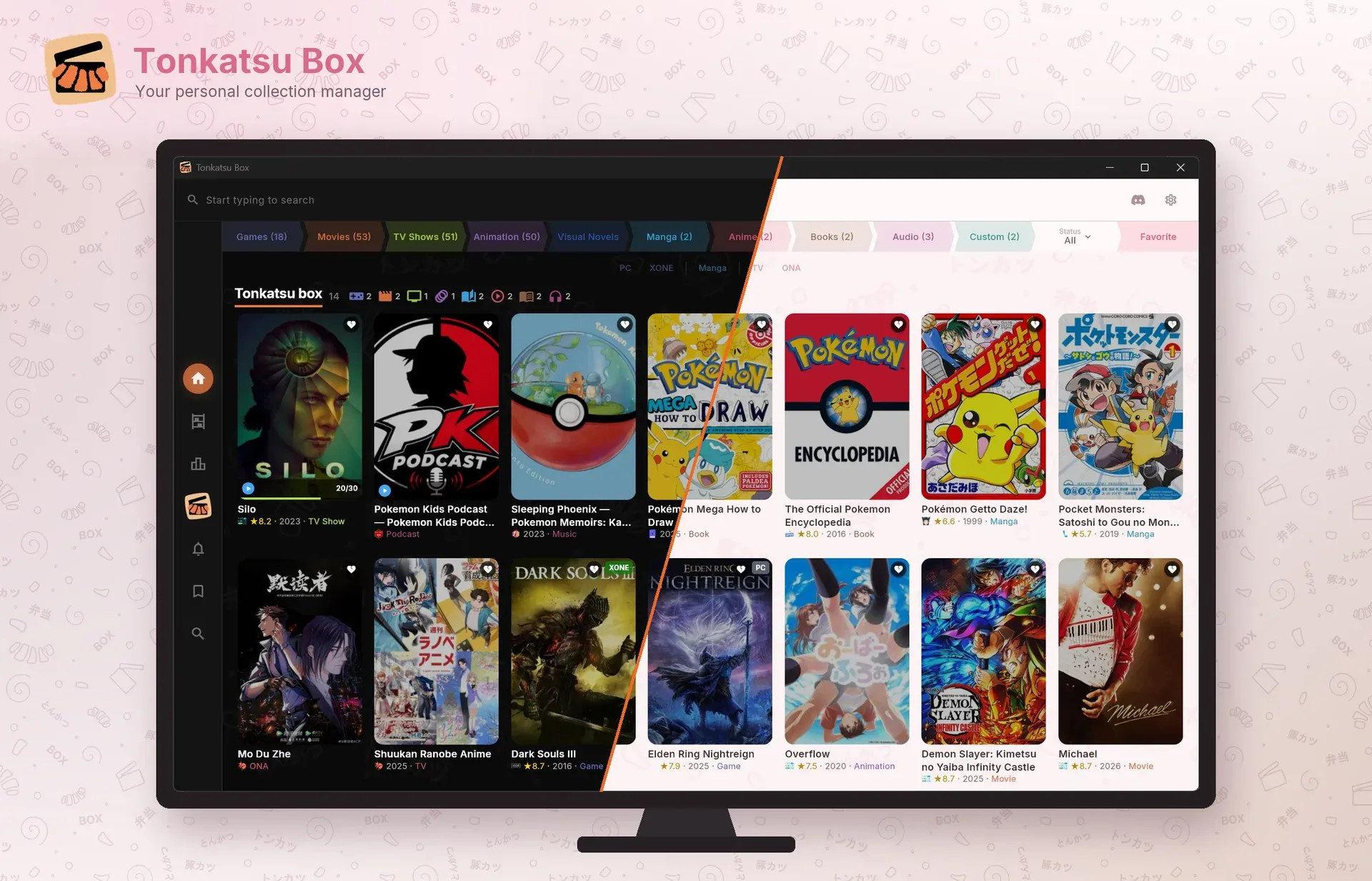
Official README mockup: the home grid with media-type tabs, ratings and progress badges, shown half in the Dark theme and half in the Sakura theme.
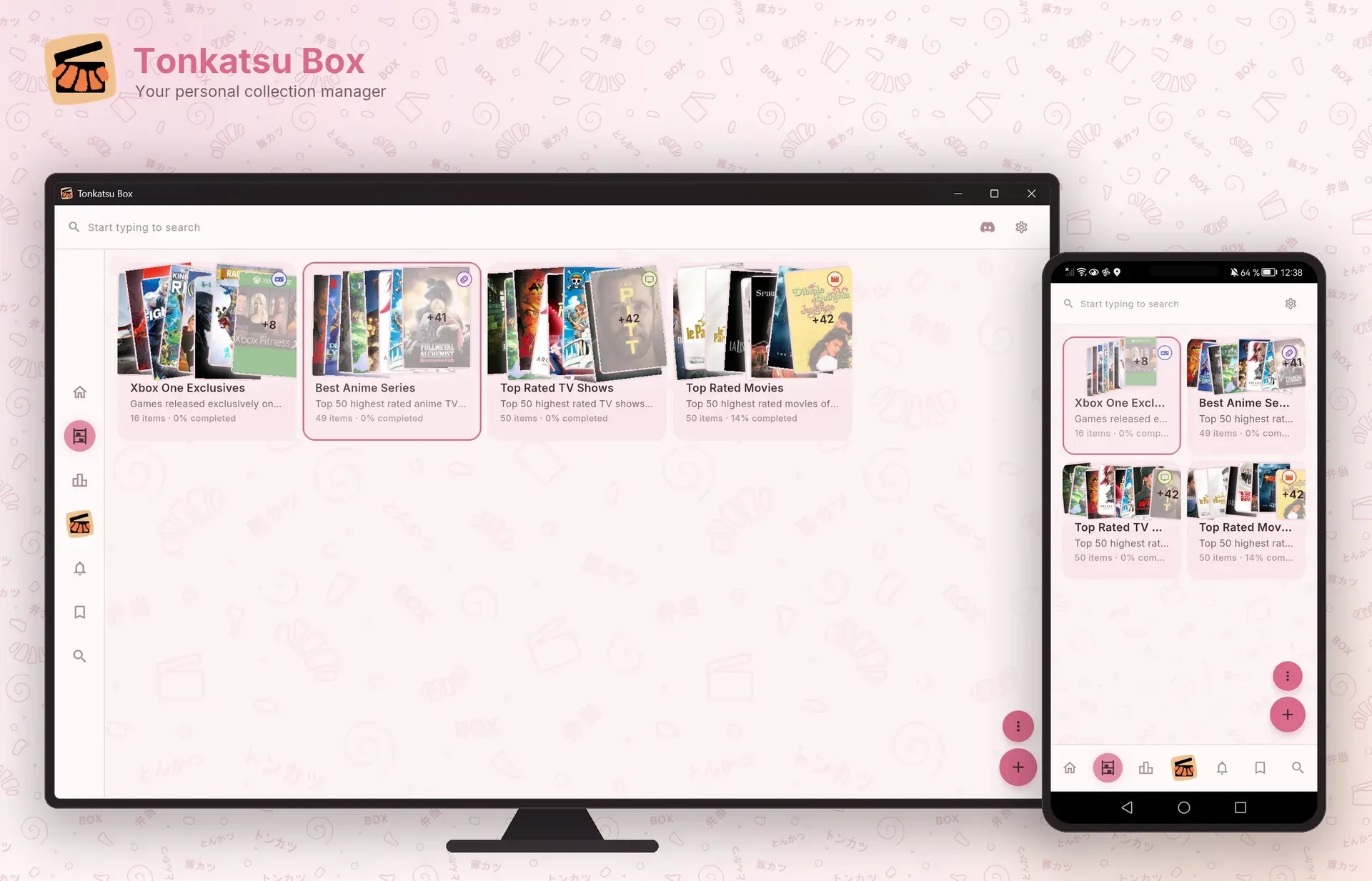
Official mockup of the Collections screen on desktop and Android, each collection showing its item count and completion share.
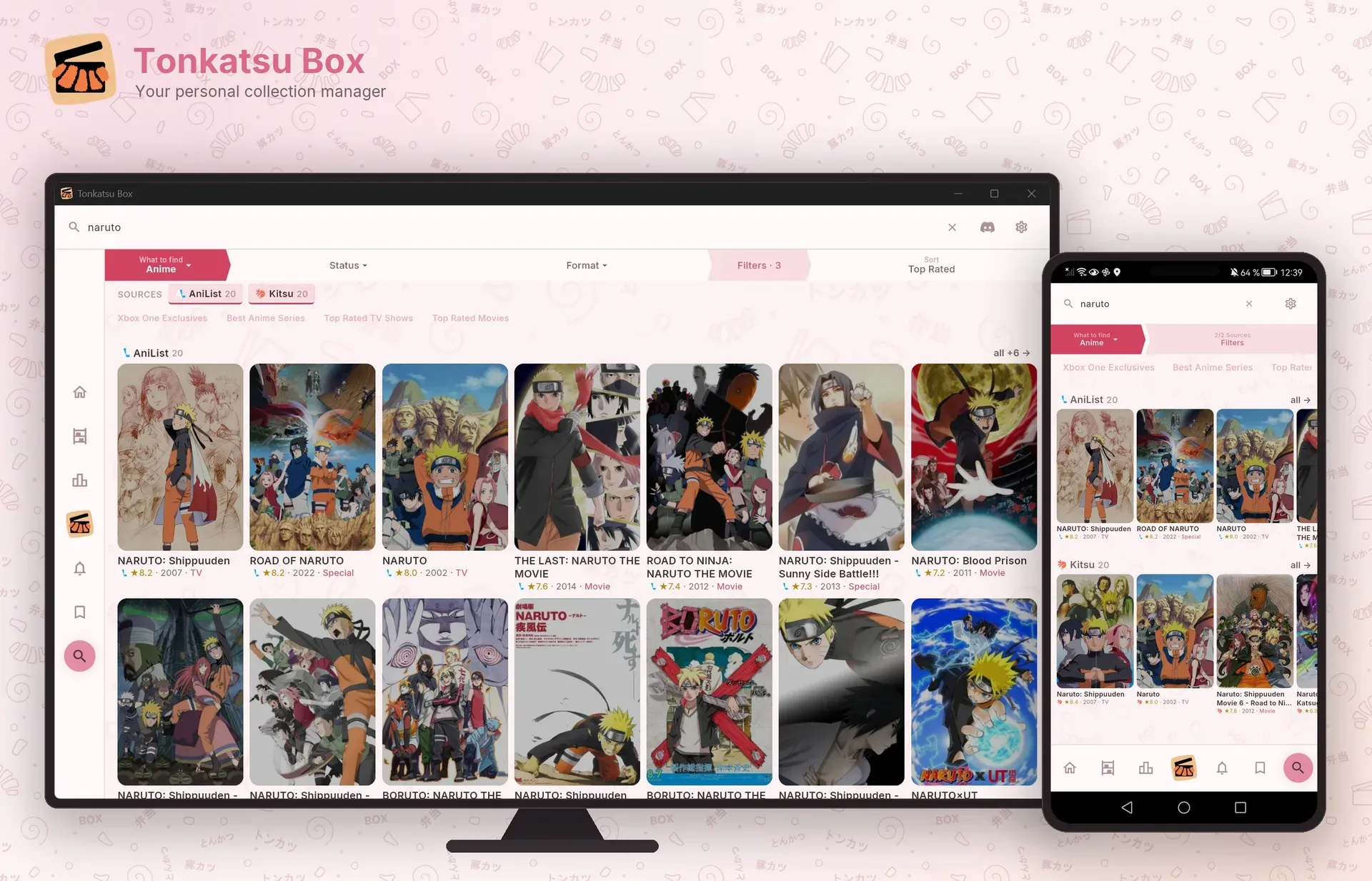
Official mockup of a search query answered by two catalogs, AniList and Kitsu, with per-source result rows and filters.
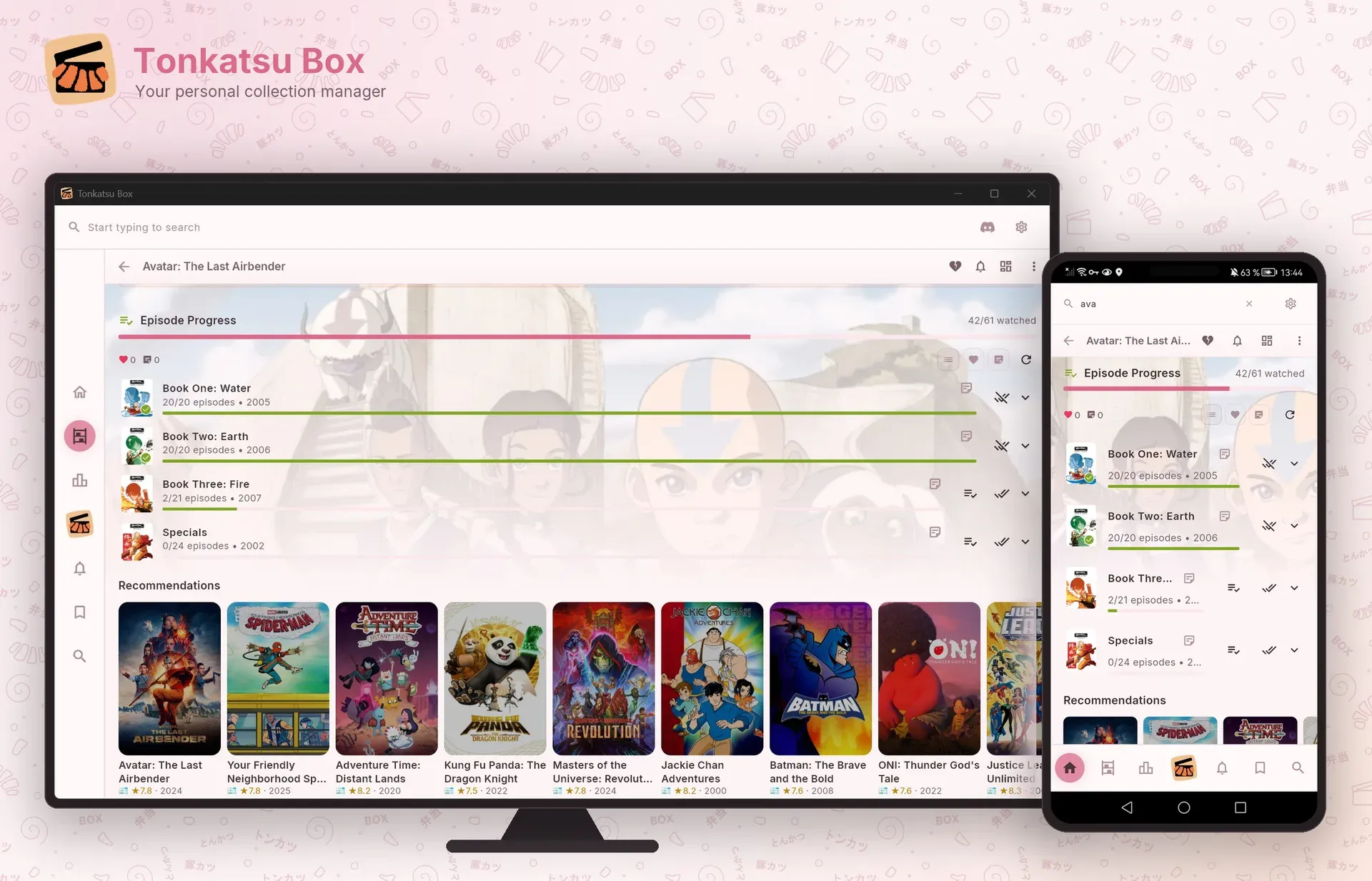
Official mockup of the episode tracker: per-season progress, 42 of 61 episodes watched, and recommendations below.
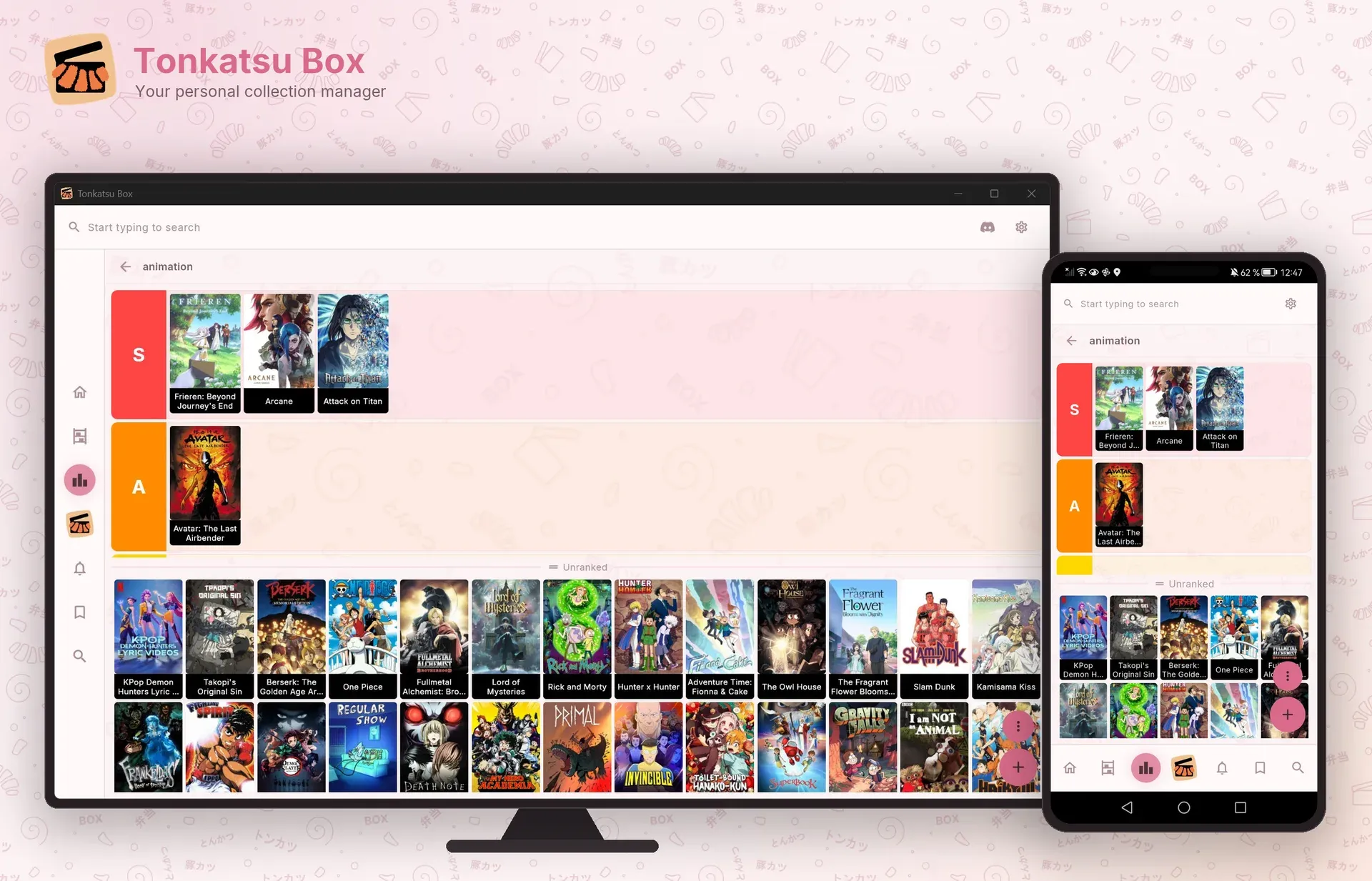
Official mockup of a tier list being built from a collection, with ranked rows and the unranked pool.
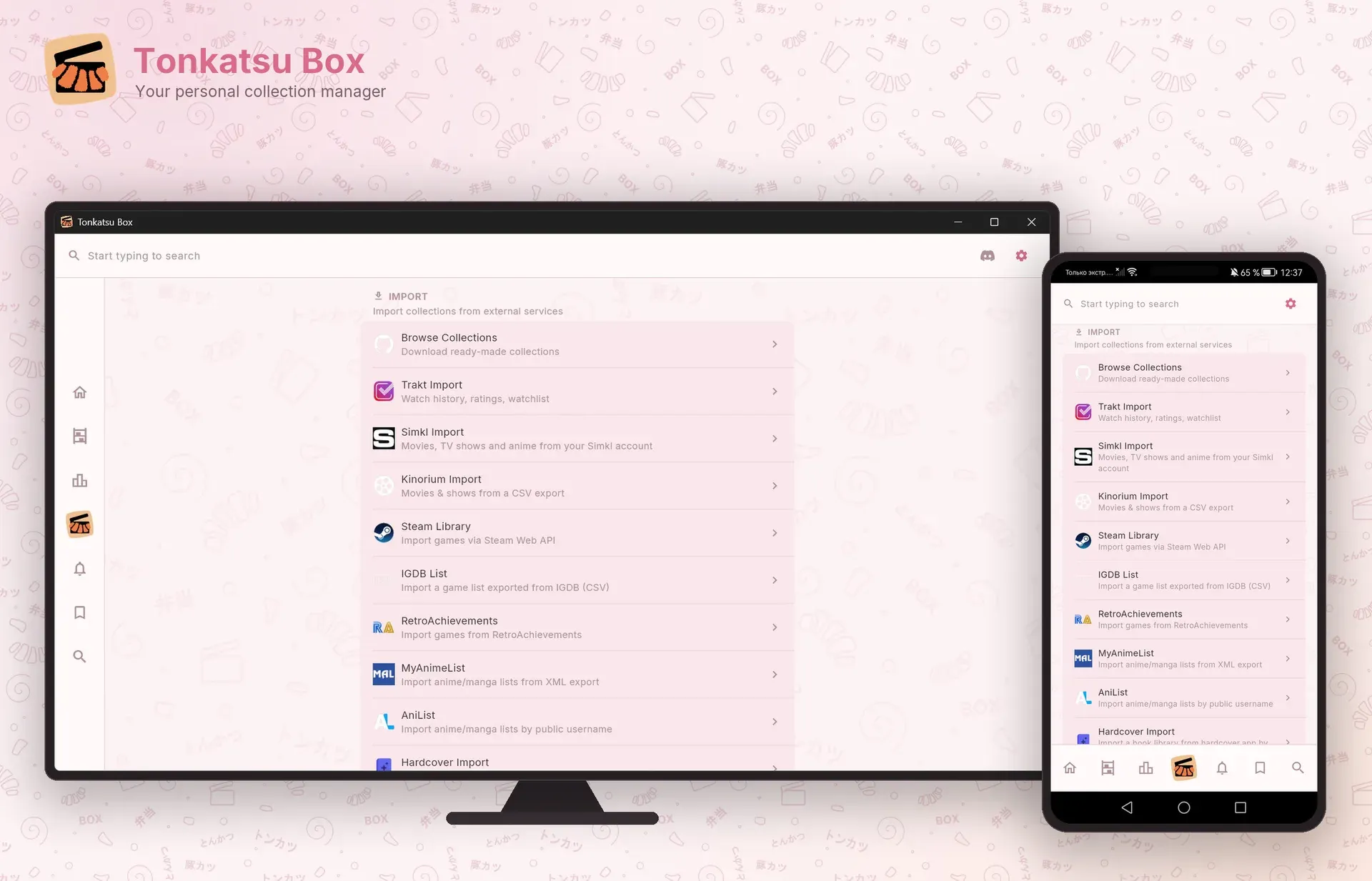
Official mockup of the Import screen with the supported tracker and store sources.
Source: official Tonkatsu Box project page.
Key capabilities
- Download Tonkatsu Box for Windows The Windows build is a ZIP archive on the latest release page; unpack it and run the application. Windows has the widest feature set: it is the only platform with the VGMaps browser, and it supports Discord Rich Presence, Kodi sync, gamepad navigation and device-to-device sync.
- Download Tonkatsu Box for Linux Two x86_64 packages are published: an AppImage that runs after
chmod +x, and a tar.gz bundle that you unpack anywhere and start withtonkatsu_box. Both need GTK 3 from the distribution,zenityfor file dialogs andxdg-utilsfor opening links. Data is kept in~/.local/share/tonkatsu_boxor under$XDG_DATA_HOME. The AppImage is built for x86_64 only. - Download Tonkatsu Box for macOS The macOS DMG is marked experimental. The README states that the maintainers have not tested it yet and that it is unsigned, so macOS shows an unidentified-developer warning on first launch. Data lives in
~/Library/Application Support/com.hacan359.tonkatsuBox. - Install Tonkatsu Box on Android Each release ships APKs for arm64-v8a, armeabi-v7a and x86_64 plus a universal APK. RuStore offers a store install with its own updates, and the README documents Obtainium for automatic installs from GitHub releases; Android still asks you to confirm each install unless the device is rooted.
- Self-hosted web app with Docker Compose Clone the repository and run
docker compose up -d --build; the first build compiles the web client and the Dart server and takes several minutes. The library is then served on port 8080 and works as an installable PWA. All state sits in onedata/folder (database, cover cache,keys.jsonand pre-migration snapshots). By default there is no login, so setTONKATSU_AUTH=tokenor bind to 127.0.0.1 for anything beyond a trusted LAN; an optional Caddy compose file adds HTTPS. Desktop-only features are hidden in the browser; see the self-hosting guide. - Collections with mixed media types A collection can mix games, films, series, anime, manga, visual novels, books, albums and podcasts. Collections offer grid, list, table and board views, manual drag-and-drop order and bulk actions over a selection. A separate top-level Wishlist holds titles you plan to start, and importers place items they could not match there instead of discarding them.
- One search field across fifteen catalogs Search covers IGDB, TMDB, TVmaze, VNDB, AniList, Kitsu, MangaBaka, MangaDex, OpenLibrary, Fantlab, Google Books, Hardcover, ComicVine, MusicBrainz and Podcast Index, with per-source filters and an empty-query browse mode. A result can be added to several collections at once. Since 0.44.0 the library itself can be searched by genres, tags, studios, authors, publishers, platforms, formats, seasons and release years.
- Progress tracking that follows each medium Every item carries a status, a 1 to 10 rating, start and finish dates, replays and time spent. Books track pages, manga tracks chapters and albums use a checklist of listened tracks. Version 0.46.0 adds a rating per season and a "stopped at" line on the card.
- Episode tracker and release calendar Series and anime open as a season accordion with posters, episode stills, air dates and synopses; you can mark one episode, a whole season or the next unwatched one. Following a show with the bell puts upcoming episodes on a month, week or day calendar, fetched from the provider the show came from (TMDB or TVmaze for series, Kitsu for anime). A followed show stays on the calendar only while it is in at least one collection, as the calendar guide explains.
- Visual boards, tier lists and mood grids Each collection can open a free-form canvas with posters, text notes, images, links and drawn connections. Tier lists rank items into S, A, B and C rows by drag and drop, and mood grids arrange items on a labelled board of N by M cells. Both tier lists and mood grids export as PNG images for sharing.
- Statistics and the personalization hub The statistics page reports counters, per-type breakdowns, a month-by-month ribbon, platforms, formats, tags and best against worst, for all time or a single year, with a shareable summary card. The hub also builds a genre, platform and decade cloud, recommendations from completed and rated items, and showcase boards of upcoming anime seasons, films, episodes, games and albums. Showcase boards query the external catalogs and can be switched off per profile.
- Imports from other trackers Supported sources are Steam (Steam Web API key, 64-bit Steam ID and a public library, matched against IGDB with DLC and soundtracks filtered out), Trakt.tv data exports, Simkl by sign-in code, Kinorium CSV, RetroAchievements, MyAnimeList XML, AniList and Hardcover by public username, and IGDB list CSV files. Matching quality depends on the catalog: check the Wishlist afterwards for unmatched titles. Per-source steps are in the wiki import guides.
- Custom cards from JSON or CSV Items that no catalog knows can be imported from your own JSON or CSV file with titles, types, covers, notes, tags and personal fields. With source lookup enabled, a row that matches exactly one catalog record by title, year and platform becomes a real card that keeps your status, rating, notes, dates and tags. The custom cards format documents the columns and the lookup rules.
- Sharing with .xcoll and .xcollx files A .xcoll file is a small list that needs internet access on the receiving side to load details and images; a .xcollx file embeds covers, board layouts and metadata and works offline. An optional switch adds personal data such as statuses, dates, notes and watched-episode marks. Wishlist items, API keys and app settings are not exported. The separate tonkatsu-collections repository offers ready-made files, including more than 25,000 games across 23 platforms.
- Backups, device-to-device sync and a custom data folder Settings creates one backup archive covering collections, tags, boards, tier lists, mood grids, wishlist, watch progress, calendar and settings. Device-to-device sync copies the whole database over the local network and replaces the receiving library; it is not a merge, the transfer is unencrypted and unpaired, and only one previous database is kept for rollback. The database can also move to an SD card or another folder, but a folder shared live by two devices or a cloud sync client is unsupported and can corrupt SQLite. The sync and backup guide lists these limits.
- Kodi sync and Discord Rich Presence Kodi sync pulls movies from a Kodi library over JSON-RPC on the local network, matches them to TMDB and maps watched, partially watched and unwatched states to Completed, In Progress and Planned, with ratings and last-played dates. It needs Kodi's HTTP remote control enabled and a TMDB key. Discord Rich Presence shows the current game, film or book on Windows, Linux and macOS, not on Android.
- Profiles, languages, themes and input Several profiles can share one installation, each with separate collections, boards, covers and statistics, while API keys and the app language are shared. The interface is fully translated into English, Russian, Simplified Chinese, Spanish, Brazilian Portuguese and French and switches without a restart. Themes include Dark, Sakura, PS1 Retro and Eva Azure, text size runs from 85 to 130 percent, and an Xbox-compatible gamepad can drive the interface on desktop and Android handhelds.
- Catalog API keys The README lists built-in keys for IGDB, TMDB, Podcast Index and SteamGridDB, while the API keys guide recommends registering your own free IGDB and TMDB keys for heavier use. Hardcover, ComicVine, RetroAchievements and ScreenScraper require your own credentials, and Google Books takes an optional key. On a self-hosted server, keys come from
TONKATSU_KEY_*variables or from Settings and are stored indata/keys.json.
Where Tonkatsu Box fits
Moving an existing library from another tracker
Start with one source, for example a Steam library, a Trakt.tv export or a MyAnimeList XML file, and import it into a new collection rather than an existing one. Steam needs a public library, a Web API key and a working IGDB connection; AniList and Hardcover only need a public username. After the run, compare the item count with the source, open the Wishlist for unmatched titles and spot-check ratings and dates on a few cards. Since 0.46.0 the collection remembers its import, so a later rerun starts from inside it.
Following series and anime week by week
Add the show from TMDB, TVmaze or Kitsu, mark the episodes already watched in the season accordion and tap the bell to follow it. New episodes then appear on the Releases calendar as dates are announced; pull to refresh when a date is missing. Use per-season ratings and episode likes or notes for longer series. Check that the show stays in at least one collection, because removing it everywhere also removes it from the calendar.
Cataloguing a retro game collection
Import a ready-made .xcollx set from the tonkatsu-collections repository or search IGDB by platform, then organise games into collections per console. RetroAchievements import adds achievement progress, and a free ScreenScraper account unlocks box art, title screens and other retro media for supported platforms. Covers can be replaced from IGDB, SteamGridDB, ScreenScraper, a link or a file. Test controller navigation if the library will be browsed from a handheld or a television.
Running one shared library on a home server
Build the container with docker compose up -d --build, open port 8080 from another device and confirm that edits appear on both. Before the server is reachable from more than one trusted machine, set TONKATSU_AUTH=token, keep the sign-in link private and consider TONKATSU_BIND=127.0.0.1 behind a reverse proxy. Back up by stopping the container and copying data/. Updates are git pull followed by a rebuild; migrations run on start after a snapshot is written to data/snapshots/.
Moving a library between two devices without a cloud
Create a backup on both devices first. Open the device-to-device sync screen on each, choose the sender from the receiving device and confirm on both sides after checking the collection and item counts shown. The receiving database is replaced, not merged, so anything that exists only on the receiver is lost apart from the single rollback copy. Use the feature only on a trusted home network, since the transfer is not encrypted.
Ranking and sharing what you have finished
Build a tier list or a mood grid from a collection, arrange the items and export the result as a PNG for a chat or a forum. To share the underlying list, export the collection as .xcollx so the recipient gets covers and board layouts offline, and decide deliberately whether to include personal data such as notes and watch dates. The statistics page adds a summary card for a year or for all time.
Install
git clone https://github.com/hacan359/tonkatsu_box.git && cd tonkatsu_box && docker compose up -d --buildReviews of Tonkatsu Box
Be the first to share your experience with Tonkatsu Box.
Write a review
Loading review form…
Alternatives to Tonkatsu Box
 PlaynitePlaynite is an open source game library manager and launcher for Windows that unifies Steam, Epic, GOG, EA App and Battle.net libraries with emulation support.
 JellyfinJellyfin is a free software media server that manages your media and streams it from a dedicated server to end-user devices through multiple apps.