

What is Loops?
Loops is a federated, open-source platform for short vertical videos. The loops-server repository holds both the server and the web application. A community or organisation runs its own Loops instance, and its accounts can follow and interact with people on other Loops servers, on Pixelfed, on Mastodon and on other ActivityPub software. According to the team page, the project was founded by dansup, who also created Pixelfed, with Shlee as core maintainer. The flagship instance, loops.video, has open registration.
Loops is distributed as source code rather than as packages. Operators deploy it as a conventional Laravel application on PHP-FPM behind Nginx or Apache, following the installation guide, or with the Docker Compose setup, which builds a serversideup/php FrankenPHP image, compiles FFmpeg from source and starts MySQL and Redis containers behind a reverse proxy. Official mobile clients for iOS and Android are published on the App Store and Google Play; their source lives in the separate loops-expo repository under the same license. There is no paid hosting tier: the software is free and the project accepts donations.
The current release is v1.0.0-beta.15, published on October 23, 2026 as a security release. It moves the Docker base image to serversideup/php 5.0.2, which carries fixes for two PHP CVEs, rebuilds the images with updated certificate authorities and bumps the bundled FFmpeg build to 9.0.2. Betas 13 and 14 (August 2026) added federated direct messages and group chats, official relay support, push notifications on Android and iOS, an Untagged AI report type, advanced transcoding settings and an upgrade to Laravel 13. Beta 11 (May 2026) introduced Mastodon-compatible Starter Kits, multi-account sign-in, opt-in video embeds, studio analytics, playlists on profiles and a DMCA page.
The backend requires PHP 8.3 or later and runs on Laravel 13, with Laravel Horizon managing Redis-backed queues, Laravel Passport issuing OAuth 2.0 tokens and laravel-ffmpeg driving transcoding. The front end uses Vue 3, TypeScript, Vite, Tailwind CSS and Video.js. Media goes to S3-compatible object storage by default, and the installation guide shows how to point the storage disk at local disk instead. Federation uses ActivityPub with WebFinger discovery, a shared inbox and both RFC 9421 and draft-cavage HTTP signatures, as described in FEDERATION.md. Development is funded in part through the NLnet NGI Zero Core fund, and the README credits the Fastly Fast Forward program for the CDN and object storage that serve videos.
Loops is licensed under the GNU Affero General Public License v3.0, so an operator who modifies the server and offers it over a network must make the modified source available to its users. The project does not accept pull requests, translations or issues substantially generated by generative AI. Several capabilities are still outside the current release: the public roadmap lists account migration, account mutes, keyword filters and collaborative moderation as planned, and the federation document names cross-server reports (Flag) and Move activities as future work.
Loops screenshots
Explore the interface. Open a screenshot to view it at full size.
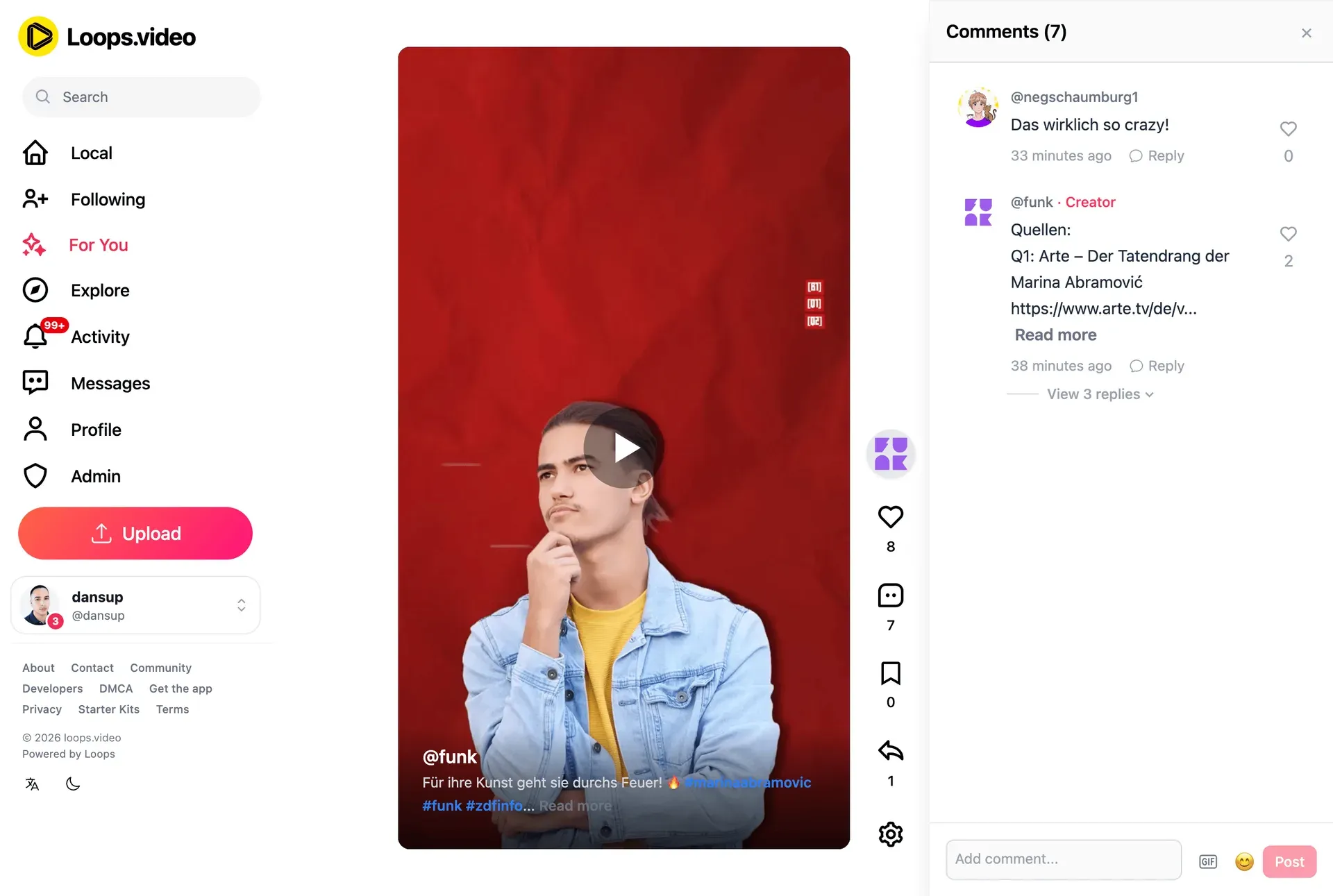
The Loops web application on loops.video: sidebar with Local, Following, For You, Explore, Activity, Messages and Admin, a vertical video and its comment thread. Official screenshot from the project README.
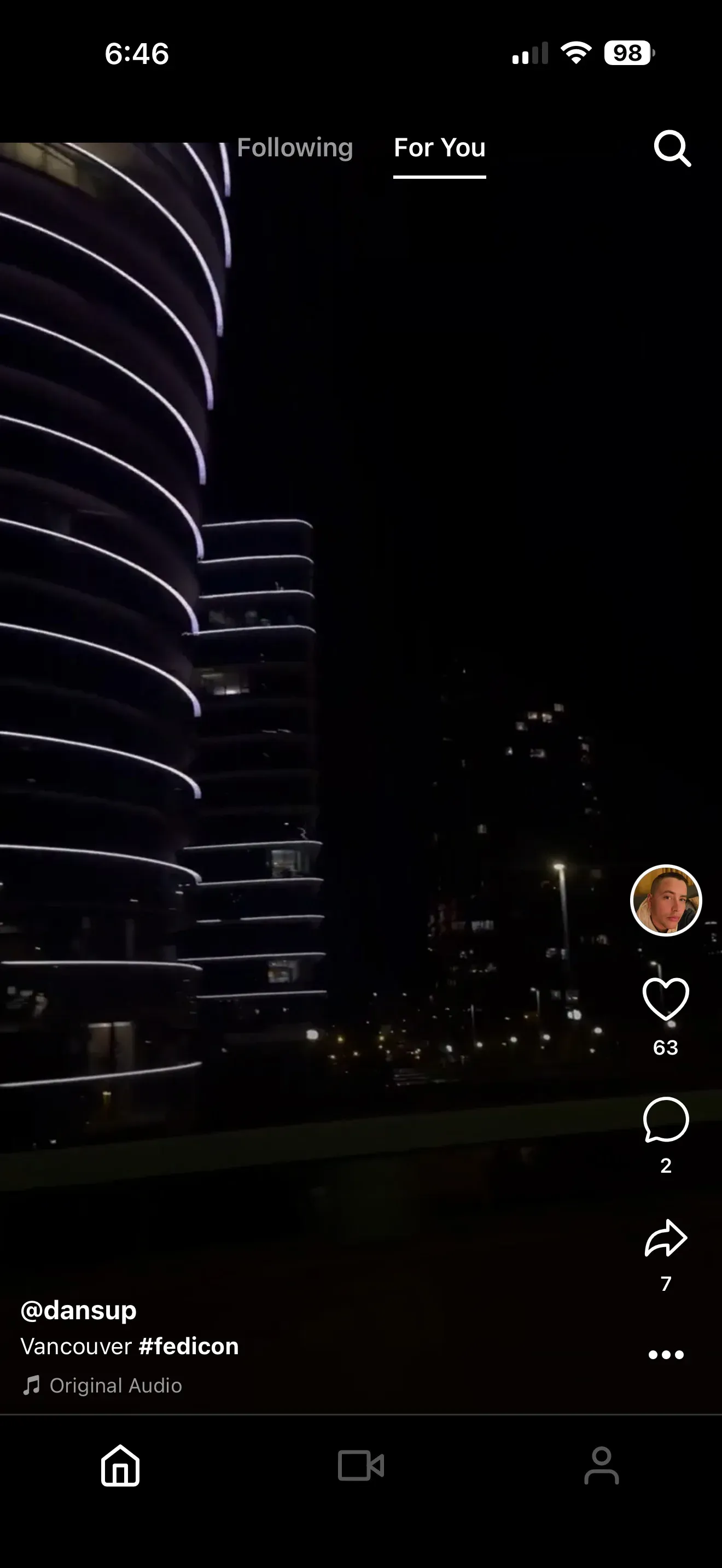
The For You feed in the Loops mobile app, with Following and For You tabs, a full-screen vertical video and the like, comment and share column. Official app screenshot from joinloops.org.
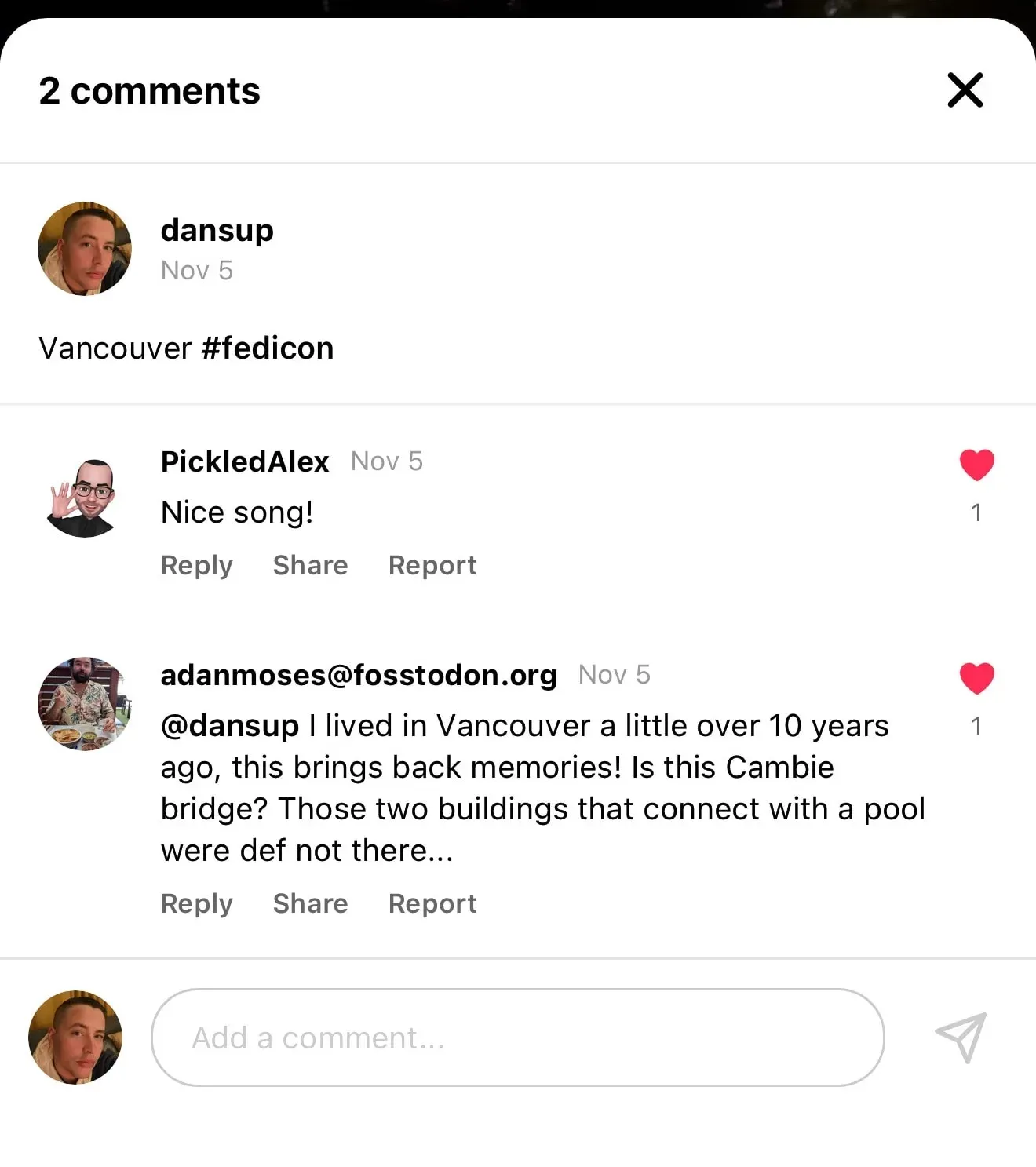
A comment thread in the Loops app that includes a reply from a Mastodon account on fosstodon.org, with reply, share and report actions. Official app screenshot from joinloops.org.
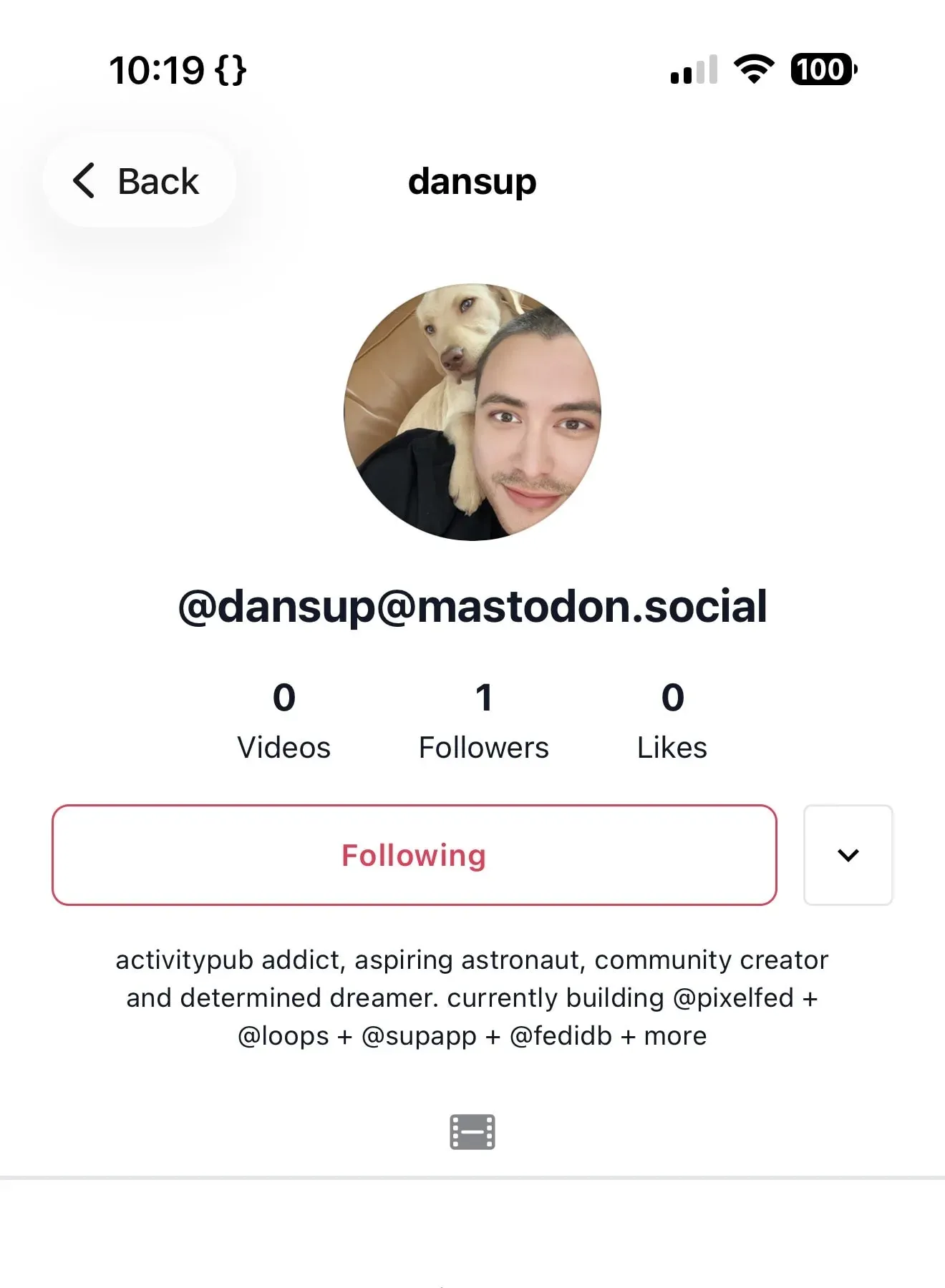
A Mastodon profile, @dansup@mastodon.social, viewed and followed from inside the Loops app. Official app screenshot from joinloops.org.
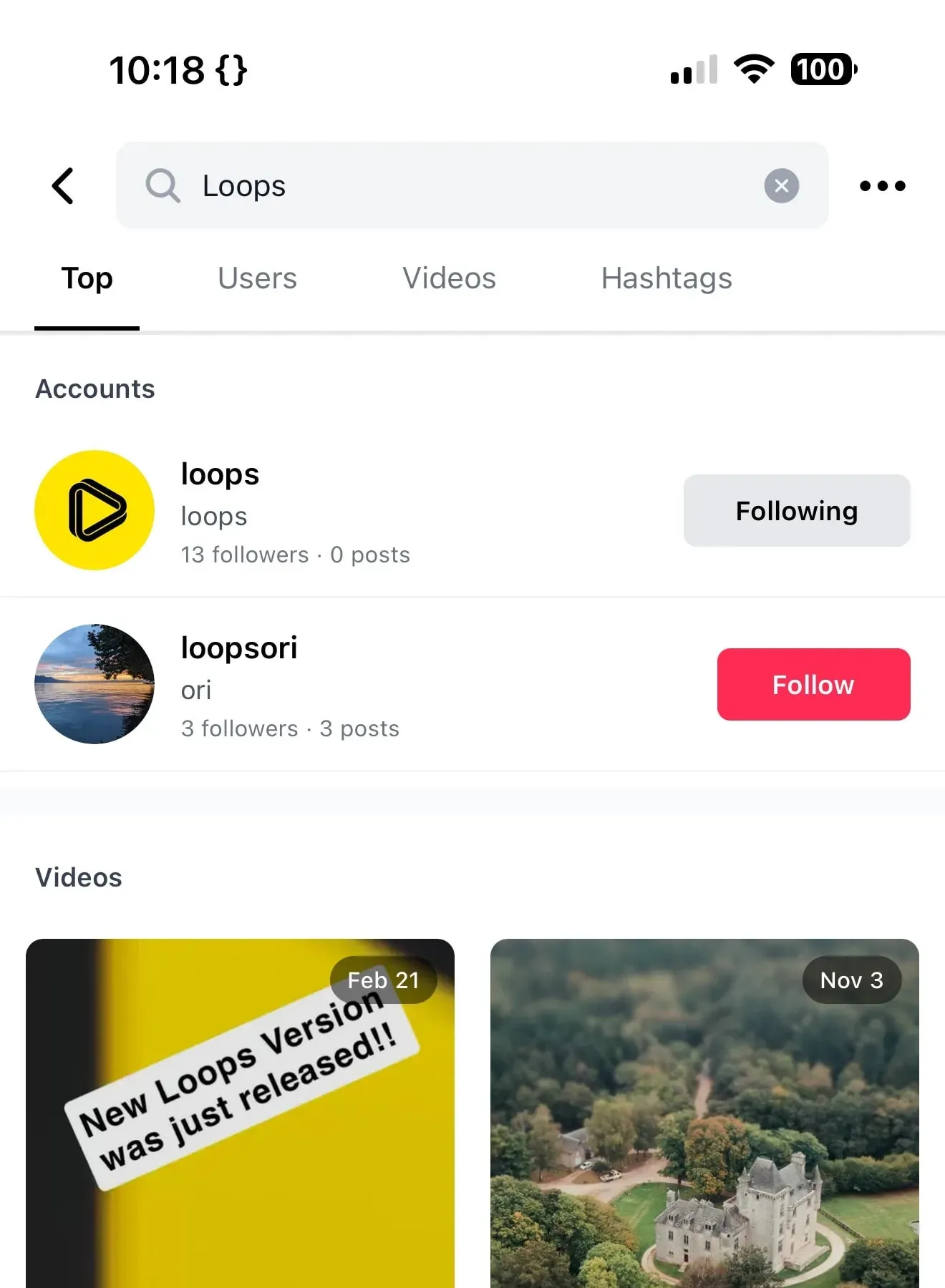
Search in the Loops app with Top, Users, Videos and Hashtags tabs, showing matching accounts and video thumbnails. Official app screenshot from joinloops.org.
Source: official Loops project page.
Key capabilities
- Manual installation on a Linux server The documented minimums are PHP 8.3, MySQL 8.0, Redis 6.0, FFmpeg 4.5 (8.0 or newer recommended), Node.js 20 and Composer 2, plus PHP extensions such as BCMath, Intl, Mbstring, GD or Imagick and Redis. The guide covers Composer and npm builds, migrations, Passport key generation, a Supervisor program for Horizon and a one-minute cron entry for the Laravel scheduler. Registration is disabled by default, so the first administrator is created with
php artisan create-admin-account. - Docker Compose deployment The repository ships a Dockerfile based on serversideup/php with FrankenPHP and a compose file that adds mysql:9 and redis:8 containers, exposing the application on port 8080. The setup guide expects an external reverse proxy for HTTPS, a domain, an email provider and an S3 bucket. After the containers start, a seeder,
passport:keysandcreate-admin-accountfinish the setup; upgrades are a pull, rebuild and restart. - Official iOS and Android apps Loops publishes a mobile app on the App Store and on Google Play under the package com.pixelfed.loops, built from the open-source loops-expo repository. The apps provide the vertical feed, camera upload, comments, search and notifications shown in the gallery. Push notifications reach the apps through the project's Push Relay, which uses APNs on iOS and FCM on Android, and Sign in with Apple is offered on iOS.
- Web application The same server delivers a browser interface with Local, Following, For You and Explore feeds, an activity list, messages, profiles, an upload flow and an administration area. Videos play in a vertical player with likes, comments, bookmarks and shares. The interface supports a dark mode and language switching, with translations managed on Crowdin.
- For You and Following feeds The Following feed is chronological, while the For You feed surfaces videos from local and remote creators. Beta 13 raised the maximum age of candidates for the For You feed to 730 days and lets administrators customise Explore scoring. A content setting lets each user hide videos labelled as AI-generated or sensitive.
- ActivityPub federation Each user is an ActivityPub actor discoverable through WebFinger, and an instance actor handles server-to-server tasks such as relay subscriptions. Loops sends and receives Create, Update, Delete, Follow, Accept, Reject, Like, Announce and Undo activities and also processes Block. Video posts are published as Note objects with a video attachment for compatibility, and failed deliveries are retried up to 10 times with exponential backoff.
- Comments, replies and quote posts Threaded comments support replies, likes on comments and mentions, and comments can arrive from Mastodon or Pixelfed accounts. Beta 11 added GIF and video replies in comments, with a GIF keyboard powered by Klipy, and beta 8 added quote post support. Beta 10 added comment controls for creators.
- Direct messages and group chats Beta 13 added one-to-one messages and group chats, and beta 14 fixed their federation and threading with Mastodon and other implementations. Accounts that have disabled direct messages cannot compose new ones, and the setting is per user. The share sheet can send a video straight into a conversation.
- Starter Kits and onboarding Starter Kits are curated lists of accounts for new users, compatible with the Mastodon feature of the same name. Remote kits are refetched at most once every 24 hours when they are searched. Administrators can also define a curated onboarding flow for new accounts.
- Creator studio, playlists and credits The studio area groups a creator's uploads and, since beta 11, shows analytics for their videos. Playlists appear on profiles and can be deep-linked. Loops also records coauthor credits on a post, backed by a public attestation from the coauthor's server so that other servers can verify the credit.
- FFmpeg transcoding pipeline Uploaded videos are processed by FFmpeg through queued jobs. The example environment exposes a slow encoding preset with a veryfast fallback, a 60 fps cap, a 900-second job timeout and a six-hour retry window, and
LOOPS_TRANSCODE_ADVANCED=trueunlocks further quality settings. The sample Nginx configuration allows uploads up to 100 MB on a manual install, while the Docker reverse-proxy example raises the body limit to 500 MB. - Administration and moderation tools The admin dashboard handles reports, including an Untagged AI report type, profile review with searchable IP addresses and enforced AI, advertising or NSFW labels on accounts. Administrators can block whole domains, maintain a blocked-terms filter, send templated emails to users and invite new members. Users can block up to 500 accounts, and blocks are sent to remote servers as ActivityPub Block activities.
- Spam and account protection Registration can be protected with Cloudflare Turnstile or hCaptcha by setting
LOOPS_CAPTCHAand the matching keys. Two-factor authentication is built in and needs no extra configuration. The example environment sets a minimum registration age of 16 throughLOOPS_REG_MIN_YEARS_OLD. - Public REST API with OAuth 2.0 Any developer can register an application at
/api/v1/apps, send users through/oauth/authorizeand exchange the code at/oauth/token, without prior approval. The reference at docs.joinloops.org covers accounts, feeds, search, playlists, studio analytics, starter kits and videos. Limits apply per account and per IP address, with HTTP 429 when exceeded; the example environment defaults to 60 requests per minute for guests and 120 for signed-in users. - Content Relay and Beacon services The project runs a moderated Content Relay at relay.loopsplatform.com that forwards public videos from loops.video to subscribing instances and auto-approves Loops servers. Beacon provides version update notices, starter kit distribution and instance health checks. Both are listed on the platform services page and are optional connections rather than requirements for running a server.
- Embeds, Atom feeds and sharing Video embeds are opt-in per instance and can be enabled or disabled in bulk; the front-end build produces a separate embed bundle. An opt-in Atom feed is available for feed readers. Share actions use Activity Intents so a viewer can repost to their own fediverse account.
- Storage and outbound email Avatars, videos and thumbnails are written through a disk named s3, which points at S3-compatible object storage by default and can be redefined as local disk in
config/filesystems.php. Email can go through SMTP, Mailgun, Amazon SES, Postmark or Resend. A working mail provider is needed for account flows and administrator messages.
Where Loops fits
Launching a community instance with Docker
Clone the repository, copy .env.docker.example, generate the database and Redis passwords and set the application URL, mail provider, S3 bucket and captcha keys. Start the database and Redis containers first, then the full stack, and run the admin settings seeder, Passport key generation and the admin account command. Put Nginx, Caddy or another reverse proxy in front of port 8080 for TLS, and confirm that its upload limit and read timeout match the video sizes you plan to accept.
Running Loops on an existing PHP host
Teams that already operate Laravel applications can install Loops directly on PHP-FPM with MySQL and Redis. Follow the installation guide for extensions, the Nginx or Apache virtual host, Supervisor for Horizon and the scheduler cron entry. Check that FFmpeg and ffprobe paths are correct, that storage/ is writable by both the web and queue users, and that OPcache and upload limits are set before opening registration.
Connecting to the wider fediverse
After the instance is reachable over HTTPS, test discovery with a WebFinger lookup and follow a Loops account from a Mastodon or Pixelfed account, then reply and like in both directions. Decide whether to subscribe to the official Content Relay for discovery, and set domain blocks before announcing the server. The federation document lists supported activities, signature schemes and troubleshooting steps for failed deliveries.
Moderating a public video community
Write the instance rules and set the DMCA contact address with LOOPS_EMAILS_DMCA before inviting users. Configure captcha, the minimum registration age and the blocked-terms filter, and decide how AI-generated, advertising and NSFW content must be labelled. Review the report queue, including Untagged AI reports, on a fixed schedule, and remember that cross-server reports and collaborative moderation are still on the roadmap.
Building a client or integration
Register an OAuth application against the target instance, request the scopes you need and send the access token as a bearer token. Design the client to accept any instance domain rather than hard-coding loops.video, and read the rate-limit headers on every response so the client backs off before receiving HTTP 429. The developer documentation explains registration, pagination and server identification.
Planning storage and transcoding capacity
Every upload is transcoded by FFmpeg in a queued job, so CPU capacity for Horizon workers and temporary disk space drive the cost of an instance. Estimate storage from expected uploads, choose between an S3 bucket and local disk, and watch queue latency in Horizon after launch. Keep FFmpeg current: the latest release rebuilds the Docker image with FFmpeg 9.0.2, and the security notes ask non-Docker operators to patch their own packages.
Reviews of Loops
Be the first to share your experience with Loops.
Write a review
Loading review form…
Alternatives to Loops
 PeerTubePeerTube is Framasoft's AGPL-3.0 video hosting server. Each instance runs its own catalogue, users and moderation, federates with other instances and Mastodon over ActivityPub, and offloads viewer traffic with WebRTC peer-to-peer.
 JellyfinJellyfin is a free software media server that manages your media and streams it from a dedicated server to end-user devices through multiple apps.