

What is PeerTube?
PeerTube is a free, decentralized video platform developed by Framasoft, a French non-profit. Each installation, called an instance, is an independent video site with its own accounts, channels, storage, quotas and moderation rules. Instances can follow each other over ActivityPub, so a video published on one platform can appear in the catalogue of another, and its channel can be followed or commented on from Mastodon and other fediverse software. The project started in 2015 under the Chocobozzz account, and the official FAQ names two developers, Chocobozzz and Wicklow. According to joinpeertube.org, the software does not rely on advertising and does not track viewers.
Framasoft does not sell a hosted PeerTube service. Viewers and creators either join an existing instance listed on the official site or run their own. Release archives (tar.xz and zip, each with an .asc signature) are published on GitHub, and the production guide describes a Linux installation behind nginx with systemd and certbot. An official Docker Compose setup uses the chocobozzz/peertube:production image, based on Debian Trixie since version 8.0. Community packages such as YunoHost exist alongside these. An official mobile app for Android (Google Play, F-Droid) and iOS covers browsing, offline downloads and publishing.
The current release is v8.3.2, published October 26, 2026. It is a security release: it upgrades the sharp image library to close a critical remote code execution path through crafted SVG files, and fixes a federation flaw that let a remote attacker impersonate actors of another instance. Version 8.3.0 (September 15, 2026) added subscriptions to remote blocklists and watched-word lists, automatic tag policies that can block labelled videos, an opt-in account login lockout and new-device login emails. It also requires PostgreSQL 14 or later, a manual post-upgrade migration script, and changes the comment-thread API to return at most 10 direct replies over 5 nesting levels. Version 8.2.0 (May 2026) introduced live DVR, channel transfer and segment removal in the Studio editor, and dropped Node.js 20.
The codebase is TypeScript. The server runs on Node.js with PostgreSQL and Redis, uses ffmpeg to transcode uploads into HLS playlists or plain web video files, and serves an Angular web client whose player can exchange video segments between viewers over WebRTC. The community-maintained dependency guide lists Node.js 22.22 or later (below 25), pnpm, PostgreSQL 14+, Redis 6.2+, ffmpeg 4.3+ and Python 3.8+. Transcoding, live encoding, transcription and storyboard jobs can move to separate remote runners. A REST API with an OpenAPI 3.0 schema, an embed player API, a plugin system and ActivityPub endpoints are documented.
The code is licensed under AGPL-3.0 or any later version; the logo is CC BY-SA 4.0. PeerTube is not a monetization platform: there are no ads or pay-per-view, only a creator support button that links to external donation pages. The project presents it as an alternative, not a YouTube replacement, and each instance administrator remains responsible for moderation, storage costs and legal compliance on that server.
PeerTube screenshots
Explore the interface. Open a screenshot to view it at full size.
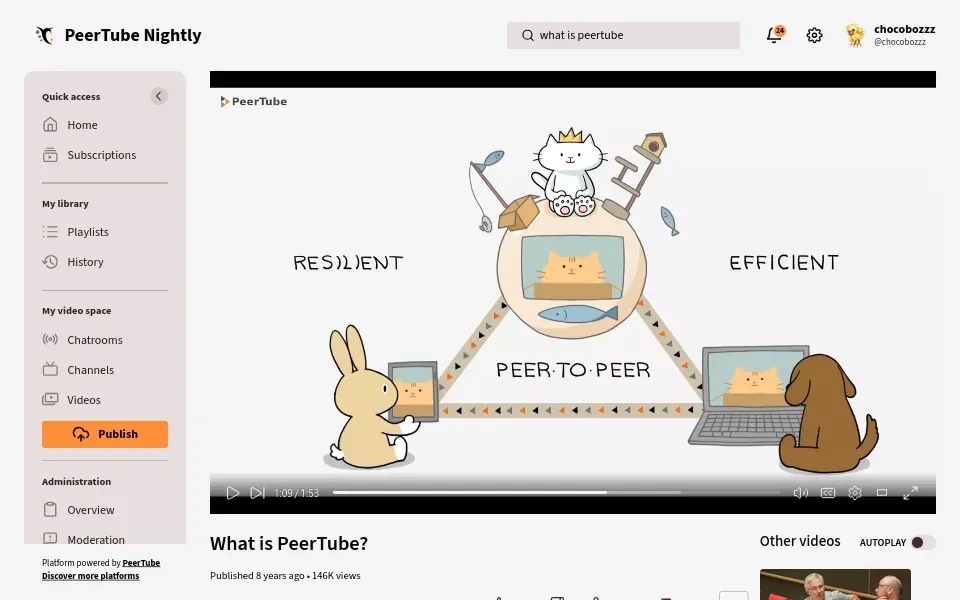
Watch page of the PeerTube Nightly demonstration instance, with the left navigation and player controls. Official screenshot from the project README.
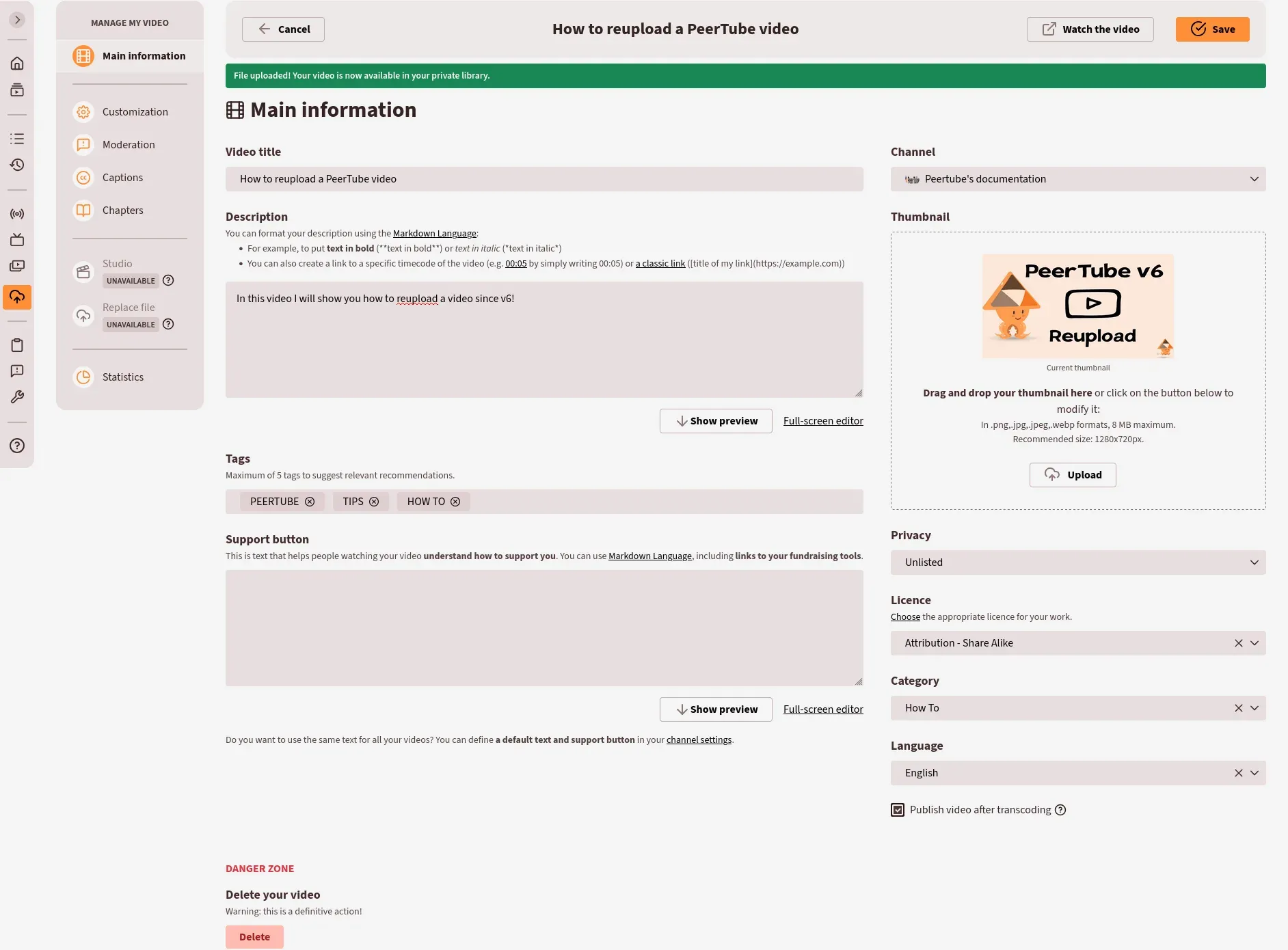
Main information form shown after an upload, with the side menu for customization, moderation, captions, chapters, Studio and statistics. Official documentation screenshot.
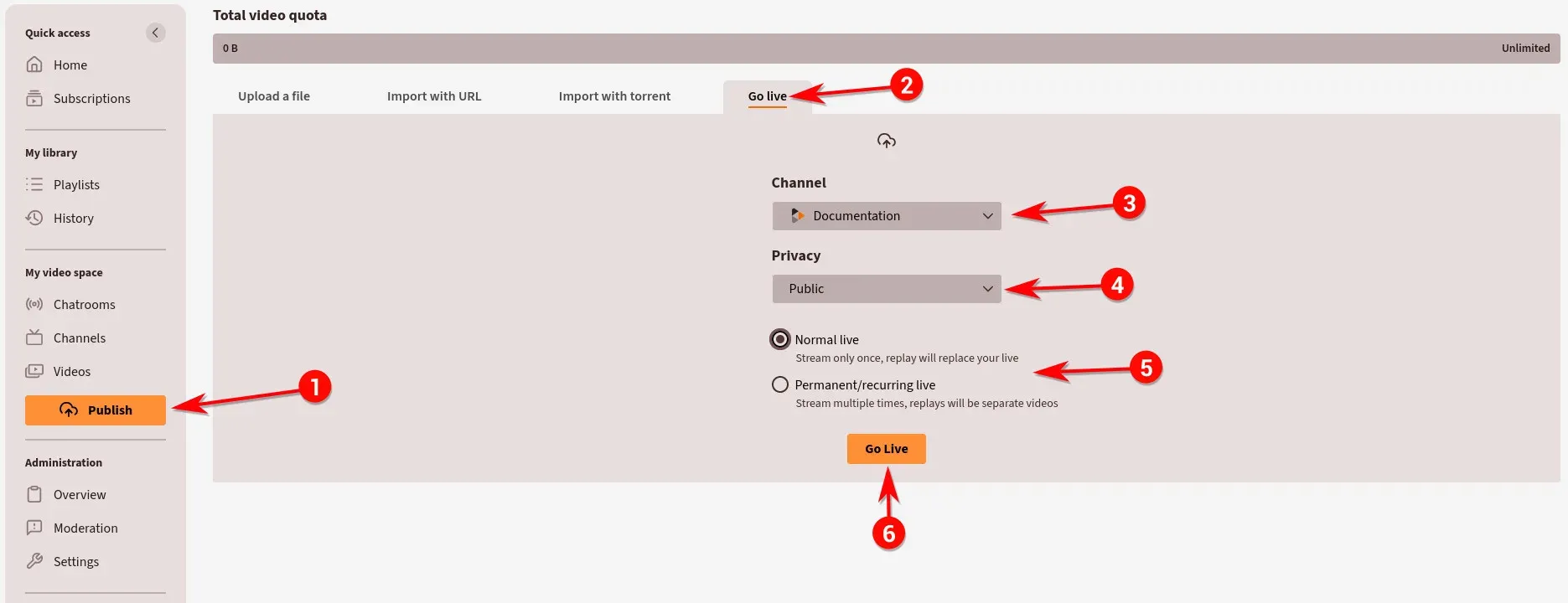
Go live tab of the publish page, next to upload, URL import and torrent import. Official documentation screenshot with numbered annotations.
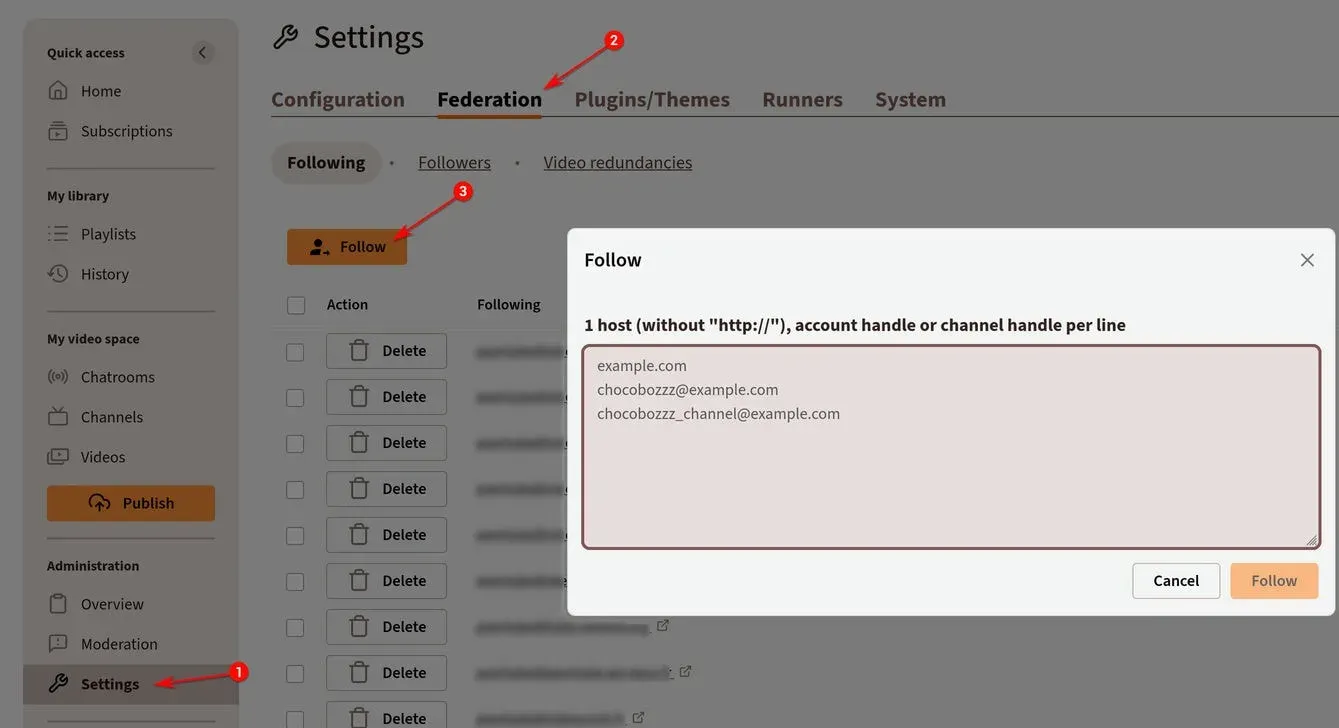
Federation settings where an administrator follows other instances, accounts or channels. Official documentation screenshot; followed hosts are blurred.
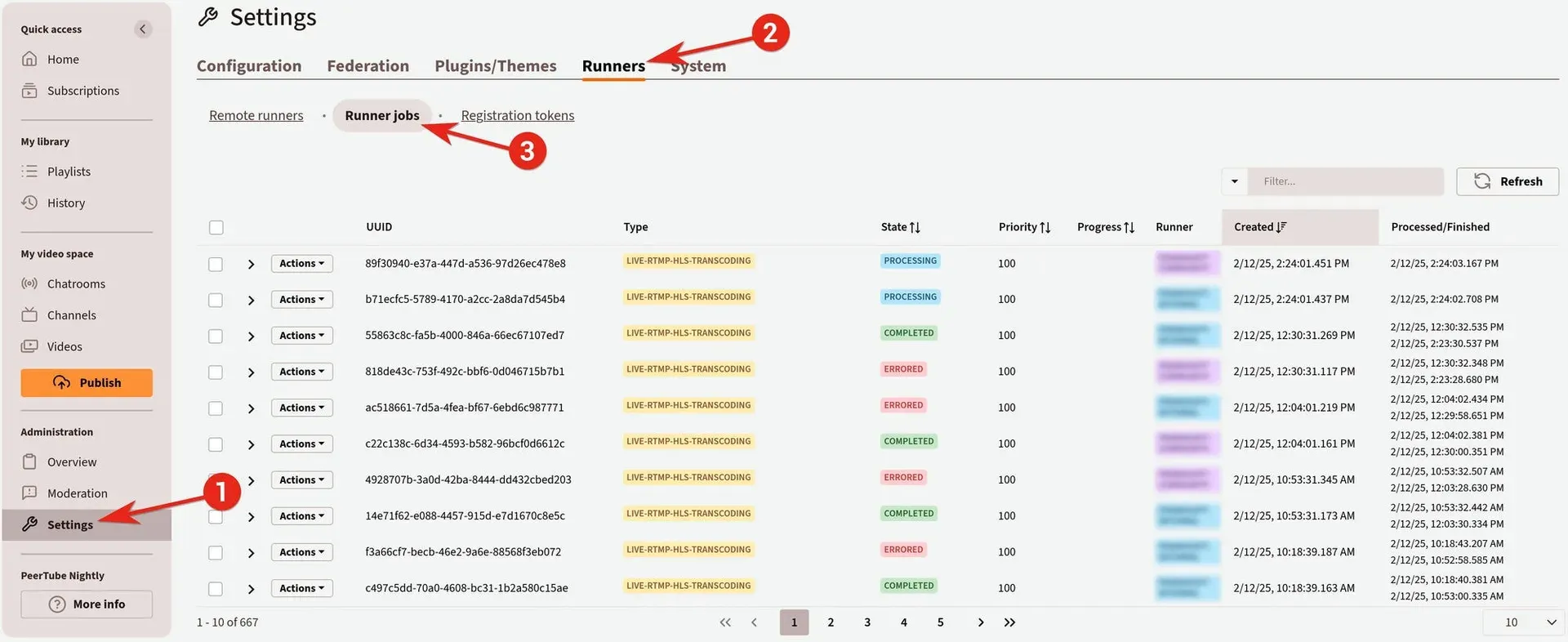
Runner jobs table in the administration settings, showing live transcoding jobs handled by remote runners. Official documentation screenshot.
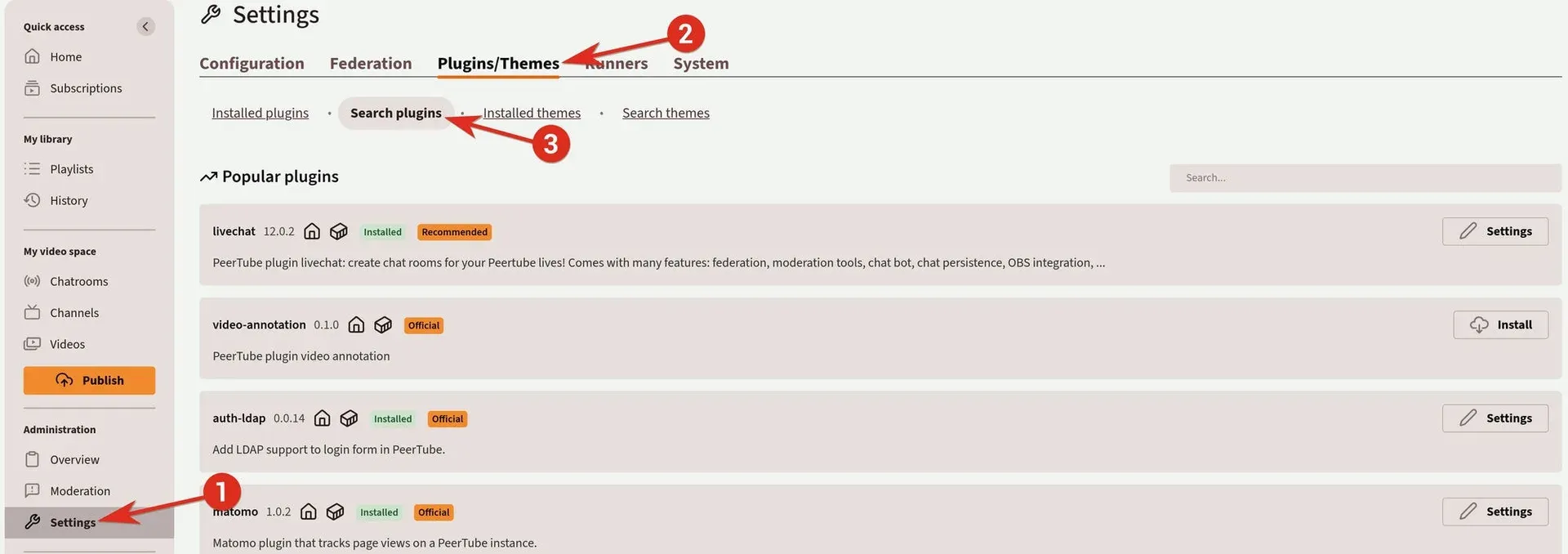
Plugin search in the administration settings, with installed and official plugins marked. Official documentation screenshot; versions shown are from the time of capture.
Source: official PeerTube project page.
Key capabilities
- Linux production installation The production guide installs a release archive under
/var/www/peertube, with a dedicated system user, a PostgreSQL database, the bundled nginx template, certbot and a systemd unit. Dependency instructions cover Debian, Ubuntu, Arch Linux and CentOS. Therootadministrator password is generated into the logs, or set beforehand throughPT_INITIAL_ROOT_PASSWORD. - Docker Compose deployment The Docker guide downloads an official
docker-compose.ymland.envfile that include PeerTube, PostgreSQL, Redis, an nginx web server, certbot and a Postfix relay that signs mail with DKIM. Docker Compose 2.x is required. Since 8.2 the entire configuration can be set through environment variables, which override values saved in the web admin interface. - Official mobile app Framasoft publishes a PeerTube app for Android through Google Play, F-Droid or a manual APK, and for iOS through the App Store. It supports browsing across platforms, offline downloads and publishing. Third-party clients exist but are listed separately as unofficial.
- Upload, import and channel synchronization Creators upload through a resumable endpoint, import from a URL with yt-dlp or from a torrent, or synchronize a remote channel so new videos are imported automatically. Since 8.0, failed imports have their own state and can be retried. Version 8.3 lets users set the default privacy for videos imported by a channel synchronization.
- Transcoding to HLS and web video Ffmpeg produces several resolutions as HLS playlists, raw MP4 files, or both; enabling both formats roughly doubles storage. Since 6.3, HLS audio and video streams are stored separately, and the original upload can be kept. Version 8.3 lets admins cancel a local transcoding job.
- Peer-to-peer delivery over WebRTC Viewers of the same video or live stream can exchange segments with each other, which reduces server bandwidth during traffic spikes. Viewers can disable P2P in their settings, and administrators configure STUN servers in
webrtc.stun_servers. A separate redundancy system lets friendly instances mirror popular videos. - Live streaming Streams are sent over RTMP from software such as OBS, either as a normal live whose replay replaces it or as a permanent live whose sessions become separate replays. Administrators set limits on simultaneous lives and enable multi-resolution live transcoding. Live DVR, added in 8.2, lets viewers pause and seek within the live window; the publishing guide covers the OBS settings.
- ActivityPub federation An instance can follow other instances, or individual accounts and channels, so their videos appear in its catalogue. Users of Mastodon and similar software can follow PeerTube channels and reply to videos, and 8.1 added FEP-1b12 compatibility used by Lemmy, PieFed and Mbin. Instances can be listed in the public index and searched through SepiaSearch.
- Studio editing The web Studio cuts the start or end of a video, adds intro and outro clips and a watermark, and since 8.2 removes segments from the middle. Edits run as transcoding jobs, locally or on a remote runner. It is a trimming tool, not a timeline editor.
- Captions, chapters and automatic transcription Creators add subtitle files, edit subtitle segments in a modal and define chapters shown in the progress bar. Automatic transcription generates subtitles with openai-whisper or whisper-ctranslate2, installed separately. A transcription widget on the watch page lets viewers search the text and jump to a segment.
- Privacy and embedding controls Videos can be public, unlisted, private, internal to the instance or password protected. Since 8.1, uploaders can restrict the domains allowed to embed a video, and 8.3 adds a setting that forbids embedding entirely. Downloads can be disabled per video; owners and admins can still download.
- Channels and collaboration One account can own several channels, each with its own banner, avatar, playlists and podcast feed. Since 8.0, channel owners can invite editors who manage videos, playlists and comments, with an Activity page recording their actions. Version 8.2 added transfer of a whole channel to another local user.
- Moderation toolkit Moderators handle reports on videos, comments and accounts with a messaging thread to the reporter, block videos, mute accounts or servers, and require approval for new registrations. Watched-word lists and automatic tags flag comments and videos. Version 8.3 adds subscriptions to remote blocklists and watched-word lists that resynchronize periodically, and an instance can publish its own blocklist for others.
- Remote runners The
@peertube/peertube-runnerpackage (Node.js 22+, ffmpeg and ffprobe 4.3+) processes VOD, live and Studio transcoding, transcription and storyboard jobs on other machines. Runners register with revocable tokens created by an administrator. The documentation warns that runners can alter video content, so only trusted operators should run them. - S3-compatible object storage Web videos, HLS playlists, original files, captions and user exports can be stored in any provider that implements the S3 API; the remote storage guide gives Backblaze B2, AWS S3 and OVH examples. Live streams stay on local disk until their replay is transcoded. The bucket must be public with CORS configured, and a caching server set as
base_urlis strongly recommended. - REST API, embeds and plugins The REST API reference is generated from an OpenAPI 3.0 schema in the repository. An embed player API controls iframes from a host page. Plugins and themes are searched and installed from the admin interface and can register server and client hooks; official plugins include LDAP authentication and Matomo analytics.
- Command-line tools
@peertube/peertube-cliuploads videos, manages plugins and themes, and lists or adds redundancies from a workstation. Server-side scripts includeprune-storage,regenerate-thumbnails,create-move-video-storage-job,create-import-video-file-jobandreset-password. They run from the installation directory or throughdocker compose exec. - Account security and authentication Users can enable two-factor authentication with one-time passwords, and external authentication plugins provide LDAP or OpenID Connect sign-in. Version 8.3 adds an opt-in login lockout across IP addresses and emails on sign-in from a new device. The
user.disable_root_authkey, added in 8.1.8, disables token use for therootaccount. - Account export and import Since 6.1, users can export a ZIP archive of their account data, channels, playlists and, optionally, video files, then import it on another PeerTube instance. The project states this is not a migration tool: data is duplicated, not moved, so the original channel keeps existing. Archives can be stored in object storage and take space on the source instance.
- Feeds and metrics Channels and, since 8.2, playlists expose podcast feeds, and every channel has RSS feeds for videos and comments. Creators get per-video statistics, including download counts since 8.2. Administrators can export OpenTelemetry metrics such as
peertube_videos_totaland runner job queue figures.
Where PeerTube fits
Running a video platform for an organization
Universities, public bodies and associations can host their own catalogue instead of uploading to a commercial platform. Decide first whether registration is open, approval-based or closed, then set per-user video quotas, the default player theme and a custom homepage. Check the hardware figures in the official FAQ: a minimum of 1 vCore, 1.5 GB of RAM and 20 Mbit/s upload, rising to 8 vCores and 8 GB of RAM when transcoding runs on the same machine. Publish terms of use and a moderation contact before inviting users.
Moving an existing channel to PeerTube
Create a channel, then add a synchronization pointing to the existing channel URL, or import individual videos by URL. Imports use yt-dlp, which may need cookies for some platforms as described in the configuration documentation. Choose the default privacy for synchronized imports so videos can be reviewed before they become public. Confirm that you hold the rights to every imported video, and watch the import list for the Import failed state and retry those entries.
Streaming live events
Open the Go live tab, choose a normal live for a one-off event or a permanent live for recurring sessions, and copy the RTMP URL and stream key into OBS. Test the latency setting: lower latency limits peer-to-peer sharing, higher latency increases it. Decide whether replays are published automatically, and check the simultaneous-live limit. For large audiences, move live transcoding to a remote runner and monitor CPU on the main server during a rehearsal.
Scaling storage and transcoding
Video storage grows with every resolution kept, so plan the format choice first: HLS only, web video only, or both. Move files to S3-compatible storage with create-move-video-storage-job and put a caching server in front of the bucket. Register remote runners for VOD, Studio and transcription jobs so the web server keeps responding during upload peaks. Run prune-storage after migrations and check that thumbnails and captions resolve from the new location.
Joining the federation with moderation in place
Following other instances fills the catalogue but also stores remote metadata and, with redundancy enabled, remote video files on your server. Start by following a small list of known instances from the federation guide, decide whether to accept incoming follows automatically, and subscribe to a shared blocklist maintained by administrators you trust. Add watched words and automatic tag policies before opening comments to remote users.
Embedding videos and integrating other systems
Use the embed player API to control playback from a website or learning platform, and restrict the allowed embedding domains for videos meant for one site. The REST API and OAuth tokens let scripts upload, update metadata and read statistics; the 8.3 comment-thread change means clients must page through replies with the new replies endpoint. Plugins can add authentication providers, analytics or chat; review their source and update cadence before installing them.
Reviews of PeerTube
Be the first to share your experience with PeerTube.
Write a review
Loading review form…
Alternatives to PeerTube
 JellyfinJellyfin is a free software media server that manages your media and streams it from a dedicated server to end-user devices through multiple apps.
 InvidiousInvidious provides a web interface for watching YouTube videos without ads or tracking. It supports independent subscriptions, audio-only playback, data imports and exports, and a developer API.
 NewPipeNewPipe is a libre, lightweight Android streaming front-end for YouTube, PeerTube, Bandcamp, SoundCloud and media.ccc.de that needs no account.