What is ToolsPad?
ToolsPad is a commercial, web-based business workspace for owner-led, small and service businesses. It combines 21 focused applications that share one workspace identity, team, permissions, tags and business records, so a contact, an opportunity, a booking, a quote, tracked time and an invoice can refer to each other instead of being copied between separate products. The official site groups the apps into five areas: Dashboards and Whiteboards; CRM and Opportunities; Plan and Organise (Notes, Documents and Media, Tasks, Appointment Scheduling, Time Tracking); Publish (Lead Forms, Surveys, Polls, Testimonial Collector, Landing Pages, QR Code Generator, Smart Links, Blogs); and Finance (Subscription Tracker, Estimates and Quotes, Invoice Maker, Business Calculators).
A workspace is the unit of ownership and billing. ToolsPad describes it as a dedicated home for one business, with its own people, apps and records, and one account can own up to 10 workspaces and switch between them. Every plan, including Free, allows unlimited human members; workspace Owners and Admins manage invitations and roles, and app permissions control who can see and work with records. Limits are counted per workspace and per app, as listed on the pricing page, and a new user can start with a single app such as CRM and open the others from the same account later.
ToolsPad runs as a hosted service in the browser at app.toolspad.com. The site lists no desktop or mobile store apps; public pages such as booking pages and polls are described as mobile-ready. The privacy policy, effective October 22, 2026, names Cloudflare for hosting, databases, object storage, queues, security and delivery, Supabase for managed authentication, Stripe for paid-plan checkout and invoices, Emailit for transactional email, Sentry for error monitoring, Google for optional sign-in, connected calendars and site analytics, and Microsoft for optional connected calendars. It states that the service runs on global infrastructure, so information may be processed outside the user's country; no storage region is named. Calendar access tokens and sensitive event fields are stored encrypted.
The product pages also state what ToolsPad does not do: Invoice Maker and booking pages do not collect payments, CRM does not sync an email inbox, Subscription Tracker does not cancel services, and Time Tracking does not capture screenshots, GPS or keystrokes. The Terms of Service, effective November 4, 2026, state that customers keep ownership of their content and that ToolsPad does not become the accountant, legal adviser or merchant of record of a customer business. Pricing combines a permanent Free plan, Premium and Business subscriptions charged per workspace rather than per seat, and one-time lifetime purchases.
For AI tools, ToolsPad operates a remote Model Context Protocol server at app.toolspad.com/mcp over Streamable HTTP, with OAuth authorization in the browser, documented on the AI and MCP page. A connection covers one workspace with read-only or read-and-write access, can be revoked in Settings under AI connections, and cannot administer ToolsPad, change workspace ownership, retrieve secrets or permanently delete data. Separately, the marketing pages register six read-only WebMCP tools for browser assistants, with schemas published in a JSON catalogue, and the full product reference is published as llms-full.txt.
Key capabilities
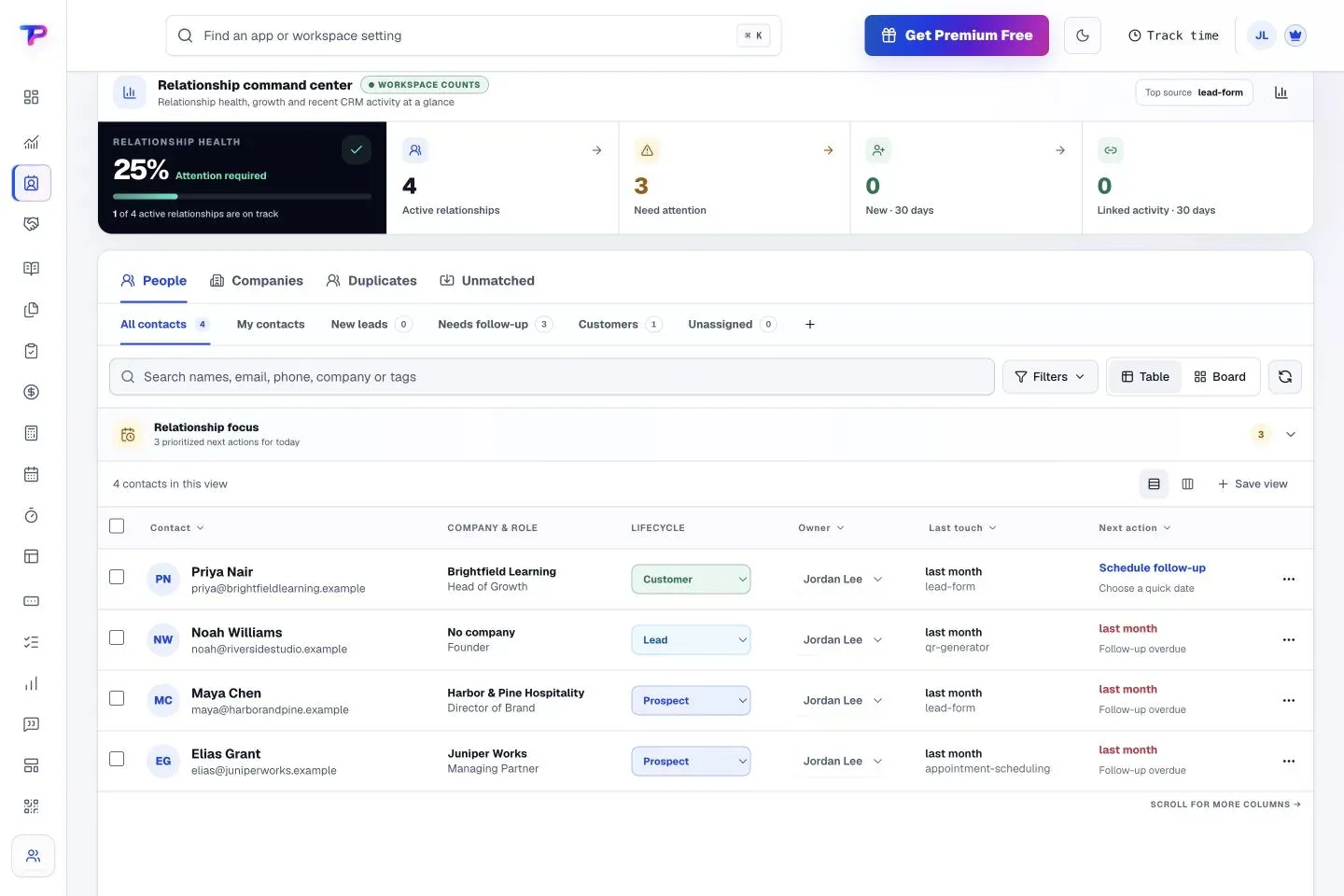
- CRM contacts and companies People and companies are stored with roles, contact methods, owners, lifecycle stage (Lead, Prospect or Customer), custom fields and workspace tags, in table or board layouts with quick filters for new leads, follow-ups, customers and unassigned records. A contact timeline shows linked forms, appointments, notes, tasks, testimonials, estimates and invoices without copying them. CSV import maps columns and reviews duplicates, merges require a conflict preview, and CRM does not sync a mailbox, as the CRM page states. Free allows 500 contacts and 100 companies, Premium 25,000 and 10,000, Business 250,000 and 100,000.
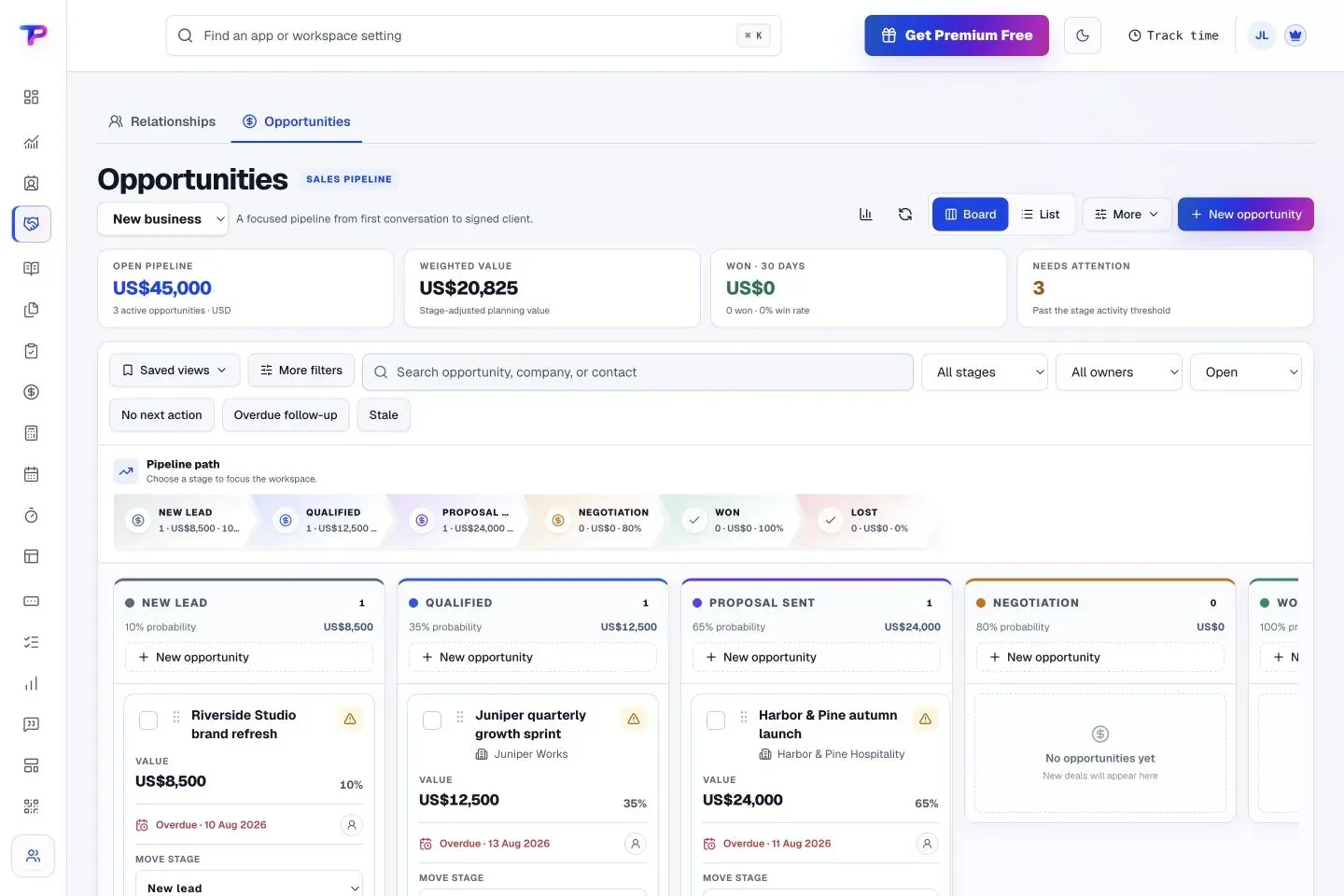
- Opportunities and sales pipelines Board and list views show the same pipeline data, and each pipeline has its own stages, colors, probabilities and stale-work threshold. A deal links several contacts with one primary contact and records the next step, owner and expected close date. Reports show open and weighted value, win rate and sales cycle, and a won deal can promote a contact to Customer, while stages are never demoted automatically. Free includes 1 pipeline and 100 open opportunities, Premium 25 and 10,000, Business 100 and 100,000.
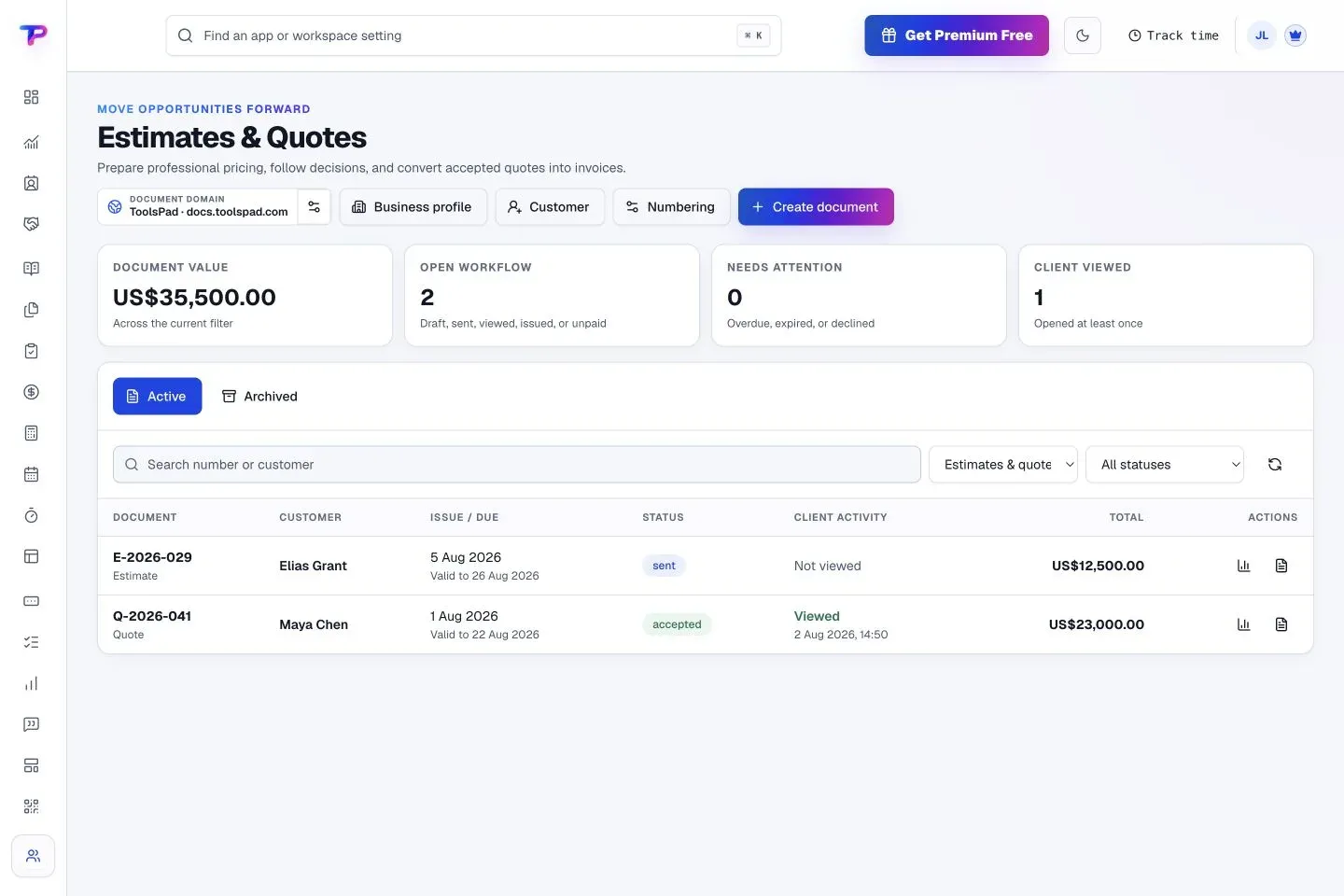
- Estimates and Quotes Documents combine reusable business and customer profiles, line items, discounts, taxes, validity terms and scope notes, and each one produces a PDF and a secure link the customer opens without an account. The library tracks sent, viewed and accepted status, and an accepted quote converts into an invoice with its customer details and line items. Free allows 10 documents sent per month and 100 stored, Premium 500 and 10,000, Business 5,000 and 100,000.
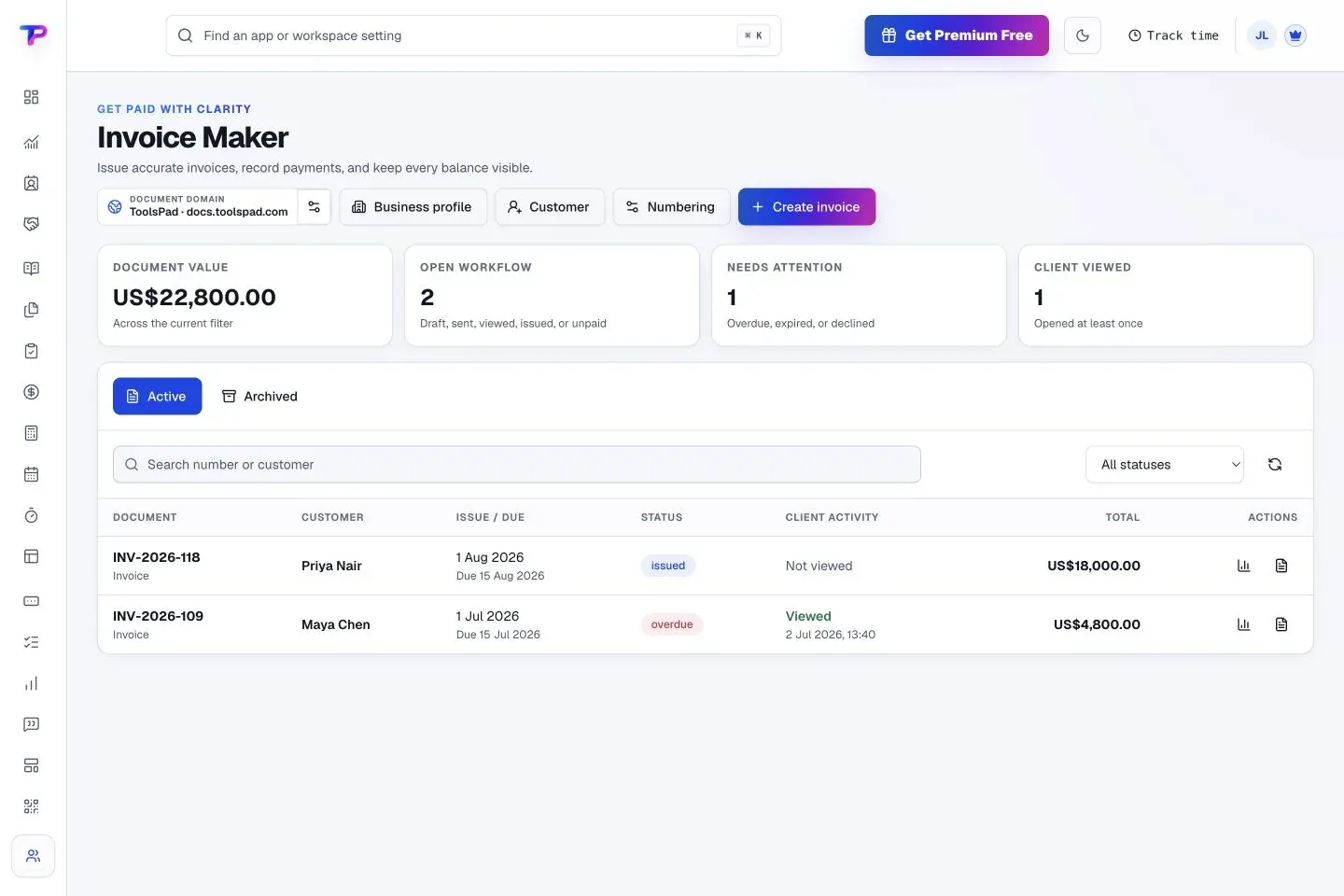
- Invoice Maker Invoices use workspace numbering sequences, due dates, terms, taxes and discounts, and can start from CRM details, a quote or approved billable time. Customers get a PDF or secure link with payment instructions such as bank transfer details, and the status (sent, due, paid or overdue) is recorded manually: ToolsPad states that Invoice Maker does not collect payments and is not accounting software. Send and storage limits match Estimates and Quotes.
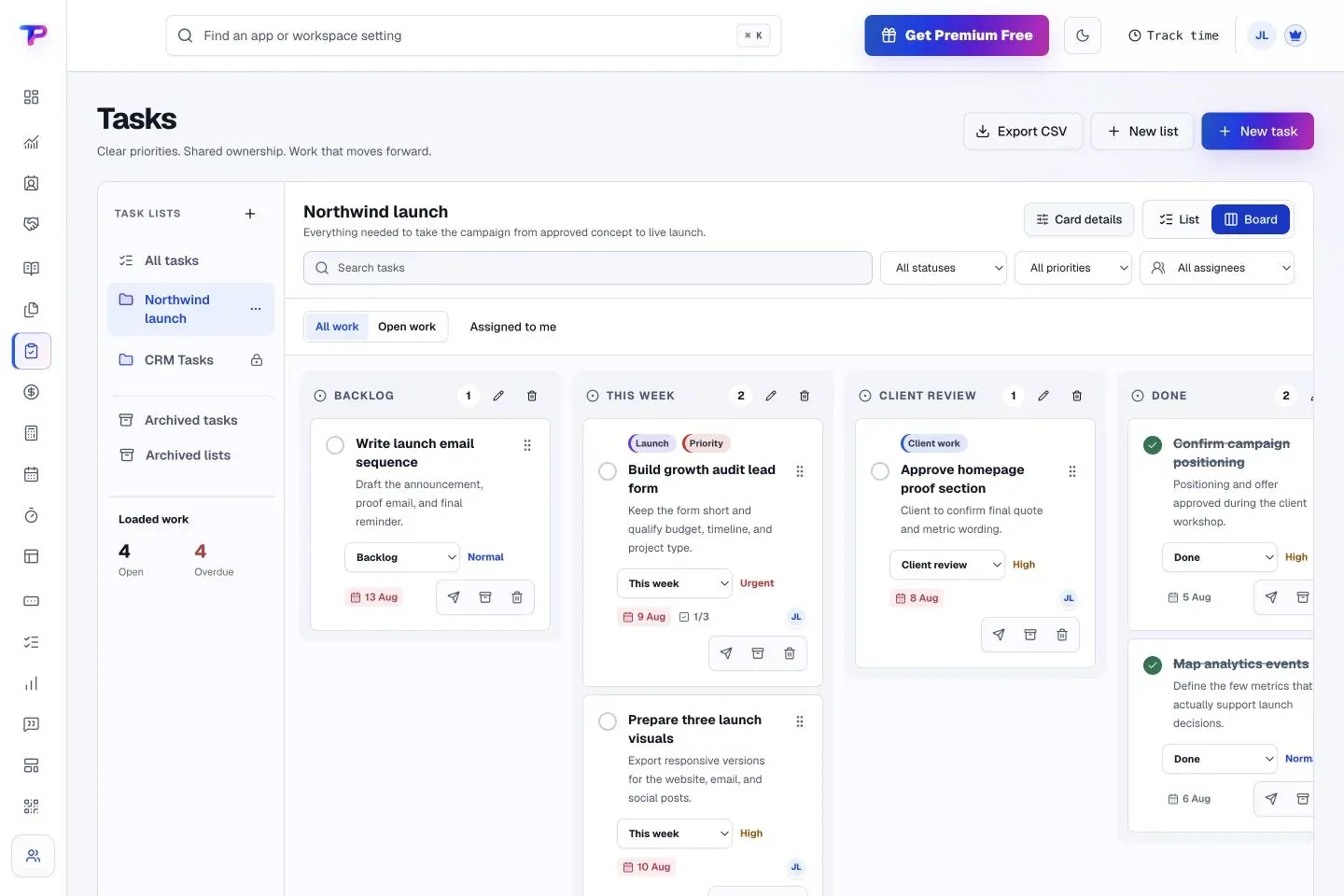
- Tasks Task lists switch between list and board views of the same data, with assignees, priority, status, due dates, reminders, comments, checklists, tags, filters, archiving and CSV export. Free allows 500 tasks, Premium 25,000 and Business 250,000.
- Appointment Scheduling Booking pages offer one-to-one, group, collective and round-robin appointments. Google Calendar and Microsoft 365 connections check availability and receive confirmed bookings, and rules cover working hours, buffers, notice periods, booking horizons, date overrides and time zones. Confirmations and reminders are sent automatically; booking pages do not take payments. Free includes 1 appointment type, 1 calendar and 100 bookings per month, Premium 25, 6 and 2,000, Business 100, 25 and 20,000.
- Time Tracking A timer is available throughout ToolsPad, with daily, weekly and calendar timesheets and manual entries. Projects track billable value, budget burn, fixed fees and retainers, and separate billable and internal cost rates give authorised managers revenue, labour cost and margin. Weekly or monthly periods can be approved and locked, approved unbilled time and expenses become a draft invoice, and no screenshots, GPS or keystrokes are captured. Free covers 3 active projects, Premium 100 and Business 1,000 with advanced reports.
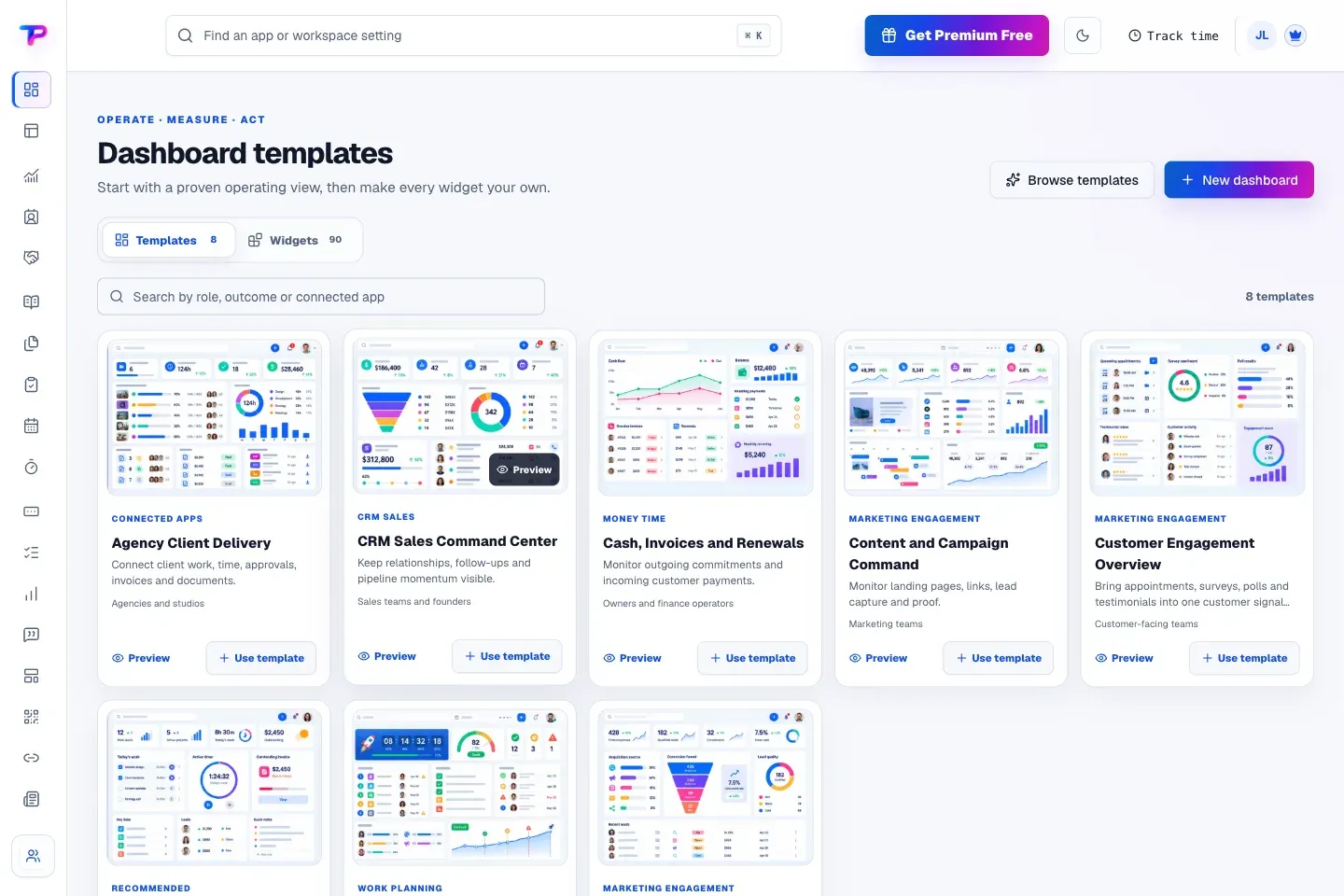
- Dashboards and Whiteboards Dashboards are built from permission-aware widgets over CRM, sales, tasks, money, time and publishing data, some of which act directly, such as completing a task or starting a timer; templates include CRM Sales Command Center and Cash, Invoices and Renewals. Whiteboards add a canvas with sticky notes, shapes, mind maps, flowcharts and connectors, live cursors, comments and linked records such as contacts or invoices. Free allows 3 dashboards with 50 widgets each and 3 boards with 500 objects; Business allows 250 dashboards and 500 boards.
- Notes and Documents and Media Notes use notebooks, folders, a visual editor, tags, pinning, archiving and a Markdown copy action. Documents and Media is a shared library whose files are reused across Blogs, Landing Pages, Whiteboards, CRM and other apps without a second upload, with external shares that expire and can be revoked. Storage is 250 MB on Free, 10 GB on Premium and 100 GB on Business.
- Lead Forms, Surveys and Polls Forms and surveys are hosted on a ToolsPad URL or embedded in an HTTPS website, with validation, consent fields, spam protection, UTM attribution, HEX-color themes and CSV export. Lead form submissions can go to signed webhooks with retries, delivery history and manual replay; webhooks are listed as a paid-plan control. Free includes 3 published forms, 3 surveys, 5 polls and 250 pooled responses per month; Premium 25 of each and 10,000 responses; Business 100 of each and 50,000.
- Landing Pages, Blogs and Testimonial Collector Landing Pages start from templates, keep drafts separate from published versions and reuse lead forms and approved testimonials. Blogs use the Notes editor and generate canonical URLs, structured data, RSS, sitemaps and hreflang, with confirmed email subscribers and a custom hostname on Premium. Testimonial Collector captures consent, text, a rating and a photo, moderates every response and publishes approved ones as hosted walls or embedded widgets.
- Smart Links and QR Code Generator Smart Links creates short links on the ToolsPad redirect domain with weighted, sticky or round-robin routing across up to ten destinations, rules by country, device, language or schedule (advanced rules on paid plans), passwords and click limits. QR codes use a permanent redirect whose destination can change after printing, with PNG, SVG and PDF downloads. Both report aggregate counts without visitor profiles; Free allows 10 active links and 10 QR codes, Premium 500 and Business 5,000.
- Subscription Tracker and Business Calculators The tracker records renewal cycles, costs per currency, owners, vendors, reminders and cancellation links, with CSV import and export, but does not cancel services. Nine calculators for pricing, break-even, runway, loans, ROI and similar figures run in the browser on every plan and keep values on the current device.
- Free, Premium and Business plans Free costs $0 with 250 MB storage, 250 pooled responses per month, ToolsPad domains and ToolsPad attribution. Premium is listed at $19 per month or $190 per year per workspace, with 10 GB, up to 10 custom domains, 10,000 responses, advanced analytics, webhooks, approvals, premium templates and branding removal. Business is $49 per month or $490 per year, with 100 GB, up to 100 custom domains, 50,000 responses, application-level access controls, audit exports and priority support routing. Prices exclude taxes; the pricing page marks them as holiday prices through January 31, 2027 and shows standard prices of $49 per month ($490 per year) for Premium and $99 per month ($990 per year) for Business.
- Regional prices, lifetime purchases and trial For India, the product guide lists Premium at INR 999 per month or INR 9,990 per year and Business at INR 2,499 or INR 24,990, excluding 18% GST. Premium Lifetime ($999) and Business Lifetime ($1,999) are one-time payments for one workspace at that tier, shown against standard prices of $3,000 and $6,000, with tier limits and a 30-day refund policy. The first workspace gets a 30-day Premium trial without a card and then moves to Free without an automatic charge; each qualifying referral can add up to 60 Premium days.
- Billing and downgrades Subscriptions renew monthly or annually through Stripe checkout and a hosted billing portal; upgrades can take effect immediately with a prorated charge, and downgrades take effect at the end of the paid period. A downgrade or failed payment never deletes records: content above a lower limit stays readable and exportable while new creation in that resource family pauses, and imports, exports and deletion controls remain on Free.
- Remote MCP server for AI agents AI clients add the endpoint, sign in to ToolsPad in the browser and approve one workspace with read-and-write (the default) or read-only access. Each request rechecks membership, app entitlement, access mode and rate limit, operations are audited without storing request bodies, and tokens are short-lived. Examples on the MCP page include creating a contact with a follow-up, building a lead form and drawing a whiteboard flowchart.
Where ToolsPad fits
Capturing an enquiry and following it up in CRM
A lead form is published on a ToolsPad URL or embedded in an existing website, with the fields, consent text and UTM attribution the campaign needs. Identified submissions are matched to CRM contacts, and the New leads and Needs follow-up filters list records together with their owner and scheduled next action. The contact timeline then gathers later forms, appointments, notes and documents for that person, as described on the Lead Forms page.
Running a sales pipeline
Opportunities are created in a default pipeline or in separate pipelines for brands, services or teams; the sample pipeline on the Opportunities page uses the stages New lead, Qualified, Proposal sent, Negotiation, Won and Lost, each with its own probability. Every opportunity links its contacts and company, the next step and its owner, and the estimates, tasks, notes and meetings that belong to it. The pipeline header shows open pipeline value, weighted value, wins in the last 30 days and the number of deals past their stale threshold.
Moving from quote to invoice
An estimate or quote is built for a CRM customer, sent as a secure link or PDF and tracked as sent, viewed or accepted. Once the customer accepts, the document converts in Invoice Maker, which carries the customer details and line items into an invoice numbered from the workspace sequence. The invoice states how to pay, and the team records the payment status after the money arrives outside ToolsPad, according to the Estimates and Quotes and Invoice Maker pages.
Billing tracked client work
The workflow ToolsPad describes for agencies and studios runs from a project enquiry in Lead Forms to an opportunity, then to delivery tasks with owners and checklists, and finally to time tracked against the project. Hours are reviewed in timesheets, optionally approved and locked per week or month, and approved unbilled time and expenses are grouped into a linked draft invoice. ToolsPad notes that a won opportunity does not create a project automatically; the team creates the delivery tasks when the engagement starts.
Booking meetings against connected calendars
An appointment type defines duration, location, hosts, questions, buffers, limits and reminder rules, and a connected Google or Microsoft 365 calendar supplies busy times so that bookings avoid conflicts. Customers pick a time on the public booking page, confirmed meetings are written back to the host calendar, and bookings can link to leads, tasks, QR codes and landing pages. Payment for an appointment is handled separately, for example through an invoice from Invoice Maker, as the scheduling page states.
Working through an AI agent
After the MCP endpoint is added to an AI client and a workspace is approved, the agent can create and update records such as contacts, tasks, notes, forms, appointments, landing pages and connected whiteboard diagrams, with guided higher-level workflows for complex records like flowcharts. The connection appears under Settings, AI connections, with the client name, workspace, access mode, last use and status, and can be revoked there at any time.
Similar products listed on iThub include HubSpot, Zoho, Odoo, Invoice Ninja and ClickUp.
Reviews of ToolsPad
Be the first to share your experience with ToolsPad.
Write a review
Loading review form…
Found ToolsPad useful? Upvote it todayYour vote helps other IT teams find it in the daily ranking.