

What is Atomic CRM?
Atomic CRM is an open-source customer relationship management application published by Marmelab, a software studio with an office in Nancy, France. It is built with React, shadcn-admin-kit and Supabase, and it covers the usual small-team CRM entities: contacts, companies, deals, notes and tasks. The project describes itself as a CRM toolkit for personalized solutions, which is an accurate summary of how it is meant to be used: you fork the repository and adapt it, rather than subscribing to a vendor-hosted product.
Distribution follows from that. There is no installer and no vendor cloud. The README asks for Make, Node 24 LTS and Docker, then make install and make start bring up the Vite dev server, a local Supabase instance and a Postgres database, and the first visit prompts you to create the first user. For production, the deployment guide puts the backend on a Supabase project and the frontend, a single-page app of static files, on any CDN or GitHub Pages. An online demo runs on an in-browser mock API and resets when the page reloads.
The release reviewed here is v1.6.1, published on November 2, 2026. It is a security release: public sign-up is now closed once the first user exists, and administrators add users from the Users page, with SAML SSO users still created on first login. The upgrade needs a database migration and a redeployed users edge function, and the notes tell operators to review existing accounts they do not recognize. The previous release, v1.6.0 of September 22, 2026, added internationalization, a configurable currency, CSV import, bulk contact tagging, a contact status sidebar, infinite scroll for notes and a Task list MCP app.
The code is MIT licensed. The main application code lives in src/components/atomic-crm and the architecture notes put it at under 15,000 lines, next to two directories of editable dependencies: the shadcn-admin-kit glue code and the shadcn UI components. Out of scope are a vendor-hosted edition, a native mobile app (the mobile experience is an installable web app), invoicing and outbound email campaigns.
Atomic CRM screenshots
Explore the interface. Open a screenshot to view it at full size.
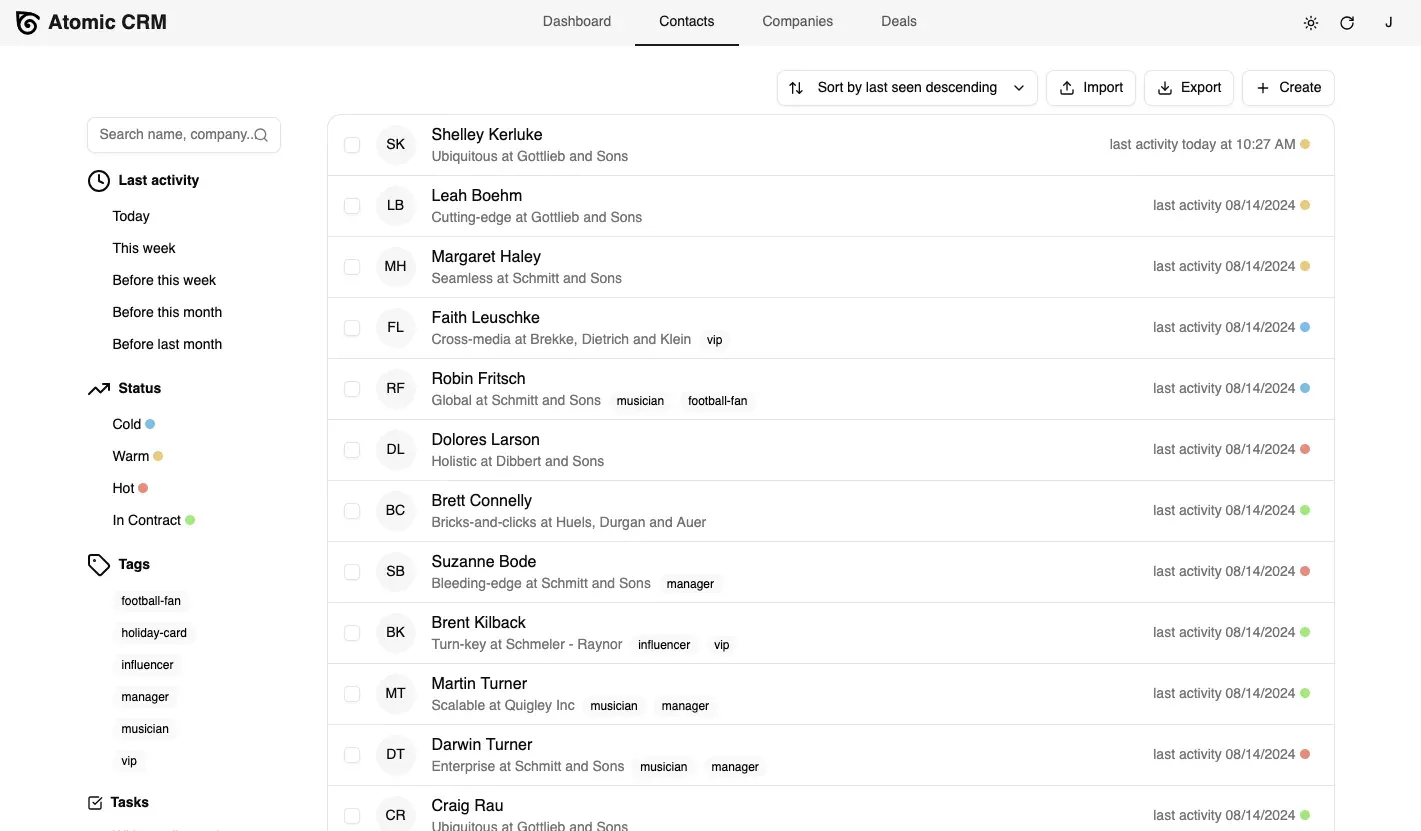
Contacts list from the official documentation, with sample data and sidebar filters.
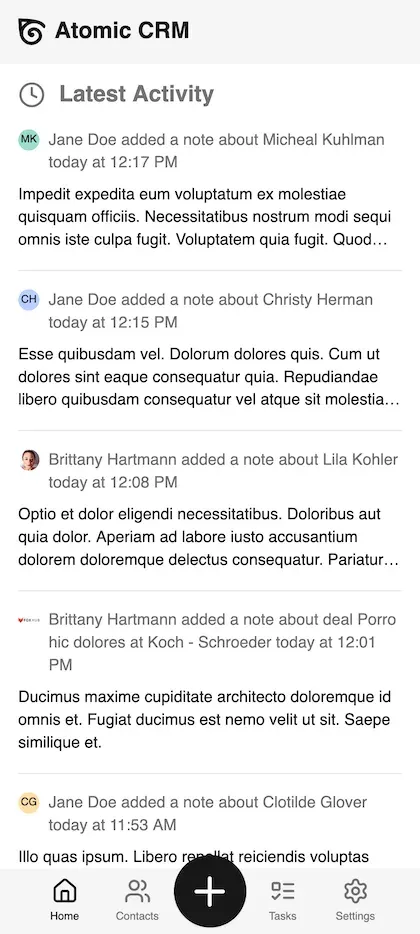
Mobile web app dashboard from the official documentation, with sample notes.
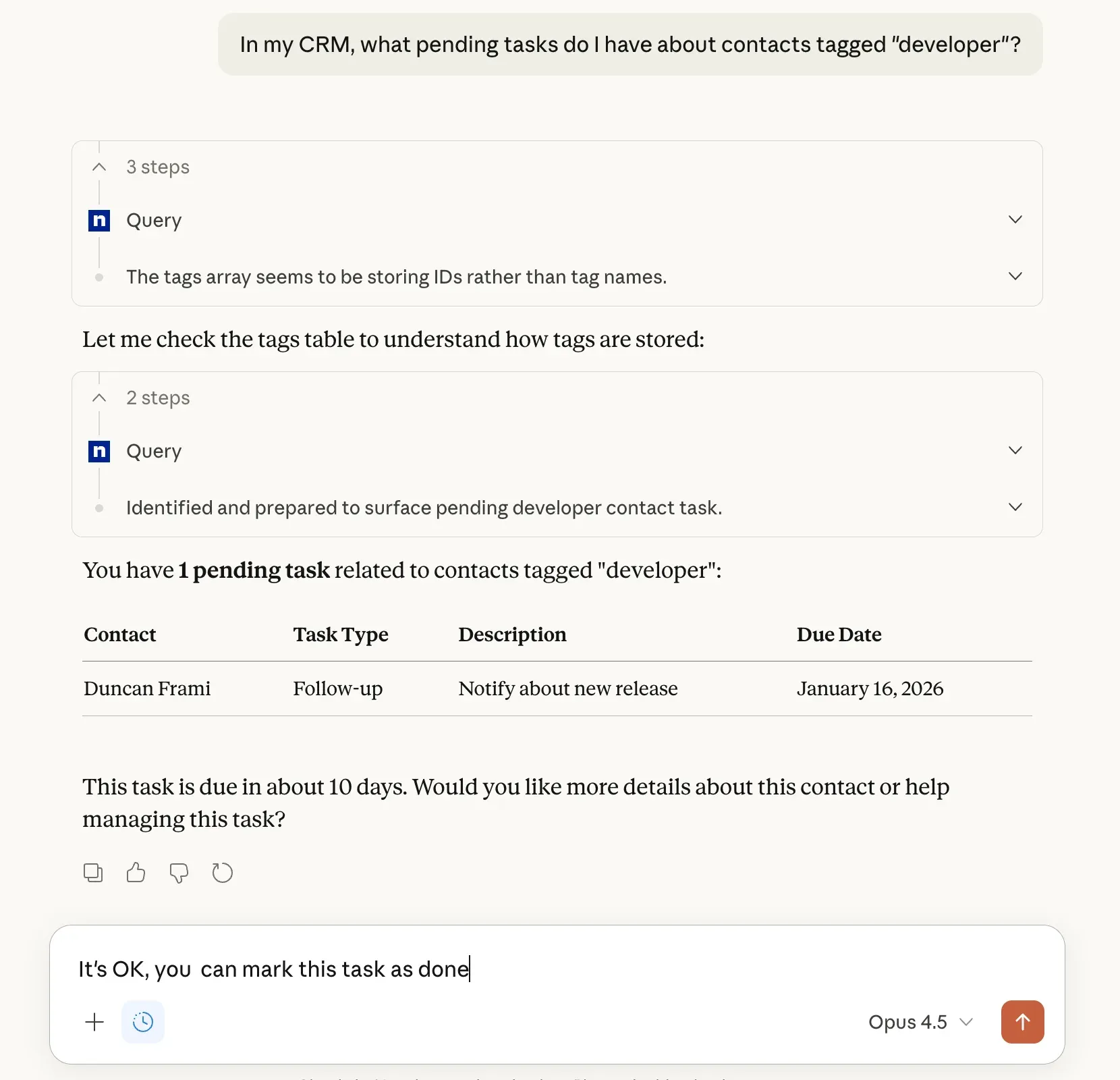
Official MCP guide screenshot: an assistant queries pending tasks for tagged contacts.
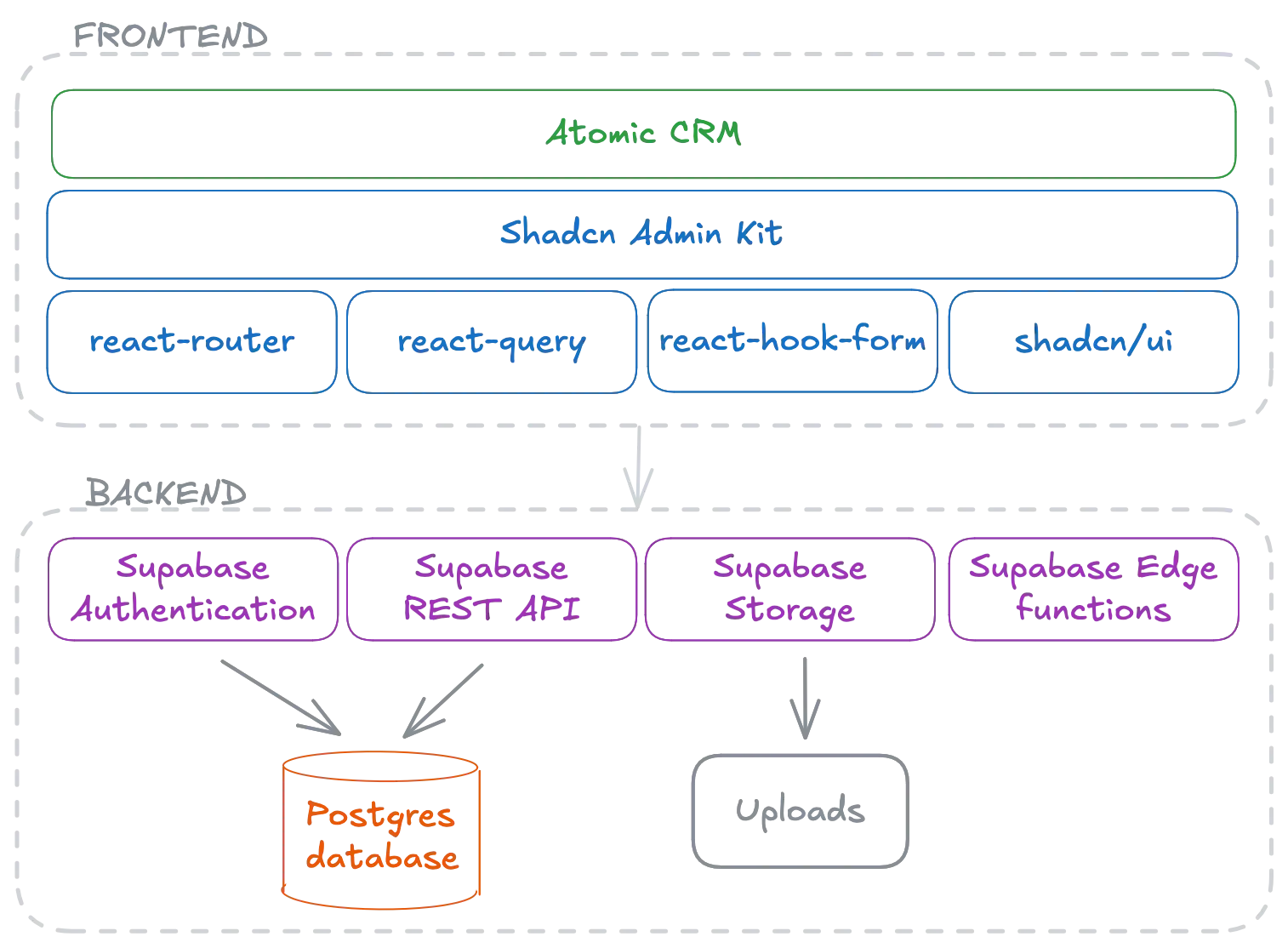
Architecture diagram from the official documentation: frontend libraries above Supabase auth, REST API, storage and edge functions.
Source: official Atomic CRM project page.
Key capabilities
- Contacts and companies Contacts carry names, job title, background, several email addresses and phone numbers, a LinkedIn link, tags and a status such as cold, warm, hot or in contract. Companies hold sector, size, website, address and description. The list view has filters for last activity, status, tags and tasks, plus sorting by last seen. Contacts and companies are linked, and the merge feature folds a duplicate into a target contact.
- Deals on a Kanban board Deals sit on a pipeline board whose stages, categories and pipeline statuses are configurable. The dashboard shows upcoming deal revenue by month, split between won and lost. Archived deals drop out of search. Deal stages are a setting you adjust for your sales process, not a fixed list.
- Notes and attachments Notes attach to contacts and deals, with a status, Markdown rendering and file attachments stored in a Supabase storage bucket named attachments by default. Notes are paged with infinite scroll in v1.6.0. Empty notes are rejected. The note input grows when focused so longer entries are practical.
- Tasks and reminders Tasks belong to a contact, have a type such as call, email or meeting, and a due date. The dashboard lists overdue, today and upcoming tasks. Task types are configurable. Completed tasks are excluded from global search.
- Inbound email capture Copy a Bcc address or forward a message to a Postmark inbound address and the email becomes a note on the matching contact. The sender identifies the CRM user and the recipient identifies the contact; unknown contacts are created, with the email domain as the company name. Setup needs a Postmark account and a webhook, described in the inbound email configuration.
- Global search Press Ctrl+K, or Cmd+K on macOS, to search companies, contacts, deals, tasks and notes at once. Every word must match the start of a word in the same record, accents and case are ignored, and matches are highlighted with an excerpt. The global search guide lists the searched fields.
- CSV import and export Contacts, companies and deals import from CSV through a dialog that offers a sample file per resource. Unknown columns are ignored, companies and tags are matched or created, and the import runs in the background with a progress snackbar. Contacts export as CSV or vCard and companies as CSV, as described in the import guide.
- Authentication and SSO Supabase handles accounts. The README lists sign-in with Google, Azure, Keycloak and Auth0, and the SSO guide walks through SAML 2.0 with Google Workspace as the example identity provider, with Okta and Microsoft Azure AD named as other options. The first user becomes an administrator, and only administrators manage users.
- Settings and customization Administrators change deal stages, note statuses, task types and similar domain data from a Settings page. Developers go further by passing props to the CRM component in
src/App.tsx, adding custom fields through the Supabase Studio and a migration (see custom fields), or editing the source directly. Currency is configurable since v1.6.0. - Internationalization V1.6.0 added i18n support and each user can pick a language on the profile page. Translation coverage depends on the locales shipped in the repository, so check the language you need before committing to it. Missing keys were being fixed in the same release cycle.
- Mobile web app and offline reading The interface is a Progressive Web App that installs from the mobile browser through Add to Home Screen. It exposes a subset of the web features: contacts, tasks and notes, camera photos and voice input on notes, and pull-to-refresh. Offline mode only shows data that was loaded while online. See the mobile app guide.
- REST API The backend exposes the whole data model through Supabase's PostgREST interface. Calls use a publishable API key plus a user JWT obtained from the auth endpoint, and the secret key stays on the server. The API guide also documents the invitation step required to create users from a script after v1.6.1.
- MCP server for AI assistants An MCP server runs as a Supabase Edge Function behind Supabase OAuth, and the URL is shown on the profile page. The MCP guide lists ChatGPT, Claude.ai, Visual Studio Code, Claude Desktop and Claude Code as supported clients; custom connectors on ChatGPT and Claude.ai need a paid account. An administrator must first enable the OAuth server on the Supabase instance.
- Agent harness for changing the CRM The repository ships a team of Claude Code agents (planner, developer, reviewer, documenter) that turn a plain-English request into committed code. It needs the Claude Code CLI and an Anthropic key or subscription, and the documentation advises running it in a sandbox such as the included DevContainer. See the agent harness guide.
- Updates through a shadcn registry Components are also published as a shadcn registry. After forking and customizing, running the documented npx shadcn add command with the Atomic CRM registry URL pulls upstream component changes into your tree. Commit first, since the command overwrites changed files and you resolve conflicts with your own edits by hand.
- Migrations and declarative schema Database changes ship as Supabase migrations, applied with
npx supabase db pushor the Makefile targets, and v1.6.0 introduced declarative database schemas. The migrations guide explains how to add your own without diverging from upstream. - Test data and a mock backend A test-data/contacts.csv file adds 500 contacts and 55 companies for development. Running npm run dev:demo swaps Supabase for the FakeRest in-browser provider, which is how the public demo works. Unit tests run with make test and Playwright end-to-end tests with make test-e2e.
Where Atomic CRM fits
Running a small sales pipeline
Define your deal stages in Settings before importing anything, then create companies, contacts and deals and move deals across the board as they progress. Check that the stage names match how your team talks about the sale, and that the pipeline statuses you want in the revenue chart are included. The getting started guide shows how to load sample data first.
Keeping a log of customer conversations
Put the CRM's inbound address in Bcc when you write to a customer, or forward replies to it. Send one test message and confirm that the note lands on the right contact and that the company name derived from the email domain is what you expect. Free mail providers are blacklisted for company creation after a fix in v1.6.0, so personal addresses should not produce companies. The inbound email guide has worked examples.
Migrating contacts from another CRM
Export contacts and companies from the old system, map the columns to the sample CSV that the import dialog offers, and import companies before deals. Review matched tags and companies afterwards, then use the merge function on duplicates that appear. Keep the original export, because the importer ignores columns it does not know.
Building an internal CRM for a specific business
Fork the repository, change the domain values in src/App.tsx, add custom fields through the Studio and a migration, and edit the components under src/components/atomic-crm. Plan how you will take upstream releases, either with the shadcn registry command or with git merges. The getting updates guide describes the options.
Querying CRM data from an AI assistant
Enable the OAuth server in Supabase, copy the MCP URL from the profile page and add it as a connector in your assistant. Start with read-only questions, such as pending tasks for contacts with a given tag, and confirm that the answer matches the records before allowing the assistant to change anything. Treat the connector as a user with the same access as the account that authorized it.
Deploying and securing a production instance
Create a Supabase project, configure it as described in the Supabase configuration guide, deploy with make supabase-deploy, host the built dist folder and open the app once to create the administrator. If you run anything older than v1.6.1, upgrade and review the user list for accounts you did not create.
Reviews of Atomic CRM
Be the first to share your experience with Atomic CRM.
Write a review
Loading review form…
Alternatives to Atomic CRM
 TwentyTwenty is an open-source CRM with custom objects, workflows, AI agents and REST and GraphQL APIs, run on a managed cloud or self-hosted.
 Krayin CRMMIT-licensed CRM from Webkul built on Laravel 12 and Vue.js. It covers leads in Kanban pipelines, contacts, quotes, products, activities, an IMAP or SendGrid inbox, web forms and workflows, self-hosted or on managed cloud hosting.
 Comp AI CRMOpen-source, single-tenant CRM from Comp AI built on Next.js, NestJS, Postgres and the eve agent framework. It reads Gmail or Outlook, enriches records from cited evidence and runs agents you describe in one sentence.