

What is Comp AI CRM?
Comp AI CRM is an open-source customer relationship manager published by Comp AI, the company behind the Comp AI compliance platform. Its premise is that the research agent is the primary user of the database: records for contacts, companies and deals are filled from the team's own email threads, meetings and signature blocks, and the agent books its own follow-up checks. The product site is trycrm.ai; the code and every installation instruction live in the GitHub repository under the MIT license.
There are no installers or container images. You clone the repository and run three processes against one PostgreSQL database: a Next.js front end on port 3000, a NestJS API on port 3001 and the agent on port 2000. Local development uses Bun and a Docker Compose file that starts PostgreSQL 17. The documented production target is Vercel, with Vercel Sandbox, Vercel Blob and the Vercel AI Gateway, but the three deployments are independent and only need to share DATABASE_URL and BETTER_AUTH_SECRET. The site lists no hosted plan or price.
The current release is v1.16.0, published October 22, 2026. It adds reviewed MCP integrations for external platforms and updates vulnerable dependencies. Releases 1.15.1 and 1.15.2 began serving a runtime OpenAPI document; 1.14.0 moved person lookups from RapidAPI to Context.dev and added a paged enrichment queue; 1.8.0 lets sourced facts fill empty fields automatically; 1.6.0 added first-party website tracking; and 1.2.0 added Microsoft sign-in with Outlook mailbox sync. Version 1.0.0 was tagged on August 3, 2026, so the project is young and moves quickly. The changelog lists each change.
The codebase is a TypeScript Turborepo. The front end uses the App Router, shadcn/ui and URL-held list state, so a copied address reproduces filters and sorting. The API exposes tRPC procedures generated from NestJS routers, with Prisma over Postgres, optional Redis caching and Better Auth for Google, Microsoft or a custom identity provider. The agent runs on eve, Vercel's filesystem-based framework for durable agents, with 18 authored tools, 4 markdown skills and one dispatch schedule.
Several limits are deliberate. The system is single tenant: there are no organizations, roles or per-record permissions, and every signed-in user can read and write every record. Microsoft mail access is read-only, so the CRM cannot send, reply, move or delete messages. The security policy describes it as a tool for one organization of authenticated internal users, not a hardened public or multi-tenant service.
Comp AI CRM screenshots
Explore the interface. Open a screenshot to view it at full size.
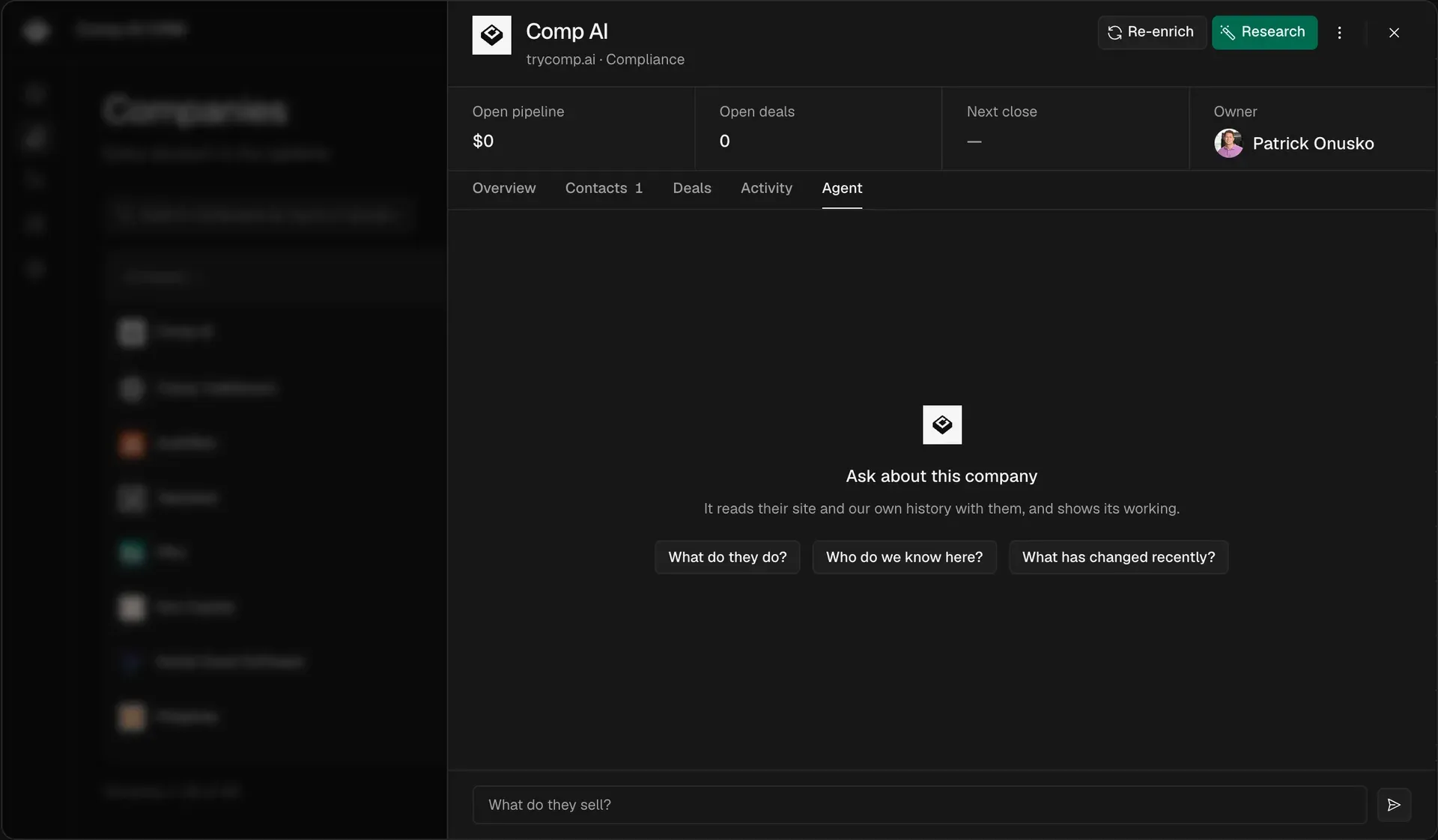
Official product screenshot: a company sheet showing open pipeline, owner and suggested questions for the record agent.
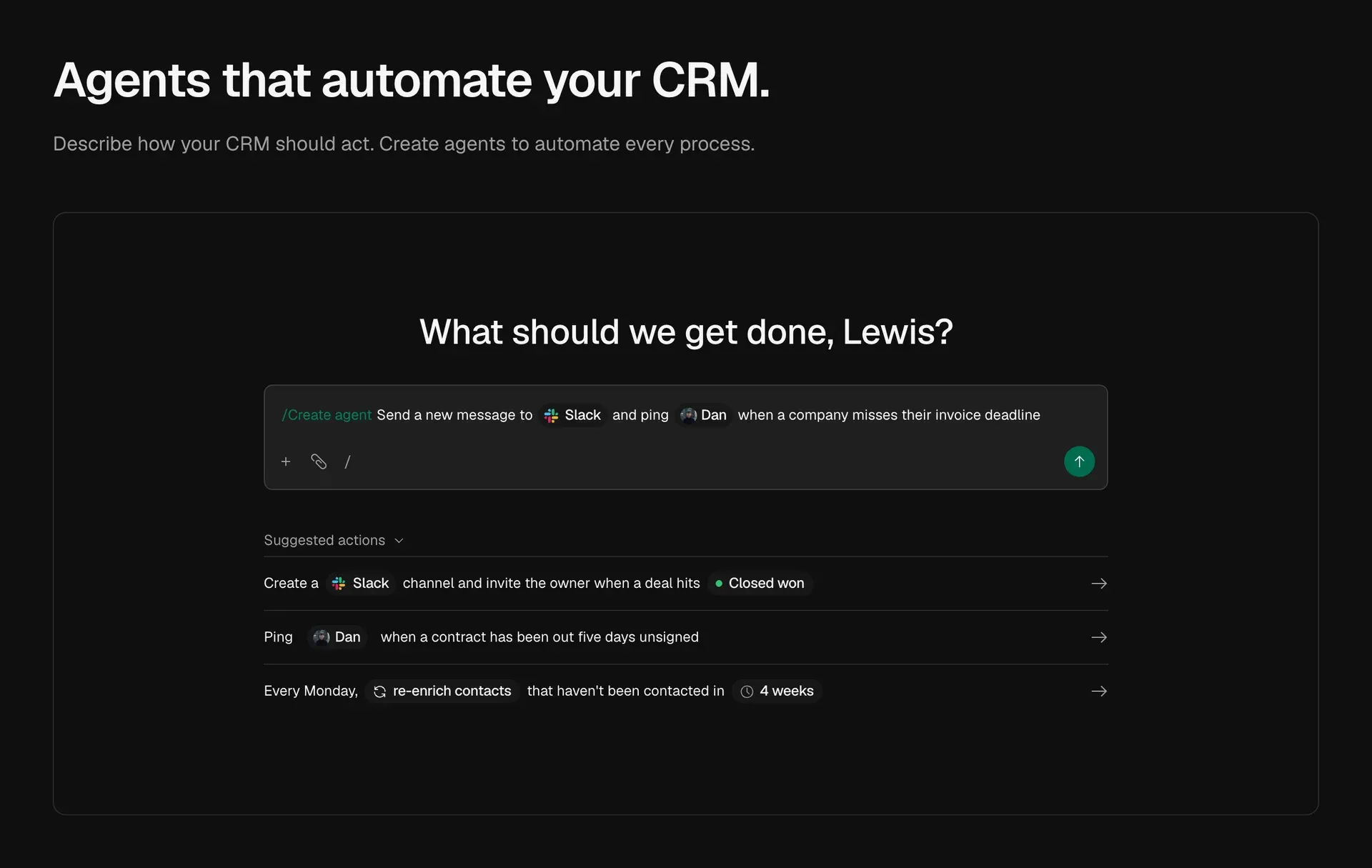
Project figure of the agent composer: a one-sentence agent request mentioning Slack, with suggested automations below.
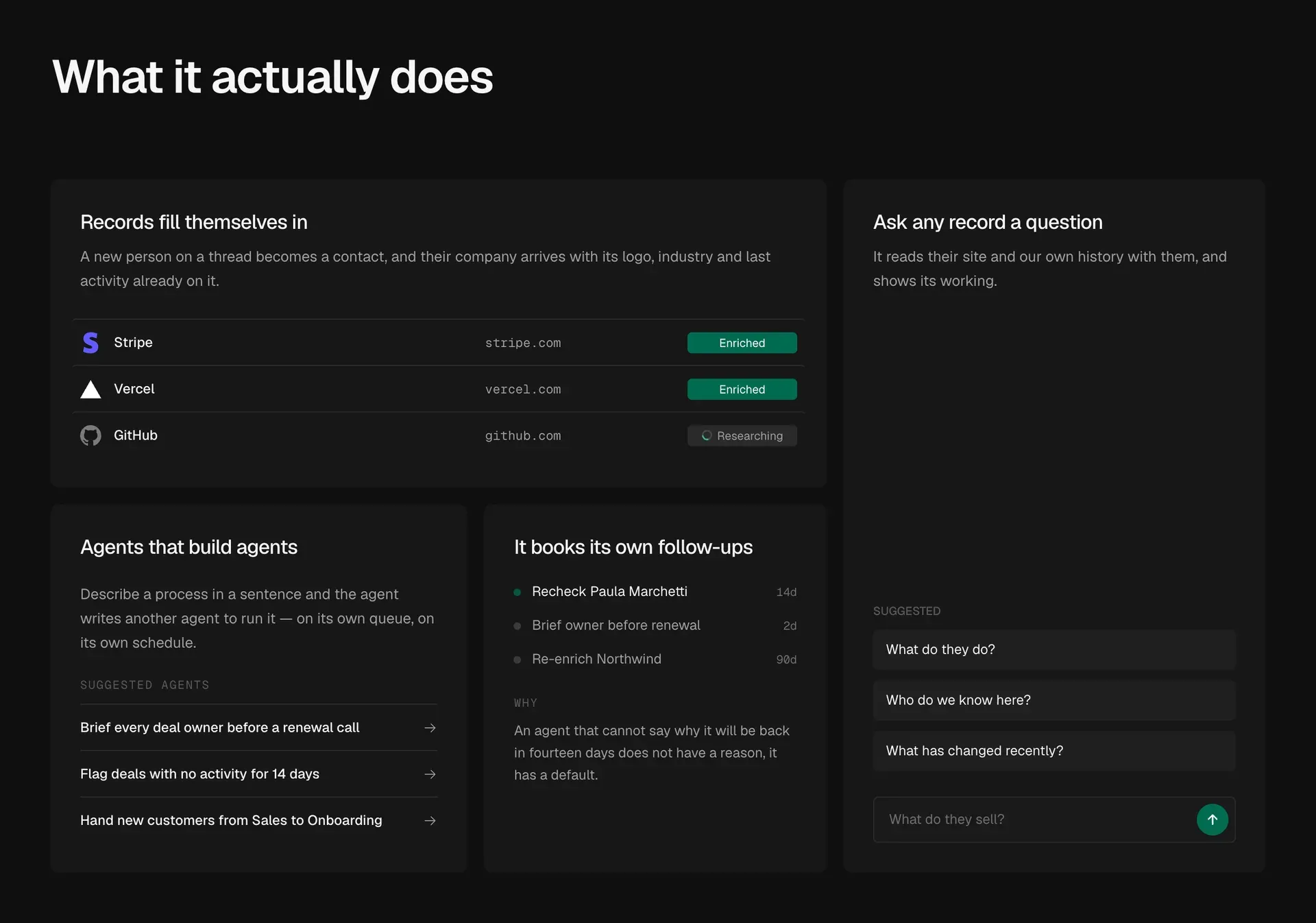
Project figure summarising enrichment status, suggested team agents, self-booked follow-ups and the record question box.
Source: official Comp AI CRM project page.
Key capabilities
- Contacts, companies and deals The core record types are contacts, companies and deals, each opened in a sheet with Overview, Contacts, Deals, Activity and Agent tabs. Lists are filtered, sorted and paginated in the database rather than in the browser, and the filter state lives in the URL. Records can be archived, restored or deleted. An optional seed command creates a demo pipeline for evaluation.
- Mailbox and calendar sync Google sign-in uses the same OAuth client to read Gmail and Google Calendar; Microsoft sign-in requests only User.Read and Mail.Read. Reading is forward-only: the first check records the current time and imports nothing older. A scheduler must call
POST /internal/sync/mailboxes, guarded byCRON_SECRET, to keep sync running in production. - Scheduled research agent The agent runs as its own deployment on eve and works from a database queue that leases due rows with
FOR UPDATE SKIP LOCKED, so parallel dispatchers take disjoint work. Each research session has a budget counted in metered vendor calls and ends normally when it runs out. Brand and portrait lookups run in a separate lane without a model, up to 60 per tick; research rows start up to 12 sessions per tick. - Evidence ledger instead of confidence scores Tools report what they observed, such as a signature block or a GitHub account identity, and a ledger weighs that evidence. Strong evidence writes to the record; weak evidence becomes a suggestion a person settles. No tool accepts a model-generated confidence score, and fields that cannot be established stay blank.
- Self-scheduled follow-ups The agent calls
schedule_recheckwhen it wants to look at a record again and must state the reason, which is shown to the rep. Recurring work is expressed as a due date on a task row rather than a cron expression. Stale rows and blank fields are handled on the dispatch tick without a model session. - Agent tab on every record Each contact, company and deal has a conversation panel that shows the steps the agent takes, the leads it discards and the questions it cannot settle on its own. Conversations persist across reloads. The panel needs
AGENT_BRIDGE_SECRETset to the same value in the app and agent processes; without it the tab reports that it is not configured. - Agents built from a sentence A composer turns a one-sentence description, such as posting to Slack when an invoice deadline passes, into a versioned team agent. Builder and runner are separate subagents with their own sandboxes. Each version declares a record scope (selected records or the whole workspace) and structured action grants such as creating notes or tasks, and every action is ledgered before it runs.
- Connections with reviewed access Settings, Connections lets an owner or admin connect services as read-only or read-and-write. Each deployed agent receives a smaller grant listing exact tool names and fingerprints, and new or changed tools need review before use. Disconnecting a service blocks the next agent call. The connections document covers the rules.
- MCP platform integrations Since v1.16.0, Clerk, Cloudflare, Linear, Neon, PlanetScale, Prisma, Supabase and Vercel use a shared MCP connection flow with encrypted OAuth tokens that are never returned to the browser. Model-facing results are cut at 16 KiB. The documentation keeps the Vercel connection unavailable in production until Vercel approves the client.
- Slack automation A Slack connection supplies a bot token for public channels and, optionally, a workspace user token so the bot can be invited to private channels. Deal owners and Slack members are matched by email, and unmatched people stop an automation instead of being guessed. Connecting or replacing Slack is restricted to owners and admins at the OAuth callback.
- Optional enrichment sources The agent works with no external keys, using only your own mail history. A Context.dev key, entered during onboarding or in Settings, General, adds company brand data (logo, colours, industry, legal name) and reads a person back from a LinkedIn URL already on the record; a brand lookup costs 10 Context credits and a person lookup 20.
PERPLEXITY_API_KEYadds cited web search. - Isolated agent sandbox The agent shell has
bash, file tools and a/workspacedirectory with deny-all network egress, and it never receives the database URL. Web fetches run in the app runtime and web search at the model provider, so the sandbox remains a text processor rather than a path for mail content to leave. - Model selection through AI Gateway Model calls go through the Vercel AI Gateway with no provider SDK. The default is
zai/glm-5.2-fast, stored as an application setting rather than an environment variable, and the chooser offers only models that support tool use. Open conversations keep the model they started with. - Multi-currency deals Deals store the customer amount and currency unchanged, plus a base amount in the reporting currency that is the only value ever summed. Exchange rates are resolved once and frozen, manual rates override fetched ones, and unconverted deals are reported rather than counted as zero. Eleven currencies are supported, from USD and EUR to SGD and ZAR, as listed in the currency rules.
- First-party website tracking A small script served from your own app origin records page views and turns form submissions on your marketing site into contacts with attribution. It can be installed directly or through Google Tag Manager, posts only to your own API, and is held to 1 KB (loader) and 4 KB (tracker) brotli budgets. Pausing tracking stops collection in every browser within five minutes.
- REST and OpenAPI surface The app talks to the API over type-safe tRPC. Each API instance also serves
GET /openapi.json, combining the NestJS controllers with a REST bridge under/restgenerated from every tRPC procedure, and renders Swagger UI at its root. The API rules explain the generated router and its limits. - Sign-in and identity providers Better Auth handles Google, Microsoft Entra ID and custom providers added in Settings, SSO.
ALLOWED_SIGN_INtakes domains, single addresses or a mix, and an empty value lets nobody in.MICROSOFT_TENANT_IDcan restrict sign-in to one Entra tenant instead of the defaultcommonendpoint. - Install from source Requirements are Bun and Docker. Clone the repository, copy
.env.exampleto.env, runbun install,docker compose up -d,bun run db:deployandbun run dev. The defaultreleasebranch carries the last tagged release;mainreceives unreleased work. - Documented telemetry with opt-out The API and agent send anonymous server-side events to PostHog: one install UUID, one rollup a day, eight one-time setup events and one event per failure, with IP addresses dropped. There is no client-side capture inside an install. Setting
CRM_TELEMETRY_DISABLED=1orDO_NOT_TRACK=1turns it off, as described in the telemetry document.
Where Comp AI CRM fits
Building a pipeline from existing email
Connect Google or Microsoft at sign-in and let the forward-only sync collect new threads and meetings. New participants become contacts and their companies are created from the email domain. Run the agent with no vendor keys first and check which fields it fills from signature blocks and reply history alone, then add a Context.dev key and compare. The agent document describes lanes, budgets and evidence rules.
Researching an account before a call
Open a company or contact and use the Agent tab to ask what the company sells, who the team knows there or what changed recently. The agent reads the company website and your own history and shows each step. Review the leads it rejected and any open identity question before trusting a new title or employer, because weak evidence arrives as a suggestion, not a written field.
Automating sales handoffs with team agents
Describe a process in one sentence in the agent composer, for example creating a Slack channel and inviting the owner when a deal reaches Closed won, or flagging deals with no activity for 14 days. The builder asks for anything it cannot derive, such as a standing channel. Check the record scope and action grants on the saved version before deploying it, and confirm that unmatched Slack users are listed on the connection page.
Giving agents access to engineering platforms
Use Settings, Connections to attach Linear, Supabase, Neon, Cloudflare or another supported MCP platform. Start with read-only access, review every discovered tool and its call kind, and grant read-and-write only to agent versions that need it. Supabase read-only connections also use the hosted server's read-only mode. Treat SQL execution, secrets, deployments and billing tools as high-risk grants.
Capturing website leads
Copy the tracking tag from the settings page into your marketing site or Google Tag Manager. Submit a test form and confirm that a contact appears with its page-view history and attribution. Pause tracking and verify that collection stops within the documented five minutes. The tracking document explains the cache design and data path.
Running a production deployment
Deploy the app, API and agent separately against one Postgres database with identical DATABASE_URL and BETTER_AUTH_SECRET values; a mismatch shows up as a redirect loop. Set API_URL, APP_URL, the OAuth redirect URIs and CRON_SECRET, and point a scheduler at the mailbox sync route. The setup guide covers the agent bridge errors and the case where the queue grows because no dispatcher is running.
Reviews of Comp AI CRM
Be the first to share your experience with Comp AI CRM.
Write a review
Loading review form…
Alternatives to Comp AI CRM
 TwentyTwenty is an open-source CRM with custom objects, workflows, AI agents and REST and GraphQL APIs, run on a managed cloud or self-hosted.
 HubSpotHubSpot CRM stores contacts, companies and deals, and connects to Marketing, Sales, Service, Content, Data and Revenue Hubs with free and premium plans.
 SalesforceSalesforce is a cloud CRM platform with Sales Cloud for leads, accounts and opportunities, plus service, marketing, commerce, Slack and Agentforce products.