

What is Invoice Ninja?
Invoice Ninja is an invoicing, quoting, expense, project and time-tracking application built with Laravel. The README describes version 5 as keeping the best parts of version 4 while adding the most requested features, and the repository description calls it a source-available invoice, quote, project and time-tracking app. Freelancers and small businesses use it to bill clients, accept online payments, track billable time and follow expenses, with a client portal where customers view and pay invoices.
The product is made by the Invoice Ninja team, whose website says it has been building business tools since 2014. It is offered two ways: a hosted service at invoiceninja.com, and a self-hosted installation described at invoiceninja.org. The README states that all Pro and Enterprise features from the hosted app are in the source-available code, and that a white-label license for $40 per year removes the Invoice Ninja branding from client-facing parts of the app.
Distribution covers a server or VM install, a Docker image on Docker Hub, and marketplace packages for Cloudron, Softaculous, Elestio and YunoHost. Mobile apps are listed for iPhone, Android and F-Droid, and desktop apps for macOS, Windows, and Linux through Snap and Flatpak; the README notes that self-hosted servers work with the desktop and mobile apps. The backend in the current composer file requires PHP 8.2 to 8.5 and Laravel 12, and the project recommends Stripe and Postmark as providers. The API is documented at api-docs.invoicing.co.
The current release is v5.13.53, published November 2, 2026, one of several small releases in a few weeks; its notes list only a version bump. The neighboring v5.13.50 notes mention scheduler fixes, API fixes found while building new apps, and a change to constrain database lock contention when purging a user. The code is released under the Elastic License 2.0, which is source-available rather than open source: it forbids offering the software as a hosted or managed service to third parties and bars removing license-key protected functionality.
Invoice Ninja screenshots
Explore the interface. Open a screenshot to view it at full size.
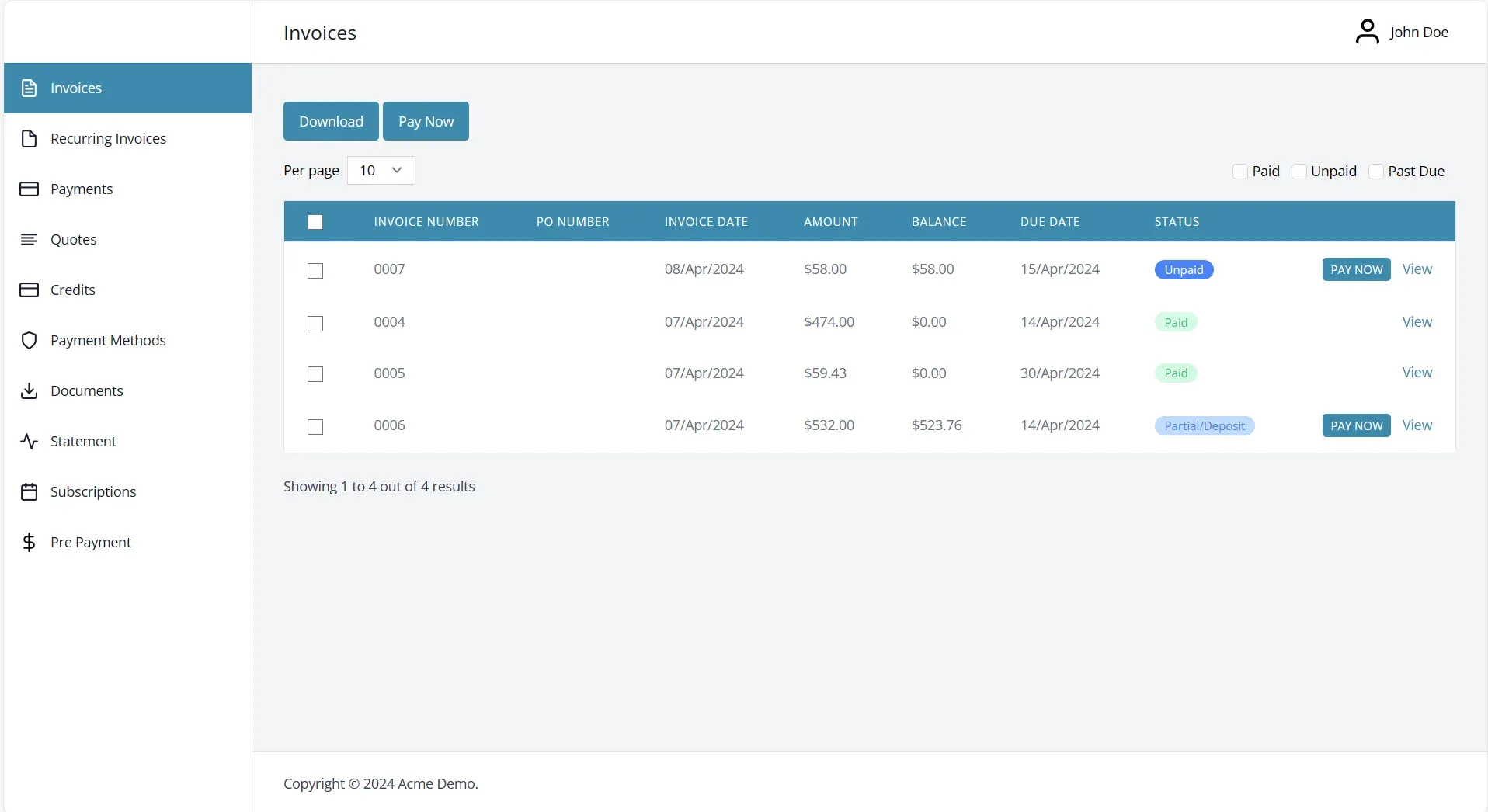
Official documentation screenshot of the client portal; data is demo data.
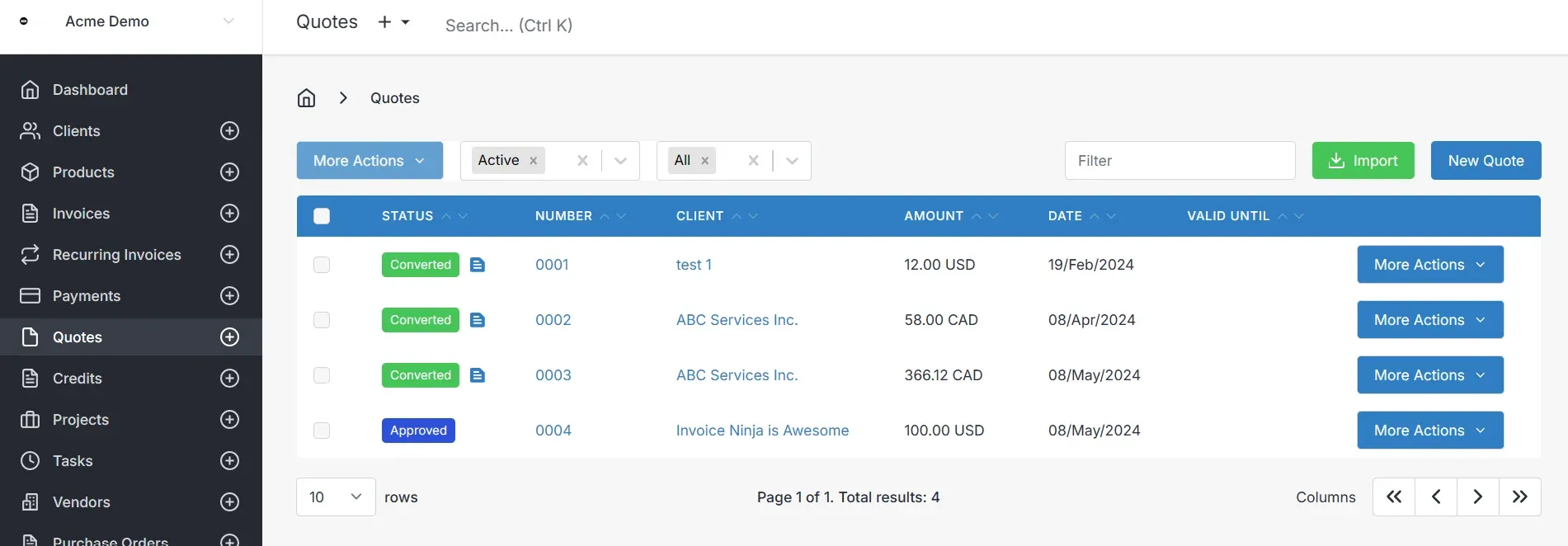
Official documentation screenshot of the quotes list, with demo data.
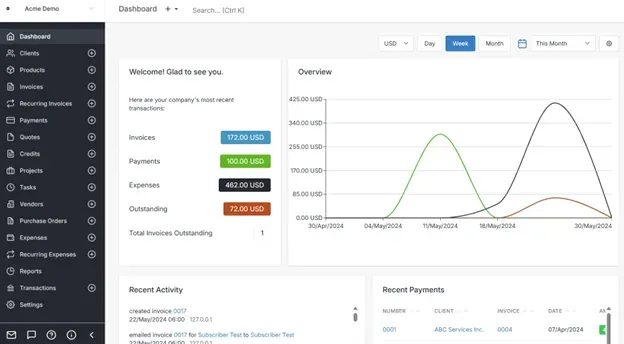
Official documentation screenshot of the dashboard, with demo data.
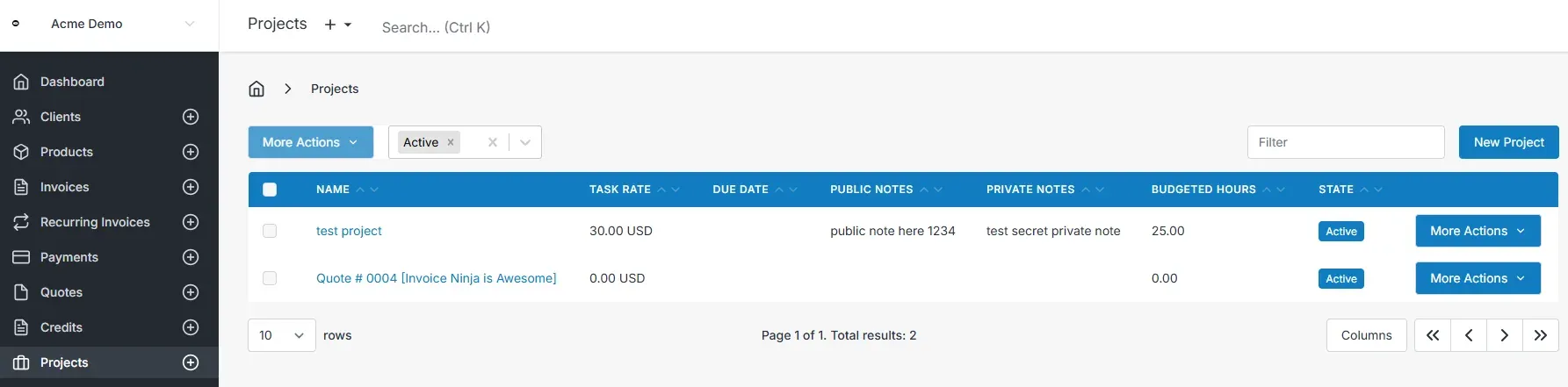
Official documentation screenshot of the projects list, with demo data.
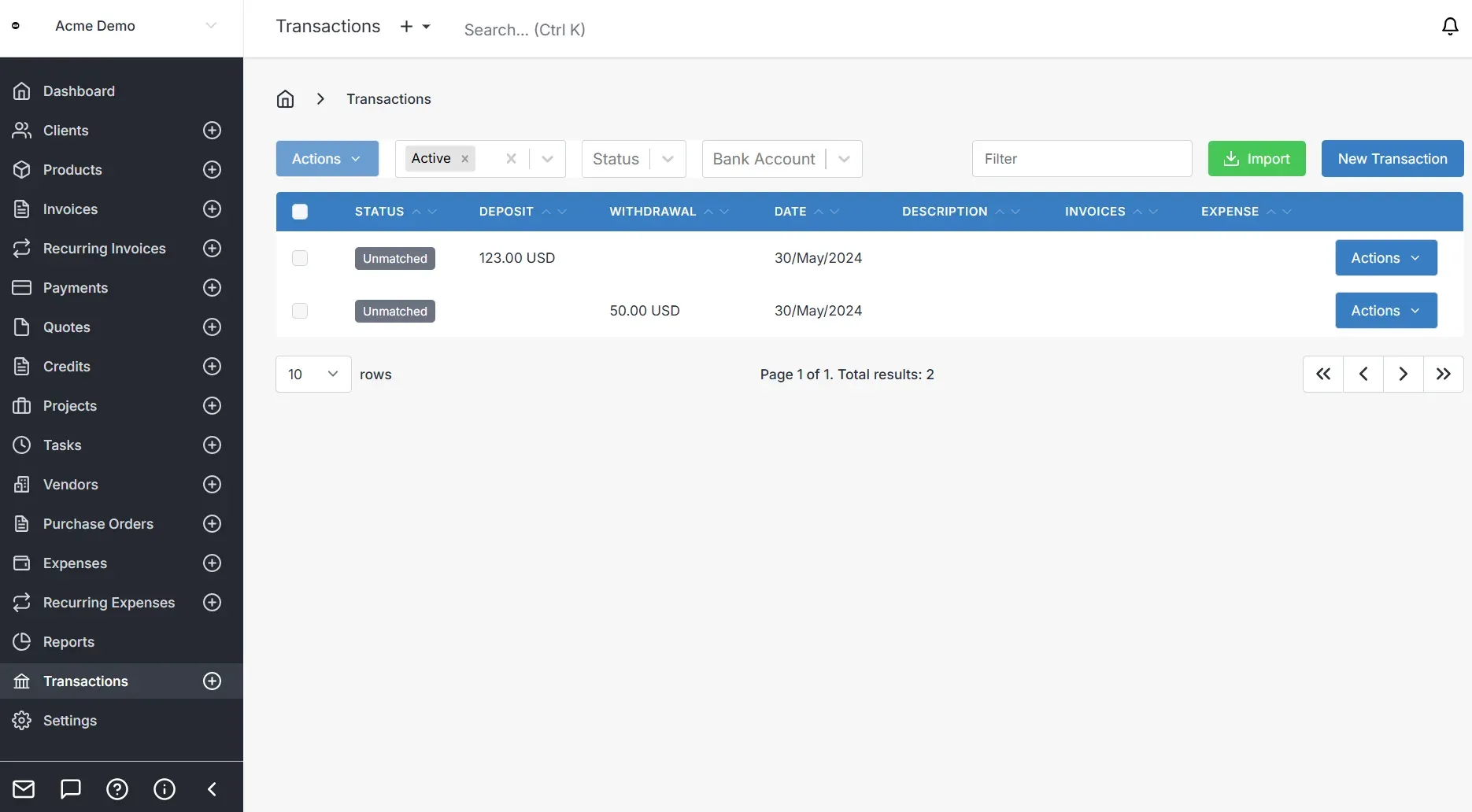
Official documentation screenshot of bank transactions, with demo data.
Source: official Invoice Ninja project page.
Key capabilities
- Invoices with templates Create invoices with customizable templates; the website lists 11 templates on the free plan. Invoices can be emailed, downloaded and paid online, and Pro adds custom invoice designs and removal of Invoice Ninja branding.
- Quotes and credits Send quotes that a client can approve, with an e-signature, then convert them to invoices. The quote list shows states such as Approved and Converted, and credits and prepayments appear in the client portal alongside invoices.
- Online payments through gateways The site names Stripe, PayPal, Square, GoCardless and Venmo among many gateways, and the UI repository ships logos for further gateways such as Authorize.net, Braintree and Razorpay. Gateway availability depends on your region and account, so check the one you plan to use.
- Recurring invoices and auto-billing Schedule recurring invoices and auto-bill clients with stored payment methods. The documentation covers activity and history panels, and the portal lets clients view recurring invoices and subscriptions.
- Client portal Clients log in to a portal to view invoices, quotes, payments, credits, statements, documents and payment methods, and to pay. The Enterprise plan offers a custom portal domain such as Billing.YourCompany.com.
- Expenses, vendors and purchase orders Record expenses and vendors, make recurring expenses and create purchase orders. Enterprise adds bank sync and the documentation describes importing bank transactions and matching them to payments or expenses with rules.
- Projects, tasks and time tracking Create projects, track billable time against tasks and use Kanban boards, then convert tasks or projects to invoices. The documentation shows project overviews with task lists, time, money and burnup views.
- Reports and dashboard A dashboard shows invoiced, paid, expense and outstanding totals with a chart and recent activity, with filtering by currency and period. A reports section is available from the main menu; confirm which report types your plan includes.
- E-invoicing and PEPPOL The pricing page lists e-invoicing and PEPPOL network access as Enterprise features with 250 credits included, and the documentation covers PEPPOL and ZUGFeRD topics. Rules differ by country, so validate formats with your tax advisor and your clients' systems.
- REST API and SDKs A REST API is included on paid hosted plans and in the self-hosted code. The API reference covers invoices, quotes, payments, bank transactions and more, and the README links a community Go SDK. A developer guide explains the Laravel structure.
- Mobile and desktop apps Apps are listed for iOS, Android, F-Droid, macOS, Windows, and Linux through Snap and Flatpak. They connect to the hosted service or to a self-hosted server. Feature parity between the web and native apps can vary, so test your workflow.
- Self-hosted installation Follow the installation guide or clone a tagged release, copy .env.example, run Composer and use the setup page. The README warns that the APP_KEY in .env encrypts data, so losing it means the application can no longer decrypt it. Update from the latest tag instead of a development branch.
- Docker and marketplace packages The official image is on Docker Hub, and third-party catalogs such as Cloudron, Softaculous, Elestio and YunoHost carry packaged versions. Packaged installs are maintained by those catalogs, so compare their versions with the GitHub release.
- Multi-company and permissions Pro links up to 10 companies, and Enterprise adds user permissions and file attachments for larger teams. Check the user and company limits on your plan before inviting staff.
- Pricing plans The hosted free plan covers up to 5 clients with unlimited invoicing. Pro is $14 per month ($140 per year), Enterprise starts at $18 per month for 1 to 2 users, and Premium Business starts at $280 per year. The pricing page shows dollar signs without naming a currency.
- Community and support Support options include a support forum, Slack, Discord and a YouTube channel. The README says feature questions are best discussed with the team on Slack before contributing code.
Where Invoice Ninja fits
Bill clients and collect online payments
Set up a company, add clients and a payment gateway, and send an invoice with a pay link. Test with the gateway's test mode before live billing, and confirm that payment confirmations, partial payments and deposits appear correctly in the client portal.
Quote, then convert to an invoice
Send a quote with an e-signature approval, convert it to an invoice, and link the work to a project if needed. Check numbering, tax settings and the converted indicator so your accounting records match the approved scope.
Track billable time for projects
Create a project with a task rate and budgeted hours, record time on tasks and invoice from the project. Review the time and money views before invoicing, and agree rounding rules with the client. Decide whether unbilled time should be locked after an invoice is sent, so totals do not drift.
Automate recurring billing
Set up a recurring invoice with a frequency and an auto-bill payment method, then watch the activity history for the first cycles. Confirm reminders, late fees and failure handling, and write down who is notified when a payment fails. Also check how the client can update an expired card without contacting you.
Self-host the application
Prepare PHP 8.2 or later, a database and a web server, install a tagged release and finish the setup page. Back up the database and the .env file, including APP_KEY, and test an update on a copy before production. Configure outgoing email early, since invoices and reminders depend on it, and use a queue worker and scheduler if the guide asks for them.
Integrate with other systems through the API
Create an API token and call the REST API to read or create invoices and payments from your own software. Read the API reference for each resource, handle rate limits and errors, and use a separate test company while developing. Store the token in a secrets manager, never in client-side code.
Reviews of Invoice Ninja
Be the first to share your experience with Invoice Ninja.
Write a review
Loading review form…
Alternatives to Invoice Ninja
 Frappe BooksFrappe Books is AGPL accounting software from Frappe Technologies with invoicing, inventory, POS and financial reports. The Electron desktop app is archived; the supported version runs on a self-hosted Frappe site in the browser.
 OdooOdoo is a web-based suite of business apps from Odoo S.A. The LGPLv3 Community edition covers CRM, sales, invoicing, inventory, manufacturing, POS and website modules on PostgreSQL; Enterprise apps, Studio and hosting are sold per user.