

What is Frappe Books?
Frappe Books is free, open-source double-entry accounting software for small businesses and freelancers, maintained by Frappe Technologies, the company behind the Frappe Framework and ERPNext. It covers sales and purchase invoices, payments, journal entries, inventory, a point of sale and the standard financial reports. The project began in 2018 as an Electron desktop application that kept one company in one local file, and the frappe/books repository listed here holds that desktop code.
That desktop variant has reached end of life. On October 2, 2026 the maintainers published an end-of-life announcement, archived the repository and named frappe/frappe-books as its replacement. The official product page now states that the old desktop app is no longer supported. The last desktop release, 0.36.0 from November 6, 2025, added a party ledger, a Terms and Conditions section in print templates, multiple selection in the item master, a Remove Filter option in System Settings, images on item groups, direct sales quotes from the item master and a Swiss (CH) localisation file. Version 0.35.0 added recently used options in Quick Search and keyboard selection in drop-downs. Its installers for Windows, macOS and Linux remain on the releases page for anyone who forks or keeps running it.
The current Frappe Books is an app for the Frappe Framework. It is installed on a Frappe site with Bench, and users sign in from a browser on a computer or a phone at the site's /books path. Version 16 is the stable line: 16.0.0 shipped on October 24, 2026, 16.1.0 added a Books Cashier role for the point of sale, and 16.1.1 on November 7, 2026 collected fixes from an end-to-end test of returns, foreign-currency loyalty points, batches, serial numbers, POS cash counting and setup. The successor's release notes list each patch and the bench migrate step.
The two variants share the interface concept but not the stack. The desktop app used Vue 3, Electron 22 and SQLite through better-sqlite3, with company data in a single .db file on the user's machine. The Frappe app uses the Frappe Framework (Python and JavaScript) for its database layer, authentication, permissions and REST API, and Frappe UI (Vue) for the interface. Version 16 requires the Frappe version-16 branch at 16.36.0 or later, Python 3.14, Node.js 24, Redis and MariaDB 11.8. PostgreSQL and SQLite support exist only on the unstable develop branch.
Both repositories are licensed AGPL-3.0, and there is no subscription for the software itself. Payroll, projects and multi-company consolidation are not part of the documented feature set; ERPNext from the same vendor covers that wider scope. Setup, roles, inventory, reports and printing are documented in the Frappe Books documentation, which now describes the web version only.
Frappe Books screenshots
Explore the interface. Open a screenshot to view it at full size.
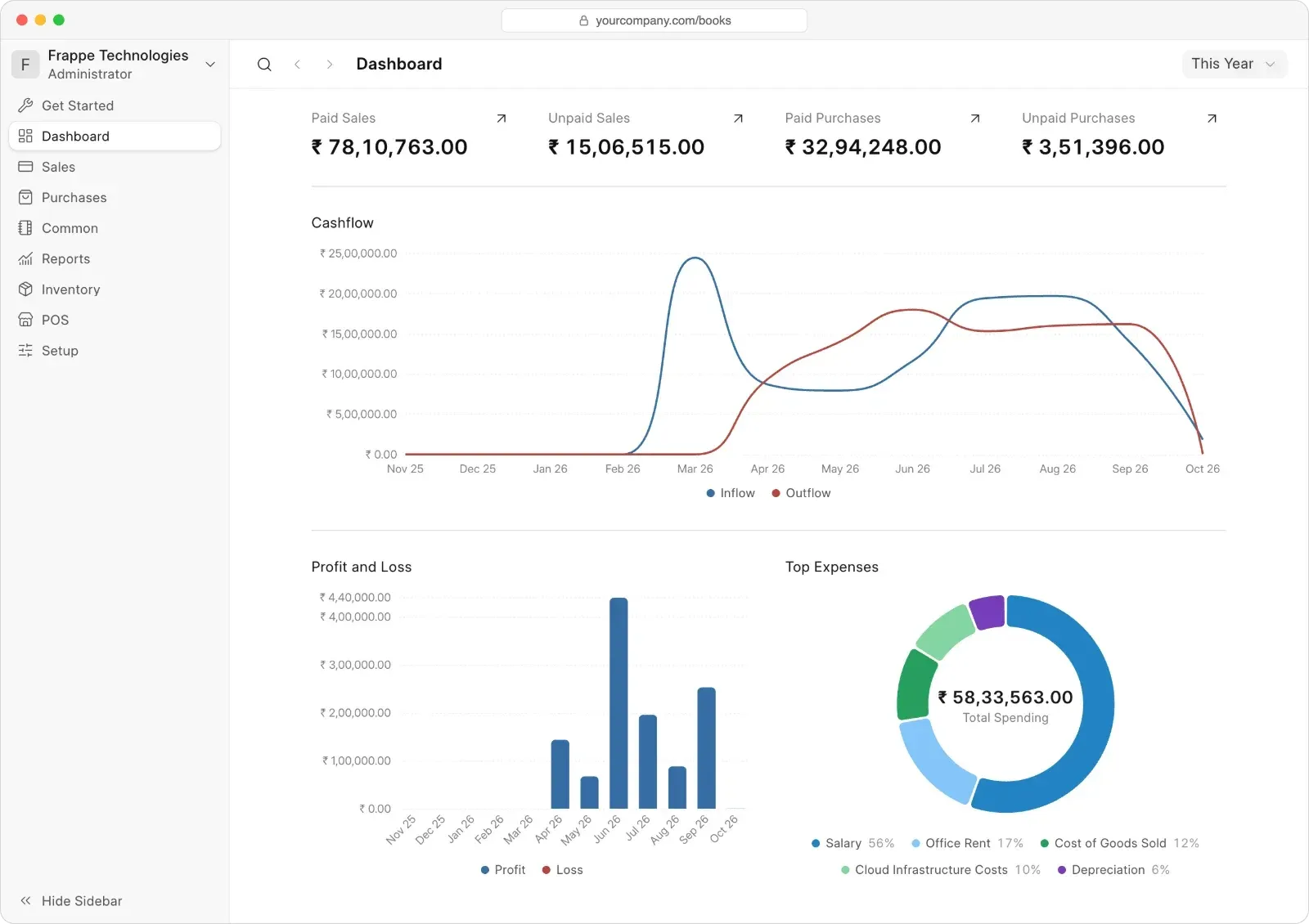
Official dashboard screenshot of the Frappe Framework version, opened in a browser at the site's /books path.
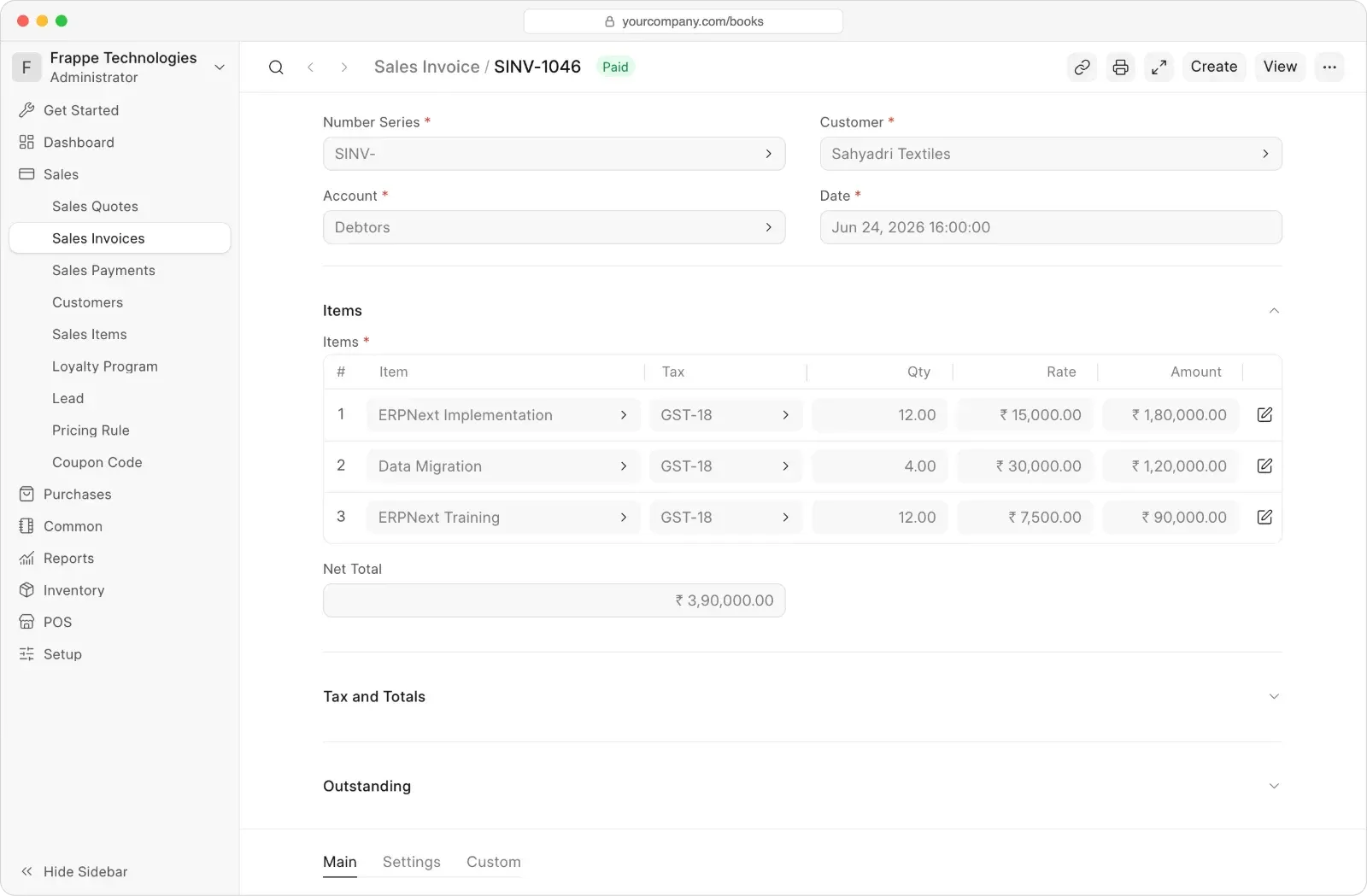
Official screenshot of a sales invoice form with item rows, tax templates and the Sales menu expanded.
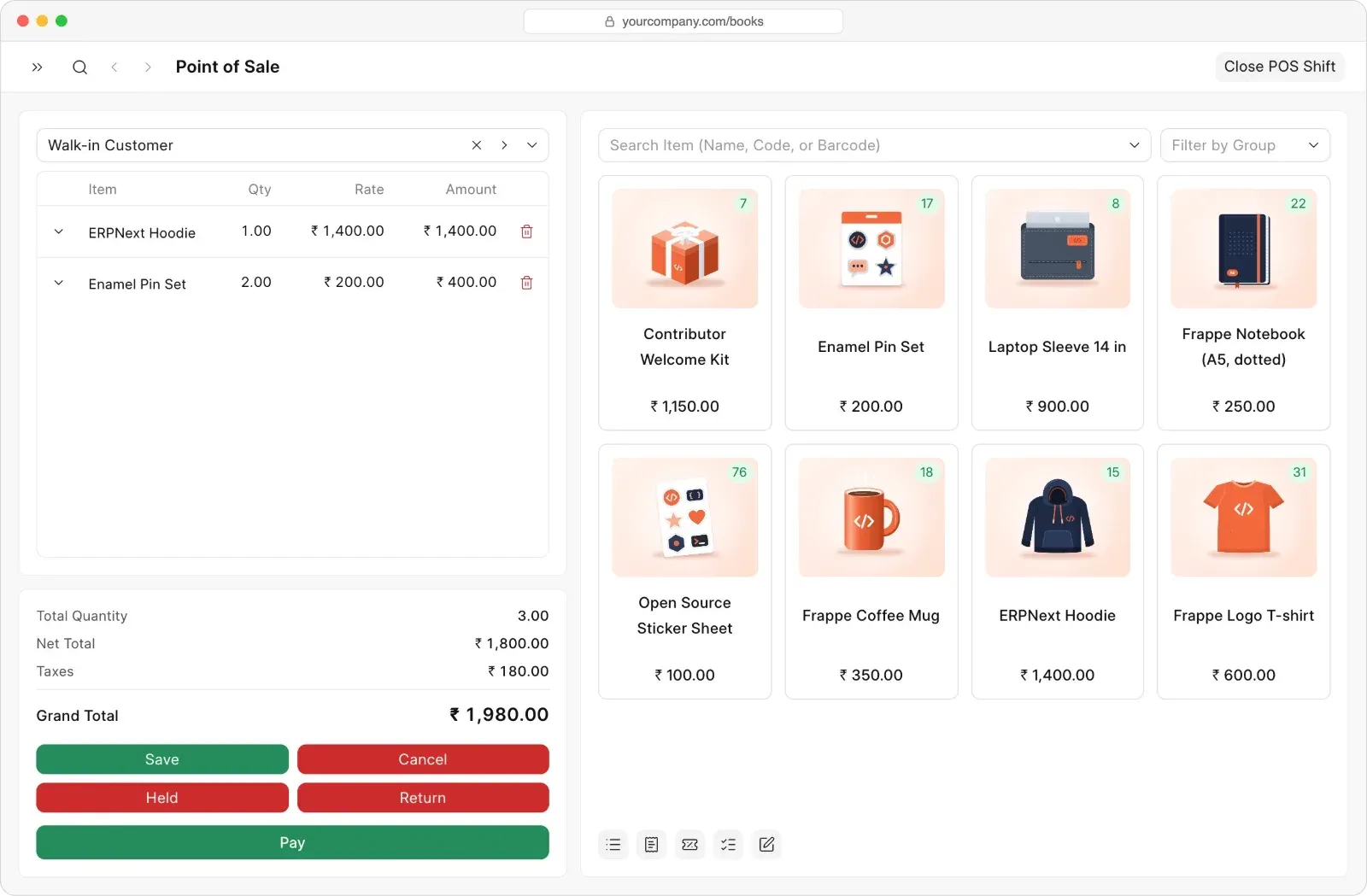
Official Point of Sale screenshot showing item search by name, code or barcode and the Close POS Shift action.
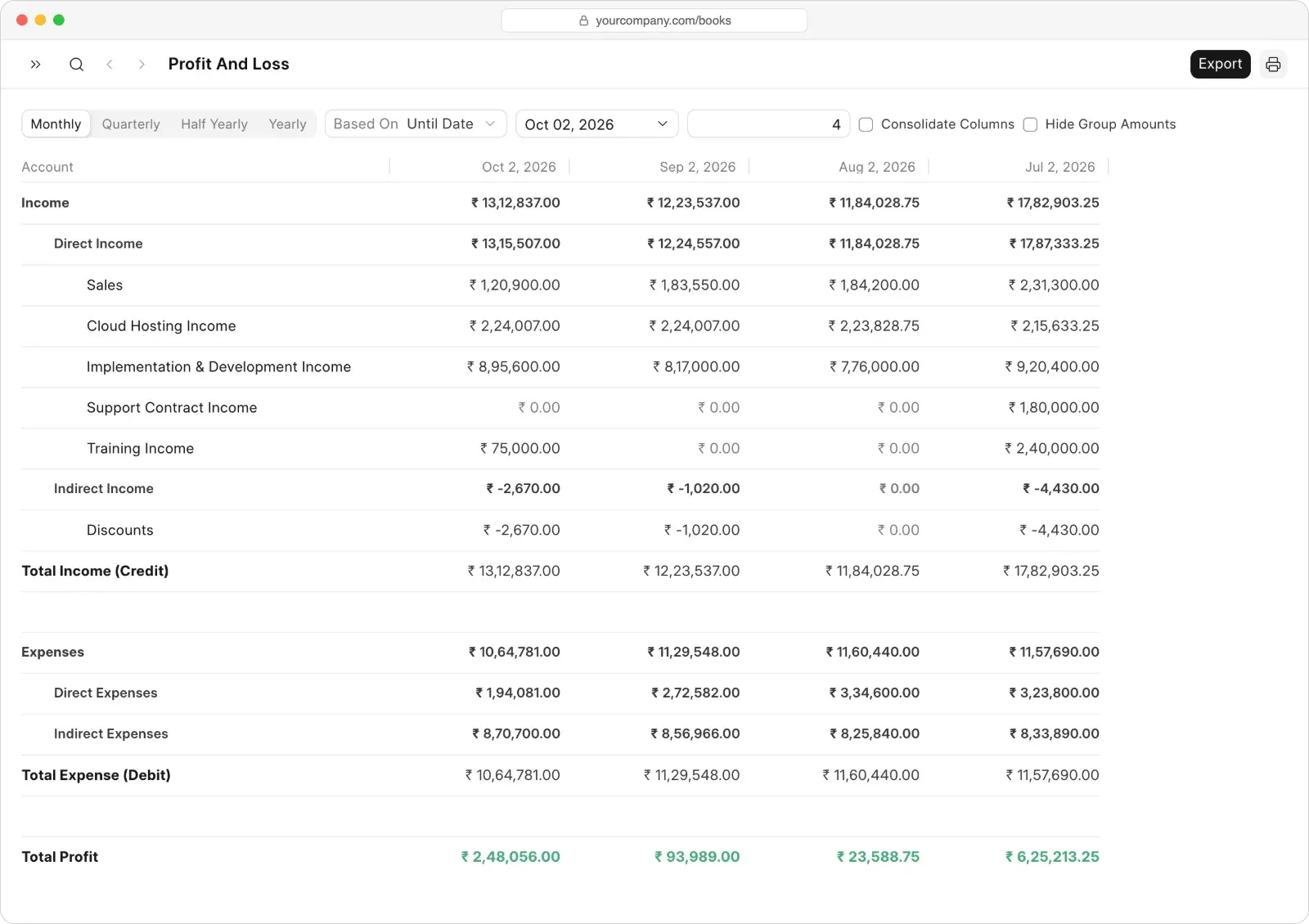
Official report screenshot with monthly, quarterly and yearly periods, Export and print controls.
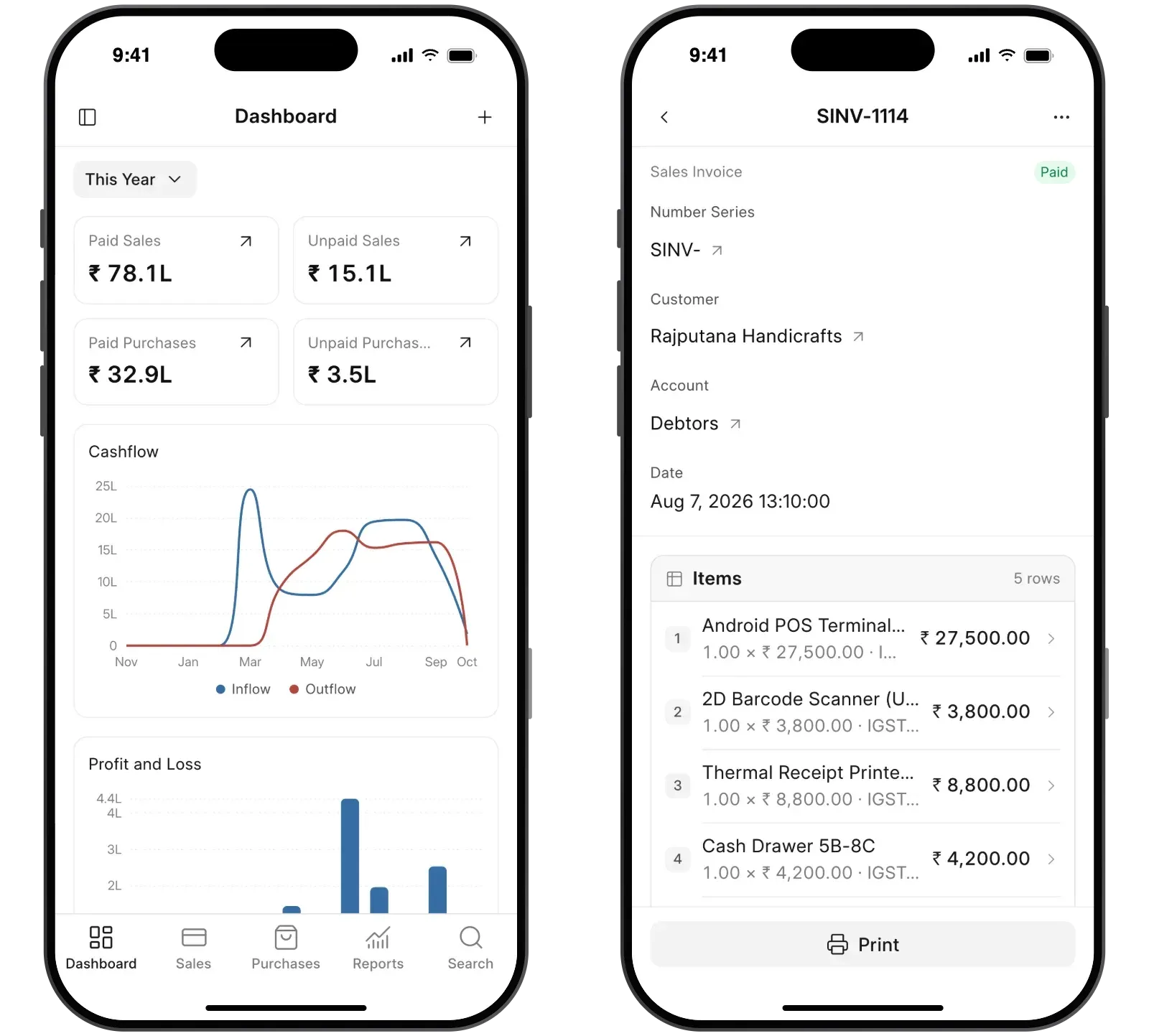
Official screenshot of the phone layout, which the browser can add to the home screen.
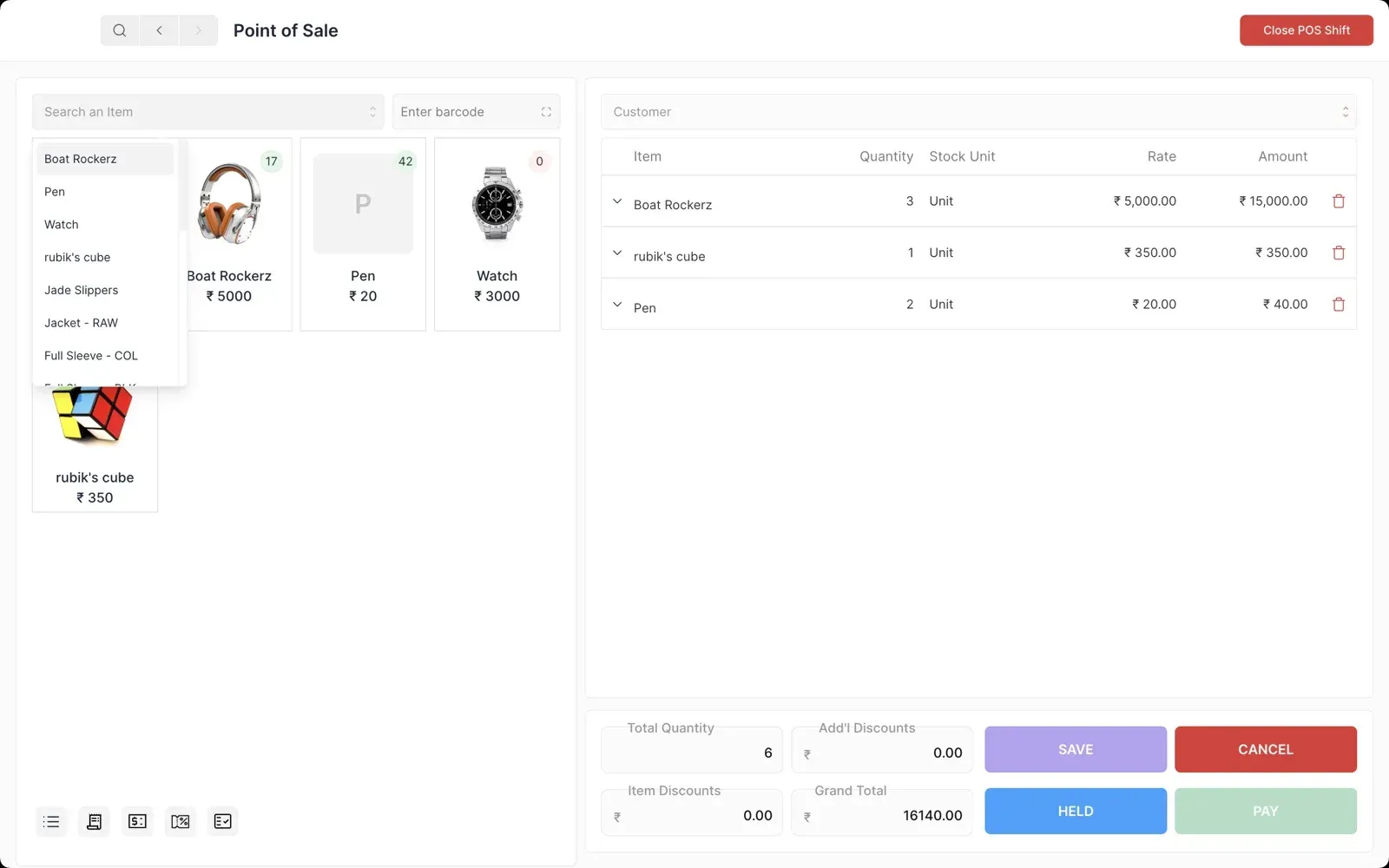
Screenshot from the README of the archived Electron desktop app; resized from 2880x1800.
Source: official Frappe Books project page.
Key capabilities
- Self-hosted install with Bench The current version installs on a Frappe site:
bench init --frappe-branch version-16,bench get-app --branch version-16 https://github.com/frappe/frappe-books,bench new-siteandbench --site <site> install-app frappe_books. The installation guide lists Python 3.14, Node.js 24, Redis and MariaDB 11.8 as requirements. There is no desktop file to download and no .db file to keep; all company data lives in the site database. - Archived desktop builds for Windows, macOS and Linux Release 0.36.0 still offers Windows x64 and ia32 installers, macOS DMG and ZIP packages for Apple Silicon and Intel, Linux DEB packages for amd64 and arm64, RPM packages for x86_64 and aarch64 and an x86_64 AppImage on the release page. The README also documented a Homebrew cask (
brew install --cask frappe-books) and a Flathub package (io.frappe.books). These builds receive no further fixes after the October 2026 end-of-life notice. - Double-entry ledger and chart of accounts Every submitted invoice, payment, stock document and journal entry produces ledger entries that no role can edit or delete directly. The setup wizard loads a chart of accounts for the selected country and creates the fiscal year and currency defaults. The desktop source shipped verified charts for countries including India, Switzerland, the UAE, Canada, France, Mexico, the Netherlands, Indonesia and Singapore, plus a standard chart for other countries.
- Sales quotes, invoices and payments Quotes can be turned into sales invoices, and payments are recorded against outstanding amounts, including returns and write-offs. Purchase invoices, supplier payments and purchase returns follow the same flow. Each document type has a print format, and number series control document numbering.
- Multi-currency invoicing Sales and purchase invoices can be issued in the party's currency while the books stay in the company currency, which is fixed in the setup wizard. Frappe Books fetches the rate for the invoice date from a public exchange rate service and asks for manual entry when none is available. The rate cannot be changed after submission; the multi-currency guide explains how ledger amounts and rounding differences are posted.
- Pricing rules, coupons and loyalty programs Price lists, pricing rules, coupon codes and tiered loyalty programs are built in and enabled from Settings. Loyalty points are earned per invoice total and redeemed at a configured conversion factor, with optional expiry and maximum use. Some switches, such as loyalty programs, cannot be turned off once saved.
- Inventory with batches and serial numbers When inventory is enabled, stock movements, shipments and purchase receipts track items across locations, with batches, expiry dates, serial numbers and FIFO valuation. Invoices can create their shipment or purchase receipt on submit. Inventory cannot be disabled after it is turned on, and only new products can be marked as tracked.
- Point of Sale with shifts The POS screen supports barcode scanning, held sales, returns, pricing rules, coupons and loyalty points. Cash is counted when a shift opens and closes, and since 16.1.1 cash for an older sale is counted by the shift in which it was taken. Version 16.1.0 added a Books Cashier role limited to selling, returns, shifts and customer records.
- Financial and stock reports Reports cover the General Ledger, Profit and Loss, Balance Sheet, Trial Balance, Stock Ledger and Stock Balance, with period selection, filters and print. All roles can export the reports they can open. Accounting reports are restricted to Books Manager and System Manager, while Books Users see stock quantities only.
- India GST and Swiss fields Companies in India get CGST, SGST and IGST accounts, standard GST tax templates and the GSTR-1 and GSTR-2 reports once a GSTIN is set. Switzerland adds a Tax ID field and a Swiss chart of accounts. The GST reports guide explains how the GST Head of each account drives the report columns.
- Roles and permissions Access is controlled by Frappe roles: Books Cashier, Books User, Books Manager and System Manager. Only Books Managers delete submitted business documents, and cancelled documents stay as a record. The permissions table lists what each role can create, submit, cancel, print and report on.
- Phone layout installable from the browser Below 768 pixels the interface switches to a phone layout with bottom tabs for Dashboard, Sales, Purchases, Reports and Search, and it can be added to the home screen on Android or iOS. It requires a connection to the server and shows a No connection screen when offline. The Chart of Accounts, Import Wizard, Print Templates, GST reports and Customize Form are computer-only pages.
- Import Wizard for CSV data Books Managers can download a CSV template, fill it in a spreadsheet and import sales and purchase invoices, payments, journal entries, parties, items, tax templates, accounts, addresses and number series, plus stock documents when inventory is on. The wizard only creates new entries and never updates existing ones. It also reads list exports and templates produced by the desktop app.
- Print templates in HTML and Jinja Standard templates exist for sales invoices, POS invoices, quotes, purchase invoices, payments and shipments; they can be duplicated and edited but not changed in place. Custom templates are HTML with Jinja tags, previewed against the newest document, and can be set to A4, A5, Letter, POS or a custom size. The print templates guide lists the editor shortcuts.
- Custom fields through Customize Form A System Manager can enable form customization and add custom fields to forms such as Item or Sales Invoice, including table rows. Custom fields appear on desktop and phone forms. Settings and ledger entries cannot be customized.
- REST API through the Frappe Framework Because Books runs as a Frappe app, its documents are available through the standard Frappe REST API, subject to the same roles and permissions. There is no separate Books-specific API reference. The desktop variant did not document an API; its source includes ERPNext sync settings instead.
- Updates and backups The web version is updated with
bench update --apps frappe_booksfollowed bybench --site <site> migrate, which also runs the data patches listed in each release. Backups usebench --site <site> backup --with-files, and the site_config.json file should be stored with them. - Translations The desktop app listed community translations for more than 15 languages, including Arabic, Chinese, Dutch, French, German, Hindi, Indonesian, Korean, Portuguese, Spanish, Swedish and Turkish. The Frappe version also states translations for more than 15 languages. Some desktop translations were seeded with DeepL and later corrected by contributors.
Where Frappe Books fits
Moving off the archived desktop app
Desktop users have two paths: keep the final 0.36.0 build running unchanged, or move to the Frappe version. The documentation does not describe a converter for the desktop .db file, so the practical route is to set up a new site, finish the setup wizard with the same country and chart of accounts, then bring parties, items and opening balances in through the Import Wizard, which accepts desktop templates. Reconcile the Trial Balance of both systems at the cut-over date and keep the old .db file and a desktop installer as an archive.
Running a self-hosted Books site
Install Bench on a host that meets the version-16 requirements, create a MariaDB-backed site and install the frappe_books app as described in the installation guide. Put the site behind HTTPS before inviting users, since phone access relies on the browser. Schedule bench backup --with-files, copy the archive and site_config.json off the host, and test a restore before the first fiscal period closes.
Invoicing customers in several currencies
Enable each currency in Frappe Desk, set the currency on the customer, then create invoices that pick up the exchange rate for the invoice date. Check that rate before submitting, because a later date change refetches it and submission locks it. Confirm that payments and the Profit and Loss report show the expected exchange difference in the company currency.
Selling at a counter
Turn on inventory and the POS, create a POS profile and give counter staff the Books Cashier role so they can sell, take returns and open or close shifts without access to accounts or purchases. Test a barcode scan, a coupon, a loyalty redemption and a return, then count cash at shift close and compare it with the payments recorded in that shift.
Preparing Indian GST returns
Set the GSTIN in Settings so the GST group appears, assign GST tax templates to items and verify that each tax account carries the correct GST Head. Run GSTR-1 for sales and GSTR-2 for purchases from registered suppliers on a computer, since these reports are not available on a phone. Compare the totals with the tax accounts in the General Ledger before filing.
Adapting documents and forms
Duplicate a standard print template, edit its HTML and Jinja, set the page size and preview it against real invoices before assigning it. Add custom fields such as a delivery date through Customize Form when the standard fields fall short. Keep template files exported as .template.html under version control so changes can be reviewed and restored.
Install
bench get-app --branch version-16 https://github.com/frappe/frappe-booksReviews of Frappe Books
Be the first to share your experience with Frappe Books.
Write a review
Loading review form…
Alternatives to Frappe Books
 OdooOdoo is a web-based suite of business apps from Odoo S.A. The LGPLv3 Community edition covers CRM, sales, invoicing, inventory, manufacturing, POS and website modules on PostgreSQL; Enterprise apps, Studio and hosting are sold per user.
 ERPNextERPNext is an open-source ERP from Frappe Technologies covering accounting, stock, manufacturing, procurement, sales, projects and POS. It is GPL-3.0, self-hosted with Docker or bench, or run on Frappe Cloud.