

What is Mkdirs?
Mkdirs is a directory website template built with Next.js. It provides the code for a site that lists products, tools or other resources, with categories, collections, tags, search, user submissions, payments, authentication, a blog, a newsletter and SEO metadata. The project describes itself as a boilerplate for launching AI-powered directory websites, and the official website lists three monetization models it is built around: affiliate links on listed items, paid submissions and sponsored advertising slots. A public demo site shows the template with sample content.
Mkdirs is published by the Mkdirs project and, according to the README and website, is run by an independent developer known as OpenFox (Fox), who also makes the MkSaaS and TanStarter boilerplates. The template was first sold as a paid product with access to a private GitHub repository; the website FAQ page dates from October 2024. On August 9, 2026 the code was published in the public MkThingsHQ/mkdirs repository with a commit titled "open source Mkdirs". That repository has no tagged GitHub releases; its package.json carries version 1.0.0.
The public repository is licensed under the Apache License 2.0, which allows use, modification and distribution, including commercial use. The README adds that the license does not grant use of the Mkdirs name, logo or other trademarks to identify derived products, while a reference such as "Built with Mkdirs" is permitted. Separately, the pricing page lists a Lifetime plan at $59 (USD), described as "Pay once, Build unlimited directory websites". Purchase strings on the site state that Lifetime buyers receive invitations to private GitHub repositories, and the homepage describes the purchase as one template with three codebases: the Mkdirs template behind the demo site plus the IndieHub and BoilerplateHunt directory codebases. A License Policy page dated April 1, 2025 sets the terms for the purchased template, governed by Swiss law.
The documented stack is Next.js with React and TypeScript, Tailwind CSS and shadcn/ui for the interface, Sanity as the headless CMS, Auth.js for accounts, Stripe for payments, Resend for transactional email and newsletters, and the Vercel AI SDK for AI-assisted form filling. In the public repository, package.json pins Next.js 14.2.35 with the App Router layout, React 18.3, next-auth 5.0.0-beta.18, Sanity 3.57, Tailwind CSS 3.4 and TypeScript 5.6, and uses Biome for linting and formatting. Content, users, items, blog posts and images are stored in Sanity, so the template does not require a separate database or file storage service.
Mkdirs is distributed as source code only: there is no installer, desktop or mobile app, and no hosted Mkdirs service. The documentation, available in English and Chinese, covers prerequisites, installation, configuration of each external service, deployment to Vercel, Docker or Dokploy, and customization. The documentation FAQ states that the template does not support internationalization and that payments are handled through Stripe only. Video tutorials are published on the Mkdirs YouTube channel, and a showcase page lists directory sites built by users. Similar projects in this directory include Payload CMS for Next.js content management and the Next.js framework the template is built on.
Key capabilities
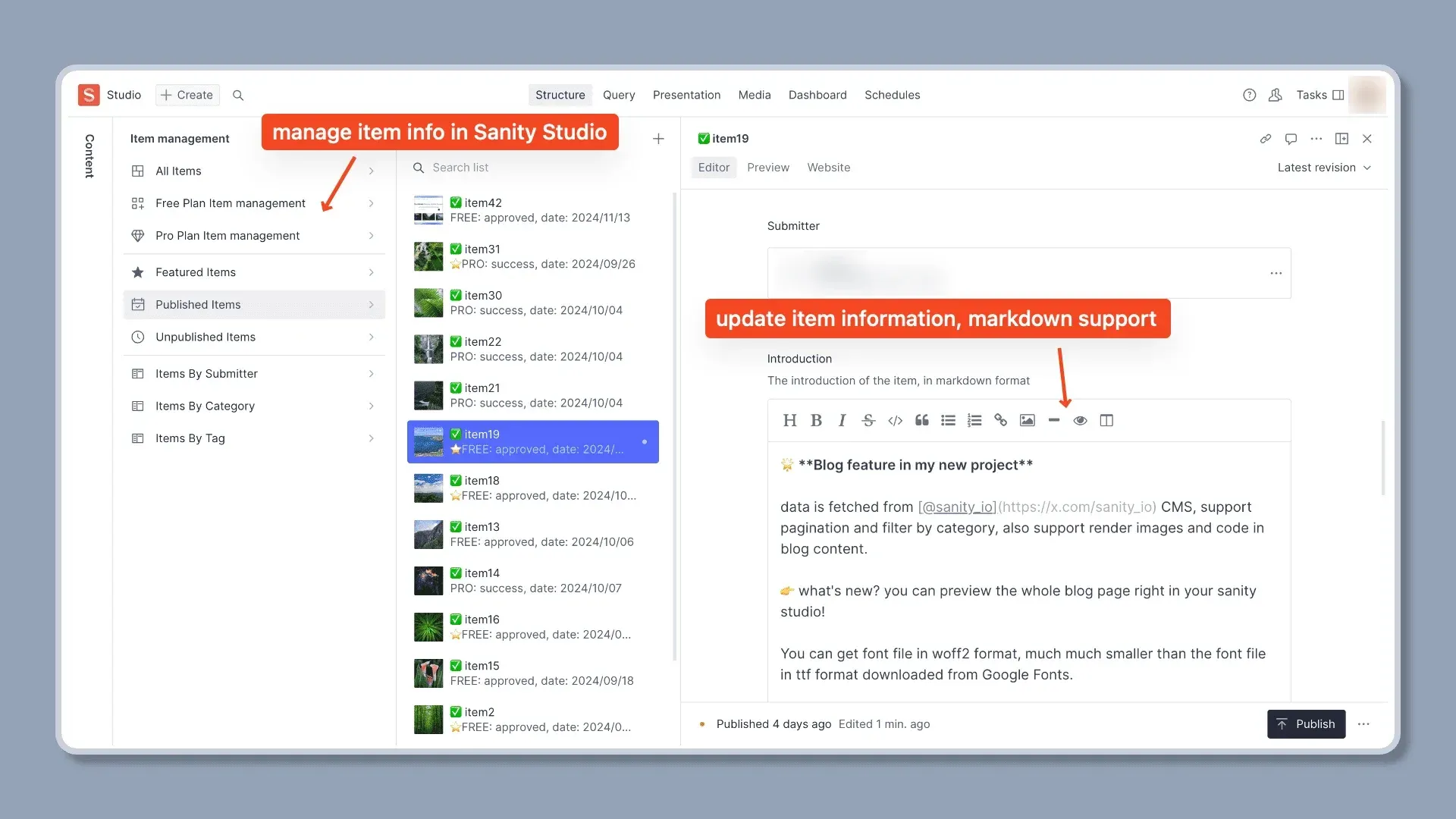
- Directory listings and item pages Items carry a name, link, description, Markdown introduction, image, categories and tags, and each item has its own detail page. Items can be marked as featured, and featured or paid items are highlighted in the listing grids. Item content is edited in Sanity Studio, where views group items by plan, publication state, submitter, category and tag.
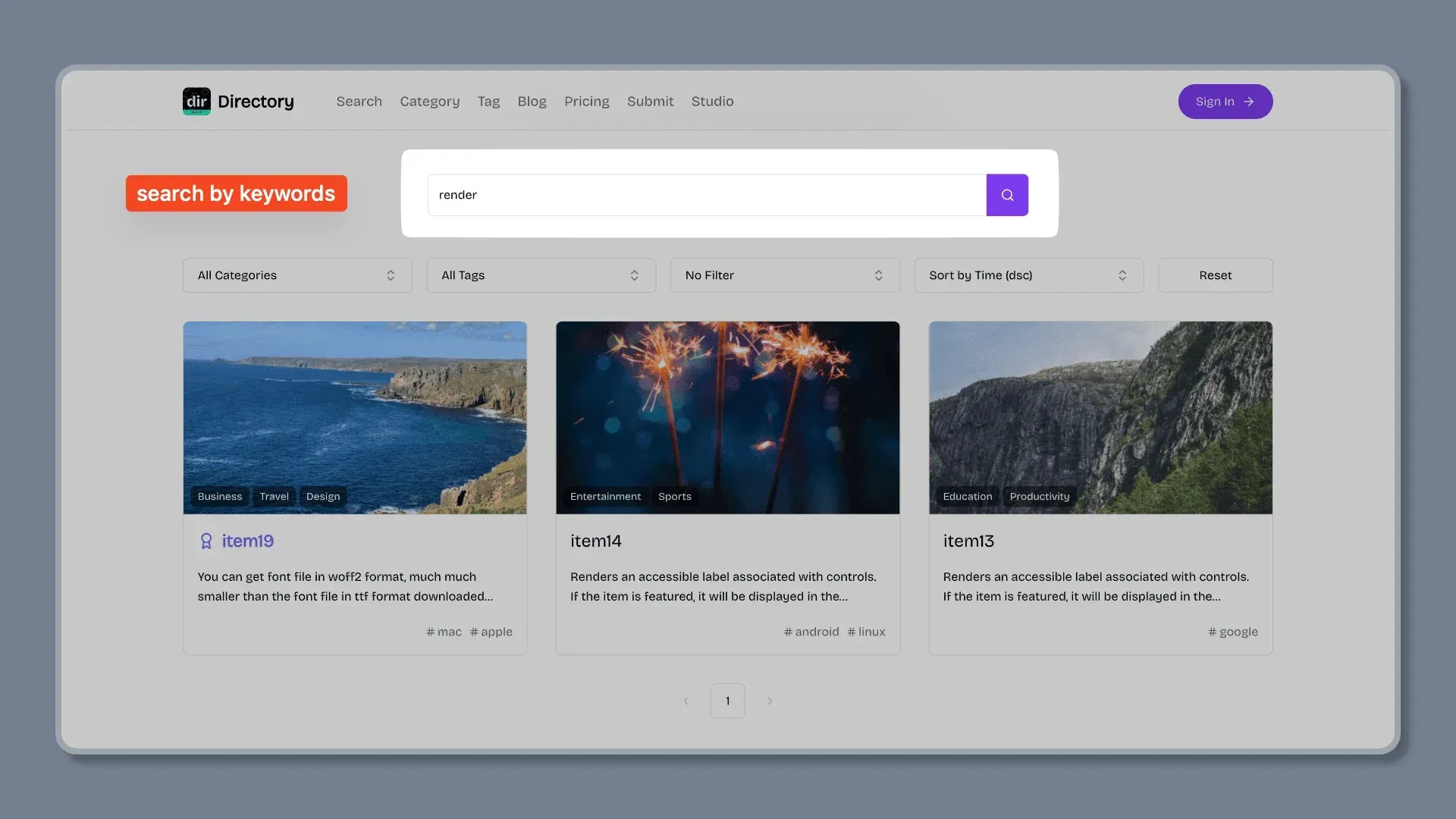
- Categories, tags, collections and search The template includes category, tag and collection pages and a search page that matches keywords in the item name, description and rich text content. Results can be filtered by category and tag and sorted, for example by publication time. Category groups, categories and tags are managed as Sanity documents.
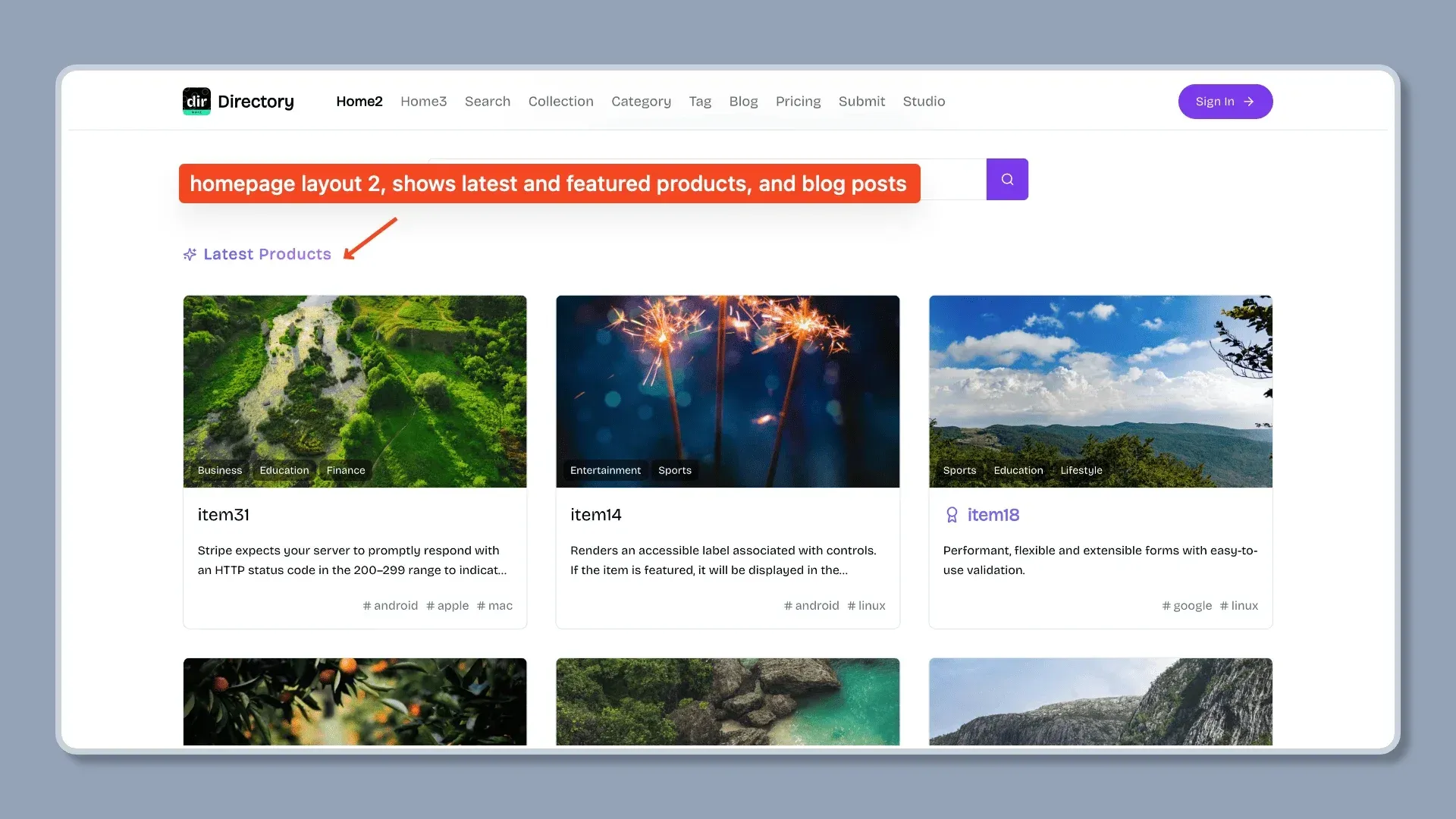
- Three homepage layouts The repository ships three homepage variants: the default layout, a second layout that shows latest and featured items with recent blog posts, and a third layout with a sponsor slot in the hero. The customization guide describes replacing the files in the home route folder to switch layouts.
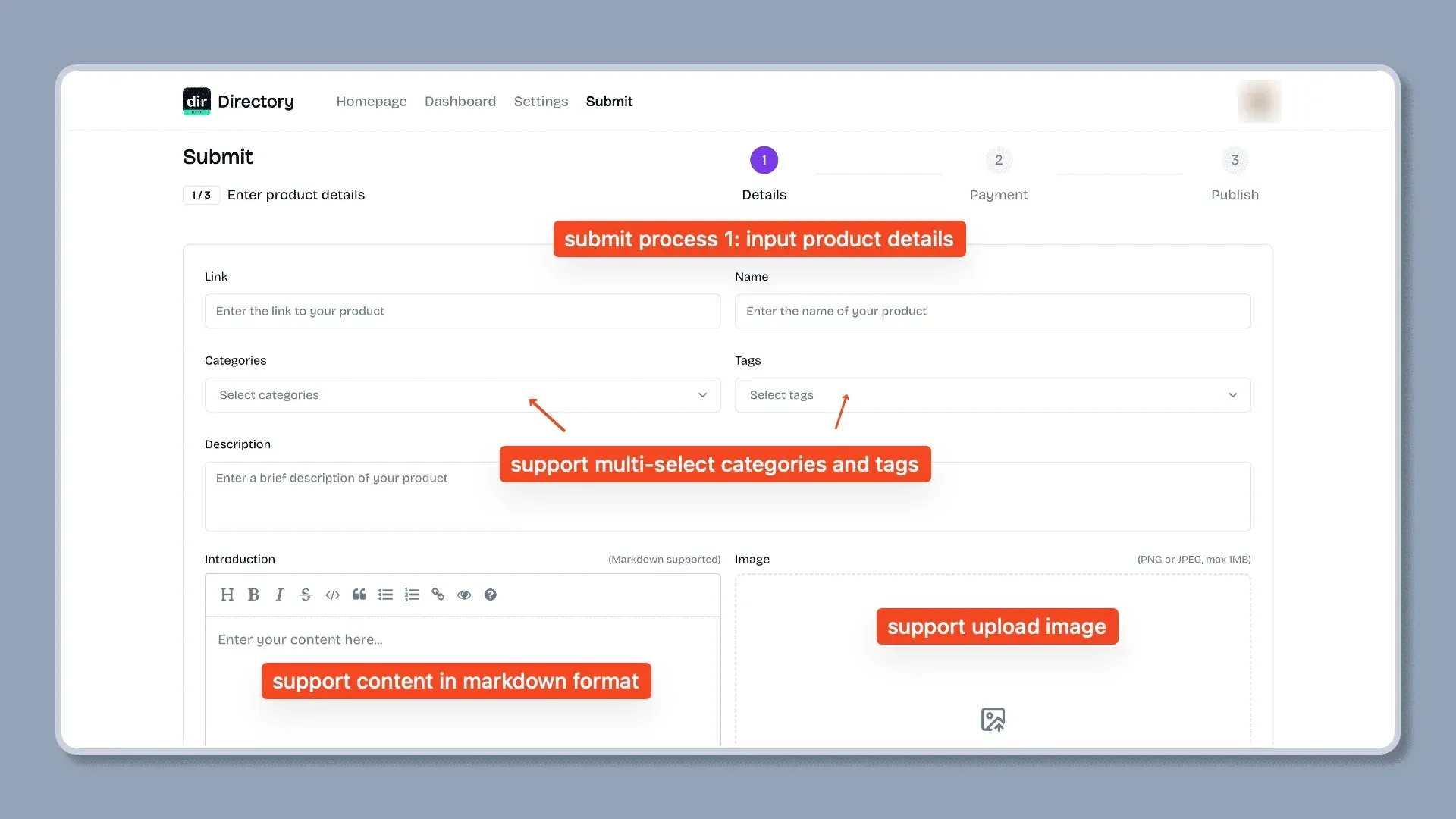
- User submission workflow Signed-in users submit an item through a three-step form (details, payment, publish). Free submissions go to an admin review in which the item is approved or rejected, with an optional notification email to the submitter; the user then publishes an approved item when they choose. Paid submissions skip the review and can be published immediately, as described in the submission guide.
- AI autofill for submissions The submission form can analyze the submitted website and fill in the fields with an AI model through the Vercel AI SDK. Supported providers are Google Gemini, DeepSeek, OpenAI, xAI and OpenRouter, selected with the DEFAULT_AI_PROVIDER variable. The feature is disabled by default and is enabled with SUPPORT_AI_SUBMIT; the AI configuration page notes that autofill can fail when page content or SEO data is not relevant.
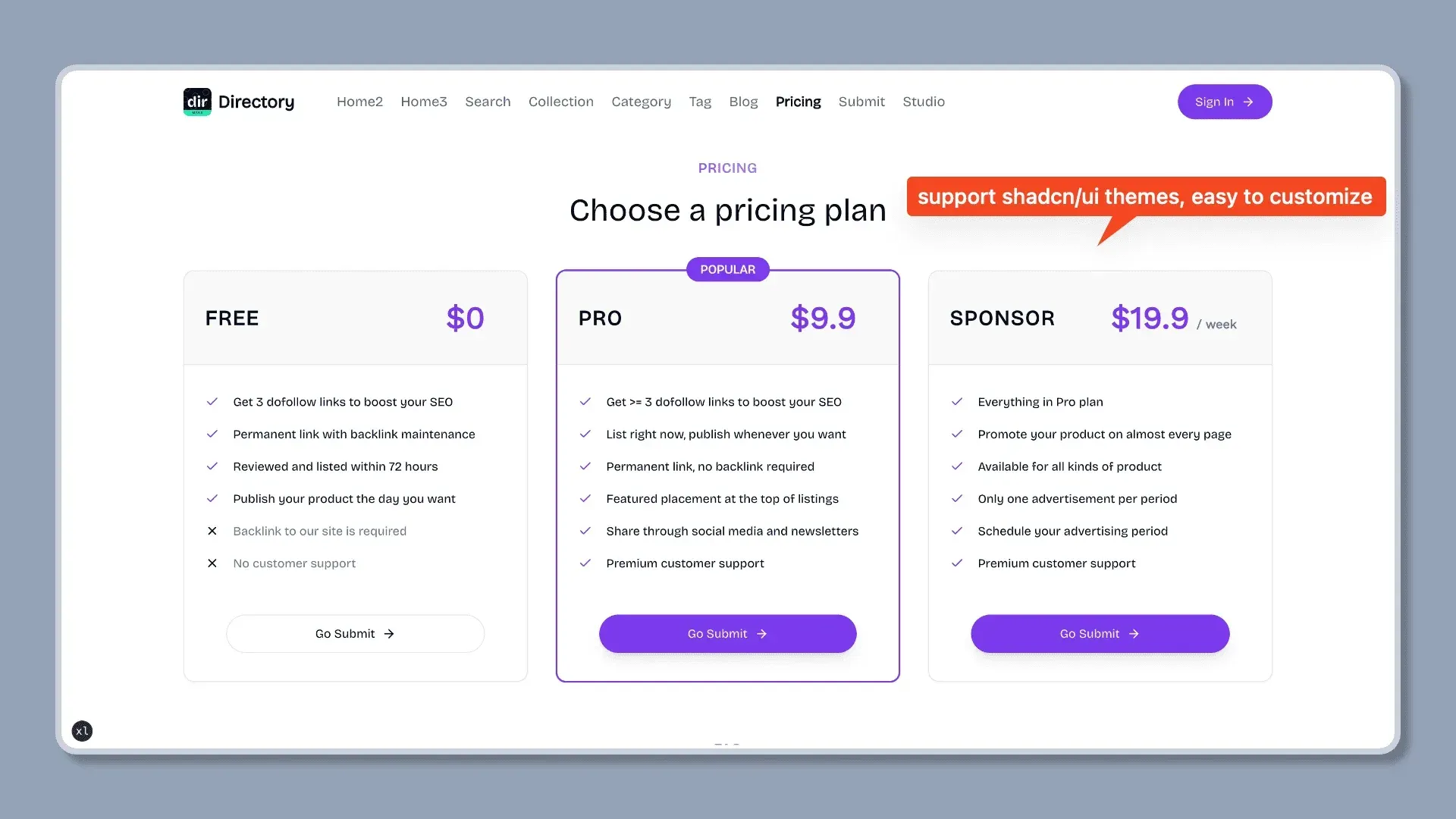
- Paid submissions and sponsor ads with Stripe Stripe handles one-time payments for the Pro submission plan and for sponsor ads, configured with two Stripe price IDs and a webhook secret. Sponsor ads are shown on list and detail pages; only one sponsor ad is displayed at a time, and an admin sets its display period in Sanity Studio. The Stripe guide covers products, prices and webhooks; the FAQ states that no other payment provider is supported.
- Sanity CMS and Sanity Studio Sanity stores items, categories, tags, collections, blog posts, users, custom pages and images. Sanity Studio is embedded in the app at the /studio path and requires the site origin in the Sanity CORS settings. Schemas live in the source tree, and pnpm typegen regenerates TypeScript types after schema changes. The documentation FAQ cites a limit of 10,000 items on the Sanity Free plan.
- Authentication and user dashboard Auth.js v5 provides email and password accounts with email verification and password reset, plus optional GitHub and Google OAuth sign-in, as documented in the authentication guide. Signed-in users get a dashboard listing their submissions and their status, and a settings page for name, link and password changes.
- Blog A blog section reads posts from Sanity with categories, authors, a table of contents and rich text with images and code blocks. The blog index supports filtering by category and pagination. Posts can be previewed from Sanity Studio through draft mode routes.
- Email templates and newsletter Transactional emails are built with React Email and sent through Resend: account verification, password reset, submission notifications to the user and the admin, approval, rejection, payment success and a newsletter welcome message. Newsletter sign-up and unsubscribe are handled through a Resend audience.
- SEO features Pages include SEO metadata, with item and blog pages given their own titles and descriptions. The app generates Open Graph images through an API route and produces a sitemap and robots file from the Next.js app routes.
- Analytics integrations The analytics configuration supports Google Analytics, OpenPanel, Umami and Plausible, each enabled by setting its environment variables. A Discord webhook variable is also available for notifications.
- Themes and customization The interface uses shadcn/ui components with Tailwind CSS, a light and dark mode toggle and a responsive layout. Color themes are changed by replacing CSS variables in the global stylesheet, and the documentation also covers fonts, logo, item cards, category display, email templates and site information.
- Custom pages Additional pages such as About, Contact, Privacy or Terms are created as Page documents in Sanity Studio and served at /[slug]. A new slug must be added to the public routes list in the source code; otherwise the page redirects to the login page.
- Batch import scripts The scripts folder contains TypeScript scripts to import, update or remove category groups, categories, tags and items in Sanity, run with pnpm batch and related commands. Additional scripts fetch website metadata with Microlink or the AI SDK and export user email addresses. The development guide describes them.
- Local setup requirements The prerequisites page lists Node.js 18 or later, Git and pnpm. Setup consists of cloning the code, running pnpm install, copying .env.example to .env and filling in the Sanity, Resend, Stripe, Auth.js and optional analytics and AI keys, then running pnpm dev on localhost port 3000.
- Deployment on Vercel The Vercel guide covers importing the repository, adding the environment variables and attaching a domain. When AI autofill is enabled, the guide sets the function maximum duration to 60 seconds.
- Deployment with Docker or Dokploy The repository includes a multi-stage Dockerfile based on node:20-alpine that builds a standalone Next.js output with a dedicated Docker configuration file, as shown in the Docker guide. The Dokploy guide builds from that Dockerfile and adds the AUTH_TRUST_HOST and AUTH_URL variables.
Where Mkdirs fits
Running a curated tools or product directory
Mkdirs is designed for directory sites such as AI tool lists, SaaS catalogs or resource collections. The operator creates category groups, categories and tags in Sanity Studio, adds items directly in the Studio or through the public submission form, and publishes them to the category, tag, collection and search pages. The homepage lists sites built with the template, including IndieHub and BoilerplateHunt, which are also part of the paid codebase bundle.
Accepting free and paid listing submissions
Visitors sign up, submit a product with the multi-step form and choose a plan. A free submission waits for an admin to approve or reject it in Sanity Studio, while a paid Pro submission is paid through Stripe Checkout and can be published without review. Submitters follow their items from the dashboard and decide when an approved item goes live. The demo site's pricing page shows sample Free, Pro and Sponsor plans.
Selling sponsored placements
A sponsor pays a fixed price through Stripe, and the admin agrees on a display period and sets it on the item in Sanity Studio. The site then shows that item in the sponsor slot during the period. The sponsor ads guide states that the template shows one sponsor ad at a time and does not let users pick the display period themselves.
Importing an existing dataset
For a directory that starts from an existing list, the batch scripts in the repository import category groups, categories, tags and items into Sanity, and can update or remove them later. Website metadata and screenshots can be fetched with the Microlink scripts, and AI SDK scripts fetch website content and turn it into structured fields. The documentation FAQ refers to the Sanity CLI and Sanity Client API for other migrations.
Publishing content and newsletters
The built-in blog publishes articles from Sanity with categories and authors, and custom pages cover static content such as About or Terms. Visitors can subscribe to the newsletter, which adds them to a Resend audience, and React Email templates handle the welcome message and the submission and payment notifications.
Deploying on managed or self-managed hosting
The same codebase deploys to Vercel from a Git repository, or runs in a Docker container built from the included Dockerfile on any container host, including Dokploy on a self-managed server. Content and images remain in the operator's Sanity project in both cases. The website FAQ states that a site can start on the free plans of Sanity, Resend, Vercel and Stripe, with upgrades as traffic grows.
Reviews of Mkdirs
Be the first to share your experience with Mkdirs.
Write a review
Loading review form…
Found Mkdirs useful? Upvote it todayYour vote helps other IT teams find it in the daily ranking.


