

What is OpenPanel?
OpenPanel is an open-source web and product analytics platform made by a small team in Stockholm, Sweden; the README credits Carl Lindesvärd as its creator. It joins the visitor metrics of a lightweight web analytics script (visitors, referrers, pages, countries and devices) with product analytics features: funnels, retention, cohorts, user profiles, session replay and revenue tracking. The project describes itself as an open-source alternative to Mixpanel and a Google Analytics replacement, and it tracks without cookies by default.
There are two ways to run it. OpenPanel Cloud is hosted in the EU, starts with a 30-day trial without a credit card and is priced only by monthly event volume, as listed on the pricing page. Self-hosting is free, has no event limit and runs on Docker Compose. The public self-hosted line is 2.x: the lindesvard/openpanel-* images on Docker Hub were last tagged 2.3.0 on August 18, 2026, and are installed from the self-hosting branch with a setup script. OpenPanel 3 goes to paying supporters first, through a new openpanel command-line tool and private images built from every commit on the main branch.
The GitHub releases page lists those supporter builds as pre-releases, each with Linux x64 and arm64 CLI binaries and a checksums.txt file; v3.30.0 was published on November 6, 2026. The self-hosting changelog says version 3.0.0 makes Redpanda a required event broker, removes the separate worker image, moves images to the :3 tag and requires draining the old queue before the upgrade. Recent commits on main add AI observability with traces and token cost, a redesigned session replay player, funnels counted per group, time to convert per funnel step, dashboard-wide filters, a distribution chart and a self-hosted dashboard that runs without outbound calls. Sign-in, sign-up, password reset and two-factor authentication moved to better-auth in late October 2026.
The monorepo is written in TypeScript. A Fastify API receives events, ClickHouse stores them, PostgreSQL holds accounts, projects and settings, and Redis provides caching, pub/sub and queues through BullMQ and GroupMQ. The current dashboard app is built on TanStack Start and Vite, although the README stack list still names Next.js. An OpenPanel 3 deployment runs PostgreSQL, Redis, ClickHouse, Redpanda, the API, the dashboard, a worker and an optional Caddy proxy. Client libraries cover the script tag, JavaScript, React, Next.js, Vue, Nuxt, Astro, Remix, Express, Node.js, Python, Ruby, Rust, Java, Swift, Kotlin and React Native, as listed in the SDK documentation.
The repository on GitHub is licensed under AGPL-3.0, which matters if you modify OpenPanel and offer it to others as a network service. OpenPanel is an event analytics product, not a general BI tool: it does not query your application database, model warehouse tables or replace a SQL reporting layer. The README lists A/B testing with variant breakdowns, but the documentation does not describe a feature-flag delivery service, so variant assignment remains part of your own application.
OpenPanel screenshots
Explore the interface. Open a screenshot to view it at full size.
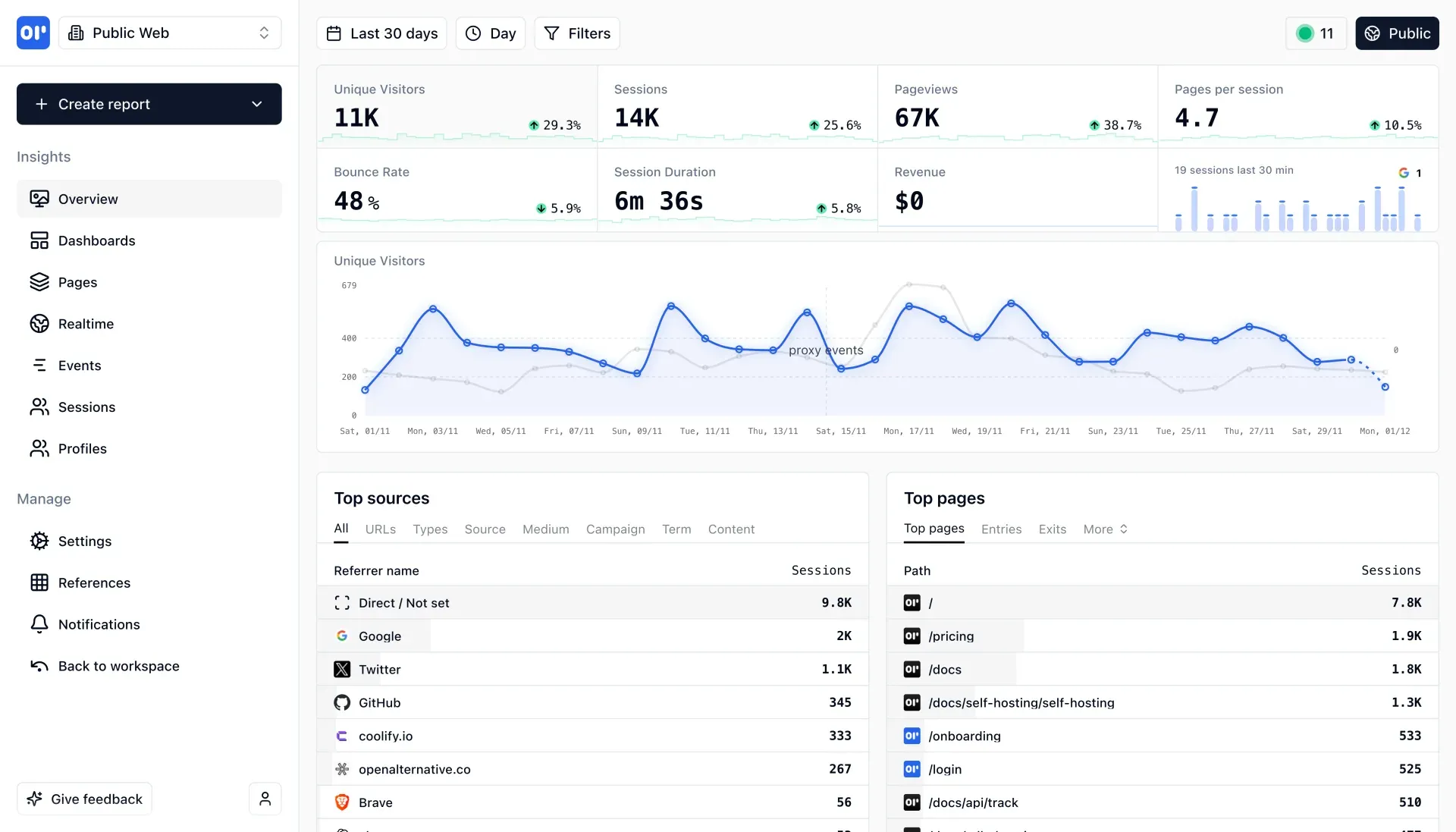
Overview dashboard with headline metrics, a 30-day unique visitors chart, top sources and top pages. Official product screenshot from the OpenPanel repository.
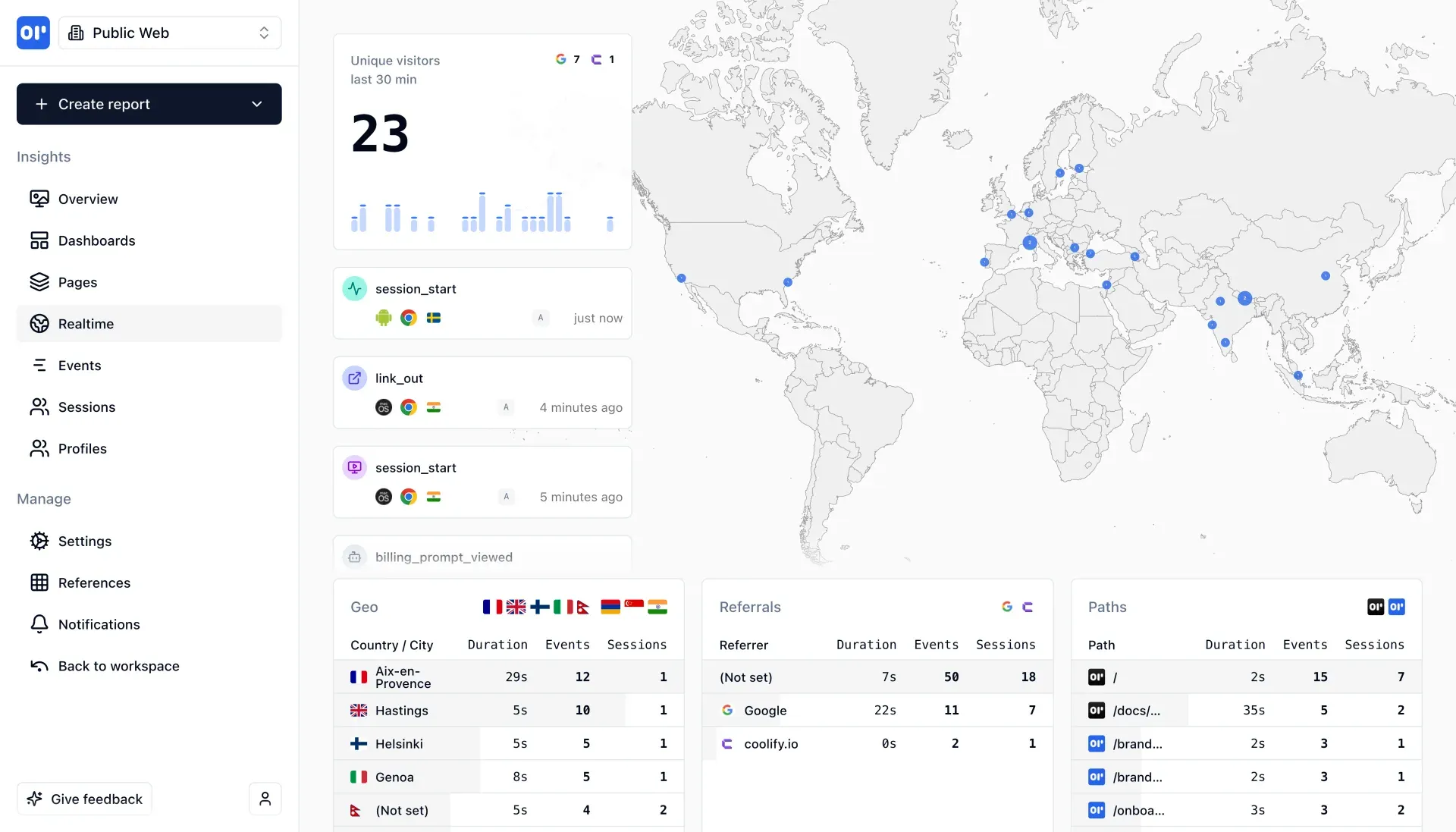
Realtime view with a 30-minute visitor count, incoming session_start and link_out events, a location map and geo, referral and path tables. Official screenshot.
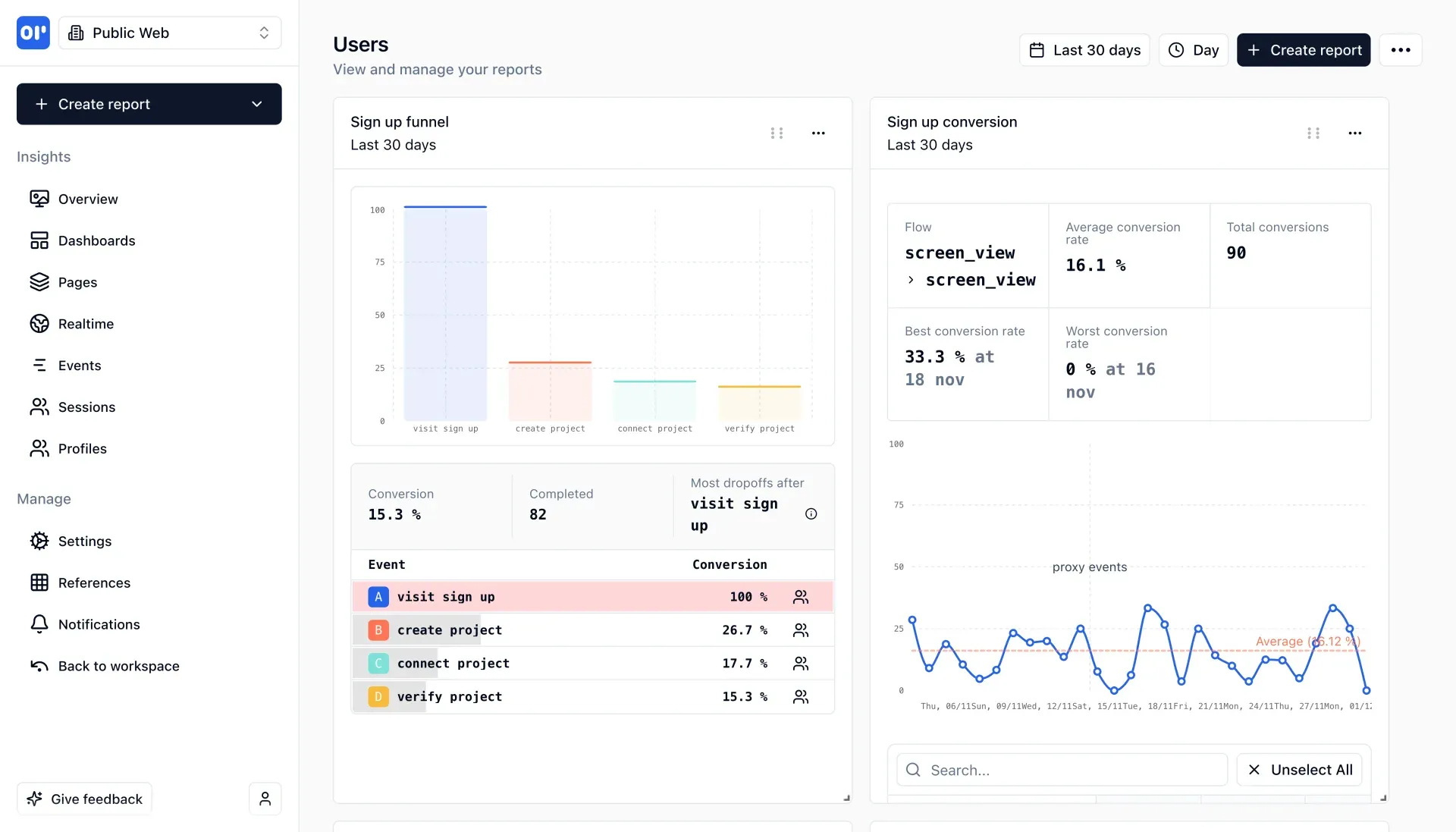
A saved dashboard showing a sign-up funnel with step conversion and drop-offs beside a conversion rate chart. Official screenshot.
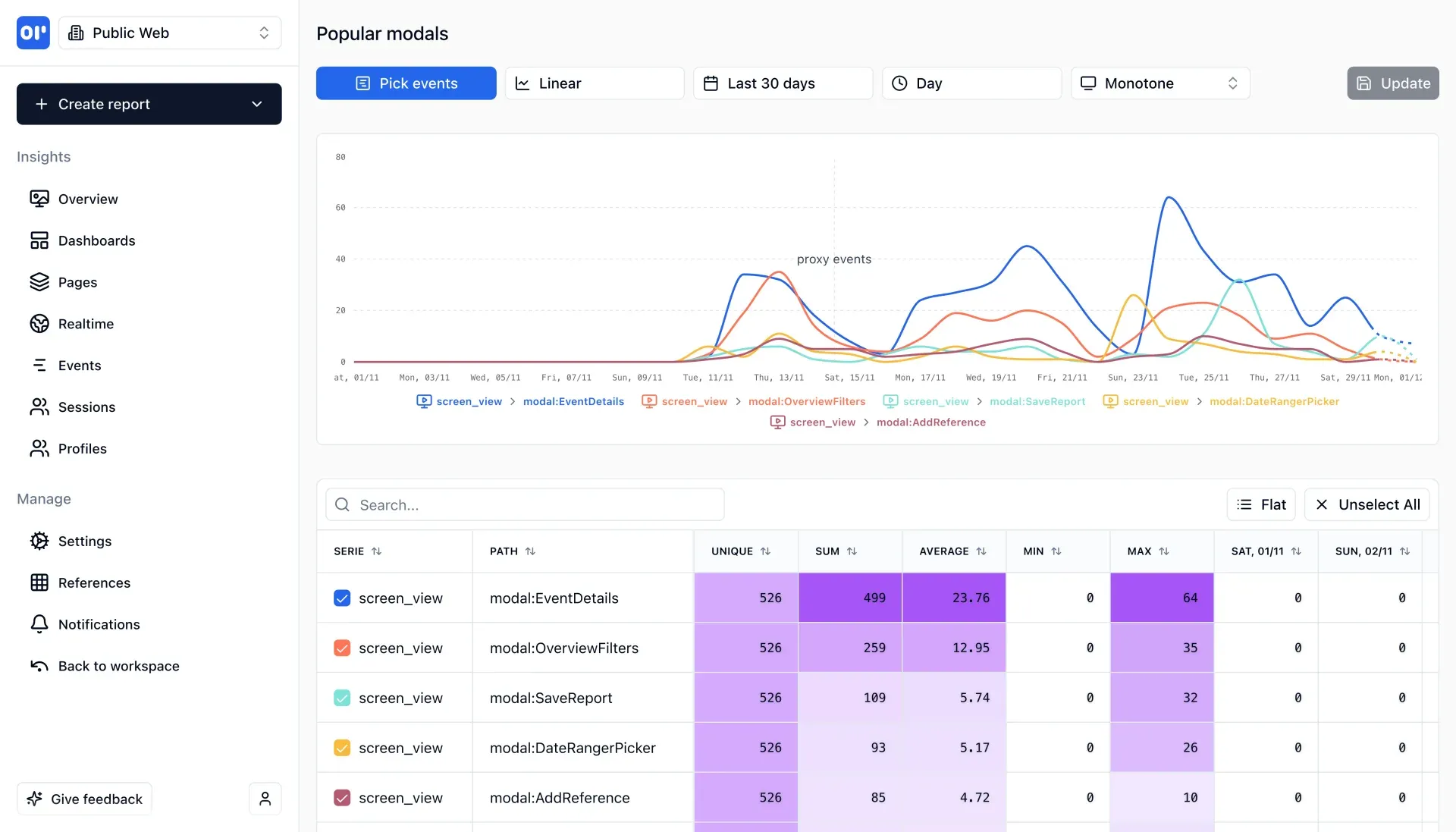
Report builder comparing several screen_view events over 30 days, with the per-series data table below. Official screenshot.
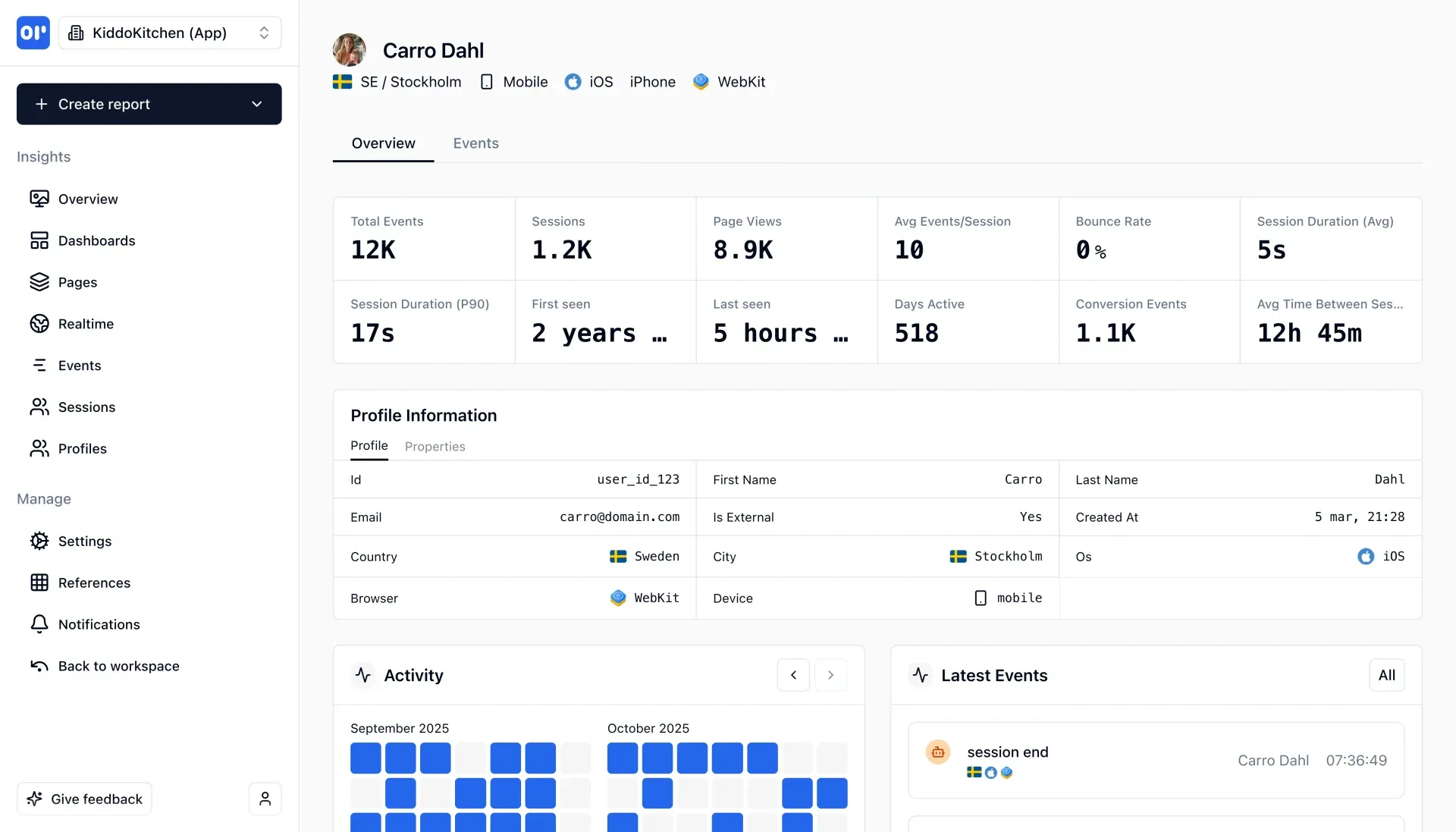
Profile page for an identified sample user with totals, session duration, profile properties and monthly activity. Official screenshot with sample data.
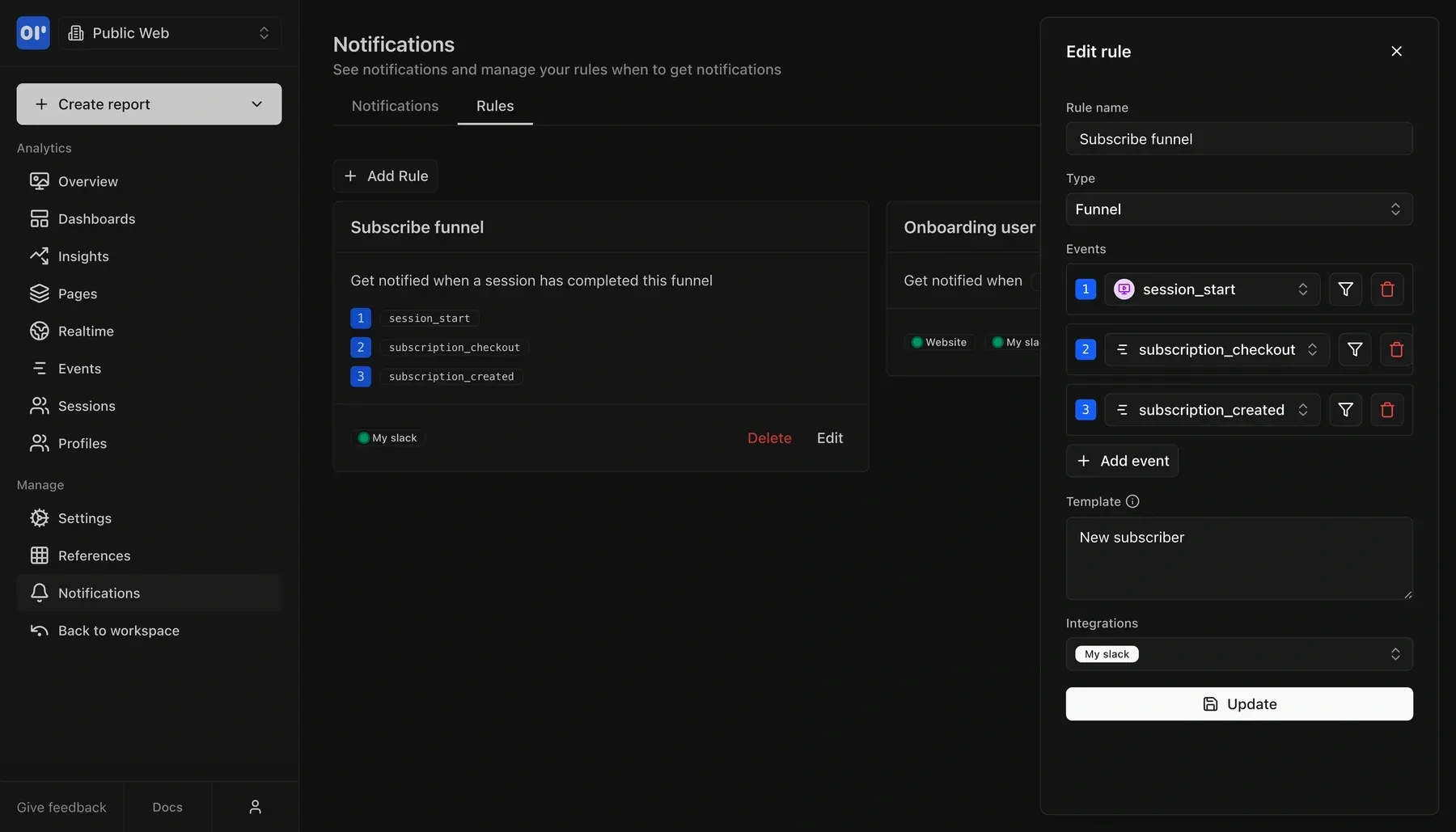
Editing a funnel notification rule that fires after session_start, subscription_checkout and subscription_created, sent to a Slack integration. Official screenshot.
Source: official OpenPanel project page.
Key capabilities
- Web analytics overview The overview page shows unique visitors, sessions, pageviews, pages per session, bounce rate, session duration and revenue for a chosen range and interval, each compared with the previous period. Top sources can be split by referrer, URL, type and the UTM source, medium, campaign, term and content fields. Top pages include entry and exit pages, and further panels cover countries, devices and browsers. The overview guide explains each metric.
- Realtime view A realtime page counts unique visitors over the last 30 minutes, streams incoming events with device, browser and country icons, and plots active locations on a world map. Panels for geography, referrals and paths show duration, events and sessions for the current window.
- Event tracking, identification and groups Events are sent with
track, andidentifyattaches aprofileIdso that events from several devices join one profile. Groups support B2B reporting by company or workspace. A session ends after 30 minutes without events; only client events start sessions, while server-side events attach to an existing session. - Cookieless device identification Without a profile ID, a visitor is recognised by a device ID computed as a hash of the user agent, IP address, project and a salt. The salt rotates daily at midnight UTC, so anonymous device IDs reset every day, and the previous salt is kept briefly for late events. This design avoids storing an identifier in the browser, but it means anonymous returning-visitor counts across days are not possible without identification. Details are in How it works.
- Funnels, retention and cohorts Funnel reports show conversion per step, completed users and the step with the most drop-offs. Recent builds add time to convert per step and funnels counted per group instead of per user. Retention and cohort reports reuse the same events, so no separate instrumentation is needed.
- Reports and custom dashboards The report builder offers line, bar and funnel charts, a series that counts only each user's first occurrence, events that have not fired yet and a distribution chart that buckets users by a per-user value. Reports are placed on dashboards, and dashboard filters narrow every report on that dashboard. Dashboards and cohorts can be duplicated, and dashboards can be shared.
- User profiles and session history Each profile shows total events, sessions, pageviews, bounce rate, average and P90 session duration, first and last seen, days active and conversion events. A profile tab lists stored properties such as name, email, country, operating system and device, and an activity calendar shows the days a user was active.
- Session replay Replay is off by default and is enabled per project through the
sessionReplayoption of the script tag or the@openpanel/webpackage. Recordings are rrweb-based structured data, not video, andmaskAllTextandmaskAllInputsare true by default, replacing text with asterisks in the browser. Selectors can unmask, block or ignore elements. Chunks are sent every 10 seconds with a 1 MB payload cap, and replays are kept for 30 days according to the session replay documentation. - Consent management Setting
disabled: truequeues track, identify, screen view and replay data in memory untilready()is called. If consent is never given, the queue is discarded when the page closes. AwaitForProfileoption holds events untilidentify()supplies a profile ID. The consent guide shows both patterns. - First-party proxy against ad blockers The script and the track endpoint can be served from your own domain, so requests are not sent to a third-party tracking host. The Next.js SDK includes a route handler for this, the WordPress plugin proxies automatically, and other frameworks need two small endpoints: one that serves
op1.jsand one that forwardsPOST /trackwith client IP and user agent headers. - Revenue tracking
op.revenue()records a payment, normally from a backend webhook, and needs a client secret. To attribute revenue to a visitor, you store the device ID or profile ID in the payment provider's metadata at checkout; the documented examples use Stripe. A frontend flow withpendingRevenueandflushRevenueis quicker to add but less accurate and less secure. - Notifications and integrations Rules can trigger on a single event or on a completed funnel, with a message template and one or more integrations such as Slack or Discord. Each rule lists its events and filters. A Google Search Console integration adds search data to a project; on self-hosted installations the operator must configure it first.
- AI observability (beta) LLM calls can be recorded with model, token counts, cost, latency and failure status, grouped into traces and optional conversations and tied to profiles and sessions. Packages exist for the Vercel AI SDK (
@openpanel/ai/vercel), the OpenAI client and the Anthropic SDK; other languages send the raw payload to the track endpoint. Prompts and completions are stored by default for 30 days unlessprivacyModeis set per call or per project. See the AI observability documentation. - HTTP API The API has Track, Export, Insights and Manage sections. Clients authenticate with the
openpanel-client-idandopenpanel-client-secretheaders, and the client type decides access:writeonly tracks,readcan export and query insights, androotreaches every API across the organization. Export and Insights allow 100 requests per 10 seconds, Manage 20 per 10 seconds. See the API authentication reference. - MCP server A hosted MCP endpoint at
https://api.openpanel.dev/mcplets Claude, Cursor, Windsurf and other MCP clients query analytics. The documentation lists 49 tools covering projects, dashboards, events, sessions, profiles, groups, aggregated metrics, user behavior and Search Console data. Tools are read-only except dashboard management, which needs a root client. Requests are limited to 60 per minute per client; see the MCP documentation. - SDKs for web, mobile and server Official SDKs cover the browser (script tag and
@openpanel/web), React, Next.js, Vue, Nuxt, Astro, Remix, Express and Node.js, as well as Python, Ruby, Rust and Java on the server. Mobile apps use the Swift, Kotlin or React Native SDKs. - OpenPanel Cloud The hosted service runs in the EU and is priced by events per month, from 5,000 events for $2.50 per month up to 50 million events for $900, with yearly billing at ten times the monthly price. Every plan includes unlimited sites, members, dashboards and profiles plus replay, AI and API access. When a plan is exceeded, new events wait for the next period instead of creating overage charges.
- Self-hosting 2.x with Docker Compose The public release is installed by cloning the
self-hostingbranch and running./setup, which can install Node and Docker and then asks configuration questions;./startlaunches the stack. The guide is tested on Ubuntu 24.04. Separate guides cover Coolify, Dokploy, Kubernetes, reverse proxies, social login, environment variables and a high-volume setup in the 2.x documentation. - Self-hosting OpenPanel 3 with the CLI The
openpanelCLI is installed with a script that verifies its checksum, thenopenpanel initandopenpanel upcreate and start the stack in~/openpanel. It needs a Linux x64 or arm64 server with Docker and at least 4 GB of RAM, with 6 GB recommended. Commands cover status, logs, doctor checks, export, upgrade and a reset that deletes all data volumes. Supporters log in todocker.openpanel.devand runopenpanel upgrade --supporter; see the self-hosting guide.
Where OpenPanel fits
Replacing Google Analytics on a marketing site
Add the script tag with trackScreenViews enabled, or the framework SDK for Next.js, Nuxt or Astro, and compare visitors, sources and top pages against your previous tool for two or three weeks. Expect differences: OpenPanel resets anonymous device IDs daily and blocks fewer requests when served through a first-party proxy. Check that UTM parameters appear under campaign and medium, and decide whether the cookieless setup removes the need for a consent banner under your own legal assessment.
Measuring a sign-up or checkout funnel
Name the events that mark each step, such as visiting sign-up, creating a project and verifying it, and track them from the client or server. Build a funnel report, add time to convert per step and save it to a dashboard. Check that server-side events attach to sessions as expected, because sessionless events are excluded from session-grouped funnels. A funnel notification rule can post to Slack or Discord when a session completes the flow.
Product analytics for a mobile app
Use the Swift, Kotlin or React Native SDK and call identify after login so that events from phone, tablet and web join one profile. Review the profile page for sessions, active days and conversion events, and build retention reports from the same events. Decide which profile properties you send: email and names become visible to every project member, so keep only what support and analysis need.
Attributing payments to traffic sources
Read the device ID with op.getDeviceId() before checkout, or use the profile ID for logged-in users, and store it in the Stripe session metadata. In the webhook, call op.revenue() with that ID so revenue appears beside sources and campaigns. Confirm the amount unit you send, since the documented Stripe example passes cents, and test a refund or cancelled payment path before trusting the totals.
Running analytics on your own server
For a public install, follow the 2.x Docker Compose guide on a Linux host with a domain and HTTPS; supporters can use the OpenPanel 3 CLI instead. Plan for PostgreSQL, ClickHouse and Redis, and for Redpanda on version 3, which together need at least 4 GB of RAM. Configure email before inviting colleagues, keep ALLOW_REGISTRATION off, schedule backups of the data volumes and read the changelog before every upgrade, because the 3.0 upgrade requires draining the old queue first.
Asking an AI assistant about product usage
Create a read client limited to one project, encode its ID and secret as the bearer token and add the MCP endpoint to Claude, Cursor or another client. Ask questions about top pages, funnel drop-offs or a specific profile, and compare the answer with the dashboard before relying on it. Use a root client only when the assistant should create or change dashboards, and avoid the query-string token option because URLs leak more easily.
Install
git clone -b self-hosting https://github.com/Openpanel-dev/openpanel && cd openpanel/self-hosting && ./setupReviews of OpenPanel
Be the first to share your experience with OpenPanel.
Write a review
Loading review form…
Alternatives to OpenPanel
 GrowthBookGrowthBook combines feature flags, warehouse-native experimentation and product analytics, as a cloud service or self-hosted with Docker Compose.
 MetabaseMetabase is open-source business intelligence for asking questions of your database, building dashboards and embedding analytics. Run the AGPL edition yourself with Docker or the JAR, or use paid Cloud, Pro and Enterprise plans.
 SentrySentry is a Fair Source debugging platform that groups errors into issues and adds traces, logs, session replays, profiles, cron and uptime monitors. It runs as the sentry.io service with US or EU storage, or self-hosted with Docker Compose.