

What is Umami?
Umami is an open-source web and product analytics platform published by Umami Software, Inc. A JavaScript tracker on each website sends pageviews, referrers, campaign parameters, custom events and optional session properties to an Umami server, which presents them in a web dashboard. The tracker sets no cookies and Umami does not collect personal information automatically; data a site chooses to send, such as a distinct ID or event properties, remains the operator's responsibility. The repository dates from July 2020 and the source is licensed under MIT. The current documentation covers Umami v3, while the v2 documentation stays available separately.
There are two ways to run it. Umami Cloud is the hosted service operated by the project's creators, with servers in the US and EU according to the pricing page. Self-hosting uses a source build with pnpm, the prebuilt image docker.umami.is/umami-software/umami:latest, or the repository's Docker Compose file, which starts ghcr.io/umami-software/umami:latest next to a postgres:15-alpine database. The installation guide lists Node.js 20.19 or newer (22 LTS recommended) and PostgreSQL 12.14 or newer. The first build creates the tables and a default admin account whose password must be changed after the first login.
The latest release is v3.4.1, published on October 23, 2026. It is a security hotfix: Next.js moves to 16.4.2 to close a critical remote code execution issue in next/og and an SSRF in image optimization, React moves to 19.3.1, the Docker base image is pinned to Node 22.23.4 on Alpine, and the MCP packages move to 2.3.1 to fix an OAuth credential leak. Version 3.4.0 (September 2026) added chart annotations, a read-only MCP server, account API keys and a typed API client. Version 3.3.0 added TOTP two-factor authentication and session identity stitching, 3.2.0 added heatmaps, and 3.1.0 introduced Boards, session replay and Core Web Vitals tracking.
The application is written in TypeScript on Next.js 16 and React 19, with Prisma 7 handling PostgreSQL access and migrations that run during the build. Redis is optional for caching and coordination, and session replay is built on the rrweb recorder. The repository also carries ClickHouse migrations and a Kafka client, but the public self-hosting documentation describes PostgreSQL as the only supported database. MySQL support ended with v3.0, and the project published a guide for moving MySQL data to PostgreSQL.
Some boundaries are worth knowing before adoption. Umami is an event analytics product, not a general BI tool for querying arbitrary databases. Email reports and the streaming API are listed as Cloud features that the self-hosted edition lacks. The tracker documentation already describes error-tracking attributes marked for v3.5.0, a version not yet released when v3.4.1 was current. The gallery uses official screenshots from umami.is and the GitHub release notes, which show the vendor's own sample data.
Umami screenshots
Explore the interface. Open a screenshot to view it at full size.
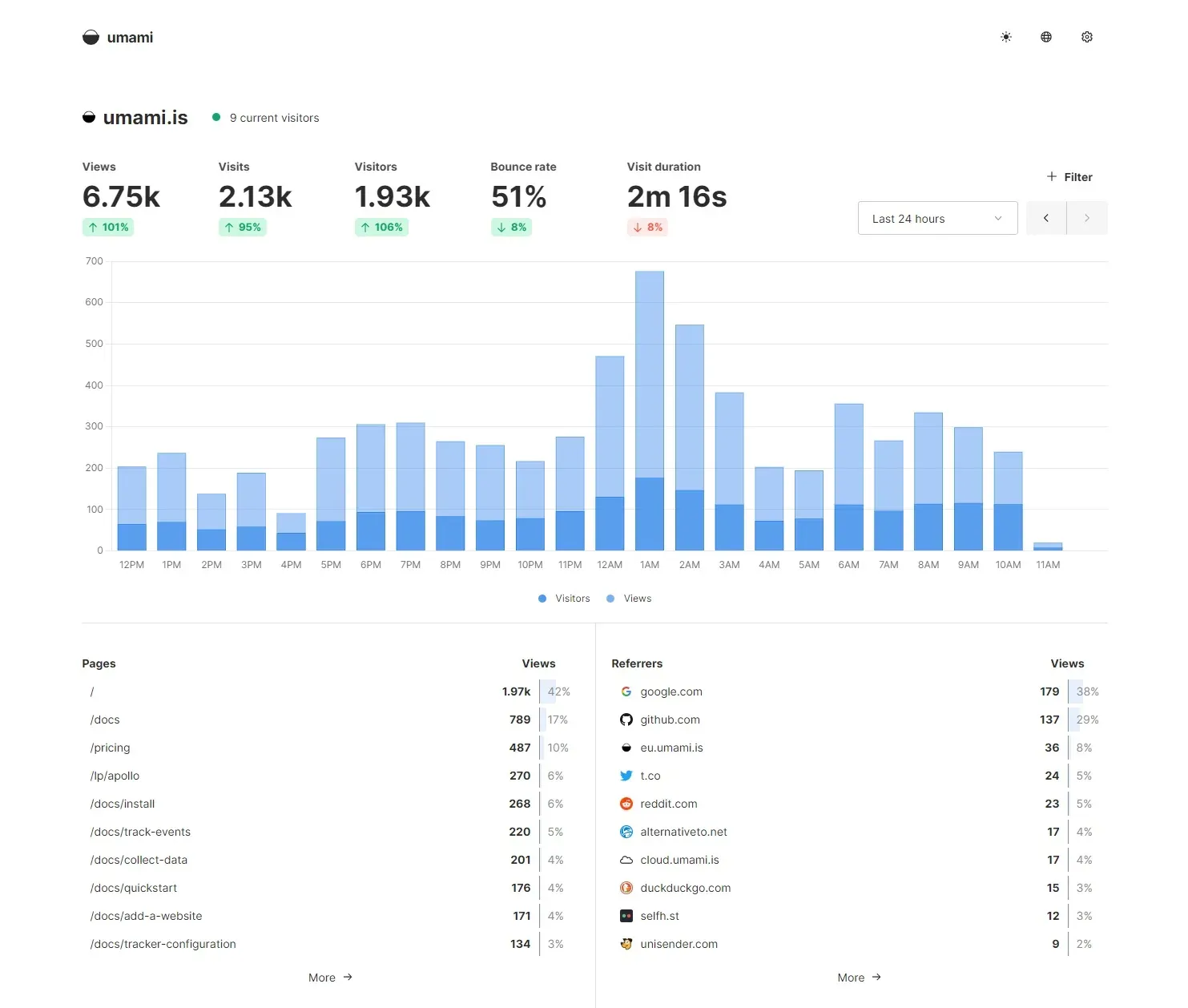
Official screenshot of the Umami website dashboard over the last 24 hours, from umami.is, showing the vendor's own traffic.
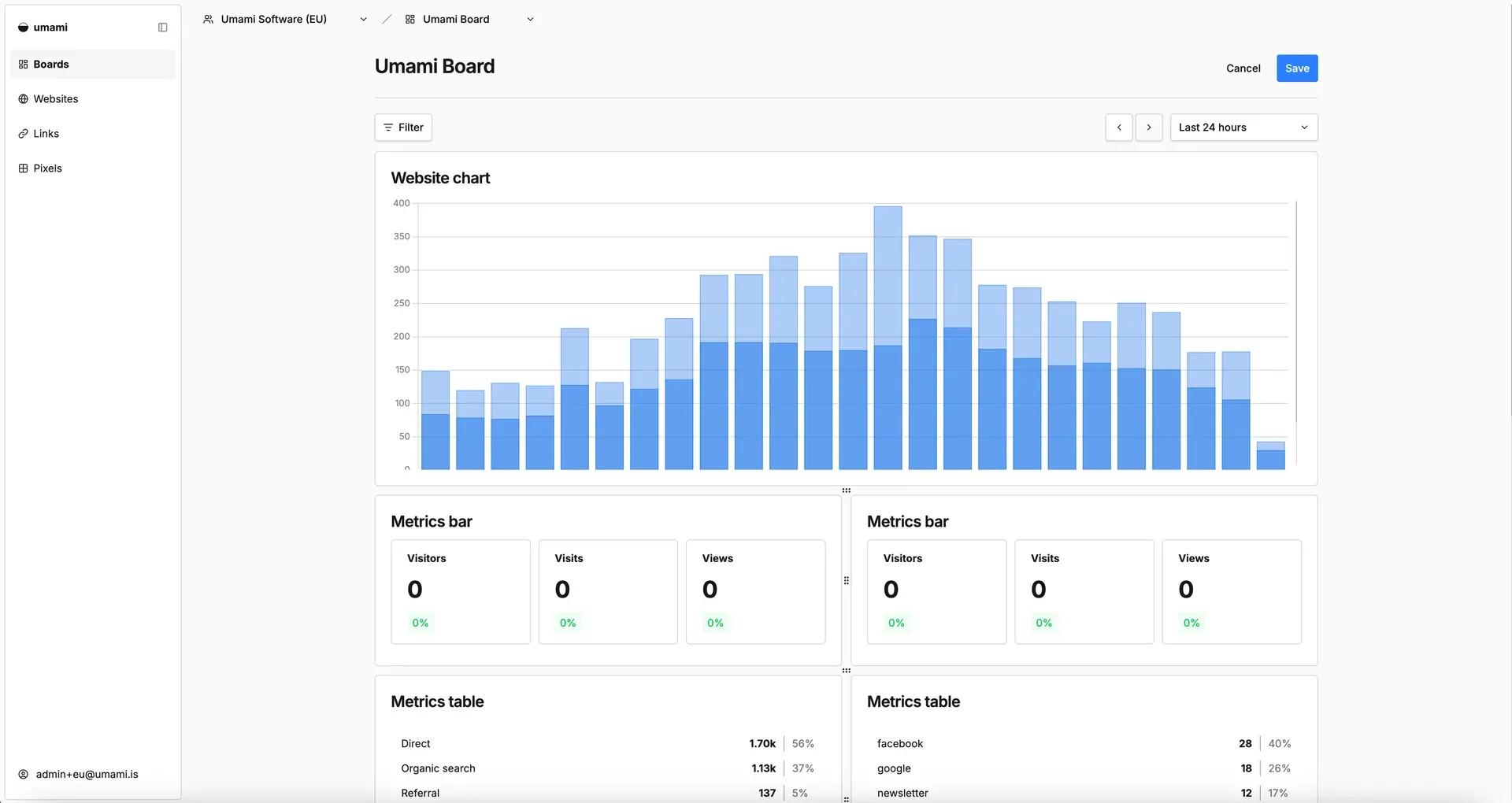
Board editor introduced in v3.1.0, composing chart, metrics bar and metrics table components. Official image from the v3.1.0 release notes.
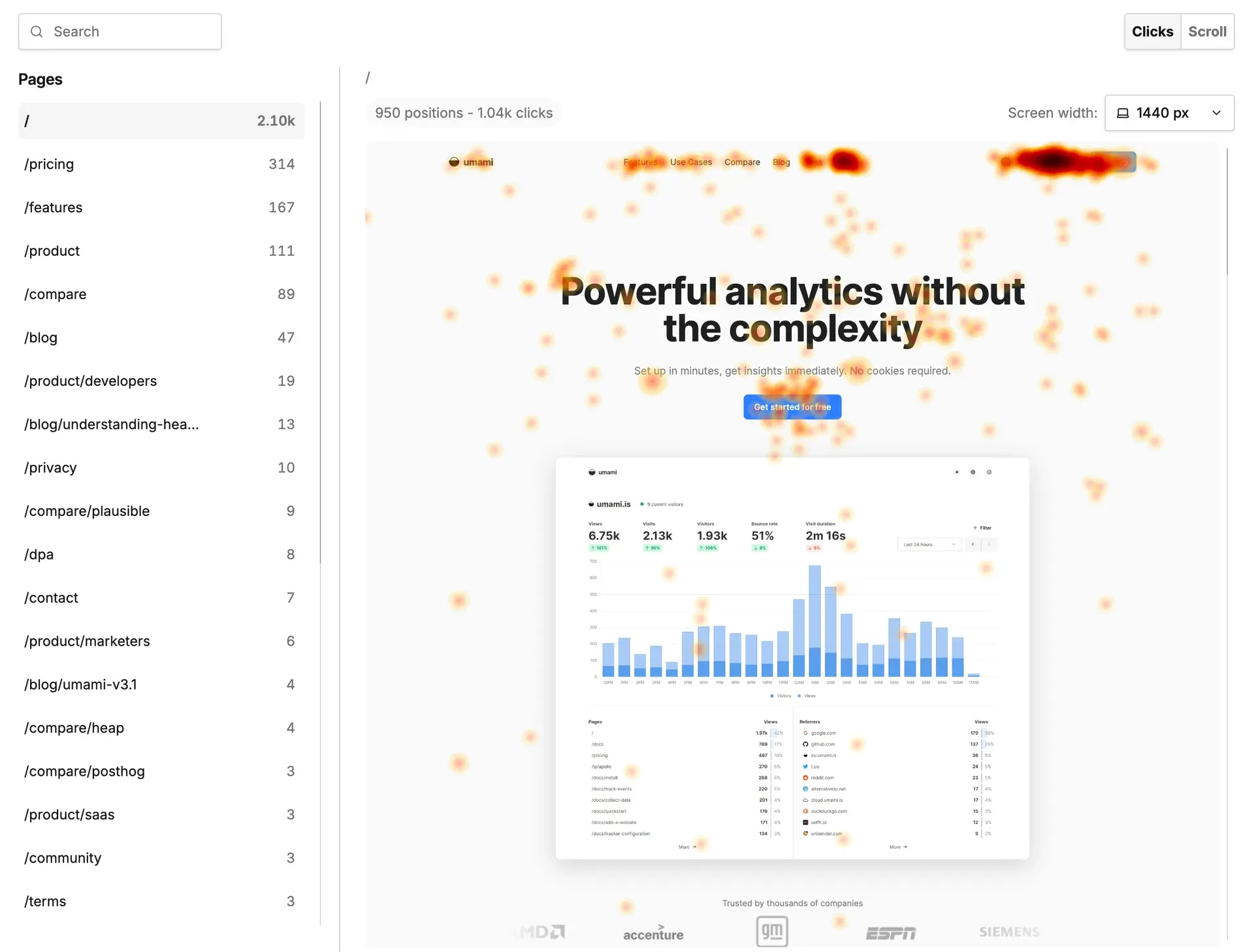
Click heatmap report added in v3.2.0, showing 950 positions and 1.04k clicks on the home page. Official image from the v3.2.0 release notes.
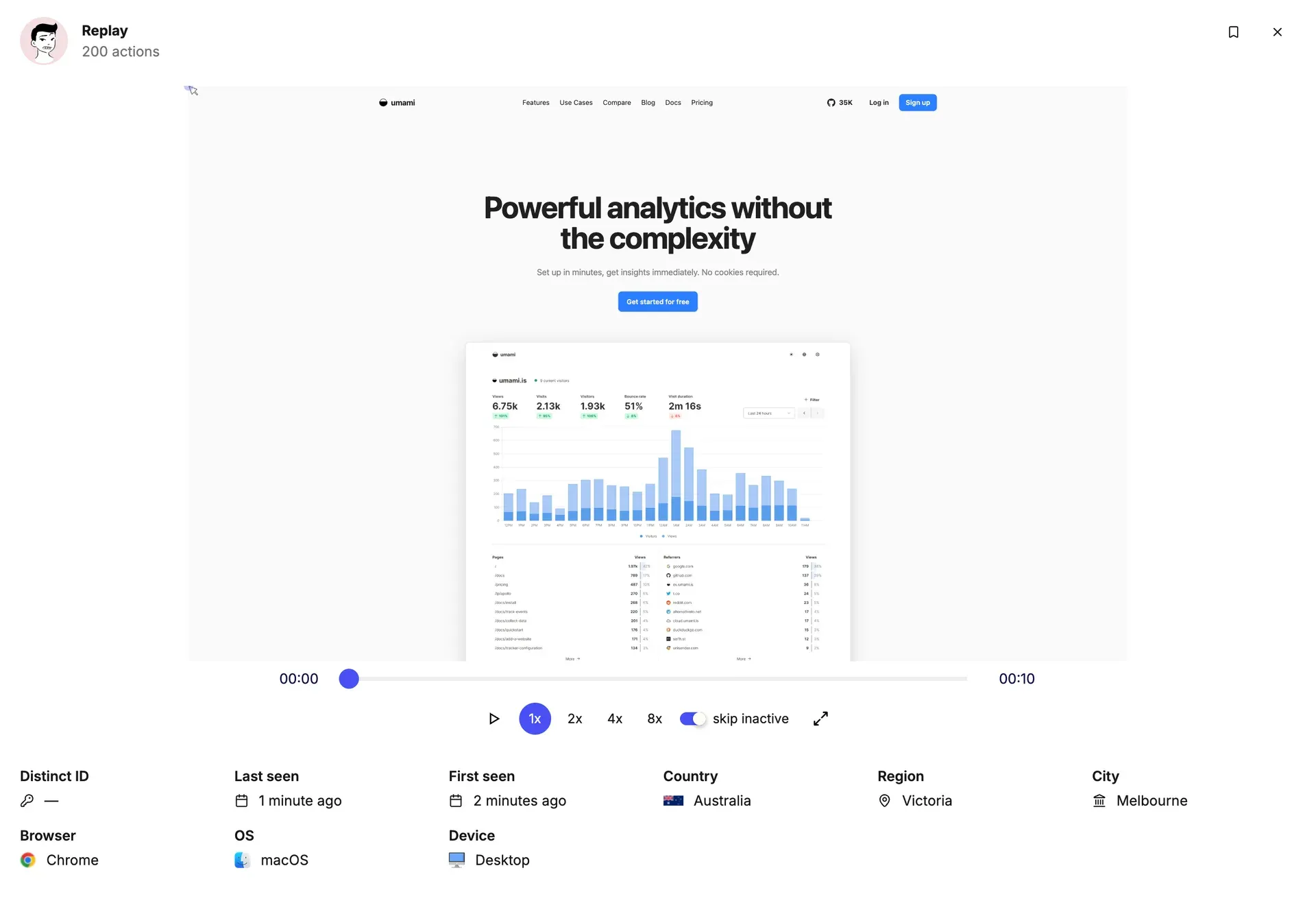
Session replay modal introduced in v3.1.0, with 1x to 8x playback and a skip-inactive toggle. Official image from the v3.1.0 release notes.
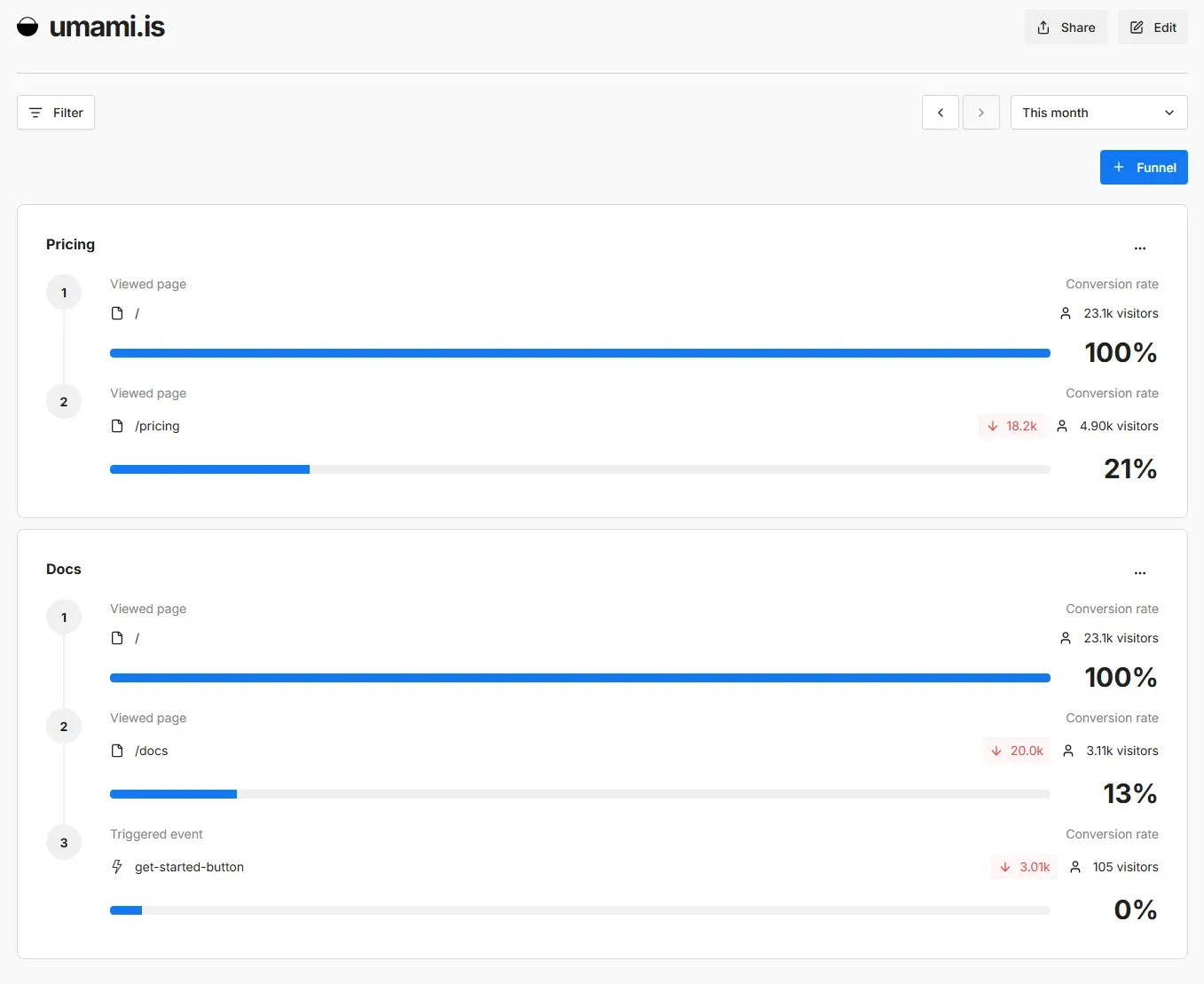
Funnel report with page and event steps, conversion rates and drop-off counts. Official screenshot from umami.is.
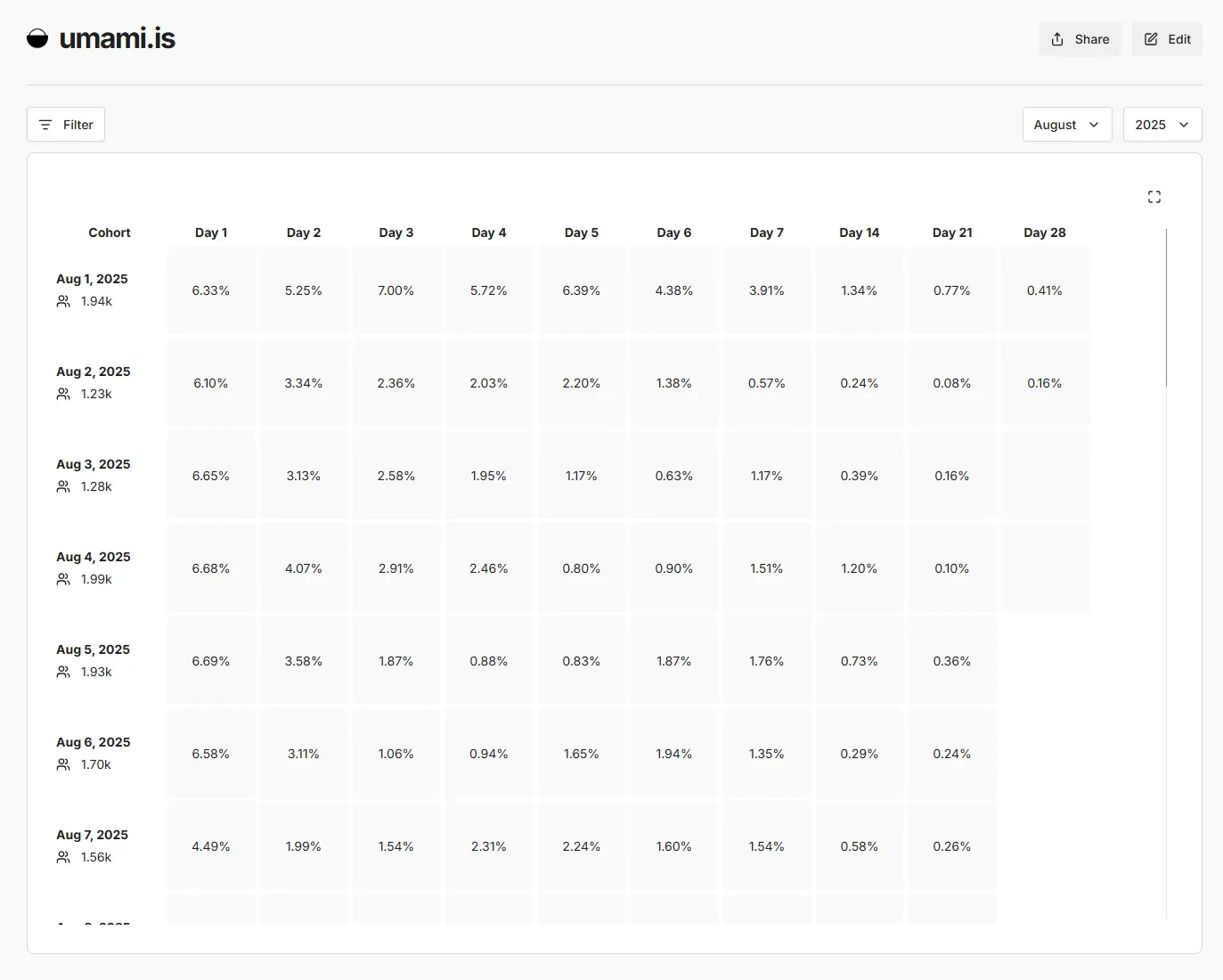
Retention report showing daily visitor cohorts and the share returning on later days. Official screenshot from umami.is.
Source: official Umami project page.
Key capabilities
- Self-hosting with Docker The repository ships a
docker-compose.ymlthat runs Umami on port 3000 with a PostgreSQL 15 container, a health check on/api/heartbeatand a named data volume. Replace the placeholderAPP_SECRETand setTWO_FACTOR_ENCRYPTION_KEYbefore exposing it. A standalone image is also published atdocker.umami.is/umami-software/umami:latest, in which case you supply the database andDATABASE_URLyourself. Updates are pulled and the container is recreated. - Installation from source Clone the repository, run
pnpm install, setDATABASE_URLin.env, thenpnpm buildandpnpm start. The build applies Prisma migrations and creates the default account. The docs recommend PM2 for process management and a reverse proxy in front of the default port.BASE_PATHserves Umami from a subdirectory, which is a build-time setting. - Umami Cloud plans The hosted service has a free Hobby plan (100K events per month, one website, six months of retention), Pro at $20 per month (1 million events, up to 20 websites, two years of retention) and Business at $200 per month (10 million events, five years of retention, 5,000 session replays and heatmaps). Enterprise adds SAML SSO, audit logs and an uptime SLA on custom terms. Each pageview and each stored event property counts as one event, and overages are billed per event rather than dropped.
- Cookieless tracking script Sites load
script.jswith adata-website-idattribute in the page head, or throughnext/scriptin Next.js. Single-page application navigations are tracked automatically. Visitor sessions rely on an anonymous salt that rotates monthly by default throughSALT_ROTATION. Bots are excluded from statistics unlessDISABLE_BOT_CHECKis set. - Tracker configuration Attributes restrict collection to listed hostnames (
data-domains), honour the browser Do Not Track signal, drop URL search parameters or hashes, send data to another host, or pass every payload through adata-before-sendfunction that can modify or cancel it.data-auto-pageview="false"keeps the tracker active without automatic pageviews. The docs note that Do Not Track is deprecated and is not a consent solution on its own. - Custom events and properties Events are sent from
umami.track()or fromdata-umami-eventattributes on HTML elements, with optional properties attached. Since v3.3.0 the event and session property filters apply across data views, and v3.4.0 can store session property filters in saved segments.data-taggroups events for A/B comparisons. Remember that stored properties count toward Cloud event quotas. - Links and pixels Links are short URLs that redirect to a destination and record clicks, with custom slugs since v3.1.0. Pixels are invisible images for newsletters, external pages or other places that cannot run JavaScript. Both have their own statistics pages and share options, and both appear in the tables with sparklines added in v3.3.0.
- Traffic and acquisition reports The website dashboard shows views, visits, visitors, bounce rate and visit duration, with breakdowns by page, referrer, browser, operating system, device, language, country, region and city. A realtime view, period comparison, UTM report and channel attribution complement it. Location comes from CDN headers or a MaxMind-compatible database set through
GEO_DATABASE_URL. - Funnels, goals and journeys Funnels measure conversion and drop-off across page and event steps, with per-step property filters since v3.1.0. Goals track pageview or event targets and accept wildcards. The journey report shows the paths visitors take between pages and events, and can be filtered by event type.
- Retention, cohorts and segments Retention tables show how many visitors from a daily cohort return on later days. Cohorts group users by a shared action in a period, segments save reusable filter sets, and both can be applied as filters. v3.1.0 added OR logic, regular-expression operators and a toggle that excludes bounces.
- Revenue and attribution Revenue is recorded by sending
revenueandcurrencyproperties with an event, for example on checkout. Unrecognised ISO 4217 codes fall back to USD. The revenue report aggregates by period and has a cumulative chart mode since v3.2.0, and attribution connects campaign engagement to conversions. On Umami Cloud, Stripe, Paddle, Polar, Dodo Payments, WooCommerce and Lemon Squeezy can be connected so payments and refunds sync every hour; the pricing page lists integrations from the Pro plan. - Session replay A separate
recorder.jsscript, enabled per website, records sessions with rrweb. Defaults are a 15 percent sample rate, a five-minute maximum duration and a moderate mask level that hides all input fields; the strict level also masks page text, and a CSS block selector excludes elements entirely. Replays are stored for 30 days and only sessions after activation are recorded. On Umami Cloud, replay is part of the Business plan. - Click and scroll heatmaps Heatmaps, added in v3.2.0, also depend on the recorder script and have their own sample rate. Data is grouped by screen width, and the page preview is embedded live, so the tracked site must permit framing through
frame-ancestors. Without that, clicks and scroll depth appear on a blank canvas. - Core Web Vitals With
data-performance="true", the tracker collects LCP, INP, CLS, FCP and TTFB from real visitors. The performance page shows the standard thresholds with rating badges, and v3.4.0 split performance stats, charts and metrics into separate API datasets. - Boards, annotations and sharing Boards compose charts, tables, metric bars and text blocks on a row and column canvas, each component bound to a website, and can be cloned and shared. Annotations from v3.4.0 add dated notes for launches or campaigns to website charts. Public share pages are named individually and expose only the sections you select.
- Teams, admin and account security Teams give members role-based access to specific websites, and an admin page manages all users, websites and teams. TOTP two-factor authentication with backup codes and team-level enforcement is available once
TWO_FACTOR_ENCRYPTION_KEYis set. v3.4.0 also binds sessions to password fingerprints and rejects partial 2FA tokens for API access. - REST API and typed client Everything in the interface is available through a JSON API: at
/apion a self-hosted instance, or athttps://api.umami.is/v1with an API key on Cloud, where API access starts with the Pro plan. Account API keys are created and revoked under Settings. The@umami/api-clientTypeScript package is generated from the OpenAPI contracts, and a report API migration guide maps older endpoints. - Read-only MCP server Since v3.4.0, MCP clients such as Claude, ChatGPT or Cursor can query 23 read-only tools for traffic, events, sessions, funnels, journeys, retention, attribution, revenue and performance. Cloud exposes
https://cloud.umami.is/mcpon Pro and higher plans; self-hosted instances must setMCP_ENABLED=1. A local stdio mode runs throughnpx -y @umami/mcp. Replays, heatmaps and boards are not available through MCP. - Ad blocker and proxy settings
TRACKER_SCRIPT_NAMEandCOLLECT_API_ENDPOINTrename the script and the/api/sendroute.TRUSTED_PROXIESandCLIENT_IP_HEADERrecover the real visitor IP behind proxies,IGNORE_IPexcludes addresses or CIDR ranges, andPRIVATE_MODEstops all external calls, including website icon lookups.DISABLE_TELEMETRYopts out of anonymous usage telemetry.
Where Umami fits
Replacing a cookie-based analytics script on a marketing site
Create a website in Umami, copy the tracking code from its settings into the page head and restrict it with data-domains so staging traffic is not counted. Check referrers, UTM campaigns and page rankings against the previous tool for a few weeks before removing it. The FAQ states that the tracker sets no cookies but that whether a notice is required depends on your other services and jurisdiction, so involve whoever owns the consent policy. If the site uses Google Tag Manager, follow the dedicated Tag Manager guide.
Measuring a signup funnel in a SaaS product
Add custom events for the key steps, such as viewing pricing, starting signup and completing onboarding, either through umami.track() or HTML data attributes. Build a funnel from those steps and a retention report for the resulting cohort. If you identify logged-in users with a distinct ID, sessions are stitched across devices since v3.3.0, but that identifier is personal data you chose to send. Confirm that the funnel counts match your application database for a sample period.
Attributing campaigns and revenue
Tag inbound links with UTM parameters, use Umami short links for channels where you control the URL, and place a pixel in newsletters to record opens. Send revenue and currency with the checkout event, using ISO 4217 codes to avoid the USD fallback. The attribution and revenue reports then connect campaigns to income. On a self-hosted instance, reconcile totals with the payment provider, because refunds only appear if your own events report them; Umami Cloud can sync payments and refunds from providers such as Stripe or Paddle hourly. The revenue documentation covers both sending methods.
Running a self-hosted instance in production
Start from the Compose file or the published image, put a TLS reverse proxy in front of port 3000 and set APP_SECRET, TRUSTED_PROXIES and TWO_FACTOR_ENCRYPTION_KEY. Change the default admin password immediately. Self-hosted data is kept until you delete it, so plan PostgreSQL backups and disk growth, and configure the database for UTC as the installation guide recommends. Rebuild or re-pull images for releases such as v3.4.1, whose fixes include the Node base image, and review the environment variable reference before each upgrade.
Investigating interface problems with replays and heatmaps
Enable replays or heatmaps per website, add recorder.js with the same website ID and start with the default 15 percent sample rate. Select the strict mask level for pages that display personal or financial data, and add a block selector for sensitive components. For heatmap previews, allow the dashboard origin in the site's frame-ancestors policy. Check the 30-day replay retention against your privacy notice, and on Cloud confirm that the account is on the Business plan.
Giving an AI assistant read-only analytics access
On a self-hosted instance set MCP_ENABLED=1, restart, then create a dedicated API key under Settings for the assistant. The tools follow the key owner's website and team permissions, so a restricted user account limits what the assistant can read. Verify that answers match the dashboard for a known date range. The MCP guide lists the 23 tools and the stdio alternative for clients that only support local servers.
Install
git clone https://github.com/umami-software/umami.git && cd umami && docker compose up -dReviews of Umami
Be the first to share your experience with Umami.
Write a review
Loading review form…
Alternatives to Umami
 OpenPanelOpenPanel combines web traffic metrics with product analytics: funnels, retention, profiles, session replay, revenue and AI call tracking. It is AGPL-3.0, cookieless by default and runs in an EU cloud or on your own Docker server.
 GrowthBookGrowthBook combines feature flags, warehouse-native experimentation and product analytics, as a cloud service or self-hosted with Docker Compose.
 MetabaseMetabase is open-source business intelligence for asking questions of your database, building dashboards and embedding analytics. Run the AGPL edition yourself with Docker or the JAR, or use paid Cloud, Pro and Enterprise plans.