
What is Yab?
Yab, short for Yet Another Browser, is a native web browser for the Mac with tabs across the top or down the left, spaces, pins and folders modelled on Arc, one field for addresses and searches, and AI agents that work in tabs of their own. Pages run on WebKit, the engine built into macOS, or on Apple silicon Macs on Chromium, chosen per tab or per site. The About page states that Yab is made by Serafim Korablev as one person working with a lot of AI agents, and that about 4,000 people use it every day. The NOTICE file records that Yab began as a fork of Search by Office Commun, released under the MIT license.
The Mac app is free, needs no account and is downloaded as a DMG from yetanotherbrowser.com for Apple silicon and Intel Macs on macOS 15.4 or later; the About page states that every build is signed and notarized by Apple, and the app updates itself on a Stable or Nightly channel. Versions are dated in the changelog: 0.1 on September 26, 2026, when the app was renamed from Fast to Yab, Chromium as a page engine in 0.46 on November 3, and the current 0.50 on November 19, 2026, delivered as builds 0.50.0 to 0.50.2 while the download link served 0.50.0. Yab for iPhone has been in public beta through TestFlight since 0.21 (October 12, 2026), and the site links an Android alpha APK (0.1.0-alpha.6 at the time of checking); the architecture notes describe the Android client as in progress.
The source code became public with 0.48 on November 17, 2026 in the yetanotherbrowser/yab repository under the Apache License 2.0. The NOTICE file excludes the names Yab and Yet Another Browser, the logo and the app icons, which are trademarks of Serafim Korablev, and the bundled Central Icon System icons, which are licensed separately. The website's About page still says the browser is not yet open source, while the changelog and the repository state that it is. Releases are not published as GitHub releases; they ship through the website and the built-in updater.
The architecture document describes a SwiftUI app with AppKit where SwiftUI does not reach, split into SwiftPM modules for the app, the design system, storage, a Gmail and IMAP mail engine, sync and updates. Chromium tabs come from a helper built on the Chromium Embedded Framework with Yab's own patches, and Chrome extensions run on WebKit through WKWebExtension. The iPhone app uses SwiftUI and WKWebView, the Android client uses Kotlin, Compose and GeckoView, and the sync server is a Cloudflare Worker that stores sealed records it cannot read. The repository also contains a Raycast extension and agent skills for specific sites.
Governance is set out in GOVERNANCE.md: the owner decides on scope, look and releases, maintainers merge bug fixes with proof, and coding agents run by maintainers may open pull requests but never merge, release or label on their own. The project states that Yab follows Arc's behaviour and that a request to diverge waits until 10 people ask, then ships as an option. Other browsers listed on iThub include Zen Browser, Helium and Flow Browser.
Key capabilities
- Mac download and requirements Yab is a free download for Apple silicon and Intel Macs running macOS 15.4 or later, installed from
yab.dmg; the download page describes opening the image and double-clicking Open Yab, which moves it to Applications. The site gives the app size as 40 MB. There is no Yab account, and the app updates itself and asks for a restart when an update is ready. - Two page engines Each tab holds a page handle that runs on WebKit or, on Apple silicon, on Chromium, chosen per tab, per site or by a default in Settings. The README states that the released app opens pages in Chromium by default on Apple silicon, with protected video and Apple Pay checkouts in WebKit. Chromium tabs bring Chrome extensions, Chrome DevTools and the Chrome Web Store, and the About page states they receive Chromium security fixes as they come out.
- Tabs, spaces and folders Tabs sit in a column on the left as in Arc or in a row across the top, switched with Shift-Command-S. The manual covers pinned and kept tabs, folders inside folders, live folders that fill themselves with pull requests, issues, files and feeds, spaces with their own colour and sign-ins, and tidying of old tabs. Tabs restored from the last session cost nothing until clicked, and Command-K finds any open tab.
- One field A single field handles addresses and searches; it completes addresses from the user's own history and, according to the README, sends nothing until Return is pressed. The same field reaches open tabs, history, commands and settings, with quick actions, clipboard history, a calculator with units, currencies and time zones, emoji search and site search by keyword.
- Split View, Peek and floating video Option-click opens a link beside the current page in Split View, where each half keeps its own address bar. Shift-click opens Peek, a page over the current one that closes back to where the user was. Floating video lifts a video into a small window above other apps, and links from Mail or Slack can open in a small window over that app.
- Ad blocking and hiding elements The ad blocker is a compiled content rule list that runs inside the engine before a request is made; the site states it uses uBlock Origin's lists, about 160,000 rules, and can be switched off per site. Shift-Command-H hides any element on a site permanently, using per-site selectors injected before the first frame, as described in the manual.
- Chrome extensions Extensions install from the Chrome Web Store with an Add to Yab button and run on WebKit or Chromium. The site names Bitwarden, uBlock Origin Lite, Dark Reader and Grammarly as working examples, and the extensions manual covers how they are stored. Extensions can follow the user to other Macs through Sync.
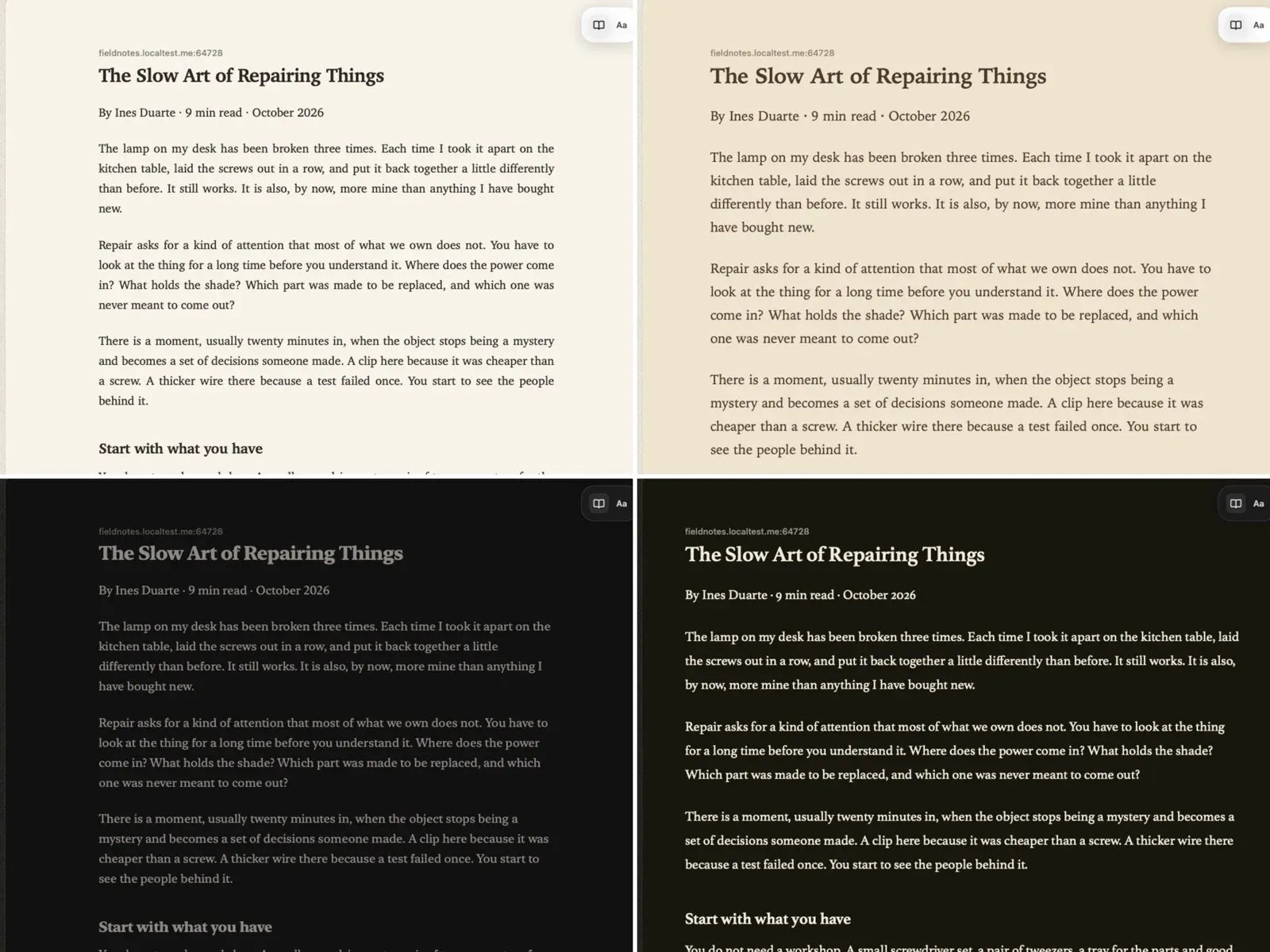
- Reading, translation and capture Reading mode shows an article alone in a clean column while keeping the page underneath, with several themes. Pages in another language are translated in place on the Mac. Capture copies part of a page, the visible area or the whole page to the clipboard on a backdrop, and pages or links can be copied as Markdown or as a file for an agent.
- Passwords and autofill Passwords are stored in the macOS login keychain as items tagged
yab, or in a connected password manager. The manual covers passkeys, one-time codes stored beside passwords, addresses and cards filled after Touch ID, and filling whole forms such as sign-ups and checkouts from earlier answers. - Agents in their own tabs Yab has no model of its own: agents run on the user's existing Claude or ChatGPT plan, and the changelog adds Gemini and Cursor as full agents and an option for an own API key. Agents work in tabs beside the user's with the user's sign-ins and never see a private tab. In the Ask and Auto modes, sending, paying and deleting wait for the user's approval, as described in What agents ask first; memory is kept on the Mac as Markdown notes, and routines repeat tasks on a schedule.
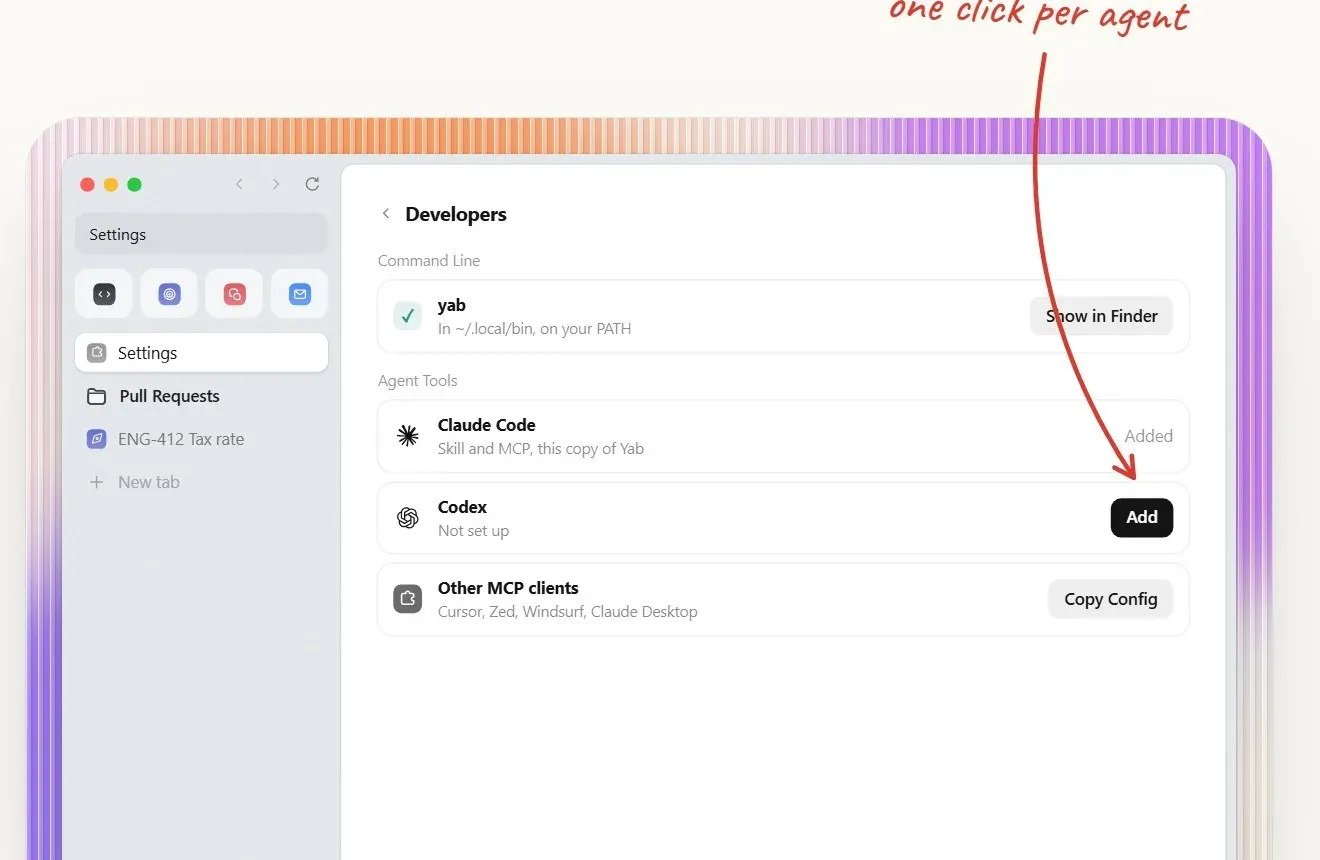
- MCP server and the yab command Settings, Developers installs Yab's MCP server and skill into Claude Code and Codex, and Copy Config produces entries for Cursor, Zed, Windsurf and Claude Desktop;
yab setupdoes the same from a terminal. The developers page lists tools for accessibility snapshots with element refs, trusted clicks and typing, JavaScript runs of up to 200 tool steps per call, fetching a URL with the user's cookies, screenshots and PDFs, file upload and download, history, memory and native control of spaces, pins and settings. - Mail Mail puts a Gmail account in a space of its own, stored on the Mac and sorted into splits by sender and type. The manual covers keyboard triage, replies and forwarding with undo, snippets, reminders and send later, Gmail search operators, unsubscribing, calendar invitations answered in place, and an agent that drafts and sends only after approval.
- Boosts, plugins and the Store Boosts are small changes to sites, such as larger text or hidden promoted cards, tried on the user's own page and kept only when confirmed. The Store lists published boosts per site with a check status. Plugins go further with page scripts, tools for agents, their own pages and scheduled automations through the yab API, and are published to the Store by pull request after a check on the live site and a review by a person.
- Sync Optional Sync carries spaces, tabs, bookmarks, settings and passwords between Macs and the iPhone, each record sealed on the device with a key that iCloud Keychain carries to the user's other Macs. The privacy document states that the server sees only how many records there are, their sizes and when they change. Chats of the last 14 days and agent memory can also sync.
- Bringing in from other browsers Bring In imports tabs, spaces, passwords, cards, bookmarks, history and extensions from the browser in use; the site names Arc, Dia, Chrome, Safari, Firefox and Brave, and the changelog adds Zen and Dia's spaces. Arc's spaces, pins and folders land where they were, and history from other Chromium browsers can be read in place for suggestions.
- iPhone and Android companions Yab for iPhone is in public beta through TestFlight and shares Sync with the Mac. The Android client is distributed as an alpha APK from the website; its release notes in the repository describe the first alpha as a usable browser milestone that does not claim the stricter Beta 1 acceptance, with translation and the full extension flow still experimental.
- Building from source CONTRIBUTING.md requires a Mac on macOS 15.4 or later with Xcode 26 or later;
./build.shproduces Yab Dev, a separate development copy with its own bundle id, data and keychain items, signed ad hoc with no Apple developer account. The first build took 13 minutes on an M2 Pro. Chromium tabs are optional for contributors and use the official CEF build instead of Yab's patched one. - Privacy data flows The privacy document lists what stays on the Mac and what leaves it: a daily activity ping with random IDs that can be switched off, crash reports sent only after consent, pages an agent reads sent to that agent's model provider, and sealed Sync records. History can also index the words of visited pages locally, except private tabs and password pages, and that can be switched off.
Where Yab fits
Moving from Arc or another browser
On first launch Yab offers to bring in pinned tabs and passwords from the current browser, and Bring In also imports spaces, folders, cards, bookmarks, history and extensions. The compare pages cover Arc's shutdown, which the site dates to December 22, 2026, and the export steps. The manual lists every keyboard shortcut and how to assign another key to any of them.
Choosing WebKit or Chromium per site
On Apple silicon the released app defaults to Chromium, while sites that need protected video or Apple Pay open in WebKit, and the engine can be set per tab, per site or globally. For bug reports, the README names the Yab version, the macOS version and the tab's engine as the details that matter most. Intel Macs use WebKit only.
Letting a coding agent test a local web app
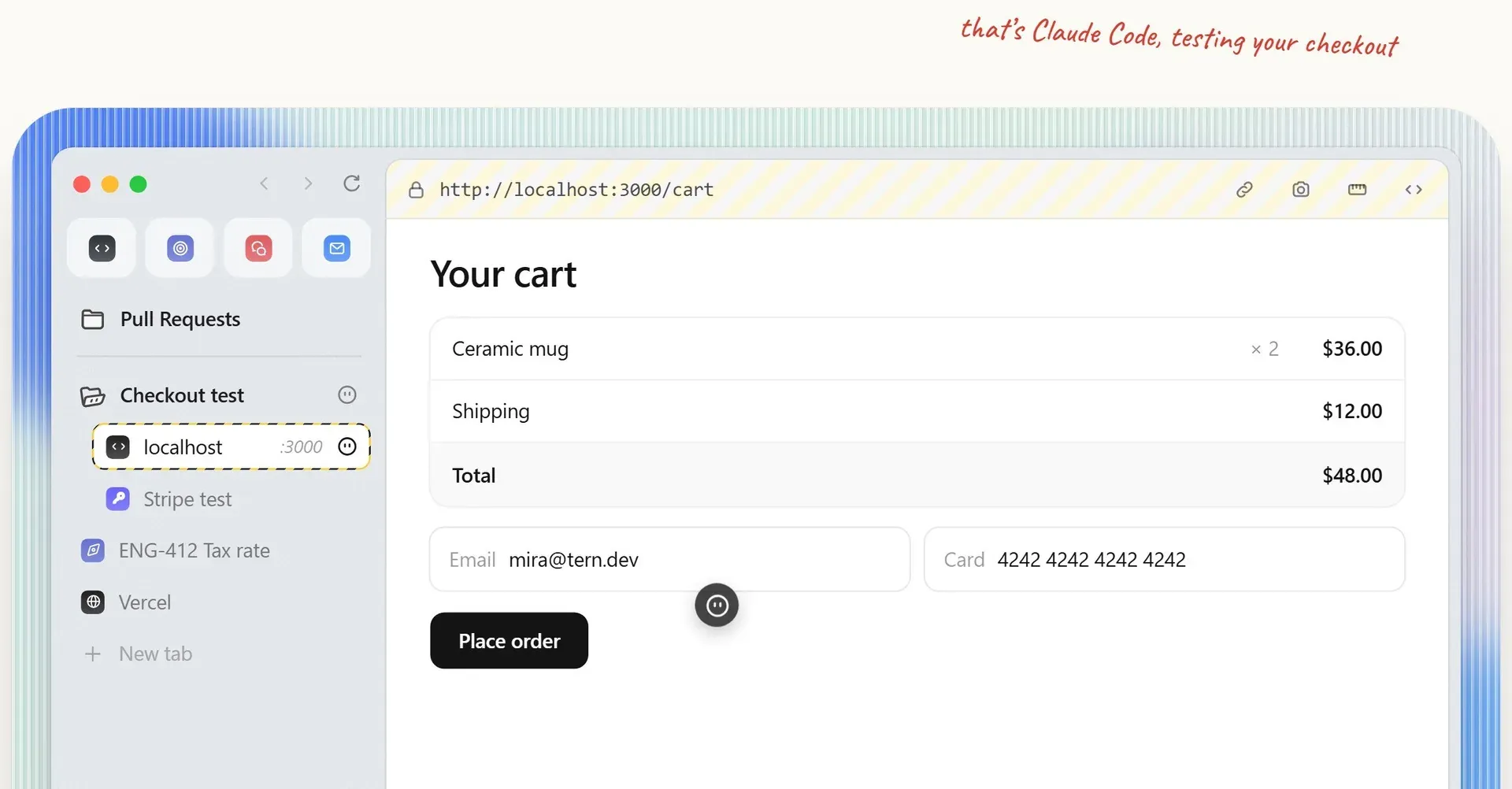
After Settings, Developers connects Claude Code, Codex, Cursor or Zed, the agent opens pages in the space where the user is already signed in, including localhost, staging and dashboards, without exporting cookies or minting tokens. The developers page shows an agent placing a test order on a local checkout. Saved passwords are filled by Yab without the agent seeing them, and two-factor prompts and captchas are handed to the user.
Delegating web tasks to Claude or ChatGPT
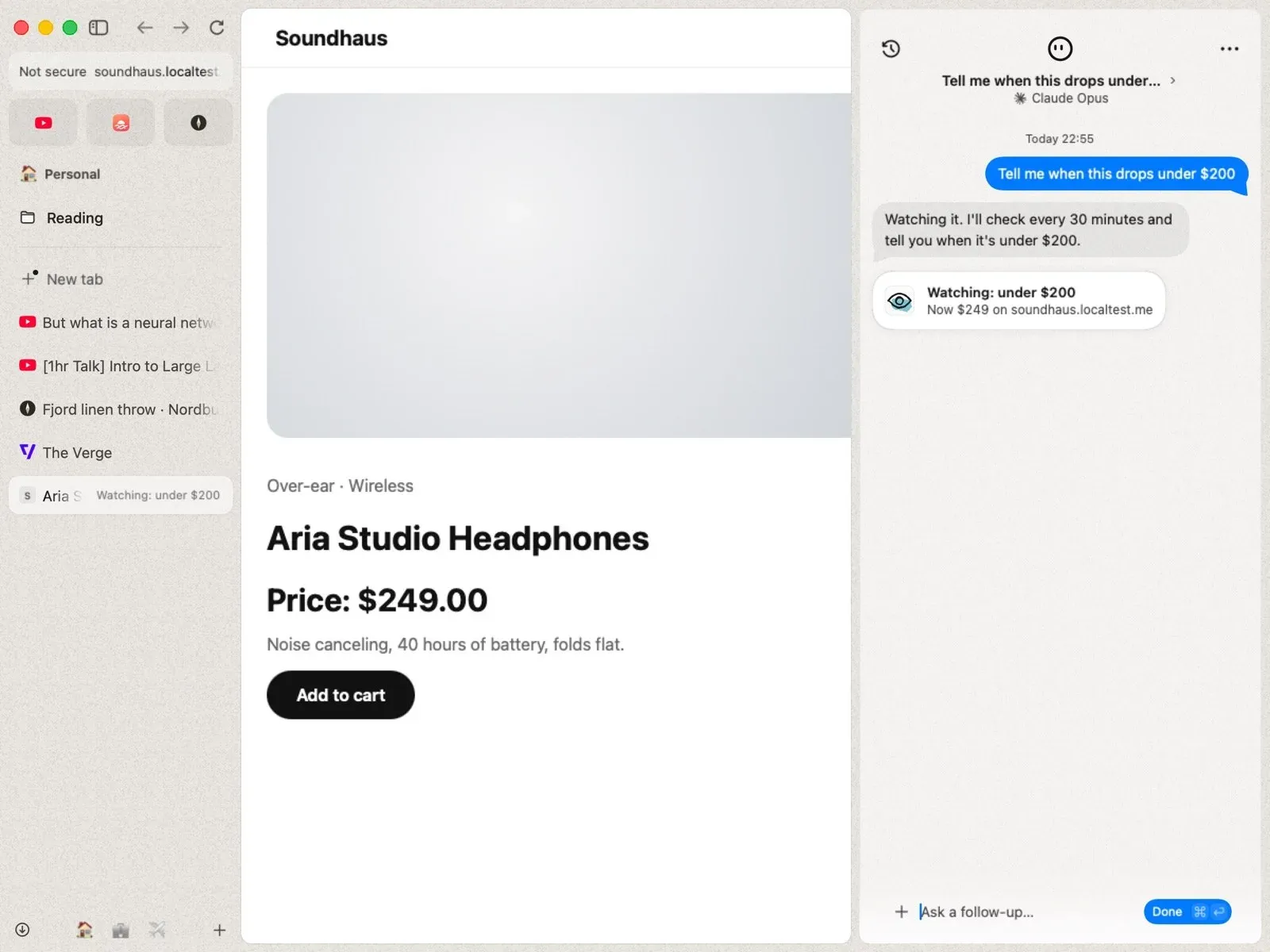
From the field or the chat column, a task in plain words goes to the connected agent, which works in its own tabs and reports its steps in the chat. Agents can watch a page, for example for a price drop, save a table to Excel or close tabs, and routines repeat checks on a schedule. Actions that send, pay or delete wait for the user's yes on a card.
Syncing between Macs and an iPhone
With Sync switched on, spaces, tabs, bookmarks, settings and passwords appear on the user's other Macs and on the iPhone beta, encrypted on the device before they leave it. The sync server, a Cloudflare Worker whose code is in the repository, stores records it cannot read. Sync is optional, and without it data stays in the app's Application Support folder and the keychain.
Contributing a fix to the open-source code
The repository invites bug fixes first, with issues labelled good first issue and help wanted. CONTRIBUTING.md states what proof a pull request needs, CI runs on GitHub's macOS runners, and a maintainer reads each new pull request by hand. Security problems go privately through the process in SECURITY.md rather than in an issue.
Reviews of Yab
Be the first to share your experience with Yab.
Write a review
Loading review form…
Found Yab useful? Upvote it todayYour vote helps other IT teams find it in the daily ranking.