

What is Midori Browser?
Midori Browser is a desktop web browser developed by Astian, Inc. on top of the Gecko engine that powers Mozilla Firefox. The Midori name is older than the current code: the project started in 2007 as a lightweight GTK browser built on WebKit, joined Astian in 2019, and the README now describes it as having moved from WebKit to Gecko. The current desktop repository, goastian/midori-desktop, was created in October 2023. Astian positions Midori as a privacy-oriented browser with zero telemetry by default, built-in content blocking, no account requirement and an optional VPN, alongside its AstianGO search engine and MidoriVPN.
The repository contains a Firefox-derived source tree in engine/, Midori additions and overrides in src/, branding and per-platform mozconfig files in configs/, and build, packaging and validation scripts. Builds run through Amelia, Astian's build tool, via npm scripts. The build configuration pins the upstream Firefox version: tag v11.9.1 is based on Firefox 152.0.6 and bundles two first-party add-ons, the midori-privacy protection extension and the midori-tab new tab page. On the dev branch the base has moved to Firefox 159.0.1 with a display version of 11.9.2, and the privacy extension is no longer bundled because blocking is being moved into the browser itself.
The latest published desktop release is v11.9.1, released July 20, 2026. Changes in the 11.9 series include an auto-hide mode for horizontal tabs, tabs shown on hover in inactive windows, vertical tab and web panel sidebar options in the first-run setup, a new entry point to the about:center settings page, an updated blocker, and fixes for memory management, context menus, shortcuts and window layout on Windows 10 and 11. Astian has said on its blog that the desktop gap since July is due to Midori Sync, a native ad blocker announced for 11.9.2 and work toward Midori 12. The Android browser, midori-android, is a separate GeckoView code base with its own release line (11.9.5 in November 2026).
Each desktop release ships a Windows x64 installer and ZIP, Linux tar.xz archives for x86_64 and aarch64, an x86_64 AppImage, Debian packages for amd64 and arm64, and RPM packages for Fedora, openSUSE Tumbleweed and openSUSE Leap. Debian and Ubuntu users can also add Astian's APT repository. macOS DMG images were last published with 11.5.2 and Windows arm64 ZIPs with 11.6.5, so current official downloads cover Windows and Linux only, although the build scripts still contain macOS targets. Midori is licensed under the Mozilla Public License 2.0 and states that it is based on Firefox but not affiliated with Mozilla. In November 2026 the project was accepted into the HeroDevs Open Source Sustainability Fund.
Out of scope today: there is no current macOS build, no documented native Windows build environment (Windows packages are cross-compiled from Linux), no public admin guide for Midori Enterprise and no released sync service. Firefox Sync is disabled in desktop builds, and Astian's own Midori Sync is announced but not yet in a desktop release.
Midori Browser screenshots
Explore the interface. Open a screenshot to view it at full size.
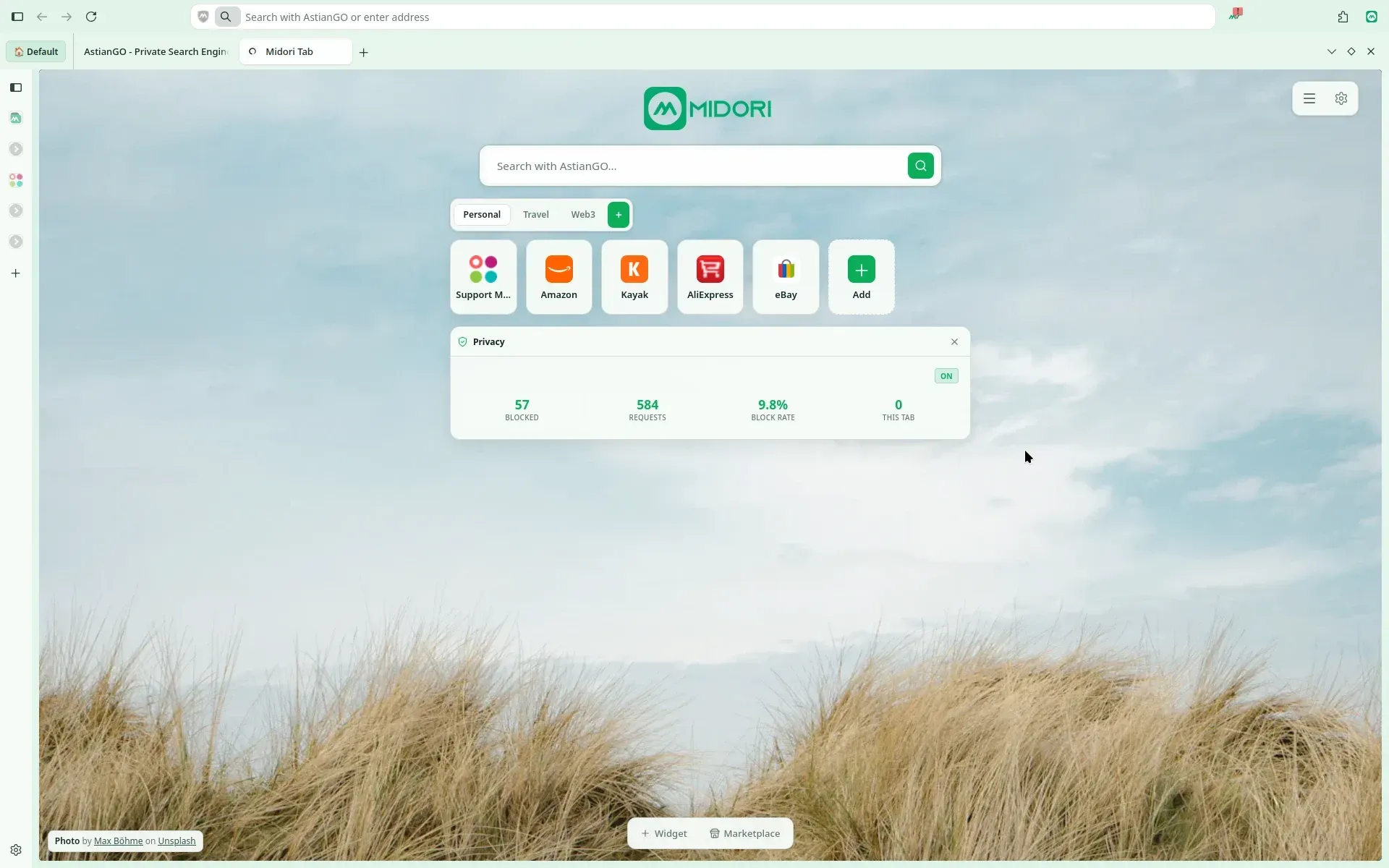
Official product image: the Midori Tab new tab page with vertical tab sidebar, AstianGO search and blocking statistics.
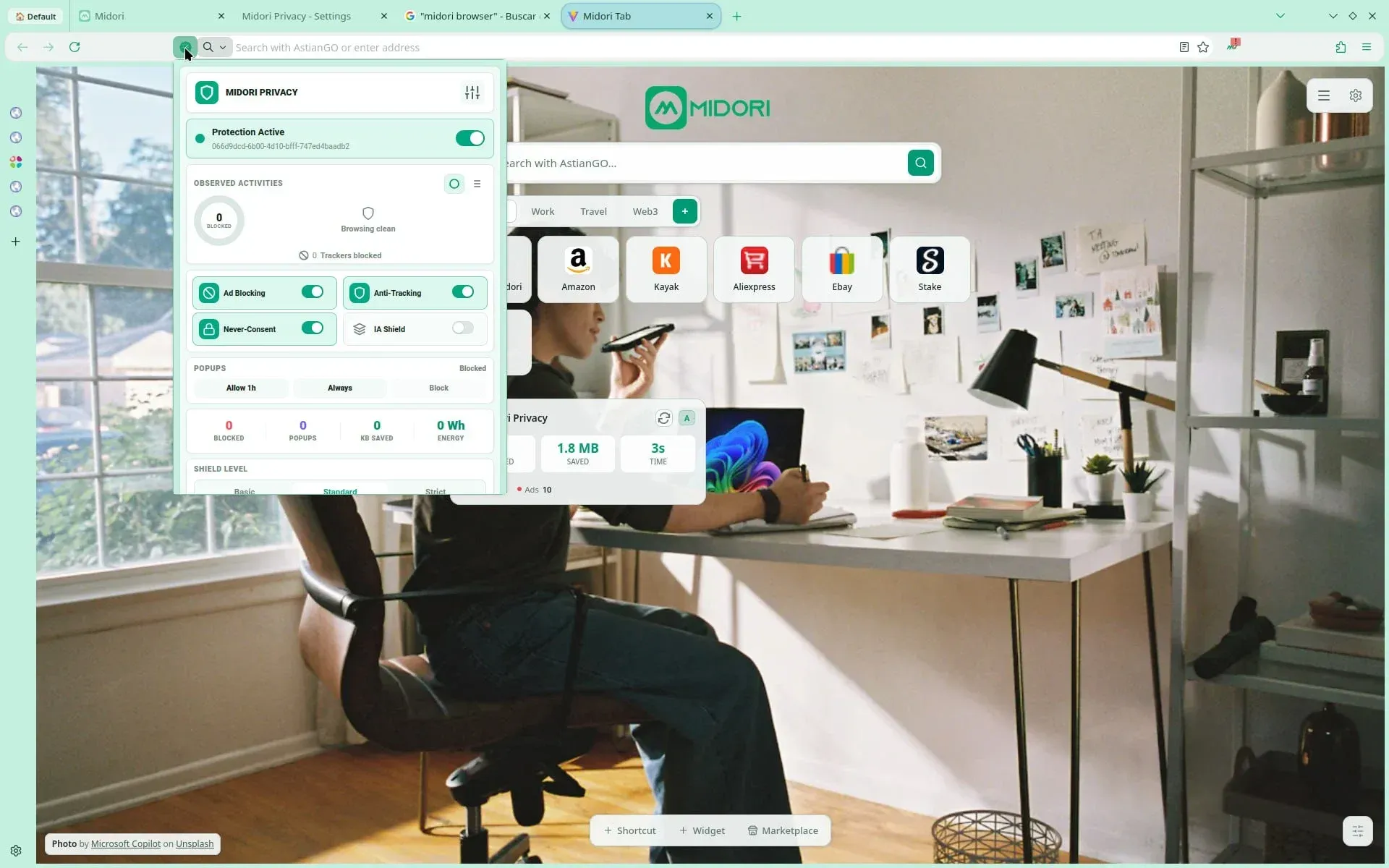
Official screenshot of the protection panel: four blocking layers, per-site popup control, counters and Basic, Standard and Strict levels.
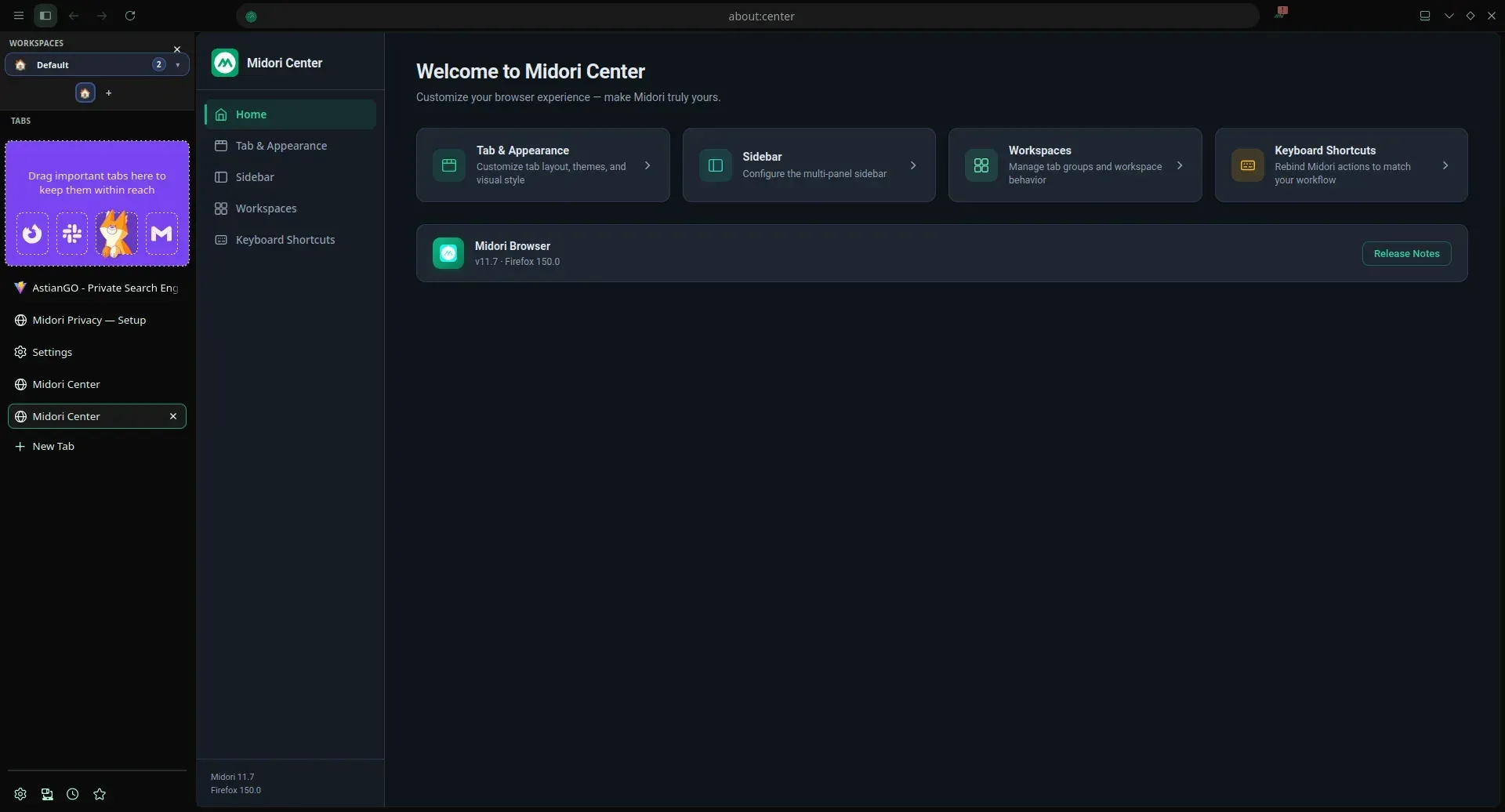
Repository screenshot of about:center in Midori 11.7 on Firefox 150, with workspaces and pinned tabs in the sidebar.
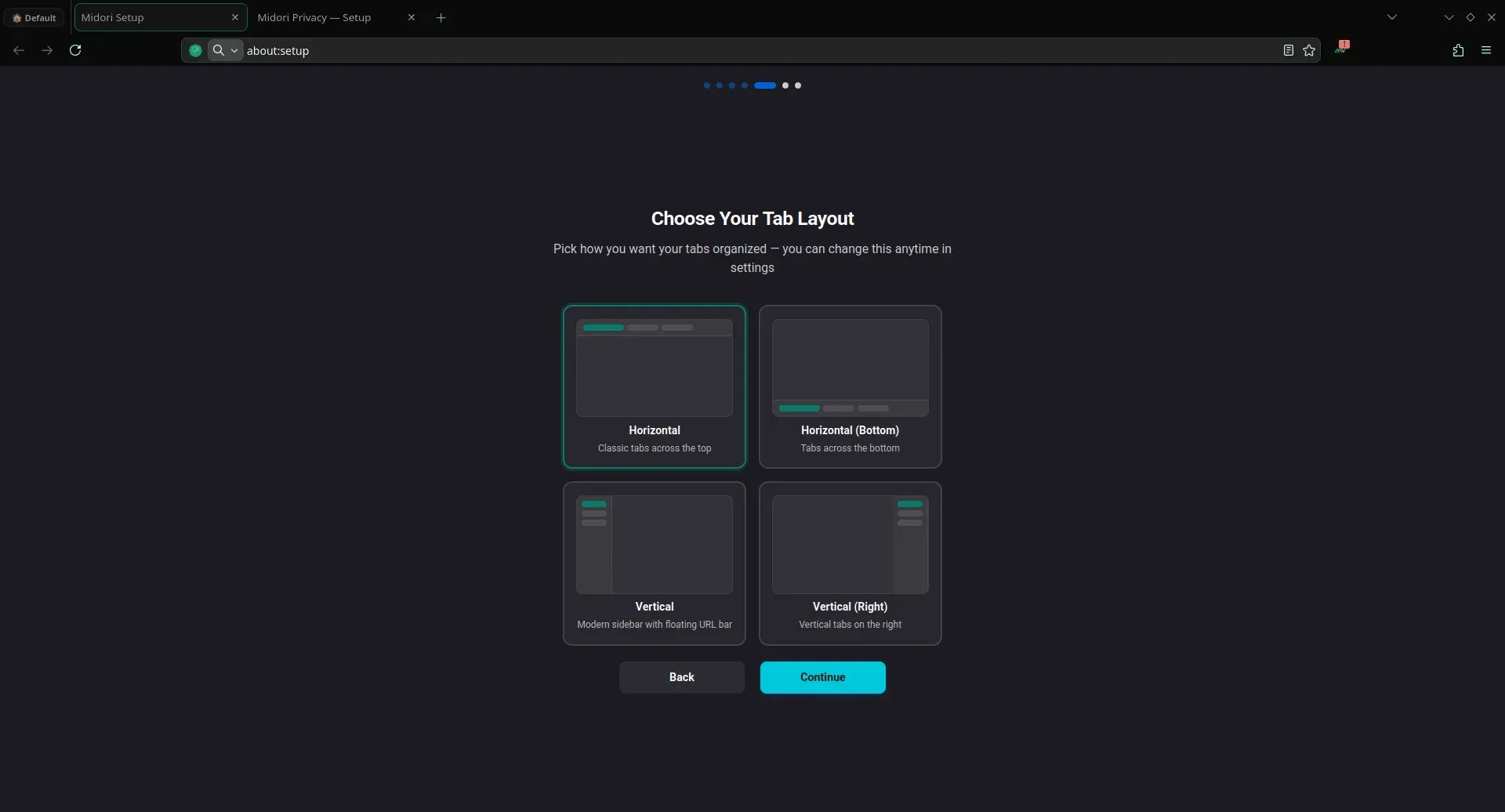
Repository screenshot of the first-run setup: four tab layouts that can be changed later in settings.
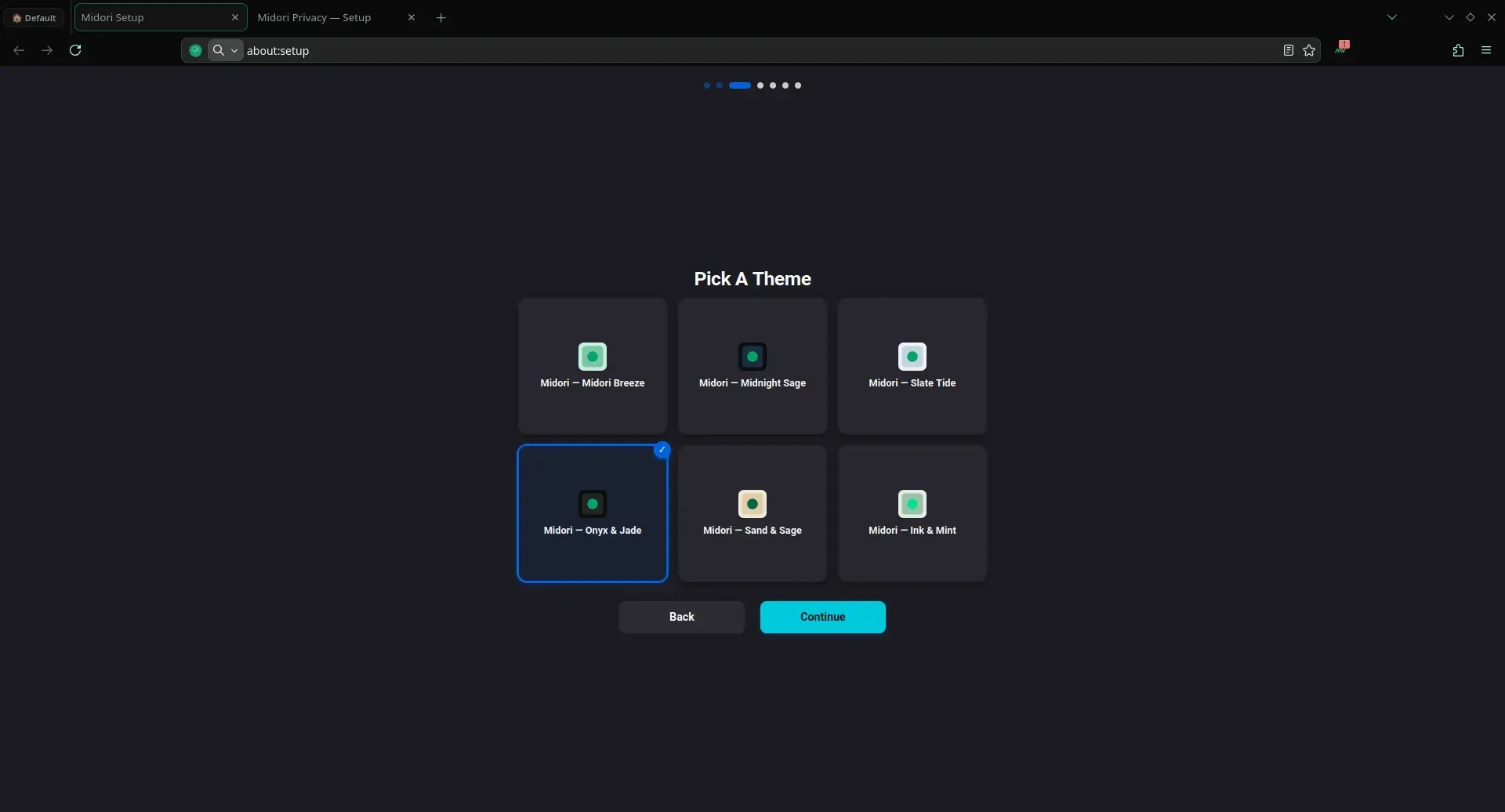
Repository screenshot of the theme step in first-run setup with six bundled Midori themes.
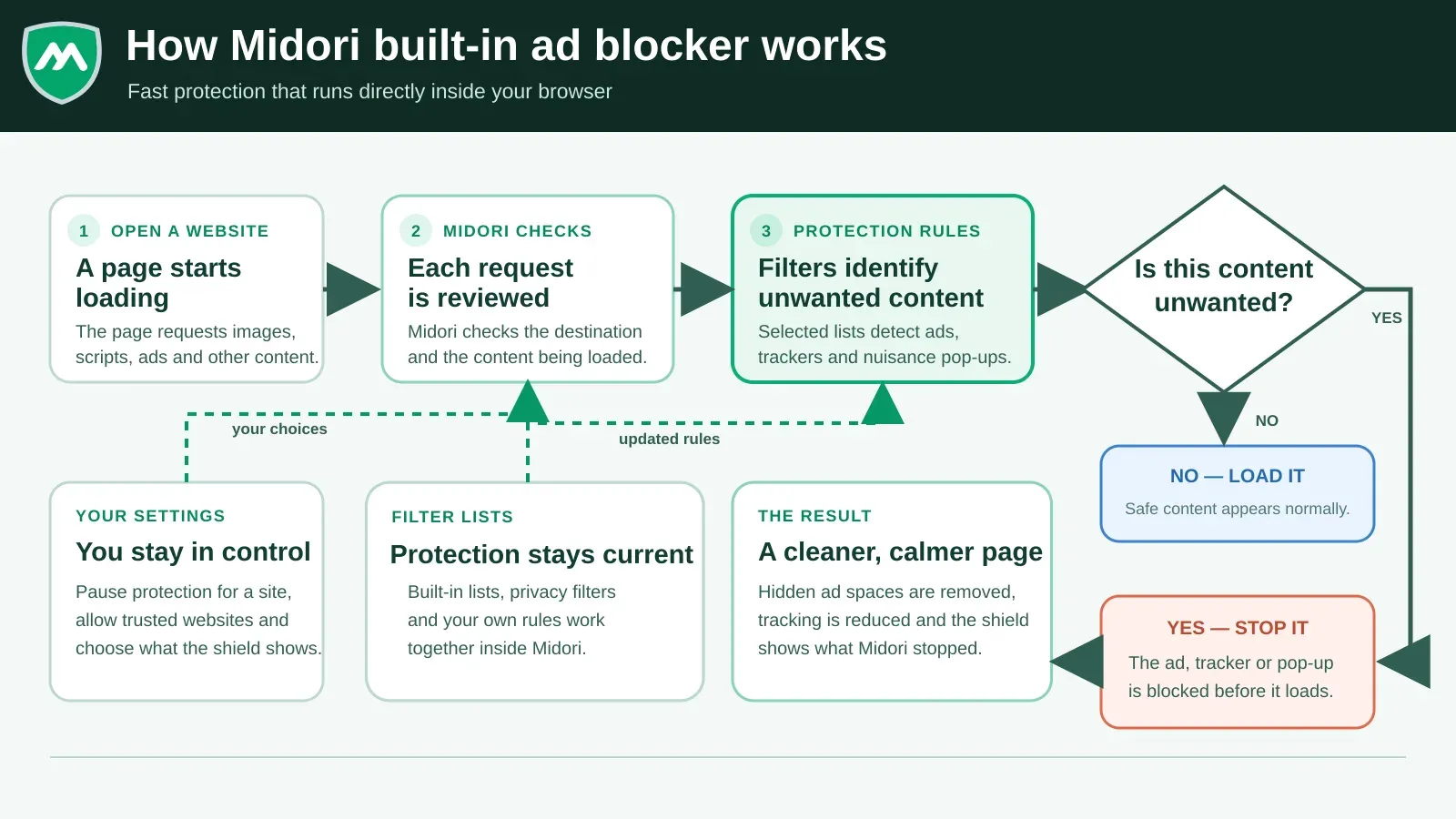
Official diagram from Astian's announcement of the native ad blocker planned for Midori 11.9.2.
Source: official Midori Browser project page.
Key capabilities
- Gecko engine with Firefox extension support Midori is built from the Firefox source tree, so pages render with the same Gecko engine and the browser accepts Firefox WebExtensions. Version 11.9.1 is based on Firefox 152.0.6. Because Midori rebases on upstream Firefox on its own schedule, security fixes reach users only when Astian publishes a new Midori build, not on Mozilla's release day.
- Content blocking with four protection layers The protection panel exposes Ad Blocking, Anti-Tracking, Never-Consent (automatic rejection of cookie and tracking consent prompts) and a fourth layer the site calls IA Shield, with Basic, Standard and Strict shield levels and live counters for blocked items, popups, data and energy saved. In 11.9.1 this panel is the bundled midori-privacy extension (GPL-3.0); Astian announced that a blocker integrated into the browser core and enabled by default arrives with 11.9.2. The site does not document what IA Shield blocks.
- Per-site popup control From the same panel each site can be set to allow popups for one hour, allow them always or block them. Protection can also be paused for a single site and trusted sites allowed, according to Astian's blocker documentation. This is the place to check first when a payment or login popup fails to open.
- Zero telemetry by default Astian states that Midori collects no usage data on any platform and that this is the default rather than an opt-out. No account is needed to use the browser. The company privacy policy covers its website and services separately and mentions Google Safe Browsing lookups, so read it alongside the browser claims.
- Midori Center settings hub The
about:centerpage collects Tab and Appearance, Sidebar, Workspaces and Keyboard Shortcuts in one place and shows the Midori and Firefox version with a link to release notes. Keyboard shortcuts can be rebound to Midori actions. Standard Firefox settings remain available for everything else. - Workspaces and tab layouts Tabs can sit horizontally at the top or bottom, or vertically on the left or right with a floating URL bar, and the layout can be changed later. Workspaces group tabs, and a pinned area holds frequently used sites. The 11.9 series added an auto-hide mode for horizontal tabs and showing tabs on hover in inactive windows.
- Sidebar with web panels A multi-panel sidebar can host web panels next to the page, configured in Midori Center and during first-run setup. It suits chat, mail or documentation pages that need to stay visible. Each panel is a regular web page, so it uses the same blocking and cookie rules as a tab.
- First-run setup with themes On first launch
about:setupwalks through tab layout, theme choice and protection options. Six Midori color themes are offered, from light to dark. Every choice can be changed later in Midori Center. - Midori Tab new tab page The new tab page is the separate midori-tab project (AGPL-3.0), bundled as an add-on. It shows an AstianGO search box, grouped shortcut tiles, widgets, background photos and a privacy statistics card, plus a marketplace entry. Default tiles in official screenshots point to shopping and travel sites, so review them when deploying to a team.
- AstianGO default search AstianGO, Astian's own search engine, is the default and the site states it keeps no query logs or profiles. Astian has announced Ecosia, Qwant and StartPage as additional built-in choices, noting there are no commercial agreements with them.
- Built-in MidoriVPN free tier A free VPN tier is available from the side panel with a server choice and no extension, using WireGuard according to Astian. It covers browser traffic only and requires signing in. A separate paid VPN Premium desktop app for Windows, macOS and Linux covers all applications; plans are loaded dynamically on the MidoriVPN page, so iThub lists no price.
- Password manager and private windows Midori keeps the Firefox password manager and form autofill, and the private window mode from Firefox. Firefox Sync is disabled in desktop builds, so saved passwords do not sync between devices until Midori Sync ships. Export them or use an external manager if you need them on more than one machine.
- Windows download Each release offers
midori-<version>.win64.installer.exeand a portablewin64.zipfor 64-bit Windows 10 and 11. The build produces MAR update archives served from update.astian.org. Windows arm64 ZIPs were published up to 11.6.5 but not for the current release. - Linux packages and APT repository Releases include tar.xz archives for x86_64 and aarch64, an x86_64 AppImage,
.debpackages for amd64 and arm64, and RPMs for Fedora, openSUSE Tumbleweed and openSUSE Leap. Debian and Ubuntu users can add the repository at repo.astian.org with its signing key and runsudo apt install midori. The AppImage ships a policy that turns off in-app updates, so it must be replaced manually. - macOS status DMG images for Apple silicon and Intel were published with releases 11.5 to 11.5.2 and have not been published since. The repository still contains macOS build scripts and CI fixes for Mac Intel, so a return is possible, but Mac users currently have no supported current build.
- Android companion app Midori for Android is a separate MPL-2.0 project distributed through Google Play and GitHub releases. Recent Android releases added native ad blocking, web apps, background media playback, gestures and early sync work. Feature parity with desktop is not guaranteed because the two code bases ship on different schedules.
- Midori Sync (announced) Astian is building its own sync service to replace Firefox Sync, covering passwords, bookmarks, settings, open tabs, history and send-tab. The server is AGPL-3.0, written in PHP with Laravel and Vue, uses libsodium with XChaCha20-Poly1305 and Argon2id, and can be self-hosted. The dev branch contains sync code, but no desktop release includes it yet.
- Build from source The README documents builds on Debian or Ubuntu for Linux x86_64 and arm64, on macOS with Xcode tools, and Windows cross-compilation from Linux with wine and msitools. Requirements are at least 50 GB of free disk, 16 GB of RAM recommended, Node.js 22, Python 3.11, Rust and Clang.
npm test,npm run test:unitandnpm run l10n:validaterun the repository checks. - Localization The interface is localized into more than 60 languages according to the official features page, with translations managed through Crowdin and language packs downloaded at build time. Check that your required locale is included in the build you install.
Where Midori Browser fits
Replacing Firefox or a Chromium browser on a Linux desktop
Install Midori from the APT repository, the RPM for your distribution or the AppImage, then run the first-run setup to pick a tab layout and theme. Import bookmarks and passwords from Firefox or a Chromium browser through the standard import dialog, reinstall the Firefox extensions you rely on, and open your daily sites with protection at the Standard level. Check that sign-in popups, payment pages and video sites work, and note which sites need a per-site exception.
Setting a privacy baseline for a small team on Windows
Deploy the Windows installer to a pilot group and document the defaults you keep: protection level, Never-Consent, default search engine and whether the built-in VPN may be used. Midori Enterprise has no public admin guide, so test the Firefox enterprise policy mechanism (policies.json) before relying on it for settings such as extension allowlists. Review the new tab tiles and replace them with internal links.
Organizing research with workspaces and vertical tabs
Choose the vertical layout in setup or Midori Center, create one workspace per project, and pin the sites you return to in the pinned tab area. Add chat or documentation pages as web panels in the sidebar so they stay visible next to the page you are working on. Remap shortcuts in Midori Center if your team has existing muscle memory from another browser.
Comparing blocking strength with your current setup
Open the same set of pages in Midori and in your current browser with its blocker, and compare the counters in the Midori privacy panel with what you expect to be removed. Switch between the Basic, Standard and Strict shield levels to see where sites start to break. After 11.9.2 ships the native blocker, repeat the test, since the blocking path moves from an extension into the browser.
Building a custom or audited Midori
Clone the repository on a Debian or Ubuntu machine with at least 50 GB free, install the listed dependencies, Node.js 22, Python 3.11 and Rust, then run npm ci, npm run brand, the bootstrap step and npm run build:linux-x64. Verify the output with scripts/verify-build-output.sh and package with npm run package:linux-x64. Compare the pinned Firefox version in amelia.json with the current Firefox release to judge the patch gap.
Testing Midori Sync on your own server
Teams that want cross-device sync without a vendor account can follow the midori-sync repository, which runs on ordinary PHP hosting. Until a desktop release includes the sync client, treat this as an evaluation: set it up on a test host, confirm which data types sync between desktop and Android, and check how keys are derived and recovered before moving real passwords.
Install
sudo wget -O /etc/apt/trusted.gpg.d/midori-archive-keyring.gpg http://repo.astian.org/midori-archive-keyring.gpg && echo "deb http://repo.astian.org midori main" | sudo tee /etc/apt/sources.list.d/midori.list && sudo apt update && sudo apt install midoriReviews of Midori Browser
Be the first to share your experience with Midori Browser.
Write a review
Loading review form…
Alternatives to Midori Browser
 Zen BrowserZen Browser is an open-source, Firefox-based desktop browser with workspaces, compact mode, split view and a mods registry for custom themes.BBBrave BrowserBrave is a web browser from Brave Software that blocks ads and trackers by default and ships a built-in VPN, with an independent search engine.
 HeliumGPL-3.0 Chromium browser from imput for macOS, Windows and Linux. It removes Google service dependencies, bundles a uBlock Origin fork, adds local !bangs and four layouts, and routes services through a self-hostable backend. Still in beta.