
What is JobOps?
JobOps is a self-hosted web application that runs a job search as a pipeline: it collects postings from several job boards in one run, scores each role against the user's profile, drafts a tailored CV for selected roles, exports PDFs and tracks applications and employer replies. The GitHub description sums it up as DevOps principles applied to job hunting. The README names Shaheer Sarfaraz (GitHub account DaKheera47) as the builder; the product site is jobops.app and the documentation is at jobops.dakheera47.com/docs. The README states that JobOps does not apply to jobs on the user's behalf: the user still submits every application.
The application is written in TypeScript: a React client built with Vite and an Express server, with data in a SQLite database accessed through Drizzle ORM. The Docker image, based on node:22-slim, also contains Python 3 with the python-jobspy library, Playwright with Firefox, the Camoufox browser used by browser-based extractors, and Tectonic and Typst for local PDF rendering. The documentation is a Docusaurus site that is also bundled into self-hosted installs at /docs. Deployment uses Docker Compose with the prebuilt image ghcr.io/dakheera47/job-ops; no environment variables are required to boot, the app is served on port 3005 by default, and the database, generated PDFs and challenge cookies are kept in a ./data bind mount, as described in the self-hosting guide.
The LICENSE file contains the GNU Affero General Public License v3.0 preceded by the Commons Clause License Condition v1.0. That condition removes the right to sell the software, defined as providing third parties, for a fee or other consideration (including hosting, consulting or support fees), a product or service whose value derives entirely or substantially from JobOps. Because of this restriction the combination is not an OSI-approved open source license, and GitHub reports it as NOASSERTION; the README itself describes the self-hosted version as free and open source and summarizes the terms as free self-hosting, use and modification without selling the software or paid hosting based on it.
JobOps Cloud is the hosted offering. As listed on the jobops.app pricing section on November 18, 2026, the Ready to Go plan costs £30 per month with AI usage included, the For Developers plan costs £20 per month with the user's own API keys, and each additional profile costs £10 per month. The README notes that hosted instances may enforce monthly quotas for searches, AI tailoring, Ghostwriter generations and PDF exports, while self-hosted installs are unaffected unless hosted quotas are enabled. It also states that JobOps sends anonymous usage analytics to Umami, which can be stopped by blocking umami.dakheera47.com.
The latest release is v0.14.0, "More Ways In, Better Jobs Out", published on October 27, 2026. It added a LiteLLM proxy provider and an API Route provider, sign-in through single sign-on with account linking, a paper size setting for generated PDFs, bulk manual import from lists of URLs, reading job descriptions from text PDFs and permanent deletion of jobs, along with fixes for Hiring Cafe scraping and for US searches losing results during location filtering. Earlier releases added OJCP and FreeHire support (v0.12.0, August 25, 2026) and larger watchlists with more AI providers (v0.13.0, September 15, 2026). Several extractors scrape job board websites, among them LinkedIn, Indeed and Glassdoor through JobSpy, so their use is subject to those sites' terms. Similar listings on iThub: Dossier and AI Job Search.
Key capabilities
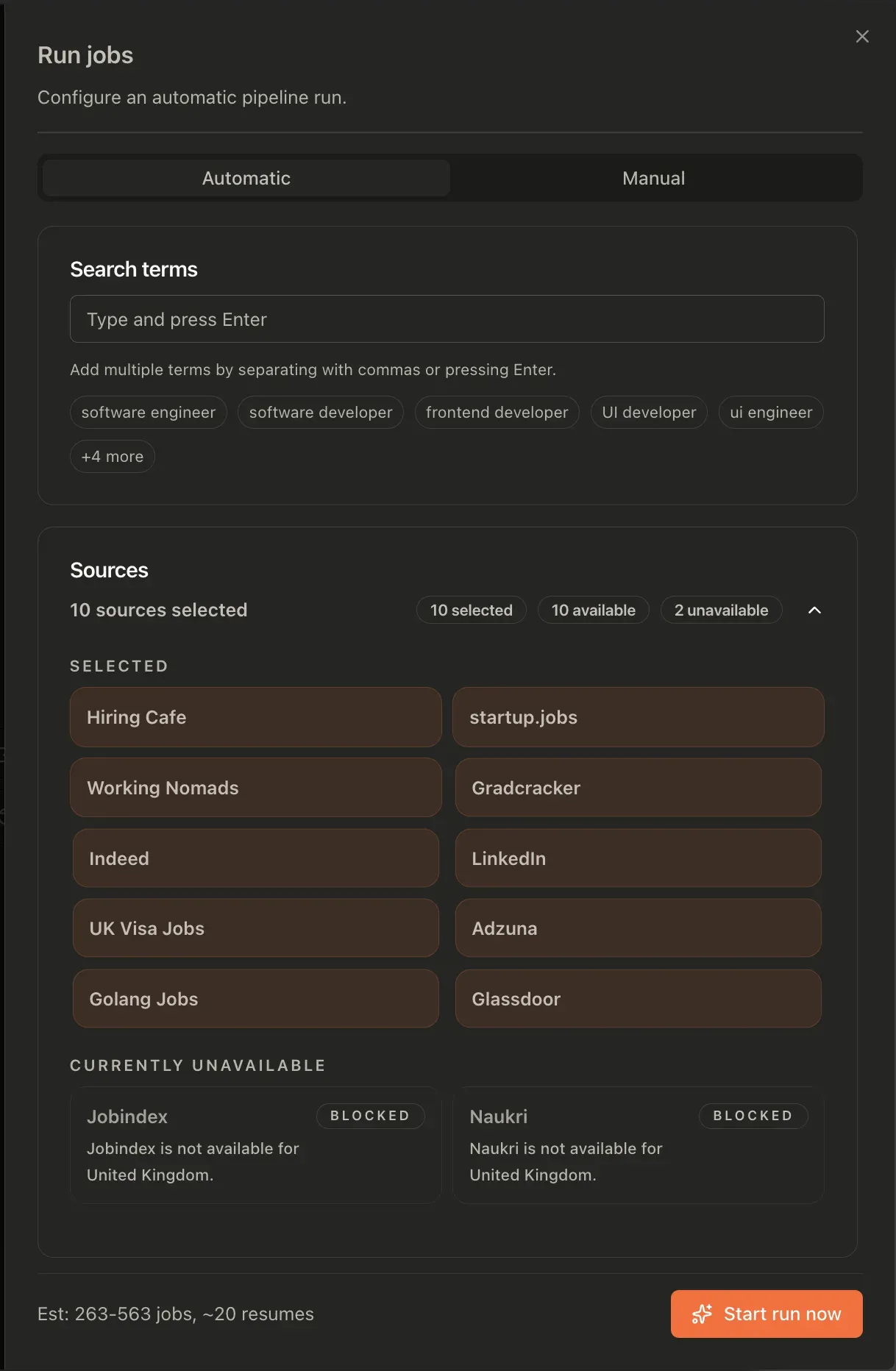
- Multi-source job discovery One run combines the chosen search terms with the selected sources, removes duplicates and puts the results in a single ranked list. The README lists LinkedIn, Indeed, Glassdoor, Adzuna, Hiring Cafe, startup.jobs, Working Nomads, Gradcracker, UK Visa Jobs, Golang Jobs, Seek, WUZZUF and Khamsat, and the extractors overview adds Jobindex for Denmark and FreeHire. Sources that do not cover the selected country are shown as unavailable in the run dialog.
- Source requirements and limits Adzuna needs an App ID and App Key, UK Visa Jobs needs the user's own account credentials, and Seek runs through an Apify actor that the documentation prices at $1.50 per 1,000 results with a free tier of about 3,000 results per month. Hiring Cafe and Gradcracker are browser-backed and subject to the sites' anti-bot checks. Working Nomads, Golang Jobs, startup.jobs and FreeHire need no credentials.
- JobSpy extractor LinkedIn, Indeed and Glassdoor are reached through a Python wrapper around the python-jobspy library, run once per search term. Settings such as
JOBSPY_SITES,JOBSPY_RESULTS_WANTEDandJOBSPY_HOURS_OLDcontrol which sites are queried, how many results are requested and how old postings may be. The orchestrator normalizes the output and removes duplicates by job URL. - Custom extractors and health checks Extractors are registered through manifest files under
extractors/<name>/and loaded when the orchestrator starts, so a new source is added as a TypeScript module without changing the core app. Every registered source exposesGET /api/:source/health, which runs a one-result live probe and returns 200, 503 or 404. - Manual import A job that no extractor covers can be added from a link, pasted description, HTML or PDF; the model extracts the details, and the job is saved and scored after review. Release v0.14.0 added bulk import from a list of URLs and reading descriptions from text-based PDFs.
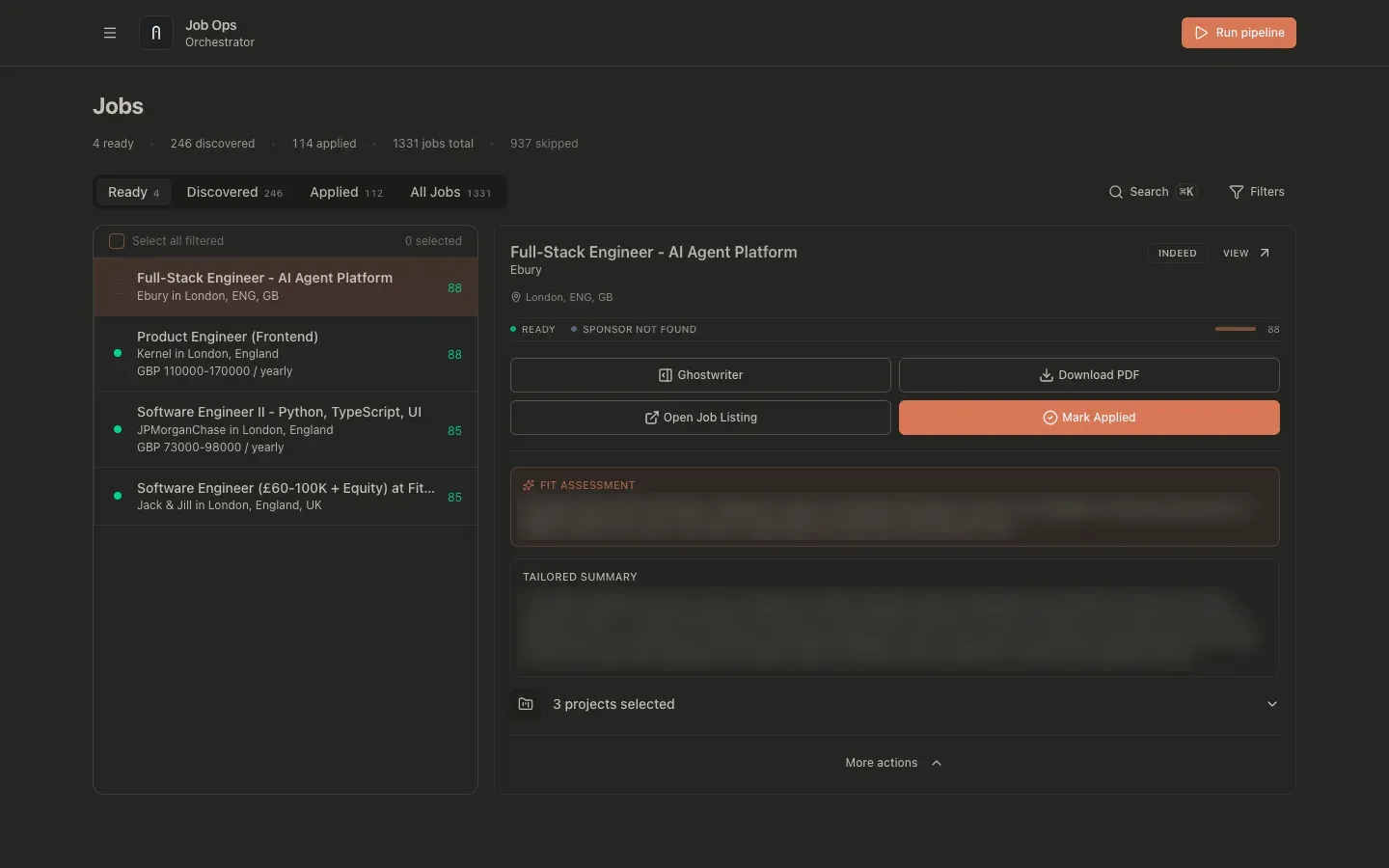
- AI fit scoring Each discovered job receives a score from 0 to 100 against the user's profile, together with a short fit assessment. A Previously Applied warning appears when a fuzzy title and company match points to a past application from within 30 days of the new job's discovery date. Filters cover source, sponsor status, salary and several date fields.
- Ready flow and job states Jobs move through
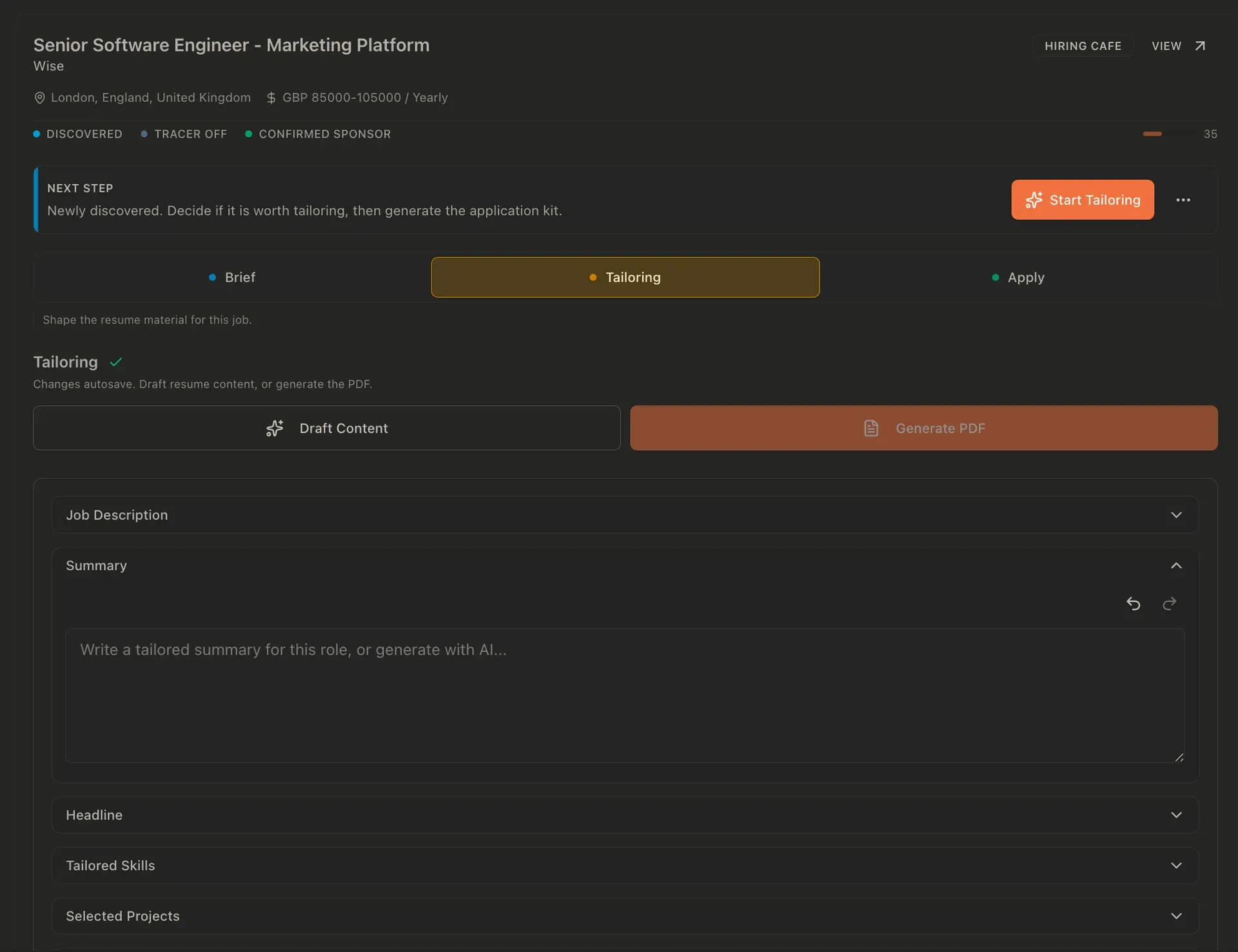
discovered,processing,ready,applied,skippedandexpired. In the automatic flow, the pipeline tailors the top-scoring jobs above a threshold and moves them to Ready with a generated PDF; in the manual flow the user opens a job, edits the tailored fields and selects Finalize. The orchestrator page describes both. - CV tailoring and Resume Studio Tailoring rewrites the summary, headline, skills and project selection for each job. The base resume lives in Resume Studio, which stores an exact Reactive Resume v5 document inside JobOps, imports from Reactive Resume or an uploaded PDF, DOCX or JSON file, and offers AI drafting for text fields such as headline and summary. See Resume Studio.
- PDF renderers Three renderers are supported: export through Reactive Resume, a local LaTeX renderer using Tectonic, and a local Typst renderer with selectable themes. The Docker image includes Tectonic and Typst. When the base resume changes, ready jobs with generated PDFs are queued for regeneration and marked PDF stale until the new file exists.
- Ghostwriter Each job has one persistent AI chat that uses the job description, a reduced profile snapshot, selected job notes and the global writing style settings (tone, formality, constraints and terms to avoid). Up to 8 notes can be added, each contributing up to 3,000 characters and 12,000 in total. The system prompt template can be edited under Settings; see Ghostwriter.
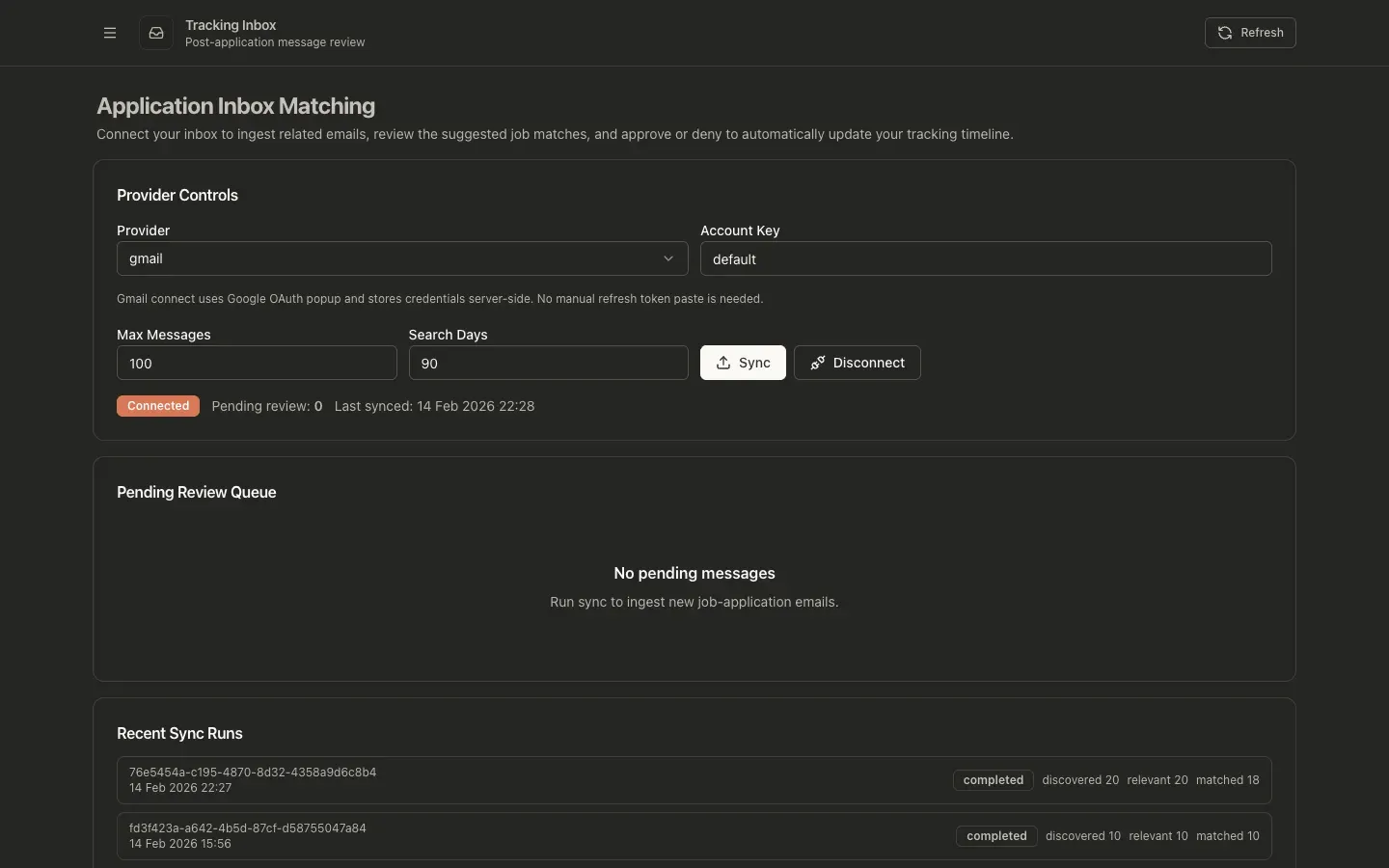
- Gmail tracking inbox With a Google OAuth client configured, JobOps reads Gmail with the
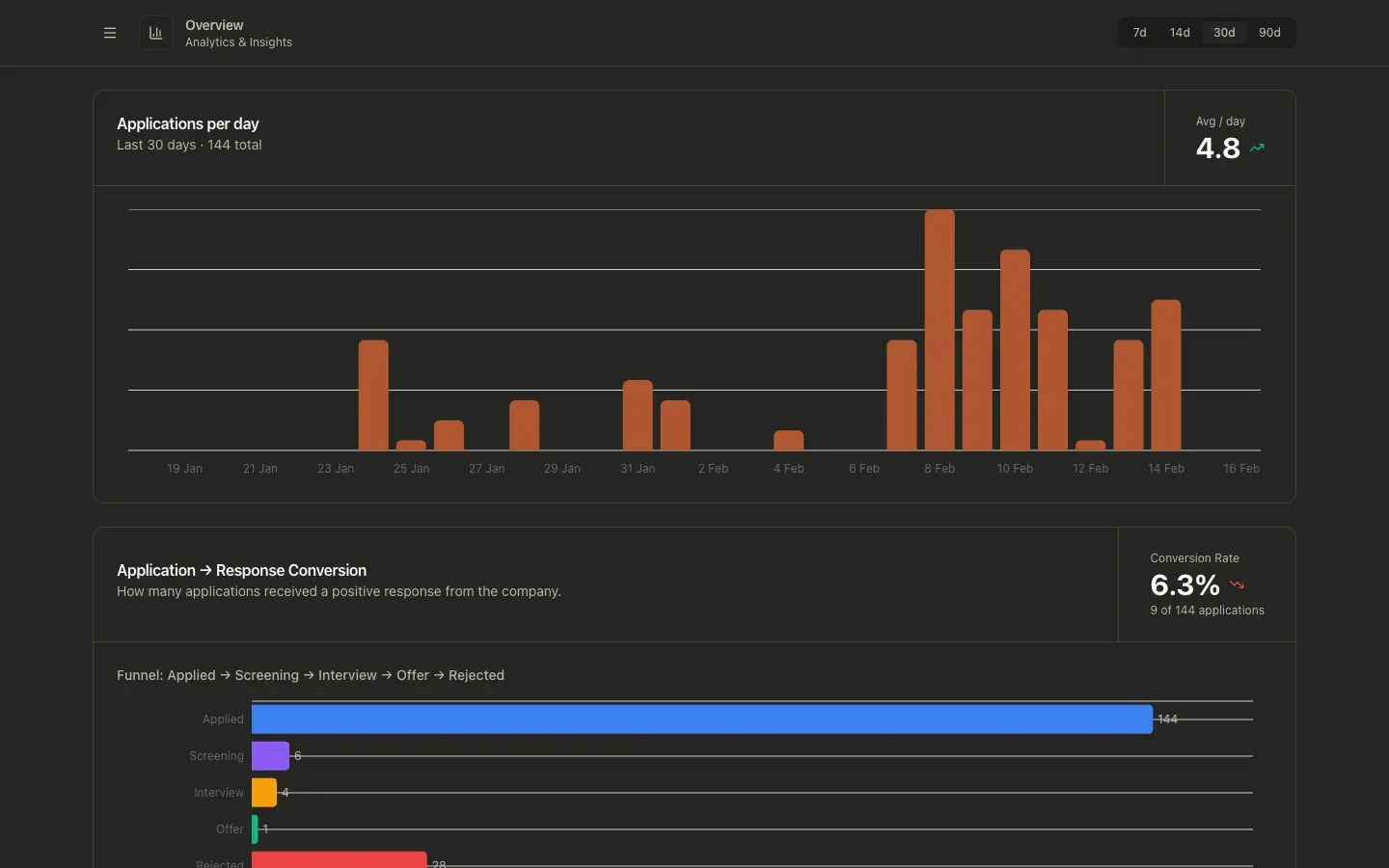
gmail.readonlyscope and matches recruitment emails to tracked jobs. Matches with 95 to 100 percent confidence update the timeline automatically, 50 to 94 percent go to a review queue with a suggested job, and lower scores are queued as unmatched or ignored. According to the tracking documentation, only message metadata is stored, not full bodies, and the inbox is available only in self-hosted mode. - Board and analytics The In Progress board is a kanban view of post-application stages such as recruiter screen, assessment and technical interview, with drag-and-drop. The Overview page charts applications per day, conversion from application to response, a funnel from applied to offer or rejection and response rate by source, over 7, 14, 30 or 90 days.
- Visa sponsor registers A Visa Sponsors page searches official registers for the United Kingdom, Canada (positive LMIA employers), the Netherlands (IND recognised sponsors) and the United States (USCIS H-1B employer data). Each provider refreshes daily, by default at 02:00 UTC, and the search is also available as
POST /api/visa-sponsors/search. See Visa Sponsors. - Watchlist and tracer links The Watchlist saves company careers sources, currently Workday and BambooHR boards, and shows roles that are new since the last check. Tracer Links rewrite outbound links in a job's PDF to short redirect URLs on the JobOps host so link opens can be counted; the documentation states that no raw IP address is stored and bot traffic is flagged.
- Model providers Supported providers in v0.14.0 include Atlas Cloud, LiteLLM, OpenRouter (the onboarding default), OrcaRouter, Requesty, API Route, LM Studio, Ollama, OpenAI, GLM, Google Gemini, the Gemini and Claude command-line tools, Codex and any OpenAI-compatible endpoint. Scoring, tailoring and project selection can each use a different provider and model, and API keys are stored as secrets with only redacted hints returned.
- Accounts, workspaces and webhooks The first account created during onboarding becomes the system admin; admins can add users, each with a private workspace for jobs, settings, resumes, integrations and analytics. Sign-in works with JobOps accounts and, since v0.14.0, Google, GitHub or a generic OpenID Connect provider. Webhooks fire on pipeline completion or failure and when a job is marked applied, with an optional secret sent as a bearer token.
- OJCP endpoint for MCP clients JobOps exposes live FreeHire job search as an Open Job Context Protocol provider over MCP Streamable HTTP at
/ojcp/mcp, with the read-only toolssearch_jobsandget_job_detail. The endpoint is unauthenticated and sends queries to FreeHire; it does not read or write the JobOps database. Details are in the OJCP documentation. - Docker Compose deployment, backups and demo mode The documented install is
git clone, thendocker compose up -d, which pulls the GHCR image; Docker Desktop or Docker Engine with Compose v2 is the only prerequisite. Updates usegit pull,docker compose pullanddocker compose up -d. Automatic daily backups ofjobs.dbkeep 1 to 5 copies plus manual backups and are limited to system admins, andDEMO_MODE=trueruns a read-only sandbox that resets every 6 hours.
Where JobOps fits
Running a search across several job boards
From Find jobs, the user enters search terms, picks sources and a country, and starts a run in automatic or manual mode; the dialog shows an estimate of how many jobs and resumes the run will produce. JobOps queries every term against every selected source, removes duplicates, scores each posting against the profile and lists the results by fit on the Discovered and Ready tabs. Sources needing keys, such as Adzuna or Seek, are configured first, as described in the extractors overview.
Tailoring a CV for one role and exporting a PDF
For a discovered job, Start Tailoring opens the Brief, Tailoring and Apply steps. Draft Content generates a tailored summary, headline, skills and project selection from the job description and the Resume Studio document; the fields can be edited by hand, and Generate PDF renders the result with Reactive Resume, LaTeX or Typst. Finalizing moves the job to Ready, where the PDF can be downloaded and the listing opened to apply.
Drafting answers and letters with Ghostwriter
On a discovered or ready job, the Ghostwriter drawer holds one conversation per job. The user selects job notes, such as application questions or interview details, as extra context and asks for answers, cover letter drafts or interview preparation in a chosen language. Responses stream, can be stopped or regenerated and are copied out with the Copy button.
Tracking replies after applying
After a job is marked applied, it can move through the In Progress board manually. With Gmail connected through the user's own Google OAuth client, the Tracking Inbox syncs recruitment emails, links confident matches to the job timeline and queues uncertain ones for approval; the Overview page then shows response rates and the funnel by source. Setup steps are in the post-application tracking guide.
Checking visa sponsorship before applying
The onboarding enables visa sponsorship by default, and each job shows a sponsor status. On the Visa Sponsors page, a company name is searched against the UK, Canadian, Dutch and US registers, with match scores, locations and licensed routes; registers refresh daily and can be updated on demand. UK Visa Jobs can also be used as a sponsorship-focused source.
Self-hosting or using JobOps Cloud
Self-hosting runs the single container from Docker Compose and walks through onboarding: admin account, country and workplace preferences, model provider and base resume. Behind a reverse proxy, SSO and Gmail redirect URLs are set to the public address. JobOps Cloud provides the same features as a hosted instance for £20 per month with the user's own API keys or £30 per month with AI usage included, as listed on jobops.app.
Reviews of JobOps
Be the first to share your experience with JobOps.
Write a review
Loading review form…
Found JobOps useful? Upvote it todayYour vote helps other IT teams find it in the daily ranking.