
What is Dossier?
Dossier is a self-hosted web application for running a personal job search. The user keeps a single career profile, and Dossier turns it into a base resume, reads each job posting that is pasted in or found through a job source, shows how the profile matches the posting's requirements and drafts a tailored resume and cover letter that only use facts from that profile. Applications are then tracked on a board and a table from draft to offer. The project is published on GitHub by the account AienTech, with a project site at dossier.aien.me and documentation in the GitHub wiki.
The application is written in TypeScript on Next.js 16 and stores its data in PostgreSQL 18 or, as an alternative, in a single SQLite file. PDFs are rendered on the server with a headless Chromium that starts on demand and closes after five idle minutes. The project describes Dossier as an app for one person: there is one password and one profile, no user accounts, an English interface, and a single running instance per database, because the nightly backups, the AI job queue and the PDF browser live inside the app's process. The interface is made for laptop and desktop browsers, not for phones. These limits are listed in the README under known limitations.
Dossier does not ship a language model. The user picks a provider in Settings: a local model through Ollama, llama.cpp or LM Studio, any OpenAI-compatible API (OpenAI, OpenRouter, vLLM and others), Anthropic or Mistral. According to the privacy page, a local model keeps the profile, postings and documents on the user's own hardware, while a hosted model receives the text it writes from. The project site lists the supported model routes and states that the software is free under the AGPL-3.0.
Distribution covers three routes. A Docker image is published as ghcr.io/aientech/dossier with a Compose file for PostgreSQL; the installation guide also covers plain Docker with SQLite, Node.js without Docker, a plain Ubuntu server with Caddy, CapRover, Coolify and Dokploy. A desktop app for Windows (installer .exe) and Linux (.deb and AppImage) on 64-bit Intel or AMD processors runs Dossier locally with its data in one file, or opens a Dossier hosted elsewhere. The project states there is no macOS desktop version yet, and the Windows build is not code-signed.
The latest release is Dossier 1.14.0, published on November 13, 2026. It keeps Undo messages open until they are used or dismissed, adds a configurable AI timeout in Settings (up to an hour), a plain-text copy of cover letters, a level filter for job searches made through the Claude connector and several accessibility changes. Its fixes include AI requests that ended after five minutes regardless of the timeout, and an OpenAI-compatible API key that could follow a changed server address; a saved key now only goes to the host it was saved for. The previous release, 1.13.0, added up to three named searches for the job agent, the option to write only a resume or only a letter, and Gmail, Calendar and MCP support in the desktop app.
Dossier is licensed under the GNU Affero General Public License v3.0: running a changed version for others over a network requires offering them its source code. Sending applications is out of scope for the automated parts: the job agent and the Claude connector never send or apply, and email goes out through Gmail only after the user confirms it. Similar self-hosted local AI building blocks on iThub include Ollama, which Dossier can use as its model backend.
Key capabilities
- Career profile One profile holds basics with contact details and a photo, skills and languages, experience and volunteering, projects, education, certifications, publications and references, in an order the user chooses. A strength meter counts only what a profile needs. Certifications keep issuer, dates, credential ID and a verification link, and publications are carried onto resumes word for word.
- Import from an existing resume The profile can be started from a PDF, Word or Markdown resume. The setup guide in the app offers this as one of its first steps. What the AI read from the file is kept as task data and removed once the user merges, replaces it or picks another file, as described in PRIVACY.md.
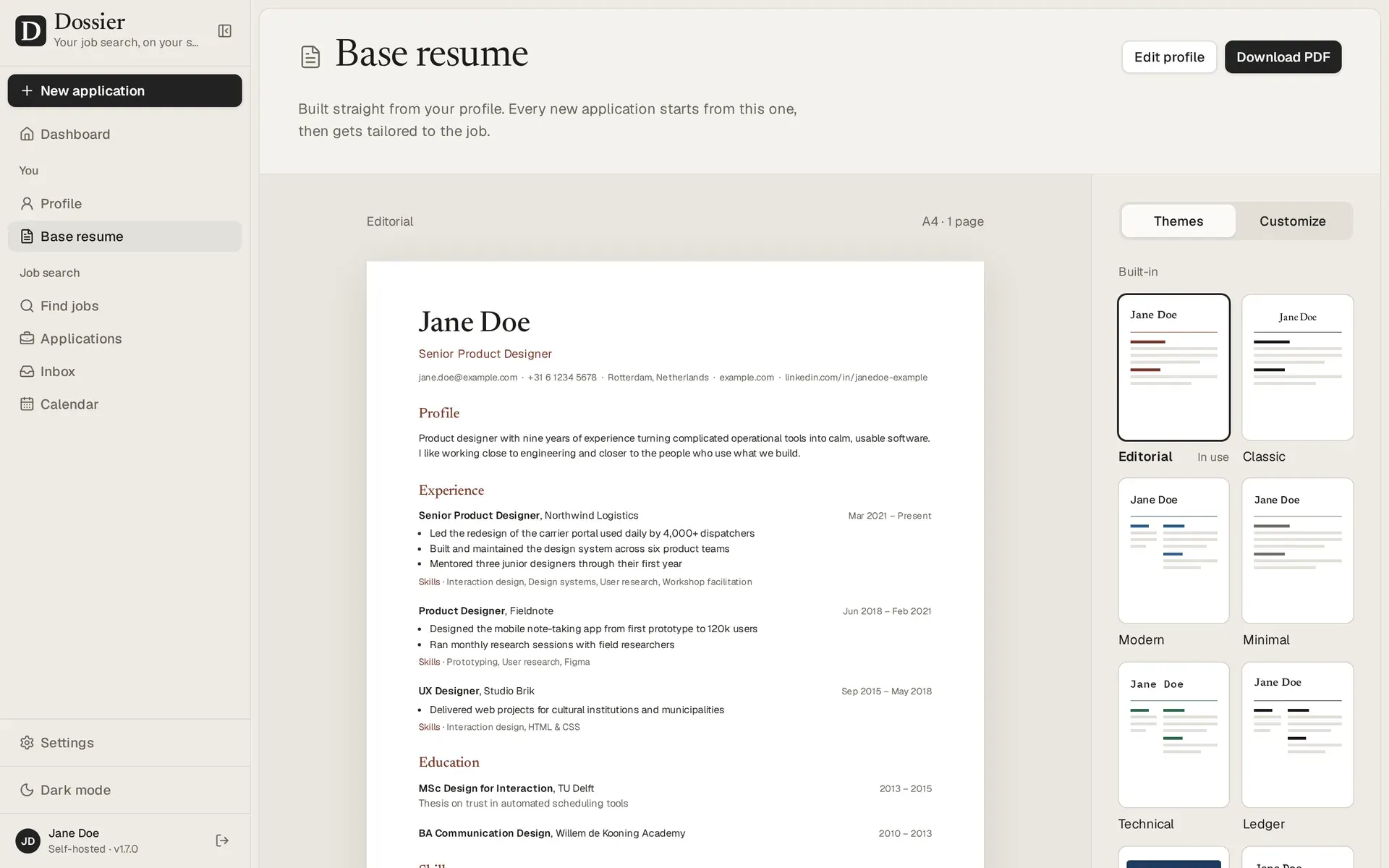
- Base resume with twelve themes The base resume is built straight from the profile and previewed live in one of twelve built-in themes (for example Editorial, Classic, Modern, Minimal, Technical and Ledger). A theme builder customizes them, and themes can be duplicated or shared as files. PDFs are printed on the server with Chromium.
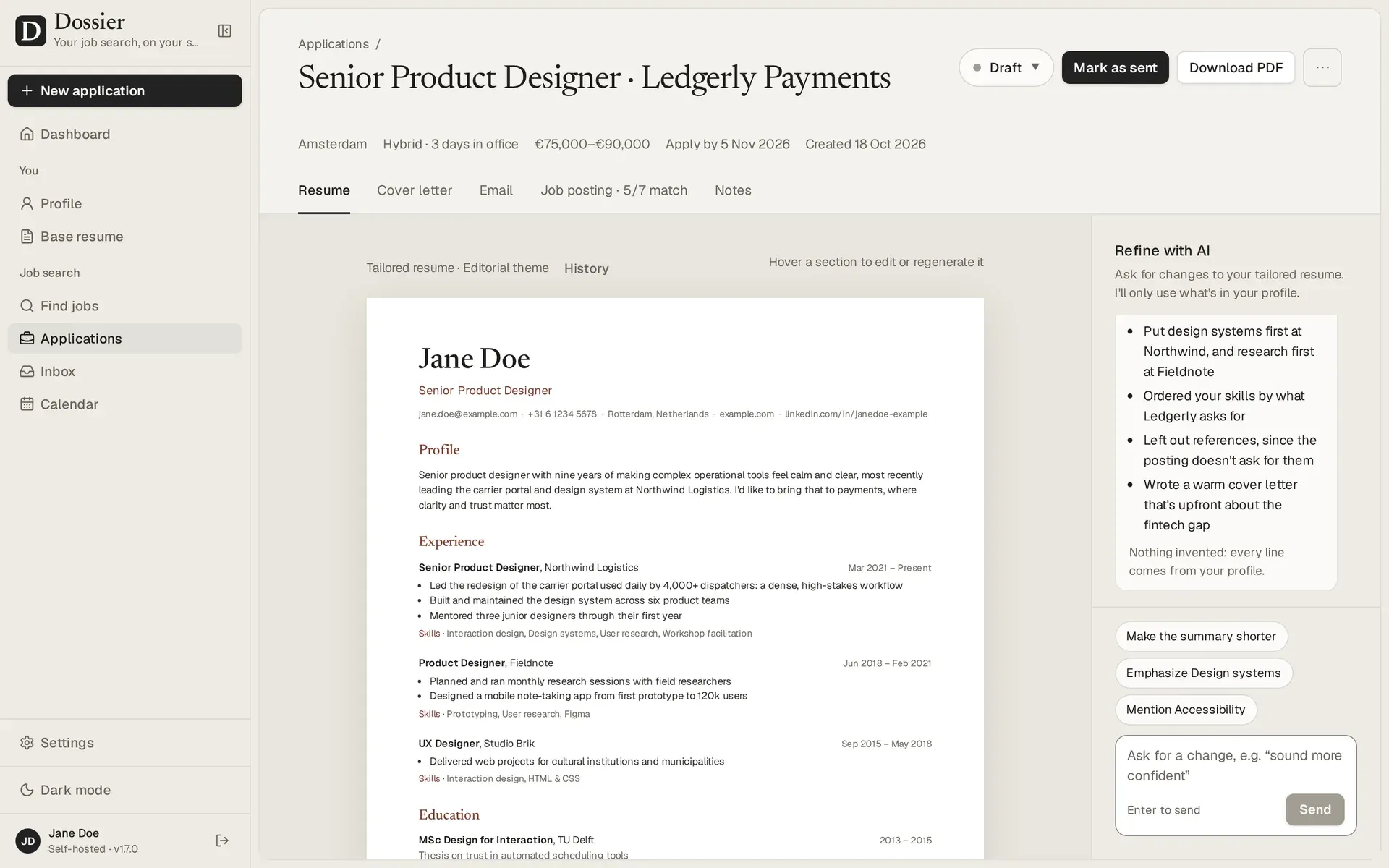
- New application from a pasted posting Pasting a posting makes Dossier extract the details and requirements, match them against the profile and write a tailored resume and cover letter in a tone the user picks. Since 1.13.0 the user can choose to write the resume and letter, only the resume or only the letter.
- Never invent experience Drafts only use facts from the profile. Requirements the profile does not cover are shown as gaps rather than filled in, and a gap the user fills goes into the profile for later applications. The setting is on by default and also flags names and numbers that neither the profile nor the posting supports.
- Refine in a chat Each application has a chat for requested changes, and any section can be edited or regenerated, including every part of the cover letter (sender, date, recipient, greeting and sign-off). AI changes can be undone, every document keeps a version history, and private notes stay with the application. Since 1.14.0 a cover letter can also be copied as plain text.
- Documents in 21 languages Resumes and cover letters can be written in 21 built-in languages, with headings, dates and language levels localized. A further language can be added with Other language, in which case those elements stay in English. The application interface itself is English only.
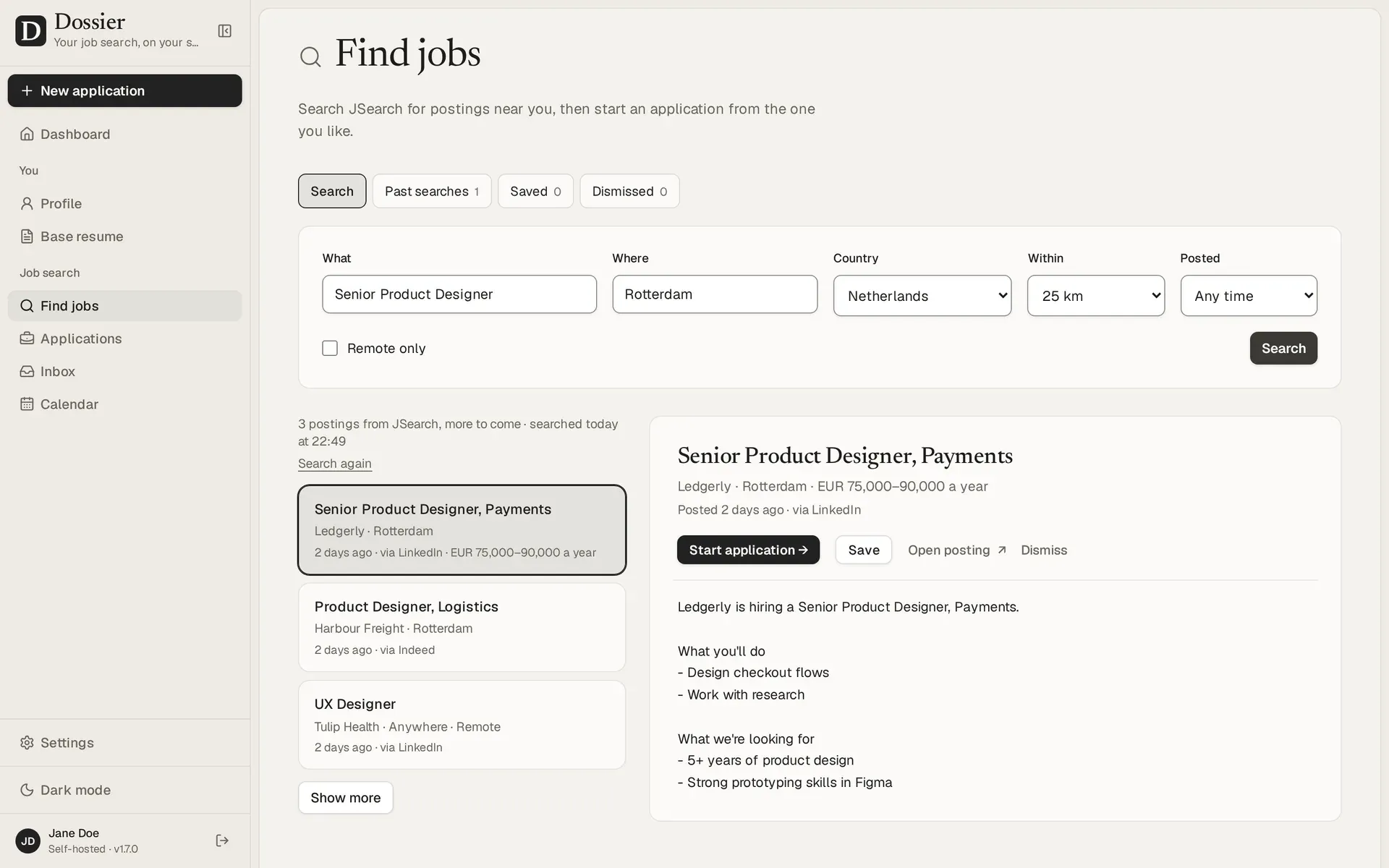
- Find jobs Searches start from the profile's city, country and role, with radius (10 to 200 km), recency and a remote-only filter. Sources are JSearch (Google for Jobs data including LinkedIn and Indeed postings, key required), Adzuna (free key) and FreeHire (no key), plus an unofficial source for Germany's Bundesagentur fuer Arbeit that the job source guide marks as used on the user's own responsibility. Postings can be saved, dismissed, scored against the profile or turned into an application.
- Startups A Startups view collects hiring startups from YC startups' job posts and the Hacker News monthly "Who is hiring?" thread, limited to those hiring where the user lives or remotely from their country, and ranks them against the profile. It shows the application address each startup publishes, reads sites while following robots.txt and leaves the decision whom to write to the user.
- Job agent An optional agent runs up to three named searches once a day, skips postings already seen, scores new ones and keeps the best on the Agent screen with reasons and the searches that found them. Limits are shared: three first-page source requests per rolling 24 hours and at most 15 postings scored and 3 drafts per run. It can prepare drafts for review but never sends or applies.
- Application email Each application gets an email addressed to whoever the posting names, ready to copy or open in a mail client, with the resume and cover letter PDFs to attach. The email can be edited, rewritten or refined in the same way as the documents.
- Gmail and Google Calendar With the user's own Google OAuth client, Dossier can send an application from the user's address with PDFs attached, show employer replies next to each application, have the AI read what they ask and draft an answer, offer free interview times and keep interviews in step with Google Calendar both ways. Nothing is sent without confirmation. Setup is in the Gmail and Calendar guide.
- MCP connector for Claude and other apps An optional MCP endpoint at
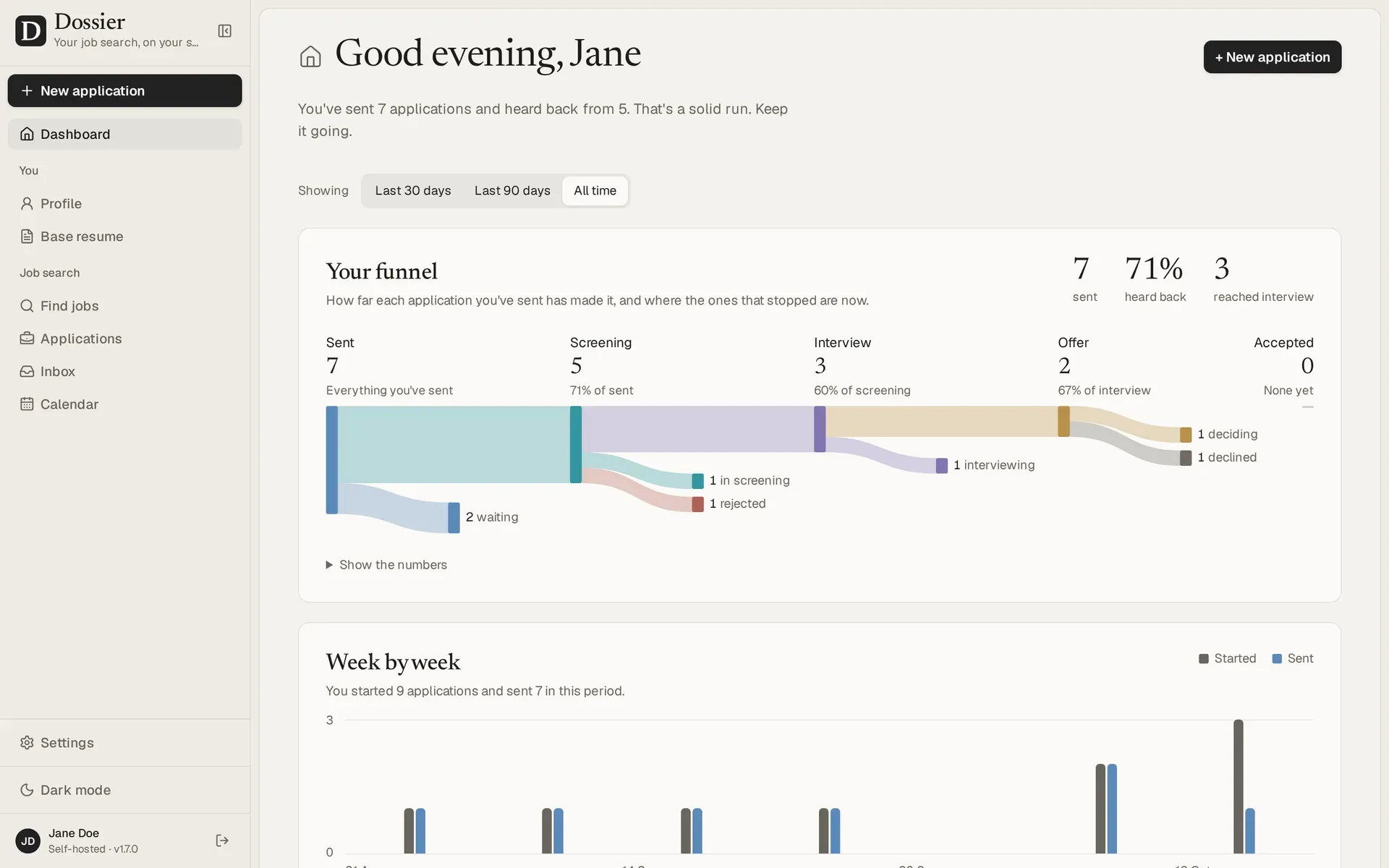
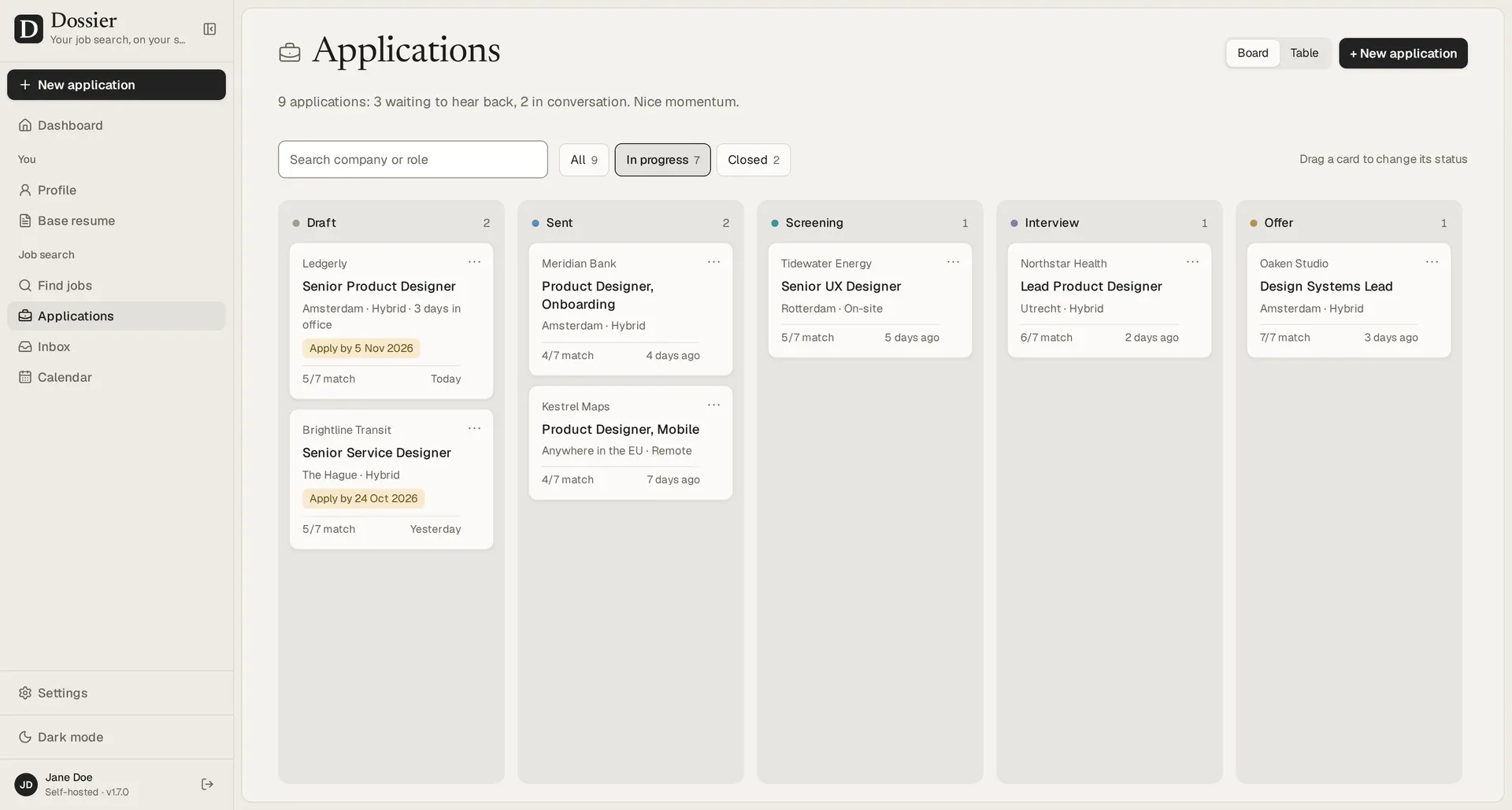
/api/mcplets Claude (web, desktop, mobile and the command-line app) or another MCP client such as n8n search jobs, score postings, read the profile without contact details and save a resume and cover letter as a Draft application. It never sends an email or application and never deletes or archives anything. Claude's hosted apps need a public HTTPS address; see Connecting Claude. - Tracking and dashboard A board and a table list every application by status, and cards can be dragged between columns. The dashboard shows a funnel for the last 30 days, 90 days or all time, a week-by-week chart, what to look at next including upcoming interviews, and a calendar of the month and the week ahead.
- Data export, backups and deletion Everything can be exported and imported as one file, nightly backups are written as full JSON exports to the data directory, and Delete everything removes all data. Task data from AI jobs is kept for 1 hour, 24 hours (default), 7 days or 30 days, configurable under Settings, Your data. API keys and the Google refresh token are encrypted with
DOSSIER_SECRET. - Docker and Compose install The documented local install fetches
compose.production.yml, generates a PostgreSQL password andDOSSIER_SECRET, stores an argon2id hash of the chosen password created withdocker run --rm -it ghcr.io/aientech/dossier hash-password, and starts withdocker compose up -d. The image is about 1.7 GB and Docker needs about 2 GB of free memory. A single-container SQLite variant usesDATABASE_URL=file:/data/dossier.dband a volume for/data. - Server deployment guides The installation guide covers an Ubuntu server with Docker Compose and Caddy for HTTPS, Node.js without Docker, CapRover, Coolify and Dokploy. The README asks for at least 2 vCPUs and 2 GB of memory on a server, and at least 768 MB for the container, based on its own measurements with a 2 vCPU, 1 GB limit.
- Desktop app for Windows and Linux Release assets include
Dossier-1.14.0-win-x64.exe(per-user install, no admin rights), a.debfor Ubuntu and Debian and an AppImage, with aSHA256SUMS.txtfile. On this computer mode keeps data in%LOCALAPPDATA%\Dossieror~/.config/Dossierwithout a password; On my server mode opens a hosted instance. Updates are installed manually. Details are on the Desktop app page.
Where Dossier fits
Tailoring a resume and cover letter to one posting
The user pastes a posting into New application. Dossier extracts its details and requirements, lists which ones the profile covers and where each one comes from, and marks the rest as gaps. It then writes the tailored resume, the cover letter or both in the selected tone and theme. Changes are requested in the refine chat or made by editing a section, and the result is downloaded as PDF from the server-side renderer.
Searching and scoring job postings
With a job source configured under Settings, Job search, Find jobs searches around the profile's city or a chosen place and keeps every search under Past searches, so revisiting one does not spend another request. Any posting can be scored against the profile with reasons and red flags, saved, dismissed or turned into an application with one click. The job source guide lists the key and cost situation for JSearch, Adzuna and FreeHire.
Running a daily job agent
Under Settings, Job agent the user saves up to three named searches and turns them on or off. Once a day the agent runs the enabled ones in order within a shared budget of three source requests per 24 hours, scores new postings and keeps the best with its reasons on the Agent screen. It can also prepare tailored drafts, which wait for review. In the desktop app the daily run happens when the app is next opened.
Tracking applications through the funnel
Each application moves through statuses such as Draft, Sent, Screening, Interview and Offer on a board or in a table. The dashboard summarizes sent applications, replies and interviews over a chosen period and shows a weekly chart. With Google connected, employer replies appear in the Inbox next to their application and interviews sync with Google Calendar.
Using Dossier from Claude or another MCP client
After turning on Let apps connect under Settings, MCP connector, the user adds the /api/mcp address as a custom connector in Claude or runs claude mcp add --transport http dossier https://<address>/api/mcp in Claude's command-line app. Claude can then search jobs, score them and save drafts that Dossier checks against the profile. Other MCP apps, such as n8n, need their callback address added first.
Self-hosting on a server or running locally
For a server, the installation guide walks through Ubuntu with Docker Compose and Caddy, or one of the PaaS tools Coolify, Dokploy and CapRover. For one computer, the desktop app or Docker Desktop is enough. Moving between PostgreSQL and SQLite, or between desktop and server, works through export and import in Settings, Your data, as described in Backups and restore.
Reviews of Dossier
Be the first to share your experience with Dossier.
Write a review
Loading review form…
Found Dossier useful? Upvote it todayYour vote helps other IT teams find it in the daily ranking.