

What is Mika?
Mika is an open-source AI assistant for Android phones, published on GitHub by the developer wangzan101. You describe a task in one sentence and Mika operates your apps and the web until it is done. It works on a separate, hidden background screen, so you can keep using the phone while it opens apps, taps, types and scrolls, and you can open a small live view to watch each step.
Mika does not depend on app APIs or per-app integrations. It looks at the screen and finds buttons the way a person does, reads on-screen text with bundled text recognition, and can locate controls from screenshots when the model supports vision. Beyond app control it includes a built-in desktop-class browser, scheduled and conditional tasks, a memory for preferences you state, and a Linux sandbox per conversation that runs Python, Node and shell commands on arm64 devices.
The app is installed as an APK from the GitHub releases page and is free under the Apache-2.0 licence. There is no Mika server: you connect your own model provider with an API key, a custom OpenAI-compatible endpoint (including one on your local network), or a ChatGPT, xAI or OpenRouter sign-in, and API keys and memories are stored encrypted on the phone. Chat, web and files need Android 11 or later. Operating phone apps needs Android 12 or later and a one-time wireless debugging pairing, with Android 14 or later recommended. AI tools on a computer can also hand Mika tasks through a CLI, a Skill or MCP.
Mika screenshots
Explore the interface. Open a screenshot to view it at full size.
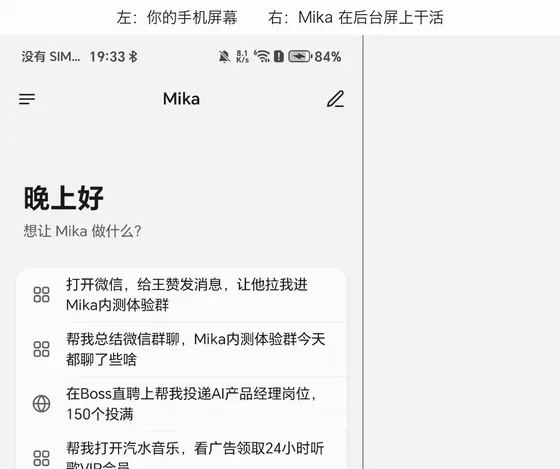
Source: official Mika project page.
Key capabilities
- Background app control Mika opens apps, taps, types and scrolls on a separate background screen while you keep using the phone.
- Works with any app It reads the screen and finds buttons like a person, so no app APIs or per-app integration are needed.
- Built-in browser A desktop-class browser keeps you signed in, reads pages, handles downloads and uploads, and hands block pages back to you.
- Schedules and conditions Reminders and recurring jobs run on time and report back in the original conversation.
- Linux sandbox Each conversation gets a workspace that runs Python, Node and shell on files you send, on arm64 devices.
- Computer access AI tools on a computer can hand Mika tasks, check progress and get results through CLI plus Skill or MCP.
Where Mika fits
- Mobile task automation Mika reads long lists and chat histories, shares text into apps, and hands logins, verification codes and payments back to you.
- Ask and Autonomous modes Ask mode checks with you only before spending money, while Autonomous mode does not ask even before paying.
- Bring your own model Presets cover providers such as DeepSeek, OpenAI, Anthropic, Gemini, Mistral, Groq, Ollama and LM Studio, plus any OpenAI-compatible endpoint.
- Memory and skills It remembers preferences you state and turns finished tasks into skills so repeat runs are faster.
- Screen context Double-tapping the floating capsule sends the screen you are looking at to Mika with your question.
- Traceable runs Answers list their sources and every task keeps a step-by-step record you can review.
Reviews of Mika
Be the first to share your experience with Mika.
Write a review
Loading review form…
