

What is TaskView?
TaskView is a self-hosted project and task management platform for small and growing software teams, distributed as source-available software under the TaskView Source-Available License. It is built and maintained by Nikolai Giman, who describes it on the about page as a solo project developed in his spare time and made source-available in January 2026. The README summarizes the scope as task management, custom workflows, developer integrations, analytics and AI-assisted automation that a team runs on its own infrastructure.
The product is delivered in several forms. The Community Edition runs as a set of Docker containers (PostgreSQL 17, an API server, a web app and a one-time migration runner) described in the installation guide. A hosted instance, TaskView Cloud, is available at app.taskview.tech. iOS and Android apps are published on the App Store and Google Play, and they can connect to a self-hosted server. A desktop application is listed on the README roadmap rather than as a shipped product.
The latest GitHub release is v1.58.2, published on November 13, 2026. According to the release notes and the changelog, it adds per-project and cross-project dashboards, a full calendar with an Hours view, "when, then" automation rules, file attachments on local disk or S3-compatible storage, import from Trello, Todoist, Jira Cloud and Jira Data Center, a theme builder, SCIM group links to projects, keyboard shortcuts and moving tasks between projects. Its security changes turn self-service account deletion off by default (ALLOW_ACCOUNT_DELETION=true re-enables it), fix a refresh-token cookie and CORS origin flaw, confine restricted API tokens and OAuth apps to their scope everywhere, rate-limit email sign-in codes and limit SSO metadata URLs to public addresses unless SSO_ALLOW_PRIVATE_URLS=true is set. The upgrade requires running the database migration container and signs every user out once. The previous release, v1.56.0 (September 22, 2026), added invoices generated from tasks with income amounts, an OAuth 2.1 authorization server for third-party apps and cloud AI assistants, and a restriction of outgoing webhooks to public addresses unless WEBHOOKS_ALLOW_PRIVATE_URLS=true is set.
The repository is a TypeScript monorepo. The api package is a Node.js and Express backend over PostgreSQL with Drizzle ORM, the web package holds the Vue and Nuxt UI web client plus the Capacitor mobile app, and taskview-packages contains the taskview-api TypeScript client, shared database schemas and the taskview-mcp server. All packages share one product version under Semantic Versioning, and the README notes that database migrations and breaking changes can arrive between releases.
The license allows internal use, self-hosting, modification and forks with the TaskView name and logo removed, but prohibits offering TaskView as a managed service to third parties, building a competing project management product on it, and reselling it without a separate commercial license. The README states that TaskView is source-available and not OSI-approved open source. Similar self-hosted projects listed on iThub include Plane, OpenProject and Vikunja.
Key capabilities
- Projects, lists, tasks and subtasks Work is organized into projects that contain lists of tasks, and every task can carry nested subtasks. The task documentation lists priority, single dates or start and end ranges with optional times, a rich-text note editor, multiple assignees, project-level color tags and an income or expense amount. Subtasks hold only a title and completion state, and completing a parent does not complete its subtasks.
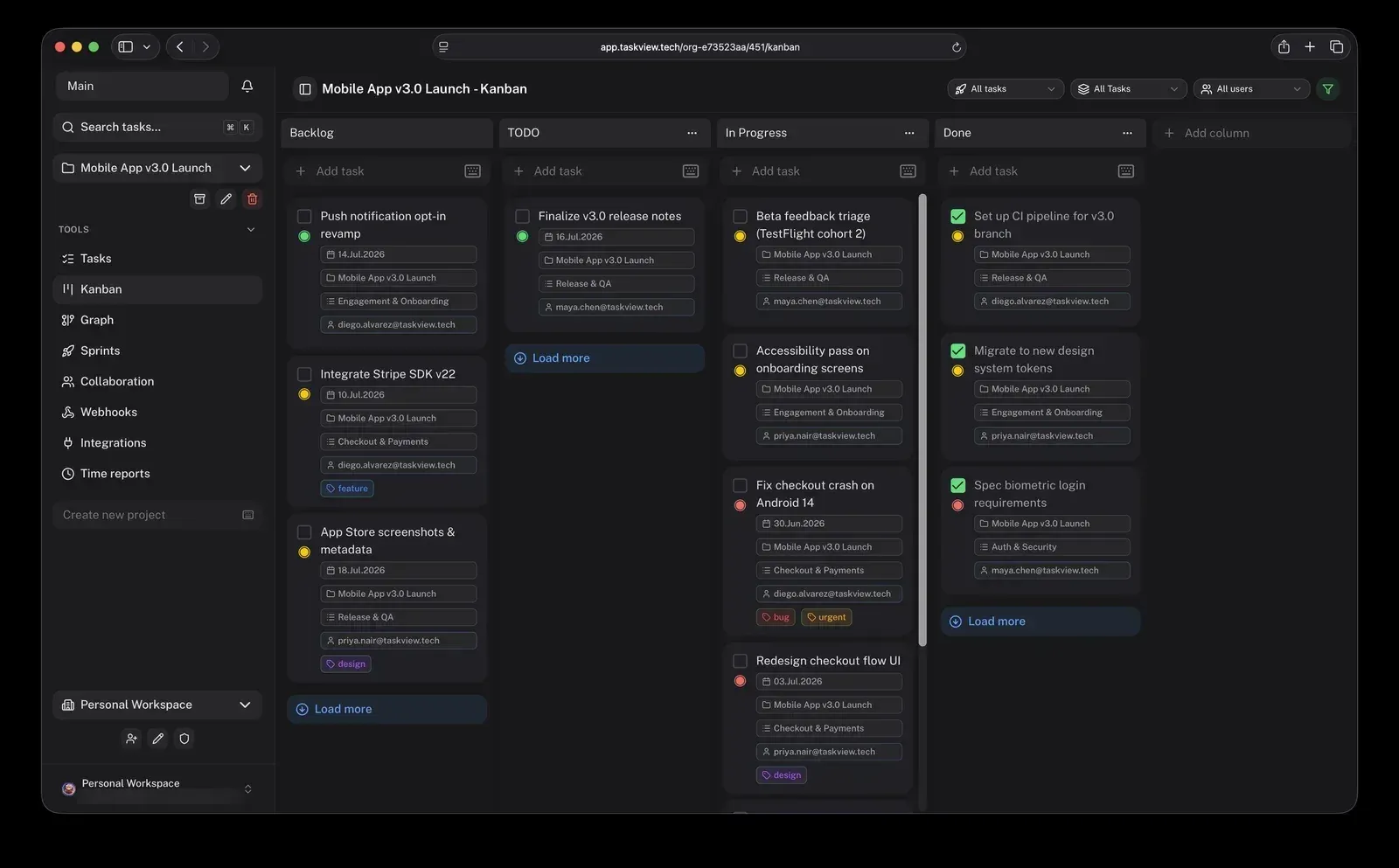
- Kanban boards with per-project statuses Each Kanban column is a task status, and each project has its own set; new projects start with Backlog, Todo, In Progress and Done. Cards show title, priority, deadline, assignee avatars and tags, and dragging a card changes its status everywhere in the app. Column reordering arrived in release 1.58.2, and cards of tasks with subtasks show the subtask count. See the Kanban page.
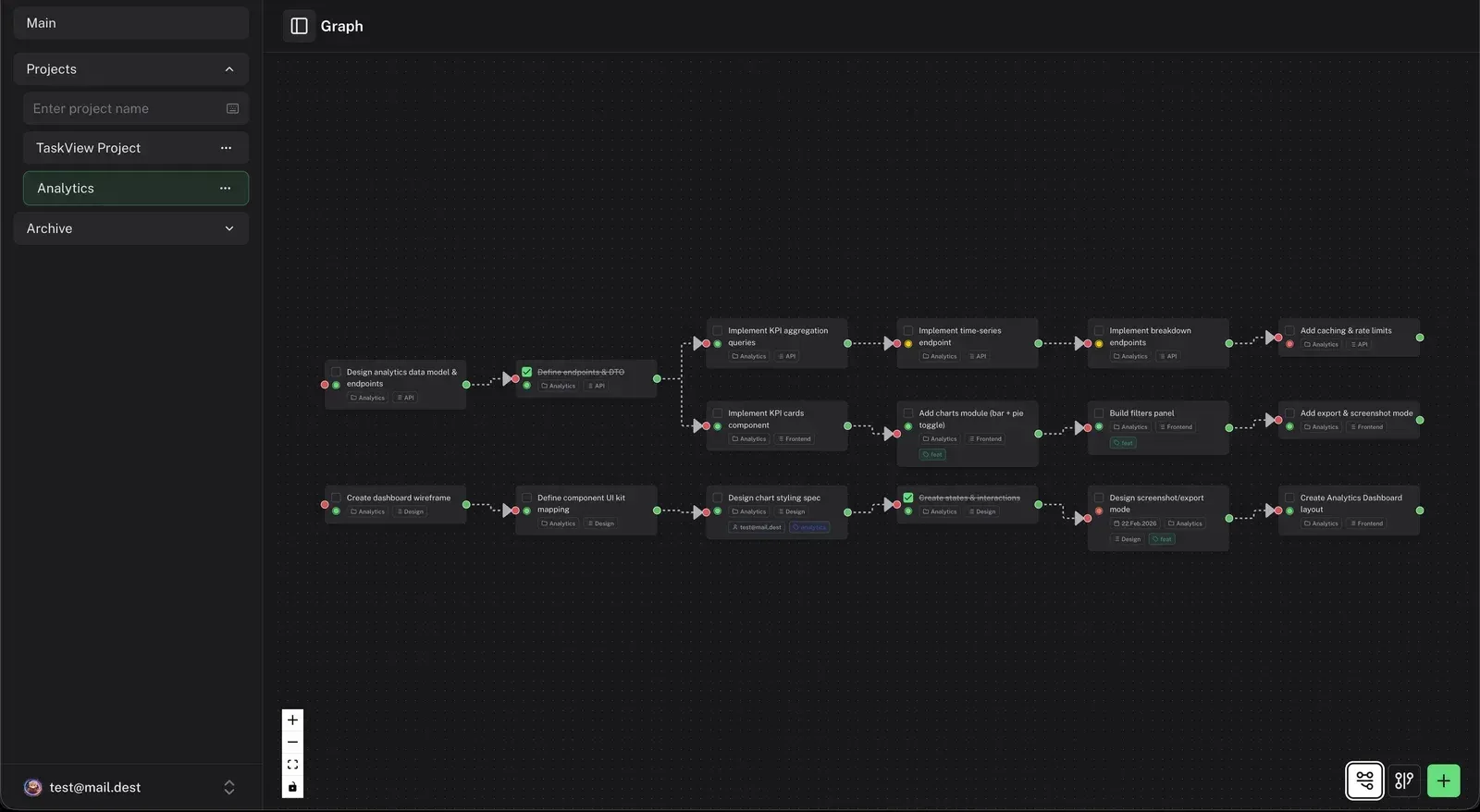
- Dependency graph The graph view shows a project's tasks as nodes; dragging from one node to another creates a dependency, and an arrow from A to B means B depends on A. Nodes reflect task state such as complete, in progress or overdue. The view supports zoom, pan and a minimap, and deleting an edge removes only the relationship. Release 1.56.0 made the graph render faster on large projects.
- Calendar views Tasks with a start date, end date or both appear on a project calendar with Month, Week, Hours and List views; Week is the desktop default and List the mobile default. Cards are colored by priority, and tasks can be dragged to new days or resized to change their length, snapping to 5-minute steps in the Hours view.
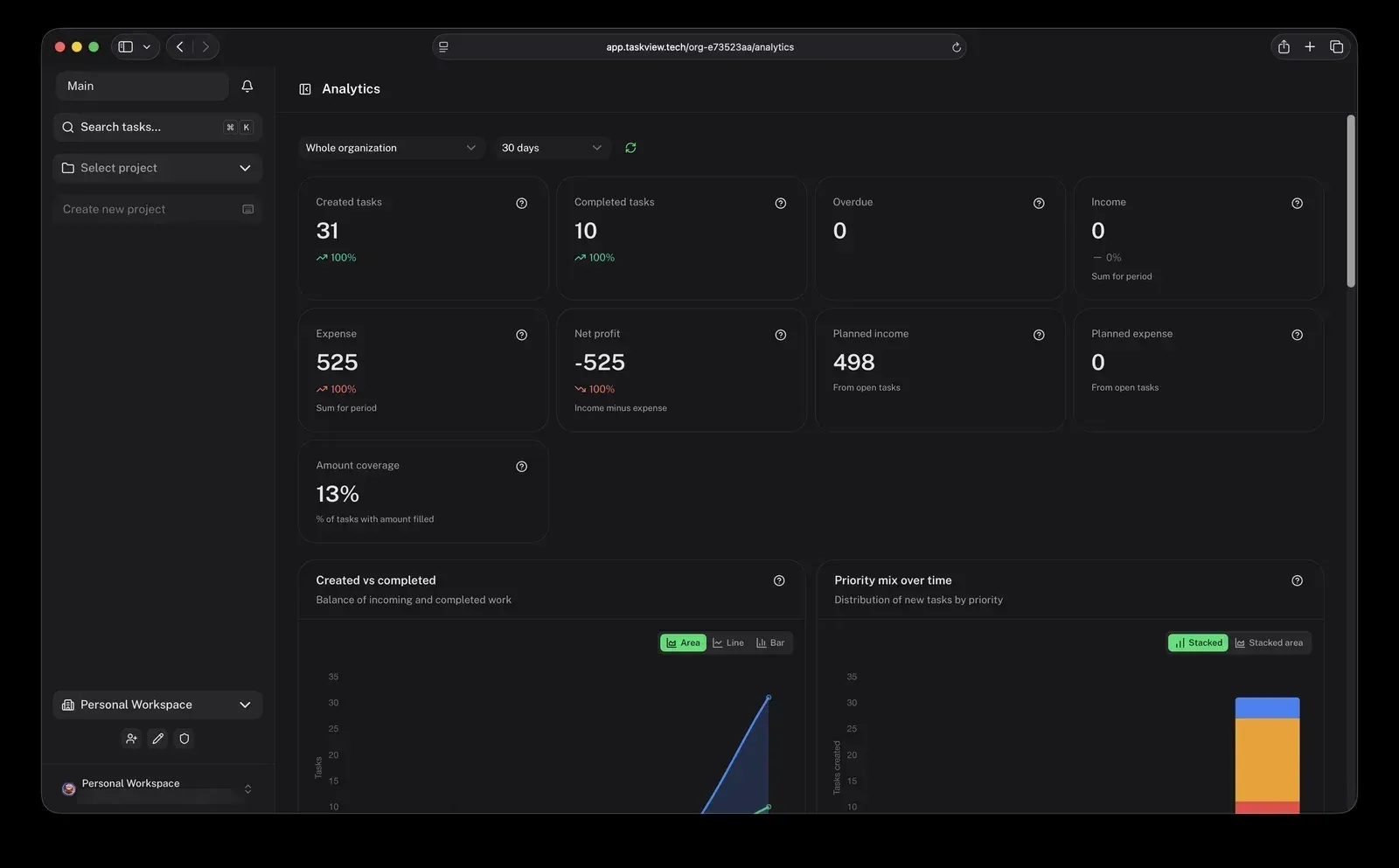
- Dashboards, automations and sprints Since release 1.58.2 every project has a Dashboard tab with progress, overdue and upcoming work, deadlines for the next 7 days, workload per person, the current sprint and tasks completed per week over 12 weeks, and the main screen shows the same dashboard across all projects. Project automations are "when, then" rules: when a task is created, completed, reopened, moved to a column or list, or tagged, the rule can complete, reopen, move or tag it. A rule acts with the rights of the person who last saved it. The README lists sprints and recurring tasks among the project features. Sprint events such as created, activated, review started, completed, paused and resumed are exposed through webhooks, and the sprint dialog shown in the official screenshots takes a name, goal, start and end dates and a capacity in story points.
- Task history and restore Every task keeps a change history, and the role permissions include separate rights to view history and to restore a task to a previous state. The homepage describes restoring an accidental change or deletion in one click. History access follows the project role of the person viewing it.
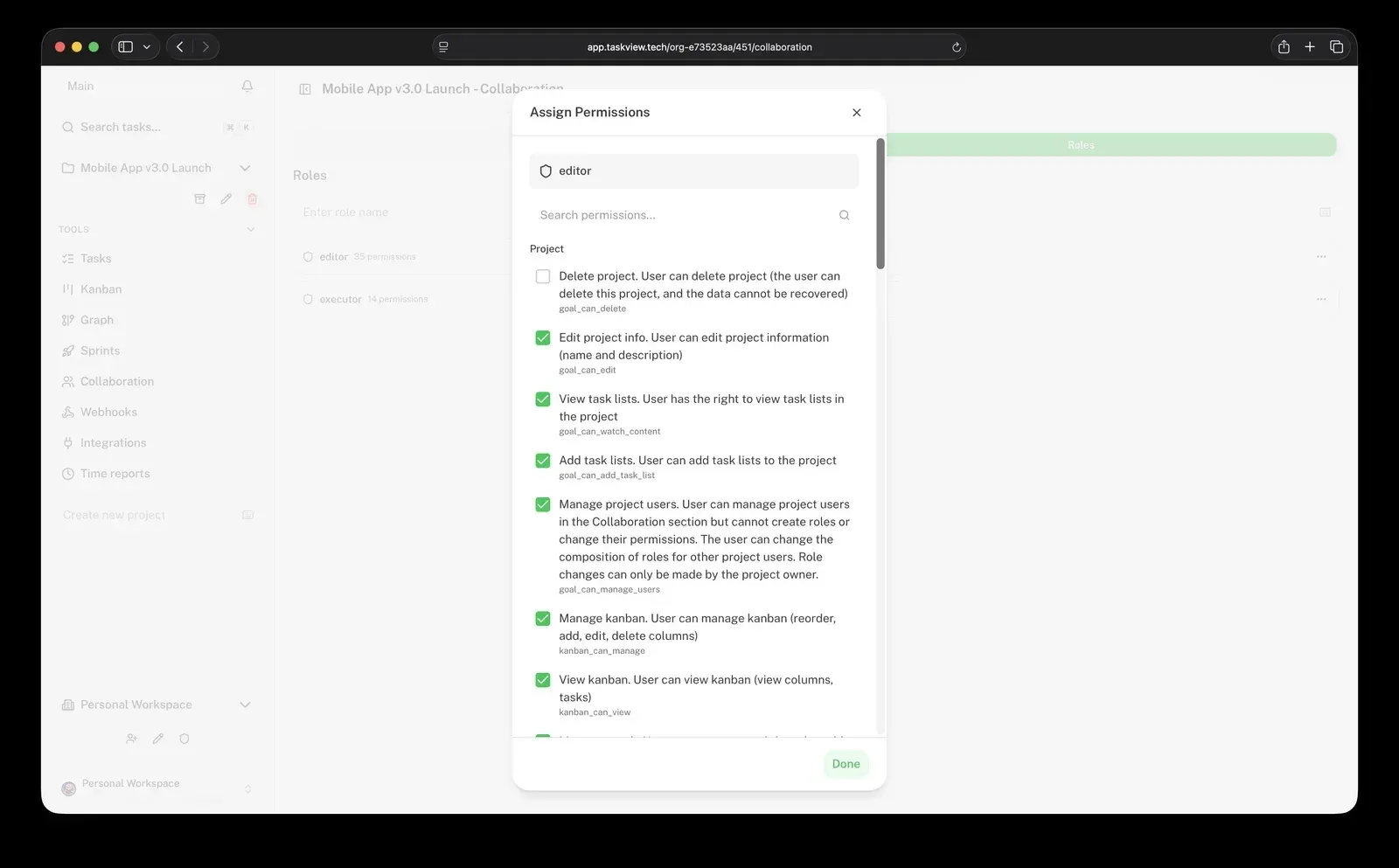
- Roles and 28 project permissions Access is role-based per project: permissions are assigned to roles and roles to users, and a role in one project does not affect another. The roles and permissions page lists 28 permissions covering projects, lists, tasks, Kanban, graph and integrations. The docs warn that the Manage users permission lets a holder assign any existing project role, including to themselves.
- Organizations Every user gets a personal organization on registration, and team organizations group shared projects and members. Organization roles are owner, admin and member: admins can edit settings and manage members, members can create projects but cannot view the member list. People are invited by email and can be added before they create an account.
- SSO with SAML 2.0 and OpenID Connect Organizations can route sign-in through an identity provider such as Okta, Azure AD, Google Workspace or Keycloak. SSO stays disabled until the email domain is verified by a DNS TXT record or a file under
/.well-known/; closed networks can list domains inSSO_TRUSTED_DOMAINSinstead. The pricing page states that SSO is included in the free Community Edition. - SCIM 2.0 provisioning On top of an SSO configuration, an identity provider can create, update and deactivate organization members through a SCIM endpoint at
/scim/v2with a bearer token that is shown once and stored as a hash. Provider groups can be linked to projects with a chosen role. Turning SCIM off deletes the token but removes no users or project links. - GitHub, GitLab and Gitea issue sync The integration guide connects repositories through separate OAuth apps per provider, imports issues as tasks and keeps them in sync through webhooks; GitHub Enterprise, self-hosted GitLab and self-hosted Gitea are supported. Provider tokens are encrypted with AES-256-GCM using a 64-character
ENCRYPTION_KEY. The homepage states that completing a synced task closes the issue in the repository. - Import from Trello, Todoist and Jira Organization owners and admins can copy a Trello board, a Todoist project, a Jira Cloud project or a Jira Data Center or Server project (Jira 8.14 or later) into a new TaskView project. The import page maps lists, sections or statuses to Kanban columns, cards to tasks, checklists to subtasks, labels to tags and matched members to assignees. Imports run in the background and are not kept in sync afterwards.
- Signed webhooks Project webhooks send HTTP POST requests for task, time-entry, sprint and file events (including
task.movedand file upload, rename, delete, attach and detach events since 1.58.2), signed with an HMAC-SHA256 secret that is shown once, with retries and delivery history. Two project permissions control who can view or manage them. Since 1.56.0 private and internal target addresses are refused unless the instance allows them. - Scoped API tokens and public HTTP API API tokens use a
tvk_prefix, are shown once and stored only as a SHA-256 hash. A token can be limited to selected permissions and projects, is intersected with the owner's role, and can expire. Tokens cannot manage other tokens. Thetaskview-apinpm package provides a TypeScript client for the same HTTP API. - MCP server for AI assistants The MCP server runs locally over stdio with
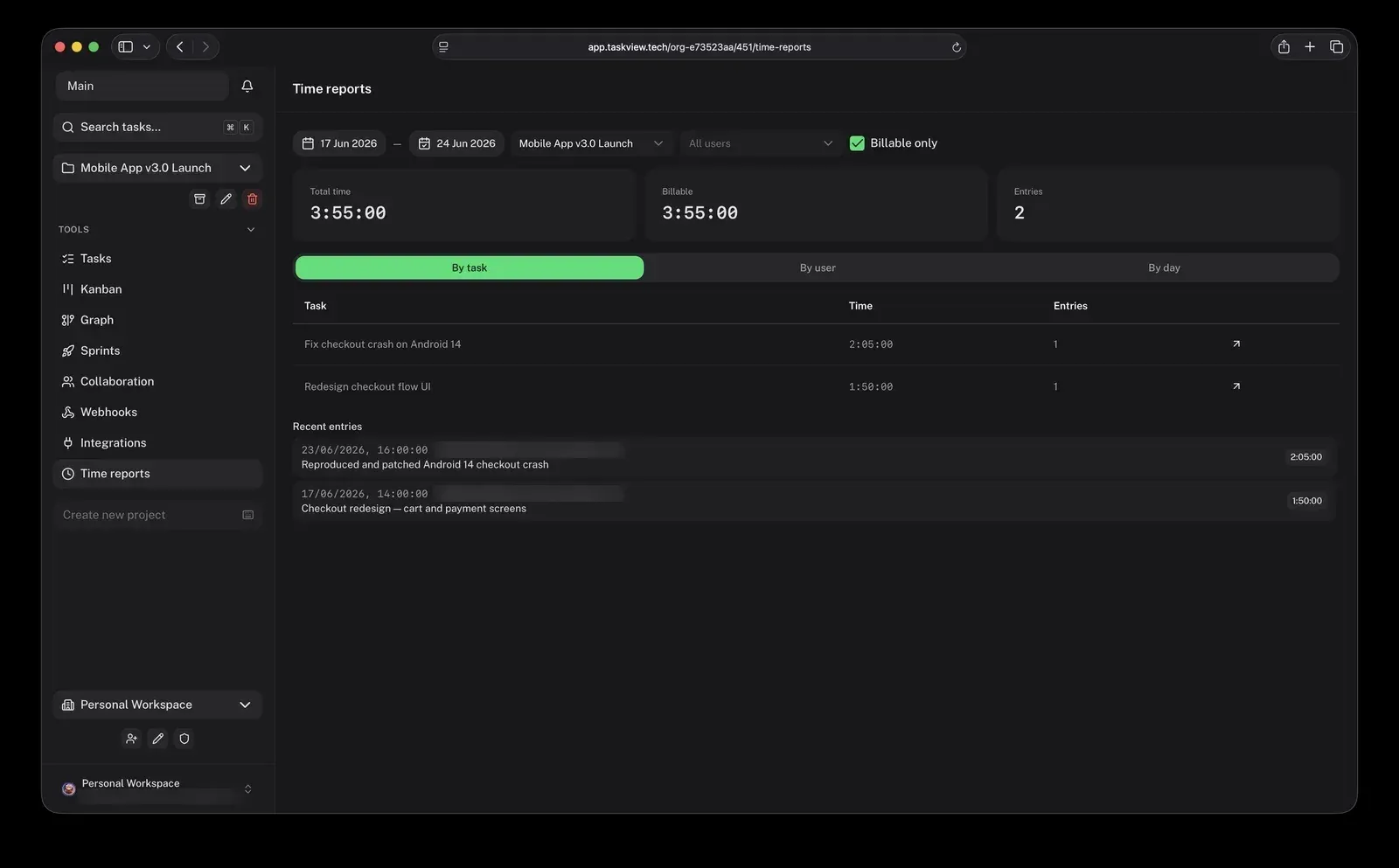
npx -y taskview-mcp(Node.js 24 or later) or as the sharedgimanhead/taskview-ce-mcpcontainer using Streamable HTTP. Assistants such as Claude Code, Claude Desktop and Cursor can search projects, create and update tasks, change statuses, log time and manage task files within the token's permissions. OAuth 2.1 connections for cloud assistants requireOAUTH_DYNAMIC_REGISTRATION=true. - Time tracking, finance and invoices Time can be logged with a timer or manual entries, each with a billable flag, and reports group time by day, person, task and contributor. Tasks can carry income or expense amounts that feed analytics on income, expense and net profit. Since 1.56.0 owners and admins can generate invoices with a chosen currency and payment terms, download them as PDF and track them from draft to paid.
- Notifications through Telegram and Slack Messaging integrations send personal direct messages about a user's tasks and project-wide posts to a group or channel. Bot credentials are configured per instance, so self-hosted servers supply their own bots, and the API must be reachable over public HTTPS. A per-channel post content switch can hide descriptions, assignee emails and action buttons.
- Self-hosting with Docker Compose The installation guide uses two environment files and a compose file with PostgreSQL 17 and the
gimanhead/taskview-ce-api-server,-webappand-db-migrationimages, exposing ports 8888 (web) and 1725 (API). The FAQ gives a recommended minimum of 1 CPU core, 1 GB RAM and 10 GB disk, uses a reverse proxy for HTTPS, and updates withdocker compose pullanddocker compose up -d. Attachments are stored on local disk or S3-compatible storage. - Web, iOS and Android apps The web app is the main client, and native-packaged iOS and Android apps built with Capacitor sync with either TaskView Cloud or a self-hosted server through a custom server URL. A desktop application is on the roadmap but not released.
- Community Edition and SE licenses The pricing page describes the Community Edition as free with the full feature set, including SSO and SCIM without user limits. Perpetual SE licenses for 1.x add an audit log, best-effort priority email support without an SLA, and an invoice: Starter (up to 20 people), Team (up to 50) and Business (no user limit), listed at $990, $2,490 and $4,990 with founding-customer prices of $690, $1,740 and $3,490 when checked. The license is an offline signed file with no activation server.
Where TaskView fits
Running a software team's backlog and sprints
A team creates a project with lists, tasks and per-project statuses, then moves cards across the Kanban board as work progresses. Sprints group tasks with dates, a goal and story-point capacity, and the calendar shows what is due each week. Issues from GitHub, GitLab or Gitea can be synced into the same project so repository work and planning share one board.
Planning work order with dependencies
For features made of many interrelated tasks, the dependency graph links tasks with directed edges so blocked work and its prerequisites are visible. Dependencies can also be set from the task panel since release 1.56.0. The graph documentation describes reading upstream arrows to find what has to be finished first.
Controlling access in a company instance
Administrators connect a SAML 2.0 or OpenID Connect identity provider, verify the email domain, and optionally turn on SCIM so the provider creates and deactivates members and maps groups to projects. Inside each project, custom roles combine the 28 documented permissions, for example a role that can view tasks and Kanban without editing them. API tokens and OAuth apps inherit no more rights than their owner.
Moving projects from Trello, Todoist or Jira
An organization owner or admin opens the import page, connects the source with an API key, token or OAuth pop-up, picks a board or project, maps the structure and matches people to members. The import runs in the background into a new project; the import documentation lists what is carried over, such as comments and files, and what is skipped, such as Todoist reminders.
Letting AI assistants work with tasks
A user creates a scoped tvk_ token limited to selected projects and permissions, then adds taskview-mcp to Claude Code, Claude Desktop, Cursor or another MCP client, or points the client at a shared MCP container. The assistant can then search projects, create and update tasks and log time. Cloud assistants such as ChatGPT and claude.ai connect over OAuth 2.1 when dynamic client registration is enabled on the instance.
Tracking billable time and project income
Agencies and freelancers log time per task with a billable flag, review reports by task, user or day, and attach income or expense amounts to tasks. Analytics summarize created and completed tasks, overdue work, income, expense and net profit for an organization or project. Invoices built from income tasks can be issued, marked as paid or replaced with a corrected invoice. Comparable time tools on iThub include solidtime.
Reviews of TaskView
Be the first to share your experience with TaskView.
Write a review
Loading review form…
Found TaskView useful? Upvote it todayYour vote helps other IT teams find it in the daily ranking.


