

What is OpenProject?
OpenProject is a web-based project management application for planning, tracking and documenting work inside one instance. Its basic unit is the work package, which can be a task, phase, milestone, bug, epic or user story. Around it sit Gantt planning, agile boards, Scrum backlogs, time and cost tracking, budgets, a project wiki, collaborative documents, meetings and news. The software is developed by OpenProject GmbH in Berlin, Germany, together with community contributors. The copyright notice dates the code line from 2012, and the project is a derivative work of ChiliProject.
The free Community edition is licensed under the GNU General Public License version 3 and is self-hosted. The installation guides recommend Docker Compose for smaller instances and Helm charts on Kubernetes for larger ones. A single all-in-one Docker container serves evaluation, and DEB/RPM packages exist for a fixed list of Ubuntu, Debian, RHEL and SLES releases. Containers are published for AMD64 and ARM64, and every image on Docker Hub carries signed provenance, SBOM and VEX attestations. Enterprise on-premises and Enterprise cloud add paid add-ons and support; the cloud is operated by OpenProject in an EU data center.
The latest GitHub release is OpenProject 17.9.6, published October 30, 2026, a patch that fixes unsaved workflow changes and time-tracking activity values. The 17.9.0 release notes add work package creation from the Documents module, backlog filters, an Observed in versions field, time entries in the MCP server and concurrent Jira imports, and move date alerts into the Community edition. Patch releases 17.9.3 and 17.9.5 closed two security advisories, and 17.9.4 updated the bundled Ruby and Node.js runtimes for recent CVEs. Version 17.8 let AI assistants create and update work packages through MCP and introduced multiple target versions; 17.7 added the Enterprise resource management module.
Technically, OpenProject is a Ruby on Rails application. According to the architecture overview, most pages use Rails with Hotwire and ViewComponents, while modules such as the work package views run as an Angular frontend against the REST API. A deployment consists of the Puma application server, a background worker, PostgreSQL 16 or later, memcached and attachment storage on disk, NFS or object storage. External clients use API v3, the BCF API 2.1 for BIM, SCIM for user provisioning and an MCP endpoint at /mcp.
Several capabilities sit outside the free edition: the team planner, resource management, portfolios, OpenID Connect and SAML login, LDAP group synchronization, OneDrive and SharePoint storage, the XWiki integration and the MCP server are Enterprise add-ons. There is no desktop client; the iOS and Android app is a Beta companion to the web interface. The Jira Migrator is a beta for Jira Data Center only and is documented for test setups. The Docker setups cannot create Git or SVN repositories from inside OpenProject, which still requires the packaged installation.
OpenProject screenshots
Explore the interface. Open a screenshot to view it at full size.
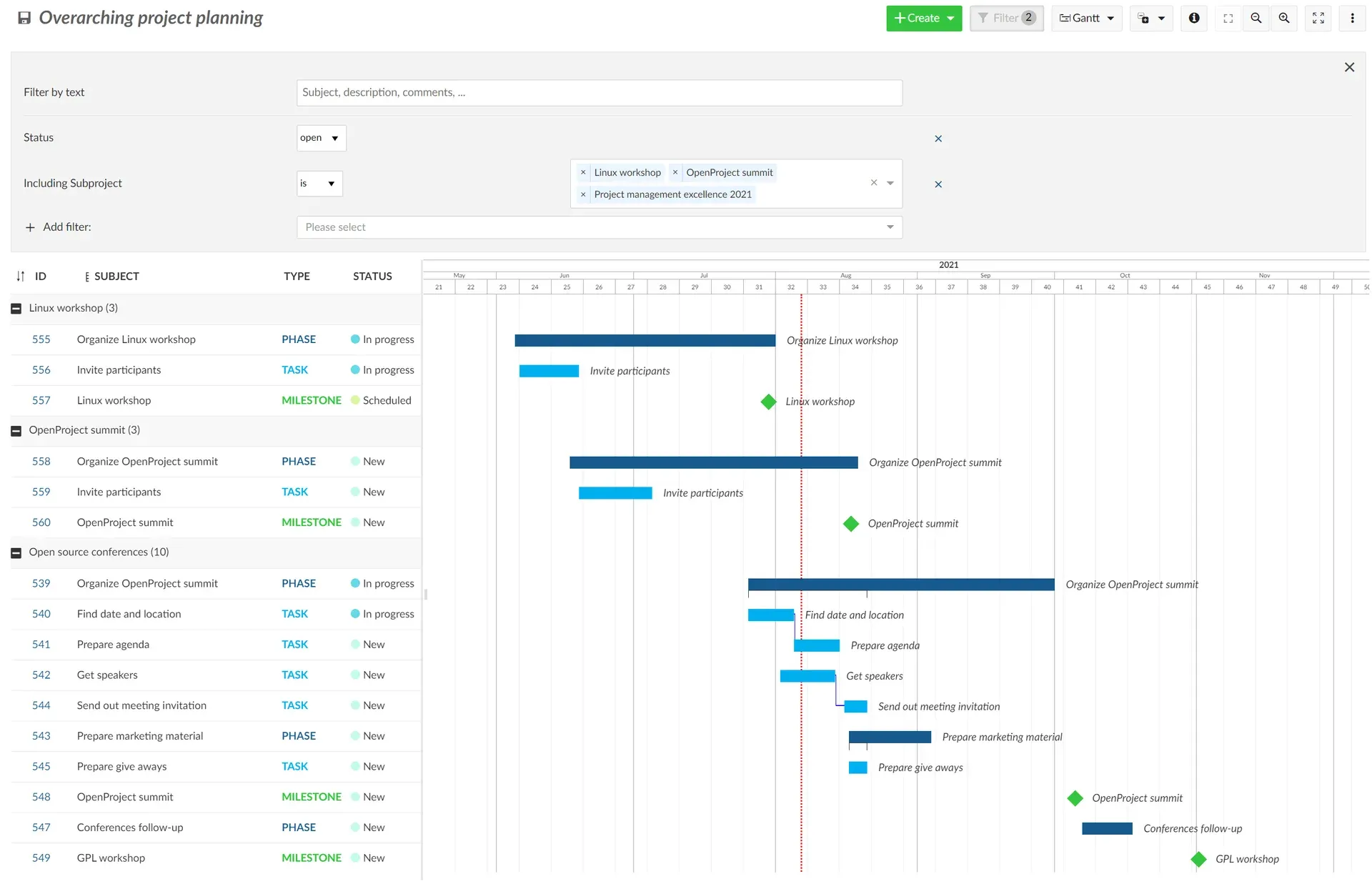
Overarching project planning in the Gantt view from the official user guide: filtered subprojects, phase and task bars, milestones and dependency lines.
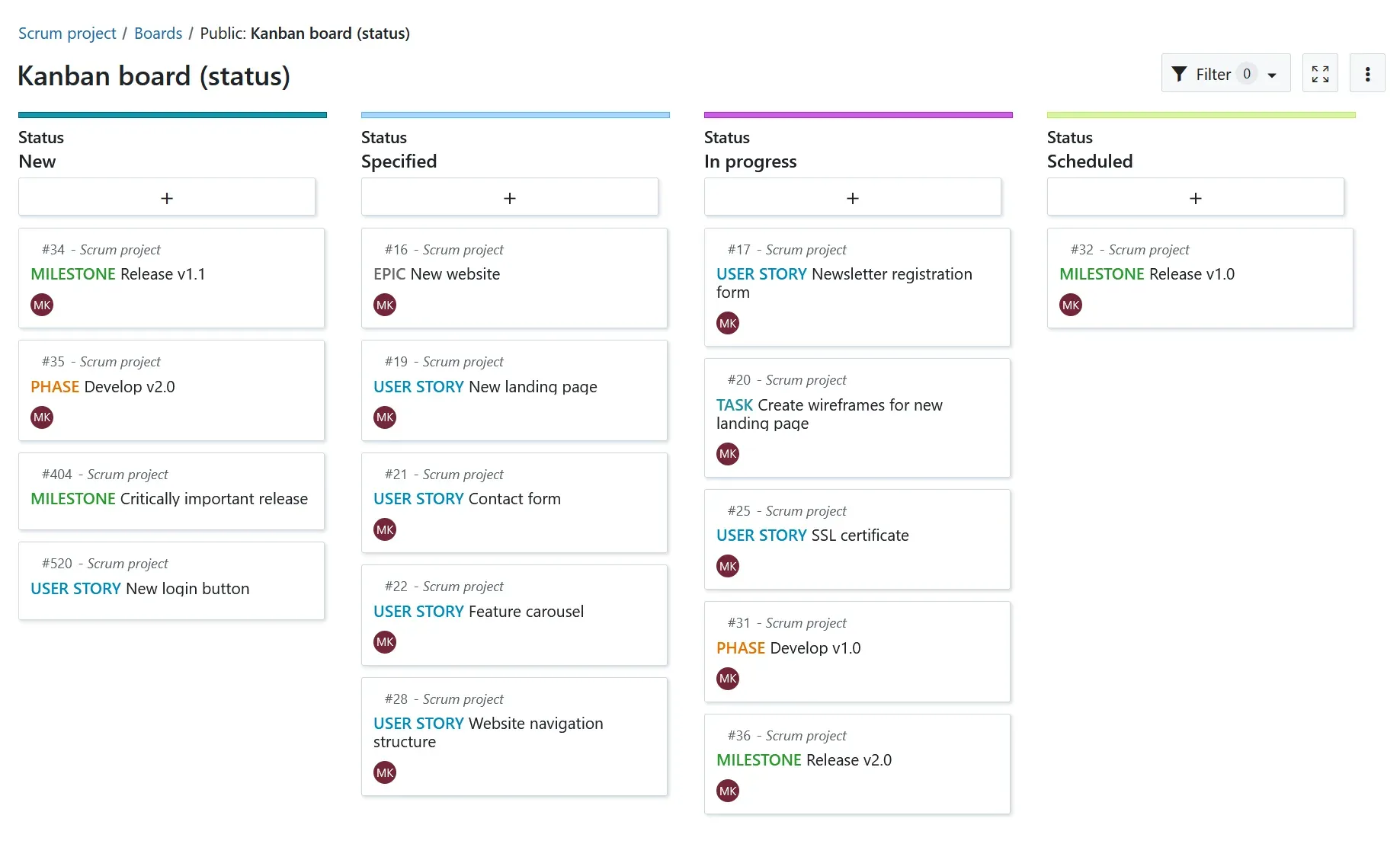
A status action board from the Boards guide: moving a card between columns changes the work package status.
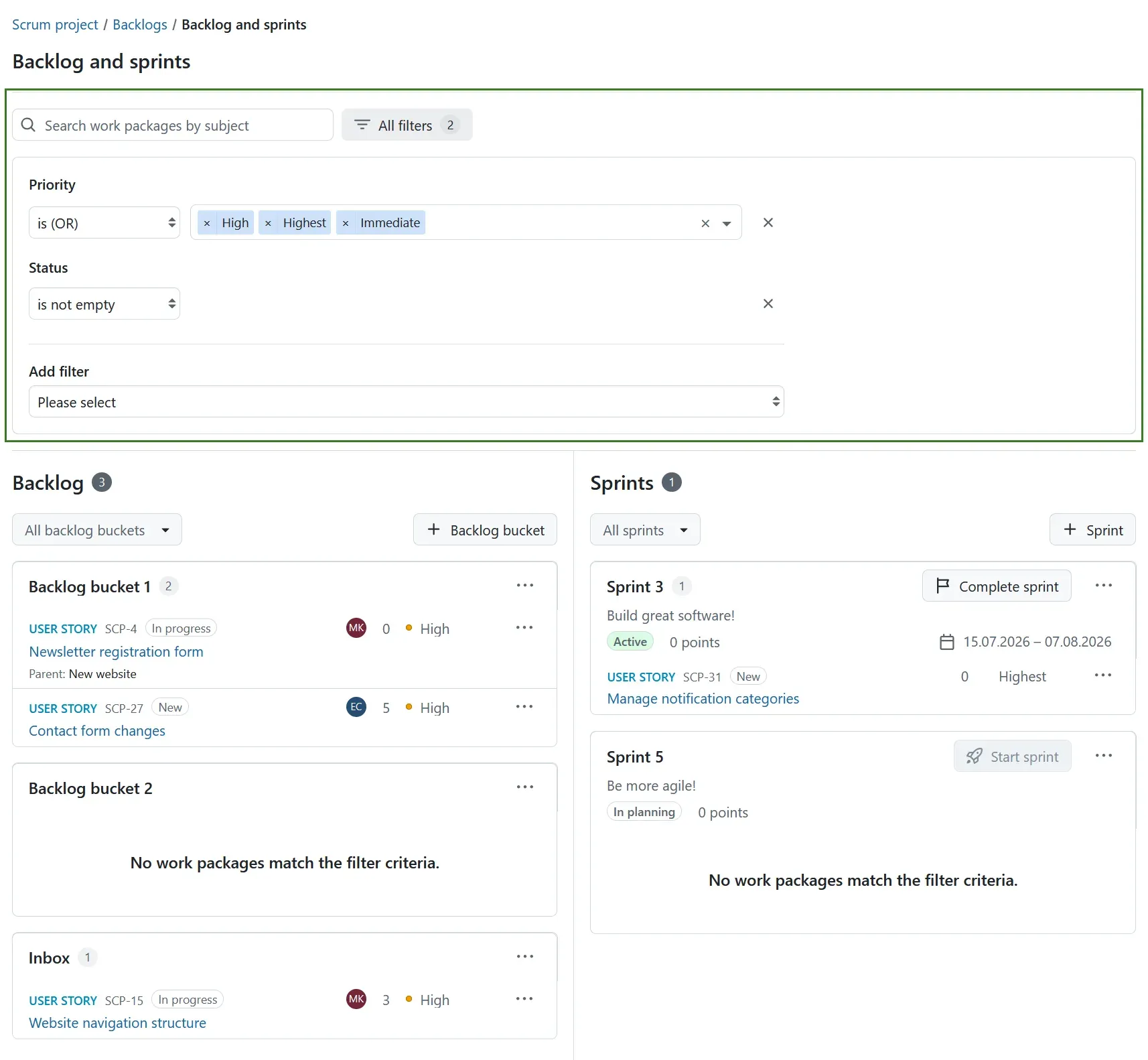
Backlogs filters introduced in 17.9: a priority and status filter applied across backlog buckets, the inbox and sprints with goals and dates.
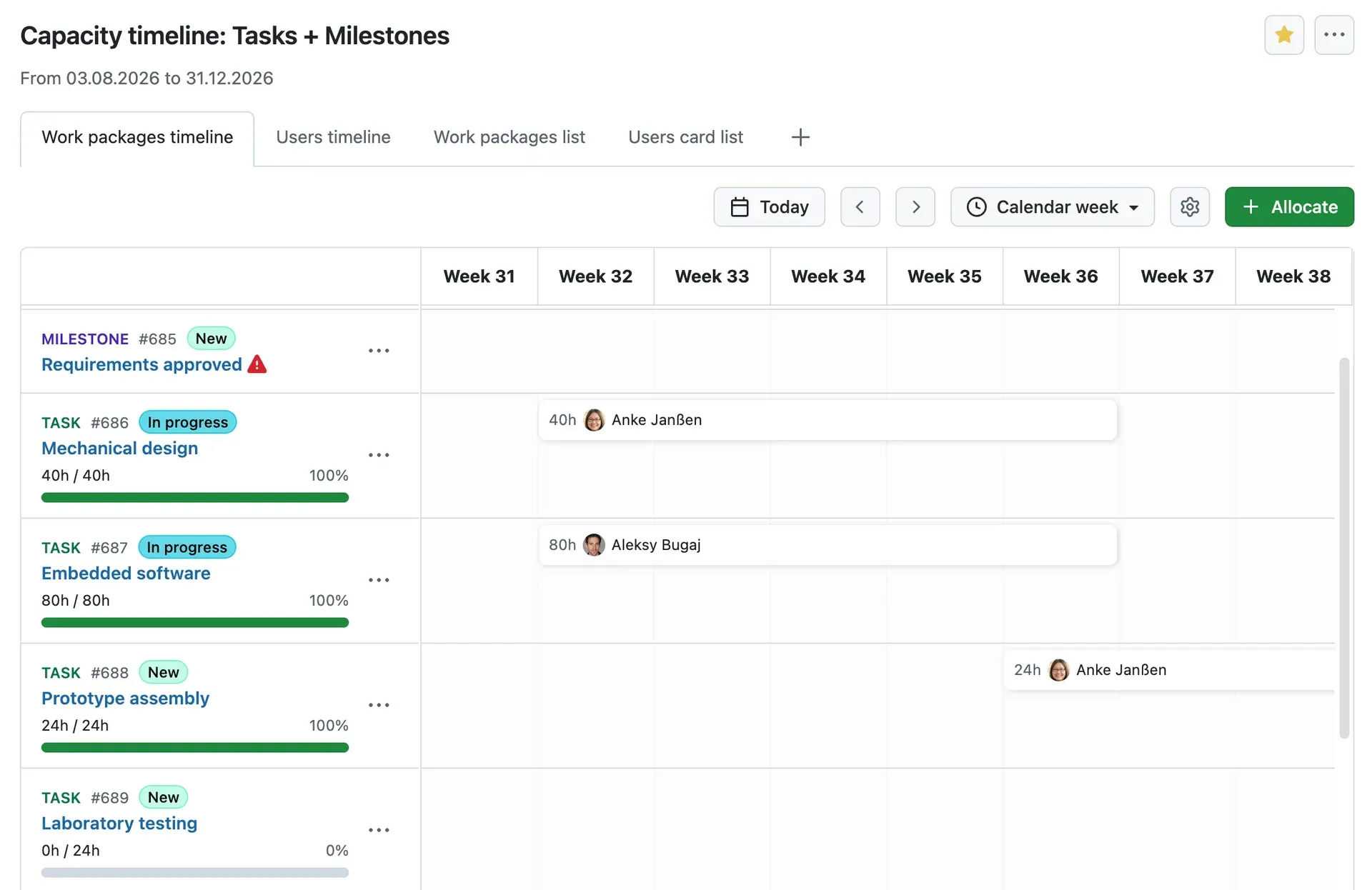
Enterprise resource management from the 17.7 release notes: a work package timeline with hours allocated to named users per calendar week.
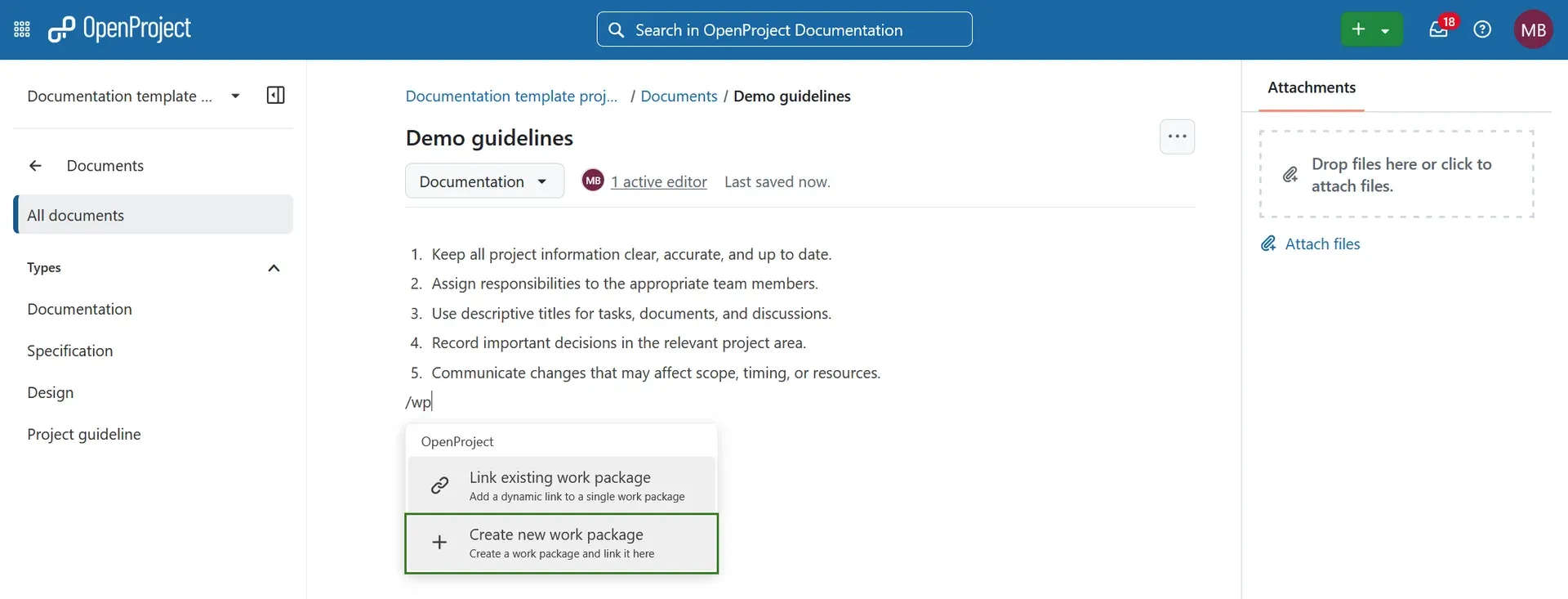
From the 17.9 release notes: typing a slash command in a collaborative document creates a new work package and links it in place.
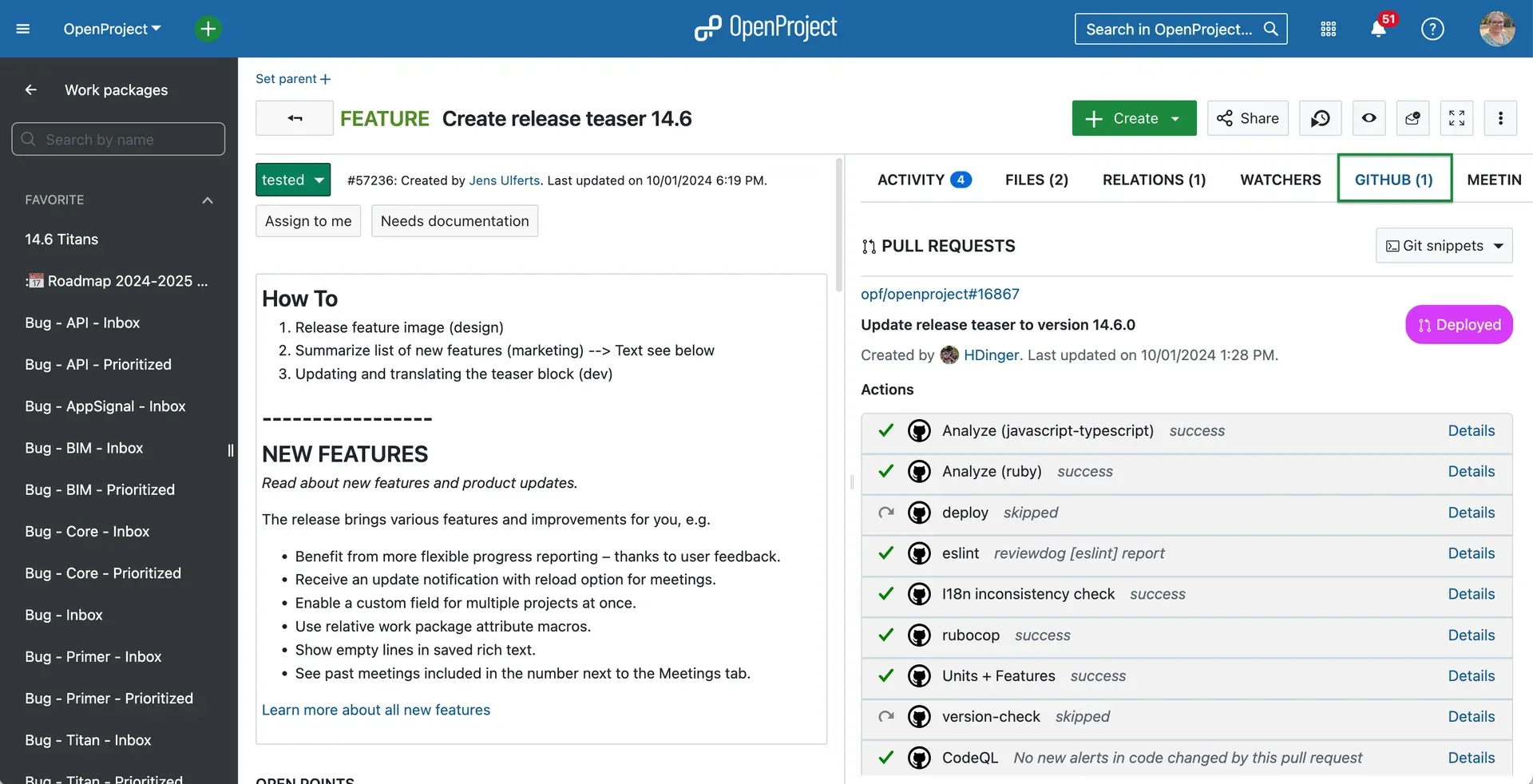
README screenshot of the GitHub integration: a feature work package with its linked pull request, deployment state and CI check results.
Source: official OpenProject project page.
Key capabilities
- Self-hosting with Docker Compose The recommended route for smaller instances clones the official openproject-docker-compose repository on the
stable/17branch, sets aSECRET_KEY_BASEand starts the stack withdocker compose up -d. Each process runs in its own container, so the database, proxy and workers can be scaled or replaced separately. Upgrades pull the branch again and recreate the containers. - Kubernetes with Helm charts For larger installations the documentation recommends the charts from the opf/helm-charts repository. Kubernetes and Docker Swarm deployments scale horizontally across web and background workers. A shared PostgreSQL database, memcached and file storage are needed once more than one application node runs.
- All-in-one Docker container for evaluation One
docker runcommand starts OpenProject with an internal PostgreSQL and memcached on port 8080. The image refuses a default or weakSECRET_KEY_BASE, and the first login uses admin/admin until changed. The guide recommends against this container for production because it hinders separate database upgrades. Tags follow semantic versioning:X.Y.Zis fixed, whileX.YandXfloat. - DEB and RPM packages Packages cover 64-bit Ubuntu 22.04 and 20.04, Debian 12 and 11, CentOS/RHEL 9 and SUSE Linux Enterprise Server 15. A configuration wizard installs PostgreSQL, an Apache front end, optional TLS and optional Git or SVN repositories. No packages will be built for newer distributions such as Ubuntu 24.04, and the docs provide a migration path to Docker Compose.
- Enterprise cloud and trials OpenProject GmbH runs Enterprise cloud instances in an EU data center where all sub-processors are based in the EU. A 14-day cloud trial starts at start.openproject.com, and Community installations can request a 14-day on-premises trial key. Paid plans start at Basic with a 25-user minimum.
- Work packages, relations and versions Work packages carry types, statuses, custom fields, parent-child hierarchies and relations such as follows or blocks. Since 17.8, relation columns in the work package table are available in the Community edition, and a work package can have several target versions. Enabling multiple target versions on an existing instance is a one-way conversion. Version 17.9 adds an Observed in versions field for bugs and lets users delete a work package with or without its descendants.
- Gantt charts and scheduling The Gantt view places phases, tasks and milestones on a shared timeline with dependencies, filters and zoom levels. Views can span several projects, as in the overarching planning example from the Gantt guide. Saved views keep filters and columns. Exporting the Gantt chart to PDF is an Enterprise add-on.
- Agile boards Basic boards hold freely named lists whose cards do not change the work package when moved. Action boards bind each list to a status, assignee, version, subproject or parent, so dragging a card updates that attribute. Boards share the same work packages as the table and Gantt views rather than keeping separate cards.
- Backlogs and sprints The Backlogs module groups work in backlog buckets, an inbox and sprints with goals, dates and story points. Release 17.9 added a first iteration of filters across sprints and buckets, though a filtered view cannot be saved yet. Sprint and bucket changes can be bulk edited and are recorded in the activity tab. Several active sprints without sprint sharing require an Enterprise plan.
- Time tracking, costs and budgets Users log time against work packages with activities, and projects can define their own cost types. Budgets combine unit and labor costs; since 17.9 planned labor can be entered in hours, days, weeks or months. Administrators can set global time-entry rules, such as a daily hour limit or no logging on non-working days, all disabled by default and not yet overridable per project.
- Documents, wiki and meetings The Documents module provides real-time collaborative editing, and from 17.9 a slash command or a text selection creates a linked work package. The project wiki has a collapsible page hierarchy with search. Meetings hold agendas, outcomes and recurring series, and agenda items can be converted into work packages.
- Resource management, team planner and portfolios The Enterprise resource management module plans capacity against user work schedules, with timelines per work package or per user. The team planner shows assignments per person, and programs and portfolios group projects above the project level. All three carry an Enterprise feature flag in the documentation.
- MCP server for AI assistants An MCP endpoint under
/mcplets AI clients search and read projects, create and update work packages, manage comments and relations and, since 17.9, handle time entries. Access uses personal API tokens or OAuth tokens with themcpscope, and the tools follow the same permissions as the UI. The MCP documentation lists it as an Enterprise add-on for the Professional, Premium and Corporate plans. - APIs and webhooks API v3 is a hypermedia REST API with an OpenAPI specification in JSON and YAML. A BCF API 2.1 serves BIM topics and viewpoints, SCIM manages users and groups, and outgoing webhooks notify other systems. The API overview also documents OAuth metadata endpoints under
.well-known. - Integrations with code and file platforms GitHub and GitLab integrations show pull or merge requests and their checks on a work package tab. Nextcloud can serve as file storage for project files. OneDrive and SharePoint storage and the XWiki integration are Enterprise add-ons. An Excel synchronization workflow exchanges work package queries with Microsoft Excel.
- Authentication and user management Local accounts, two-factor authentication and LDAP connections are part of the base product. OpenID Connect and SAML providers, LDAP group synchronization and SCIM provisioning appear among the Enterprise features. A setting can restrict how much users see of people outside their shared projects.
- BIM edition for construction projects The BIM edition adds an IFC model viewer, BCF issue management and a Revit add-in. Docker users switch with the
-slim-bimimage orOPENPROJECT_EDITION=bim, and packaged installations reconfigure the edition through the wizard. The BIM edition runs on AMD64 only, and the pricing calculator lists it as an add-on of 1 euro per user. - Jira Migrator (beta) Administrators can import projects, versions, issues with history, comments and attachments, a subset of custom fields, users, statuses and types from Jira Data Center 10.x or 11.x. Jira Cloud is not supported, and issue relations and sprint assignments are not migrated yet. The migration guide asks for a backup and test setups only. Imports can be aborted, resumed, reverted or approved.
- Mobile app (Beta) The OpenProject app for iOS 17+ and Android 12+ covers a home dashboard, work packages, notifications, meetings, global search and time tracking with timers. It can attach camera photos to work packages and comments. The server must run OpenProject 17.0 or later over HTTPS with a signed certificate and built-in OAuth applications enabled.
- Backups, health checks and signed images Administrators can create backups from the administration area unless the feature is disabled in configuration. Health checks, including a
worker_backed_upcheck, report on the background job queue. Docker images can be verified with Sigstore cosign before deployment, and their SBOM can be read with Docker Scout.
Where OpenProject fits
Planning a project with phases and milestones
Create a project from a template, define work package types for phases, tasks and milestones, and add start and finish dates. Link dependent tasks with follows relations so the Gantt chart shows the sequence, then save a filtered view per audience. Check how date changes propagate before sharing the plan, and decide whether project members should receive date alerts, which every edition includes since 17.9. A PDF export of the Gantt chart requires an Enterprise plan.
Running Scrum sprints from the backlog
Enable the Backlogs module, place incoming stories in the inbox or backlog buckets and move the selected items into a sprint with a goal and dates. Use backlog filters to focus on one priority or assignee, keeping in mind that filtered views cannot be saved yet. Review story points on the sprint card before starting it. Teams running several active sprints without sharing need an Enterprise plan; the Backlogs guide describes the sprint lifecycle.
Tracking time and budgets for controlling
Define time-tracking activities and project cost types, then create a budget with planned labor and unit costs. Team members log time and costs against work packages, and time and cost reports summarize the logged values. If time sheets feed billing or payroll, enable the global restrictions for daily maximums, working hours or closed months before go-live. Those rules apply instance-wide, so projects with different policies need a separate discussion. The time tracking guide covers logging and reporting.
Linking development work to GitHub or GitLab
Create a dedicated OpenProject user whose role grants only View work packages and Add notes, generate an API token for it and configure the webhook on the GitHub side. Set a webhook secret as well: without one, OpenProject accepts incoming requests without signature verification. Branches and pull requests can then be started from the work package, which shows linked pull requests and their check results. Test with one repository before rolling out, and use the GitLab integration the same way for merge requests. The GitHub integration guide lists the required permissions.
Moving off Jira Data Center
Install a separate OpenProject test instance, enable project-based semantic identifiers and create a Jira configuration with an admin personal access token. Run the import, then compare projects, issue counts, comments, attachments and custom fields before approving. Relations, sprint assignments, workflows and permissions still need manual work, and Jira Cloud is not a supported source. Keep the Jira system available until users have accepted the result in OpenProject. Compare the result with Atlassian features your teams actually use.
Sizing and operating a self-hosted instance
Start from the system requirements: four CPU cores, 4 GB RAM and 20 GB disk for up to 200 users, with PostgreSQL 16 or later and the pg_trgm, btree_gist and unaccent extensions. Pin a non-floating image tag, store the secret key base safely and put TLS termination in front of the application. Watch the background job health check as users grow, and add web workers before background workers. Test a restore from backup before relying on the instance.
Install
docker run -it -p 8080:80 -e SECRET_KEY_BASE=<your-secret-key-base> -e OPENPROJECT_HOST__NAME=localhost:8080 -e OPENPROJECT_HTTPS=false -e OPENPROJECT_DEFAULT__LANGUAGE=en openproject/openproject:17Reviews of OpenProject
Be the first to share your experience with OpenProject.
Write a review
Loading review form…
Alternatives to OpenProject
 AtlassianAtlassian, founded in 2002 by Mike Cannon-Brookes and Scott Farquhar, makes Jira for work tracking and Confluence for knowledge, plus the Forge platform.
 PlanePlane is a project management tool for tracking work items, running cycles, grouping work into modules and writing pages. The Community Edition is AGPL-3.0 and self-hosted with Docker or Kubernetes; Plane Cloud and the Commercial Edition add paid plans.
 HulyHuly is an EPL-2.0 platform for issue tracking, team planning, chat, collaborative documents, virtual office calls, HR and recruiting. The hosted service has shut down and the original repository is frozen, so new deployments run on Docker Compose or Kubernetes.