

What is solidtime?
solidtime is an open-source time-tracking application for freelancers and agencies. Time entries are recorded against clients, projects and tasks, priced with billable rates, analysed in reports and, in the paid plans, turned into invoices. The source code is published at github.com/solidtime-io/solidtime under the GNU Affero General Public License v3.0 (AGPL-3.0). The official website describes the project as bootstrapped, made in Europe and EU-hosted, and lists 15,000+ users and 1,000+ self-hosted servers. The main repository was created in January 2024.
solidtime is available in three ways. solidtime Cloud at app.solidtime.io is the hosted service with a free Solo plan and a paid Professional plan. The open-source code can be self-hosted for free with the official Docker image solidtime/solidtime, following the Docker guide and the self-hosting examples repository. The On-Premise Business license adds invoicing, an audit log and a private Docker registry to self-hosted instances. Next to the web app, the project distributes a desktop app for macOS, Windows and Linux (marked beta in its README) and a browser extension for Chrome and Firefox, both also under AGPL-3.0.
The application is built with PHP on Laravel and a Vue front end, according to the repository topics. A self-hosted deployment consists of an app container (default port 8000), a scheduler container and a queue worker container, selected with the CONTAINER_MODE variable, plus PostgreSQL, an SMTP service for notifications and password resets, and a Gotenberg server for PDF rendering. The desktop app and browser extension authenticate through OAuth clients created with Laravel Passport commands, and the REST API uses JWT bearer tokens.
The latest release is v0.22.1, published on October 21, 2026, and labelled an urgent security release. It updates PHP to 8.3.36 to fix two critical PHP vulnerabilities (CVE-2026-109618 and CVE-2026-109619) and updates FrankenPHP to version 1.13. The previous release, v0.22.0 from October 19, 2026, introduced Goals, renamed the DB_SSLMODE variable to DB_SSL_MODE with a DATABASE_URL fallback, prevented multiple running time entries per user and time entries that end before they start, hardened the importers and added extension auditing.
The README asks contributors not to use AI-generated text in issues, discussions and pull request descriptions, and pull requests from authors who are not vouched are closed automatically unless they change 50 lines or fewer. Bugs go to GitHub issues, feature requests to GitHub Discussions, and the self-hosting introduction also points to a Discord server. Similar listings on iThub include Invoice Ninja and Midday.
solidtime screenshots
Explore the interface. Open a screenshot to view it at full size.
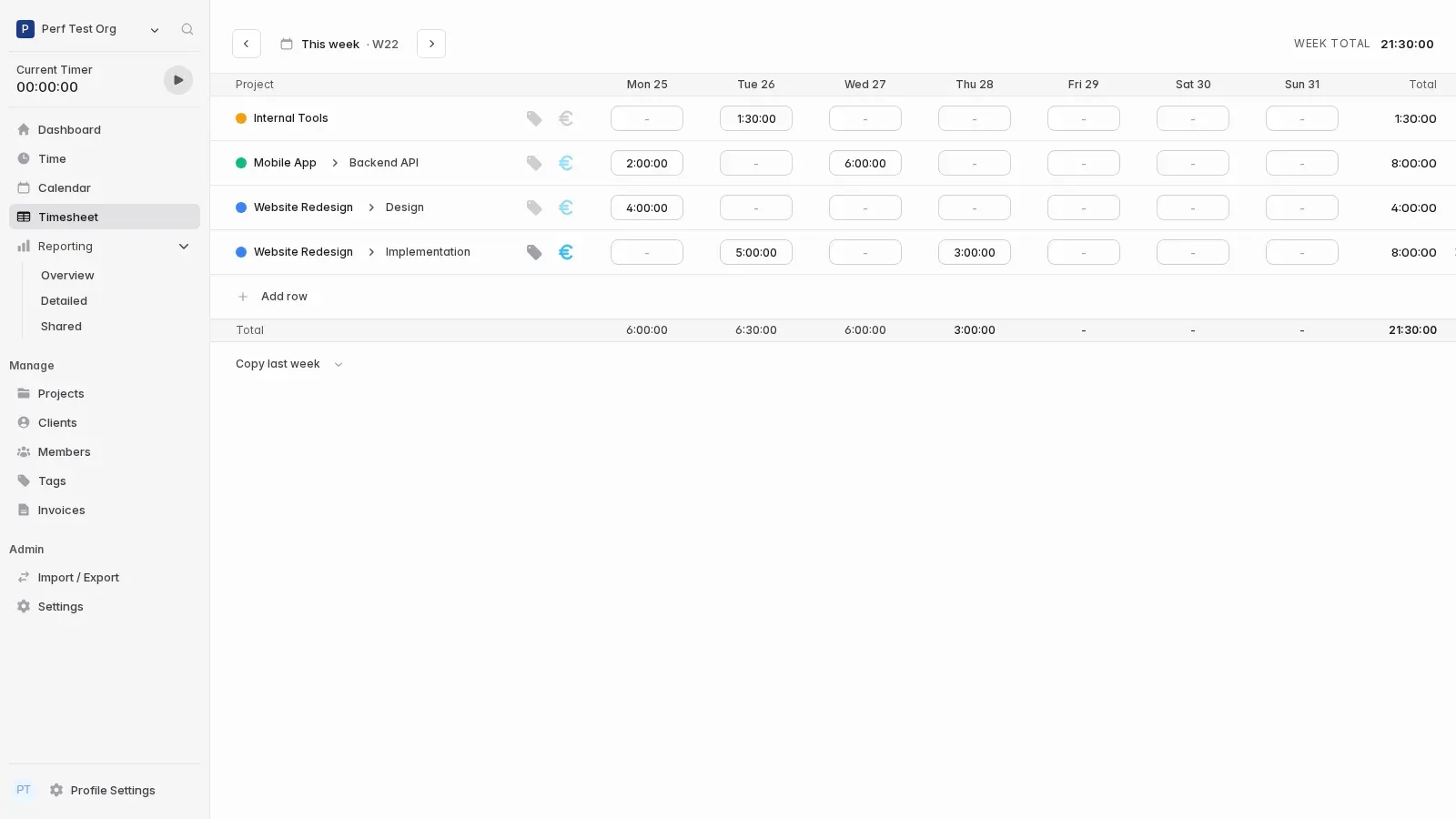
Official documentation screenshot of the weekly timesheet with project and task rows.
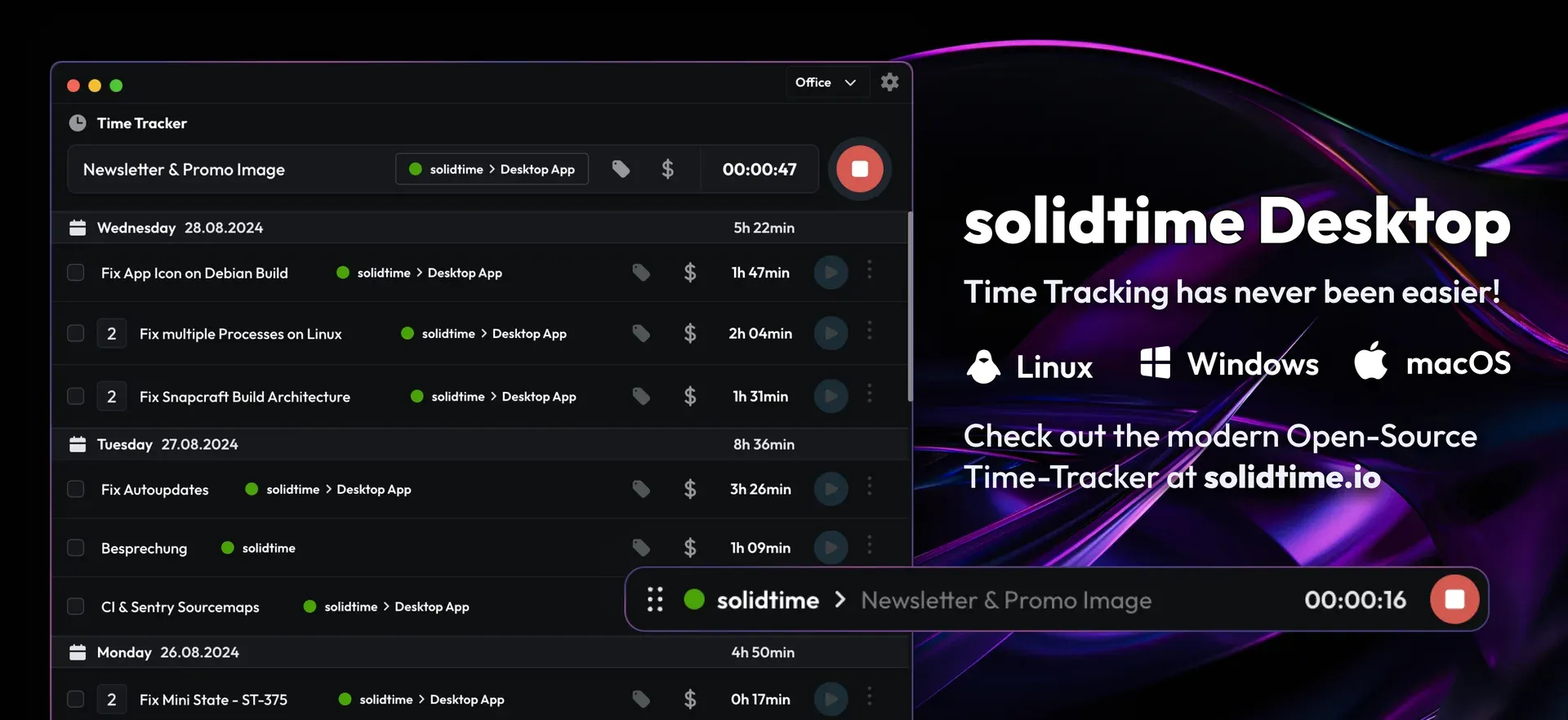
Official solidtime Desktop image showing the entry list, a running timer and the floating mini timer, for Linux, Windows and macOS.
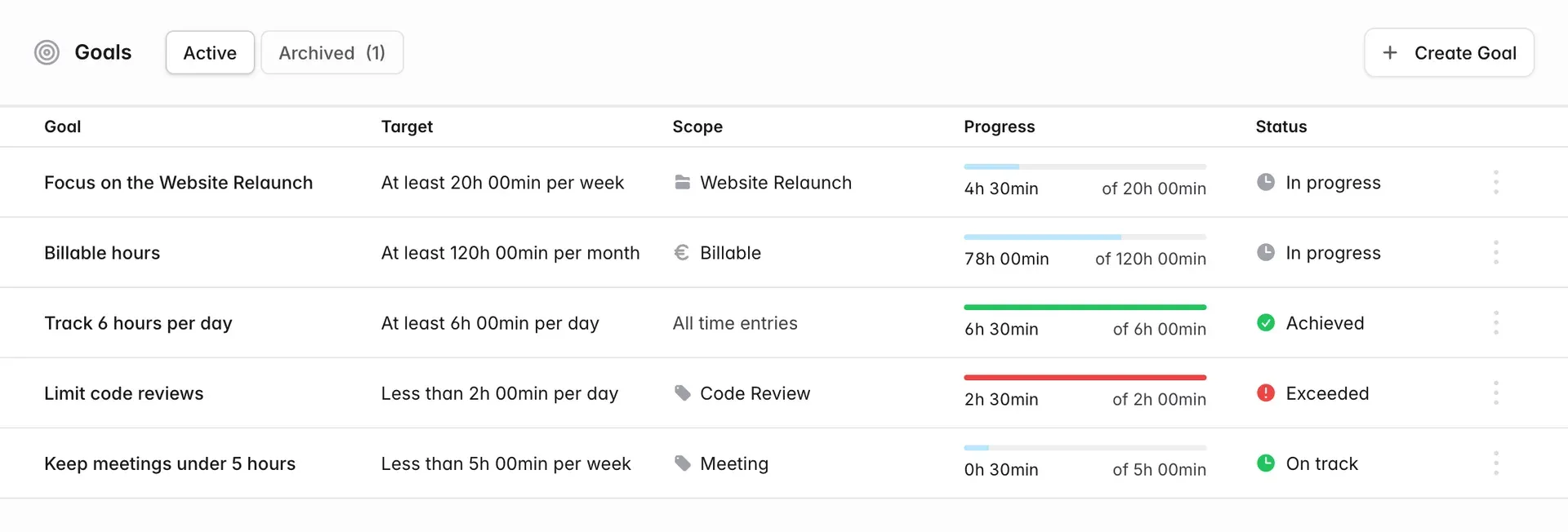
Official documentation screenshot of the Goals list showing targets and progress states.
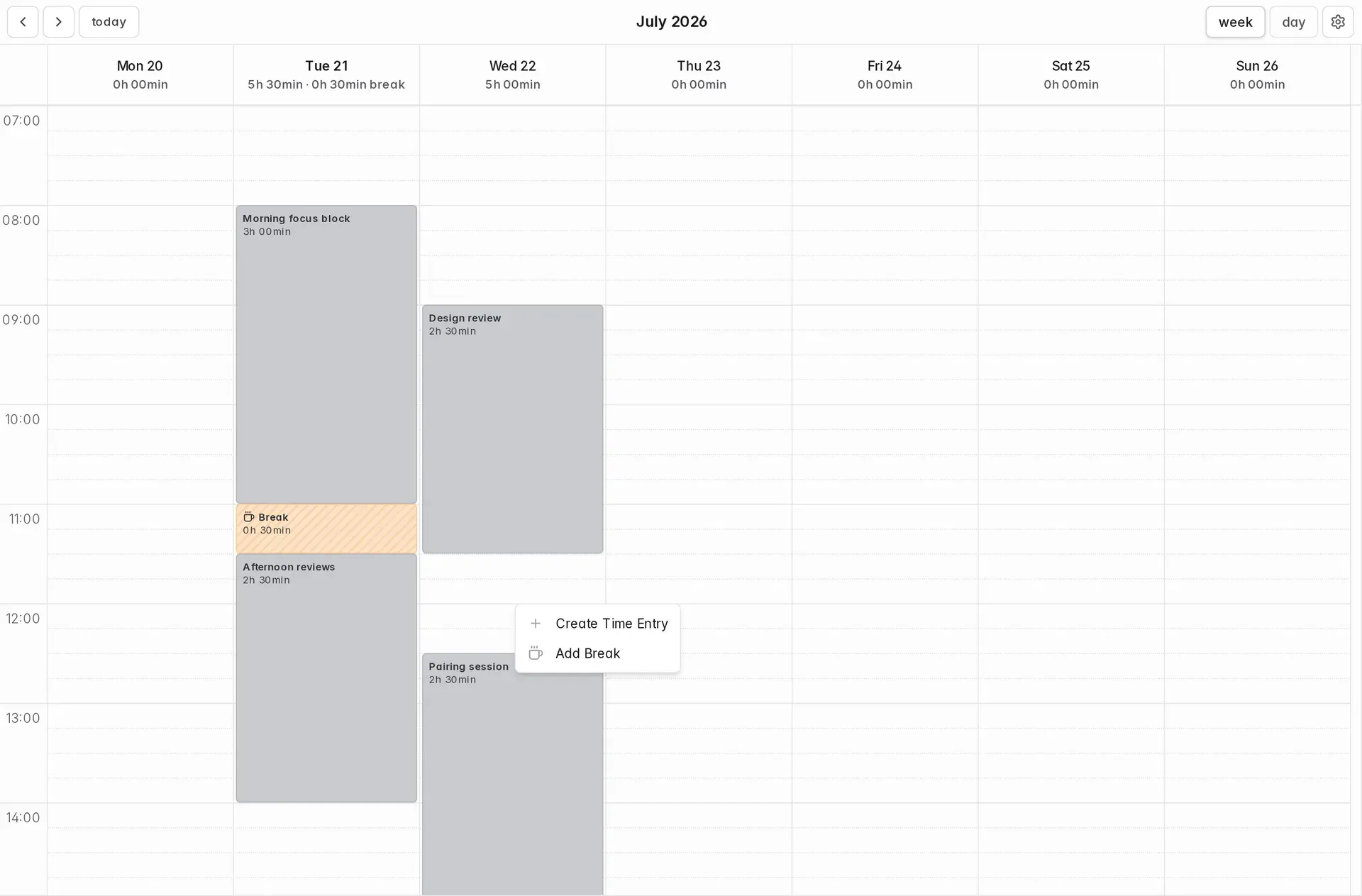
Official documentation screenshot of the calendar with a break and the create menu.
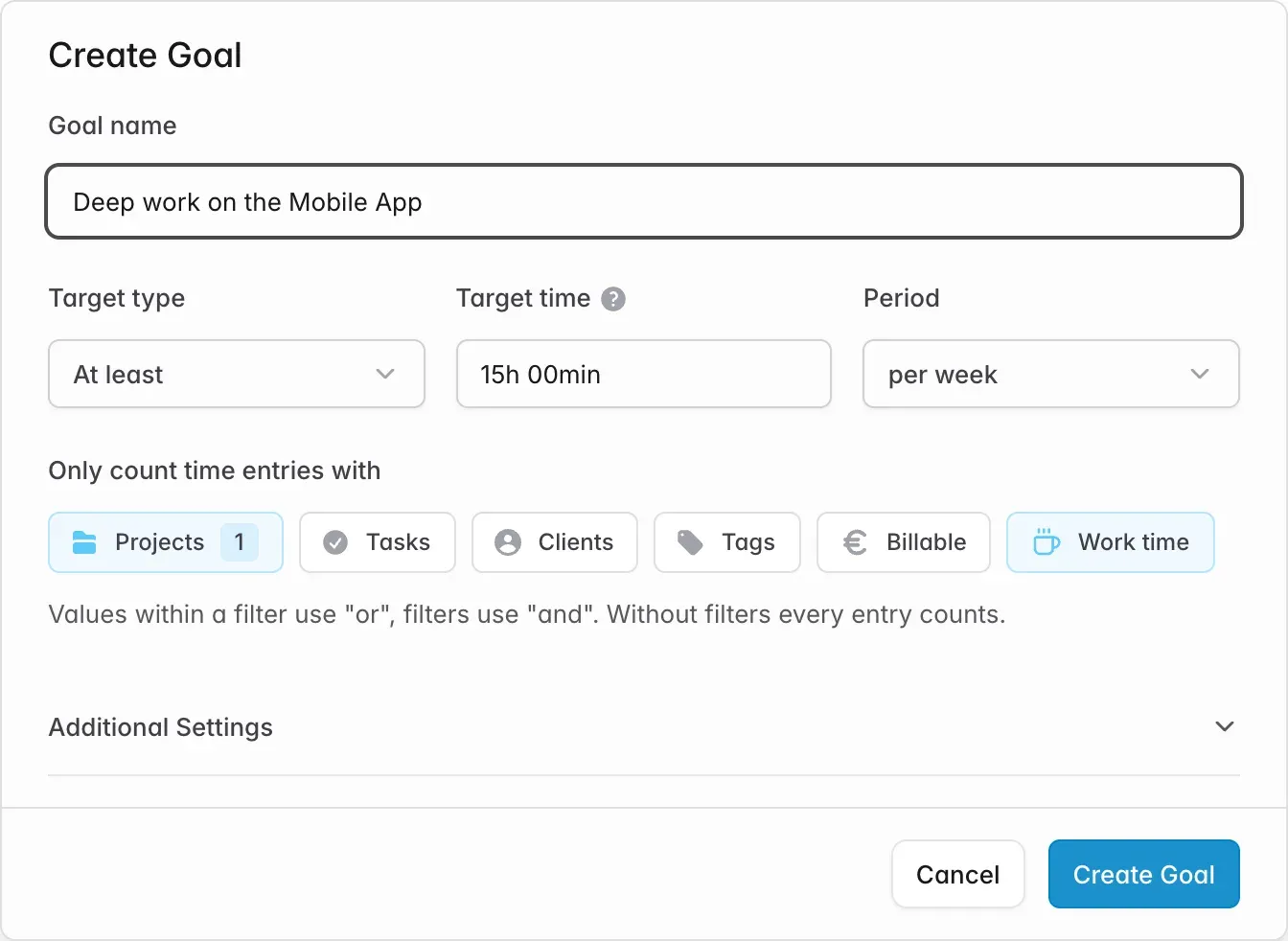
Official documentation screenshot of the Create Goal dialog with an at-least weekly target and time entry filters.
Source: official solidtime project page.
Key capabilities
- Live timer The time tracker starts and stops a running entry with a description, project, task, tags and billable flag, which can be set while the timer runs or after it stops. Entries roll up by day with running daily totals. Since v0.22.0 each user can have only one running time entry, and entries that end before they start are rejected.
- Calendar view Time entries appear on a week or day calendar. A block can be painted on the grid to log time, and dragging an edge trims or extends an entry. A context menu on an empty slot offers Create Time Entry and Add Break.
- Weekly timesheet The timesheet shows one row per combination of project, task, billable status and tags and one column per day. Cells accept durations such as
2,2.5,2h 30min,1:30or90min; new entries are placed at 9:00 local time or in the earliest free window, and a value that cannot fit before midnight is refused. Rows can be added inline, Copy last week duplicates the previous week, and the cell of a running timer is locked. - Breaks Break tracking is disabled by default and is enabled by an owner or admin in the organization settings. Breaks have no project, tags or billable status and are counted separately from work time on the dashboard, in day totals and in reports. A Take a break button stops the current entry and starts a break, Resume restores the interrupted entry's details, and the timesheet gets a pinned Break row that places breaks between work entries.
- Goals Introduced in v0.22.0, Goals set a target time per day, week or month with the type At least or Less than. Filters for projects, tasks, clients, tags, billability and work or break type narrow what counts; values inside one filter are combined with or, different filters with and. Goals are personal, have their own timezone and week start, and show statuses such as In progress, Achieved, On track and Exceeded. The free Solo plan includes one goal, Professional unlimited goals.
- Clients, projects, tasks and tags Projects can be assigned to a client, have a colour, members, a billable default and an estimated time, and can be archived. Tasks break a project down and tags cut across projects, for example for meetings. Project and task estimates are part of the Professional plan in solidtime Cloud.
- Billable rates Billable rates are hourly prices on four levels: project member, project, organization member and organization, where the more specific level overrides the one above. Changing a rate asks for confirmation that it is applied to the existing time entries that use that rate; entries priced by a more specific level stay unchanged. In solidtime Cloud billable hours and rates are a Professional feature.
- Reporting Reports filter by member, project, task, client, tag and billable state over any date range and group by project, task or client, with billable totals and cost per group. The overview, detailed and shared report views support saved reports, bulk retagging or rebilling of rows in the detailed list, and rounding of time entries. Exports are available as PDF, CSV, Excel (.xlsx) and OpenDocument (.ods); PDF reports, shareable read-only report links and rounding are Professional features in the cloud.
- Invoicing Invoices are built from selected billable entries: solidtime applies each project's rate and creates line items, with an optional attached hourly report. The website lists PDF and structured e-invoices (EN 16931), tax rates with EU reverse-charge, percentage or fixed discounts, reusable company templates and invoice recipients, duplication of earlier invoices and the states draft, sent and paid. Invoicing is part of the cloud Professional plan and the On-Premise Business and Enterprise plans, not of the free open-source edition.
- Organizations and roles One account can belong to several organizations and switch between them. The roles are Owner, Admin, Manager, Employee and Placeholder. Placeholder users hold imported or deactivated members' time entries and are not billed in solidtime Cloud; they can later be invited to become real users.
- Import The import area under Admin (owner or admin only) supports Toggl, Clockify, Harvest, solidtime exports and a generic CSV format. Some sources need several import types in a set order, for example the Toggl Data Importer before Toggl Time Entries. The generic CSV importers for projects and time entries expect UTF-8, comma-separated files with documented columns such as billable_rate in cents and ISO 8601 UTC timestamps.
- Organization export An organization export produces a ZIP file with one CSV per entity (clients, members, invitations, organization settings, projects, project members, tags, tasks and time entries) and a
meta.jsonfile. Money values are integers in cents, IDs are UUID v4 and timestamps are UTC. The docs mention the export as a way to move between self-hosted instances and the cloud. - REST API The REST API covers the functionality of the web application and is described in the API reference. Users create API tokens (JWT) in their profile settings and send them as a Bearer token; a token is shown only once. Authenticated requests are limited to 200 per minute per user and guest requests to 60 per minute per IP, with HTTP 429 on excess; self-hosted instances can change the limits through environment variables.
- Desktop app The desktop app is available for macOS (Apple Silicon and Intel), Windows 10 and 11 (x64 and ARM64) and Linux as .deb, .rpm and .tar.gz for x64 and ARM64, plus the Snap Store. It records which application and document is in focus, pauses on idle and asks whether to keep or discard idle time, and offers an always-on-top mini timer and a tray icon. Activity data stays on the device until it is turned into a time entry. The latest desktop release is v0.3.2 from August 6, 2026.
- Browser extension The official extension for Chrome, Edge and Brave (Chrome Web Store) and Firefox (Firefox Add-ons) adds start and stop controls to issue pages in Linear, Jira and Plane and captures issue IDs and titles in the time entry. It signs in with OAuth and PKCE, supports switching organizations and can connect to self-hosted instances once an OAuth client has been created.
- Self-hosting with Docker The Docker guide offers two example setups (Docker with Traefik and database, or Docker with database behind an own reverse proxy), two environment files, key generation with
php artisan self-host:generate-keys, database migrations and user creation through artisan commands. Optional steps enable desktop client access, browser extension access and personal API tokens. Updates pull a new image tag and run migrations; a Kubernetes and Helm guide is marked incomplete in the docs. - Super admin panel On self-hosted instances, email addresses listed in the
SUPER_ADMINSenvironment variable can open an administration panel at/admin. The docs describe it as a tool for technical operators that can break the application if misused. CLI commands such asadmin:user:createandadmin:user:verifyhandle user setup. - Cloud plans The pricing page lists Solo, free for one user, with clients, projects, tags and tasks, calendar and timesheet views, breaks, desktop activity tracking, reporting and one goal. Professional costs 9 euros per user per month billed monthly or 8 euros billed annually, excluding VAT, and adds team support, project and organization access management, unlimited goals, billable rates, invoicing, estimates, rounding, PDF and shareable reports and priority support.
- On-premise plans The on-premise pricing lists the open-source edition at 0 euros, Business from 49 euros per year for one organization (199 euros per year at the default 5 users, excluding VAT) with invoicing, a private Docker registry and an audit log, and Enterprise with custom pricing and priority support. Upgrading switches the app, scheduler and queue images to
registry.on-premise.solidtime.ioand runs migrations. - Privacy documents The website describes the cloud as GDPR-friendly and EU-hosted and publishes a data processing agreement, a sub-processor list, a privacy policy and a status page at status.solidtime.io.
Where solidtime fits
Tracking client work as a freelancer
A freelancer creates clients and projects, sets a project or organization billable rate and records time with the timer, the calendar or the weekly timesheet. The reporting overview groups the period by project or client and shows billable time and billable amount separately from non-billable time. In the cloud Professional plan the selected billable entries become invoice line items with the project's rate, tax and optional discount, sent as a PDF or e-invoice.
Running time tracking for an agency team
An agency invites members into an organization and assigns the roles Owner, Admin, Manager or Employee. Managers handle projects, clients, tags and reports, while employees only track time. Member and project-member rates price each person's work per project, project and organization access management controls visibility in the Professional plan, and shareable read-only report links let clients see a filtered report without an account.
Migrating from Toggl, Clockify or Harvest
Admins open Import under the Admin menu, pick the source and follow the export instructions shown for it, in the documented order when a source has several import types. People found in the imported data are created as placeholder users, so their time stays attached until they are invited as real members. Data from spreadsheets or custom tools can be brought in with the generic CSV importers for projects and time entries.
Self-hosting on own infrastructure
Operators choose one of the self-hosting examples, fill the environment files, generate the application and Passport keys, start the containers, run migrations and create the first user with an artisan command. The deployment uses PostgreSQL, SMTP, Gotenberg for PDFs and separate app, scheduler and queue containers. Release v0.22.1 updates the bundled PHP for two critical vulnerabilities, and v0.22.0 renamed the database SSL variable to DB_SSL_MODE.
Automatic activity tracking on the desktop
With the desktop app connected to a cloud account or to a self-hosted instance (after creating the desktop OAuth client), the app records the focused application and document in the background. When the user returns from idle time, a dialog offers to keep it, discard it or discard it and start a new timer. Window activity statistics stay on the device until the user converts them into time entries on the calendar.
Tracking time from issue trackers and scripts
Developers start timers directly from Linear, Jira or Plane issues with the browser extension, which copies the issue ID and title into the entry. Other systems can read and write time entries, projects and reports through the REST API with a personal JWT token, within the documented rate limit of 200 requests per minute per user. Personal goals, such as at least 6 hours of tracked work per day or meetings under 5 hours per week, then show progress against these entries.
Reviews of solidtime
Be the first to share your experience with solidtime.
Write a review
Loading review form…
Alternatives to solidtime
 Invoice NinjaSource-available invoicing app for freelancers and small businesses: invoices, quotes, recurring billing, expenses, projects and time tracking, a client portal, REST API and apps, hosted or self-hosted.
 MiddayOpen-source finance app for freelancers and small teams with bank sync, invoicing, time tracking, receipt matching, a document vault and an AI assistant. The hosted service was wound down after Midday joined Ramp in 2026; the source stays public.