

What is Midday?
Midday is an open-source business finance application for freelancers, consultants, solo founders and small teams. It combines bank transaction sync, invoicing, time tracking, receipt matching, document storage and an AI assistant in one TypeScript monorepo. The code is published by Midday Labs AB, the company of founders Pontus and Viktor, in the midday-ai/midday repository, with a copyright line that starts in 2023. For most of its life Midday was used as a hosted subscription service at app.midday.ai, with a 14-day trial, a web dashboard and a macOS desktop app.
The most important fact for a reader in late 2026 is the change of status. On May 7, 2026 the founders announced that Midday is joining Ramp and that the product would be wound down over roughly three months, with refunds on annual plans, a full data export path and a migration offer to Ramp for eligible customers. New sign-ups had already been placed behind a waitlist in April 2026. The last commit, on June 13, 2026, added an in-app sunset banner and scripts that cancel remaining subscriptions. When iThub checked on November 7, 2026, the marketing site and documentation were still online, the pricing page redirected to the announcement, and the app and API hostnames returned a hosting-platform 404 instead of the application.
The latest tagged release is Midday v0.5.0, published February 15, 2026. It is a desktop packaging release: it carries macOS disk images for Apple Silicon and Intel plus signed updater archives, and its only listed change is the desktop download work. The preceding v0.4.0 release collected a long series of changes, including an OAuth flow for third-party apps, invoice creation and scheduling, split-day time entries, OCR retries, embeddings and transaction enrichment. Product posts on the website describe the larger steps of 2026: Midday v2 in January with a rebuilt assistant and a widget dashboard, MCP support, a CLI for agents in March and the private beta of Midday Computer in April.
Architecturally the repository is a Bun and Turborepo workspace. The apps folder holds the Next.js dashboard, the public website, a REST and tRPC API, a background worker and a Tauri desktop shell. Shared packages cover banking providers (GoCardless, Enable Banking, Plaid and Teller), invoices, inbox processing, accounting exports, encryption, jobs, a CLI and MCP views. Supabase supplies PostgreSQL, authentication, storage and realtime; Redis backs caching and BullMQ queues; the README lists Trigger.dev, Resend, Typesense, OpenPanel, Polar, Gemini and OpenAI as external services.
The license is AGPL-3.0. The README adds a note asking commercial users to contact the company for a separate license, which sits uneasily with the standard AGPL text in the LICENSE file and deserves legal review before any commercial deployment. There is no official self-hosting guide: the README still says local development documentation is in progress, and the production code assumes many paid third-party services. Midday is therefore best read today as a large, readable reference implementation of a small-business finance product rather than as a service you can subscribe to.
Midday screenshots
Explore the interface. Open a screenshot to view it at full size.
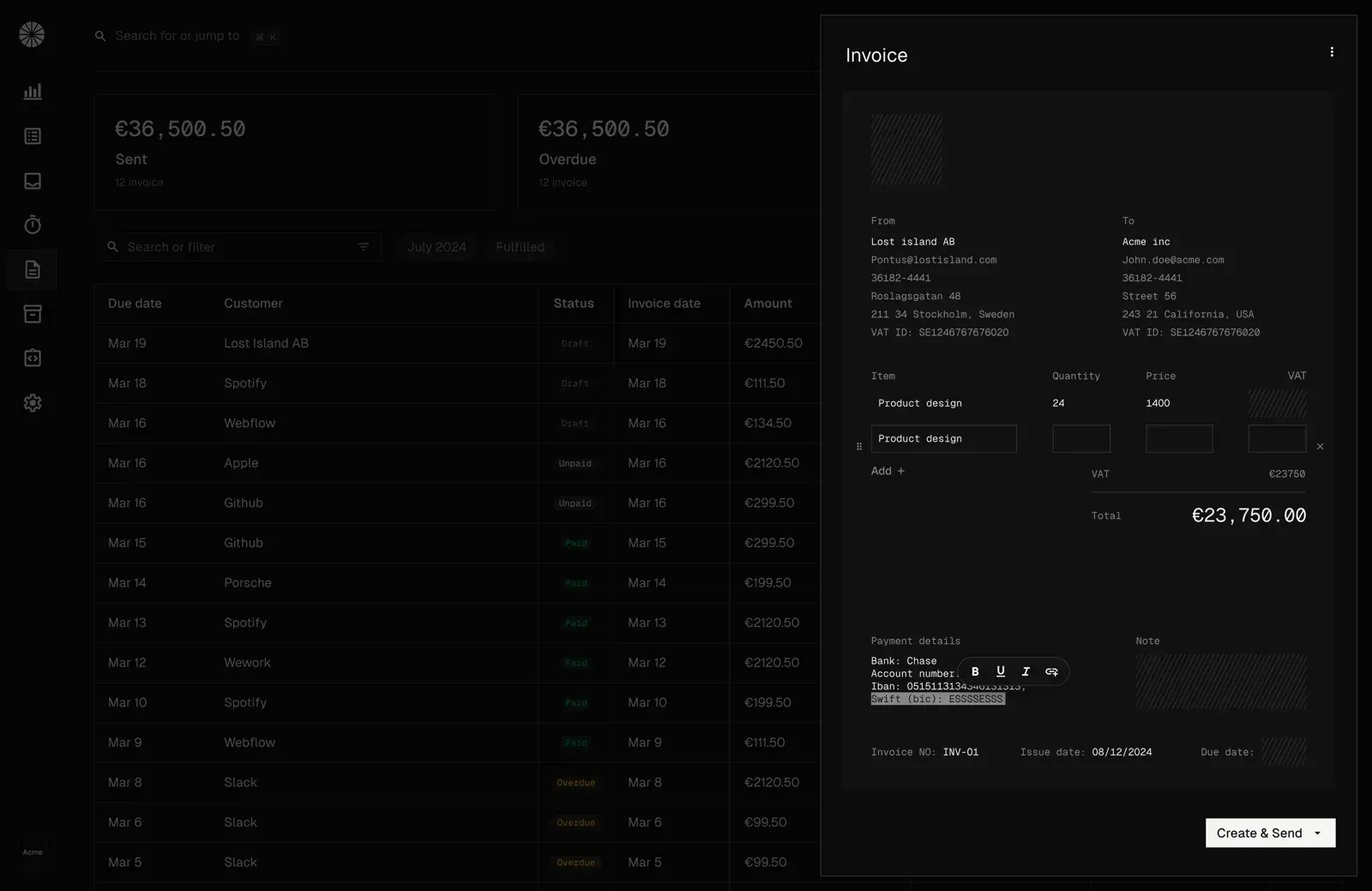
Official product image from the October product update: invoice list and the invoice editor with demo data.
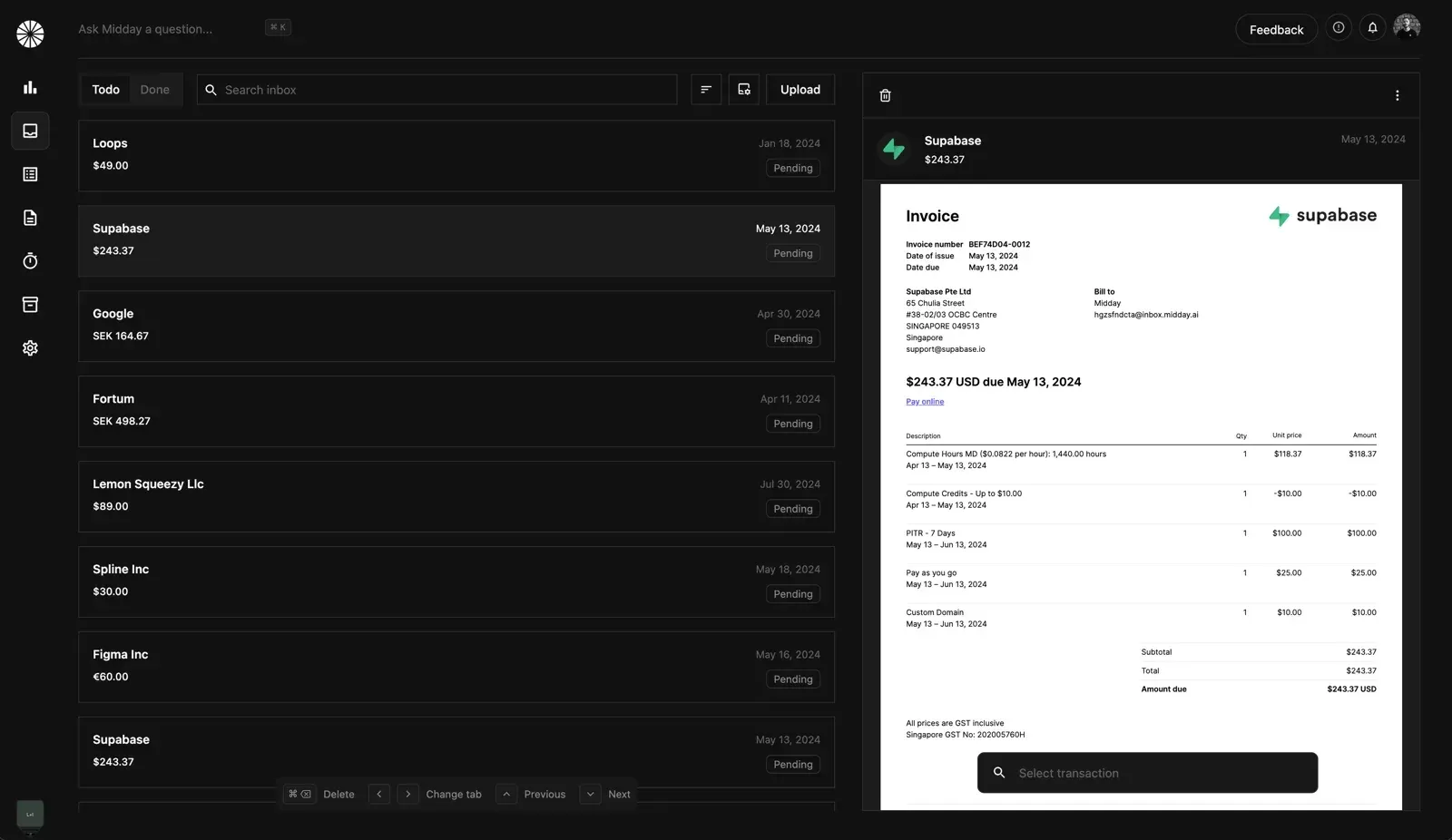
Official image from the July product update: the Magic Inbox waiting to match a receipt to a transaction.
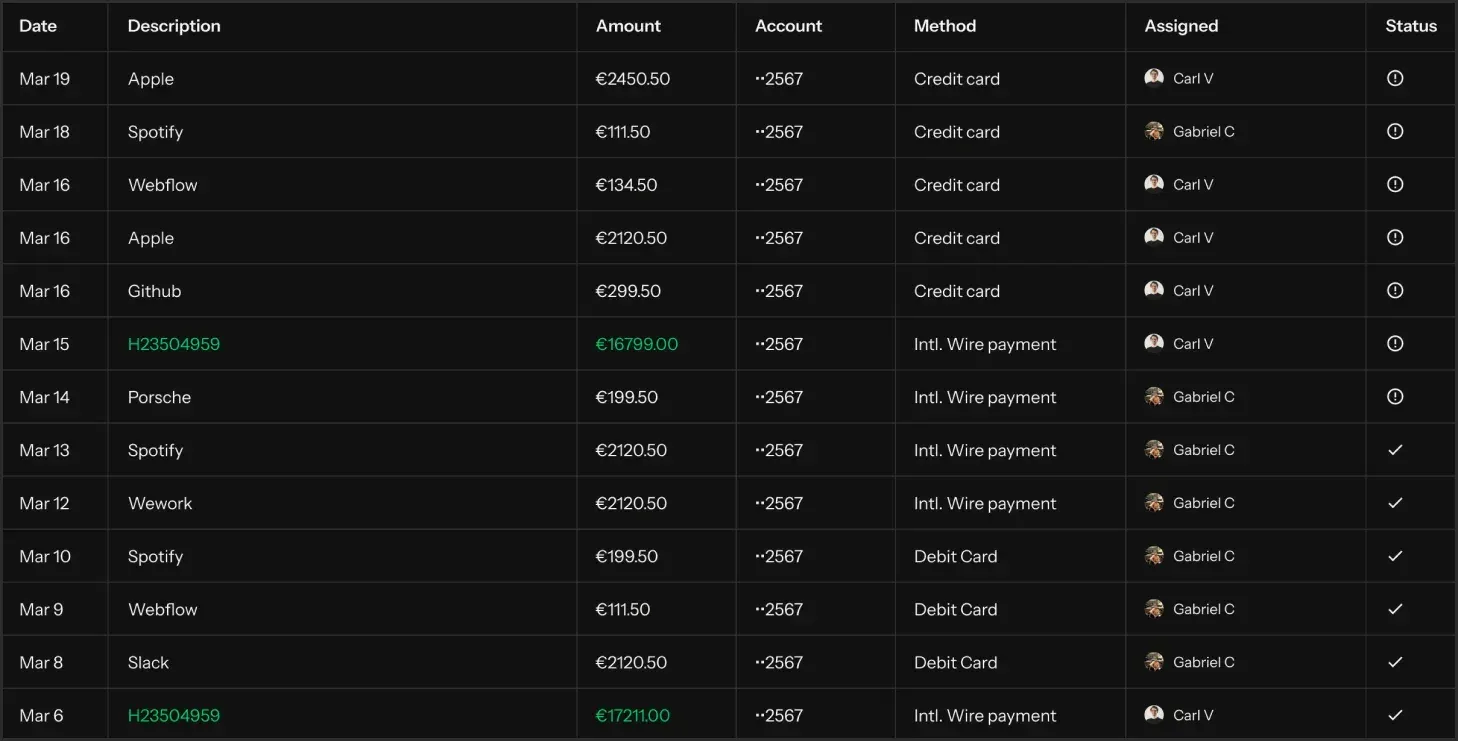
Transactions view from the dashboard's public assets, showing demo data and per-row receipt status.
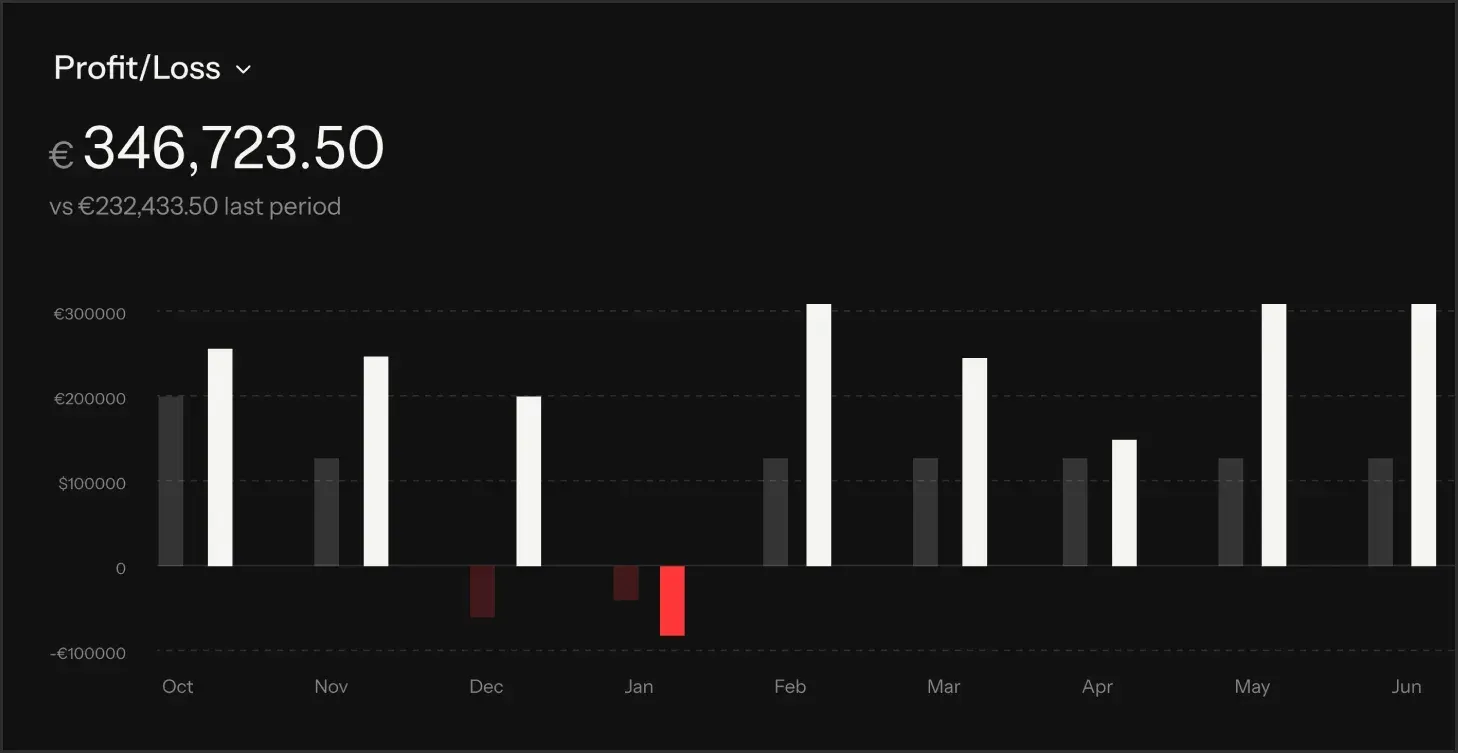
Profit and loss widget from the dashboard's public assets, with demo figures in euros.
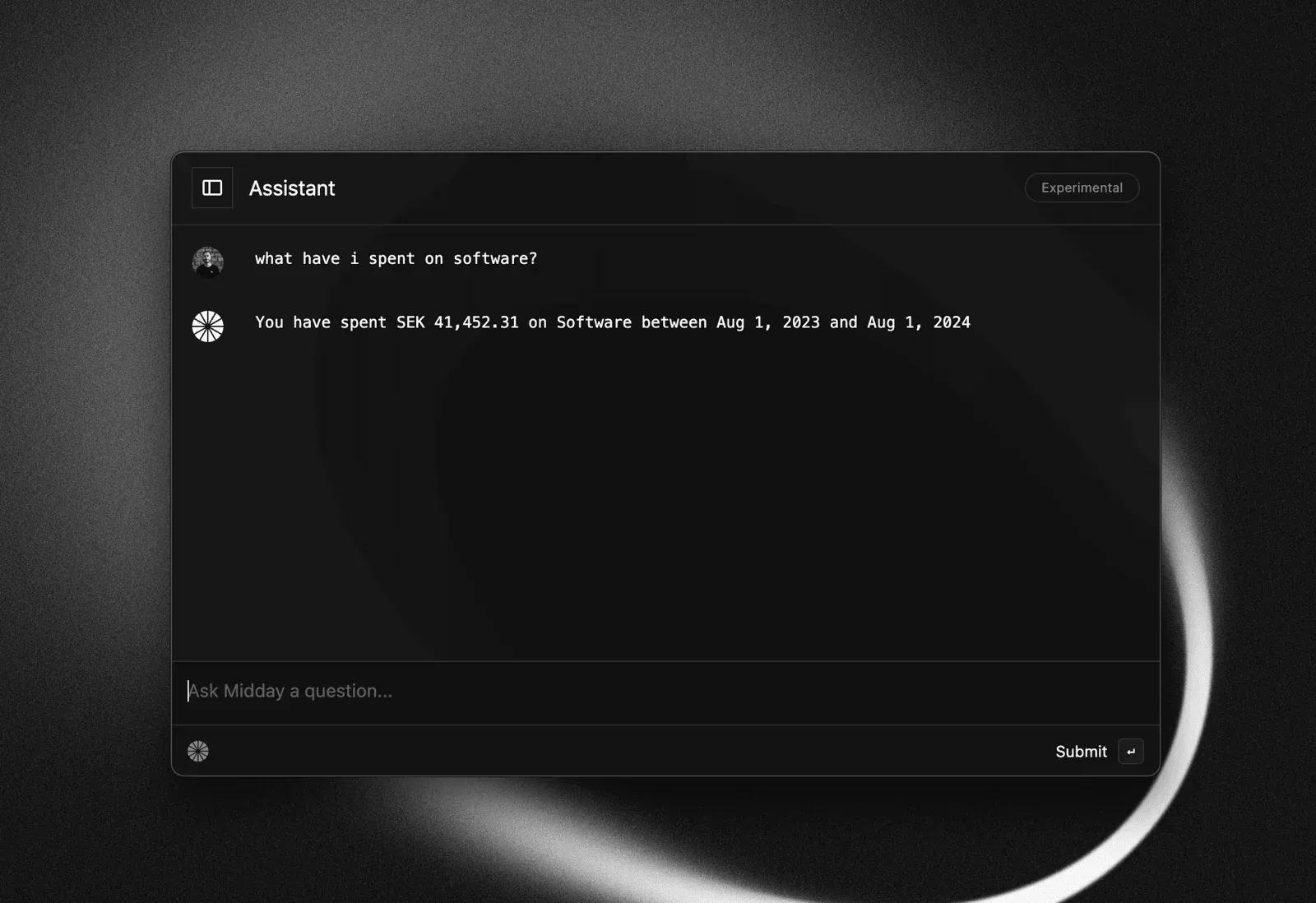
Early Assistant from the July product update; the assistant was rebuilt in Midday v2.
Source: official Midday project page.
Key capabilities
- Bank account sync The banking package connects to accounts through GoCardless and Enable Banking in Europe, Plaid in the US and Canada, and Teller in the US. The hosted service advertised coverage of more than 20,000 institutions, read-only access and roughly 90 days of initial history. Each provider needs its own contract and API keys, so this coverage does not come with the source code. The bank connection guide documents the original flow.
- Transaction categorisation and review Synced transactions receive categories automatically and move through statuses such as no receipt, receipt found, ready to export and exported. A Review tab acts as an export queue that should reach zero. Categories, tags and assignments can be edited by hand, and CSV import serves as a fallback for banks without a connection.
- Magic Inbox and receipt matching Receipts and supplier invoices arrive by upload, by forwarding to a unique inbox address, or through connected Gmail and Outlook accounts. Midday extracts merchant, amount, date and currency, then scores candidate transactions. High-confidence matches attach automatically, uncertain ones wait for confirmation, and the matching documentation explains the signals used.
- Invoicing Invoices have customers, line items, tax or VAT, custom numbering, issue and due dates and a per-invoice currency. They can be sent by email with an optional PDF attachment, shared as a web invoice, saved as drafts or scheduled. Status tracking covers draft, unpaid, paid and overdue states.
- Recurring invoices and reminders Retainer billing can be set to weekly, monthly, quarterly or yearly schedules with an optional end date. Each run creates a new invoice with an incremented number and sends it. Schedule edits apply only to future invoices, so earlier invoices stay unchanged.
- Online payments through Stripe Connecting a Stripe account adds a Pay button to invoices and marks them paid after checkout. Stripe processing fees apply and Midday documented no extra fee of its own. Payment details remain in the Stripe dashboard, which is the place to reconcile refunds and disputes.
- Time tracking A timer and manual entries record time per project and customer, with descriptions, split-day handling and entries that cross midnight. Time can be reviewed by day, project, week or month. Tracked hours can be turned into invoice lines, which links billable work to revenue.
- Vault document storage The Vault stores contracts, statements, tax papers and other files in Supabase storage, with tags, search and filters. It accepts PDF, Office documents, spreadsheets and images including HEIC. Unlike the inbox, it is meant for long-term records rather than transaction matching.
- Financial metrics and dashboard Midday v2 introduced a configurable dashboard with more than 20 widgets for cash balance, burn rate, runway, revenue, profit, outstanding invoices and forecasts. The metrics guide explains each formula, for example why credit-card balances are excluded from cash. Figures are only as accurate as the connected accounts and the categorisation.
- Multi-currency accounts Each bank account keeps its native currency, while reports convert to one base currency at market exchange rates. Changing the base currency changes how historical data is displayed. Cross-currency receipt matching is part of the inbox logic.
- Accounting exports Reviewed transactions and attached receipts can be pushed to Xero, QuickBooks or Fortnox with a one-time mapping of categories to the chart of accounts, or exported as CSV for an accountant. Midday prepares records for bookkeeping; it is not a general ledger and does not file taxes.
- AI assistant The assistant answers questions about spending, cash flow and invoices and, since v2, can produce charts, reports, runway forecasts and stress tests with saved chat history. It calls hosted model providers listed in the README (Gemini and OpenAI). Treat its answers as analysis to verify, not as accounting output.
- REST API, SDK and OAuth apps The API exposes transactions, invoices, customers, time entries, documents, bank accounts and reports under a v1 base path, with API keys for personal use and OAuth 2.0 with scoped permissions for third-party apps. The hosted API documented 100 requests per minute with short bursts to 200. The API reference page and the OAuth scope list remain readable, but the hosted endpoint no longer answers.
- MCP server and CLI An MCP server exposed more than 100 tools to Claude, Cursor, ChatGPT, Raycast and other clients, controlled by API key scopes, and the
@midday-ai/clipackage (version 0.1.2 on npm) offered the same operations for scripts and agents. Both connect to the hosted API. Without a running Midday backend they have nothing to talk to, so they are mainly useful as code to study or adapt. - macOS desktop app The Tauri desktop app ships as DMG files for Apple Silicon and Intel on the GitHub releases page, with signed auto-update archives. It adds a menu bar timer and keyboard shortcuts, but it is a shell that loads the web dashboard from the configured environment. With the production host offline, the published builds cannot be used as-is.
- Team access and full data export Workspaces support invited team members, notification settings and a full team data export added in April 2026 for the wind-down. Former customers were told their accounts would stay active for 90 days with export available. Anyone holding Midday data should confirm they have that export, because the hosted copy is no longer reachable.
- Source code and build The monorepo builds with Bun 1.3 and Turborepo and contains Dockerfiles for the API, dashboard and worker. Running it requires PostgreSQL through Supabase, Redis and credentials for the services each feature uses. The GitHub repository is the only distribution of the server code; no container images or install script are published.
Where Midday fits
Exporting and archiving data after the shutdown
For former customers the remaining practical task is preservation. Confirm that the team export from Settings was downloaded before the account closed, that receipts and Vault files are included, and that invoice PDFs are readable outside Midday. Store the export with the bank statements it was reconciled against, because the hosted copy is gone and the inbox forwarding addresses and web invoice links depended on the hosted service. Check whether an accountant still relies on exports made to Xero, QuickBooks or Fortnox.
Studying a complete finance product codebase
Developers building invoicing or reconciliation features can read how Midday structures bank provider adapters, transaction enrichment, receipt matching scores, recurring invoice jobs and accounting exports in one workspace. Start with the banking, inbox, invoice and accounting packages, then follow the jobs that call them. Note which pieces depend on external APIs and which are plain TypeScript logic you could reuse under the AGPL terms.
Running a private fork
A team with engineering capacity can attempt to run the API, dashboard and worker from source using the Dockerfiles, a Supabase project and Redis. Expect to supply your own banking provider contracts, email delivery, search, background job and model provider keys, and to replace or disable features that assume Midday's infrastructure. Without an official self-hosting guide, budget time to trace environment variables through the code, and plan who will apply security patches to the many dependencies from now on.
Reconciling receipts against bank transactions
The core workflow Midday automated was: transactions arrive from the bank, receipts arrive by email or upload, matches are scored on amount, date, merchant and currency, and confirmed pairs enter an export queue. Anyone evaluating a replacement can use the export flow documentation as a checklist: status model, review queue, failure handling and what is sent to the accounting system.
Billing clients from tracked time
Freelancers used projects, a timer and recurring invoices to go from hours worked to a sent invoice with an online payment link. When moving to another tool, export the time entries and invoice history, recreate customer records with VAT numbers and addresses, and check that invoice numbering continues without gaps, which many tax authorities require.
Connecting agents to finance data
Midday's MCP server and CLI are a worked example of exposing finance operations to AI clients through scoped API keys, with read access by default and explicit write scopes. If you adapt that design, review the MCP documentation and the OAuth scope list, keep human approval for sending invoices or changing transactions, and log every tool call that writes data.
Reviews of Midday
Be the first to share your experience with Midday.
Write a review
Loading review form…
Alternatives to Midday
 Ever GauzyEver Gauzy is an AGPL-3.0 business management platform from Ever Co. that combines HR, time and activity tracking, CRM, invoicing, recruiting and project management, available as Docker images, desktop apps for Windows, macOS and Linux, and a cloud service.
 Firefly IIIFirefly III is a free, AGPL-licensed personal finance manager you host yourself with Docker or on a PHP server. It records income and expenses in double-entry form, with budgets, rules, recurring transactions, reports and a REST API.