

What is Ever Gauzy?
Ever Gauzy is an open business management platform developed by Ever Co. LTD, the company that also publishes Ever Teams and the wider Ever Platform. A single web application combines enterprise resource planning, customer relationship management, human resource management, an applicant tracking system and work and project management, built around employee time and activity tracking. Its stated audience is agencies, studios, freelancers and in-house teams. The source code has been public on GitHub since 2019 and is written in TypeScript.
Gauzy is distributed in several forms. For servers, the repository ships Docker Compose files for a demo stack, a minimal production stack and a Caddy stack with automatic HTTPS, plus prebuilt gauzy-api and gauzy-webapp images on Docker Hub and GHCR, Kubernetes manifests, Helm charts, Terraform and Pulumi projects and a DigitalOcean App Platform template. For desktops, the Gauzy Desktop App, Desktop Timer, Gauzy Server, API Server, Agent and MCP Server are built from the same code and published from separate release repositories as Windows installers, macOS DMG files and Linux AppImage, DEB, RPM and Flatpak packages for x64 and arm64. A hosted service runs at app.gauzy.co; the README still labels it an alpha that should be used cautiously. The downloads page lists mobile apps and a Chrome extension as coming soon.
The latest stable GitHub release is v111.142.11, published on October 29, 2026; pre-release tags are created several times a day from the staging branch, and the desktop packages were last built as 111.138.2. Version 111.142.11 redesigned the proposal details page and updated the Plane integration plugin to 0.1.14. Version 111.142.5 added archiving and unarchiving of projects and teams, a per-task sync scope that keeps tasks private to the Ever platform and a redesigned project management dashboard. Version 111.138.2 introduced the anonymous usage statistics plugin, enforced the GAUZY_AI_CHAT_ENABLED switch on AI chat and dictation.
Technically, Gauzy is an Nx monorepo with a NestJS API organized around CQRS, an Angular web interface based on Nebular and ngx-admin, and Electron desktop apps. Data access goes through TypeORM, with MikroORM and Knex as alternatives. SQLite is the default for demos and local runs; PostgreSQL 14 or later (16 recommended) is the production database, and MySQL is also listed. Redis, OpenSearch, S3-compatible storage, Cube and Jitsu are optional services. Entities are tenant-scoped and features arrive as plugins; the architecture overview describes these layers. Building from source requires Node.js 26 and Yarn 1.22.
The Community Edition is licensed under AGPL-3.0. Ever Co. also sells Small Business and Enterprise licenses that remove the copyleft obligations, as explained in LICENSES.md. The README lists inventory, supply chain and production management among the main features, but most of the documentation and recent release work concentrate on time tracking, HR, invoicing, CRM and project management. Teams that need deep manufacturing or warehouse processes should confirm those modules in the public demo before planning around them.
Ever Gauzy screenshots
Explore the interface. Open a screenshot to view it at full size.
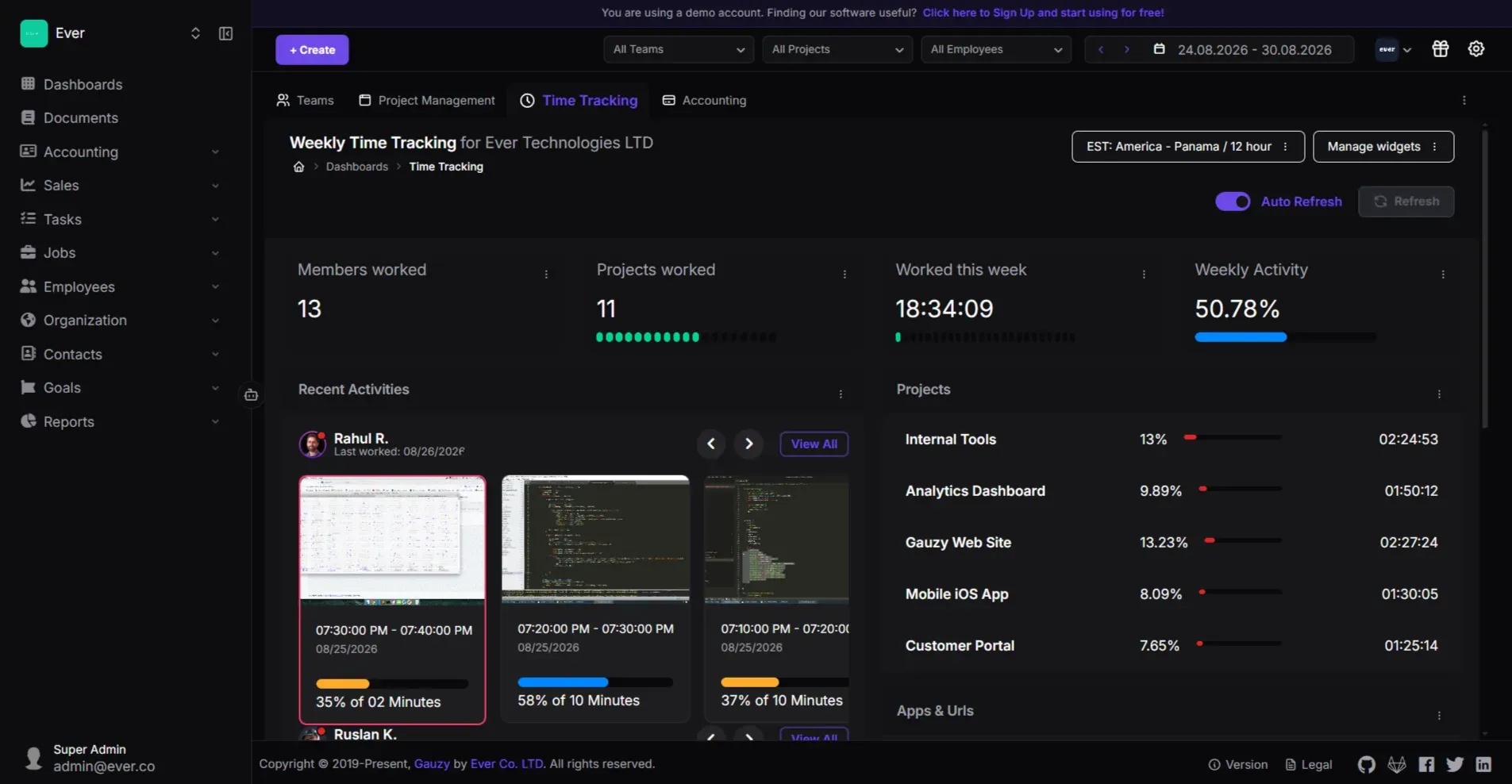
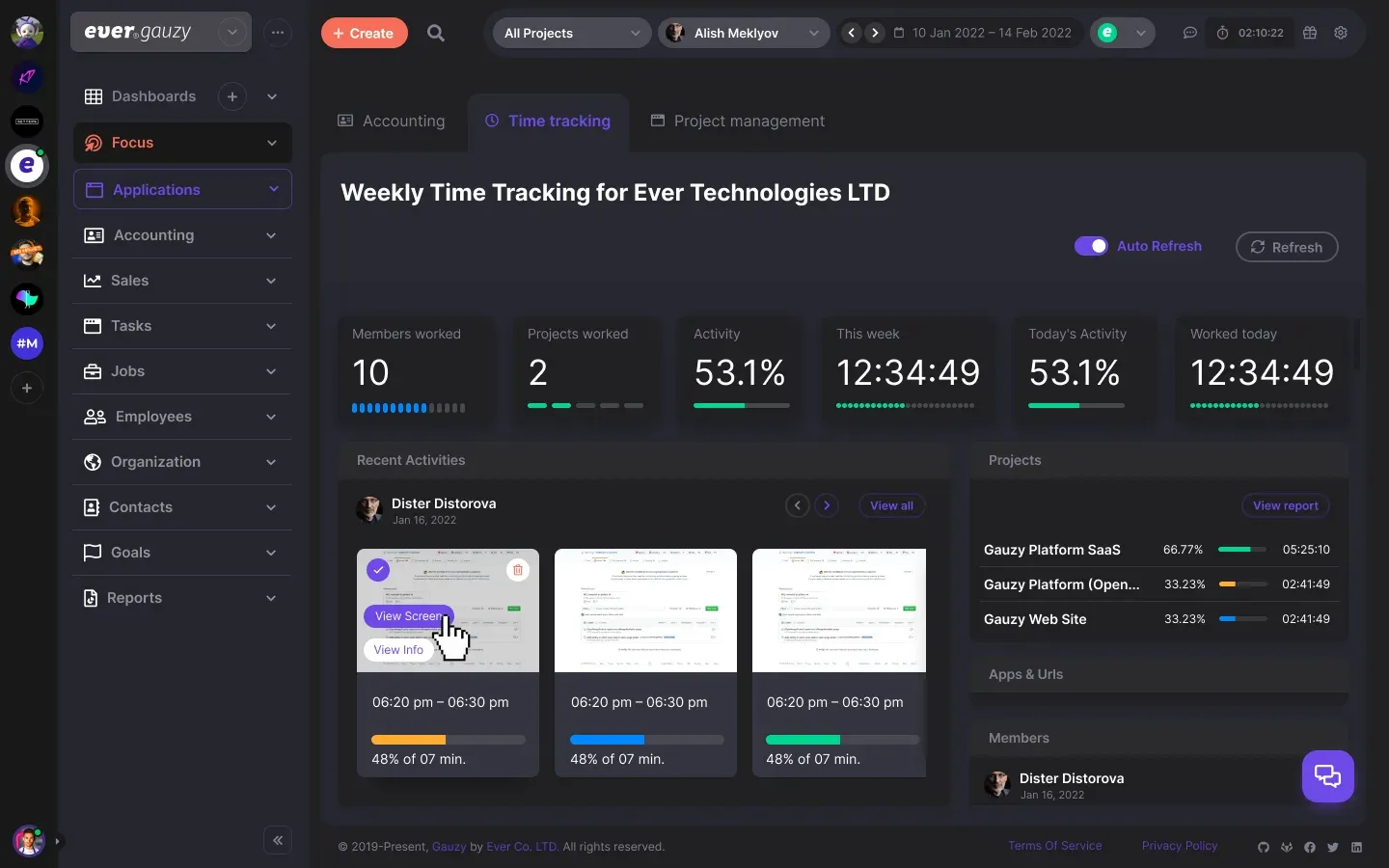
Current Gauzy web interface from the official README: the time tracking dashboard of the demo organization with screen capture cards and time per project.
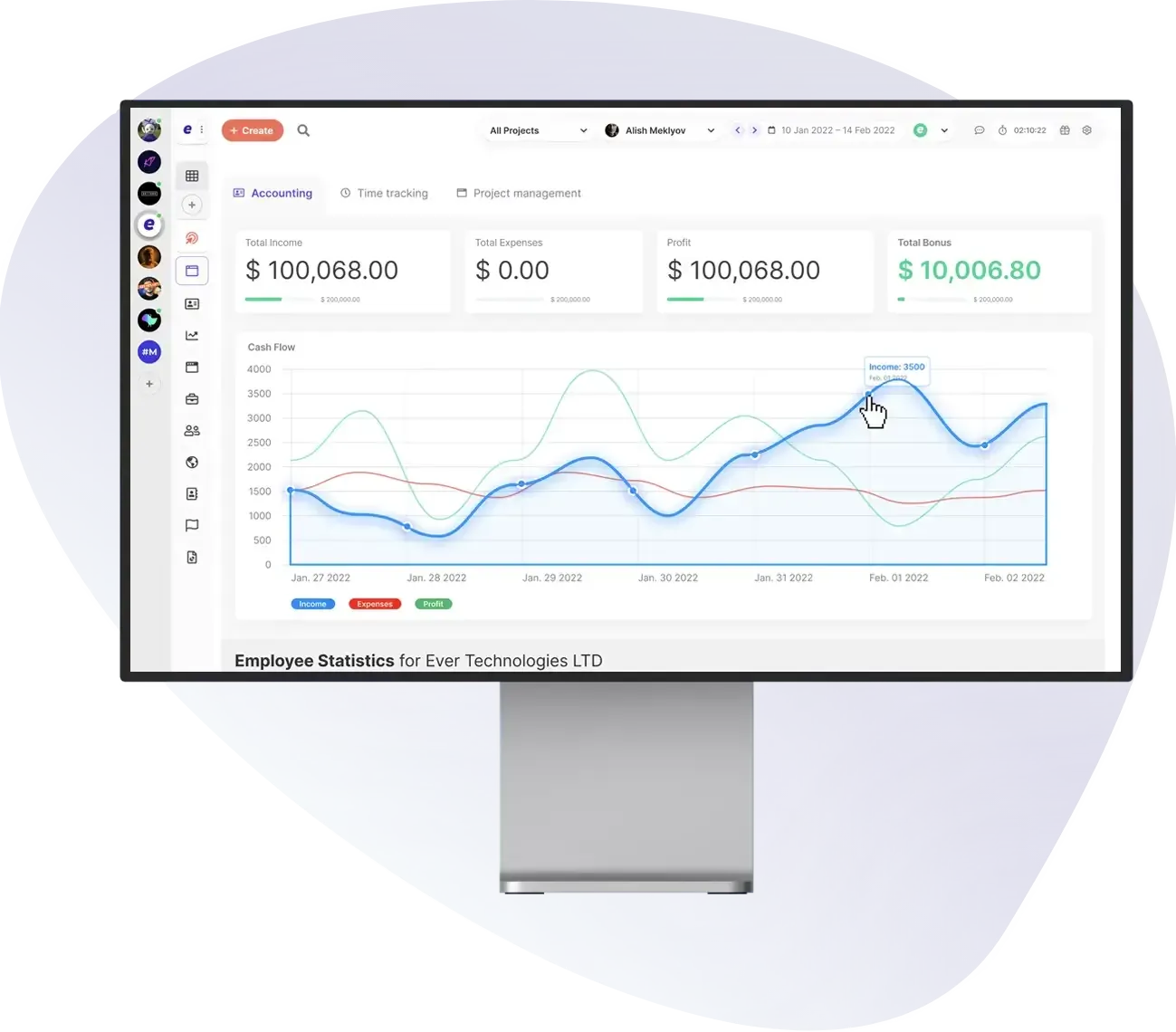
Official product image from gauzy.co showing the accounting dashboard tab with income, expense and profit lines over several days.
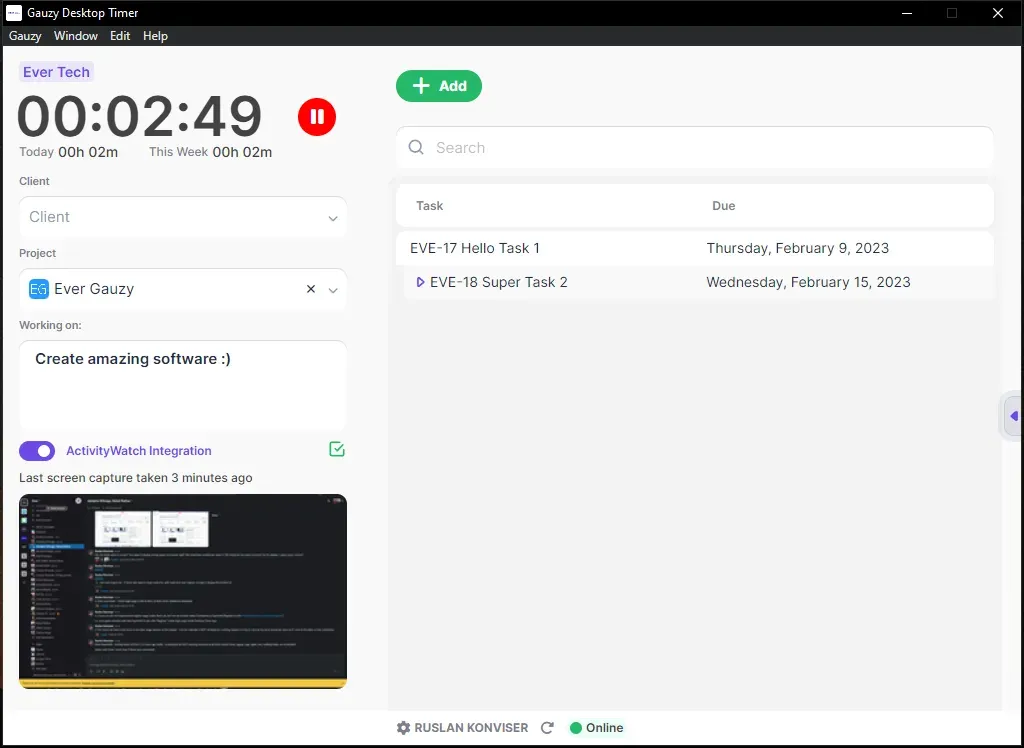
Official documentation screenshot of the expanded Desktop Timer on Windows, with the task list and the last screen capture.
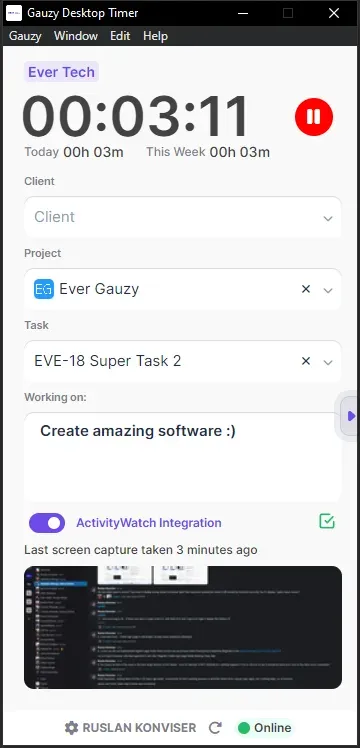
Official documentation screenshot of the standard Desktop Timer layout used by employees who only track time.
Official overview image from docs.gauzy.co and the gauzy.co social preview, showing an earlier version of the dashboard design with a workspace switcher.
Source: official Ever Gauzy project page.
Key capabilities
- Download Gauzy Desktop App for Windows, macOS and Linux The Desktop App bundles the web interface, the API and an SQLite database, so the whole platform runs on one computer, and it can also connect to an external PostgreSQL database or a remote Gauzy API. Release 111.138.2 provides x64 and arm64 EXE installers and ZIP archives for Windows, x64 and arm64 DMG images for macOS, and AppImage, DEB, RPM, Flatpak and tar.gz packages for Linux on the Desktop App release page. Its integrated server only accepts connections from the same computer.
- Desktop Timer for employees The Desktop Timer is a separate Electron app for time and activity tracking with optional screen captures, a client, project and task picker and a work description field. It must be connected to a Gauzy Server or API and is meant for staff who only track work time. Packages for the same three operating systems are published on the Desktop Timer release page.
- Gauzy Server and API Server packages Gauzy Server includes the API, an SQLite database or a connection to external PostgreSQL, and serves the web interface on port 4200 with the API on port 3000. It is the recommended desktop-installed option for small and medium organizations and accepts network connections unless that setting is turned off. On first start it creates a Super Admin, an Admin and an Employee account with random passwords that are displayed once.
- Docker Compose deployments The repository contains a demo Compose file with prebuilt images, a production file that also starts PostgreSQL, OpenSearch, MinIO, Redis, Cube, Jitsu, Zipkin and a worker, a build file that compiles everything locally, and a Caddy file that publishes only Caddy and obtains HTTPS certificates. Docker Compose 2.20 or later is required. In production the API refuses to start with blank JWT and session secrets and refuses to seed accounts with the published default passwords.
- Kubernetes and cloud templates For larger installations the project recommends Kubernetes, with plain manifests in
.deploy/k8s, Ever Helm charts, Terraform modules and a Pulumi project for AWS EKS, ECS and Fargate. A DigitalOcean App Platform button deploys the API, web app, worker, Redis and a development database; uploaded files are lost on redeploy until object storage is configured. Third-party templates exist for Easypanel, RepoCloud and ZopDay. - Time and activity tracking Time is recorded from the web interface or the desktop apps and reviewed as timesheets per employee, project and date range. The desktop apps can capture screenshots and keyboard and mouse activity percentages, and the dashboard shows members worked, projects worked, weekly activity and recent screen captures per employee. The Agent app adds an always-on tracker that can also record video, according to the downloads page.
- Employees, time off and onboarding The employee register stores contractors and staff with rates, departments and teams. Time off policies, holidays and approval flows sit alongside onboarding and public employee pages. Recent releases exclude employees whose work has ended from member lists and project counts.
- Applicant tracking and interviews Candidates and their interviews are managed in the same tenant and organization as employees, so recruiting data sits next to HR records. Job search, job matching and proposal plugins connect the hiring side to freelance work, including an Upwork integration for contracts and time logs.
- Contacts, sales pipelines and proposals The CRM side covers clients, customers and leads, sales pipelines with stages, and proposal templates. Organization vendors and clients are kept per organization, and version 111.142.11 redesigned the proposal details view. The CRM is oriented toward service businesses rather than marketing automation.
- Invoicing, payments and expenses Invoices and estimates can be created from tracked time or items, with taxes, discounts and multiple currencies, and payments are recorded against them. Income and expense records feed the accounting dashboard with income, expenses, profit and employee bonus totals. A payment gateway guide in the documentation covers online invoice payment.
- Projects, tasks and goals Projects and tasks with configurable statuses, priorities, sizes and labels are built in, together with goals, KPIs and objectives and key results. Projects and teams can be archived since 111.142.5, and a per-task sync scope controls which tasks are shared with connected tools such as GitHub, Jira or Plane.
- Dashboards and reports Dashboards show time tracking, project management and accounting widgets that can be filtered by team, project, employee and date range. Reports and insights cover tracked time, activity and finances. Some dynamic reporting features require the optional Cube semantic layer to be running.
- Multiple organizations, roles and permissions One installation can host several tenants, and each tenant can contain several organizations with their own departments, teams, currencies and settings. Role and permission records control access per user. Tenant scoping is applied at the ORM level, so queries are filtered by tenant automatically.
- REST, GraphQL and webhooks The API is documented with Swagger at api.gauzy.co/docs and at
/swgon self-hosted instances, with GraphQL and subscriptions at/graphql. Outbound webhooks are dispatched through an event outbox by the worker every minute, so webhooks, the search index and GraphQL subscriptions receive no events without the worker and Redis. Ever Co. publishes SDK repositories for TypeScript, Python, Go, Java and C#. - Integrations and plugins The integrations documentation covers GitHub, GitLab, Jira, Upwork, HubStaff, Wakatime, Activepieces, Zapier, Slack, Microsoft Teams and Google Calendar. The repository also contains plugin packages for Make, Plane, email providers such as SES, Postmark and Resend, inventory, chat and documents. Each plugin is loaded as a NestJS module, and the same system supports custom plugins.
- Sign-in options and account protection Plugins provide OpenID Connect, Keycloak and Zitadel sign-in, and the documentation includes SAML 2.0 and LDAP or Active Directory guides. The API rate-limits sign-in per client address and locks an account after 10 failures from at least two addresses for 900 seconds by default. Redis is needed to share rate limits across API replicas.
- AI providers and MCP server AI chat and dictation can use providers including OpenAI, Anthropic, Gemini, Mistral, Groq, OpenRouter, LocalAI and whisper.cpp through separate plugins, and can be disabled with an environment variable. The Gauzy MCP server exposes projects, time tracking and employee data to AI assistants over stdio, HTTP or WebSocket, with optional OAuth 2.0 and Redis-backed sessions.
- Languages and themes The interface is multilingual, with translations managed on Crowdin, and supports multiple currencies. Dark, light, corporate and material themes are included. Localization coverage differs by language, so check the screens your users rely on.
Where Ever Gauzy fits
Tracking billable time for a remote team
Create the organization, clients and projects, invite employees and give each one an hourly rate. Install the Desktop Timer for staff who only track time and connect it to the server API, then decide whether screen captures and activity levels are enabled before anyone starts the timer. Check that time entries appear in timesheets, that managers see the right teams and that employees can see what was captured about them.
Running a self-hosted pilot
Clone the repository and start docker-compose.demo.yml to explore the interface with demo data on port 4200. For a pilot that keeps real data, use the Caddy Compose file with a domain, fill every secret and the three seed passwords in .env.caddy, and keep the worker and Redis running. Verify HTTPS, backups of the PostgreSQL volume and the uploaded-files volume, and the restore path before inviting users. The deployment overview lists the other targets.
Invoicing clients from tracked work
Set the organization currency and client rates, then generate invoices from tracked time or from items. Record payments when they arrive and compare the accounting dashboard with your bookkeeping system. Gauzy records income, expenses and invoices, but confirm with your accountant whether its exports satisfy local tax and e-invoicing rules before replacing a dedicated accounting product.
Hiring and onboarding contractors
Add candidates and schedule their interviews in the applicant tracking module, then add the hired person as an employee with a rate, department and team. Test which personal data each role can see, because candidate records, employee profiles and time-off requests live in the same tenant.
Connecting project tools
Connect GitHub, Jira or Plane when the engineering team keeps its issues elsewhere, and choose per task whether it is synchronized or kept private to the Ever platform. Run a small project first and check that statuses, assignees and logged time map as expected in both directions, and read the integration guide for the fields it synchronizes.
Giving an AI assistant access to Gauzy data
Build or download the MCP server, point it at your Gauzy API and authenticate with a dedicated user that has only the permissions the assistant needs. Use stdio for a local desktop assistant, or HTTP and WebSocket transports with OAuth 2.0 and Redis for shared access. Review which projects, time logs and employee records that account can read before enabling it for a team.
Install
git clone https://github.com/ever-co/ever-gauzy.git && cd ever-gauzy && docker compose -f docker-compose.demo.yml upReviews of Ever Gauzy
Be the first to share your experience with Ever Gauzy.
Write a review
Loading review form…
Alternatives to Ever Gauzy
 OdooOdoo is a web-based suite of business apps from Odoo S.A. The LGPLv3 Community edition covers CRM, sales, invoicing, inventory, manufacturing, POS and website modules on PostgreSQL; Enterprise apps, Studio and hosting are sold per user.
 ZohoZoho One bundles more than 50 business apps for sales, finance, support and HR under one license, with centralized administration and a developer platform.
 TwentyTwenty is an open-source CRM with custom objects, workflows, AI agents and REST and GraphQL APIs, run on a managed cloud or self-hosted.