

What is Leantime?
Leantime is a project management system aimed at teams whose members are not professional project managers. It combines strategy (goals, canvases), planning (milestones, timelines, sprints) and execution (to-dos, timesheets) in one web application, and its own materials say it was designed with ADHD, dyslexia and autism in mind. The product is published by Leantime, described on its site as a Hyve5 Inc product. The source repository is older than the company pages: the GitHub project dates from 2015.
There are three ways to get it. The self-hosted community edition is AGPL-3.0 licensed PHP code that you install from the release ZIP or from the official Docker image, and the README lists PHP 8.2 or newer, MySQL 8.0 or MariaDB 10.6 or newer, and Apache or Nginx as the stack. A managed hosting offering and a SaaS product, Leantime Pro, are sold by the company. Plugins come from the Leantime marketplace, which also sells installation services.
The latest release is v3.14.0, published on November 10, 2026. Projects, timesheets, users, API keys, to-dos, milestones, sprints, the dashboard and menu items now check specific permissions instead of role rank. Calendar events and filters became class-based so calendar plugins can hook in, and a new CalDAV Calendar Sync plugin on the marketplace, which requires this release, offers two-way sync with Nextcloud, ownCloud, Baikal or Radicale. Other changes include toggle switches for on/off checkboxes, collapsible content-box sidebars and fixes for plugin update folders and subtask lists. The release has no database changes, and Custom Fields versions below 1.6.0 no longer load. The preceding v3.13.2 of October 31, 2026 added an email digest that separates new notifications from already seen ones, makes the company email frequency a floor that individuals can only make quieter, and fixes OIDC login by sending PKCE and showing provider errors. It follows v3.13.0 of October 30, 2026, which moved the application to Laravel 12, added mobile push notifications, per-project modules and new roles and permissions, and ships three database migrations. The v3.12.0 release added one-click plugin updates with automatic rollback and a crash breaker that disables a plugin after five failing requests within ten minutes.
The core application covers task and project coordination with goals attached, and further modules are distributed as plugins. Similar listings on iThub include OpenProject, Plane, WeKan and PLANKA.
Leantime screenshots
Explore the interface. Open a screenshot to view it at full size.
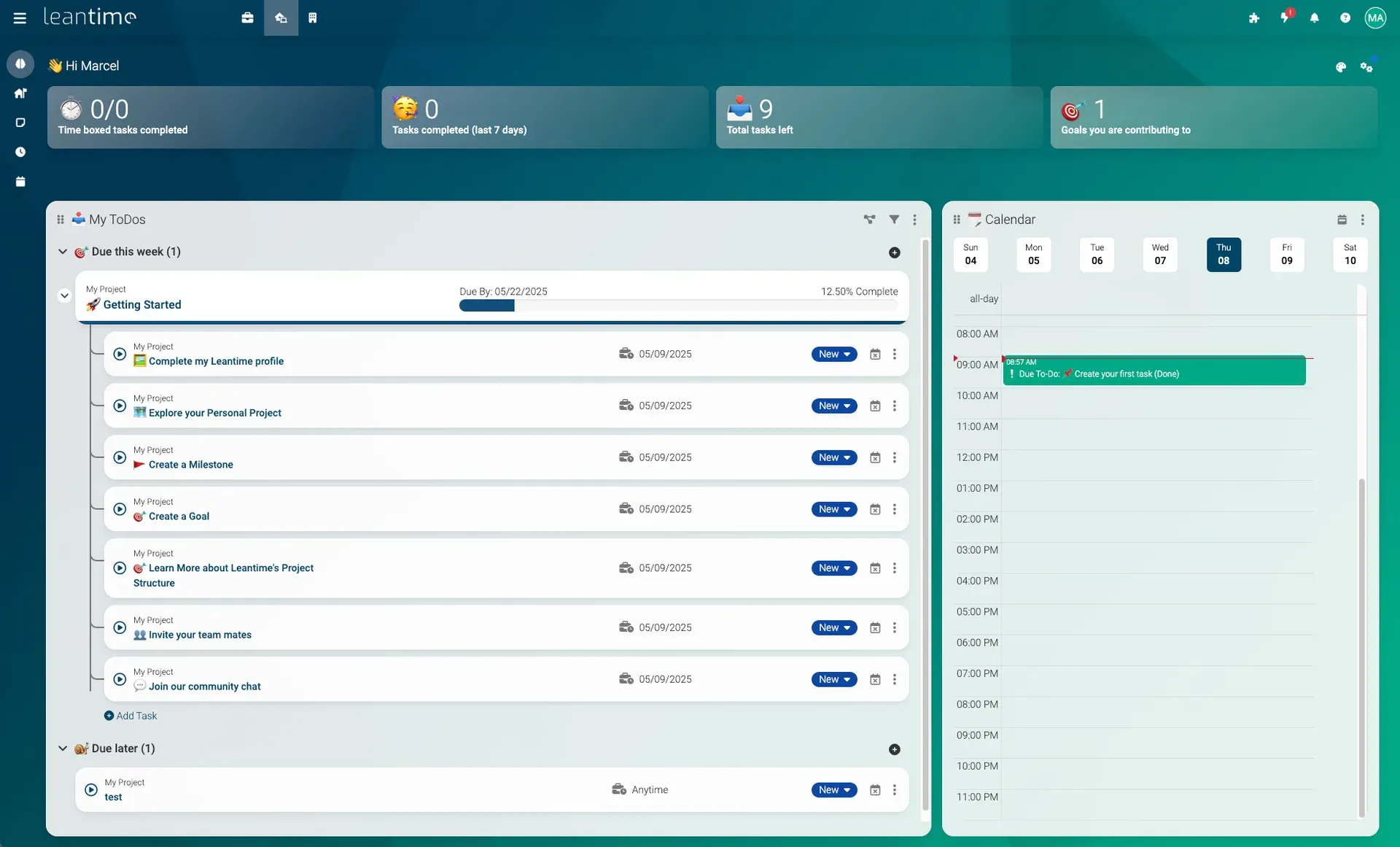
My Work dashboard from the Leantime README, shown with sample onboarding tasks.
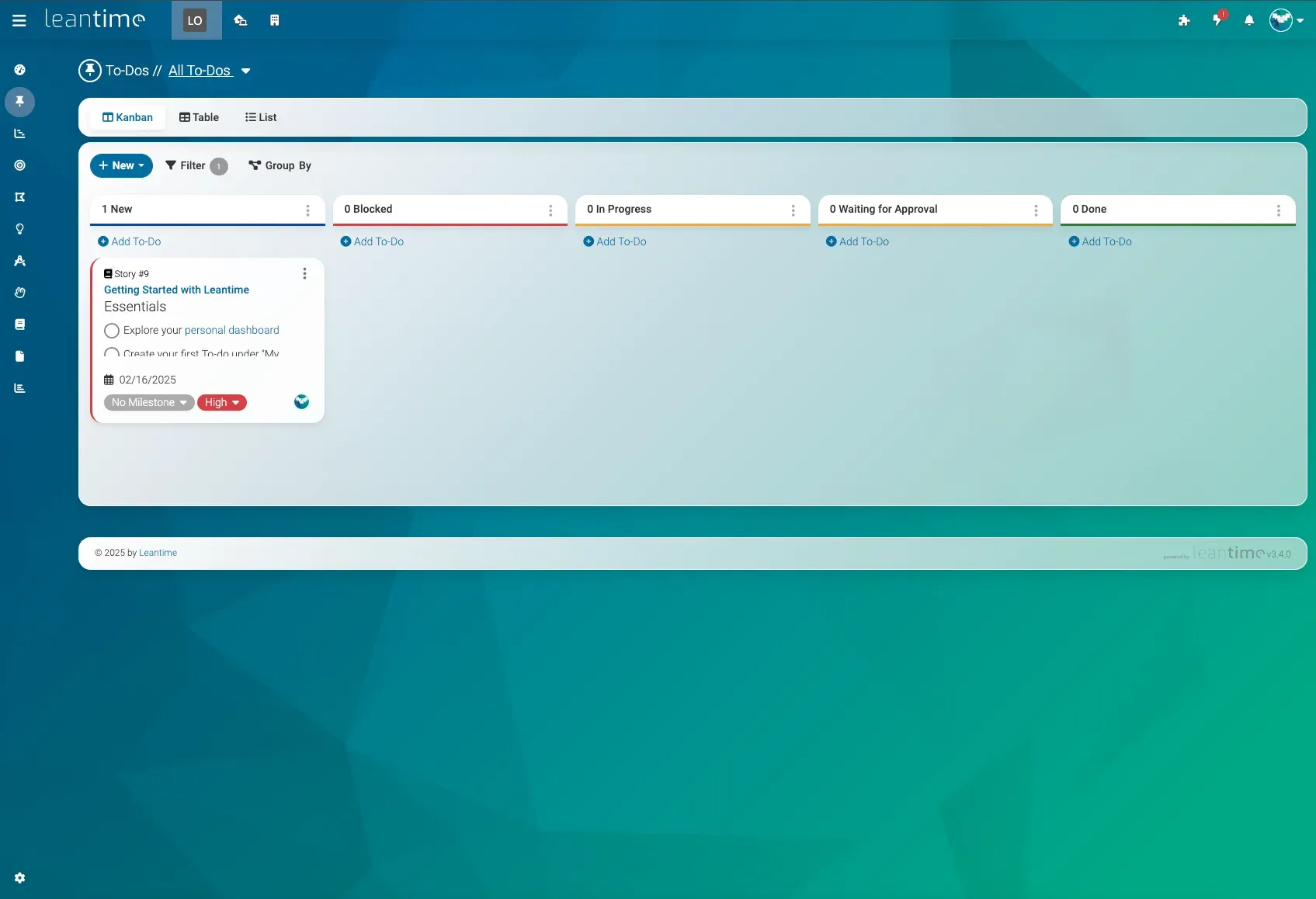
To-do Kanban board from the Leantime README; the table and list views sit on the same tab bar.
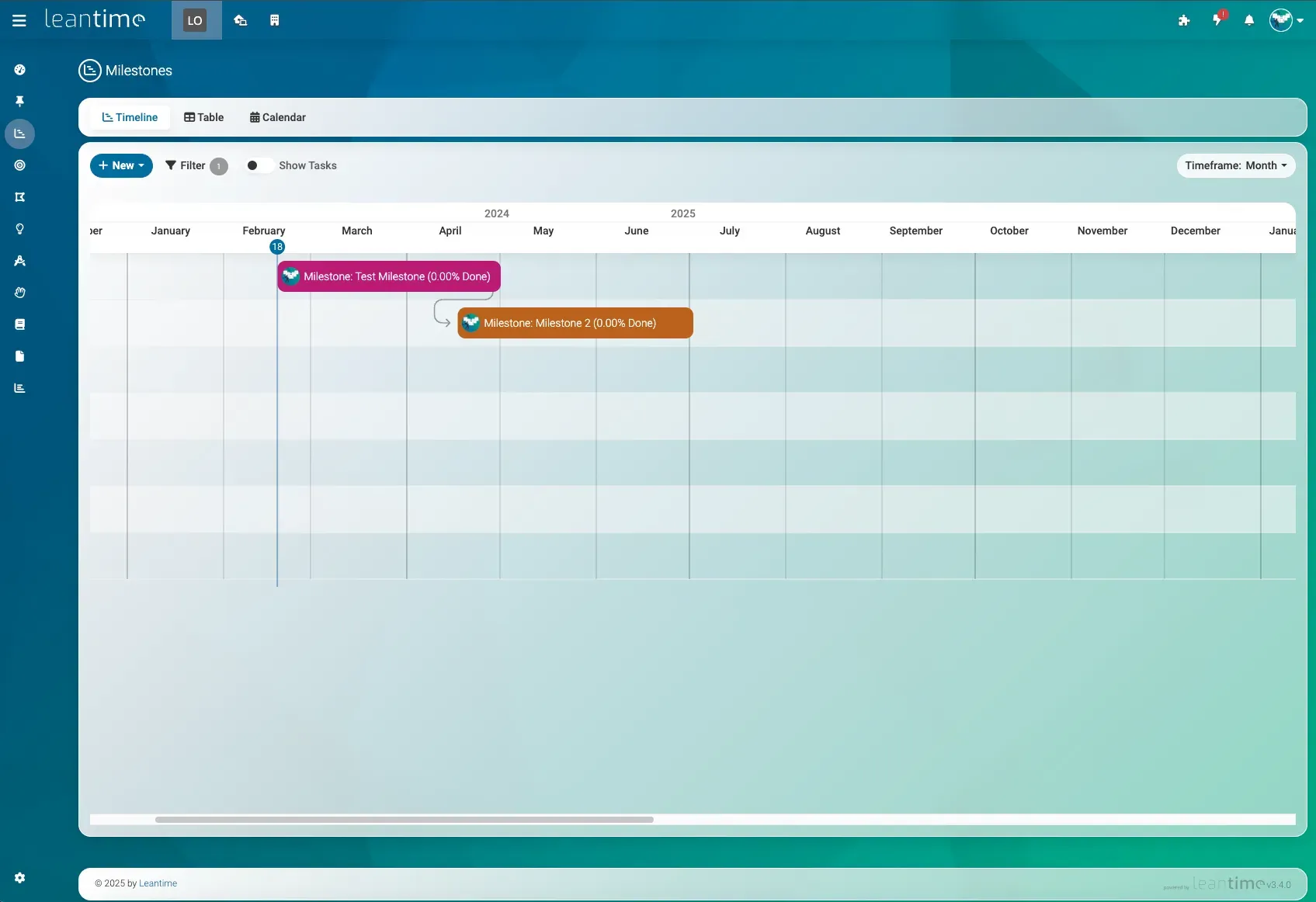
Milestone timeline with a dependency arrow, from the Leantime README.
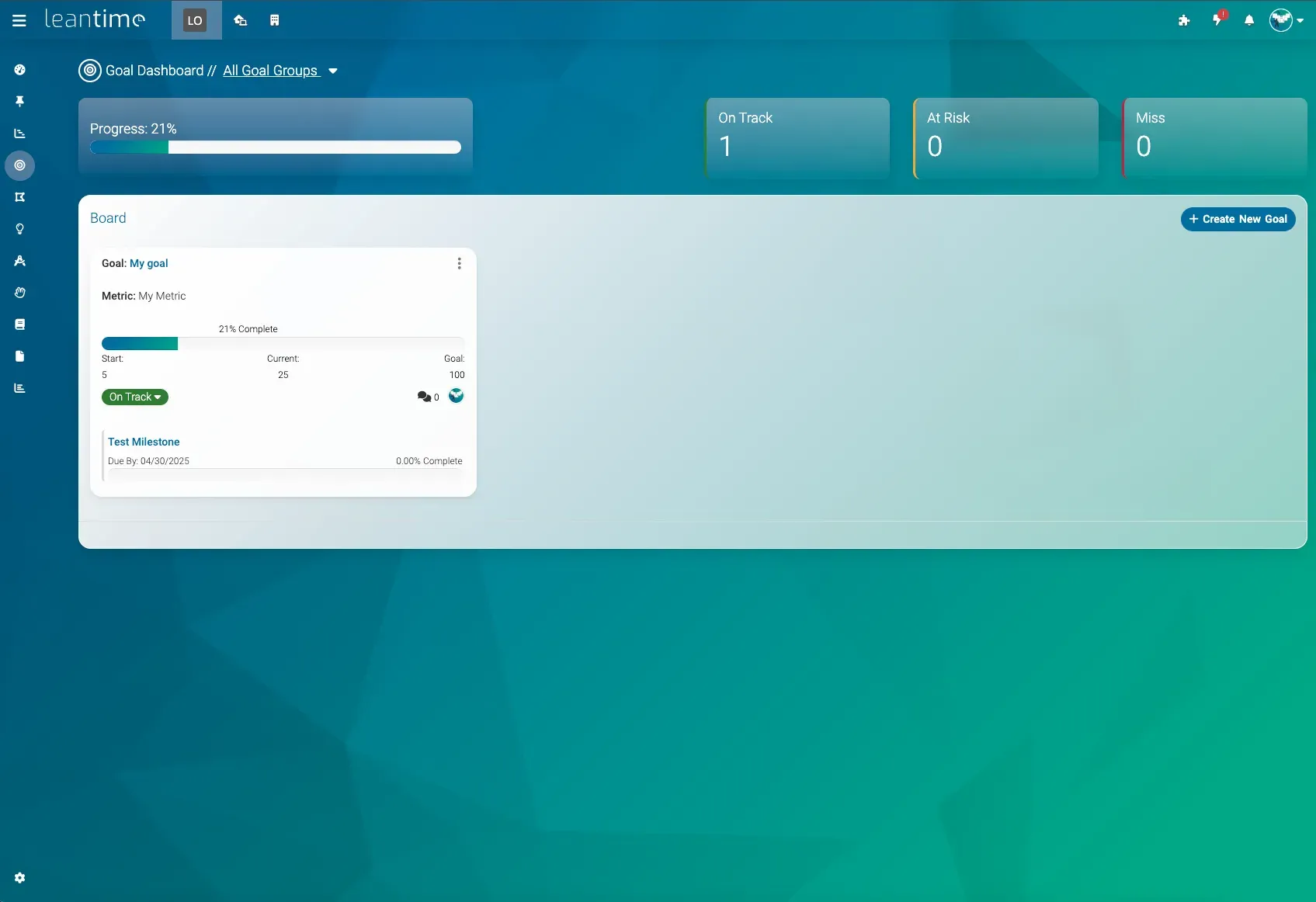
Goal dashboard with a goal, metric and linked milestone, from the Leantime README.
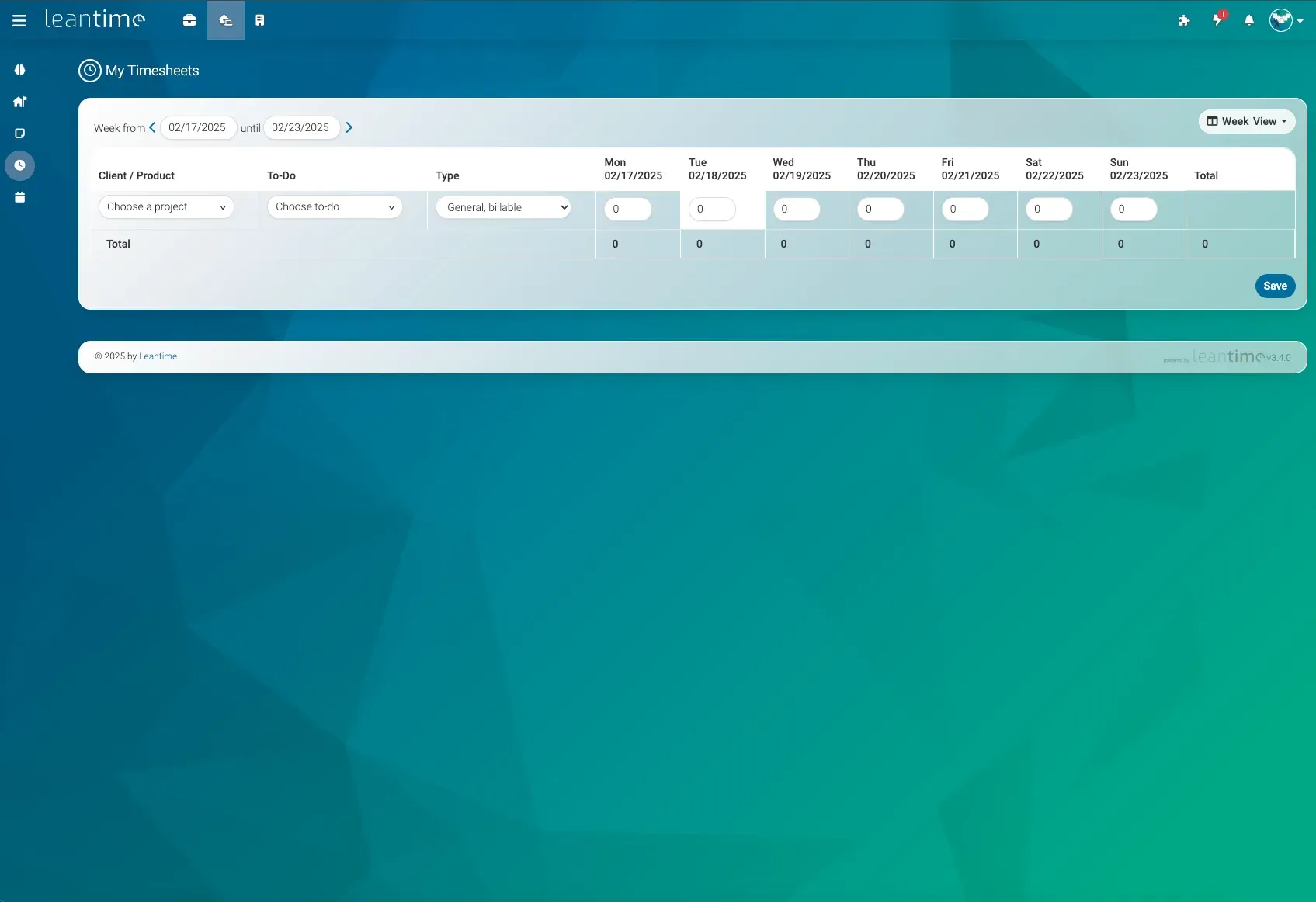
Weekly timesheet entry form from the Leantime README.
Source: official Leantime project page.
Key capabilities
- My Work dashboard A personal home screen with widgets for to-dos grouped by due date, a calendar, counts of completed and remaining tasks and the goals you contribute to. Time boxing lets you schedule tasks between meetings, and you can import an iCal link to show those events. Widgets can be rearranged and filtered.
- To-dos in several views Tasks appear as a Kanban board, a grouped table, a list or on a calendar. The board in the screenshots uses columns such as New, Blocked, In Progress, Waiting for Approval and Done. The project documentation states that subtasks and dependencies have no fixed limit.
- Milestones and timeline Milestones have dates, progress percentages and dependencies and are shown on a timeline with a month or other timeframe selector, as a table or on a calendar. Tasks can be shown beneath their milestone. This is the Gantt-style view the README refers to.
- Sprint management Sprints group tasks for iterations, with story and effort fields on to-dos. The board can be shown per sprint, and the README lists retrospectives as a separate tool.
- Goals and metrics Goals carry a metric with a start value, current value and target value, a status of on track, at risk or missed, and linked milestones. A goal dashboard summarizes progress across goal groups.
- Strategy canvases Lean Canvas, Business Model Canvas, SWOT analysis and risk analysis boards are part of the project tools. They give small teams a planning workspace without a separate whiteboard product. The README lists these under project planning, next to dashboards and status reports.
- Idea boards and retrospectives Idea boards and retrospectives are listed in the README as knowledge-management tools that sit beside the task views. Both are stored inside the project.
- Wikis and documents Each project has documents and wiki pages with rich-text editing, and the screenshots show a product requirements template with lists and tables. Comments and discussions exist on most objects. Files are stored locally or in an S3-compatible bucket, as configured.
- Timesheets and time tracking Weekly timesheets record hours per project and to-do with a type such as general billable time. Time tracking can be switched off per project since v3.13.0, and projects with a module disabled are left out of search, goal roll-ups and reports.
- Screen and webcam recording The README lists screen and webcam recording among the knowledge-management features.
- Roles, permissions and projects Multiple user roles and per-project permissions are documented. Release 3.13.0 added viewAll and roles.manage permissions that custom roles can hold, with roles stored as data keyed by level and base role. Since v3.14.0, projects, timesheets, users, API keys, to-dos, milestones, sprints, the dashboard and menu items check specific permissions rather than role rank.
- Authentication and security Two-factor authentication, LDAP and OIDC sign-in are listed in the README. OIDC now uses PKCE and surfaces provider errors. Password reset and invite emails only link to the trusted application URL set in LEAN_APP_URL.
- Notifications and chat integrations Email notifications support a digest, and v3.13.0 added a mobile push toggle separate from email plus an "Assigned to you" message. Integrations with Slack, Mattermost and Discord are listed in the README. Self-hosted servers have admin settings for a push relay.
- Plugins, marketplace and API Behavior is extended through plugins, a JSON-RPC API described in the API usage guide and a plugin development guide. Plugins named in release notes include CustomFields, Notes, Whiteboards, StrategyPro, PgmPro, RecurringTasks, CalDAV and GoogleCalendar. With v3.14.0, CustomFields must be 1.6.0 or newer, and calendar plugins use the new CalendarEventCreated, CalendarEventUpdated and CalendarEventDeleted event classes.
- MCP server Core ships laravel/mcp 1.x and exposes an /mcp endpoint that speaks the MCP 2026-07-28 protocol and still answers initialize for 2025-03-26 to 2025-11-25 clients. The separate McpServer plugin must be at version 2.0 or newer on Leantime 3.13. Since 3.13, errors are returned with HTTP status 400, 404 or 500 instead of 200.
- Docker and manual installation The official image listens on port 8080 and takes database settings as LEAN_ environment variables, with a compose file in the docker-leantime repository. The plugin directory must be mounted at app/Plugins or plugins disappear on restart. Manual installs rename config/sample.env to config/.env and open /install. Details are in the common issues guide.
- Updates and migrations Manual updates replace the files and redirect to /update when the database changes. The CLI route is php bin/leantime system:update, and db:migrate applies migrations. Docker data persists only when MySQL is on a mounted volume. Release 3.14.0 contains no database changes.
- Languages and appearance The interface is translated into more than 20 languages through Crowdin. v3.13.0 added core color schemes and backgrounds and a shared component library, and a dark mode appears in the project screenshots. New strings in recent releases are English only until translations catch up.
- Calendar sync Calendar events can be moved or resized in the calendar, and since v3.14.0 those changes notify calendar plugins. The CalDAV Calendar Sync plugin from the marketplace, which requires 3.14.0, syncs two ways with Nextcloud, ownCloud, Baikal or Radicale, and lets Apple Calendar, Thunderbird or DAVx5 add Leantime as a calendar account.
Where Leantime fits
Planning a project with milestones
A project holds milestones with start and end dates, dependencies between milestones and tasks attached to each one. The timeline shows milestones over a selectable timeframe, and the same data is available as a table or calendar. The project dashboard includes a checklist and progress information.
Running sprints
Stories and tasks carry effort estimates, are assigned to a sprint and move across the configured board statuses, such as New, In Progress, Waiting for Approval and Done. The README lists retrospectives as a separate tool next to the sprint board.
Tracking goals and metrics
A goal stores a metric with start, current and target values and a status of on track, at risk or missed. Milestones can be linked to goals, and the goal dashboard summarizes progress across goal groups.
Recording billable hours
The weekly timesheet records hours against projects and to-dos with a type such as billable time, and shows totals per week. Since v3.13.0 the time tracking module can be switched off per project, which removes that project from related reports.
Personal work overview
The My Work dashboard groups a user's to-dos by due date and shows a calendar, task counts and goals. Time boxing places tasks between meetings, and an iCal link can bring external events into the calendar. The features page states that the interface was designed with ADHD, dyslexia and autism in mind, and the same tasks can be viewed as board, table, list or calendar.
Self-hosting with Docker
The official Docker image listens on port 8080 and reads LEAN_ environment variables for the database and the application URL, with a compose file in the docker-leantime repository. Plugins persist when app/Plugins is mounted. Two-factor authentication, LDAP and OIDC are available for sign-in, updates run through /update or php bin/leantime system:update, and the security policy lists which release lines receive fixes.
Reviews of Leantime
Be the first to share your experience with Leantime.
Write a review
Loading review form…
Alternatives to Leantime
 OpenProjectOpenProject is open-source project management software from OpenProject GmbH in Berlin. It combines work packages, Gantt charts, boards, Scrum backlogs, time and budgets, wikis and meetings. Self-host the free Community edition or use the paid Enterprise cloud.
 PlanePlane is a project management tool for tracking work items, running cycles, grouping work into modules and writing pages. The Community Edition is AGPL-3.0 and self-hosted with Docker or Kubernetes; Plane Cloud and the Commercial Edition add paid plans.
 VikunjaVikunja is an AGPL-licensed task manager written in Go. It runs as a single binary or Docker container on SQLite, MySQL or PostgreSQL, offers four project views, CalDAV, webhooks, SSO and an MCP server, and is also sold as an EU-hosted cloud service.