

What is WeKan?
WeKan is an MIT-licensed kanban board application that teams install on their own server or use as a hosted service. Boards are built from swimlanes, lists and cards, and changes reach every connected browser in real time. It is a web server rather than a native client: people work in a desktop or mobile browser, optionally with a progressive web app icon created from their own instance. The repository description states that WeKan sends no telemetry.
The project started in 2014 as Metrello, a Trello-style board written with the Meteor framework, and was renamed Libreboard and then Wekan by its original author, Maxime Quandalle; the project FAQ records that history. When pull-request review stalled in 2016, a community fork was merged back in early 2017, and Lauri Ojansivu (xet7) has led maintenance since then. WeKan now operates as a Finnish sole proprietorship that sells hosting and prepaid support. Its commercial support page states that all code is published under MIT with no proprietary edition, and that WeKan is a registered trademark in Finland.
The install page lists self-contained bundles for Windows, macOS and Linux that include Node.js, FerretDB v1 and SQLite with a start-wekan script, a Snap package with automatic updates for amd64 and arm64, Docker images on GitHub Container Registry, Docker Hub and Red Hat Quay for five CPU architectures, a Helm chart for Kubernetes and a Sandstorm package. The v13.00 release also attaches AppImages, single-file binaries, Bun-based bundles, Snaps for six architectures and server builds for FreeBSD, OpenBSD, NetBSD and Android, each with a SHA256 checksum file.
Releases arrive several times a week, and the changelog summarises the newest five. Version 13.00, published on November 6, 2026 (UTC), fixes the CreateBleed advisory: the "Only admins can create boards" setting is now enforced on every path that creates a board, including the REST API, imports, copies and the browser console, and refused REST calls answer 403. Version 12.98 fixed GroupLinkBleed, where a board admin could attach an organization or team without passing the invitation checks, made public CSV and TSV exports honour the selected columns and changed several REST card endpoints to return a JSON 404 instead of a 500. Versions 12.96 to 12.99 repaired release builds, including a bundle that failed to start after a nodemailer upgrade and the macOS arm64 bundle.
The main branch runs on Meteor 3.x with Node.js 26.x; the install page names Meteor 3.6-rc.1, Node 26.13.0 and FerretDB 1.107.0 for this release. WeKan's own FerretDB v1 fork storing data in SQLite is the default on every platform, so no separate database server is needed. FerretDB on PostgreSQL works, MySQL, MariaDB and SAP HANA backends are experimental, and MongoDB 6 to 9 are supported. The database matrix describes a 110-query conformance catalogue run against each backend. Only the newest release is supported, and the README still asks operators to keep at least daily backups.
WeKan screenshots
Explore the interface. Open a screenshot to view it at full size.
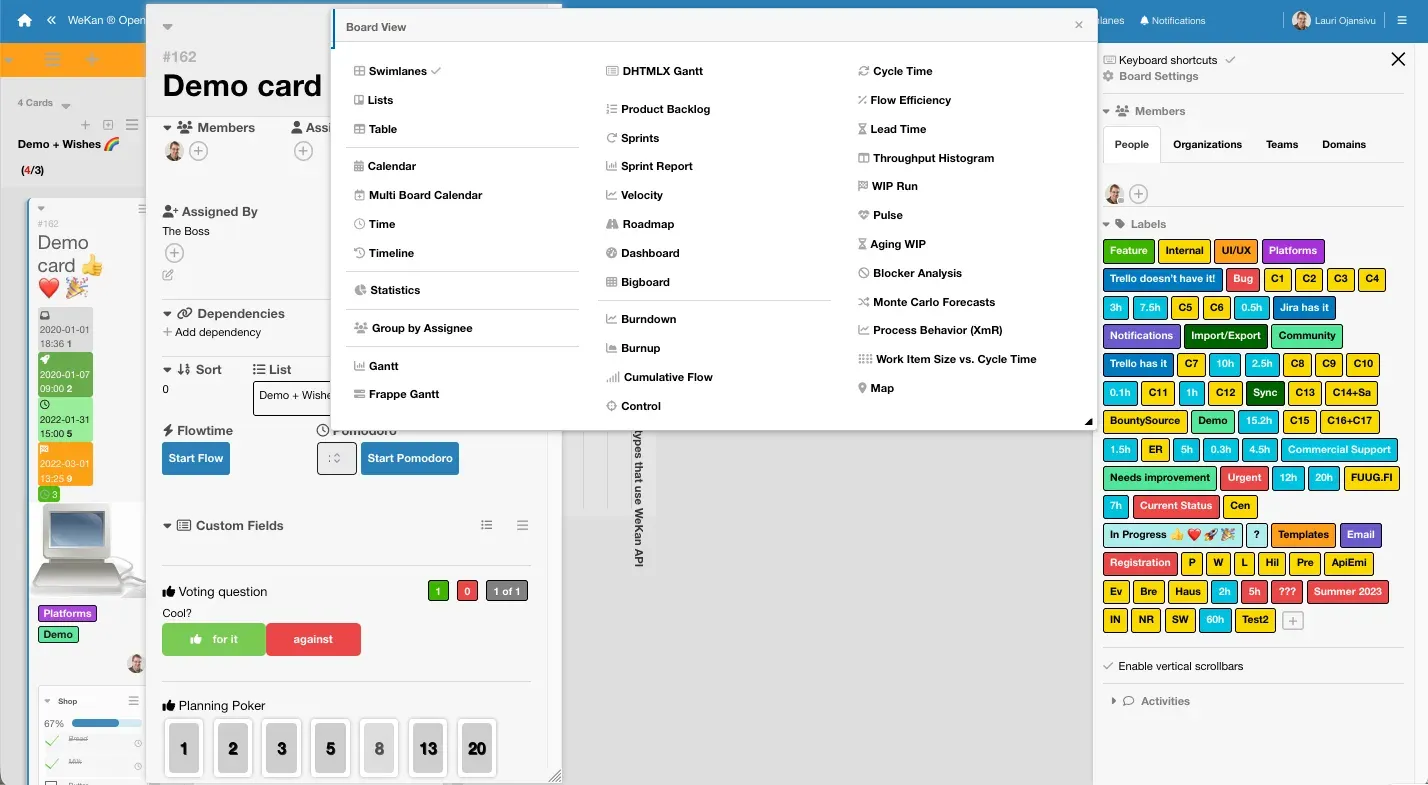
Official screenshot from wekan.fi: the Board View menu over an open demo card, with labels in the sidebar.
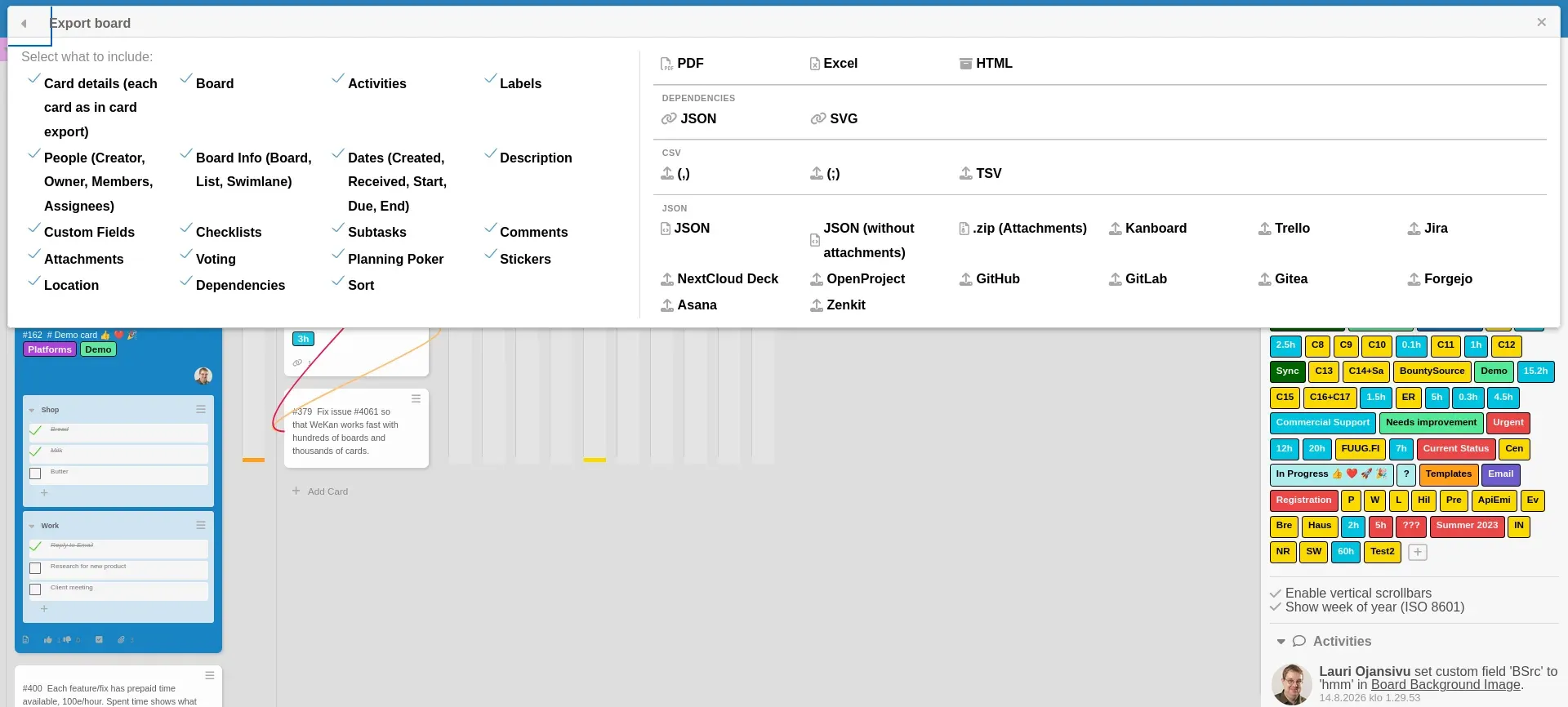
Export dialog from the backup documentation: choose card content, then a format such as PDF, Excel, CSV, JSON or another tool.
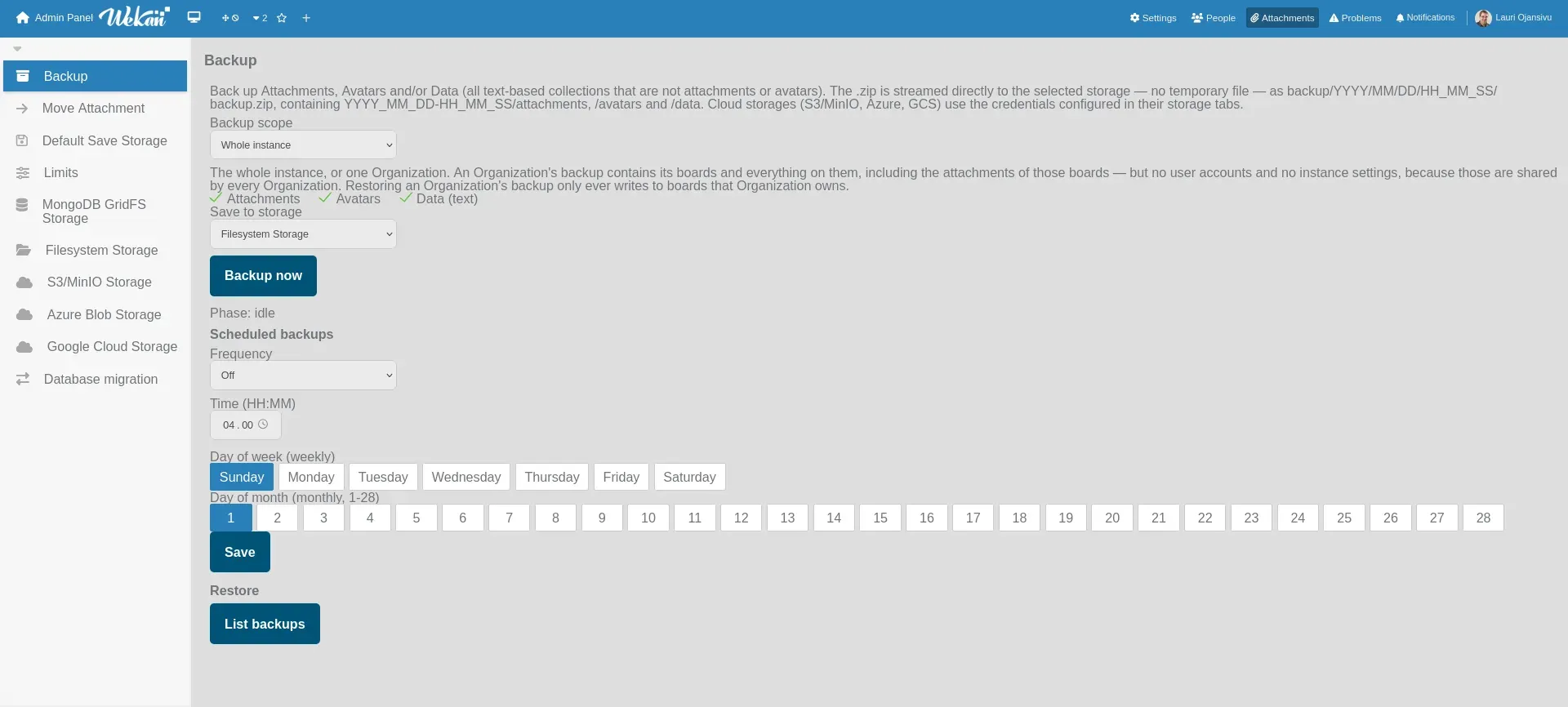
Admin Panel backup page with scope, target storage and a daily, weekly or monthly schedule, from the backup documentation.
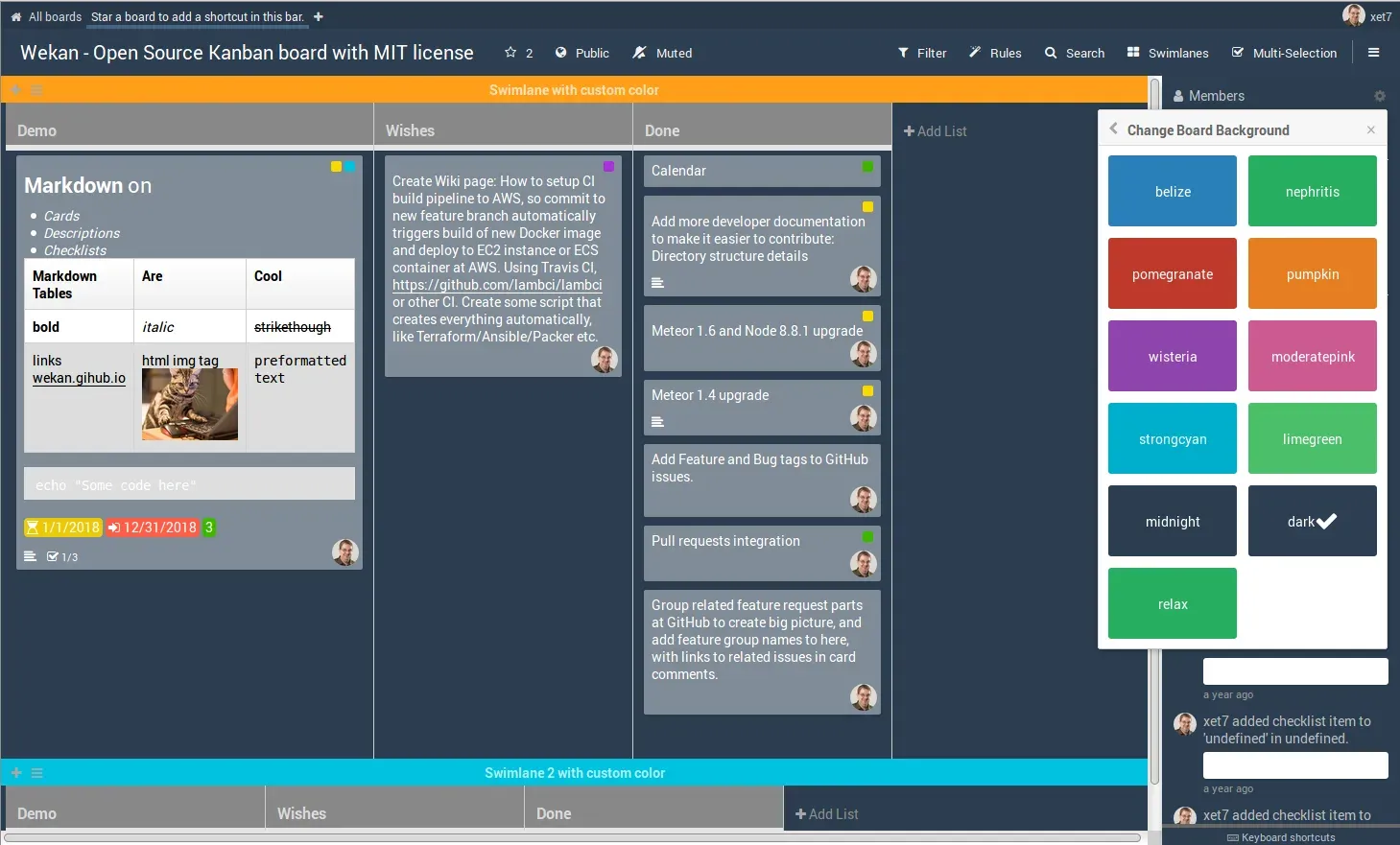
Older documentation screenshot of a swimlanes board in the dark theme, with Markdown rendering in a card and the background picker open.
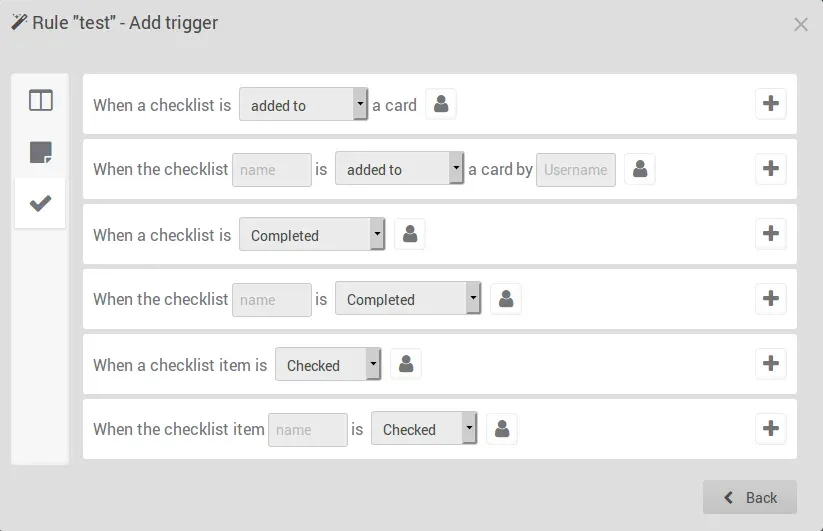
Rule trigger dialog from the IFTTT rules documentation, showing checklist-based triggers.
Source: official WeKan project page.
Key capabilities
- Install on Linux with Snap The Snap is the route the project recommends for Linux because it updates automatically:
sudo snap install wekan, then setroot-urlandportwithsnap set. Data, including the FerretDB SQLite files, stays in/var/snap/wekan/common, and an older Snap that still holds MongoDB data migrates itself to FerretDB.snap revertreturns to the previous revision if an update misbehaves. - Run with Docker Compose The repository's docker-compose.yml starts the
ghcr.io/wekan/wekanimage with a FerretDB service, maps host port 80 to container port 8080 and setsWITH_API=true. ChangeROOT_URLto the address users will open, then rundocker compose up -d. Separate compose files cover FerretDB on PostgreSQL, MySQL, MariaDB or SAP HANA and MongoDB 7. - Self-contained bundles for Windows, macOS and Linux Release bundles ship as .zip archives that already contain Node.js, FerretDB v1 and SQLite, so the server runs without a container or database installation. Builds exist for Windows x64, ARM64 and 32-bit, macOS Intel and Apple Silicon, and Linux on x64, ARM, ppc64le, s390x and riscv64, plus AppImages and single-file executables. Each file has a SHA256 checksum on the release page.
- Kubernetes, Sandstorm and other platforms A Helm chart on Artifact Hub includes FerretDB for Kubernetes clusters. A Sandstorm .spk package runs WeKan as an isolated grain, and the project notes that Sandstorm installs are usually not affected by issues in standalone WeKan. The install page also links guides for FreeBSD, SmartOS, Raspberry Pi, Qnap NAS and running the server on Android.
- Choice of database backend FerretDB v1 with SQLite is the default and keeps the whole database in one file. FerretDB with PostgreSQL works; MySQL, MariaDB and SAP HANA (amd64 only) are experimental. MongoDB 6, 7, 8 and 9 are supported, but MongoDB refuses to start on Linux kernels 6.19 to 7.0.13 until MongoDB 8.0.35 or 9.0.4, a limit FerretDB does not share.
- Swimlanes, lists and cards Lists are board-wide columns that repeat in every swimlane, and each card belongs to one list and one swimlane. Lists and swimlanes can be collapsed and resized, show a card counter and the sum of a numeric custom field, and accept work-in-progress limits. Multi-selection copies, moves or recolours many cards at once.
- Additional board views Besides Swimlanes and Lists, the board view menu offers Table, Calendar, a multi-board calendar, Timeline and three Gantt variants. Scrum views cover a product backlog, sprints, velocity and a roadmap, and flow reports include burndown, burnup, cumulative flow, cycle and lead time, aging WIP and Monte Carlo forecasts. The views read the same card data, so no separate project is needed.
- Detailed cards A card holds a description in Markdown, labels, members, assignees, requester and assigner, received, start, due and end dates, checklists, subtasks, custom fields, attachments and comments. Cards can also carry votes, planning-poker estimates, stickers, a map location and dependencies drawn as coloured lines between cards. An attachment viewer opens PDF and Office documents inside the card.
- Rules and board automation Rules follow a trigger and action model similar to Trello Butler, with triggers on board, card and checklist events. The same rules can be shown as a list, as a Jira-style workflow or as Scratch-like blocks, and board buttons can run a rule on demand. Rules can be imported and exported, and the README lists importers for n8n, Node-RED and Trello Butler definitions.
- REST API and webhooks The REST API covers users, boards, lists, cards, rules, attachments and several Admin Panel settings, authenticated with a token obtained from the login endpoint. The project publishes a Python client,
api.py. Global and per-board outgoing webhooks send board events to chat systems or other services. - Import from other tools Add Board accepts WeKan JSON or .zip, CSV, TSV, Excel and Markdown, and exports from Trello, Jira, Asana, Kanboard, Nextcloud Deck, OpenProject, Taiga, Vikunja, Plane and many other planners and issue trackers. Imported members can be mapped to real WeKan accounts. Several export files, or a .zip of them, can be imported at once, one board per file.
- Export with selected content The export dialog lets you choose which parts to include, from card details and comments to attachments, dependencies and Scrum settings. Output formats include PDF, Excel, HTML, CSV with comma or semicolon, TSV, JSON with or without attachments, an iCal feed and dependency graphs as JSON or SVG, as well as formats for other tools such as Trello, Jira and GitLab. All boards can be exported in one pass.
- Roles, organizations and teams Nine per-board roles range from admin and normal to comment-only, worker and read-assigned-only. Organizations and teams provide multi-tenancy, and two Admin Panel options restrict board membership to people from the same organization or team. Boards can be private or public, and an option can allow private boards only.
- Sign-in and identity providers Users sign in with a password, LDAP, CAS, OIDC or OAuth2 providers, SAML or Sandstorm accounts, and the README also lists passwordless login. Administrators can turn off self-registration so the instance becomes invite-only, and can disable forgot-password, username changes and self-deletion. Repeated failed logins lock the account.
- Attachment storage backends Attachments and avatars can be stored on the filesystem, in MongoDB GridFS, in S3 or MinIO, Azure Blob Storage or Google Cloud Storage. The Admin Panel moves files between storages, sets a default storage and size limits, and repairs files whose recorded location no longer matches.
- Scheduled and continuous backups The Admin Panel backs up attachments, avatars and data for the whole instance or one organization, on demand or on a daily, weekly or monthly schedule, and streams a .zip to the selected storage. A continuous backup option records changes within seconds and restores to a chosen moment. The backup guide explains the coverage limits of each method and how to copy a stopped SQLite installation.
- Admin Panel and problem reports The Admin Panel has four sections: Settings, People, Attachments and Problems. Settings covers announcements, accessibility, custom translation strings, white-labelling, PWA options and global webhooks. Problems shows instance health plus reports on security events, impersonation, performance, broken cards, rules, API and database or filesystem integrity.
- Hosted WeKan Cloud and store apps The official SaaS runs on servers in Finland and costs 50 euro per year for an instance with the Admin Panel and a custom domain. A free account at boards.wekan.team has no Admin Panel. The Google Play, Microsoft Store and Ubuntu Touch OpenStore apps are full-screen browsers for that service, without platform-specific native features.
Where WeKan fits
Moving a team off Trello or another planner
Export the source boards, including attachments where the tool allows it, and import them through Add Board; WeKan reads Trello JSON and ZIP, Jira, Asana, Kanboard, Nextcloud Deck, Vikunja and many other formats. Create the user accounts first so imported members can be mapped to real people rather than placeholders. Compare card counts, checklists, due dates and attachments on a few representative boards, and check that labels and custom fields arrived with the expected values before retiring the old tool.
Running a small self-hosted instance
On a Linux server, install the Snap, set root-url to the public address and register the first account, which becomes the administrator. In the Admin Panel, turn off self-registration, set the logo and configure email so invitations and notifications work. Put Caddy or another reverse proxy in front for TLS, as the install guide suggests, and leave Snap automatic updates enabled because only the newest version receives fixes. Budget at least 1 GB of free RAM and 4 GB total for production.
Serving a larger organization
Use Docker or the Helm chart, connect LDAP, CAS, OIDC or SAML for sign-in and model departments as organizations and teams. The README describes a layout for thousands of users with three frontend servers, each with two CPUs and two WeKan containers, and one database server with many CPUs. Test the chosen database backend against the supported databases list, and monitor disk space, because a full disk can corrupt the database.
Automating card workflows
Define rules for recurring steps, such as moving a card when its checklist is complete or adding a label when a card enters a list, and use board buttons for actions people trigger by hand. Outgoing webhooks push events to chat or ticketing systems, while the REST API and the Python client create cards from scripts or monitoring alerts. Enable WITH_API, keep API tokens out of shared scripts and verify that the API account has only the board role it needs.
Running Scrum and flow reporting
Turn on the Scrum settings for a board, keep a product backlog and plan sprints, then review velocity, burndown and cumulative flow from the board view menu. Flow metrics such as cycle time, lead time and aging WIP depend on cards moving through lists consistently, so agree on list meanings and WIP limits first. Cross-check a sprint report against the cards it counts before using it for planning.
Planning backup and recovery
Schedule an Admin Panel backup to separate storage such as S3 or MinIO, or enable continuous backup, and also copy the stopped data directory on a schedule. Board exports are useful for exchange but do not replace a full server copy with users and settings. Restore a backup to a test instance at least once, and confirm that boards open, attachments download and logins work, following the backup and restore guide.
Install
sudo snap install wekanReviews of WeKan
Be the first to share your experience with WeKan.
Write a review
Loading review form…
Alternatives to WeKan
 VikunjaVikunja is an AGPL-licensed task manager written in Go. It runs as a single binary or Docker container on SQLite, MySQL or PostgreSQL, offers four project views, CalDAV, webhooks, SSO and an MCP server, and is also sold as an EU-hosted cloud service.
 KanKan (kan.bn) is an AGPL-3.0 kanban project management app with boards, lists, cards, labels, comments, checklists, activity logs and templates. It runs on Kan Cloud or self-hosted with Docker Compose and PostgreSQL.
 PlanePlane is a project management tool for tracking work items, running cycles, grouping work into modules and writing pages. The Community Edition is AGPL-3.0 and self-hosted with Docker or Kubernetes; Plane Cloud and the Commercial Edition add paid plans.