
What is On-Page SEO Analyzer?
On-Page SEO Analyzer is an open-source web application for auditing the on-page SEO of a website. Inside the interface it is branded OnPageSEO with the subtitle "SEO Analysis Tool". The project README describes it as a tool that analyzes up to 500 pages at once and reports 74 SEO metrics per page. The repository is published on GitHub by Agrici Daniel, whose author section in the README describes him as an AI Workflow Architect.
The application does not crawl or measure pages with its own engine. Page discovery is delegated to the Firecrawl map API, and each selected page is analyzed through the DataForSEO On-Page API (the instant pages endpoint) with JavaScript execution and browser rendering enabled. A Firecrawl API key and a DataForSEO account are listed as prerequisites. Both can be set in a .env file or on the app's API Keys settings page, which writes them to the local SQLite database. Firecrawl is also listed on iThub as Firecrawl.
The code is a TypeScript monorepo with client/, server/ and shared/ folders. The frontend uses React 19, Vite, TanStack Router and React Query, Tailwind CSS with shadcn/ui components and Recharts. The backend is a Node.js Express server with better-sqlite3. Node.js 18 or later and npm or yarn are required. In production the Express server serves the built client and the API on the same port.
Distribution is source only: the repository has no GitHub releases, packages or container images, and installation starts with a git clone. The repository was created on January 3, 2026. The most recent commit on the main branch is dated April 10, 2026 and adds a README reference to the author's Rankenstein publishing pipeline; earlier 2026 commits added a security policy, issue templates, a code of conduct and Dependabot configuration. The README's "How It Was Built" section links a YouTube video about turning an n8n workflow into this app.
The project is licensed under the MIT License, as stated in the README and the LICENSE file (whose copyright line reads "Copyright (c) 2025" without a holder name). The security policy states that only the latest version receives security updates and that vulnerabilities are reported through a GitHub Security Advisory. The documented feature set covers page discovery, per-page analysis, live progress and export; the README does not describe keyword research, backlink analysis or rank tracking. Other SEO projects on iThub are grouped under Marketing & SEO, for example OpenSEO.
Key capabilities
- Page discovery through Firecrawl Entering a domain or full URL starts discovery through the Firecrawl v2 map endpoint, with sitemap URLs included and subdomains excluded. The discovery service removes duplicates and drops links ending in .pdf, common image extensions, .css, .js and .xml, plus
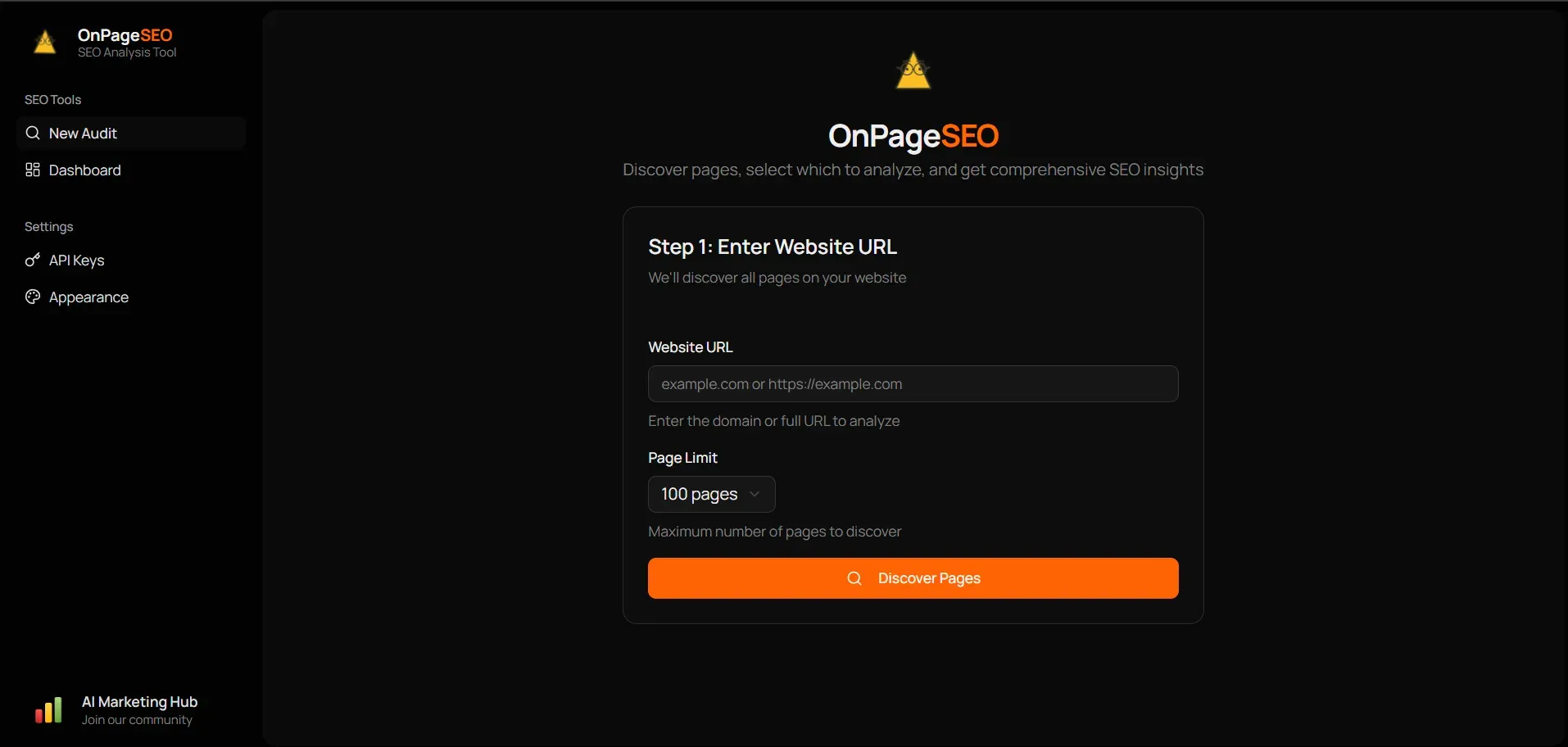
/wp-json/and/feed/paths. A URL without a scheme is prefixed with https://. The page limit defaults to 100 and the README states a maximum of 500 pages per audit. - Selecting pages before analysis Discovery and analysis are separate steps. The new-audit screen asks for the website URL and a page limit, then lists the discovered pages so a subset can be chosen. The API exposes this as a discover call that returns the page list, followed by an audit request that can carry the selected pages.
- Per-page analysis through DataForSEO Each page is sent to the DataForSEO
on_page/instant_pagesendpoint with resource loading, JavaScript, browser rendering and spell checking enabled and cookie popups disabled. The DataForSEO service spaces requests at least one second apart and retries a failed page up to three times with exponential backoff. The cost and processing time reported by DataForSEO are stored with every page result. - Meta tags and canonical checks Results include the meta title and its length, the meta description and its length, and the canonical URL. Flags record whether a title, description and canonical are present, and whether the title, description or meta tags are duplicated according to DataForSEO.
- Headings, content and spelling The first H1 text is stored together with the H1, H2 and H3 counts. Content metrics are the plain-text word count, the content-to-code rate and the Flesch-Kincaid readability index, plus a low content rate flag and a duplicate content flag. Spell checking returns the number of misspelled words and the list of words.
- Core Web Vitals Each page records Largest Contentful Paint, First Input Delay and Cumulative Layout Shift with a good, needs improvement or poor status. The thresholds in the code are 2,500 and 4,000 ms for LCP, 100 and 300 ms for FID, and 0.1 and 0.25 for CLS. A page passes Core Web Vitals only when all three values are in the good range.
- Performance and resources Timing fields cover time to interactive and DOM complete. Size fields cover total page size and encoded size. Resource counts and sizes are stored for scripts, stylesheets and images, along with the number of render-blocking scripts and render-blocking stylesheets.
- Links and images The analyzer stores internal and external link counts and flags broken links and broken resources. Image checks flag images without ALT attributes and images without title attributes.
- Technical and HTML checks Additional checks record whether the page uses HTTPS, whether the URL is considered SEO-friendly and whether an HTML doctype is present. HTML errors and warnings returned by DataForSEO are counted and stored with their details.
- Social media tags Open Graph values are captured for og:title, og:description, og:image and og:url, together with the twitter:card value, so missing social preview tags are visible per page.
- Score, status, issue count and priority fix The DataForSEO on-page score is mapped to a status: excellent from 90, good from 70, needs improvement from 50 and poor below that. The analyzer service counts issues across eleven checks and assigns one priority fix per page in a fixed order, starting with a missing meta title, meta description or H1, then broken links, broken resources, low content, Core Web Vitals, spelling, image ALT text, page size over 3 MB and a missing canonical.
- Live progress, cancel and re-run Audit progress is streamed to the browser through server-sent events, so the processing view updates as pages complete. A running audit can be cancelled, and a finished audit can be regenerated as a new audit over the same page URLs. Audits are listed on a dashboard and individual page results open as separate reports.
- CSV and JSON export Any audit can be downloaded as
seo-audit-<id>.csvorseo-audit-<id>.json. The JSON file contains the audit record and all page results. The CSV file has 22 columns, including URL, on-page score, status, meta title and description, readability score, page size, load time, word count, broken links, the presence checks, issue count, priority fix and Core Web Vitals pass. - REST API The Express server exposes the endpoints listed in the README API table: create, list, read, export and delete audits under
/api/audits, an SSE progress stream, and/api/settingsto read configuration status and update credentials. The route code also contains discover, cancel, regenerate and report endpoints, plus settings calls that test the Firecrawl and DataForSEO connections. - Local SQLite storage All data is kept in
data/seo-dashboard.db, created automatically and opened in WAL mode. The database layer defines three tables: audits, page_results (holding the per-page SEO fields) and settings, which stores the API credentials entered in the app. Deleting an audit removes its page results. - API key configuration Credentials are read first from the settings table and then from environment variables. The server example file uses
FIRECRAWL_API_KEY,DATAFORSEO_USERNAMEandDATAFORSEO_PASSWORD; the root.env.examplelistsDATAFORSEO_LOGINinstead. The interface also has an Appearance page, and the README lists full dark mode support. - Installation and development After cloning,
npm run install:allinstalls the root, client and server dependencies, and.env.exampleis copied to.env.npm run devstarts the client on http://localhost:3005 and the server on http://localhost:3001;dev:clientanddev:serverstart them separately. - Production deployment
npm run buildbuilds the client and the server, andNODE_ENV=production npm run startstarts the compiled Express server, which then serves the built client files and the API on one port. The README documents no Docker image, hosted version or authentication layer for this mode.
Where On-Page SEO Analyzer fits
Auditing a website from its URL
An audit starts from the New Audit screen with a domain or full URL and a page limit. The app first runs Firecrawl discovery, then sends each chosen page to DataForSEO and stores the results in SQLite. The README positions this as an analysis of up to 500 pages with 74 metrics per page, and the server records the DataForSEO cost of every analyzed page.
Choosing which discovered pages to analyze
Because discovery and analysis are separate API calls, the list returned by Firecrawl can be narrowed before any DataForSEO request is made. Only the selected pages are submitted to the audit, which limits the number of on-page API calls to the pages chosen in the interface.
Reviewing per-page results and priority fixes
Completed audits are listed on the dashboard, and the page results of an audit are returned sorted by on-page score. Each page report shows the status band, the issue count and one priority fix derived from a fixed order of checks, along with meta tags, headings, content metrics, Core Web Vitals, resource sizes, link and image checks, HTML errors, misspelled words and social tags.
Following long audits in real time
During processing the client subscribes to the server-sent events stream at /api/audits/:id/progress and shows completed against total pages. An audit can be cancelled while it is running, in which case its status becomes failed and the progress stream reports "Audit cancelled by user". Regenerating a previous audit creates a new audit that re-analyzes the same page URLs.
Exporting results for spreadsheets or other tools
The export endpoint returns CSV by default or JSON with ?format=json. The CSV variant is a 22-column summary for spreadsheets, while the JSON variant carries the full audit record and every stored page field. Export and other actions are available through the same REST endpoints the interface uses.
Running it on a server
The production deployment section builds client and server with one command and runs the compiled server with NODE_ENV=production. The SQLite file in data/ holds audits, results and the API credentials, and the port comes from the PORT variable, defaulting to 3001.
Reviews of On-Page SEO Analyzer
Be the first to share your experience with On-Page SEO Analyzer.
Write a review
Loading review form…
Found On-Page SEO Analyzer useful? Upvote it todayYour vote helps other IT teams find it in the daily ranking.