

What is Canonry?
Canonry is a self-hosted platform for answer engine optimization (AEO), also called generative engine optimization (GEO). It records whether AI answer engines such as ChatGPT, Claude, Gemini, Perplexity and Meta Muse mention or cite a domain for a set of tracked queries, and stores those observations next to Search Console, Google Analytics 4, server-side AI crawler traffic, site crawl results, ads data and SEO research. The project describes itself as agent-first: the dashboard, the CLI, the MCP adapter and the coding-agent plugins all call the same REST API, so a connected agent can read the same evidence a person sees and run the same actions, subject to approval.
The software is published by Canonry, a New York company formerly known as AI NYC and founded by Arber Xhindoli, which also sells managed AEO services, an embedded edition for agencies and custom work through canonry.ai. The open-source platform is distributed as the npm package @canonry/canonry, which installs the canonry, cnry and canonry-mcp commands, through a Homebrew tap (brew tap canonry/canonry), and as a documented Dockerfile and systemd unit in the deployment guide. Supported Node.js ranges are 22.23.4 or later on the 22 line, 24.22.1 or later on 24, and 26.12.1 or later on 26.
The latest GitHub release is v7.50.0, published October 20, 2026. It is a toolchain release: type checking moved to tsrs, a Rust port of the TypeScript 7 checker, and linting moved from ESLint to oxlint, with no change to CLI, API or dashboard behavior compared with 7.48.0. The npm package is published far more often than GitHub releases; the project site listed npm version 7.97.1 on November 7, 2026. Version 6.0.0 removed the DeepInfra provider for the built-in Aero analyst, which now runs on Claude, OpenAI, Gemini or Z.ai keys, and 5.20.0 moved the Perplexity adapter to its Agent API.
Locally, Canonry runs as a single Node.js process: a Fastify API under /api/v1, an in-process job runner, a SQLite database managed with Drizzle ORM and migrated on startup, and a prebuilt Vite single-page dashboard. Provider adapters for each answer engine sit behind a shared interface, as shown in the architecture document. By default the server binds 127.0.0.1 on port 4100 and keeps state in ~/.canonry/config.yaml and ~/.canonry/data.db. An OpenAPI description is served at GET /api/v1/openapi.json on each instance.
The code is MIT licensed starting with Canonry 5.0.0; earlier releases keep their original licenses, and bundled dependencies keep their own. Users bring their own API keys for every AI engine and data provider, and pay those vendors directly. Out of scope: Canonry is single-tenant with no per-tenant isolation inside an instance, it does not include Lighthouse or performance audits in its SEO data layer, and its visibility numbers describe the answers sampled through APIs on given dates rather than every answer a consumer app may show.
Canonry screenshots
Explore the interface. Open a screenshot to view it at full size.
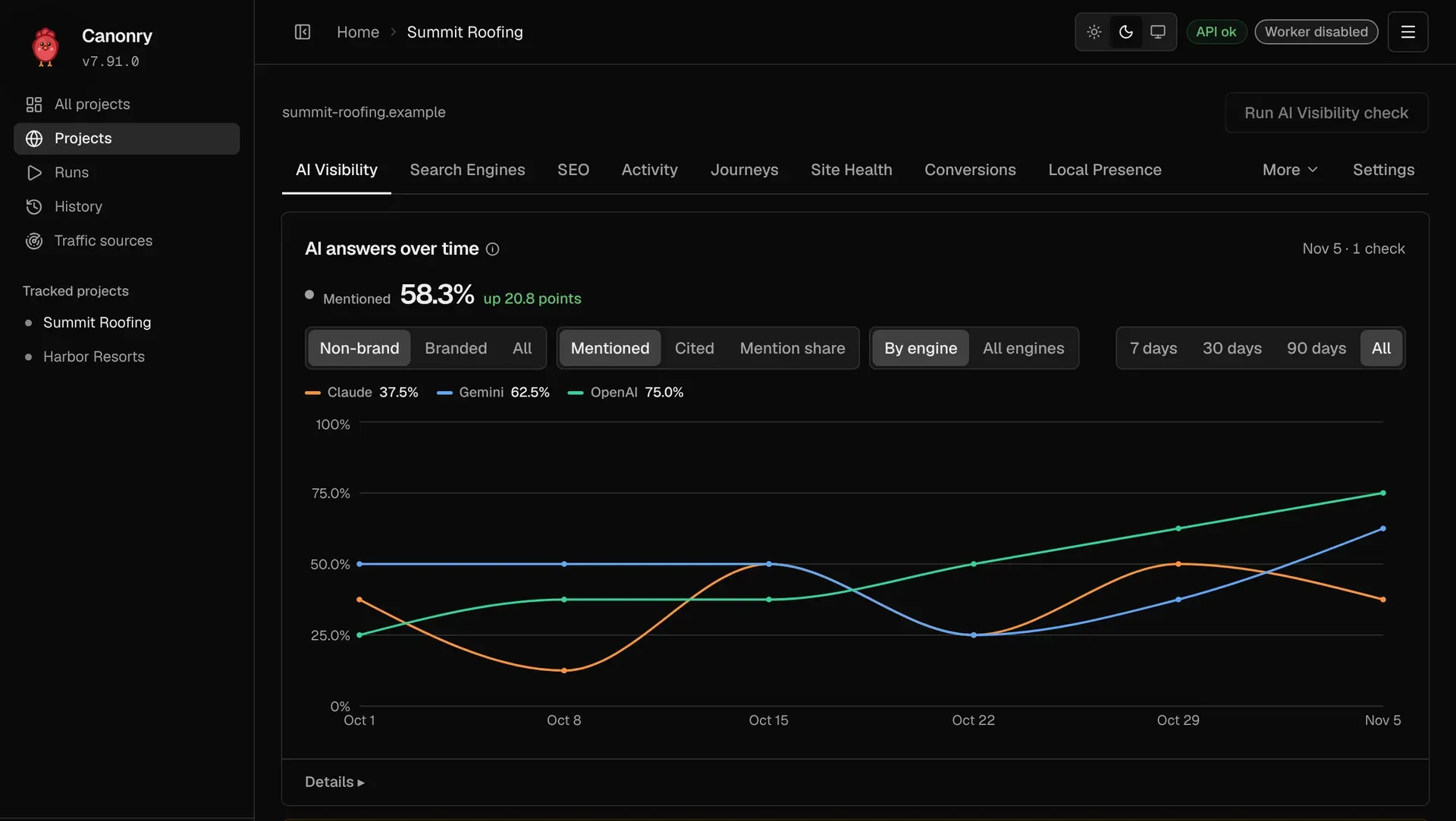
Official README screenshot of the AI Visibility tab: share of non-brand answers that mention the brand, per engine, for a sample roofing company.
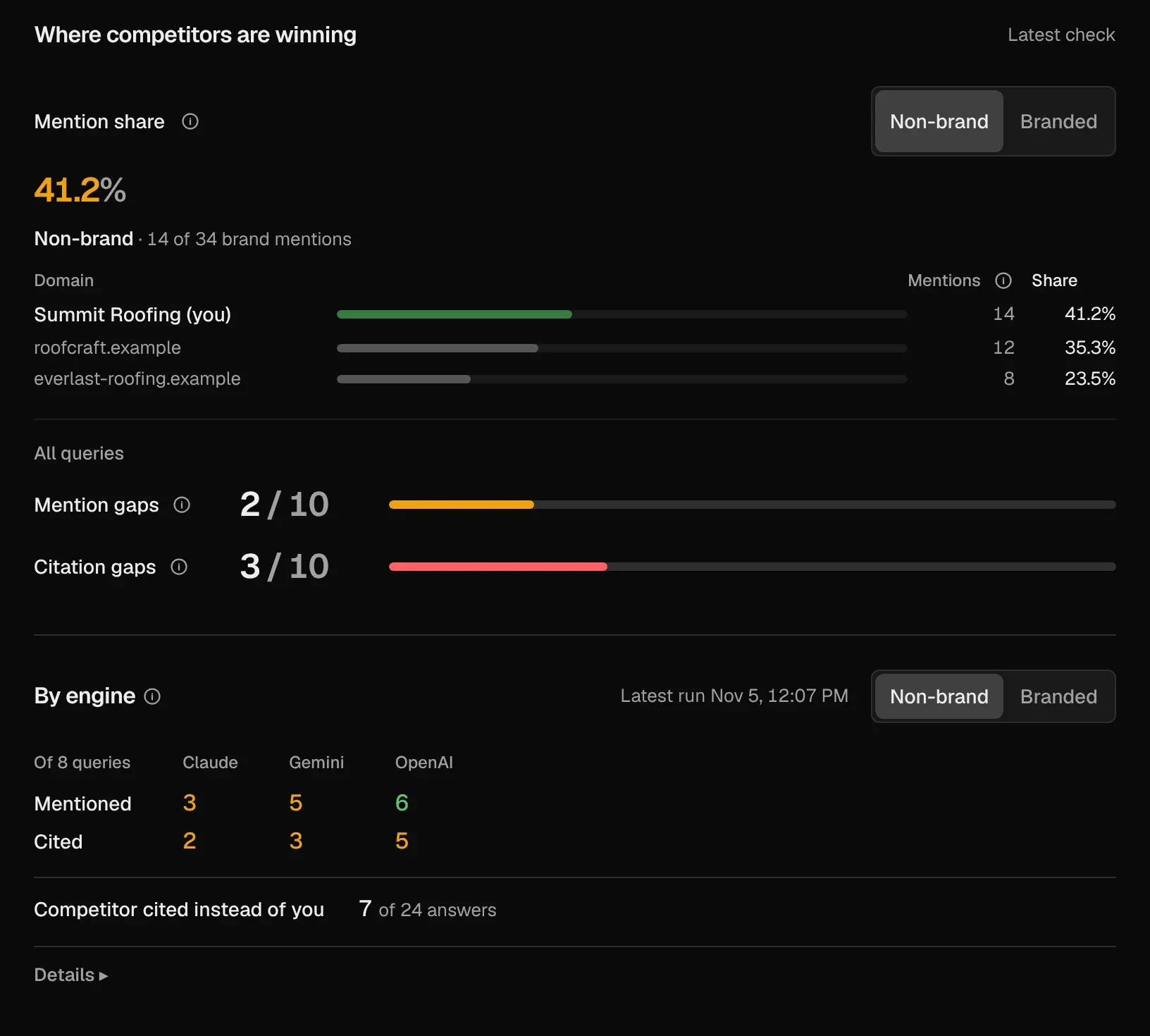
Official screenshot of the competitor view: mention share, mention gaps, citation gaps and mentioned and cited counts by engine, with sample data.
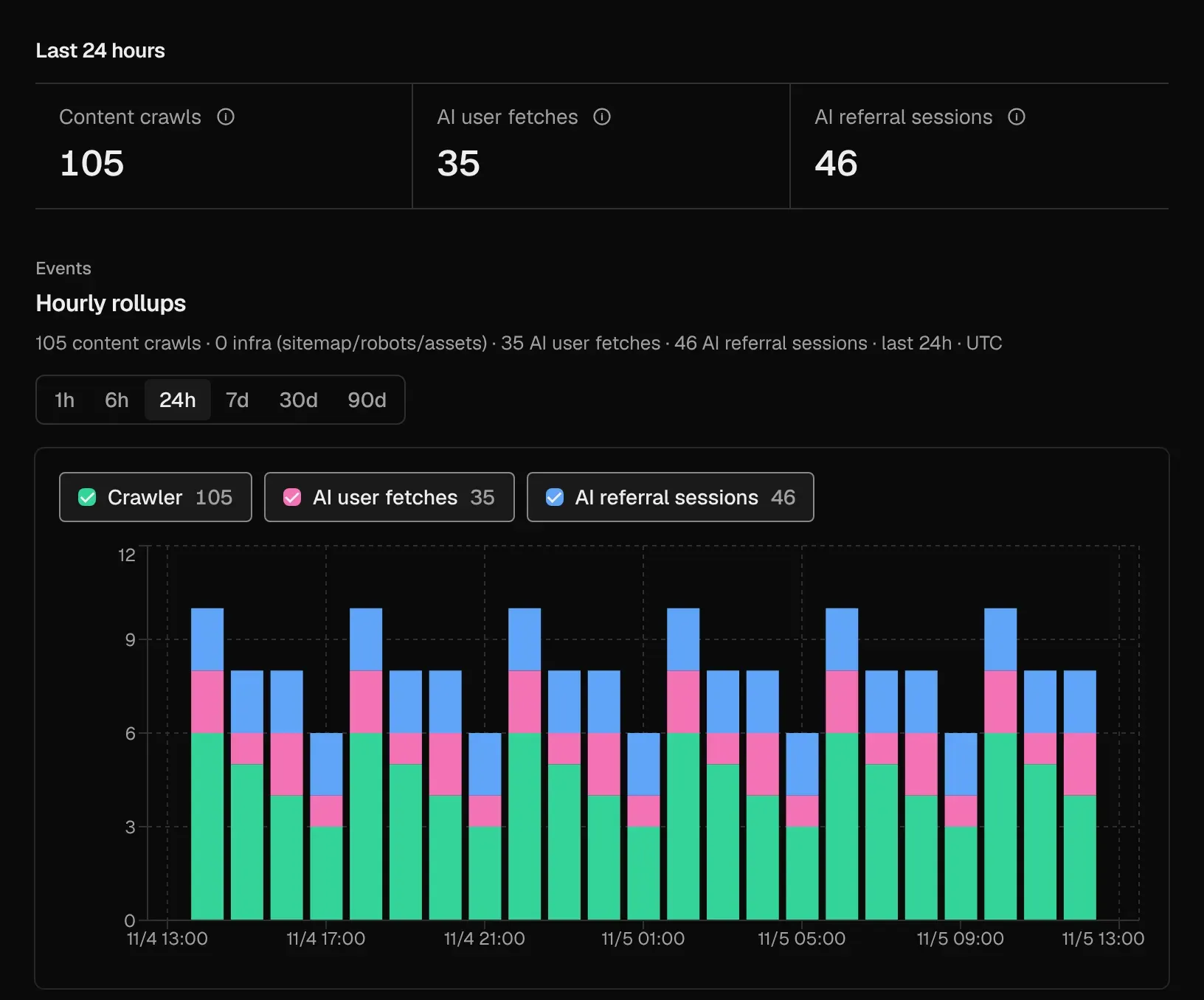
Official screenshot of server-side AI traffic: 105 content crawls, 35 AI user fetches and 46 referral sessions in hourly rollups, with sample data.
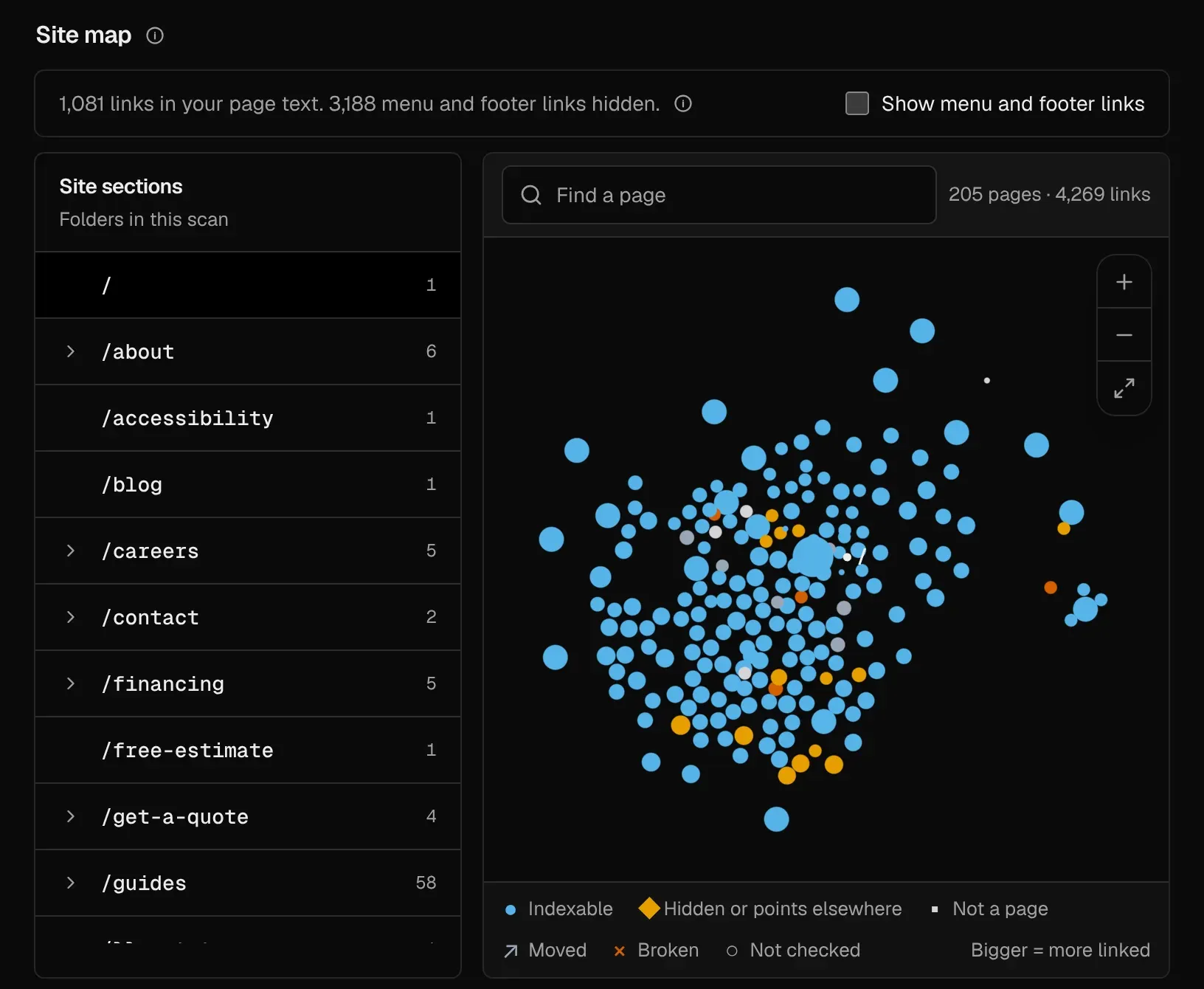
Official screenshot of the Site Health link map, colored by indexability, with the folder list of the crawled site; sample data.
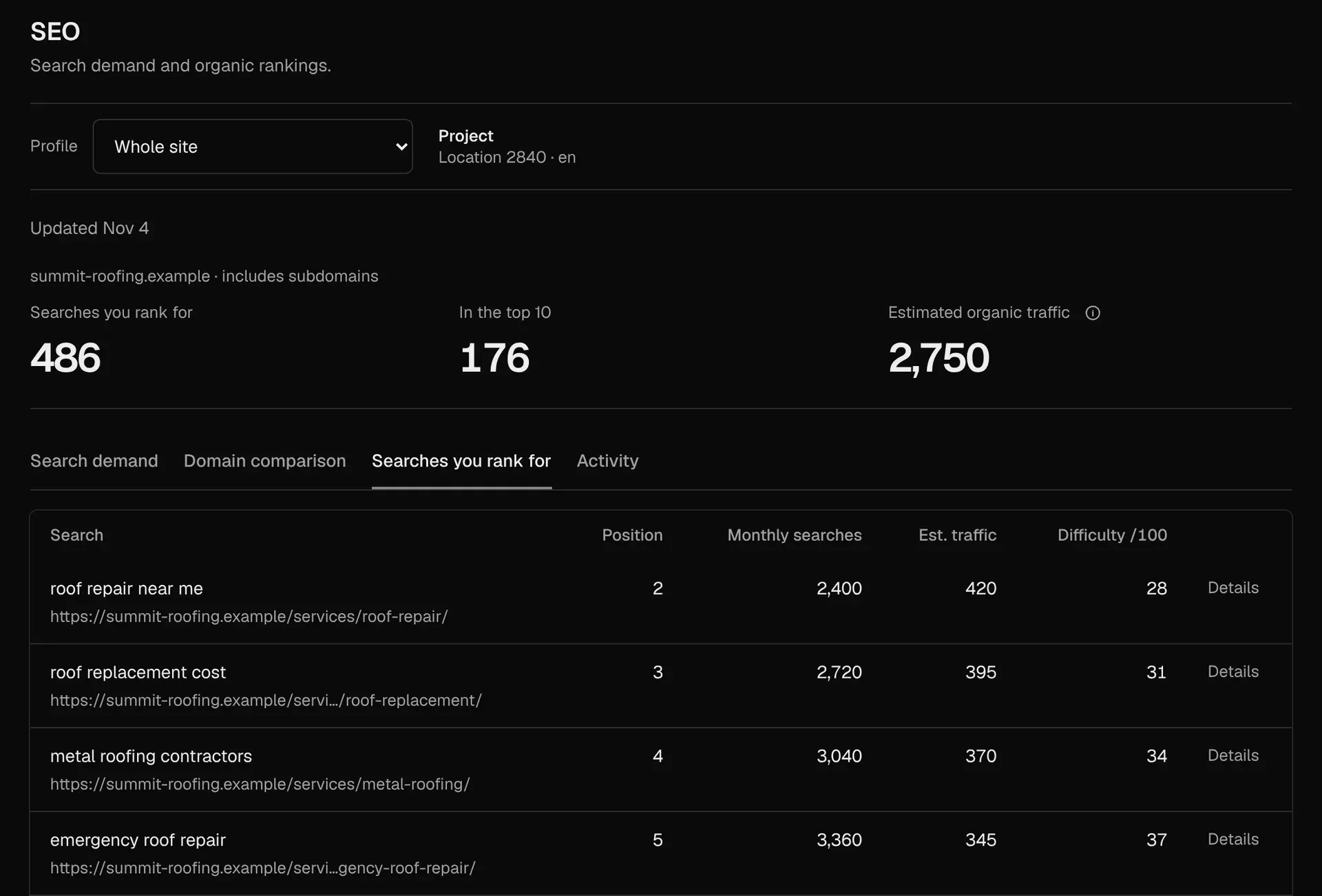
Official screenshot of the SEO research tab backed by DataForSEO: ranked searches, top-10 count and estimated organic traffic, with sample data.
Source: official Canonry project page.
Key capabilities
- Install with npm Run
npm install -g @canonry/canonry, thencnry bootstrapandcnry serve, and openhttp://127.0.0.1:4100/setup. Node.js 22, 24 or 26 in the documented minimum patch ranges is required. The SQLite driver isbetter-sqlite3, so a failed install usually means missing native build tools for node-gyp. Release history and the current tag are on the v7.50.0 release page. - Install with Homebrew, Docker or systemd On macOS or Linux,
brew tap canonry/canonryfollowed bybrew install canonryinstalls the same CLI. The deployment guide provides a Dockerfile based onnode:26.12.1-bookworm-slimthat installs the npm package and serves on 0.0.0.0:4100, plus a systemd unit and Tailscale Serve and reverse proxy examples with sub-path support. No official prebuilt container image or Windows guide is documented. - AI visibility tracking Add tracked queries to a project and run sweeps across the configured engines. Each run stores per-query snapshots of whether the brand was mentioned and whether its domain was cited, with the exact answer and sources kept for review. Mentions and citations are measured separately, branded and non-brand queries stay apart, and runs end as completed, partial, failed or cancelled. The query visibility guide covers assignments and frozen results.
- Supported answer engines Direct adapters cover OpenAI, Anthropic Claude, Google Gemini, Perplexity and Meta Muse, each configured with its own key such as
OPENAI_API_KEYorGEMINI_API_KEY. OpenRouter adds many models through one key, Exa and Parallel provide search answers with source evidence, andLOCAL_BASE_URLaccepts any OpenAI-compatible local endpoint. Each engine, OpenRouter route and service profile keeps separate history, because the same model through different APIs can return different citations. - Competitor landscape Projects can pin competitor domains and compare mention share, mentions and citations over time. The dashboard shows where a competitor is cited instead of the project domain and counts mention and citation gaps per query. The competitor landscape document explains how pinned competitors are scoped across measurement plans.
- Server-side AI traffic Canonry reads request logs to separate AI crawler visits (GPTBot, ClaudeBot, Meta AI, Grok), AI user fetches made by assistants on behalf of a user, and AI referral sessions. Sources include Cloudflare direct push or Queue pull, Google Cloud Run, Vercel and WordPress, the latter through a separately versioned WordPress Traffic Logger plugin. Setup, smoke tests and rollback are described in the server-side traffic reference.
- Site Health crawl
cnry technical-aeo runcrawls a site within a page budget such as--max-pages 100, scores each page for AI readiness and draws a map of internal links. Dead-link checking is off unless--check-dead-linksis passed. A run that stops at a page, depth or time limit is reported as partial, and the crawl output states the termination reason so a partial score is not mistaken for a full-site result. - SEO research through DataForSEO A provider-neutral SEO data layer stores ranked keywords, search volume and difficulty, domain comparison, market rankings, organic competitors and search gaps. DataForSEO Labs is the first adapter, and the host config sets spending caps per run, day, month and project in microUSD. Refreshes run on request or on a schedule. The SEO data guide notes that this layer adds no crawler or Lighthouse audit.
- Search Console, Bing and Analytics Google Search Console connects through OAuth, Bing Webmaster Tools through an API key and Google Analytics 4 through a service account. Two projects on one instance that track the same canonical domain share their Search Console and Bing connections by design. The Search Console setup guide lists the required scopes.
- Ads and conversion checks An agent can sync ChatGPT Ads campaigns and daily results, create and edit campaigns, and enable them only after approval. Google Ads spend and conversions are tracked, and each conversion's configuration is checked across Google Ads and Google Tag Manager. Paid results are kept separate from organic mentions and citations, as described in the Google marketing guide.
- Aero analyst Aero is a built-in analyst in the dashboard that reads stored evidence and explains what changed between runs. It needs a key for Claude, OpenAI, Gemini or Z.ai. Since 6.0.0 its tools return counts beside percentages, competition ranks for cited sources and noise flags per signal, and its rules ask it to quote those counts rather than bare rates.
- Content engine, publishing and indexing The content engine lists content gaps and pages to write or improve. Drafts can be sent to WordPress through its REST API with an Application Password, with staging diffs for review, and Canonry can add JSON-LD and submit sitemaps and URLs to Google and Bing. See the WordPress setup guide for the handoff workflow.
- Query discovery and one-off research
cnry discover runwith an ideal-customer description proposes new queries, and a completed session can be previewed before promotion.cnry research runsends one-off questions to the engines without adding them to the tracked set. Portfolios provide versioned measurement plans for locations, products or site sections. - CLI and REST API Every dashboard number has a typed endpoint under
/api/v1, and the CLI exposes the same calls with--format jsonorjsonlfor scripts. REST responses carry anx-canonry-accessheader marking an operation as stored, live or write. The full command list is in the CLI reference. - MCP adapter and agent plugins
canonry-mcpis a stdio MCP adapter over the public API for Claude Desktop, Codex and other MCP clients. Plugins in the Agent Plugins 1.0.0 format install into Claude Code and Codex from the repository marketplace. A separate read-only remote plugin connects to the hosted gateway atmcp.canonry.aiwith OAuth. Details are in the MCP guide and plugin guide. - Stored-only mode
--stored-onlyorCANONRY_STORED_ONLY=1restricts the CLI and MCP adapter to saved evidence. Provider calls and state changes are refused withSTORED_ONLY_REFUSEDbefore any network request, which is useful when an agent should analyze data without spending provider credits. Config-as-code changes also have a preview tool that rolls back before responding. - Schedules, webhooks and batch mode Checks can rerun on a schedule and send notifications to Discord, Slack or custom webhooks. For scheduled sweeps, Claude can use the Message Batches API at half the standard token price; batch mode is off by default and must be enabled per provider in config and per project. OpenAI and Gemini batch support is not yet available.
- Backlinks and sentiment Backlink data comes from Common Crawl web graphs and is queried locally with DuckDB rather than through a paid link index. Sentiment is experimental and off by default; when enabled it rates branded answers as favorable, mixed or unfavorable.
Where Canonry fits
Getting a first Site Health baseline
Install the CLI, run cnry bootstrap and cnry serve, then create a project with its domain, country and language, since those two locale settings apply only at creation. Start a bounded crawl with cnry technical-aeo run my-site --max-pages 100 --wait --format json. No AI provider key is needed for this step. Read the crawl output first to see whether the scan covered the whole site or stopped at a limit, then sort pages by lowest score to find the first fixes.
Measuring AI answer visibility for a brand
Add provider keys for the engines that matter, add a mix of branded and non-brand queries with cnry query add, and run cnry run my-site --wait. Compare results with cnry visibility-stats my-site --by-provider. Check the sample size behind each percentage, keep mentions and citations apart, and open the stored answer and sources before acting on a change, because a single sweep can move within normal variation.
Finding where competitors are cited instead
Pin two or three competitor domains, then review mention share and the citation gap count per query. Join that with SEO research from DataForSEO to see whether the competitor also ranks organically for the same searches. A connected agent can draft a page or a pull request for the gaps, but the README example routes the result through review before anything is published.
Separating AI crawlers, assistant fetches and referrals
Connect a server-side log source such as Cloudflare, Vercel, Cloud Run or the WordPress Traffic Logger plugin. After the smoke test, confirm that infrastructure requests such as sitemaps, robots.txt and static assets are excluded, then compare crawler visits with user-initiated assistant fetches and referral sessions. This shows whether pages are being read by AI systems at all before content changes are judged on visibility scores.
Running Canonry from a coding agent
Install the Claude Code or Codex plugin, or connect canonry-mcp, and start with canonry_help to get a route through the available tools. Treat live and write operations as approval points: provider sweeps cost money, and WordPress drafts, index submissions and ad changes alter external systems. Use stored-only mode when the agent should only read existing evidence, and run cnry doctor --format json to confirm config, database and server state.
Hosting a shared team instance
For a team, run the daemon behind a reverse proxy or Tailscale, set publicUrl and CANONRY_TRUST_PROXY, and create the dashboard password before exposing the port. Every API key on an instance can read and write every project and global setting, so unrelated clients or teams belong on separate instances with separate databases and OAuth clients. Back up config.yaml and data.db together.
Install
npm install -g @canonry/canonryReviews of Canonry
Be the first to share your experience with Canonry.
Write a review
Loading review form…
Alternatives to Canonry
 OpenSEOOpenSEO is an open-source SEO platform with keyword research, competitor analysis, backlinks, rank tracking and audits, hosted or self-hosted, with MCP access.OOpenGSCOpenGSC is a free, MIT-licensed, self-hosted dashboard that combines Google Search Console, Bing and Yandex data with SEO analysis and AI tools.CSClaude SEOClaude SEO is an MIT-licensed Claude Code plugin that audits technical SEO, content, structured data and AI search readiness into prioritized action plans.