

What is Ansvisor?
Ansvisor is an open-source platform for measuring and acting on how brands appear in AI-generated answers. It sends a tracked set of prompts to answer engines such as ChatGPT, Google AI Overviews, Google AI Mode, Gemini, Claude, Grok, Perplexity and Microsoft Copilot, stores each response, and records whether the brand is named, which pages are cited and how competitors are described. The project calls this an AI Search Execution Platform: the same workspace that measures visibility also ranks work in an Action Center and lets a Content Agent draft page changes that a person approves before anything is published.
The software is developed by Empler AI Inc., which operates the Ansvisor brand and lists a business address in Wilmington, Delaware. The repository was opened in May 2026 and the code is released under the MIT license. Two distribution paths exist: the managed Ansvisor Cloud at app.ansvisor.com, and a self-hosted build from the GitHub repository. According to the official FAQ, the self-hosted build has no paywalled features; it skips Stripe billing when IS_CLOUD is left at false and has no monthly quota on features such as Site Audit.
The latest GitHub release is v0.3.0, published August 25, 2026. It added a Google Analytics 4 integration that syncs AI-sourced sessions, conversions and revenue daily, per-prompt tracking across several countries and US states, detection of valuable pages that receive no AI referrals, and an OpenRouter tracking provider. It also moved Citations, Topics and Insights aggregation into Postgres, which removed a silent 50,000-row truncation, and fixed six security-definer database functions that did not check organization membership. Version 0.2.0, from August 2026, introduced the Daily Pulse digest, the Google Search Console integration and the current 0-100 AI Visibility Score. The changelog follows Keep a Changelog and semantic versioning.
The stack has two services. The web service is a Next.js 16 dashboard with React 19, TypeScript and Tailwind CSS 4, listening on port 3000. The server service is an Express API with background workers on port 80, using the Vercel AI SDK with OpenAI, Anthropic, Google, Perplexity and Grok providers. Supabase is an external requirement for Postgres, authentication, row-level security and storage. Responses from web answer engines without public APIs are collected through Cloro, a third-party scraping service, while Site Audit fetches pages through Scrape.do and prompt search volumes come from DataForSEO. The docker-compose.yml references prebuilt images at ghcr.io/ansvisor/ansvisor, tagged 0.3.0.
Ansvisor does not publish content on its own by default. Pages go to Webflow, WordPress, Framer or Wix as drafts, or to a webhook, and automatic go-live is an opt-in setting that also requires an admin to allow each agent. It is not a general web analytics suite: it reads Google Analytics and Search Console and adds its own referrer snippet for AI traffic. Visibility numbers describe sampled answers to the prompts a team chooses, so they depend on prompt selection, locations and run frequency.
Ansvisor screenshots
Explore the interface. Open a screenshot to view it at full size.
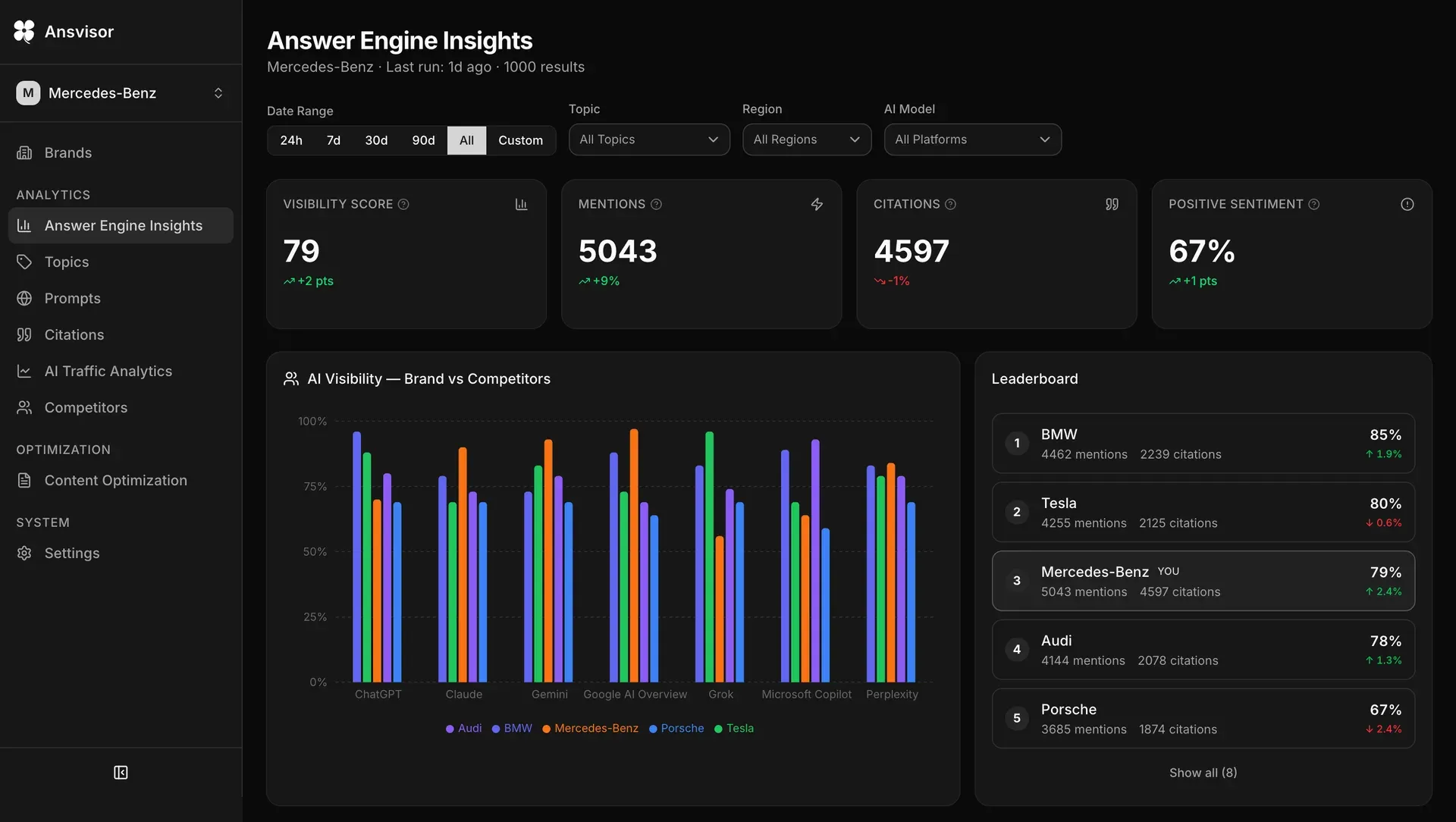
Answer Engine Insights for a sample brand: KPI cards, a brand versus competitors chart across seven AI engines and a leaderboard. Image from the official documentation hero.
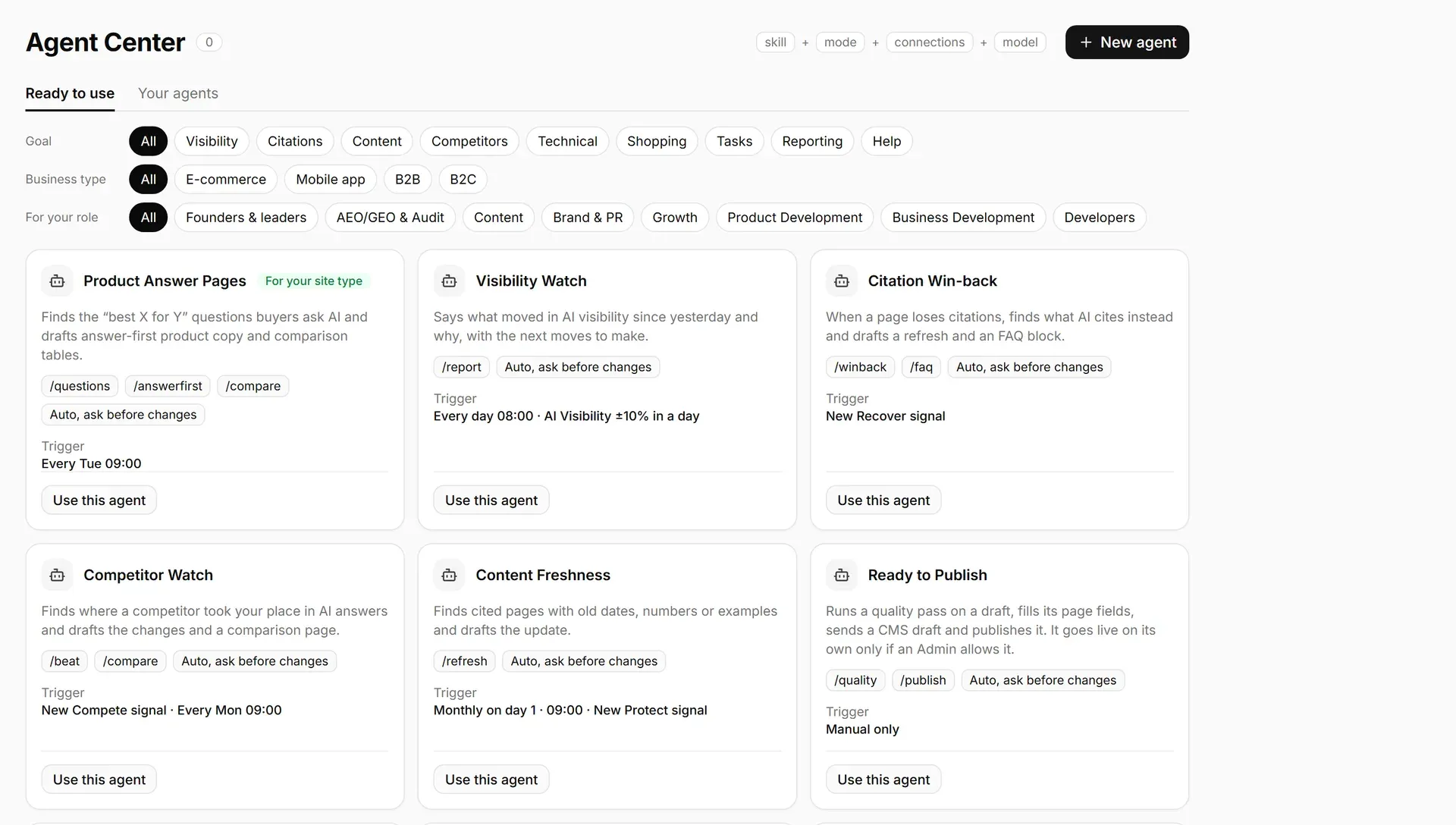
Agent Center with ready-made agents, their slash commands, triggers and the ask-before-changes mode. Official screenshot from ansvisor.com.
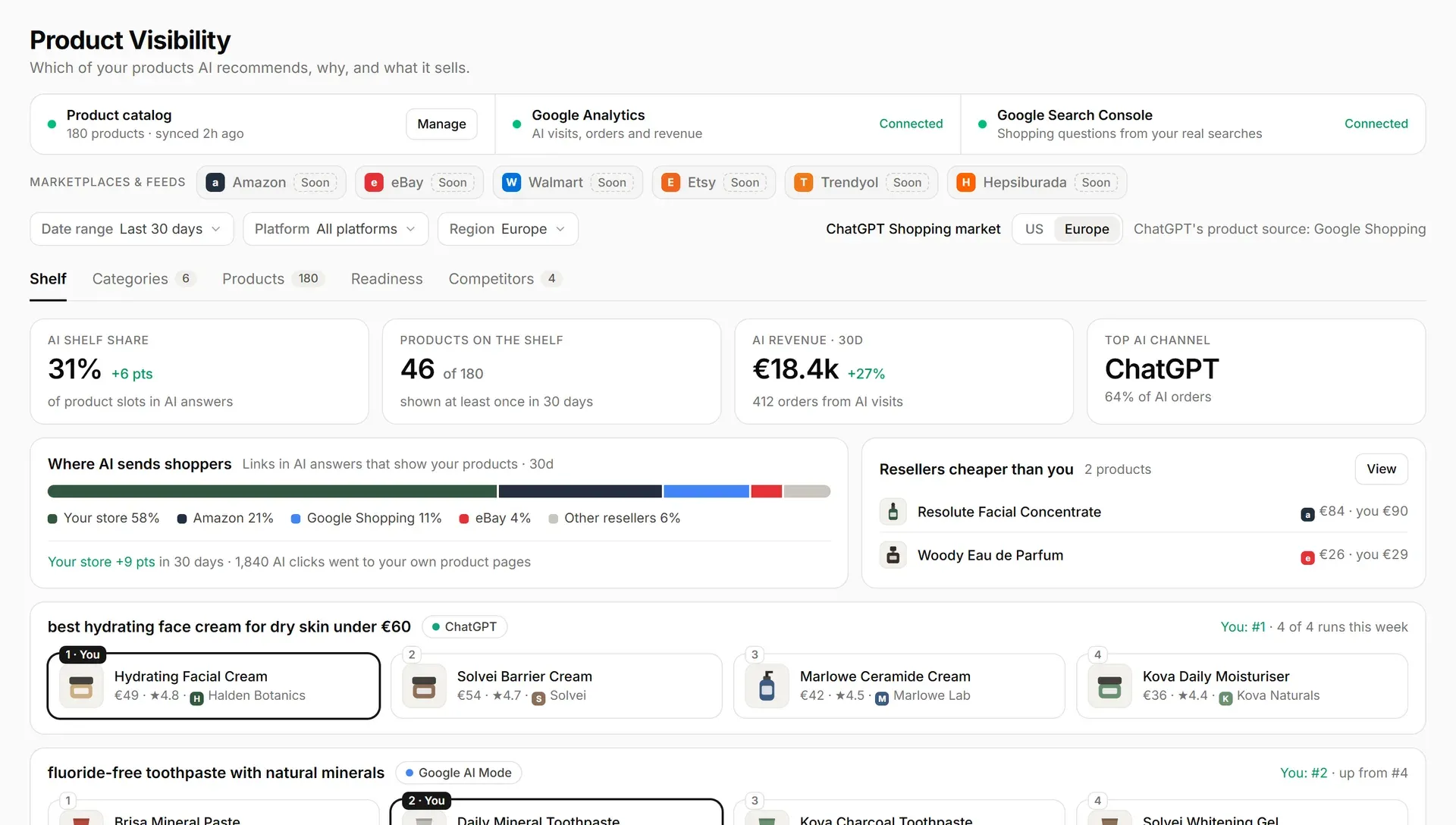
Product Visibility for a sample e-commerce catalog, with Google Analytics and Search Console connected and marketplace feeds marked as coming soon. Official screenshot from ansvisor.com.
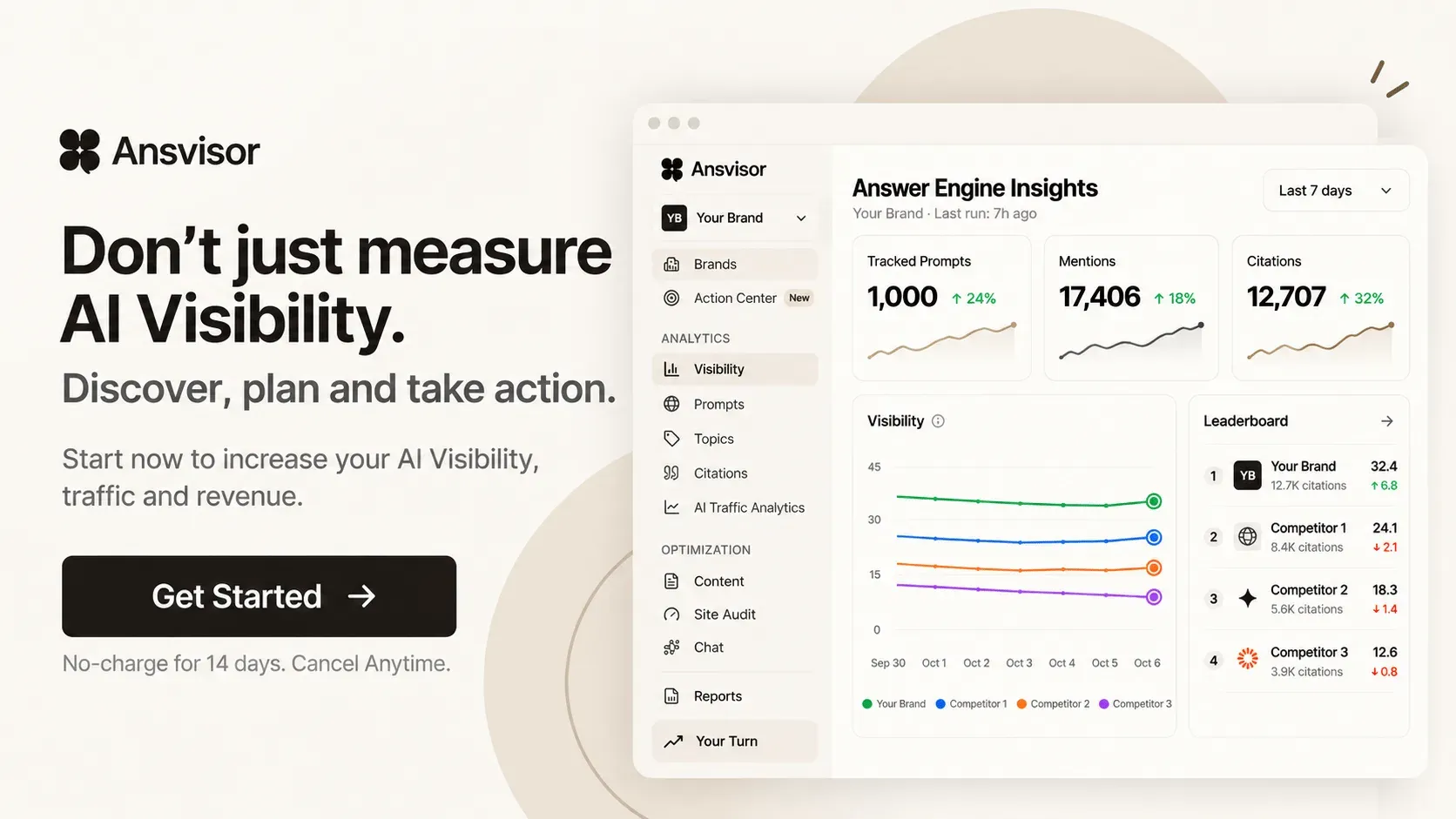
Official promotional image with the light-theme Answer Engine Insights view and the full navigation, including Action Center, Site Audit and Chat.
Source: official Ansvisor project page.
Key capabilities
- Answer Engine Insights dashboard The main Visibility page shows the AI Visibility Score, mentions, citations and positive sentiment for one brand, filtered by date range, topic, region and AI platform. A bar chart compares the brand with tracked competitors per engine, and a leaderboard ranks them. Any prompt or platform cell opens the full stored response with parsed citations, sentiment and detected competitor mentions, so the metric can be checked against the answer text.
- Documented AI Visibility Score Since 0.2.0 the score is 100 times a weighted blend: mention rate 60 percent, citation rate 25 percent and position 15 percent. Position counts 1 for first named, one half for second and so on, and is shrunk when few answers name the brand. The scoring page and changelog state that detection is deterministic and uses no LLM judge, and the same formula feeds reports, the Daily Pulse, MCP and the public API.
- Prompt tracking with locations Teams define topics and prompts, and each prompt can target a list of countries and US states since 0.3.0. Google AI Overviews and AI Mode have no sub-country targeting, so state locations for those engines collapse into one country-wide run. Prompt suggestions can be fed by real Google Search Console queries, and DataForSEO supplies optional search volume data.
- Citation monitoring Every URL and domain that answer engines cite alongside the brand is stored and classified by source type. Each cited URL has a detail page listing the answers and prompts behind it, and brand-owned URLs link to their traffic. Competitor Gaps shows sources that cite competitors but not the brand.
- Mentions and sentiment The Mentions views list responses that name the brand with sentiment, position and co-mentioned competitors. Figures under 20 mentions are flagged as low sample. Admins and managers can override the sentiment of a single response with a note when the classification is wrong.
- Competitor benchmarking Named competitors receive the same score, share of voice and per-platform splits as the brand. The Daily Pulse flags competitor surges and leaderboard overtakes. Rows for deleted competitors are dropped from aggregates.
- AI Traffic Analytics A small script tag from the server's
/t.jsendpoint reads the referrer and classifies visits from AI domains page by page. Google Analytics 4 adds engaged visits, key events and revenue, Search Console adds Google clicks, and AI bot logs from Cloudflare, Vercel or a server show which crawlers read the site. The traffic guide recommends placing the snippet on the 404 page as well, to catch broken AI links. - Action Center Signals from tracking and connected sources become actions ranked by a Priority Score, with tabs for Actions, Signals, KPIs and History. A new brand starts with a 17-step Getting started checklist that unlocks as data arrives. Tasks can be sent to a webhook for editorial or project tools.
- Content Agent and editor The Content section has Opportunities, a ranked Plan with Create, Optimize and Protect cards, an editor and a Library. The agent drafts or fixes pages from prompts, query fan-out and cited pages and checks them against the brand's content rules. A draft waits for approval; Content Optimization produces three opportunities per run since 0.3.0.
- Agent Center and Chat Ready-made agents such as Visibility Watch, Citation Win-back, Competitor Watch and Content Freshness run on schedules or signals, with an ask-before-changes mode shown on each card. On a self-hosted instance, the new Chat and Agent Center are enabled with the
CHAT_AGENTICvariable on both web and server, together withCRON_SECRET. - Send to CMS Pages from the editor go to Webflow or Framer as draft items, to WordPress or Wix as draft posts, or to a webhook for n8n, Make, Zapier or a custom endpoint. Ansvisor does not publish these drafts itself. Webflow tokens are kept by the connector service rather than in the Ansvisor database, as described in the Send to CMS guide.
- Site Audit A page is fetched and scored out of 100 across 48 signals in five categories, with generated fixes such as a revised H1, meta description, answer-first opening and FAQ markup. Competitor URLs can be audited without affecting the site score. Self-hosted instances need a Scrape.do key for page fetching but have no monthly audit limit.
- Product visibility for e-commerce A product catalog can be loaded from Google product feeds, Meta catalog CSVs or store connectors such as WooCommerce. The Product Visibility view shows which products AI answers recommend, AI shelf share and orders from AI visits. Several marketplace connectors are marked as coming soon on the official screenshot.
- Remote MCP server The web app exposes a Streamable HTTP MCP endpoint at
/api/mcp, authenticated with anans_API key as a bearer token, with no local install. The MCP guide lists 65 tools with read-only and destructive hints and gives setup for Claude Code, Claude Desktop, Codex CLI, Cursor, VS Code, Windsurf, Gemini CLI, Zed and others. Write tools are marked and some require the admin or manager role. - Public API and webhooks Versioned
/api/v1endpoints use the same API keys and feed connectors such as Looker Studio. Webhooks sendopportunity.sent,daily_pulse.created,action_task.sentand signedcontent_draft.sentevents. The authentication reference separates API keys, Supabase JWTs and cron secrets. - Daily Pulse and reports After each tracking run a per-brand digest summarizes visibility, mentions, citations and sentiment, with highlights such as first citations and warnings for sharp drops. Email delivery uses Resend on the cloud service; the webhook event works on self-hosted instances too. Saved reports are immutable snapshots.
- Claude skills The skills folder contains an
ansvisor-aeo-coachskill in an MCP flavour for Claude Desktop, Claude Code, Cursor and Zed, and a standalone REST flavour for claude.ai. It packages scoring, prompt-writing and sentiment references for analysis of an Ansvisor account. - Self-hosted Docker Compose deployment The Docker Compose guide targets a Linux host with Docker 24 or later and Compose v2, a Supabase project, and at least one AI provider key. After filling
web/.envandserver/.envand applying the schema,docker compose up -dstarts both services; the first user to sign up becomes organization admin. The web app can also be deployed to Vercel with only the server on a VM. - Local development setup Without Docker, the web app runs with Yarn and the server with npm on Node.js 20 or later. A local Supabase seed creates a demo organization with about 120 prompt results so the dashboard can be explored without provider keys. The seed runs only against a local Supabase started through the CLI.
Where Ansvisor fits
Baseline AI visibility for a brand
Add the brand, its domains and at least three competitors, then group representative buying questions into topics with several prompts each. Let the first tracking run complete before reading the score, and open individual responses to confirm that brand detection matches the text. A new brand often starts near zero, which the FAQ treats as normal. Keep the prompt set stable for several weeks, because adding prompts changes what the score averages over.
Finding and recovering lost citations
Use the Citations page and the per-URL detail view to see which of your pages are cited, by which engines, and for which prompts. The Content Plan marks a page as losing ground once it is cited at least 20 percent less per tracked answer than in the previous period, from at least three citations. Compare the competitor pages cited instead, then let the Content Agent or an editor prepare a refresh and check the result over the following runs rather than on the same day.
Connecting AI visibility to traffic and revenue
Install the tracking snippet on every page, including the 404 page, and connect Google Analytics 4 and Search Console from Settings. AI Traffic then shows visits by engine and landing page, plus conversions and revenue from GA4 since 0.3.0. Verify that the Data sources strip reads Active, and treat zero visits with a Not detected snippet as missing measurement, not missing demand.
Running an approval-based content workflow
Work from the ranked Content Plan, open a Create or Optimize row in the editor, and let the Content Agent draft against the brand's content rules. Send approved pages to Webflow, WordPress, Framer or Wix as drafts, or to a webhook for an editorial tool. Leave CHAT_AUTO_GO_LIVE off unless the team wants agents to publish, and review which roles can send to the CMS.
Querying visibility data from an AI assistant
Create an API key under Settings, MCP and API Keys, store it in an environment variable, and add the /api/mcp endpoint to Claude Code, Cursor, VS Code or another MCP client. Start with read tools such as list_brands and get_visibility_summary. The server instructs clients to treat returned answers and drafts as data, but confirm that your client asks before calling tools marked as writes.
Self-hosting for cost and data control
Provision a Supabase project, apply supabase/schema.sql or run supabase db push, fill both env files and start the Compose stack behind a reverse proxy with HTTPS. Budget for your own AI provider, Cloro, DataForSEO and Scrape.do usage; the FAQ estimates roughly 5 to 15 US dollars a month in API fees for one brand tracking 30 prompts daily across four engines. On upgrade, apply migrations before restarting containers, as the upgrade guide requires.
Install
git clone https://github.com/ansvisor/ansvisor.git && cd ansvisor && docker compose up -dReviews of Ansvisor
Be the first to share your experience with Ansvisor.
Write a review
Loading review form…
Alternatives to Ansvisor
 OpenSEOOpenSEO is an open-source SEO platform with keyword research, competitor analysis, backlinks, rank tracking and audits, hosted or self-hosted, with MCP access.NPNotFair PluginNotFair Plugin is an MIT-licensed set of 48 SEO, GEO, paid media, analytics and CRM skills for Claude Code, Codex and other compatible AI agents.OOpenGSCOpenGSC is a free, MIT-licensed, self-hosted dashboard that combines Google Search Console, Bing and Yandex data with SEO analysis and AI tools.